TairVector is an extended data structure developed by the Tair team to deliver high-performance, real-time vector database services that unify storage and retrieval.
About TairVector
TairVector uses a multi-layer hash structure, as shown in the following figure. 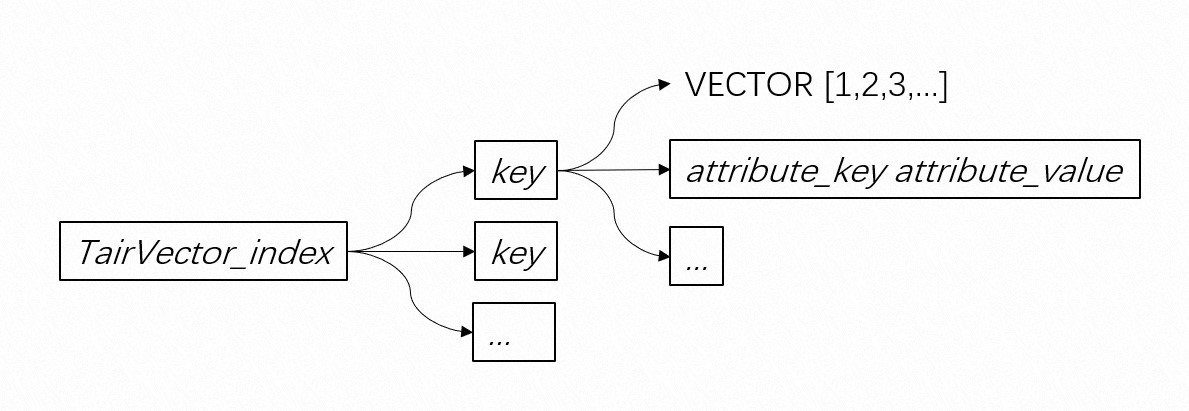 TairVector provides two indexing algorithms: Hierarchical Navigable Small World (HNSW) and Flat Search.
HNSW: builds graph-based vector indexes and supports asynchronous memory space reclamation. It maintains high query accuracy while enabling real-time index updates.
Brute-force search offers 100% query accuracy and fast insertion speed, making it suitable for small-scale datasets.
TairVector also supports multiple distance metrics, including Euclidean distance, inner product, Cosine distance, and Jaccard distance. Compared with traditional vector retrieval services, TairVector offers the following advantages:
Stores all data in memory and supports real-time index updates to minimize read and write latency.
Uses optimized in-memory data structures to reduce memory usage.
Functions as an out-of-the-box service. You can use it immediately after provisioning it as an Alibaba Cloud service. Its architecture is simple and efficient, with no complex component dependencies.
Supports hybrid search that combines vector search and full-text search.
Allows you to create inverted indexes for scalar data such as tag attributes and perform k-nearest neighbor (KNN) search. During retrieval, TairVector first filters the dataset based on scalar attributes and then performs KNN search on the filtered results.
Release notes
TairVector was released on October 13, 2022, together with Tair DRAM-based instances compatible with Redis 6.0.
Tair 6.2.2.0 was released on November 22, 2022. This release added support for the Jaccard distance metric and enhanced the TVS.GETINDEX command to report memory usage per index using the
index_data_sizeandattribute_data_sizeparameters.Tair 6.2.3.0 was released on December 26, 2022. This release added support for cluster proxy mode, introduced the FLOAT16 vector data type, and added the TVS.MINDEXKNNSEARCH and TVS.MINDEXMKNNSEARCH commands.
Tair 6.2.8.2 was released on July 4, 2023. This release added support for Cosine distance and automatic garbage collection of HNSW indexes.
Tair 23.8.0.0 was released on August 3, 2023. This release added commands such as TVS.HEXPIREAT and TVS.HPEXPIREAT to set time-to-live (TTL) at the key level in indexes. It also added the TVS.GETDISTANCE command to perform vector nearest-neighbor queries on specified keys. Full-text search capabilities were enhanced by updating commands such as TVS.CREATEINDEX and TVS.KNNSEARCH, enabling hybrid search that combines vector and full-text search.
Tair 24.5.1.0 was released on June 6, 2024. This release added the TVS.KNNSEARCHFIELD and TVS.MINDEXKNNSEARCHFIELD commands to return tag attribute information during nearest-neighbor queries.
Version 24.7.0.0, released on July 22, 2024, adds support for HNSW indexes in sparse vectors.
Best practices
Prerequisites
The instance uses a memory-optimized storage medium, which is compatible with Redis 6.0 and later.
A DRAM-based instance running Redis 5.0 cannot be upgraded to one running Redis 6.0. To use a DRAM-based instance compatible with Redis 6.0, create a new instance.
Precautions
You manage TairVector data on a Tair instance.
TairVector does not support Redis hashtags for controlling key distribution or slot allocation in indexes.
TairVector does not support features such as MOVE.
If your business requires high data persistence, enable semi-synchronous mode.
Supported commands
Table 1. TairVector commands
Type | Command | Syntax | Description |
Index metadata operations |
| Create a vector index and specify the indexing and query algorithms and distance formula. You can delete this object only using the | |
| Query a specific vector index and retrieve its metadata. | ||
| Delete a specified vector index and all data in it. | ||
| Scan vector indexes in the Tair instance that meet specific criteria. | ||
Vector data operations |
| Inserts a data record (key) into the vector index. If the record already exists, updates and overwrites the existing record. | |
| Query all data records associated with a key in a specified vector index. | ||
| Query the value associated with the key in the attribute_key of a specified vector index. | ||
| Delete specified data records (key) from a specified vector index. | ||
| Deletes the specified attribute_key and its value from the data record (key) in the vector index. | ||
| Scan data records (key) in a specified vector index that meet specific criteria. | ||
| In a specified vector index, increase the value of the specified key by an integer num. | ||
| In a specified vector index, increase the value of the specified key by a floating-point number num. | ||
| In a specified vector index, set an absolute expiration time for a specified key, accurate to the millisecond. | ||
| In a specified vector index, set a relative expiration time for a specified key, accurate to the millisecond. | ||
| In a specified vector index, set an absolute expiration time for a specified key, accurate to the second. | ||
| In a specified vector index, set a relative expiration time fora specified key, accurate to the second. | ||
| In a specified vector index, check the remaining time-to-live (TTL) of a specified key, accurate to the millisecond. | ||
| In a specified vector index, check the remaining TTL of a specified key, accurate to the second. | ||
| In a specified vector index, check the absolute expiration time of a specified key, accurate to the millisecond. | ||
| In a specified vector index, check the absolute expiration time of a specified key, accurate to the second. | ||
Vector nearest-neighbor queries |
| Perform a nearest-neighbor query on a specified vector (VECTOR) in a specified vector index. The query returns up to topN results. | |
| Perform a nearest-neighbor query on a specified vector (VECTOR) in a specified vector index. The search logic is identical to that of TVS.KNNSEARCH. In addition, this command returns tag attributes with the results. | ||
| Perform a vector nearest-neighbor query on a specified list of keys in a specified vector index. | ||
| Perform nearest-neighbor queries on multiple vectors (VECTOR) in a specified vector index. | ||
| Perform a nearest-neighbor query on a specified vector (VECTOR) across multiple vector indexes. | ||
| Perform a nearest-neighbor query on a specified vector (VECTOR) across multiple vector indexes. Tag attributes are returned with the results. | ||
| Perform nearest-neighbor queries on multiple vectors (VECTOR) across multiple vector indexes. | ||
General |
| Use the native Redis DEL command to delete one or more TairVector data entries. |
The following list describes the conventions for the command syntax used in this topic:
Uppercase keyword: indicates the command keyword.Italic text: indicates variables.[options]: indicates that the enclosed parameters are optional. Parameters that are not enclosed by brackets must be specified.A|B: indicates that the parameters separated by the vertical bars (|) are mutually exclusive. Only one of the parameters can be specified....: indicates that the parameter preceding this symbol can be repeatedly specified.
TVS.CREATEINDEX
Category | Description |
Syntax |
|
time complexity | O(1) |
Command description | Create a vector index and specify the indexing and query algorithms and distance formula. You can delete this object only using the |
Options |
|
Output |
|
Example | Sample commands: Sample output: |
TVS.GETINDEX
Category | Description |
Syntax |
|
Time complexity | O(1) |
Command description | Query a specific vector index and retrieve its metadata. |
Options |
|
Return value |
|
Example | Run the following commands in advance: Sample command (with the algorithm parameter set to HNSW): Sample output: |
TVS.DELINDEX
Category | Description |
Syntax |
|
Time complexity | O(N), where N is the number of keys in the vector index. |
Command description | Delete a specified vector index and all data in it. |
Options |
|
Return value |
|
Example | Sample command: Sample output: |
TVS.SCANINDEX
Category | Description |
Syntax |
|
Time complexity | O(N), where N is the number of vector indexes in the Tair instance. |
Command description | Scan vector indexes in the Tair instance that meet specific criteria. |
options |
|
Output |
|
Example | Sample command: Sample output: Sample command (including the pattern parameter): Sample output: |
TVS.HSET
Category | Description |
Syntax |
|
Time complexity | If inserting or updating data does not involve creating or updating a vector value, the time complexity is O(1). Otherwise, the time complexity is O(log(N)), where N is the number of keys in the vector index. |
Command description | Inserts a data record (key) into the vector index. If the record already exists, updates and overwrites the existing record. |
options |
|
Output |
|
Example | Sample command: Sample output: |
TVS.HGETALL
Category | Description |
Syntax |
|
Time complexity | O(1) |
Command description | Query all data records associated with a key in a specified vector index. |
options |
|
Output |
|
Example | Sample command: Sample output: |
TVS.HMGET
Category | Description |
Syntax |
|
Time complexity | O(1) |
Command description | Query the value associated with the key in the attribute_key of a specified vector index. |
options |
|
Returns |
|
Example | Sample command: Sample output: |
TVS.DEL
Category | Description |
Syntax |
|
Time complexity | O(1) |
Command description | Delete specified data records (key) from a specified vector index. |
Options |
|
return value |
|
Example | Sample command: Sample output: |
TVS.HDEL
Category | Description |
Syntax |
|
Time complexity | O(1) |
Command description | Deletes the specified attribute_key and its value from the data record (key) in the vector index. |
Options |
|
(return value) |
|
Example | Sample command: Sample output: |
TVS.SCAN
Category | Description |
Syntax |
|
Time complexity | O(N), where N is the number of keys in the vector index. |
Command description | Scan data records (key) in a specified vector index that meet specific criteria. |
Options |
|
Output |
|
Example | Sample command: Sample output: |
TVS.HINCRBY
Category | Description |
Syntax |
|
Time complexity | O(1) |
Command description | In a specified vector index, increase the value of the specified key by an integer num. If the specified attribute_key does not exist, it is automatically created and assigned the specified value. If the attribute_key already exists, the corresponding record is updated and the initial value is overwritten. |
Options |
|
Output |
|
Example | Sample command: Sample output: |
TVS.HINCRBYFLOAT
Category | Description |
Syntax |
|
Time complexity | O(1) |
Command description | In a specified vector index, increase the value of the specified key by a floating-point number num. If the specified `attribute_key` does not exist, the system automatically creates it and assigns the value. If the record already exists, the system updates it and overwrites the initial value. |
options |
|
Output |
|
Example | Sample command: Sample output: |
TVS.HPEXPIREAT
Category | Description |
Syntax |
|
Time complexity | O(1) |
Command description | In a specified vector index, set an absolute expiration time for a specified key, accurate to the millisecond. |
Options |
|
return value |
|
Example | Sample command: Sample output: |
TVS.HPEXPIRE
Category | Description |
Syntax |
|
Time complexity | O(1) |
Command description | In a specified vector index, set a relative expiration time for a specified key, accurate to the millisecond. |
options |
|
(return value) |
|
Example | Sample command: Sample output: |
TVS.HEXPIREAT
Category | Description |
Syntax |
|
Time complexity | O(1) |
Command description | In a specified vector index, set an absolute expiration time for a specified key, accurate to the second. |
options |
|
Returns |
|
Example | Sample command: Sample output: |
TVS.HEXPIRE
Category | Description |
Syntax |
|
Time complexity | O(1) |
Command description | In a specified vector index, set a relative expiration time fora specified key, accurate to the second. |
options |
|
Return value |
|
Example | Sample command: Sample output: |
TVS.HPTTL
Category | Description |
Syntax |
|
Time complexity | O(1) |
Command description | In a specified vector index, check the remaining time-to-live (TTL) of a specified key, accurate to the millisecond. |
Options |
|
Output |
|
Example | Sample command: Sample output: |
TVS.HTTL
Category | Description |
Syntax |
|
Time complexity | O(1) |
Command description | In a specified vector index, check the remaining TTL of a specified key, accurate to the second. |
Options |
|
Return value |
|
Example | Sample command: Sample output: |
TVS.HPEXPIRETIME
Category | Description |
Syntax |
|
Time complexity | O(1) |
Command description | In a specified vector index, check the absolute expiration time of a specified key, accurate to the millisecond. |
Options |
|
Output |
|
Example | Sample command: Sample output: |
TVS.HEXPIRETIME
Category | Description |
Syntax |
|
Time complexity | O(1) |
Command description | In a specified vector index, check the absolute expiration time of a specified key, accurate to the second. |
Options |
|
return value |
|
Example | Sample command: Sample output: |
TVS.KNNSEARCH
Category | Description |
Syntax |
|
Time complexity |
N is the number of keys in the vector index. |
Command description | Perform a nearest-neighbor query on a specified vector (VECTOR) in a specified vector index. The query returns up to topN results. |
Options |
|
Output |
|
Example | Run the following commands in advance: Sample command 1: Sample output 1: Sample command 2: Sample output 2: |
TVS.KNNSEARCHFIELD
Category | Description |
Syntax |
|
Time complexity |
N is the number of keys in the vector index. |
Command description | Perform a nearest-neighbor query on a specified vector (VECTOR) in a specified vector index. The search logic is identical to that of TVS.KNNSEARCH. In addition, this command returns tag attributes with the results. |
Options |
|
Output |
|
Example | Run the following commands in advance: Sample command: Sample output: |
TVS.GETDISTANCE
Category | Description |
Syntax |
|
Time complexity |
N is the number of keys in the vector index. |
Command description | Perform a vector nearest-neighbor query on a specified list of keys in a specified vector index. |
options |
|
Return value |
|
Example | Run the following commands in advance: Sample command: Sample output: |
TVS.MKNNSEARCH
Category | Description |
Syntax |
|
Time complexity |
N is the number of keys in the vector index. |
Command description | Perform nearest-neighbor queries on multiple vectors (VECTOR) in a specified vector index. |
Options |
|
Return Value |
|
Example | Run the following commands in advance: Sample command: Sample output: |
TVS.MINDEXKNNSEARCH
Category | Description |
Syntax |
|
Time complexity |
N is the number of keys in the vector index. |
Command description | Perform a nearest-neighbor query on a specified vector (VECTOR) across multiple vector indexes. |
Options |
|
Return value |
|
Example | Run the following commands in advance: Sample command: Sample output: |
TVS.MINDEXKNNSEARCHFIELD
Category | Description |
Syntax |
|
Time complexity |
N is the number of keys in the vector index. |
Command description | Perform a nearest-neighbor query on a specified vector (VECTOR) across multiple vector indexes. Tag attributes are returned with the results. |
options |
|
Return value |
|
Example | Run the following commands in advance: Sample command: Sample output: |
TVS.MINDEXMKNNSEARCH
Category | Description |
Syntax |
|
Time complexity |
N is the number of keys in the vector index. |
Command description | Perform nearest-neighbor queries on multiple vectors (VECTOR) across multiple vector indexes. |
Options |
|
Output |
|
Example | Run the following commands in advance: Sample command: Sample output: |