Use resource groups to organize Alibaba Cloud resources by project or team, then grant Resource Access Management (RAM) users permissions scoped to each resource group so each team manages only its own resources.
When to use resource groups
A gaming enterprise runs three independent gaming projects, each requiring its own cloud resources, team of administrators, and billing. The enterprise has two requirements:
Independent project management: each project manager controls their own team members and the access permissions those members need.
Separate billing: each project receives its own bill.
The enterprise evaluated three approaches:
-
Multi-account solution
Supports independent project management — each project gets a dedicated Alibaba Cloud account with its own project manager.
Supports separate billing — each account is billed independently, and the consolidated billing feature can roll up invoices across accounts.
-
Single-account solution with tagged resources
Does not support independent project management — project managers cannot control their own team's access permissions.
Supports separate billing — resources are tagged by project, enabling per-project billing.
-
Single-account resource group-based solution
Supports independent project management — each resource group has its own administrator who manages group members and their access.
Supports separate billing — Alibaba Cloud's consolidated billing feature generates separate bills per resource group.
Use the multi-account solution when projects are fully isolated and managed by separate teams, with a central team overseeing consistency across accounts. Use the single-account resource group-based solution when a central IT and O&M team runs the infrastructure and each project team manages resources within its own resource group.
The gaming enterprise chose the single-account resource group-based solution. This topic walks through the implementation.
Solution overview
A resource group is a container within an Alibaba Cloud account that lets you manage resources by team or project. Granting access has three parts: the RAM user (who gets access), the policy (what they can do), and the resource group (where those permissions apply).
With one account, the enterprise creates three resource groups and three RAM users — one per gaming project — and assigns each RAM user as the administrator of the corresponding resource group. For more information, see Resource Group overview.
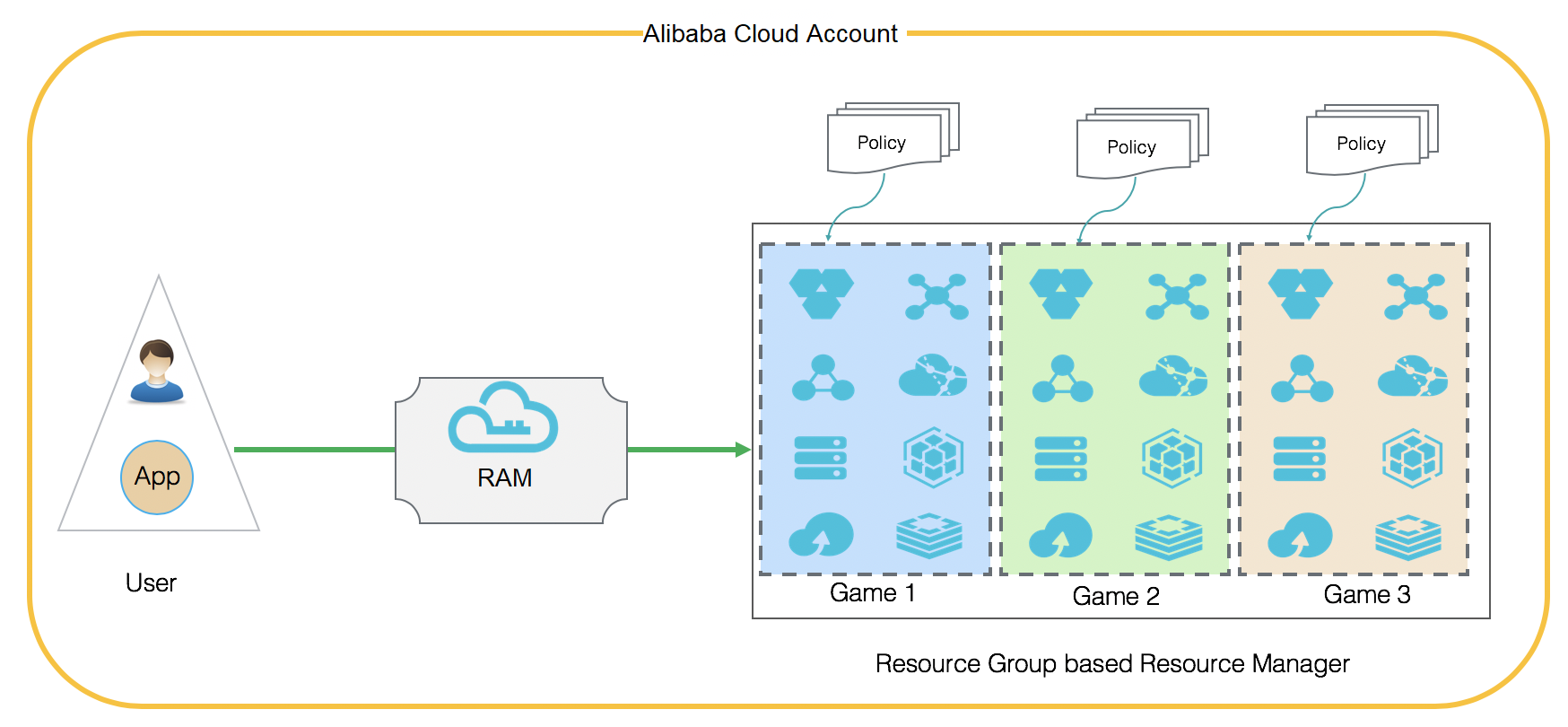
Resource group authorization applies only to cloud services and resources that support resource groups. For more information, see Services that work with Resource Group.
Set up resource group-based permissions
The following steps are performed by the account administrator.
Prerequisites: The account administrator must have full management access to the Alibaba Cloud account — specifically, permissions to create RAM users, create resource groups, and grant policies.
-
Create RAM users in the RAM console.
Create three RAM users for this example. For more information, see Create a RAM user.
RAM user
Alice: administrator of Gaming Project 1.RAM user
Bob: administrator of Gaming Project 2.RAM user
Charlie: administrator of Gaming Project 3.
-
Create resource groups in the Resource Management console.
Create three resource groups for this example. For more information, see Create a resource group.
Resource group
Game1: resources for Gaming Project 1.Resource group
Game2: resources for Gaming Project 2.Resource group
Game3: resources for Gaming Project 3.
-
Add resources to the resource groups.
New resources: select the target resource group when purchasing or creating a resource. For more information, see Purchase resources for a resource group.
Existing resources: move them to the target resource group. For more information, see Transfer resources across resource groups.
-
Grant permissions on each resource group to the corresponding RAM user.
In this example, each RAM user acts as the administrator of one resource group. Attach the
AdministratorAccesspolicy to grant full management permissions on the target resource group. For example, attachAdministratorAccessto RAM userAliceto give her full control over theGame1resource group.In production, follow the principle of least privilege and grant only the permissions each RAM user actually needs. Overly broad permissions increase security exposure.
A full-access policy scoped to a resource group, such as
AdministratorAccess, may conflict with authorization for some cloud services. For example, after a RAM user is grantedAdministratorAccesson a resource group, operations on security groups in the ECS console may fail with aForbidden.RAMerror. If this issue occurs, detach the resource group-scoped full-access policy, grant permissions at the Alibaba Cloud account scope, and attach a fine-grained service-level policy such asAliyunECSFullAccess.Grant permissions using one of these methods:
Grant permissions in the Resource Management console. For more information, see Add RAM authorization.
-
Grant permissions in the RAM console. For more information, see Manage RAM user permissions.
ImportantSet the Resource Scope parameter to Resource Group.
Result
After completing the setup, Alice, Bob, and Charlie are the resource group administrators of Game1, Game2, and Game3 respectively. Each administrator can:
-
View, manage, and create resources within their resource group in the consoles of the related cloud services.
ImportantTo see resources in a resource group, the administrator must first select that resource group in the console.
Manage RAM users, RAM user groups, and RAM roles that have permissions on their resource group, from the Resource Management console.
References
To restrict a RAM user to only the ECS instances they have permissions on, see Control RAM user access to specific ECS instances.