Create a Tencent TDSQL-H LibraDB data source in Quick BI to connect to and analyze your LibraDB data.
Prerequisites
You have created a Tencent TDSQL-H LibraDB database instance.
Limitations
Only tables that use the MergeTree family of table engines are supported.
Procedure
-
Add IP addresses to the allowlist.
Add the IP addresses of Quick BI to the allowlist of your Tencent TDSQL-H LibraDB instance.
-
Create the data source.
-
Log on to the Quick BI console.
-
Add the data source.
-
Go to the page to create a data source.
-
On the Tencent Cloud Databases tab, click TDSQL-H LibraDB.

-
-
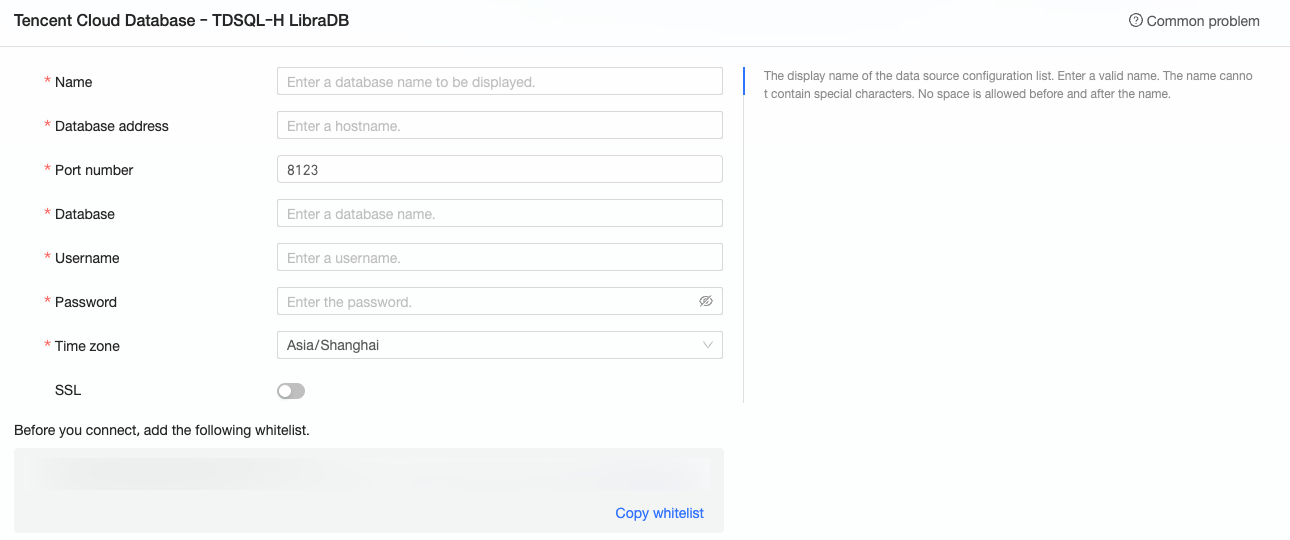
In the Configure Connection dialog box, configure the following parameters as required.
Parameter
Description
Display name
A custom name for this data source connection.
The name cannot contain special characters or leading or trailing spaces.
Database address and Port
Log on to the Tencent TDSQL-H LibraDB console, enable the public IP address on the instance details page, and copy the address and port from the basic information.
Database
The name of the database to connect to.
Username and Password
The username and password of the Tencent TDSQL-H LibraDB database.
NoteEnsure that the database user has the CREATE, INSERT, UPDATE, and DELETE permissions on the tables in the database.
Time zone
The time zone of your Tencent TDSQL-H LibraDB database.
SSL
Select this to enable a secure connection if your data source uses SSL.
-
Click Test Connection to verify the data source connection.

-
When the test succeeds, click OK to create the data source.
-
Next steps
After the data source is created, you can create datasets and analyze data.
-
To use data tables or custom SQL queries from your data source, see Create a dataset.
-
To add visualizations and analyze data, see Create a dashboard and Overview of visualizations.
-
To drill down into your data, see Step 3: Configure and view drill-down data.