The first time you use LangStudio of Platform for AI (PAI), you must assign service roles to LangStudio to allow it to access required resources and activate dependent cloud services. This topic describes the cloud services on which LangStudio depends and the permissions required to use it.
Introduction
If you want to use an operation account to manage LangStudio, you must grant permissions to the operation account before using LangStudio. If you want to grant different permissions to different RAM users, PAI lets you grant fine-grained permissions to RAM users to manage LangStudio using workspaces. LangStudio uses Object Storage Service (OSS) to store files in the backend, Simple Log Service and Managed Service for OpenTelemetry to develop and debug application flows, and Elastic Algorithm Service (EAS) of PAI to deploy application flows. In this case, you must grant your Alibaba Cloud account the permissions for LangStudio to access these cloud services. For more information, see the following sections:
Grant permissions to the operation account
LangStudio provides one-stop large language model (LLM) application development capabilities, which vary based on Alibaba Cloud services, such as OSS, Simple Log Service, Managed Service for OpenTelemetry, and EAS of PAI. Make sure that you grant LangStudio the permissions to access these cloud services.
Grant permissions to your Alibaba Cloud account of PAI
The following section describes how to grant your Alibaba Cloud account the permissions to use LangStudio:
Grant permissions to the operation account
LangStudio depends on the following cloud services. Make sure that you grant your operation account the permissions for LangStudio to access these cloud services.
PAI module: LangStudio
Operation account
Scenario
Operation Guide Link
Alibaba Cloud account
You can use an Alibaba Cloud account to perform operations on LangStudio. No additional authorization is required.
N/A
RAM user
(Recommended)
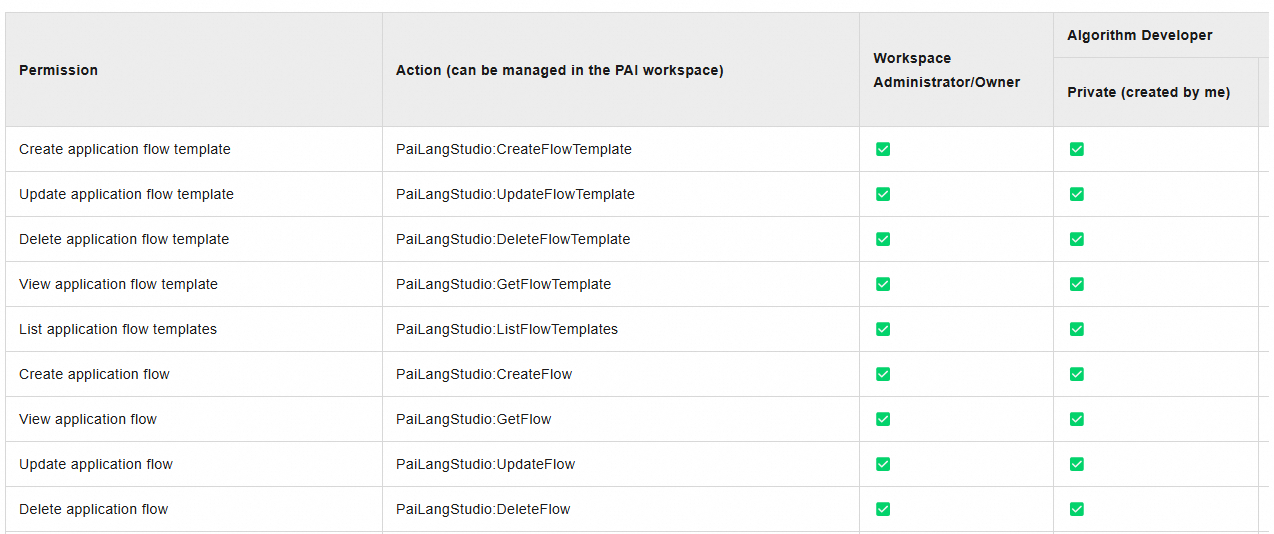
PAI provides different member roles. You can assume different member roles to the RAM users for convenient permission management. For more information about the permissions of each role, see List of Roles and Permissions - LangStudio.
OSS: stores the code and configuration files that you use when you develop LLM application flows, logs generated during development and debugging, and snapshot files generated when you deploy a service.
Scenario
Description
Operation Guide Link
Activate OSS
We recommend that you use an Alibaba Cloud account to activate OSS. No additional authorization is required. If you want to use a RAM user to activate OSS, attach the AliyunOSSFullAccess policy to the RAM user.
Activate OSS: Console quick start
Grant permissions to a RAM user: RAM Policy
Common operations: Console quick start
Use OSS
If you use OSS:
Authorization: OSS provides detailed RAM control policies. You can grant permissions to RAM users as needed.
Common operations: You need to create a bucket to upload objects to OSS.
Managed Service for OpenTelemetry: provides trace analysis when you develop and deploy LLM application flows.
Scenario
Description
Operation Guide
Activate Managed Service for OpenTelemetry
We recommend that you use an Alibaba Cloud account to activate Managed Service for OpenTelemetry. No additional authorization is required. If you want to use a RAM user to activate Managed Service for OpenTelemetry, attach the AliyunARMSFullAccess policy to the RAM user.
Activate Managed Service for OpenTelemetry: Quick Start
Grant permissions to a RAM user: Use RAM users to implement permission segregation
Use Managed Service for OpenTelemetry
You can view the trace analysis logs generated during development, debugging, or service deployment in the LangStudio console or Managed Service for OpenTelemetry console.
Simple Log Service (indirectly dependent and required by Managed Service for OpenTelemetry): stores log data of Managed Service for OpenTelemetry.
Scenario
Description
Operation Guide Links
Activate Simple Log Service
We recommend that you use an Alibaba Cloud account to activate Simple Log Service. No additional authorization is required. If you want to use a RAM user to activate Simple Log Service, attach the AliyunLogFullAccess policy to the RAM user.
Activate Simple Log Service: Description of storage resource hierarchy
Grant permissions to a RAM user: Create and authorize a RAM user
Virtual Private Cloud: During the running or deployment of an application flow service, the system queries the configuration information of your virtual private cloud (VPC) to correctly deploy the EAS service.
Scenario
Description
Operation Guide
Activate VPC
We recommend that you use an Alibaba Cloud account to activate VPC. No additional authorization is required. If you want to use a RAM user to activate VPC, attach the AliyunVPCFullAccess policy to the RAM user.
Activate VPC: Create and manage a VPC
Grant permissions to a RAM user: Use RAM for access control
PAI: lets you access PAI workspaces and PAI modules.
Scenario
Description
Operation Guide Link
Activate PAI
We recommend that you use an Alibaba Cloud account to activate PAI. No additional authorization is required. If you want to use a RAM user to activate PAI, attach the AliyunPAIFullAccess policy to the RAM user.
Activate PAI: Activate PAI and create a default workspace
Grant permissions to a RAM user: Log on as a RAM role and use PAI
DataWorks: Scheduled updates for the knowledge bases rely on DataWorks. To use this feature, activate DataWorks and grant permissions to the operating account.
Scenario
Description
Operation Guide
Activate DataWorks
We recommend that you use an Alibaba Cloud account to activate DataWorks. No additional authorization is required. If you want to use a RAM user to activate DataWorks, attach the AliyunDataWorksFullAccess policy to the RAM user.
Activate DataWorks: Activate DataWorks
Grant permissions to a RAM user: Best practices: Authorization guide for RAM users
Grant permissions to your Alibaba Cloud account of PAI
Grant your Alibaba Cloud account the permissions to use LangStudio
The first time you activate LangStudio, you must grant your Alibaba Cloud account the permissions to use it. To do so, perform the following steps:
Log on to the PAI console. In the right-side pane, select the desired workspace and click Enter LangStudio.
Grant your Alibaba Cloud account the permissions to access cloud services.
Click Authorize.
On the Quick Authorization page, click Confirm Authorization, and follow the instructions to complete the security verification.
On the Quick Authorization page, the system assigns the related service roles to your Alibaba Cloud account. You do not need to manually grant permissions.
Before you use LangStudio, click Activate For Free to activate Object Storage Service (OSS), Simple Log Service, and Managed Service for OpenTelemetry.
Reference 1: Modify the authorization policy of the LangStudio service role
Make sure that you are familiar with RAM policies to prevent LangStudio from becoming unavailable due to incorrect operations.
If you need finer-grained control over cloud resource access authorization, you can customize the permission policy for the authorized AliyunPAILangStudioDefaultRole role in the RAM console. The following example describes how to modify the access policy for OSS to grant more fine-grained authorization to the default server role for LangStudio:
View the default policy of the AliyunPAILangStudioDefaultRole service role.
Log on to the RAM console. In the navigation pane on the left, choose .
On the Roles page, enter AliyunPAILangStudioDefaultRole in the search box and click the search icon to search for the service role. Then, click the service role name.
On the Permissions tab of the service role details page, click the name of the policy. On the page that appears, you can view and copy the content of the default policy.
{
  "Version": "1",
  "Statement": [
    {
      "Action": [
        "eas:CreateService",
        "eas:ListServices",
        "eas:DescribeService",
        "eas:DeleteService",
        "eas:UpdateService",
        "eas:StartService",
        "eas:StopService"
      ],
      "Resource": "*",
      "Effect": "Allow"
    },
    {
      "Action": [
        "oss:GetObject",
        "oss:PutObject",
        "oss:DeleteObject",
        "oss:ListObjects"
      ],
      "Resource": "*",
      "Effect": "Allow"
    },
    {
      "Action": [
        "paillmtrace:GetXtraceToken"
      ],
      "Resource": "*",
      "Effect": "Allow"
    },
    {
      "Action": [
        "paidlc:CreateJob",
        "paidlc:DeleteJob",
        "paidlc:StopJob",
        "paidlc:GetJob",
        "paidlc:UpdateJob",
        "paidlc:ListJobs"
      ],
      "Resource": "*",
      "Effect": "Allow"
    },
    {
      "Action": [
        "paidsw:CreateInstance",
        "paidsw:DeleteInstance",
        "paidsw:UpdateInstance",
        "paidsw:StartInstance",
        "paidsw:StopInstance",
        "paidsw:GetInstance",
        "paidsw:ListInstances"
      ],
      "Resource": "*",
      "Effect": "Allow"
    },
    {
      "Action": "pai:AssumeUser",
      "Resource": "acs:pai:*:*:users/*",
      "Effect": "Allow"
    },
    {
      "Action": "ram:CreateServiceLinkedRole",
      "Resource": "*",
      "Effect": "Allow",
      "Condition": {
        "StringEquals": {
          "ram:ServiceName": "eas.pai.aliyuncs.com"
        }
      }
    },
    {
      "Action": [
        "dataworks:CreateWorkflowDefinition",
        "dataworks:UpdateWorkflowDefinition",
        "dataworks:GetWorkflowDefinition",
        "dataworks:ListWorkflowDefinitions",
        "dataworks:DeleteWorkflowDefinition",
        "dataworks:CreateDeployment",
        "dataworks:GetDeployment",
        "dataworks:ExecDeploymentStage",
        "dataworks:GetJobStatus",
        "dataworks:ImportWorkflowDefinition"
      ],
      "Resource": "*",
      "Effect": "Allow"
    },
    {
      "Action": [
        "paiflow:CreatePipelineRun",
        "paiflow:GetPipelineRun",
        "paiflow:DeletePipelineRun",
        "paidataset:CreateDataset",
        "paidataset:GetDataset",
        "paidataset:UpdateDataset",
        "paidataset:ListDatasets",
        "paidataset:DeleteDataset",
        "paidataset:CreateDatasetVersion",
        "paidataset:GetDatasetVersion",
        "paidataset:UpdateDatasetVersion",
        "paidataset:DeleteDatasetVersion",
        "paidataset:ListDatasetVersions"
      ],
      "Resource": "*",
      "Effect": "Allow"
    }
  ]
}
Create a custom policy using the script editor. Take note of the following instructions:
Modify the content of the default policy. For example, update the OSS authorization policy to specify accessible OSS buckets using the Condition element in RAM. A sample is shown below (Remove all comments in actual use scenarios):
{ "Version": "1", "Statement": [ //Do not modify the permissions on other services. //Add a tag to configure access permissions on OSS buckets. { "Action": [ "oss:GetObject", "oss:PutObject", "oss:DeleteObject", "oss:ListObjects" ], "Resource": "*", "Effect": "Allow", "Condition": { "StringEquals": { "oss:BucketTag/Product": "PaiLangStudio" } } } ] }NoteOSS lets you add tags to buckets. You can add tags in the key-value pair format to buckets that LangStudio is authorized to access. Examples: Key:Product and Value:PaiLangStudio. For more information, see Manage bucket tags.
Set the name of the new policy to CustomAliyunPAILangStudioDefaultRolePolicy.
Attach the CustomAliyunPAILangStudioDefaultRolePolicy policy to the AliyunPAILangStudioDefaultRole service role and detach the AliyunPAILangStudioDefaultRolePolicy policy from the service role. For more information, see Grant permissions to a RAM role and Revoke permissions from a RAM role.
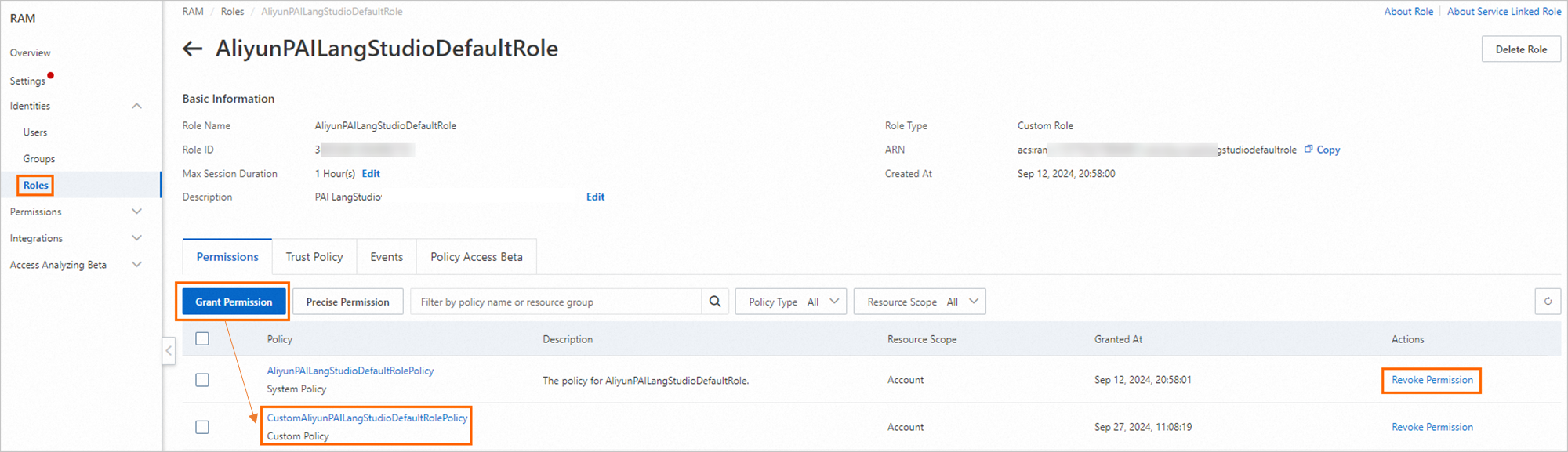
After the update is successful, LangStudio accesses your resources based on the modified policy.
Reference 2: Check whether the AliyunPAILangStudioDefaultRole service role is assigned to your Alibaba Cloud account
To check whether the AliyunPAILangStudioDefaultRole service role is assigned to your Alibaba Cloud account, perform the following steps.
Only Alibaba Cloud accounts can assign the role. RAM users cannot assign the role.
Log on to the RAM console. In the navigation pane on the left, choose Identities > Roles.
On the Roles page, enter AliyunPAILangStudioDefaultRole in the search box and click the search icon to search for the service role.
If the service role appears in the search result, the service role is assigned to your Alibaba Cloud account.
Otherwise, you must assign the service role to your Alibaba Cloud account. For more information, see Grant your Alibaba Cloud account the permissions to use LangStudio.