Explore supported Realtime API models, access methods, authentication, and existing tutorials and demos.
The Realtime API supports real-time multimodal interaction, speech recognition, speech synthesis, voice conversation, and audio and video translation. Find the access methods supported by your model, then choose one for your application and open the corresponding access documentation.
Model and protocol support
The following table lists the protocols supported by each model and application. Click "Supported" to open the corresponding access documentation.
| Model/application type | Model | WebSocket | WebRTC | AOQ |
|---|---|---|---|---|
qwen3.8-omni-flash-realtime、qwen3.5-omni-plus-realtime、qwen3.5-omni-flash-realtime | ||||
qwen-audio-3.1-tts-plus、qwen-audio-3.1-tts-flash、qwen-audio-3.0-tts-flash、qwen-audio-3.0-tts-plus | Unsupported | |||
CosyVoice series models | Unsupported | |||
qwen-audio-3.1-asr-flash-message, qwen-audio-3.1-asr-flash-streaming, qwen-audio-3.0-asr-flash-streaming, Fun-ASR-Realtime series models | Unsupported | |||
qwen-audio-3.1-realtime-plus、qwen-audio-3.1-realtime-flash、qwen-audio-3.0-realtime-plus、qwen-audio-3.0-realtime-flash | ||||
| ||||
Qwen-Livetranslate-Realtime series models |
NoteFor information such as model names, context windows, prices, and snapshot versions, see the Alibaba Cloud Model Studio console. For rate limits, see Rate limiting.
WebSocket SDKs by model
| Model | Languages and platforms |
|---|---|
| Qwen-Omni-Realtime | Python · Java · C# |
| Qwen-Audio-ASR-Streaming | Python · Java · Node.js · C# · Android · iOS · HarmonyOS · Flutter |
| Qwen-Audio-ASR-Message | Python · Java · Node.js · C# · Android · iOS · HarmonyOS · Flutter |
| Fun-ASR-Realtime | Python · Java · C# · Android · iOS · HarmonyOS · Flutter |
| Qwen-ASR-Realtime | Python · Java |
| Paraformer | Python · Java · C# · HarmonyOS · Flutter |
| Qwen-Audio-TTS | Python · Java · Node.js · C# · Android · iOS · HarmonyOS · Flutter |
| CosyVoice | Python · Java · C# · Android · iOS · HarmonyOS · Flutter |
| Qwen-TTS-Realtime | Python · Java |
| Qwen-Audio-Realtime | Node.js · C# · Android · iOS · HarmonyOS · Flutter |
| Qwen-LiveTranslate-Realtime | Python · Java · C# · Flutter |
C# reference SDK overview · Methods and events
Choose an access method
The Realtime API supports WebSocket, WebRTC, and AOQ (AI over QUIC). Available access methods and input and output capabilities depend on the selected model. Refer to its access documentation.
| Dimension | WebSocket | WebRTC | AOQ |
|---|---|---|---|
Use cases | Real-time voice and multimodal interaction, server-side integration, rapid prototyping | Real-time browser audio and video interaction, applications with existing WebRTC infrastructure | Native applications that need weak-network optimization and coordinated transmission of audio, video, and model events |
Browser compatibility | Natively supported; the API authentication requirements still apply | Natively supported | The current AOQ SDK does not provide browser access |
Echo cancellation and noise suppression | Provided by the audio capture and processing components used by the client | Provided by the browser or WebRTC client, depending on the platform and configuration | Depends on the AOQ SDK audio configuration for the selected platform |
Client platform support | All platforms (any environment that supports WebSocket) | Browsers, mobile clients | Mobile, desktop, and Linux. For details, see AOQ SDK downloads. |
Token Plan | Supported | Supported | Supported |
- WebSocket: Suitable for real-time voice and multimodal interaction, server-side integration, and prototype validation. The DashScope SDK enables quick implementation of real-time voice conversations.
- WebRTC: Suitable for real-time audio and video interaction that requires native browser support or an existing WebRTC infrastructure.
- AOQ: AOQ is based on QUIC and optimized for real-time interaction on weak networks. It supports separate-track transmission of audio/video and model events, and is suitable for native applications that need to integrate media capture, encoding/decoding, and playback capabilities.
Preparation
Confirm the regions and endpoints for calls, and obtain the API Key for the corresponding region and workspace.
NoteFor first-time use, activate the service as prompted by the console. After creation, immediately copy and securely store the API Key, manage it through environment variables, and do not embed it in clients or commit it to code repositories.
When using AOQ, download the AOQ SDK based on your client platform.
Authentication Method
The Realtime API uses an API Key for identity authentication. Whether you connect via the AOQ, WebRTC, or WebSocket protocol, authentication is completed through the Authorization field in the HTTP request header carrying a Bearer Token.
WebRTC and WebSocket authenticate at connection establishment; AOQ uses the API Key for authentication when the AppServer requests a connection credential, and the client then establishes the connection with a temporary token. Data transmission after the connection is established does not require repeated authentication.
Connection Authentication Details
WebSocket
WebSocket carries the API Key in the HTTP request header for authentication when establishing the connection. For specific requirements, see the access documentation of the corresponding model.
WebRTC
Qwen-Audio-Live submits the Offer SDP over a control WebSocket and authenticates when the WebSocket connection is established. See Qwen-Audio-Live WebRTC access.
The following models exchange SDP via HTTP POST and authenticate at this stage. The client sends an Offer SDP, and the server returns an Answer SDP.
AOQ
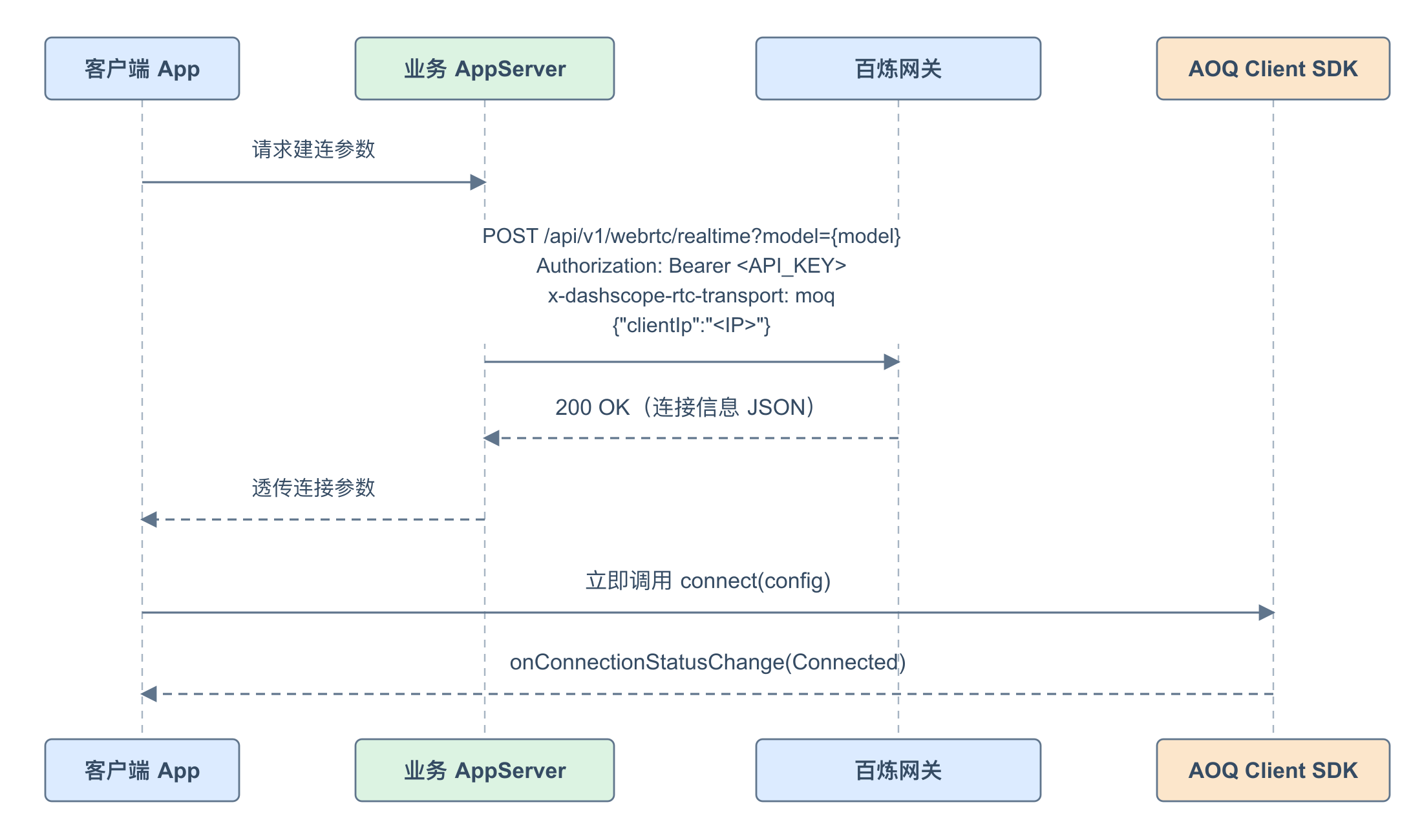
AOQ adopts a server-side proxy authentication mode: the API Key is used only on the business AppServer side, and the client establishes the connection with a temporary token returned by the gateway, preventing the API Key from being exposed on the client.
Obtain the connection credential
When the business requires a media connection, the AppServer requests a connection credential and returns it to the client, which then calls connect(config) to establish the connection.
To obtain the credential in advance, the AppServer can set tokenExpiresInSecs in the request body. The client must complete the connection within the specified validity period; after expiration, the credential must be obtained again. If not set, the connection should be established immediately after the credential is obtained. This parameter does not limit the session duration after the connection is established.
Request path
| Series | Connection request path |
|---|---|
| Qwen-Omni-Realtime、Qwen-Audio-Realtime、Qwen-Livetranslate-Realtime | /api/v1/webrtc/realtime |
| Qwen-Audio-TTS、CosyVoice、Qwen-Audio-ASR-Streaming、Qwen-Audio-ASR-Message、Fun-ASR-Realtime | /api/v1/webrtc/inference |
Request description
| Parameter | Position and type | Description |
|---|---|---|
| URL · | Required. Use the endpoint of the selected region and workspace. When using Token Plan, the |
| Query parameter · | Required. The model ID to call. Select the connection path according to the Series in the table above. |
| Request header · | Required. The format is |
| Request header · | Required. Fixed to |
| Request header · | Required. Native AOQ SDKs use |
| Request body · | Optional. The client's real public IP address, used to select the Relay access point; if not specified, the request source IP is used. |
| Request body · | Optional. The validity period of the connection Token, in seconds, an integer from 1 to 1800. Set it only when you need to obtain the credential in advance. A wrong type or an out-of-range value causes the request to fail. |
On the AppServer, send the request using the corresponding {endpoint} and the environment variable DASHSCOPE_API_KEY. The following example uses qwen3.8-omni-flash-realtime; when calling a model on the Inference path, change the path to /api/v1/webrtc/inference and set the corresponding model.
curl -X POST \
  "https://{endpoint}/api/v1/webrtc/realtime?model=qwen3.8-omni-flash-realtime" \
  -H "Authorization: Bearer ${DASHSCOPE_API_KEY}" \
  -H "Content-Type: application/json" \
  -H "x-dashscope-rtc-transport: moq" \
  -d '{}'
curl -X POST \
  "https://{endpoint}/api/v1/webrtc/realtime?model=qwen3.8-omni-flash-realtime" \
  -H "Authorization: Bearer ${DASHSCOPE_API_KEY}" \
  -H "Content-Type: application/json" \
  -H "x-dashscope-rtc-transport: moq" \
  -d '{"tokenExpiresInSecs": 600}'
curl -X POST \
  "https://{endpoint}/api/v1/webrtc/realtime?model=qwen3.8-omni-flash-realtime" \
  -H "Authorization: Bearer ${DASHSCOPE_API_KEY}" \
  -H "Content-Type: application/json" \
  -H "x-dashscope-rtc-transport: webtransport" \
  -d '{}'
curl -X POST \
  "https://{endpoint}/api/v1/webrtc/realtime?model=qwen3.8-omni-flash-realtime" \
  -H "Authorization: Bearer ${DASHSCOPE_API_KEY}" \
  -H "Content-Type: application/json" \
  -H "x-dashscope-rtc-transport: webtransport" \
  -d '{"tokenExpiresInSecs": 600}'
Response description
| Field | Type | Description and SDK mapping |
|---|---|---|
|
| The unique session identifier. For native SDKs, fill it into |
|
| The temporary Token used by the client to establish the connection. For native SDKs, fill it into |
|
| The array of Relay access points, each containing |
|
| Returned only for Web SDK requests. A list of SHA-256 fingerprints of the WebTransport server certificate for this access point; each fingerprint is a 64-character lowercase hexadecimal string. |
|
| Returned only for native SDK requests. Fill the Relay TLS certificate fingerprint into |
|
| The validity period (in seconds) of the temporary connection Token. Returned only when the request sets |
|
| The hash of the Workspace ID. For native SDKs, fill it into |
The access points, ports, and certificate fingerprints in the following response are example values; use the values actually returned by the API.
{
  "sid": "<session_id>",
  "aoqTokenForClient": "<token>",
  "clientRelayEndpoints": [
    {"endpoint": "192.0.2.1", "port": 8443, "route_index": 0}
  ],
  "clientRelayCertFingerprint": "sha256/<fingerprint>",
  "extraInfo": {"workspaceIdHash": "<workspace_id_hash>"}
}
{
  "sid": "<session_id>",
  "aoqTokenForClient": "<token>",
  "clientRelayEndpoints": [
    {"endpoint": "192.0.2.1", "port": 8443, "route_index": 0}
  ],
  "clientRelayCertFingerprint": "sha256/<fingerprint>",
  "sidExpiresInSecs": 600,
  "extraInfo": {"workspaceIdHash": "<workspace_id_hash>"}
}
{
  "sid": "<session_id>",
  "aoqTokenForClient": "<token>",
  "clientRelayEndpoints": [
    {
      "endpoint": "192.0.2.1",
      "port": 4443,
      "route_index": 0,
      "certHashes": [
        "7f83b1657ff1fc53b92dc18148a1d65dfc2d4b1fa3d677284addd200126d9069"
      ]
    }
  ],
  "sidExpiresInSecs": 600,
  "extraInfo": {
    "workspaceIdHash": "<workspace_id_hash>"
  }
}
When a Web SDK request does not set tokenExpiresInSecs, sidExpiresInSecs is not returned either, and the structure of the other fields remains unchanged.
Developer resources
WebRTC Tutorials
AOQ Tutorials and Demos
- Implement real-time calls with qwen3.8-omni-flash-realtime via AOQ
- Use AOQ to access qwen3.5-omni-plus-realtime to implement push-to-talk voice dialogue
- Use AOQ to access qwen-audio-3.1-asr-flash-streaming to implement a voice input method
- Use AOQ to access qwen3.8-livetranslate-flash-realtime to implement real-time speech translation
- Use AOQ to access qwen-audio-3.1-tts-flash to implement speech synthesis
- Use AOQ to access fun-asr-realtime to implement real-time speech recognition
- Use AOQ to access qwen-audio-3.1-realtime-plus to implement real-time voice conversation
Use the Android Demo to verify AOQ integration results. Scan the QR code to download the APK, configure the API Key and workspaceId after installation, and then you can try some of the models supported by the Demo.