Use AOQ to connect to qwen-audio-3.0-tts-flash, send text in segments, and play synthesized speech in real time. The client code uses Android Java.
Solution overview
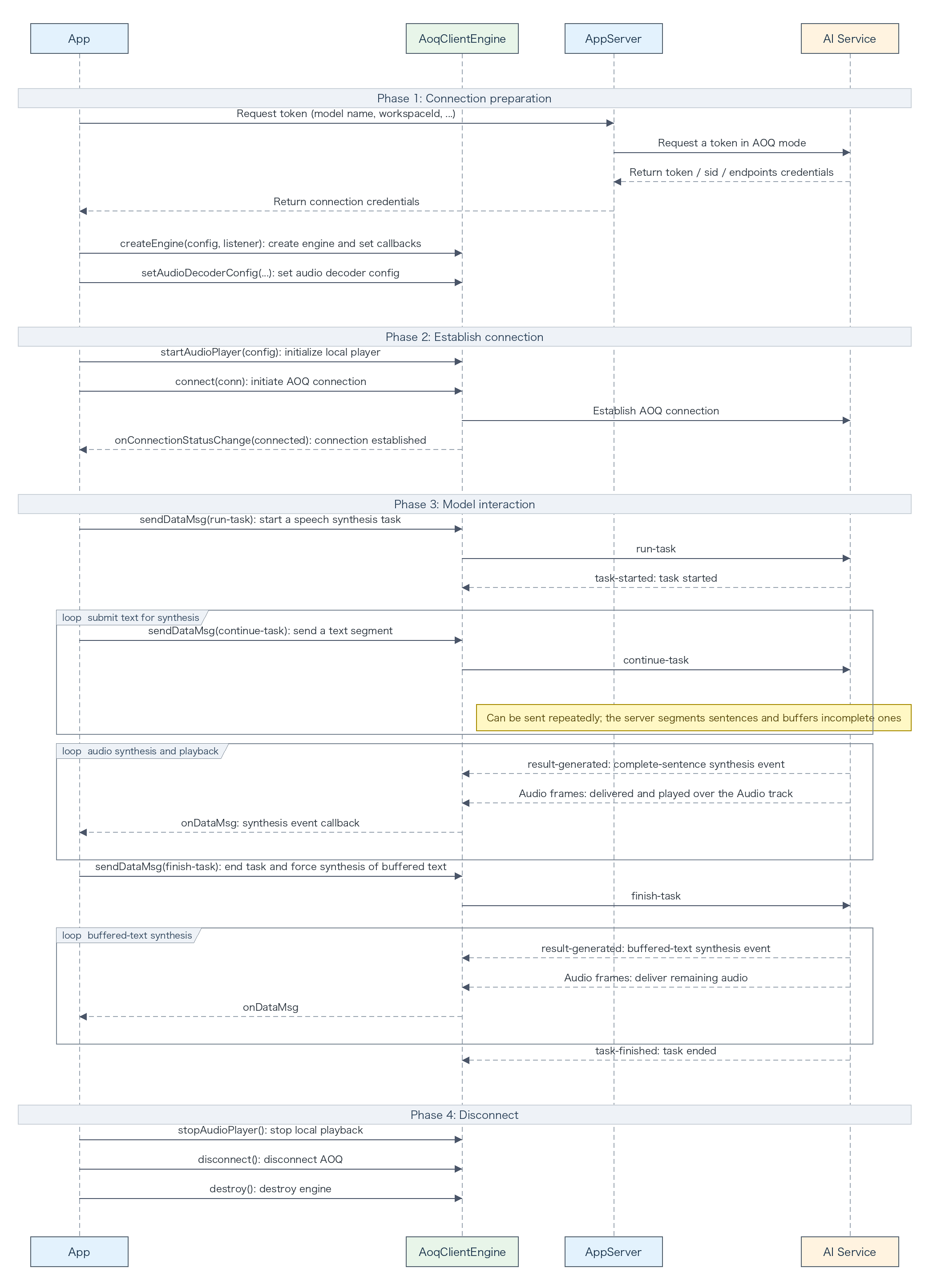
qwen-audio-3.0-tts-flash supports the AOQ Inference event protocol. This tutorial uses the model to demonstrate streaming speech synthesis over AOQ. The client sends run-task, continue-task, and finish-task over the Data track. The service streams audio over the Audio track and returns task events over the Data track.
A task can contain multiple continue-task events. Complete sentences are synthesized promptly. Incomplete sentences remain buffered until subsequent text completes them or the client sends finish-task. This approach is suitable for mobile playback, segmented long-text input, and low-latency speech output.
Prerequisites
- Activate Model Studio and follow Obtain and configure an API key. Store the API key only on your application server. Do not include it in client code or commit it to a code repository.
- Confirm the AOQ endpoint for the region in which your application is deployed. For selection guidance, see Select a region, deployment scope, and endpoint.
- Download the latest AOQ Client SDK as described in SDK download.
- Build an application server and implement proxy authentication as described in Token authentication. Before each new connection, the client must obtain new connection credentials from the application server.
Import the SDK
Import the SDK for your development platform. The client implementation uses Android Java. Other platforms provide the same interfaces and event flow. This tutorial uses Opus audio streams. Import the corresponding plugin as described in the SDK download topic before proceeding.
Android
- Place libPluginOpus.so from the Opus plugin in app/src/main/jniLibs/armeabi-v7a/ and app/src/main/jniLibs/arm64-v8a/ for the corresponding ABIs. Place AoqClientSdk-release.aar in app/libs, and configure the dependency and SDK-supported ABIs in app/build.gradle:
android {
    defaultConfig {
        minSdk 21
        ndk { abiFilters 'armeabi-v7a', 'arm64-v8a' }
    }
}

dependencies {
    implementation fileTree(dir: 'libs', include: ['*.aar'])
}
- Declare the following permissions in AndroidManifest.xml:
<uses-permission android:name="android.permission.INTERNET" />
<uses-permission android:name="android.permission.ACCESS_NETWORK_STATE" />
- This scenario does not require microphone or camera permissions.
iOS
- Add AoqClientSdk.framework and PluginOpus.framework to the Xcode project and select Embed & Sign under Target > General > Frameworks, Libraries, and Embedded Content. The SDK supports arm64 devices running iOS 13.0 or later.
- This scenario does not use the microphone or camera and requires no related permissions.
- Use import AoqClientSdk in Swift or #import <AoqClientSdk/AoqClientSdk.h> in Objective-C.
HarmonyOS
- Place libPluginOpus.so from the Opus plugin in entry/libs/arm64-v8a/. Place AoqClientSdk.har in entry/libs and declare the dependency in entry/oh-package.json5. The SDK is compatible with API 12 and supports arm64-v8a:
{
  "dependencies": {
    "@aoq/client-sdk": "file:./libs/AoqClientSdk.har"
  }
}
- Declare the following permissions in entry/src/main/module.json5:
"requestPermissions": [
  { "name": "ohos.permission.INTERNET" }
]
- This scenario does not require microphone or camera permissions.
Linux (Python)
- Extract the SDK and keep aoq_client_sdk.py, libAoqClientSdk.so, and libonnxruntime.so.1.16.3 in the same directory.
- Add the SDK directory to the Python and dynamic library search paths:
export PYTHONPATH="$PWD/AoqClientSdk:$PYTHONPATH"
export LD_LIBRARY_PATH="$PWD/AoqClientSdk:$LD_LIBRARY_PATH"
- Use import aoq_client_sdk in Python. You can also specify the absolute path of libAoqClientSdk.so by using AOQ_CLIENT_SDK_LIB.
Try the demo
Use the Android demo from Alibaba Cloud Model Studio to quickly verify AOQ connectivity. Download the APK and configure the API key and workspaceId to try selected models.
Scan the following QR code to download the demo:

Implementation flow
- The application server obtains AOQ connection parameters for qwen-audio-3.0-tts-flash from the Inference token URL.
- The client publishes the Data track, subscribes to the Audio and Data tracks, and configures the SDK audio decoder.
- The client starts the local player and connects to AOQ. After the connection succeeds, it sends run-task with a new task_id.
- After task-started is received, the client sends one or more continue-task text segments at the pace required by the application.
- After all text is sent, the client sends finish-task. The service returns the remaining audio and finally task-finished.
- After task-finished is received, start another task over the same AOQ connection with a new task_id, or disconnect and destroy the engine.
Obtain a token from the application server
Set DASHSCOPE_API_KEY on the application server and send the request to the endpoint for the selected region. clientIp is the actual public IP address of the client. This field is optional, but specifying it helps the service allocate an appropriate relay endpoint.
curl -X POST \
  "https://{endpoint}/api/v1/webrtc/inference?model=qwen-audio-3.0-tts-flash" \
  -H "Content-Type: application/json" \
  -H "Authorization: Bearer ${DASHSCOPE_API_KEY}" \
  -H "x-dashscope-rtc-transport: moq" \
  -d "{\"clientIp\": \"${CLIENT_REAL_IP}\"}"
NoteIf the application server cannot obtain the actual public IP address of the client, omit clientIp instead of passing an empty string.
The application server returns the following response fields to the client. Never return the API key to a client in production. For all request and response fields, see Token authentication.
Response field | SDK field |
aoqTokenForClient | AoqConnectConfig.token |
sid | AoqConnectConfig.sid |
clientRelayCertFingerprint | AoqConnectConfig.certFingerprint |
clientRelayEndpoints | AoqConnectConfig.relayEndpoints |
extraInfo.workspaceIdHash | AoqConnectConfig.workspaceIdHash |
Implement the Android client
After the client obtains AoqConnectConfig from the application server, follow these steps to implement streaming speech synthesis on Android.
1. Create the engine and register callbacks
Create the singleton AOQ engine and register callbacks for connection and Data-track events. Maintain connection readiness in the connection callback and pass task events to the application state machine.
AoqClientListener listener = new AoqClientListener() {
    @Override
    public void onConnectionStatusChange(AoqClientEngine.AoqConnectionStatus status) {
        connected = status == AoqClientEngine.AoqConnectionStatus
                .AoqConnectionStatusConnected;
    }

    @Override
    public void onDataMsg(AoqClientEngine.AoqDataMsg msg) {
        handleServerEvent(msg);
    }
};

AoqClientEngine.AoqCreateConfig createConfig = new AoqClientEngine.AoqCreateConfig();
createConfig.workDir = context.getFilesDir().getAbsolutePath();
engine = AoqClientEngine.createEngine(context, createConfig, listener);
2. Start audio playback
TTS does not capture microphone audio. Initialize only the local player. Select the speaker or earpiece as the default output. The SDK automatically plays server audio from the Audio track.
AoqClientEngine.AoqAudioPlaybackConfig playbackConfig =
        new AoqClientEngine.AoqAudioPlaybackConfig();
playbackConfig.channel = 1;
playbackConfig.isDefaultSpeaker = true;
engine.startAudioPlayer(playbackConfig);
3. Configure the decoder and tracks and connect
Configure the SDK audio decoder. Then publish the Data track and subscribe to the Audio and Data tracks. The following values are Opus examples for this tutorial. Populate AoqConnectConfig fields from the application-server token response.
AoqClientEngine.AoqAudioCodecConfig audioDecoderConfig =
        new AoqClientEngine.AoqAudioCodecConfig();
audioDecoderConfig.trackType = AoqClientEngine.AoqTrackType.AoqTrackTypeAudio;
audioDecoderConfig.codecType = AoqClientEngine.AoqEncoderType.AoqEncoderTypeAudioOpus;
audioDecoderConfig.sampleRate = 24000; // Example. Match run-task.sample_rate.
audioDecoderConfig.channel = 1;
engine.setAudioDecoderConfig(audioDecoderConfig);

AoqClientEngine.AoqTrackParam publishDataTrack = new AoqClientEngine.AoqTrackParam();
publishDataTrack.trackType = AoqClientEngine.AoqTrackType.AoqTrackTypeData;
connectConfig.publishTracks.add(publishDataTrack);

AoqClientEngine.AoqTrackParam subscribeAudioTrack = new AoqClientEngine.AoqTrackParam();
subscribeAudioTrack.trackType = AoqClientEngine.AoqTrackType.AoqTrackTypeAudio;
connectConfig.subscribeTracks.add(subscribeAudioTrack);

AoqClientEngine.AoqTrackParam subscribeDataTrack = new AoqClientEngine.AoqTrackParam();
subscribeDataTrack.trackType = AoqClientEngine.AoqTrackType.AoqTrackTypeData;
connectConfig.subscribeTracks.add(subscribeDataTrack);
engine.connect(connectConfig);
4. Call sendDataMsg to send a run-task event
After the connection succeeds, generate a new UUID task_id and configure the model, voice, text type, audio format, and sample rate. For optional parameters, see Client events.
taskId = UUID.randomUUID().toString();
JSONObject header = new JSONObject()
        .put("action", "run-task")
        .put("task_id", taskId)
        .put("streaming", "duplex");
JSONObject parameters = new JSONObject()
        .put("text_type", "PlainText")
        .put("voice", voice)
        .put("format", "pcm")
        .put("sample_rate", 24000);
JSONObject payload = new JSONObject()
        .put("task_group", "audio")
        .put("task", "tts")
        .put("function", "SpeechSynthesizer")
        .put("model", "qwen-audio-3.0-tts-flash")
        .put("input", new JSONObject())
        .put("parameters", parameters);
JSONObject runTask = new JSONObject().put("header", header).put("payload", payload);
AoqClientEngine.AoqDataMsg dataMessage = new AoqClientEngine.AoqDataMsg();
dataMessage.data = runTask.toString().getBytes(StandardCharsets.UTF_8);
engine.sendDataMsg(dataMessage);
5. Call sendDataMsg to send a continue-task event
Send continue-task only after task-started is received. A task can contain multiple segments. Each event supports up to 20,000 characters, and a task supports up to 200,000 characters in total. Send subsequent segments or finish the task promptly. Do not depend on a fixed connection-timeout value.
JSONObject continueHeader = new JSONObject()
        .put("action", "continue-task")
        .put("task_id", taskId)
        .put("streaming", "duplex");
JSONObject payload = new JSONObject()
        .put("input", new JSONObject().put("text", text));
JSONObject continueTask = new JSONObject()
        .put("header", continueHeader)
        .put("payload", payload);
AoqClientEngine.AoqDataMsg dataMessage = new AoqClientEngine.AoqDataMsg();
dataMessage.data = continueTask.toString().getBytes(StandardCharsets.UTF_8);
engine.sendDataMsg(dataMessage);
6. Handle server events
In onDataMsg, read header.event to maintain task state and handle failures. result-generated indicates that a sentence was synthesized, while the audio is still returned over the Audio track. For all fields, see Server events.
JSONObject header = event.optJSONObject("header");
if (header == null) return;
String name = header.optString("event");
if ("task-started".equals(name)) {
    // The application can now send one or more continue-task events.
} else if ("result-generated".equals(name)) {
    // A sentence was synthesized. Audio is delivered over the Audio track.
} else if ("task-finished".equals(name)) {
    taskActive = false;
} else if ("task-failed".equals(name)) {
    taskActive = false;
    String message = header.optString("error_message");
    // Display or log the error.
}
7. Call sendDataMsg to send a finish-task event
Immediately after all text is sent, send finish-task to synthesize incomplete text buffered by the service, and wait for task-finished. For details, see Client events.
JSONObject finishHeader = new JSONObject()
        .put("action", "finish-task")
        .put("task_id", taskId)
        .put("streaming", "duplex");
JSONObject finishTask = new JSONObject()
        .put("header", finishHeader)
        .put("payload", new JSONObject().put("input", new JSONObject()));
AoqClientEngine.AoqDataMsg dataMessage = new AoqClientEngine.AoqDataMsg();
dataMessage.data = finishTask.toString().getBytes(StandardCharsets.UTF_8);
engine.sendDataMsg(dataMessage);
8. Disconnect and destroy the engine
Do not disconnect immediately after finish-task is sent. After task-finished or task-failed is received, disconnect and destroy the engine if no subsequent task will be started. The SDK automatically closes the audio player.
engine.disconnect();
AoqClientEngine.destroy();
Main server events
Event | Description |
task-started | The task has started and continue-task can be sent |
result-generated | A complete sentence was synthesized and its audio is returned over the Audio track |
task-finished | All buffered text was processed and the task is complete |
task-failed | The task failed. Read the error code and message |
Complete example
The following class accepts an AoqConnectConfig mapped from the application-server token response. After the connection succeeds, call synthesize(text, voice). Add permissions, UI state, and reconnection logic in production.
import android.content.Context;

import com.alibaba.aoq.clientsdk.AoqClientEngine;
import com.alibaba.aoq.clientsdk.AoqClientListener;

import org.json.JSONException;
import org.json.JSONObject;

import java.nio.charset.StandardCharsets;
import java.util.UUID;

public final class TtsClient {
    private AoqClientEngine engine;
    private String taskId;
    private String pendingText;
    private String pendingVoice;
    private boolean connected;
    private boolean taskActive;

    public TtsClient(Context context, AoqClientEngine.AoqConnectConfig connectConfig) {
        AoqClientListener listener = new AoqClientListener() {
            @Override
            public void onConnectionStatusChange(AoqClientEngine.AoqConnectionStatus status) {
                if (status == AoqClientEngine.AoqConnectionStatus.AoqConnectionStatusConnected) {
                    connected = true;
                } else if (status == AoqClientEngine.AoqConnectionStatus
                        .AoqConnectionStatusDisconnected) {
                    connected = false;
                }
            }

            @Override
            public void onDataMsg(AoqClientEngine.AoqDataMsg msg) {
                try {
                    JSONObject event = new JSONObject(
                            new String(msg.data, StandardCharsets.UTF_8));
                    String eventName = event.optJSONObject("header") == null
                            ? "" : event.optJSONObject("header").optString("event");
                    if ("task-started".equals(eventName)) {
                        sendContinueTask();
                        sendFinishTask();
                    } else if ("task-finished".equals(eventName)
                            || "task-failed".equals(eventName)) {
                        taskActive = false;
                    }
                } catch (JSONException e) {
                    throw new IllegalArgumentException("Invalid server event", e);
                }
            }
        };

        AoqClientEngine.AoqCreateConfig createConfig = new AoqClientEngine.AoqCreateConfig();
        createConfig.workDir = context.getFilesDir().getAbsolutePath();
        engine = AoqClientEngine.createEngine(context, createConfig, listener);

        // Example values. Match these settings to the output audio format in run-task.
        AoqClientEngine.AoqAudioCodecConfig audioDecoderConfig =
                new AoqClientEngine.AoqAudioCodecConfig();
        audioDecoderConfig.trackType = AoqClientEngine.AoqTrackType.AoqTrackTypeAudio;
        audioDecoderConfig.codecType = AoqClientEngine.AoqEncoderType.AoqEncoderTypeAudioOpus;
        audioDecoderConfig.sampleRate = 24000;
        audioDecoderConfig.channel = 1;
        engine.setAudioDecoderConfig(audioDecoderConfig);

        AoqClientEngine.AoqAudioPlaybackConfig playbackConfig =
                new AoqClientEngine.AoqAudioPlaybackConfig();
        playbackConfig.channel = 1;
        playbackConfig.isDefaultSpeaker = true;
        engine.startAudioPlayer(playbackConfig);

        AoqClientEngine.AoqTrackParam publishDataTrack =
                new AoqClientEngine.AoqTrackParam();
        publishDataTrack.trackType = AoqClientEngine.AoqTrackType.AoqTrackTypeData;
        connectConfig.publishTracks.add(publishDataTrack);

        AoqClientEngine.AoqTrackParam subscribeAudioTrack =
                new AoqClientEngine.AoqTrackParam();
        subscribeAudioTrack.trackType = AoqClientEngine.AoqTrackType.AoqTrackTypeAudio;
        connectConfig.subscribeTracks.add(subscribeAudioTrack);

        AoqClientEngine.AoqTrackParam subscribeDataTrack =
                new AoqClientEngine.AoqTrackParam();
        subscribeDataTrack.trackType = AoqClientEngine.AoqTrackType.AoqTrackTypeData;
        connectConfig.subscribeTracks.add(subscribeDataTrack);

        engine.connect(connectConfig);
    }

    public void synthesize(String text, String voice) {
        if (!connected || taskActive) {
            throw new IllegalStateException("The connection is not ready or a task is active.");
        }
        taskId = UUID.randomUUID().toString();
        pendingText = text;
        pendingVoice = voice;
        taskActive = true;
        sendRunTask();
    }

    private void sendRunTask() {
        try {
            JSONObject header = new JSONObject()
                    .put("action", "run-task")
                    .put("task_id", taskId)
                    .put("streaming", "duplex");
            JSONObject parameters = new JSONObject()
                    .put("text_type", "PlainText")
                    .put("voice", pendingVoice)
                    .put("format", "pcm")
                    .put("sample_rate", 24000);
            JSONObject payload = new JSONObject()
                    .put("task_group", "audio")
                    .put("task", "tts")
                    .put("function", "SpeechSynthesizer")
                    .put("model", "qwen-audio-3.0-tts-flash")
                    .put("input", new JSONObject())
                    .put("parameters", parameters);
            JSONObject runTask = new JSONObject().put("header", header).put("payload", payload);
            AoqClientEngine.AoqDataMsg dataMessage = new AoqClientEngine.AoqDataMsg();
            dataMessage.data = runTask.toString().getBytes(StandardCharsets.UTF_8);
            engine.sendDataMsg(dataMessage);
        } catch (JSONException e) {
            throw new IllegalStateException("Failed to create run-task", e);
        }
    }

    private void sendContinueTask() {
        try {
            JSONObject header = new JSONObject()
                    .put("action", "continue-task")
                    .put("task_id", taskId)
                    .put("streaming", "duplex");
            JSONObject payload = new JSONObject()
                    .put("input", new JSONObject().put("text", pendingText));
            JSONObject continueTask = new JSONObject()
                    .put("header", header)
                    .put("payload", payload);
            AoqClientEngine.AoqDataMsg dataMessage = new AoqClientEngine.AoqDataMsg();
            dataMessage.data = continueTask.toString().getBytes(StandardCharsets.UTF_8);
            engine.sendDataMsg(dataMessage);
        } catch (JSONException e) {
            throw new IllegalStateException("Failed to create continue-task", e);
        }
    }

    private void sendFinishTask() {
        try {
            JSONObject header = new JSONObject()
                    .put("action", "finish-task")
                    .put("task_id", taskId)
                    .put("streaming", "duplex");
            JSONObject finishTask = new JSONObject()
                    .put("header", header)
                    .put("payload", new JSONObject().put("input", new JSONObject()));
            AoqClientEngine.AoqDataMsg dataMessage = new AoqClientEngine.AoqDataMsg();
            dataMessage.data = finishTask.toString().getBytes(StandardCharsets.UTF_8);
            engine.sendDataMsg(dataMessage);
        } catch (JSONException e) {
            throw new IllegalStateException("Failed to create finish-task", e);
        }
    }

    public void close() {
        engine.disconnect();
        AoqClientEngine.destroy();
    }
}
Run and verify
- Text is submitted only after task-started is received.
- Audio for complete sentences is played continuously over the Audio track. Incomplete sentences are synthesized after finish-task.
- task-finished is received after all audio is complete. Another task can then start with a new task_id.
Common scenarios
Multiple tasks over one connection
After task-finished is received, send another run-task with a new task_id over the same AOQ connection. No new token is needed while the connection remains active. If the connection is closed, obtain new connection credentials.
Change the voice
Each run-task can select a system voice or a valid voice_id in parameters.voice. You can therefore change the voice between tasks over the same connection.
Speaker or earpiece
Set the default output by using AoqAudioPlaybackConfig.isDefaultSpeaker, and call enableSpeakerphone to switch while the connection is active.
Troubleshooting
Issue | Solution |
The connection succeeds but the task does not start | Make sure that credentials were obtained from the Inference token URL, and check the model name, task_id, and Data-track publication in run-task. |
continue-task is rejected | Wait for task-started, and use the same task_id in run-task, continue-task, and finish-task. |
The task succeeds but no audio is played | Make sure that the Audio track is subscribed and the player is running, and verify that the SDK decoder matches the output audio format selected in run-task. |
The final text has no audio | Send finish-task after all text is sent, and wait for the remaining audio and task-finished before disconnecting. |
Related information
For all parameters, event fields, and interfaces for other platforms, see: