Describes how to integrate the AOQ Client SDK on Android, iOS, and HarmonyOS to implement audio/video calls using AOQ and qwen3.8-omni-flash-realtime.
Get the SDK
For the AOQ Client SDK and the Opus audio plug-in, see SDK download. This example uses Opus and requires the Opus plug-in.
Import the SDK
Copy the core SDK files to your project's dependency directory and declare the required permissions in your project configuration.
Android
Place AoqClientSdk-release.aar in your project's app/libs/ directory. Place libPluginOpus.so by ABI into app/libs/armeabi-v7a/ and app/libs/arm64-v8a/. In app/build.gradle:
android {
    defaultConfig {
        minSdk 21
        ndk { abiFilters 'armeabi-v7a', 'arm64-v8a' }
    }
    sourceSets { main { jniLibs.srcDirs = ['libs'] } }
    packagingOptions {
        // Avoid conflicts with same-named .so files in the host project
        pickFirsts += ['lib/*/*.so']
    }
}

dependencies {
    implementation fileTree(dir: 'libs', include: ['*.aar'])
}
Declare permissions in AndroidManifest.xml:
<uses-permission android:name="android.permission.INTERNET" />
<uses-permission android:name="android.permission.ACCESS_NETWORK_STATE" />
<uses-permission android:name="android.permission.RECORD_AUDIO" />
<uses-permission android:name="android.permission.MODIFY_AUDIO_SETTINGS" />
<uses-permission android:name="android.permission.CAMERA" />
RECORD_AUDIO and CAMERA are runtime permissions. Your app must call Android's ActivityCompat.requestPermissions() at runtime to request user authorization.
iOS (framework)
-
Drag
AoqClientSdk.frameworkandPluginOpus.frameworkinto your Xcode project. Under Target > General > Frameworks, Libraries, and Embedded Content, select Embed & Sign. -
Declare permissions: in Xcode, select your Target > Info > Custom iOS Target Properties, and add the following two permission usage descriptions:
Key
Value
NSMicrophoneUsageDescriptionFor real-time voice calls
NSCameraUsageDescriptionFor real-time video calls
-
Swift project:
import AoqClientSdk. Objective-C project:#import <AoqClientSdk/AoqClientSdk.h>.
HarmonyOS (har)
- Place
aoq-client-sdk.harin your project'slibs/directory. PlacelibPluginOpus.soby ABI intoentry/libs/armeabi-v7a/andentry/libs/arm64-v8a/. Declare the dependency inentry/oh-package.json5. - Add permissions in
entry/src/main/module.json5:
"requestPermissions": [
  { "name": "ohos.permission.INTERNET" },
  { "name": "ohos.permission.MICROPHONE",
    "reason": "$string:perm_mic_reason",
    "usedScene": { "abilities": ["EntryAbility"], "when": "inuse" } },
  { "name": "ohos.permission.CAMERA",
    "reason": "$string:perm_camera_reason",
    "usedScene": { "abilities": ["EntryAbility"], "when": "inuse" } }
]
- In
EntryAbility, trigger runtime authorization viaabilityAccessCtrl.createAtManager().requestPermissionsFromUser.
Try the demo
Use the Android demo from Alibaba Cloud Model Studio to quickly verify AOQ connectivity. Download the APK and configure the API key and workspaceId to try selected models.
Scan the following QR code to download and install the Android demo:

Get a token from the AppServer
Set {endpoint} to {WorkspaceId}.cn-beijing.maas.aliyuncs.com for China (Beijing) or {WorkspaceId}.ap-southeast-1.maas.aliyuncs.com for Singapore. Replace {WorkspaceId} with your workspace ID and use the API key for the same region and workspace.
Follow the AOQ section in Token authentication to set up an AppServer that obtains tokens. Before each call, the client must request a token from your AppServer.
Implement AI audio/video calls
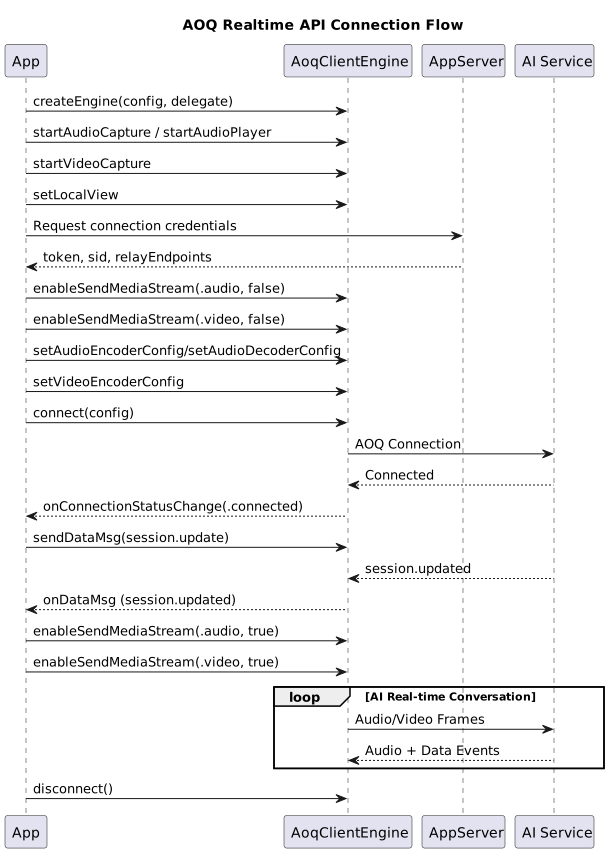
Create engine and set callbacks
Call the createEngine API to create an AoqClientEngine instance.
let config = AoqCreateConfig()
config.workDir = workDir
engine = AoqClientEngine.createEngine(config, delegate: self)
Implement the AoqEngineDelegate protocol to listen for onConnectionStatusChange, onDataMsg, onError, and other callbacks.
AoqCreateConfig config = new AoqCreateConfig();
config.workDir = appCtx.getFilesDir().getAbsolutePath();
engine = AoqClientEngine.createEngine(appCtx, config, this);
const config: AoqCreateConfig = { workDir: context.filesDir, extras: '' };
engine = AoqClientEngine.createEngine(config, this, context);
Start audio/video capture and playback
Call startAudioCapture and startAudioPlayer to start local audio capture and playback. Call startVideoCapture to start the camera, and use setLocalView to bind the SDK's render target to your preview control.
// Audio capture
let capCfg = AoqAudioCaptureConfig()
capCfg.channel = 1; capCfg.isExternal = false
engine.startAudioCapture(capCfg)

// Audio playback
let playCfg = AoqAudioPlaybackConfig()
playCfg.channel = 1; playCfg.isExternal = false
engine.startAudioPlayer(playCfg)

// Video capture
let vidCfg = AoqVideoCaptureConfig()
vidCfg.width = 720; vidCfg.height = 1280; vidCfg.fps = 15
engine.startVideoCapture(vidCfg)

// Set render view for local video preview
let canvas = AoqVideoCanvas()
canvas.view = localPreview
canvas.renderMode = .crop
engine.setLocalView(.video, canvas: canvas)
// Audio capture
AoqAudioCaptureConfig capCfg = new AoqAudioCaptureConfig();
capCfg.channel = 1; capCfg.isExternal = false;
engine.startAudioCapture(capCfg);

// Audio playback
AoqAudioPlaybackConfig playCfg = new AoqAudioPlaybackConfig();
playCfg.channel = 1; playCfg.isExternal = false;
engine.startAudioPlayer(playCfg);

// Video capture
AoqVideoCaptureConfig vidCfg = new AoqVideoCaptureConfig();
vidCfg.width = 720; vidCfg.height = 1280; vidCfg.fps = 15;
engine.startVideoCapture(vidCfg);

// Set render view for local video preview
AoqVideoCanvas canvas = new AoqVideoCanvas();
canvas.view = localPreview;
canvas.renderMode = AoqRenderMode.AoqRenderModeCrop;
engine.setLocalView(AoqTrackType.AoqTrackTypeVideo, canvas);
// Audio capture
const capCfg: AoqAudioCaptureConfig = { channel: 1, isExternal: false };
engine.startAudioCapture(capCfg);

// Audio playback
const playCfg: AoqAudioPlaybackConfig = { channel: 1, isExternal: false };
engine.startAudioPlayer(playCfg);

// Video capture
const vidCfg: AoqVideoCaptureConfig = { width: 720, height: 1280, fps: 15, isExternal: false };
engine.startVideoCapture(vidCfg);

// Set render view for local video preview
const canvas: AoqVideoCanvas = { view: localCtrl, renderMode: AoqRenderMode.AoqRenderModeCrop };
engine.setLocalView(AoqTrackType.AoqTrackTypeVideo, canvas);
Get connection credentials
Have your AppServer proxy the request to Alibaba Cloud Model Studio. See Token authentication.
Configure codecs and establish connection
Set codec parameters and call connect.
Note: qwen3.8-omni-flash-realtime requires the client to start sending media data only after receiving session.updated from the server. To avoid accidentally sending media during the window between a successful connect and the arrival of session.updated, call enableSendMediaStream(trackType, false) for each upstream track before calling connect. For WebSocket event details, see Client events.
// Audio codec configuration
let encCfg = AoqAudioCodecConfig()
encCfg.codecType = .audioOpus; encCfg.sampleRate = 16000; encCfg.channel = 1
engine.setAudioEncoderConfig(encCfg)
engine.setAudioDecoderConfig(encCfg)

// Disable media sending before connect; enable after receiving session.updated
engine.enableSendMediaStream(.audio, enable: false)
engine.enableSendMediaStream(.video, enable: false)

// Establish connection
let conn = AoqConnectConfig()
conn.token = token; conn.sid = sid; conn.certFingerprint = cert
conn.relayEndpoints = endpoints; conn.workspaceIdHash = workspaceIdHash

let aTrack = AoqTrackParam(); aTrack.trackType = .audio
let vTrack = AoqTrackParam(); vTrack.trackType = .video
let dTrack = AoqTrackParam(); dTrack.trackType = .data
conn.publishTracks   = [aTrack, vTrack, dTrack]
conn.subscribeTracks = [aTrack, dTrack]
engine.connect(conn)
// Audio codec configuration
AoqAudioCodecConfig encCfg = new AoqAudioCodecConfig();
encCfg.codecType = AoqEncoderType.AoqEncoderTypeAudioOpus;
encCfg.sampleRate = 16000; encCfg.channel = 1;
engine.setAudioEncoderConfig(encCfg);
engine.setAudioDecoderConfig(encCfg);

// Disable media sending before connect; enable after receiving session.updated
engine.enableSendMediaStream(AoqTrackType.AoqTrackTypeAudio, false);
engine.enableSendMediaStream(AoqTrackType.AoqTrackTypeVideo, false);

// Establish connection
AoqConnectConfig conn = new AoqConnectConfig();
conn.token = token; conn.sid = sid; conn.certFingerprint = cert;
conn.relayEndpoints.addAll(endpoints); conn.workspaceIdHash = workspaceIdHash;

AoqTrackParam aTrack = new AoqTrackParam(); aTrack.trackType = AoqTrackType.AoqTrackTypeAudio;
AoqTrackParam vTrack = new AoqTrackParam(); vTrack.trackType = AoqTrackType.AoqTrackTypeVideo;
AoqTrackParam dTrack = new AoqTrackParam(); dTrack.trackType = AoqTrackType.AoqTrackTypeData;
conn.publishTracks.add(aTrack);
conn.publishTracks.add(vTrack);
conn.publishTracks.add(dTrack);
conn.subscribeTracks.add(aTrack);
conn.subscribeTracks.add(dTrack);
engine.connect(conn);
// Audio codec configuration
const encCfg: AoqAudioCodecConfig = {
  codecType: AoqEncoderType.AoqEncoderTypeAudioOpus,
  sampleRate: 16000, channel: 1
};
engine.setAudioEncoderConfig(encCfg);
engine.setAudioDecoderConfig(encCfg);

// Disable media sending before connect; enable after receiving session.updated
engine.enableSendMediaStream(AoqTrackType.AoqTrackTypeAudio, false);
engine.enableSendMediaStream(AoqTrackType.AoqTrackTypeVideo, false);

// Establish connection
const conn: AoqConnectConfig = {
  token, sid, certFingerprint: cert,
  relayEndpoints: endpoints,
  workspaceIdHash,
  publishTracks: [
    { trackType: AoqTrackType.AoqTrackTypeAudio },
    { trackType: AoqTrackType.AoqTrackTypeVideo },
    { trackType: AoqTrackType.AoqTrackTypeData }
  ],
  subscribeTracks: [
    { trackType: AoqTrackType.AoqTrackTypeAudio },
    { trackType: AoqTrackType.AoqTrackTypeData }
  ]
};
engine.connect(conn);
Important: The AOQ SDK starts sending media data by default after connecting. This example demonstrates how to disable media sending when connecting to a model.
Configure AI session
In the onConnectionStatusChange(Connected) callback, send a session.update message via sendDataMsg. This message contains session parameters such as modalities, voice, instructions, and turn_detection, completing the session handshake. For WebSocket event details, see Client events.
func onConnectionStatusChange(_ status: AoqConnectionStatus) {
    if status == .connected { sendSessionUpdate() }
}

private func sendSessionUpdate() {
    let json = """
    {
      // Event ID, generated by the client
      "event_id": "event_ToPZqeobitzUJnt3QqtWg",
      // Event type, always session.update
      "type": "session.update",
      // Session configuration
      "session": {
          // Output modalities: ["text"] (text only) or ["text","audio"] (text and audio)
          "modalities": [
              "text",
              "audio"
          ],
          // Output audio voice
          "voice": "Tina",
          // Input audio format; currently only "pcm" is supported. Input audio is 16 kHz PCM.
          "input_audio_format": "pcm",
          // Output audio format; currently only "pcm" is supported. Output audio is 24 kHz PCM.
          "output_audio_format": "pcm",
          // System message for setting the model's objective or role.
          "instructions": "You are an AI customer service agent for a five-star hotel. Accurately and helpfully answer customer inquiries about room types, facilities, pricing, and reservation policies. Always respond professionally and helpfully. Do not provide unverified information or information outside the scope of hotel services.",
          // Whether to enable voice activity detection. If enabled, pass a config object and the server will automatically detect voice start and end.
          // Set to null to let the client control when to trigger a model response.
          "turn_detection": {
              // VAD type: server_vad or semantic_vad. Recommended: semantic_vad.
              "type": "semantic_vad",
              // VAD detection threshold. Increase in noisy environments; decrease in quiet ones.
              "threshold": 0.5,
              // Duration of silence after which a model response is triggered
              "silence_duration_ms": 800
          }
      }
    }
    """
    let msg = AoqDataMsg()
    msg.data = json.data(using: .utf8)!
    engine.send(msg)
}
@Override
public void onConnectionStatusChange(AoqConnectionStatus status) {
    if (status == AoqConnectionStatus.AoqConnectionStatusConnected) {
        sendSessionUpdate();
    }
}

private void sendSessionUpdate() {
    String sessionUpdateJson = /* Same session.update JSON as in the Swift example above */;
    AoqDataMsg msg = new AoqDataMsg();
    msg.data = sessionUpdateJson.getBytes(StandardCharsets.UTF_8);
    engine.sendDataMsg(msg);
}
onConnectionStatusChange(status: AoqConnectionStatus): void {
  if (status === AoqConnectionStatus.AoqConnectionStatusConnected) {
    this.sendSessionUpdate();
  }
}

private sendSessionUpdate(): void {
  const sessionUpdateJson = /* Same session.update JSON as in the Swift example above */;
  const msg: AoqDataMsg = { data: new TextEncoder().encode(sessionUpdateJson).buffer };
  this.engine.sendDataMsg(msg);
}
Enable media sending after receiving session.updated
In the onDataMsg callback, parse incoming messages. When session.updated is received from the model, call enableSendMediaStream(trackType, true) for each track type that was disabled earlier. For WebSocket event details, see Server events.
func onDataMsg(_ msg: AoqDataMsg) {
    guard let obj = try? JSONSerialization.jsonObject(with: msg.data) as? [String: Any],
          let type = obj["type"] as? String else { return }
    if type == "session.updated" {
        engine.enableSendMediaStream(.audio, enable: true)
        engine.enableSendMediaStream(.video, enable: true)
    }
}
@Override
public void onDataMsg(AoqDataMsg msg) {
    if (msg == null || msg.data == null) return;
    try {
        JSONObject obj = new JSONObject(new String(msg.data, StandardCharsets.UTF_8));
        if ("session.updated".equals(obj.optString("type"))) {
            engine.enableSendMediaStream(AoqTrackType.AoqTrackTypeAudio, true);
            engine.enableSendMediaStream(AoqTrackType.AoqTrackTypeVideo, true);
        }
    } catch (JSONException ignored) {}
}
onDataMsg(msg: AoqDataMsg): void {
  if (!msg?.data) return;
  try {
    const text = new TextDecoder('utf-8').decode(new Uint8Array(msg.data));
    const obj = JSON.parse(text) as { type?: string };
    if (obj.type === 'session.updated') {
      this.engine.enableSendMediaStream(AoqTrackType.AoqTrackTypeAudio, true);
      this.engine.enableSendMediaStream(AoqTrackType.AoqTrackTypeVideo, true);
    }
  } catch (_) { /* Not JSON, ignore */ }
}
-
Start sending media streams only after receiving
session.updated. The AI may not be ready to receive data before this event. -
The audio and video tracks added during connection (AOQ media channels) automatically deliver data to the server.
- Audio: transmitted directly through the audio track — no need to send
input_audio_buffer.appendevents. - Video: frames are sent through the video track — no need to send
input_image_buffer.appendevents.
- Audio: transmitted directly through the audio track — no need to send
Disconnect and destroy engine
engine.disconnect()
AoqClientEngine.destroy()
Common scenarios
Barge-in
- The SDK is deeply integrated with Alibaba Cloud Model Studio. Barge-in messages from the model interrupt the previous turn when a new turn begins.
- The SDK provides the
interruptAudioPlayerinterface for local playback interruption. Call this API when the user wants to stop playback.
// iOS
engine.interruptAudioPlayer(.audio, fadeMs: 100)
Mute / unmute
After muting, the SDK continues to capture audio but sends only silent frames. The session is not interrupted.
engine.muteAudioCapture(true);   // Mute microphone (capture continues, but only silent frames are sent)
engine.muteAudioCapture(false);  // Unmute
Switch between front and rear cameras
// Pass the desired camera direction enum
engine.switchCamera(AoqCameraDirection.AoqCameraDirectionFront);
engine.switchCamera(AoqCameraDirection.AoqCameraDirectionBack);
Call subtitles and ASR results
The server pushes ASR results and AI text responses through downstream data messages. In your app, route them by the type field in the onDataMsg callback. For WebSocket event details, see Server events.
Important notes
-
Singleton semantics:
createEngineis a singleton — repeated calls return the same instance. The engine can only be recreated afterdestroyis called. For multi-page use, manage the engine lifecycle at the Application or Ability level. -
Local preview view types:
- Android:
SurfaceVieworTextureView. Other types are not supported. - iOS: Any
UIViewsubclass. - HarmonyOS: See the SDK documentation.
- Android:
-
Audio route changes: Events such as headphone insertion/removal or Bluetooth connection trigger
onAudioDeviceRouteChanged. No handling is usually required in your app. If your UI includes a speaker/earpiece toggle, sync the state based on this callback. -
Background audio continuation: For audio to continue when the call moves to the background,
Info.plistmust haveUIBackgroundModes = audioenabled andAVAudioSessionmust be correctly activated in the foreground. The SDK handles most cases; usesetAudioSessionRestriction:for fine-grained control.
iOS demo source code
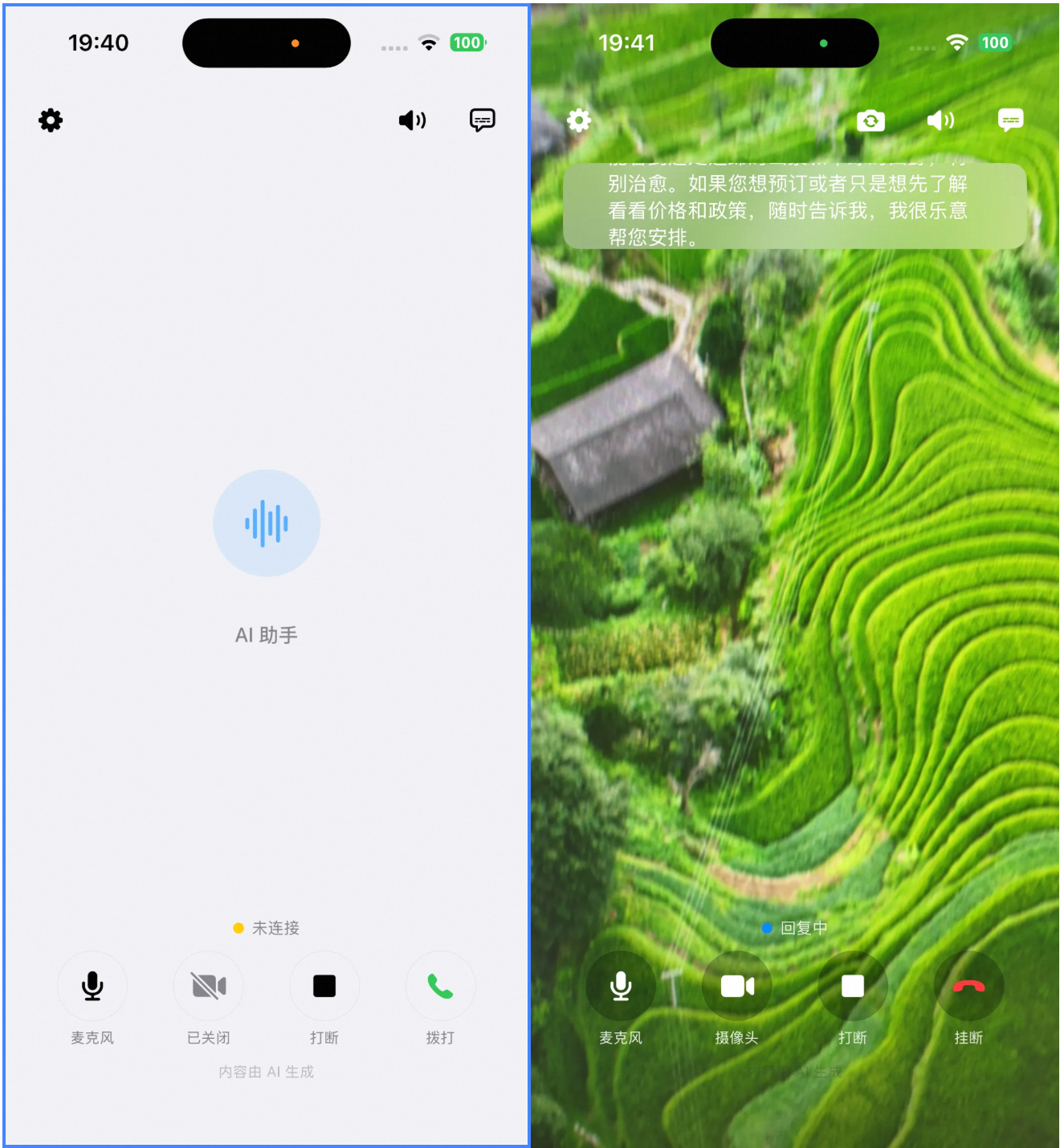
To learn how to implement AOQ on iOS, download the sample source code: aoqdemo.zip.
Related documents
- Detailed AOQ Client SDK API: SDK overview
- qwen3.8-omni-flash-realtime model client events: Client events
- qwen3.8-omni-flash-realtime model server events: Server events