PyODPS is the Python SDK for MaxCompute. It provides a Python interface for writing MaxCompute jobs, querying tables and views, and managing resources. PyODPS supports file uploads and downloads, table creation, SQL queries, MapReduce job submission, and user-defined functions (UDFs).
Features
Supported tools
PyODPS runs in local environments, DataWorks, and PAI Notebooks.
Avoid downloading full data to your local machine for PyODPS tasks, which can cause out-of-memory (OOM) errors. Submit tasks to MaxCompute for distributed execution. Important: Do not download full data to your local machine to run PyODPS.
-
Local environment: Install and use PyODPS locally. Use PyODPS in a local environment.
-
DataWorks: PyODPS is pre-installed on DataWorks PyODPS nodes for developing and scheduling tasks. Use PyODPS with DataWorks.
-
PAI Notebooks: You can install and run PyODPS in the PAI Python environment. PyODPS is also pre-installed in PAI built-in images, including the PAI-Designer custom Python component. Usage follows the standard method. Basic operations and DataFrame (Not recommended).
Important: Do not download full data to your local machine to run PyODPS
PyODPS runs on various clients, including PCs, DataWorks PyODPS nodes, and PAI Notebook environments.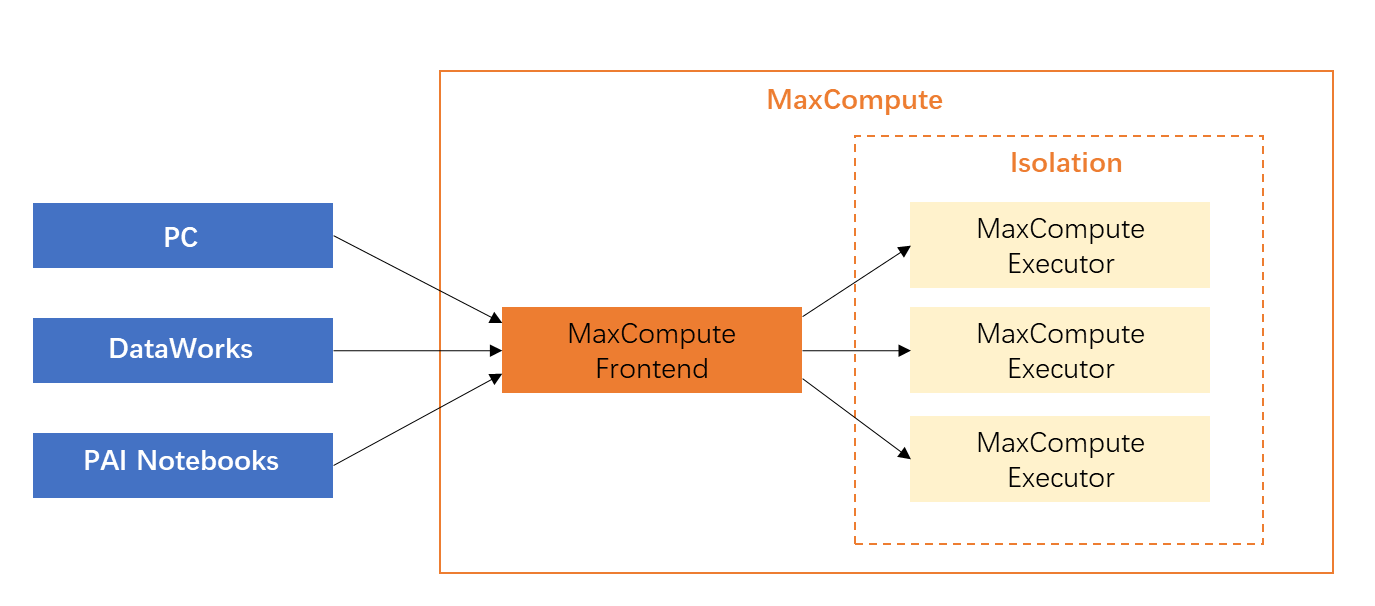 PyODPS provides operations such as tunnel download, `execute`, and `to_pandas` that pull data to your local machine. New users often pull data locally, process it, and upload it back — this approach is inefficient because it bypasses MaxCompute's distributed computing capabilities.
|
Data processing method |
Description |
Example scenario |
|
Process locally (not recommended, OOM risk) |
A DataWorks PyODPS node is a resource-constrained client container with a built-in PyODPS package. It does not use MaxCompute computing resources and has strict memory limits. |
The |
|
Distributed execution on MaxCompute (recommended) |
Use the PyODPS distributed DataFrame to submit computationally intensive tasks to MaxCompute instead of processing them on a local client node. Note
To convert an SQL result to a DataFrame, save the result to a MaxCompute table with
|
Use These operations translate to SQL for distributed computing on MaxCompute, consuming minimal local memory with significant performance gains over single-machine processing. |
The following tokenization example compares both methods.
-
Example scenario
A user analyzes daily log strings from a single-column string table. The goal is to tokenize Chinese sentences with the jieba library, find keywords, and store results in a new table.
-
Inefficient processing code demo
import jieba
t = o.get_table('word_split')
out = []
with t.open_reader() as reader:
    for r in reader:
        words = list(jieba.cut(r[0]))
        #
        # Processing logic to generate processed_data
        #
        out.append(processed_data)
out_t = o.get_table('words')
with out_t.open_writer() as writer:
    writer.write(out)
This single-machine approach reads, processes, and writes data row by row. The download-upload cycle is slow and memory-intensive. On DataWorks nodes, jobs often hit OOM errors due to limited default memory.
-
Efficient processing code demo
from odps.df import output
out_table = o.get_table('words')
df = o.get_table('word_split').to_df()

# Assume the returned fields and types are as follows
out_names = ["word", "count"]
out_types = ["string", "int"]

@output(out_names, out_types)
def handle(row):
    import jieba
    words = list(jieba.cut(row[0]))
    #
    # Processing logic to generate processed_data
    #
    yield processed_data
df.apply(handle, axis=1).persist(out_table.name)
Use `apply` to implement distributed execution:
-
The `handle` function is serialized and executed server-side as a UDF. The core row-by-row logic stays the same, but MaxCompute executes it in parallel across multiple machines.
-
The `persist` interface writes output directly to a MaxCompute table, keeping all data within the cluster and saving local bandwidth and memory.
-
MaxCompute supports third-party packages like
jiebain UDFs, so you can leverage distributed computing with minimal code changes.
-
Limits
-
Sandbox restrictions may prevent programs that pass local Pandas-backend tests from running on MaxCompute.