MaxCompute supports OSS external tables that map to Object Storage Service (OSS) directories. Use OSS external tables to read unstructured data from or write data to OSS.
Usage notes
-
OSS external tables do not support the cluster property.
-
The size of a single file cannot exceed 2 GB. You must split files that are larger than 2 GB.
-
MaxCompute and OSS must be in the same region.
Access methods
The following platforms support creating and using OSS external tables.
|
Method |
Platform |
|
MaxCompute SQL |
|
|
Visualization |
Prerequisites
-
You have created a MaxCompute project.
-
Prepare an OSS bucket and directory. Create a bucket and Manage directories.
MaxCompute can automatically create OSS directories. If an SQL statement includes external tables and UDFs, a single SQL statement can read from or write to the external table and run the UDF. Manual directory creation is also supported.
Because MaxCompute is deployed only in some regions, cross-region network connectivity can be an issue. Keep your bucket in the same region as your MaxCompute project.
-
Authorization
-
Obtain permissions to access OSS. An Alibaba Cloud account, a RAM user, or a RAM role can access OSS external tables. STS authorization for OSS.
-
Obtain the CreateTable permission in your MaxCompute project. MaxCompute permissions.
-
Create an OSS external table
-
Partitioned and non-partitioned tables:
-
Choose based on how your data files are stored in OSS. Use a partitioned table if files are in partitioned paths; otherwise, use a non-partitioned table.
-
OSS external tables support partition operations.
-
-
Network domain name: Use the classic network domain name for OSS. MaxCompute does not guarantee network connectivity for public network domain names.
-
An OSS external table only records the mapping to an OSS directory. Deleting an OSS external table does not delete the data files in the mapped OSS directory.
-
If an OSS data file is an archived object, you must first restore the object.
The CREATE EXTERNAL TABLE syntax varies by data file format. Match the syntax and parameters to your data format. Incorrect settings cause read and write failures.
Syntax
Create an external table using the built-in text data parser
|
Syntax |
Data file format |
Example |
|
Supported data file formats for reading from or writing to OSS:
|
Create an external table using a built-in open source data parser
|
Syntax |
Data file format |
Example |
|
Supported data file formats for reading from or writing to OSS:
|
Create an external table using a custom parser
|
Syntax |
Data file format |
Example |
|
Supported data file formats for reading from or writing to OSS: Data files in formats other than those listed above. |
Parameters
The following parameters are common across all external table formats. For format-specific parameters, see the documentation for each format.
-
Basic syntax parameters
Parameter
Required
Description
mc_oss_extable_name
Yes
The name of the OSS external table to create.
Table names are case-insensitive and cannot be force-converted to a specific case.
col_name
Yes
The name of a column in the OSS external table.
The schema of the external table must match the schema of the OSS data file. Otherwise, data cannot be read.
data_type
Yes
The data type of a column in the OSS external table.
Each column's data type must match the corresponding column in the OSS data file. Otherwise, data cannot be read.
table_comment
No
The comment for the table. The comment must be a valid string of no more than 1,024 bytes. Otherwise, an error is reported.
partitioned by (col_name data_type, ...)
No
If the data files in OSS are stored in a partitioned path, include this parameter to create a partitioned table.
-
col_name: The name of the partition key column.
-
data_type: The data type of the partition key column.
'<(tb)property_name>'='<(tb)property_value>'
Yes
Extended properties of the external table. See the format-specific documentation for details.
oss_location
Yes
The OSS path where the data files are located. By default, all data files in this path are read.
The format is
oss://<oss_endpoint>/<Bucket name>/<OSS directory name>/.-
oss_endpoint:
-
The OSS domain name. You must use the classic network endpoint provided by OSS, which contains
-internal.Example:
oss://oss-cn-beijing-internal.aliyuncs.com/xxx.OSS classic network domain names are listed in Regions and endpoints.
Keep the OSS region where the data files are stored the same as the region of your MaxCompute project. If they are in different regions, network connectivity issues may occur.
-
If you do not specify an endpoint, the system uses the endpoint of the region where the current project is located.
This method is not recommended because cross-region file storage may cause network connectivity issues.
-
-
Bucket name: The name of the OSS bucket. The bucket name must follow the
oss_endpoint.Example:
oss://oss-cn-beijing-internal.aliyuncs.com/your_bucket/path/.View bucket names in List buckets.
-
Directory name: The name of the OSS directory. Do not specify a file name after the directory.
Example:
oss://oss-cn-beijing-internal.aliyuncs.com/oss-mc-test/Demo1/.Incorrect examples:
-- HTTP connections are not supported. http://oss-cn-shanghai-internal.aliyuncs.com/oss-mc-test/Demo1/ -- HTTPS connections are not supported. https://oss-cn-shanghai-internal.aliyuncs.com/oss-mc-test/Demo1/ -- Incorrect connection address. oss://oss-cn-shanghai-internal.aliyuncs.com/Demo1 -- Do not specify a file name. oss://oss-cn-shanghai-internal.aliyuncs.com/oss-mc-test/Demo1/vehicle.csv -
Permission specification (RamRole):
-
Explicitly specify (Recommended): Create a custom role, attach an access policy, and use its ARN. STS authorization.
-
Use Default (Not recommended): Use the ARN of the
aliyunodpsdefaultrolerole.
-
-
-
WITH serdeproperties attributes
property_name
Scenario
property_value
Default value
odps.properties.rolearn
Add this property when using STS authorization.
Specify the ARN of the RAM role that has permissions to access OSS.
Obtain the ARN from the role details in the RAM console. Example:
acs:ram::xxxxxx:role/aliyunodpsdefaultrole.-
If the owners of MaxCompute and OSS are the same account:
-
If you do not specify
odps.properties.rolearnin the table creation statement, the ARN of thealiyunodpsdefaultrolerole is used by default. You must first create thealiyunodpsdefaultrolerole using STS authorization. -
To use a custom role ARN, first create the custom role. STS authorization for OSS (custom authorization).
-
-
If the owners of MaxCompute and OSS are different accounts, you must specify the ARN of a custom role. For more information, see STS authorization for OSS (custom authorization).
-
Read data from OSS
Notes
-
After you create an OSS external table, you can read data from OSS through the external table. For supported data file types and creation syntax, see Syntax.
-
If an SQL statement involves complex data types, prepend
set odps.sql.type.system.odps2=true;and submit them together. Data type versions. -
For OSS external tables that map to open source data, set
set odps.sql.hive.compatible=true;at the session level before reading data from OSS. Otherwise, an error is reported. -
OSS has bandwidth limits. If read/write traffic exceeds the instance bandwidth limit in a short period, external table performance degrades. Limits and performance metrics.
Syntax
<select_statement> FROM <from_statement>;-
select_statement: The
SELECTclause, which queries the data to be inserted into the target table from the source table. -
from_statement: The
FROMclause, which specifies the data source, such as the name of the external table.
Non-partitioned data
Non-partitioned data
After you create a non-partitioned OSS external table, you can read data from OSS using one of the following methods:
-
Method 1 (Recommended): Import the open source format data from OSS into a MaxCompute internal table, and then read the data.
Best for repeated calculations or high-performance scenarios. Create an internal table with the same schema as the external table, import the data, then run complex queries. Internal storage benefits from MaxCompute optimization. Sample command:
CREATE TABLE <table_internal> LIKE <mc_oss_extable_name>; INSERT OVERWRITE TABLE <table_internal> SELECT * FROM <mc_oss_extable_name>; -
Method 2: Read data directly from OSS, similar to operations on MaxCompute internal tables.
Best for low-performance scenarios. Each query reads data directly from OSS rather than from internal storage.
Partitioned data
Partitioned data
MaxCompute performs a full scan of all data in the OSS directory, including subdirectories. For large datasets, this causes unnecessary I/O and increases processing time. Two solutions are available.
-
Method 1 (Recommended): Store data on OSS using a standard partitioned path or a custom partitioned path.
Specify the partition and oss_location in the table creation statement. Standard partitioned paths are recommended.
-
Method 2: Plan multiple data storage paths.
Create multiple external tables, each pointing to a subset of OSS data. This method is cumbersome and not recommended.
Standard partitioned path format
oss://<oss_endpoint>/<Bucket name>/<directory name>/<partitionKey1=value1>/<partitionKey2=value2>/...Example: A company stores daily log files in CSV format on OSS and processes the data daily using MaxCompute. The standard partitioned path for storing OSS data should be set as follows.
oss://oss-odps-test/log_data/year=2016/month=06/day=01/logfile
oss://oss-odps-test/log_data/year=2016/month=06/day=02/logfile
oss://oss-odps-test/log_data/year=2016/month=07/day=10/logfile
oss://oss-odps-test/log_data/year=2016/month=08/day=08/logfile
...
Custom partitioned path format
A custom partitioned path format contains only partition column values, not partition column names. Example:
oss://oss-odps-test/log_data_customized/2016/06/01/logfile
oss://oss-odps-test/log_data_customized/2016/06/02/logfile
oss://oss-odps-test/log_data_customized/2016/07/10/logfile
oss://oss-odps-test/log_data_customized/2016/08/08/logfile
...
If OSS data uses a non-standard partitioned path, you can bind subdirectories to partitions manually.
After creating the external table, use alter table ... add partition ... location ... to bind subdirectories to partitions. Example:
ALTER TABLE log_table_external ADD PARTITION (year = '2016', month = '06', day = '01')
location 'oss://oss-cn-hangzhou-internal.aliyuncs.com/bucket_name/oss-odps-test/log_data_customized/2016/06/01/';
ALTER TABLE log_table_external ADD PARTITION (year = '2016', month = '06', day = '02')
location 'oss://oss-cn-hangzhou-internal.aliyuncs.com/bucket_name/oss-odps-test/log_data_customized/2016/06/02/';
ALTER TABLE log_table_external ADD PARTITION (year = '2016', month = '07', day = '10')
location 'oss://oss-cn-hangzhou-internal.aliyuncs.com/bucket_name/oss-odps-test/log_data_customized/2016/07/10/';
ALTER TABLE log_table_external ADD PARTITION (year = '2016', month = '08', day = '08')
location 'oss://oss-cn-hangzhou-internal.aliyuncs.com/bucket_name/oss-odps-test/log_data_customized/2016/08/08/';
Query optimization
Dynamic statistics collection
Dynamic statistics collection
External data lacks pre-existing statistics, causing the query optimizer to use a conservative strategy with low efficiency. Dynamic statistics collection lets the optimizer collect table statistics during query execution to identify small tables, enabling Hash Join, optimized join order, fewer shuffles, and shorter execution pipelines.
The following parameters do not apply to Paimon, Hudi, or Delta Lake external tables.
SET odps.meta.exttable.stats.onlinecollect=true;
SELECT * FROM <tablename>;
External table split optimization
External table split optimization
Adjust the split size to control how much data each concurrent task processes.
-
If the data volume is large and split size is too small, excessive splits cause high parallelism and the instance spends most time waiting for resources.
-
If the data volume is small and split size is too large, too few splits cause insufficient concurrency and idle resources.
-- You can use either of the following parameters.

-- Unit: MiB. Default value: 256 MiB. Applies to internal or external tables.
SET odps.stage.mapper.split.size=<value>;
SELECT * FROM <tablename>;

-- Unit: MiB. Default value: 256 MiB. Applies only to external tables.
SET odps.sql.unstructured.data.split.size=<value>;
SELECT * FROM <tablename>;
DOP control
Control parallelism with DOP
You can set the odps.sql.split.dop parameter to adjust the degree of parallelism when you read data. This parameter has a higher priority than odps.sql.mapper.split.size.
-
If the dop value is greater than the number of files in the OSS directory, the actual concurrency may differ significantly from the configured dop value.
-
If the dop value is too small, it will not take effect. Use the
odps.input.file.num.limitparameter to change the maximum number of files that a single instance can process.
Syntax
-- Syntax for the two-tier model: set odps.sql.split.dop={"project.table": xxx};
-- Syntax for the three-tier model: set odps.sql.split.dop={"project.schema.table": xxx};

SET odps.sql.split.dop={
  "project.schema.table1": xxx,
  "project.schema.table2": yyy
};

SET odps.sql.common.table.planner.ext.hive.bridge=FALSE;

SELECT * FROM <your_table>;
Usage example
Issue and solution for DOP distortion caused by too many small files
MaxCompute limits a single instance to processing a maximum of 240 files. If an OSS external table directory contains 3,449 files, the minimum degree of parallelism will be 3,449 / 240 ≈ 15. If you set the DOP to a value less than 15, the setting is ignored.
To resolve this, set odps.input.file.num.limit to change the maximum number of files that a single instance can process.
SET odps.sql.split.dop = {"lakehouse47_3.tpch_1t_parquet_snappy.lineitem": 2};
SET odps.input.file.num.limit = 5000;
A single instance can process up to 5,000 OSS files. Because the number of files in the lineitem table is well below this limit, the actual degree of parallelism matches the configured DOP value.
Write data to OSS
MaxCompute can write data from internal tables or processed external tables to OSS. For limits, see Scope.
-
Write data to OSS using a built-in text or open source data parser: Built-in text parser, Built-in open-source parser.
-
Write data to OSS using a custom parser: Example: Create an OSS external table using a custom parser.
-
Write data to OSS using the OSS multipart upload feature: Write data to OSS using the OSS multipart upload feature.
Syntax
INSERT {INTO|OVERWRITE} TABLE <table_name> PARTITION (<ptcol_name>[, <ptcol_name> ...])
<select_statement> FROM <from_statement>;|
Parameter |
Required |
Description |
|
table_name |
Yes |
The name of the external table to write to. |
|
select_statement |
Yes |
The |
|
from_statement |
Yes |
The |
To insert data into dynamic partitions, see Insert or overwrite data into dynamic partitions (DYNAMIC PARTITION).
Notes
-
If the
INSERT OVERWRITE ... SELECT ... FROM ...;operation allocates 1,000 mappers on the source table from_tablename, 1,000 TSV or CSV files are generated. -
You can control the number of generated files using configurations provided by MaxCompute.
-
If the outputter is in a mapper: Use
odps.stage.mapper.split.sizeto control the number of concurrent mappers, which adjusts the number of generated files. -
If the outputter is in a reducer or joiner: Use
odps.stage.reducer.numandodps.stage.joiner.numrespectively to adjust the number of generated files.
-
-
Risk of inconsistent writes: When you use an INSERT OVERWRITE statement on an OSS external table or use the UNLOAD command to export files to OSS, the data in the subdirectory of the specified OSS location or the location that corresponds to the partition is deleted before new data is written. If the location directory contains important data written directly to OSS by other external engines, that data is also deleted before the new data is written. Therefore, you must ensure that existing files in the location directory of the external table are backed up or that the UNLOAD directory is empty. For other risks of inconsistent writes, see Scope.
Write data to OSS using the OSS multipart upload feature
To write data to OSS in an open source format, create an external table with an open source data parser and enable the OSS multipart upload feature.
To enable the OSS multipart upload feature, set the following:
|
Scenario |
Command |
|
Set at the project level |
Takes effect for the entire project. |
|
Set at the session level |
Takes effect only for the current task. |
The default value of odps.sql.unstructured.oss.commit.mode is false. The two modes work as follows:
|
Value |
Principle |
|
false |
Data is stored in a .odps folder under the LOCATION directory, with a .meta file for data consistency. The .odps content can only be correctly processed by MaxCompute. Other engines may fail to parse it. |
|
true |
MaxCompute uses the multipart upload feature to be compatible with other data processing engines. It uses a |
Manage exported files
Parameters
Add a prefix, suffix, or extension to output data files using the following parameters.
|
property_name |
Scenario |
Description |
property_value |
Default value |
|
odps.external.data.output.prefix (Compatible with odps.external.data.prefix) |
Add this property when you need to add a custom prefix to the output files. |
|
A combination of allowed characters, such as 'mc_' |
None |
|
odps.external.data.enable.extension |
Add this property when you need to display the extension of the output files. |
True indicates that the extension of the output file is displayed. False indicates that it is not displayed. |
|
False |
|
odps.external.data.output.suffix |
Add this property when you need to add a custom suffix to the output files. |
Contains only digits, letters, and underscores (a-z, A-Z, 0-9, _). |
A combination of allowed characters, such as '_hangzhou' |
None |
|
odps.external.data.output.explicit.extension |
Add this property when you need to add a custom extension to the output files. |
|
A combination of allowed characters, such as "jsonl" |
None |
Examples
Set the custom prefix of the output OSS file to
test06_. The DDL statement is as follows:CREATE EXTERNAL TABLE <mc_oss_extable_name> ( vehicleId INT, recordId INT, patientId INT, calls INT, locationLatitute DOUBLE, locationLongitude DOUBLE, recordTime STRING, direction STRING ) ROW FORMAT SERDE 'org.apache.hive.hcatalog.data.JsonSerDe' WITH serdeproperties ( 'odps.properties.rolearn'='acs:ram::<uid>:role/aliyunodpsdefaultrole' ) STORED AS textfile LOCATION 'oss://oss-cn-beijing-internal.aliyuncs.com/***/' TBLPROPERTIES ( -- Set a custom prefix. 'odps.external.data.output.prefix'='test06_') ; -- Write data to the foreign table. INSERT INTO <mc_oss_extable_name> VALUES (1,32,76,1,63.32106,-92.08174,'9/14/2014 0:10','NW');The following figure shows the generated file.

Set the custom suffix of the output OSS file to
_beijing. The DDL statement is as follows:CREATE EXTERNAL TABLE <mc_oss_extable_name> ( vehicleId INT, recordId INT, patientId INT, calls INT, locationLatitute DOUBLE, locationLongitude DOUBLE, recordTime STRING, direction STRING ) ROW FORMAT SERDE 'org.apache.hive.hcatalog.data.JsonSerDe' WITH serdeproperties ( 'odps.properties.rolearn'='acs:ram::<uid>:role/aliyunodpsdefaultrole' ) STORED AS textfile LOCATION 'oss://oss-cn-beijing-internal.aliyuncs.com/***/' TBLPROPERTIES ( -- Set a custom suffix. 'odps.external.data.output.suffix'='_beijing') ; -- Write data to the foreign table. INSERT INTO <mc_oss_extable_name> VALUES (1,32,76,1,63.32106,-92.08174,'9/14/2014 0:10','NW');The following figure shows the generated file.

Automatically generate an extension for the output OSS file. The DDL statement is as follows:
CREATE EXTERNAL TABLE <mc_oss_extable_name>
(
  vehicleId INT,
  recordId INT,
  patientId INT,
  calls INT,
  locationLatitute DOUBLE,
  locationLongitude DOUBLE,
  recordTime STRING,
  direction STRING
)
ROW FORMAT SERDE 'org.apache.hive.hcatalog.data.JsonSerDe'
WITH serdeproperties (
  'odps.properties.rolearn'='acs:ram::<uid>:role/aliyunodpsdefaultrole'
)
STORED AS textfile
LOCATION 'oss://oss-cn-beijing-internal.aliyuncs.com/***/'
TBLPROPERTIES (
-- Automatically generate an extension.
    'odps.external.data.enable.extension'='true')
;

-- Write data to the foreign table.
INSERT INTO <mc_oss_extable_name> VALUES (1,32,76,1,63.32106,-92.08174,'9/14/2014 0:10','NW');
The following figure shows the generated file.
Set the custom extension of the output OSS file to
jsonl. The DDL statement is as follows:CREATE EXTERNAL TABLE <mc_oss_extable_name> ( vehicleId INT, recordId INT, patientId INT, calls INT, locationLatitute DOUBLE, locationLongitude DOUBLE, recordTime STRING, direction STRING ) ROW FORMAT SERDE 'org.apache.hive.hcatalog.data.JsonSerDe' WITH serdeproperties ( 'odps.properties.rolearn'='acs:ram::<uid>:role/aliyunodpsdefaultrole' ) STORED AS textfile LOCATION 'oss://oss-cn-beijing-internal.aliyuncs.com/***/' TBLPROPERTIES ( -- Set a custom extension. 'odps.external.data.output.explicit.extension'='jsonl') ; -- Write data to the foreign table. INSERT INTO <mc_oss_extable_name> VALUES (1,32,76,1,63.32106,-92.08174,'9/14/2014 0:10','NW');The following figure shows the generated file.

Set the prefix of the output OSS file to
mc_, the suffix to_beijing, and the extension tojsonl. The DDL statement is as follows:CREATE EXTERNAL TABLE <mc_oss_extable_name> ( vehicleId INT, recordId INT, patientId INT, calls INT, locationLatitute DOUBLE, locationLongitude DOUBLE, recordTime STRING, direction STRING ) ROW FORMAT SERDE 'org.apache.hive.hcatalog.data.JsonSerDe' WITH serdeproperties ( 'odps.properties.rolearn'='acs:ram::<uid>:role/aliyunodpsdefaultrole' ) STORED AS textfile LOCATION 'oss://oss-cn-beijing-internal.aliyuncs.com/***/' TBLPROPERTIES ( -- Set a custom prefix. 'odps.external.data.output.prefix'='mc_', -- Set a custom suffix. 'odps.external.data.output.suffix'='_beijing', -- Set a custom extension. 'odps.external.data.output.explicit.extension'='jsonl') ; -- Write data to the foreign table. INSERT INTO <mc_oss_extable_name> VALUES (1,32,76,1,63.32106,-92.08174,'9/14/2014 0:10','NW');The following figure shows the generated file.

Write large files using dynamic partitions
Business scenario
Export calculation results from an ancestor table to OSS as partitions, writing them as large files (e.g., 4 GB). Configure the odps.adaptive.shuffle.desired.partition.size parameter (in MB) with dynamic partitions.
-
Advantage: You can control the desired output file size by configuring the parameter value.
-
Disadvantage: The overall execution time is longer because writing large files reduces the degree of parallelism, which in turn increases the execution time.
Metric descriptions
-- The service.mode must be turned off.
SET odps.service.mode=off;

-- The dynamic partition capability must be enabled.
SET odps.sql.reshuffle.dynamicpt=true;

-- Set the desired data consumption for each reducer. Assume you want each file to be 4 GB.
SET odps.adaptive.shuffle.desired.partition.size=4096;
Example
Write a JSON file of about 4 GB to OSS.
-
Prepare the test data. Use the public dataset table
bigdata_public_dataset.tpcds_1t.web_sales, which is about 30 GB. The data is stored in a compressed format on MaxCompute, so the size increases after export. -
Create a JSON external table.
-- Sample table name: json_ext_web_sales CREATE EXTERNAL TABLE json_ext_web_sales( c_int INT , c_string STRING ) PARTITIONED BY (pt STRING) ROW FORMAT SERDE 'org.apache.hive.hcatalog.data.JsonSerDe' WITH serdeproperties ( 'odps.properties.rolearn'='acs:ram::<uid>:role/aliyunodpsdefaultrole' ) STORED AS textfile LOCATION 'oss://oss-cn-hangzhou-internal.aliyuncs.com/oss-mc-test/demo-test/'; -
Without setting any parameters, write the test table to the JSON external table in a dynamic partition format.
-- The service.mode must be turned off.
set odps.service.mode=off;

-- Enable the Layer 3 syntax switch.
SET odps.namespace.schema=true;

-- Write to the JSON external table in a dynamic partition format.
INSERT OVERWRITE json_ext_web_sales
PARTITION(pt)
SELECT CAST(ws_item_sk AS INT) AS c_int,
       CAST(ws_bill_customer_sk AS string) AS c_string ,
      COALESCE(CONCAT(ws_bill_addr_sk %2, '_', ws_promo_sk %3),'null_pt') AS pt
FROM  bigdata_public_dataset.tpcds_1t.web_sales;
The files stored on OSS are shown in the following figure:
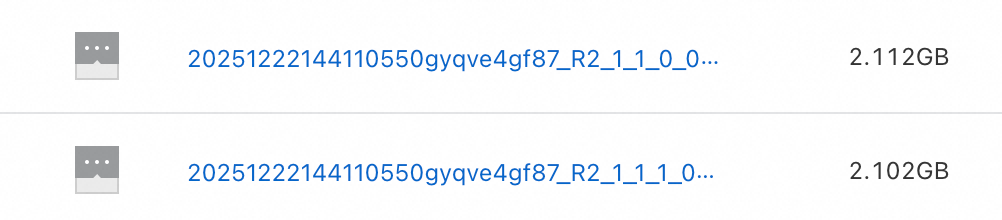
-
Add the parameter
odps.adaptive.shuffle.desired.partition.sizefor large file output and write the test table to the JSON external table in a dynamic partition format.-- The service.mode must be turned off. SET odps.service.mode=off; -- Enable the Layer 3 syntax switch. SET odps.namespace.schema=true; -- The dynamic partition capability must be enabled. SET odps.sql.reshuffle.dynamicpt=true; -- Set the desired data consumption for each reducer. Assume you want each file to be 4 GB. SET odps.adaptive.shuffle.desired.partition.size=4096; -- Write to the JSON external table in a dynamic partition format. INSERT OVERWRITE json_ext_web_sales PARTITION(pt) SELECT CAST(ws_item_sk AS INT) AS c_int, CAST(ws_bill_customer_sk AS string) AS c_string , COALESCE(CONCAT(ws_bill_addr_sk %2, '_', ws_promo_sk %3),'null_pt') AS pt FROM bigdata_public_dataset.tpcds_1t.web_sales;The files stored on OSS are shown in the following figure:

Partition operations on OSS external tables
OSS external tables support partition operations. Partition operations on OSS external tables and Partition operations on internal tables. The following table lists the supported operations.
|
Operation |
Supported |
|
Add partition |
|
|
Modify partition update time |
|
|
Modify partition value |
|
|
Merge partitions |
|
|
List partitions |
|
|
View partition information |
|
|
Drop partition |
|
|
Truncate partition |
|
Import from or export to OSS
-
LOAD command: Imports data from external storage, such as OSS, into a MaxCompute table or partition.
-
UNLOAD command: Exports data from a MaxCompute project to external storage, such as OSS, for use by other compute engines.
Appendix: Prepare sample data
-
Prepare OSS directories
The provided sample data information is as follows:
-
oss_endpoint:
oss-cn-hangzhou-internal.aliyuncs.com, which is China (Hangzhou). -
Bucket name:
oss-mc-test. -
Directory names:
Demo1/,Demo2/,Demo3/, andSampleData/.
-
-
Non-partitioned table data
The file uploaded to the
Demo1/directory is vehicle.csv, which contains the following data. TheDemo1/directory is used to map to a non-partitioned table that is created with the built-in text data parser.1,1,51,1,46.81006,-92.08174,9/14/2014 0:00,S 1,2,13,1,46.81006,-92.08174,9/14/2014 0:00,NE 1,3,48,1,46.81006,-92.08174,9/14/2014 0:00,NE 1,4,30,1,46.81006,-92.08174,9/14/2014 0:00,W 1,5,47,1,46.81006,-92.08174,9/14/2014 0:00,S 1,6,9,1,46.81006,-92.08174,9/15/2014 0:00,S 1,7,53,1,46.81006,-92.08174,9/15/2014 0:00,N 1,8,63,1,46.81006,-92.08174,9/15/2014 0:00,SW 1,9,4,1,46.81006,-92.08174,9/15/2014 0:00,NE 1,10,31,1,46.81006,-92.08174,9/15/2014 0:00,N -
Partitioned table data
The
Demo2/directory contains five subdirectories:direction=N/,direction=NE/,direction=S/,direction=SW/, anddirection=W/. The uploaded files are vehicle1.csv, vehicle2.csv, vehicle3.csv, vehicle4.csv, and vehicle5.csv, respectively. These files contain the following data. TheDemo2/directory is used to map to a partitioned table that is created with the built-in text data parser.--vehicle1.csv 1,7,53,1,46.81006,-92.08174,9/15/2014 0:00 1,10,31,1,46.81006,-92.08174,9/15/2014 0:00 --vehicle2.csv 1,2,13,1,46.81006,-92.08174,9/14/2014 0:00 1,3,48,1,46.81006,-92.08174,9/14/2014 0:00 1,9,4,1,46.81006,-92.08174,9/15/2014 0:00 --vehicle3.csv 1,6,9,1,46.81006,-92.08174,9/15/2014 0:00 1,5,47,1,46.81006,-92.08174,9/14/2014 0:00 1,6,9,1,46.81006,-92.08174,9/15/2014 0:00 --vehicle4.csv 1,8,63,1,46.81006,-92.08174,9/15/2014 0:00 --vehicle5.csv 1,4,30,1,46.81006,-92.08174,9/14/2014 0:00 -
Compressed data
The file uploaded to the
Demo3/directory is vehicle.csv.gz. The file inside the compressed package is vehicle.csv, which has the same content as the file in theDemo1/directory. It is used to map to an OSS external table with compression properties. -
Custom parser data
The file uploaded to the
SampleData/directory is vehicle6.csv, which contains the following data. TheSampleData/directory is used to map to an OSS external table that is created with an open source data parser.1|1|51|1|46.81006|-92.08174|9/14/2014 0:00|S 1|2|13|1|46.81006|-92.08174|9/14/2014 0:00|NE 1|3|48|1|46.81006|-92.08174|9/14/2014 0:00|NE 1|4|30|1|46.81006|-92.08174|9/14/2014 0:00|W 1|5|47|1|46.81006|-92.08174|9/14/2014 0:00|S 1|6|9|1|46.81006|-92.08174|9/14/2014 0:00|S 1|7|53|1|46.81006|-92.08174|9/14/2014 0:00|N 1|8|63|1|46.81006|-92.08174|9/14/2014 0:00|SW 1|9|4|1|46.81006|-92.08174|9/14/2014 0:00|NE 1|10|31|1|46.81006|-92.08174|9/14/2014 0:00|N
OSS external table FAQ
How do I resolve the "Inline data exceeds the maximum allowed size" error when processing OSS data using an external table?
-
Problem
When processing OSS data, the error
Inline data exceeds the maximum allowed sizeis reported. -
Cause
OSS Store has a size limit for each small file. An error is reported if a file exceeds 3 GB.
-
Solution
Adjust the following two properties to control the data size each reducer writes to the external table, keeping files within the 3 GB limit.
set odps.sql.mapper.split.size=256; # Adjusts the size of data read by each mapper, in MB.
set odps.stage.reducer.num=100; # Adjusts the number of workers in the reduce stage.
How do I resolve a memory overflow error that occurs after I upload a UDF to access an OSS external table on MaxCompute, even though the UDF passed local tests?
-
Problem
When accessing an OSS external table on MaxCompute, a UDF that passed local tests returns the following error after being uploaded.
FAILED: ODPS-0123131:User defined function exception - Traceback:
java.lang.OutOfMemoryError: Java heap space
After setting the following parameters, the running time increases, but the error persists.
set odps.stage.mapper.mem = 2048; set odps.stage.mapper.jvm.mem = 4096; -
Cause
There are too many object files in the external table, which causes excessive memory usage, and no partitions are set.
-
Solution
-
Use a smaller amount of data for the query.
-
Partition the object files to reduce memory usage.
-
How do I merge multiple small files into a single file using an OSS external table?
Check the Logview log to see if the last stage in the SQL execution plan is a reducer or a joiner.
-
If it is a reducer, run the statement
set odps.stage.reducer.num=1; -
If it is a joiner, run the statement
set odps.stage.joiner.num=1;
How do I resolve the "Couldn't connect to server" error when reading from an OSS external table?
-
Problem
When reading data from an OSS external table, the error
ODPS-0123131:User defined function exception - common/io/oss/oss_client.cpp(95): OSSRequestException: req_id: , http status code: -998, error code: HttpIoError, message: Couldn't connect to serveris reported. -
Cause
-
Cause 1: When the OSS external table was created, a public endpoint was used for the
oss_endpointin the oss_location address, instead of an internal endpoint. -
Cause 2: When the OSS external table was created, the endpoint of another region was used for the
oss_endpointin the oss_location address.
-
-
Solution
-
For Cause 1:
Verify that the
oss_endpointin oss_location is an internal endpoint. If it is a public endpoint, change it to an internal endpoint. Parameters.For example, if a user in the Indonesia (Jakarta) region used the address
oss://oss-ap-southeast-5.aliyuncs.com/<bucket>/....to create an external table, it should be changed to the corresponding internal addressoss://oss-ap-southeast-5-internal.aliyuncs.com/<bucket>/..... -
For Cause 2:
Verify that the
oss_endpointin oss_location matches the region you want to access. OSS classic network domain names are listed in Regions and endpoints.
-
How do I resolve the "Network is unreachable (connect failed)" error when creating an OSS external table?
-
Problem
When creating an OSS external table, the error
ODPS-0130071:[1,1] Semantic analysis exception - external table checking failure, error message: Cannot connect to the endpoint 'oss-cn-beijing.aliyuncs.com': Connect to bucket.oss-cn-beijing.aliyuncs.com:80 [bucket.oss-cn-beijing.aliyuncs.com] failed: Network is unreachable (connect failed)is reported. -
Cause
When the OSS external table was created, a public endpoint was used for the
oss_endpointin the oss_location address, instead of an internal endpoint. -
Solution
Verify that the
oss_endpointin oss_location is an internal endpoint. If it is a public endpoint, change it to an internal endpoint. Parameters.For example, if a user in the China (Beijing) region used the address
oss://oss-cn-beijing.aliyuncs.com/<bucket>/....to create an external table, it should be changed to the corresponding internal addressoss://oss-cn-beijing-internal.aliyuncs.com/<bucket>/.....
How do I resolve slow SQL job execution on an OSS external table?
-
Slow reading of GZ compressed files in an OSS external table
-
Symptoms
A user created an OSS external table with a data source of a 200 GB GZ compressed file in OSS. The data reading process is slow.
-
Cause
The SQL processing speed is slow because too few mappers are executing the computation in the map stage.
-
Solution
-
For structured data, you can set the following parameter to adjust the amount of data read by a single mapper to speed up SQL execution.
set odps.sql.mapper.split.size=256; # Adjusts the size of table data read by each mapper, in MB. -
For unstructured data, check whether there is only one OSS file in the OSS external table path. If there is only one, only one mapper can be generated because unstructured data in a compressed format cannot be split. This results in slow processing speed. We recommend that you split the large OSS file into smaller files in the corresponding external table path on OSS. This increases the number of mappers that are generated when the external table is read and improves the reading speed.
-
-
-
Slow search of MaxCompute external table data using an SDK
-
Symptoms
Searching MaxCompute external table data using an SDK is slow.
-
Solution
External tables only support full table scans, which is slow. Use a MaxCompute internal table instead.
-
How do I resolve the issue where old data is deleted but new data is not written when using the OSS multipart upload feature?
-
Problem
In an
insert overwritescenario, if the job fails in extreme cases, the result may be inconsistent with expectations. The old data is deleted, but the new data is not written. -
Cause
The newly written data fails to be written to the target table due to a very low probability of a hardware failure or metadata update failure. The delete operation in OSS does not support rollback, so the deleted old data cannot be recovered.
-
Solution
-
If you are overwriting an OSS external table based on its old data, for example,
insert overwrite table T select * from table T;, back up the OSS data in advance. If the job fails, you can then overwrite the OSS external table based on the backed-up old data. -
If the
insert overwritejob can be resubmitted, simply resubmit the job if it fails.
-
Solution for the "table not found" error when accessing an OSS external table from Spark
-
Problem
When using Spark to access an OSS external table, the task fails with a "table not found" error.
-
Solution
-
Add the following parameters:
-
Enable external table configuration:
spark.sql.catalog.odps.enableExternalTable=true; -
Configure the region where OSS is located:
spark.hadoop.odps.oss.region.default=cn-<region>
-
-
If the error persists after you add the above parameters, as shown below:

Recreate the OSS external table and then access it again.
-
References
-
Supported OSS external table formats:
-
Create an OSS external table and read from or write to OSS using a custom parser: Custom parsers.
-
Parse an OSS file into a dataset with a schema that supports column filtering and processing: Special feature: Schemaless Query.