You can create and configure external tables in DataWorks to query data stored in OSS or Tablestore without loading it into MaxCompute.
Overview
The following table describes the key concepts related to external tables.
|
Parameter |
Description |
|
Object Storage Service (OSS) |
OSS provides Standard, Infrequent Access, and Archive storage classes to cover different storage scenarios. OSS integrates with the open-source Hadoop community and other products, such as E-MapReduce (EMR), Batch Compute, MaxCompute, Machine Learning Platform for AI (PAI), and Function Compute. |
|
MaxCompute |
MaxCompute is a fast and fully managed data warehousing solution. You can integrate MaxCompute with OSS to analyze and process large amounts of data efficiently and cost-effectively. |
|
MaxCompute external table |
Powered by the MaxCompute V2.0 computing engine, an external table lets you directly query massive files in OSS without loading the data into a MaxCompute table. This reduces the time and labor for data migration and saves storage costs. |
The following figure shows the overall processing architecture of an external table.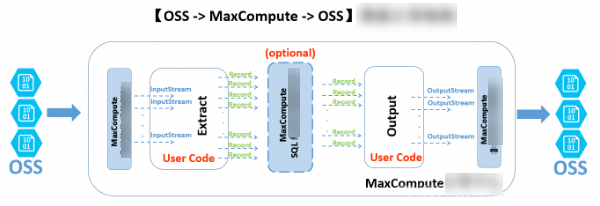
MaxCompute can create external tables for data in unstructured storage services such as OSS and Tablestore. The unstructured processing framework handles data import and export for MaxCompute. The following example uses an OSS external table to illustrate the processing logic:
-
The unstructured framework transforms external OSS data and provides it to your custom code through the Java
InputStreamclass. You can implement the EXTRACT logic to read, parse, transform, and compute the input from theInputStream, and then return the data in the universalRecordformat that MaxCompute can process. -
These records can be processed by using SQL logic in MaxCompute. This computation is based on MaxCompute's built-in structured SQL engine and may generate new records.
-
The system passes the processed records to your custom OUTPUT logic for further transformation. You can then use the system-provided
OutputStreamto write the required information from the records to OSS.
DataWorks with MaxCompute lets you create, search, query, configure, process, and analyze external tables in a visual interface.
Network and access authorization
MaxCompute and OSS are independent services, so network connectivity between their clusters may affect data access. When accessing OSS data from MaxCompute, use an OSS internal endpoint, which is a host address that ends with -internal.aliyuncs.com.
MaxCompute uses Alibaba Cloud Resource Access Management (RAM) and Security Token Service (STS) to securely access OSS data. When requesting permissions, MaxCompute applies for them from STS under the identity of the table creator. The permission settings for Tablestore are the same as those for OSS.
-
STS authorization
MaxCompute needs permissions to access OSS data. STS is a token management service provided by RAM that allows authorized cloud services or RAM users to issue temporary access tokens with custom validity periods and permissions. Applications that obtain these tokens can then call Alibaba Cloud APIs to access resources.
You can grant permissions in either of the following ways:
-
If the MaxCompute project and the OSS bucket belong to the same Alibaba Cloud account, you can perform one-click authorization after you log on with the account.
-
Open the editor page for a new table and go to the Physical Model section.
-
For Table Type, select External Table.
-
Next to Storage Address, click Authorize. Then, click Authorize again.
-
In the Cloud Resource Access Authorization dialog box, click Authorize. On the authorization page, select the AliyunODPSDefaultRole role, which is used by the ODPS service to access OSS and Tablestore resources. Then, click Confirm Authorization.
-
-
Use custom authorization to grant MaxCompute access to OSS in the RAM console.
-
Log on to the RAM console.
NoteIf MaxCompute and OSS belong to different accounts, log on with the OSS account to grant the authorization.
-
In the left-side navigation pane, choose .
-
Click Create Role, select Alibaba Cloud Account as the trusted entity, and then click Next.
-
Enter a Role name and Remarks.
NoteSet the role name to AliyunODPSDefaultRole or AliyunODPSRoleForOtherUser.
-
For Select Trusted Alibaba Cloud Account, select Current Alibaba Cloud Account or Another Alibaba Cloud Account.
NoteIf you select Another Alibaba Cloud Account, you must enter the ID of the other account.
- Click OK.
-
Configure the role details.
On the role management page, click the name of the RAM role. On the Trust Policy tab, click Edit Trust Policy and enter the following policy content based on your scenario.
-- If the MaxCompute project and OSS bucket belong to the same account.
{
"Statement": [
{
"Action": "sts:AssumeRole",
"Effect": "Allow",
"Principal": {
"Service": [
"odps.aliyuncs.com"
      ]
    }
  }
],
"Version": "1"
}
-- If the MaxCompute project and OSS bucket belong to different accounts. { "Statement": [ { "Action": "sts:AssumeRole", "Effect": "Allow", "Principal": { "Service": [ "ID of the Alibaba Cloud account that owns the MaxCompute project@odps.aliyuncs.com" ] } } ], "Version": "1" }After the configuration is complete, click Save trust policy.
-
Configure an authorization policy for the role. Find and attach the AliyunODPSRolePolicy policy, which is required for the role to access OSS. If you cannot find this policy by searching, you can create a custom policy.
{
    "Version": "1",
    "Statement": [
        {
            "Action": [
                "oss:ListBuckets",
                "oss:GetObject",
                "oss:ListObjects",
                "oss:PutObject",
                "oss:DeleteObject",
                "oss:AbortMultipartUpload",
                "oss:ListParts"
            ],
            "Resource": "*",
            "Effect": "Allow"
        },
        {
            "Action": [
                "ots:ListTable",
                "ots:DescribeTable",
                "ots:GetRow",
                "ots:PutRow",
                "ots:UpdateRow",
                "ots:DeleteRow",
                "ots:GetRange",
                "ots:BatchGetRow",
                "ots:BatchWriteRow",
                "ots:ComputeSplitPointsBySize"
            ],
            "Resource": "*",
            "Effect": "Allow"
        },
        {
            "Action": [
                "pvtz:DescribeRegions",
                "pvtz:DescribeZones",
                "pvtz:DescribeZoneInfo",
                "pvtz:DescribeVpcs",
                "pvtz:DescribeZoneRecords"
            ],
            "Resource": "*",
            "Effect": "Allow"
        },
        {
            "Action": [
                "dlf:CreateFunction",
                "dlf:BatchGetPartitions",
                "dlf:ListDatabases",
                "dlf:CreateLock",
                "dlf:UpdateFunction",
                "dlf:BatchUpdateTables",
                "dlf:DeleteTableVersion",
                "dlf:UpdatePartitionColumnStatistics",
                "dlf:ListPartitions",
                "dlf:DeletePartitionColumnStatistics",
                "dlf:BatchUpdatePartitions",
                "dlf:GetPartition",
                "dlf:BatchDeleteTableVersions",
                "dlf:ListFunctions",
                "dlf:DeleteTable",
                "dlf:GetTableVersion",
                "dlf:AbortLock",
                "dlf:GetTable",
                "dlf:BatchDeleteTables",
                "dlf:RenameTable",
                "dlf:RefreshLock",
                "dlf:DeletePartition",
                "dlf:UnLock",
                "dlf:GetLock",
                "dlf:GetDatabase",
                "dlf:GetFunction",
                "dlf:BatchCreatePartitions",
                "dlf:ListPartitionNames",
                "dlf:RenamePartition",
                "dlf:CreateTable",
                "dlf:BatchCreateTables",
                "dlf:UpdateTableColumnStatistics",
                "dlf:ListTableNames",
                "dlf:UpdateDatabase",
                "dlf:GetTableColumnStatistics",
                "dlf:ListFunctionNames",
                "dlf:ListPartitionsByFilter",
                "dlf:GetPartitionColumnStatistics",
                "dlf:CreatePartition",
                "dlf:CreateDatabase",
                "dlf:DeleteTableColumnStatistics",
                "dlf:ListTableVersions",
                "dlf:BatchDeletePartitions",
                "dlf:ListCatalogs",
                "dlf:UpdateTable",
                "dlf:ListTables",
                "dlf:DeleteDatabase",
                "dlf:BatchGetTables",
                "dlf:DeleteFunction"
            ],
            "Resource": "*",
            "Effect": "Allow"
        }
    ]
}
-
-
-
Use an OSS data source
If you have created and saved an OSS data source, find your workspace on the Workspace list page, click Operation in the Management column, and then view and use the data source on the Data Source page.
Create an external table
-
Create a table by using a DDL statement
Go to the Data Studio page. For more information about how to create a table by using a DDL statement, see Create and use MaxCompute tables. You only need to follow the standard MaxCompute syntax. If you have successfully authorized the STS service, you do not need to set the odps.properties.rolearn property.
The following DDL statement creates an external table. The EXTERNAL keyword specifies that the table is an external table.
CREATE EXTERNAL TABLE IF NOT EXISTS ambulance_data_csv_external(
vehicleId int,
recordId int,
patientId int,
calls int,
locationLatitute double,
locationLongtitue double,
recordTime string,
direction string
)
STORED BY 'com.aliyun.odps.udf.example.text.TextStorageHandler' -- Required. The STORED BY clause specifies the name of a custom StorageHandler class or another file format for the external table.
with SERDEPROPERTIES (
'delimiter'='\\|', -- Optional. The SERDEPROPERTIES clause specifies the parameters used for data serialization and deserialization. These parameters can be passed to the Extractor logic through DataAttributes.
'odps.properties.rolearn'='acs:ram::xxxxxxxxxxxxx:role/aliyunodpsdefaultrole'
)
LOCATION 'oss://oss-cn-shanghai-internal.aliyuncs.com/oss-odps-test/Demo/SampleData/CustomTxt/AmbulanceData/'     -- Required. The LOCATION clause specifies the storage location of the external table.
USING 'odps-udf-example.jar'; -- Specifies the JAR package that contains the class definition when you use a custom format. This clause is not required if you do not use a custom format.
The STORED BY clause can also specify a built-in StorageHandler for CSV or TSV files:
-
CSV:
com.aliyun.odps.CsvStorageHandler. This handler defines how to read from and write to CSV-formatted data. By convention, the column delimiter is a comma (,) and the line break is a newline character (\n). Example:STORED BY 'com.aliyun.odps.CsvStorageHandler'. -
TSV:
com.aliyun.odps.TsvStorageHandler. This handler defines how to read from and write to TSV-formatted data. By convention, the column delimiter is a tab (\t) and the line break is a newline character (\n).
The STORED BY clause also supports external tables for open-source formats, such as ORC, PARQUET, SEQUENCEFILE, RCFILE, AVRO, and TEXTFILE. For a TEXTFILE, you can specify a serialization class, such as
org.apache.hive.hcatalog.data.JsonSerDe.-
org.apache.hadoop.hive.serde2.lazy.LazySimpleSerDe -> stored as textfile
-
org.apache.hadoop.hive.ql.io.orc.OrcSerde -> stored as orc
-
org.apache.hadoop.hive.ql.io.parquet.serde.ParquetHiveSerDe -> stored as parquet
-
org.apache.hadoop.hive.serde2.avro.AvroSerDe -> stored as avro
-
org.apache.hadoop.hive.serde2.lazy.LazySimpleSerDe -> stored as sequencefile
Use the following DDL statement to create an external table for open-source formats.
  CREATE EXTERNAL TABLE [IF NOT EXISTS] (<column schemas>)
  [PARTITIONED BY (partition column schemas)]
  [ROW FORMAT SERDE '']
  STORED AS
  [WITH SERDEPROPERTIES ( 'odps.properties.rolearn'='${roleran}'
  [,'name2'='value2',...]
  ) ]
  LOCATION 'oss://${endpoint}/${bucket}/${userfilePath}/';
The following table describes the SerDe properties.
Parameter
Value
Default
Description
odps.text.option.gzip.input.enabled
true/false
false
Enables or disables read compression.
odps.text.option.gzip.output.enabled
true/false
false
Enables or disables write compression.
odps.text.option.header.lines.count
A non-negative integer
0
Skips the first N lines of the text file header.
odps.text.option.null.indicator
A string
An empty string
The string that represents a NULL value during parsing or writing.
odps.text.option.ignore.empty.lines
true/false
true
Specifies whether to ignore empty lines.
odps.text.option.encoding
UTF-8/UTF-16/US-ASCII
UTF-8
Specifies the character encoding of the text.
-
The built-in extractor in MaxCompute supports reading only gzip-compressed CSV or TSV data from OSS. Whether the file is gzip-compressed determines which properties you need to set.
The LOCATION parameter is in the following format: oss://oss-cn-shanghai-internal.aliyuncs.com/BucketName/DirectoryName. You can select the OSS directory address in a GUI dialog box. You do not need to add a file name after the directory.
Tables that are created in DDL mode appear in the table node tree under table management. You can change their display position by modifying their level-1 and level-2 themes.
Tablestore external table
Use the following statement to create a Tablestore external table.
CREATE EXTERNAL TABLE IF NOT EXISTS ots_table_external(
odps_orderkey bigint,
odps_orderdate string,
odps_custkey bigint,
odps_orderstatus string,
odps_totalprice double
)
STORED BY 'com.aliyun.odps.TableStoreStorageHandler'
WITH SERDEPROPERTIES (
'tablestore.columns.mapping'=':o_orderkey,:o_orderdate,o_custkey, o_orderstatus,o_totalprice', -- (3)
'tablestore.table.name'='ots_tpch_orders'
'odps.properties.rolearn'='acs:ram::xxxxx:role/aliyunodpsdefaultrole'
)
LOCATION 'tablestore://odps-ots-dev.cn-shanghai.ots-internal.aliyuncs.com';
Parameters:
-
com.aliyun.odps.TableStoreStorageHandler is the built-in StorageHandler in MaxCompute for processing Tablestore data.
-
The SERDEPROPERTIES clause specifies parameter options. When you use TableStoreStorageHandler, you must specify two options: tablestore.columns.mapping and tablestore.table.name.
-
tablestore.columns.mapping: A required option that describes the columns of the Tablestore table that MaxCompute will access. This includes primary keys and attributes. A colon (:) prefix indicates a Tablestore primary key. For example, in this statement,
:o_orderkeyand:o_orderdateare primary keys, and the others are attribute columns.Tablestore supports one to four primary keys of the STRING, INTEGER, or BINARY type. The first primary key is the partition key. When you specify the mapping, you must provide all the primary keys of the specified Tablestore table. For attribute columns, you need to provide only the columns that MaxCompute needs to access.
-
tablestore.table.name: The name of the Tablestore table to access. If the specified table name is incorrect or does not exist, MaxCompute reports an error. MaxCompute does not automatically create a Tablestore table.
-
-
LOCATION: Specifies the Tablestore instance name, endpoint, and other details.
Create a table in the GUI
Go to the Data Studio page and create a table in the GUI. For more information, see Create and use MaxCompute tables. An external table has the following properties:
-
General
-
English table name (entered during Create Table)
-
Display Name
-
Level-1 Theme and Level-2 Theme
-
Description
-
-
Physical Model
-
Table Type: Select External Table.
-
Partition Type: Partitioning is not supported for Tablestore external tables.
-
Storage Address: This corresponds to the LOCATION parameter. You can set the LOCATION parameter in the Physical Model section. Click Select to choose a storage address. After you make a selection, click Authorize.
-
File Format: Select a format based on your business requirements. Supported formats include CSV, TSV, ORC, PARQUET, SEQUENCEFILE, RCFILE, AVRO, TEXTFILE, and custom file formats. If you select a custom file format, you must select a custom resource. When you submit the resource, its included class names can be automatically parsed and made available for selection.
-
rolearn: You can leave this parameter empty if STS authorization is complete.
-
-
Schema: In the Schema section, add the following fields:
age(BIGINT, age),job(STRING, job type),marital(STRING, marital status),education(STRING, education level), anddefault(STRING, credit card status). None of these fields are primary keys.Parameter
Description
Field Type
MaxCompute 2.0 supports a variety of simple and complex data types.
Operation
Supports adding, modifying, and deleting fields.
Definition or Maximum Value Length
For the VARCHAR type, you can set the length. For complex data types, you can directly enter the type definition.
Supported data types
External tables support the following simple data types.
|
Type |
New |
Example |
Description |
|
TINYINT |
Yes |
1Y, -127Y |
An 8-bit signed integer. The value ranges from -128 to 127. |
|
SMALLINT |
Yes |
32767S, -100S |
A 16-bit signed integer. The value ranges from -32,768 to 32,767. |
|
INT |
Yes |
1000, -15645787 |
A 32-bit signed integer. The value ranges from -231 to 231-1. |
|
BIGINT |
No |
100000000000L, -1L |
A 64-bit signed integer. The value ranges from -263 to 263-1. |
|
FLOAT |
Yes |
N/A |
A 32-bit binary floating-point number. |
|
DOUBLE |
No |
3.1415926 1E+7 |
An 8-byte, double-precision, 64-bit binary floating-point number. |
|
DECIMAL |
No |
3.5BD, 99999999999.9999999BD |
A base-10 exact numeric type. The integer part ranges from -1036+1 to 1036-1, and the fractional part is precise to 10-18 digits. |
|
VARCHAR(n) |
Yes |
N/A |
A variable-length character type, where n is the length. The value of n ranges from 1 to 65,535. |
|
STRING |
No |
"abc", 'bcd', "alibaba" |
A string type. The maximum length is 8 MB. |
|
BINARY |
Yes |
N/A |
A binary data type. The maximum length is 8 MB. |
|
DATETIME |
No |
DATETIME '2017-11-11 00:00:00' |
A date and time type that uses UTC+8 as the system's standard time. The value ranges from 0000-01-01 to 9999-12-31 and is accurate to the millisecond. |
|
TIMESTAMP |
Yes |
TIMESTAMP '2017-11-11 00:00:00.123456789' |
A time zone-independent timestamp type. The value ranges from 0000-01-01 00:00:00.000000000 to 9999-12-31 23:59:59.999999999 and is accurate to the nanosecond. |
|
BOOLEAN |
No |
TRUE and FALSE |
A BOOLEAN type, which can be TRUE or FALSE. |
External tables also support the following complex data types.
|
Type |
Definition |
Constructor |
|
ARRAY |
array< int >; array< struct< a:int, b:string >> |
array(1, 2, 3); array(array(1, 2); array(3, 4)) |
|
MAP |
map< string, string >; map< smallint, array< string>> |
map("k1", "v1", "k2", "v2"); map(1S, array('a', 'b'), 2S, array('x', 'y')) |
|
STRUCT |
struct< x:int, y:int>; struct< field1:bigint, field2:array< int>, field3:map< int, int>> |
named_struct('x', 1, 'y', 2); named_struct('field1', 100L, 'field2', array(1, 2), 'field3', map(1, 100, 2, 200)) |
If you need to use the new data types supported by MaxCompute 2.0, such as TINYINT, SMALLINT, INT, FLOAT, VARCHAR, TIMESTAMP, BINARY, or complex types, you must add the statement set odps.sql.type.system.odps2=true; before the table creation statement. Submit the set statement and the table creation statement together. For Hive compatibility, add the statement set odps.sql.hive.compatible=true;.
View and manage external tables
You can go to the Data Studio page and click Table Management in the left-side navigation pane to query external tables. For more information, see Table management. Managing external tables is similar to managing internal tables.