Parquet external tables let you query and write Parquet files stored in OSS directly from MaxCompute, without loading data into internal tables.
Constraints
OSS external tables do not support the cluster property.
A single file cannot exceed 2 GB. Split files that exceed this limit.
MaxCompute and OSS must be in the same region.
Parsing modes
MaxCompute supports two modes for parsing Parquet files. Set the mode before running queries or write operations.
| Mode | Flag | Implementation | Supports |
|---|---|---|---|
| JNI mode | set odps.ext.parquet.native=false | Java-based open-source implementation | Read and write |
| Native mode | set odps.ext.parquet.native=true | C++-based native implementation | Read only |
Supported data types
For a full description of MaxCompute data types, see Data Type Version 1.0 and Data Type Version 2.0.
| Data type | JNI mode (read/write) | Native mode (read only) |
|---|---|---|
| TINYINT | Supported | Supported |
| SMALLINT | Supported | Supported |
| INT | Supported | Supported |
| BIGINT | Supported | Supported |
| BINARY | Supported | Supported |
| FLOAT | Supported | Supported |
| DOUBLE | Supported | Supported |
| DECIMAL(precision,scale) | Not supported | Supported |
| VARCHAR(n) | Supported | Supported |
| CHAR(n) | Supported | Supported |
| STRING | Supported | Supported |
| DATE | Supported | Supported |
| DATETIME | Supported | Supported |
| TIMESTAMP | Supported | Supported |
| TIMESTAMP_NTZ | Not supported | Not supported |
| BOOLEAN | Supported | Supported |
| ARRAY | Supported | Supported |
| MAP | Supported | Supported |
| STRUCT | Supported | Supported |
| JSON | Not supported | Not supported |
Supported compression formats
Parquet external tables support ZSTD, SNAPPY, and GZIP compression. To use compression, add the with serdeproperties clause to the CREATE EXTERNAL TABLE statement. See with serdeproperties parameters for details.
Schema evolution
Parquet external tables map column values by name, not position. This means you can safely add, delete, or reorder columns without breaking reads of existing data.
The Data compatibility column below describes whether the table can read existing data written before the schema change.
| Operation | Supported | Description | Data compatibility |
|---|---|---|---|
| Add column | Yes | New columns are added at the end of the table. Position cannot be specified. Default values apply only to data written by MaxCompute after the change. | Compatible for new data. Historical rows return NULL for the new column. |
| Delete column | Yes | Parquet maps columns by name, so removing a column from the table schema does not affect reads of existing files. | Compatible |
| Reorder columns | Yes | Parquet maps columns by name, so column order in the DDL does not need to match the file. | Compatible |
| Change column data type | No | Parquet enforces strict type validation at the file level. Changing a column's type in the DDL does not rewrite the underlying files, causing type mismatches on read. | Not applicable |
| Rename column | No | Parquet maps columns by name. Renaming a column in the DDL breaks the mapping for all existing files that still use the original column name. | Not applicable |
| Update column comment | Yes | Comments must be valid strings no longer than 1,024 bytes. | Compatible |
| Change column nullability | No | Columns are nullable by default. Changing nullability is not supported. | Not applicable |
Create an external table
Tip: If you don't know the column structure of your Parquet files, use Schemaless Query to explore the file schema before writing the DDL.
Schema mismatch behavior
When the Parquet file schema differs from the external table DDL:
Fewer columns in the file than in the DDL: Missing columns return NULL.
More columns in the file than in the DDL: Extra columns are ignored.
Column type mismatch: Reading fails with
ODPS-0123131:User defined function exception - Traceback:xxx. Align the column types in the DDL with the actual Parquet file schema to resolve this.
Syntax
Use the simplified syntax when you do not need compression or performance tuning. Use the detailed syntax to configure compression and other Parquet-specific options.
Simplified syntax structure
CREATE EXTERNAL TABLE [IF NOT EXISTS] <mc_oss_extable_name>
(
  <col_name> <data_type>,
  ...
)
[COMMENT <table_comment>]
[PARTITIONED BY (<col_name> <data_type>, ...)]
STORED AS parquet
LOCATION '<oss_location>'
[tblproperties ('<tbproperty_name>'='<tbproperty_value>', ...)];
Detailed Syntax
CREATE EXTERNAL TABLE [IF NOT EXISTS] <mc_oss_extable_name>
(
  <col_name> <data_type>,
  ...
)
[COMMENT <table_comment>]
[PARTITIONED BY (<col_name> <data_type>, ...)]
ROW FORMAT SERDE 'org.apache.hadoop.hive.ql.io.parquet.serde.ParquetHiveSerDe'
WITH serdeproperties(
    'odps.properties.rolearn'='acs:ram::<uid>:role/aliyunodpsdefaultrole',
    'mcfed.parquet.compression'='ZSTD/SNAPPY/GZIP'
)
STORED AS parquet
LOCATION '<oss_location>';
For common parameters shared across OSS external table types, see Basic syntax parameters.
Unique parameters
with serdeproperties parameters
Use WITH serdeproperties to configure compression and read performance at table-creation time. These settings apply to both read and write operations.
| Parameter | When to add | Description | Value | Default |
|---|---|---|---|---|
mcfed.parquet.compression | When writing Parquet data to OSS in compressed format | Sets the compression codec. Parquet data is uncompressed by default. | ZSTD, SNAPPY, or GZIP | None |
mcfed.parquet.compression.codec.zstd.level | When mcfed.parquet.compression is set to ZSTD | ZSTD compression level. Higher values increase the compression ratio but reduce write throughput. For large-scale Parquet I/O, use levels 3–5. | 1–22 | 3 |
parquet.file.cache.size | To improve OSS read performance | Cache size for OSS data files, in KB. | 1024 | None |
parquet.io.buffer.size | To improve OSS read performance for files larger than 1,024 KB | Buffer size for OSS data files, in KB. | 4096 | None |
tblproperties parameters
Use tblproperties to control output file naming, compression, and write behavior. These settings persist as table properties and apply at write time.
mcfed.parquet.compressionappears in bothserdepropertiesandtblproperties. Useserdepropertiesto set compression at table-creation time for both read and write. Usetblpropertieswhen you want to control write-time behavior as a persistent table property.
| Parameter | When to add | Description | Value | Default |
|---|---|---|---|---|
io.compression.codecs | When OSS data files use Raw-Snappy format | Enables the built-in resolver for Raw-Snappy compressed data. When set, MaxCompute can read compressed data. | com.aliyun.odps.io.compress.SnappyRawCodec | None |
odps.external.data.output.prefix (also: odps.external.data.prefix) | To add a custom prefix to output filenames | Letters, digits, and underscores only (a–z, A–Z, 0–9, _). Length: 1–10 characters. | For example, mc_ | None |
odps.external.data.enable.extension | To include file extensions in output filenames | True shows extensions. False hides them. | True or False | False |
odps.external.data.output.suffix | To add a custom suffix to output filenames | Letters, digits, and underscores only. | For example, _hangzhou | None |
odps.external.data.output.explicit.extension | To set a custom file extension | Letters, digits, and underscores only. Length: 1–10 characters. Takes precedence over odps.external.data.enable.extension. | For example, jsonl | None |
mcfed.parquet.compression | When writing Parquet data to OSS in compressed format | Sets the compression codec. Parquet data is uncompressed by default. | SNAPPY, GZIP, or ZSTD | None |
mcfed.parquet.block.size | To control storage efficiency and read performance | Parquet block size in bytes. | Non-negative integer | 134217728 (128 MB) |
mcfed.parquet.block.row.count.limit | To prevent out-of-memory (OOM) errors when writing large datasets | Maximum records per row group. Reduce this value if OOM occurs. If JVM memory is 1 GB and the average record size is 1 MB, set this to approximately 100 (the default row group size is 128 MB). Do not set this too low. | Non-negative integer | 2147483647 (Integer.MAX_VALUE) |
mcfed.parquet.page.size.row.check.min | To control memory check frequency during writes | Minimum records between memory checks. Reduce this value if OOM occurs. | Non-negative integer | 100 |
mcfed.parquet.page.size.row.check.max | To control memory check frequency during writes | Maximum records between memory checks. By default, MaxCompute checks memory every 10,000 records. For small records, reduce to 1,000 for more frequent checks. Because frequent memory checks add overhead, first reduce mcfed.parquet.block.row.count.limit. Reduce mcfed.parquet.page.size.row.check.max only if OOM persists or output files are too large. | Non-negative integer | 1000 |
mcfed.parquet.compression.codec.zstd.level | When writing Parquet data with ZSTD compression | ZSTD compression level. Valid values: 1–22. | Non-negative integer | 3 |
Write data
For write syntax, see Write syntax.
Query and analysis
For SELECT syntax, see Query syntax.
For query plan optimization, see Query optimization.
To query LOCATION files without defining a schema, see Schemaless Query.
Predicate push down
By default, queries on Parquet external tables with WHERE filters scan all data, regardless of filter conditions. Parquet Predicate Push Down (PPD) uses row group metadata embedded in Parquet files to skip row groups that cannot match the filter, reducing scanned data, query latency, and resource usage.
PPD requires Native mode (odps.ext.parquet.native=true). Enable it by running these session-level SET commands before your query:
-- Enable Native mode (required for PPD).
SET odps.ext.parquet.native = true;
-- Enable Parquet PPD.
SET odps.sql.parquet.use.predicate.pushdown = true;
Performance comparison
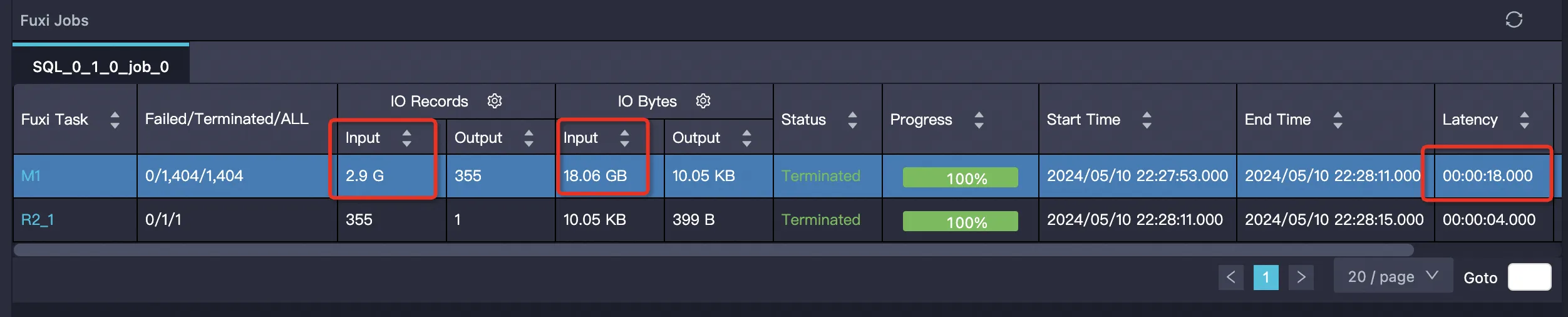
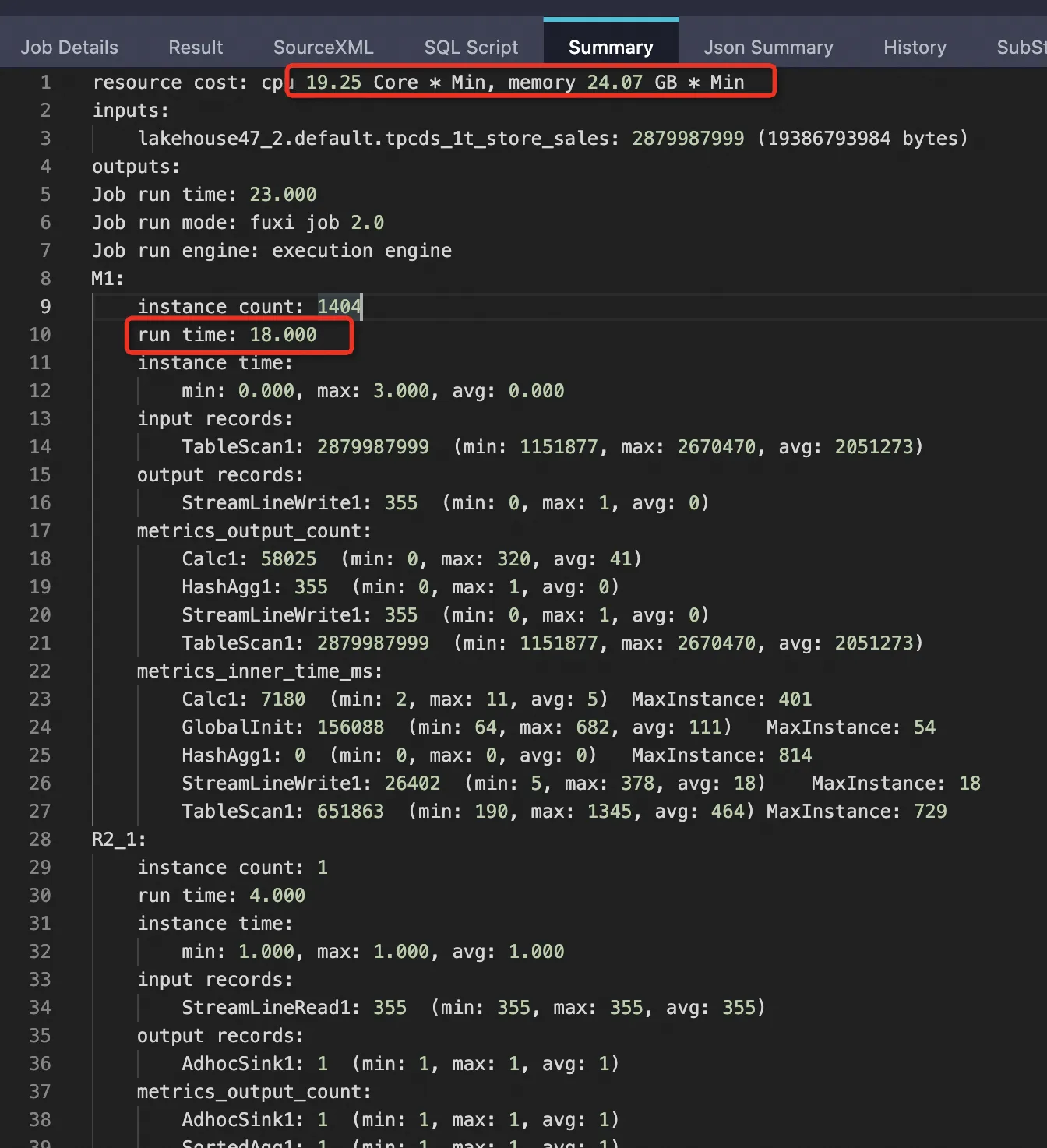
The following results are from a 1 TB TPCDS benchmark using the tpcds_1t_store_sales table (2,879,987,999 total rows).
| Mode | Rows scanned | Bytes scanned | Mapper time | CPU | Memory |
|---|---|---|---|---|---|
| External table, PPD disabled | 2,879,987,999 (100%) | 19,386,793,984 (100%) | 18 s | 19.25 Core×Min | 24.07 GB×Min |
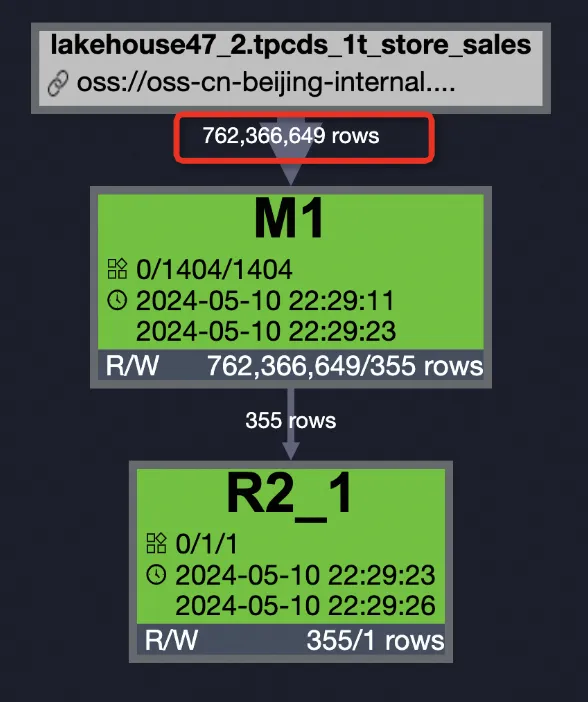
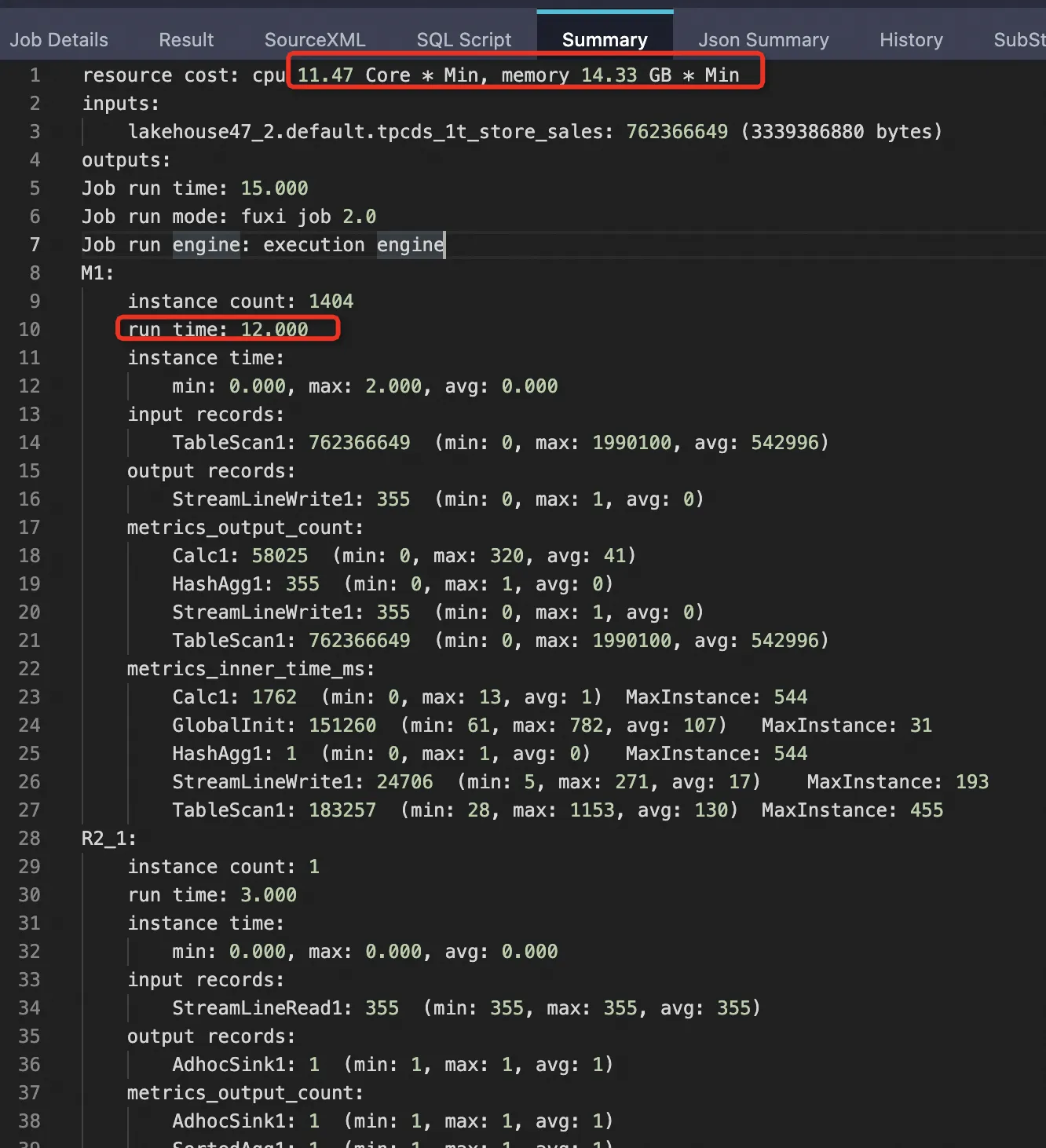
| External table, PPD enabled | 762,366,649 (26.47%) | 3,339,386,880 (17.22%) | 12 s | 11.47 Core×Min | 14.33 GB×Min (~59.58%) |
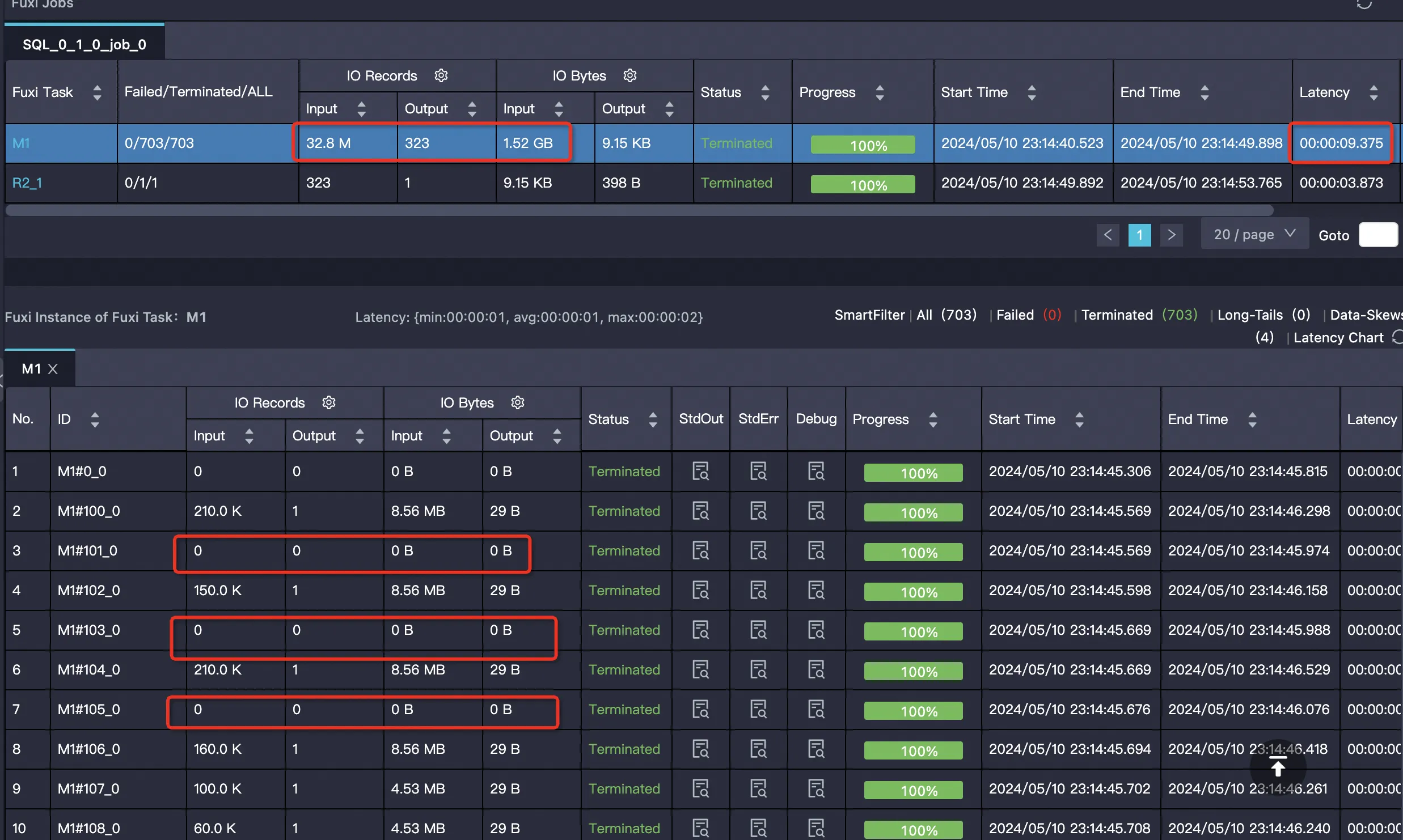
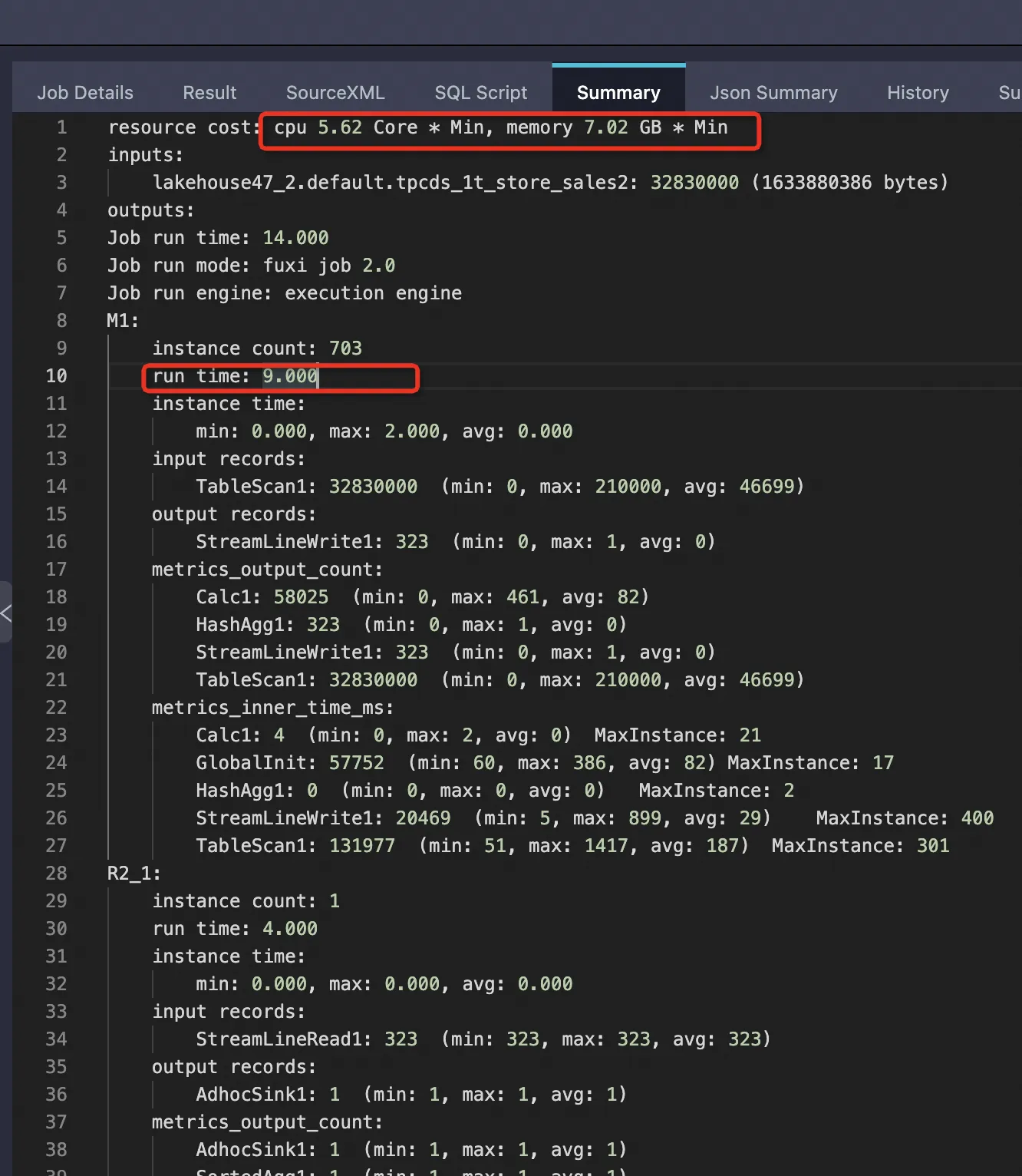
| Internal table, PPD enabled | 32,830,000 (1.14%) | 1,633,880,386 (8.43%) | 9 s | 5.62 Core×Min | 7.02 GB×Min (~29.19%) |
Enabling PPD on the external table reduced bytes scanned from 100% to 17.22% and cut resource usage by approximately 40%. Internal tables show even greater gains because data is sorted, making row group pruning more effective.
Even with PPD enabled, external tables scan significantly more data than internal tables (17.22% vs. 8.43% of bytes). If query performance is critical and data changes infrequently, consider loading data into an internal table.
Test details
External table with PPD disabled
SET odps.ext.parquet.native = true;
SET odps.sql.parquet.use.predicate.pushdown = false;

SELECT SUM(ss_sold_date_sk) FROM tpcds_1t_store_sales
  WHERE ss_store_sk = 2 AND ss_sold_date_sk >= 2451871 AND ss_sold_date_sk <= 2451880;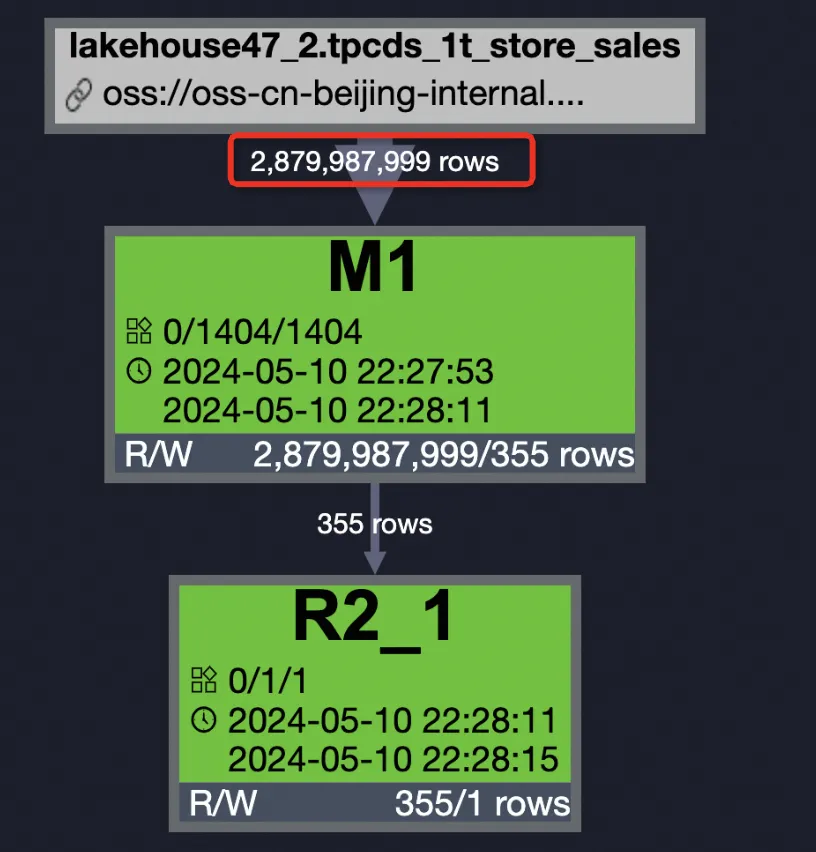
External table with PPD enabled
SET odps.ext.parquet.native = true;
SET odps.sql.parquet.use.predicate.pushdown = true;

SELECT SUM(ss_sold_date_sk) FROM tpcds_1t_store_sales
  WHERE ss_store_sk = 2 AND ss_sold_date_sk >= 2451871 AND ss_sold_date_sk <= 2451880;
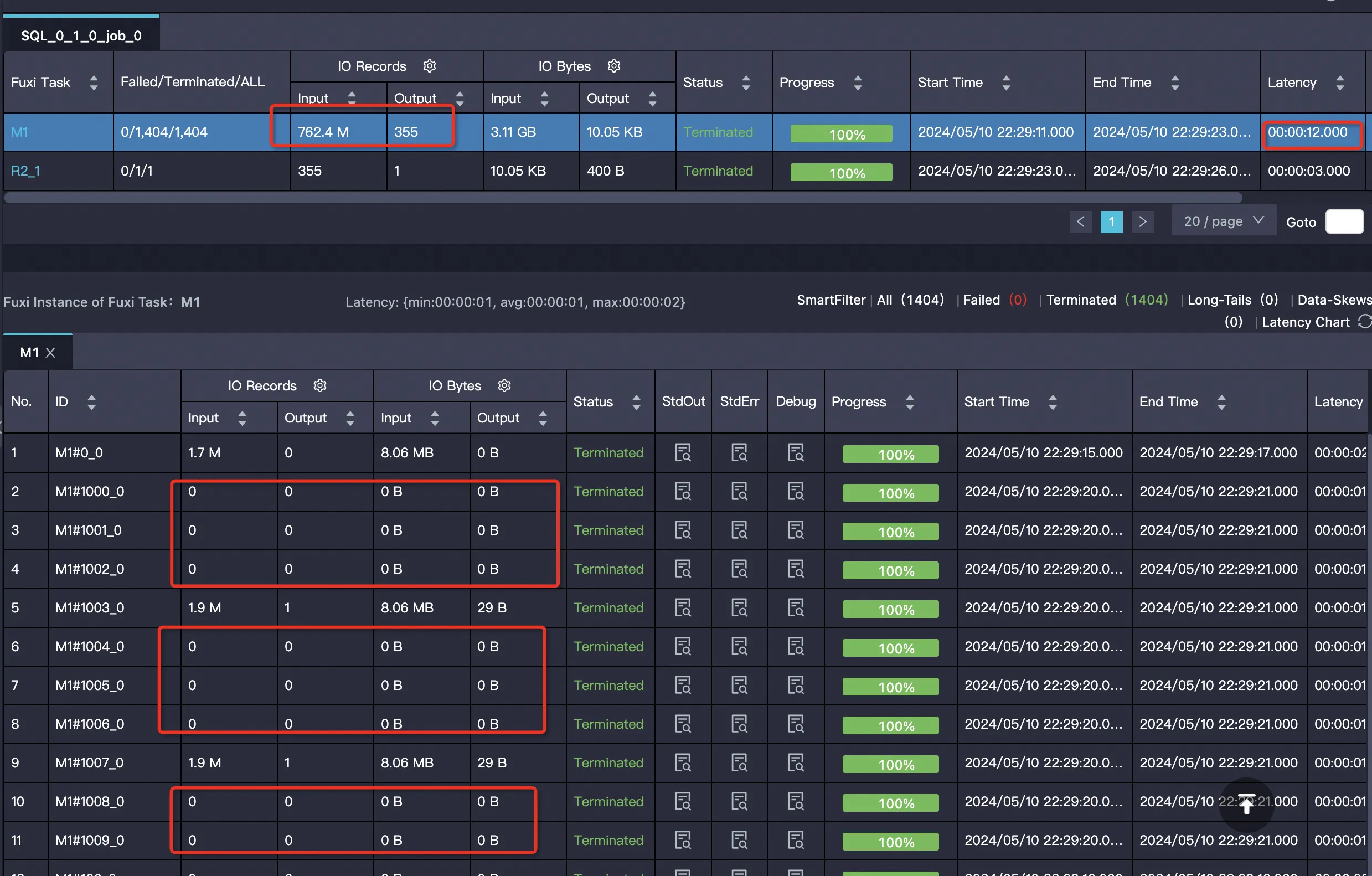
Many mappers are empty and skip reading data: Actual row group pruning log:

Internal table with PPD enabled Internal table data is sorted, so pruning is more effective.
SELECT SUM(ss_sold_date_sk) FROM bigdata_public_dataset.tpcds_1t.store_sales
  WHERE ss_store_sk = 2 AND ss_sold_date_sk >= 2451871 AND ss_sold_date_sk <= 2451880;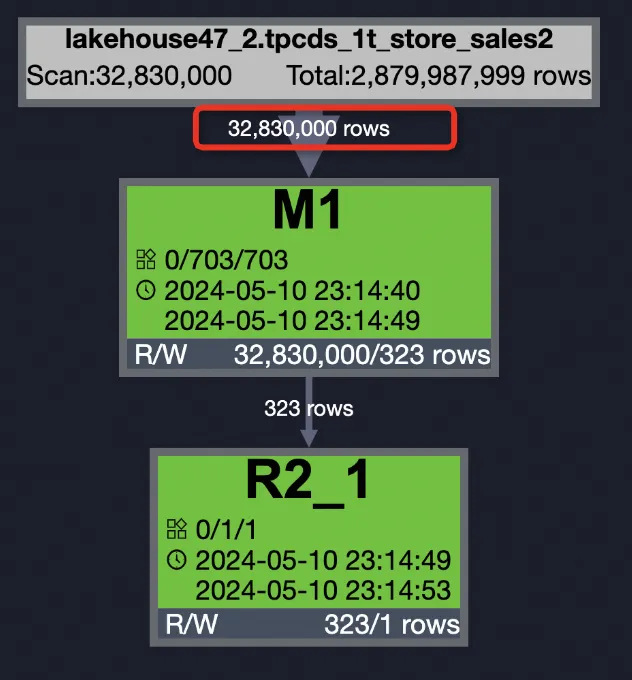
Example: create and use a ZSTD-compressed Parquet external table
This example creates a partitioned Parquet external table with ZSTD compression, then reads and writes data.
Prerequisites
Before you begin, ensure that you have:
An OSS bucket and folder in the same region as your MaxCompute project. See Create a bucket and Manage folders
OSS access permissions via an Alibaba Cloud account, a RAM user, or a RAM role. See STS authorization for OSS
The
CreateTablepermission in your MaxCompute project. See MaxCompute permissions
Steps
Prepare ZSTD-formatted data files. In the
oss-mc-testbucket from the sample data, create the directoryparquet_zstd_jni/dt=20230418and place the partitioned data in that directory.Create a ZSTD-compressed Parquet external table.
CREATE EXTERNAL TABLE IF NOT EXISTS mc_oss_parquet_data_type_zstd (
    vehicleId INT,
    recordId INT,
    patientId INT,
    calls INT,
    locationLatitute DOUBLE,
    locationLongtitue DOUBLE,
    recordTime STRING,
    direction STRING
)
PARTITIONED BY (dt STRING)
ROW FORMAT SERDE 'org.apache.hadoop.hive.ql.io.parquet.serde.ParquetHiveSerDe'
WITH serdeproperties(
  'odps.properties.rolearn'='acs:ram::<uid>:role/aliyunodpsdefaultrole',
  'mcfed.parquet.compression'='zstd'
)
STORED AS parquet
LOCATION 'oss://oss-cn-hangzhou-internal.aliyuncs.com/oss-mc-test/parquet_zstd_jni/';
Add partitions to the external table.
MSCK REPAIR TABLE mc_oss_parquet_data_type_zstd ADD PARTITIONS;For more options, see Add partitions to OSS external tables.
Read data from the table.
SELECT * FROM mc_oss_parquet_data_type_zstd WHERE dt='20230418' LIMIT 10;Expected output:
+------------+------------+------------+------------+------------------+-------------------+----------------+------------+------------+
| vehicleid  | recordid   | patientid  | calls      | locationlatitute | locationlongtitue | recordtime     | direction  | dt         |
+------------+------------+------------+------------+------------------+-------------------+----------------+------------+------------+
| 1          | 12         | 76         | 1          | 46.81006         | -92.08174         | 9/14/2014 0:10 | SW         | 20230418   |
| 1          | 1          | 51         | 1          | 46.81006         | -92.08174         | 9/14/2014 0:00 | S          | 20230418   |
| 1          | 2          | 13         | 1          | 46.81006         | -92.08174         | 9/14/2014 0:01 | NE         | 20230418   |
| 1          | 3          | 48         | 1          | 46.81006         | -92.08174         | 9/14/2014 0:02 | NE         | 20230418   |
| 1          | 4          | 30         | 1          | 46.81006         | -92.08174         | 9/14/2014 0:03 | W          | 20230418   |
| 1          | 5          | 47         | 1          | 46.81006         | -92.08174         | 9/14/2014 0:04 | S          | 20230418   |
| 1          | 6          | 9          | 1          | 46.81006         | -92.08174         | 9/14/2014 0:05 | S          | 20230418   |
| 1          | 7          | 53         | 1          | 46.81006         | -92.08174         | 9/14/2014 0:06 | N          | 20230418   |
| 1          | 8          | 63         | 1          | 46.81006         | -92.08174         | 9/14/2014 0:07 | SW         | 20230418   |
| 1          | 9          | 4          | 1          | 46.81006         | -92.08174         | 9/14/2014 0:08 | NE         | 20230418   |
| 1          | 10         | 31         | 1          | 46.81006         | -92.08174         | 9/14/2014 0:09 | N          | 20230418   |
+------------+------------+------------+------------+------------------+-------------------+----------------+------------+------------+
Write data to the table.
INSERT INTO mc_oss_parquet_data_type_zstd PARTITION (dt = '20230418')
  VALUES (1,16,76,1,46.81006,-92.08174,'9/14/2014 0:10','SW');

-- Verify the inserted row.
SELECT * FROM mc_oss_parquet_data_type_zstd WHERE dt = '20230418' AND recordid=16;
Expected output:
+------------+------------+------------+------------+------------------+-------------------+----------------+------------+------------+
| vehicleid  | recordid   | patientid  | calls      | locationlatitute | locationlongtitue | recordtime     | direction  | dt         |
+------------+------------+------------+------------+------------------+-------------------+----------------+------------+------------+
| 1          | 16         | 76         | 1          | 46.81006         | -92.08174         | 9/14/2014 0:10 | SW         | 20230418   |
+------------+------------+------------+------------+------------------+-------------------+----------------+------------+------------+
Troubleshooting
Column type mismatch
Error:
ODPS-0123131:User defined function exception - Traceback:
java.lang.ClassCastException: org.apache.hadoop.io.LongWritable cannot be cast to org.apache.hadoop.io.IntWritable
   at org.apache.hadoop.hive.serde2.objectinspector.primitive.WritableIntObjectInspector.getPrimitiveJavaObject(WritableIntObjectInspector.java:46)
The Parquet file stores the column as LongWritable (BIGINT), but the external table DDL defines it as INT. Change the column type in the DDL from INT to BIGINT.
Out-of-memory error when writing
Error:
ODPS-0123131:User defined function exception - Traceback:
java.lang.OutOfMemoryError: Java heap space
    at java.io.ByteArrayOutputStream.<init>(ByteArrayOutputStream.java:77)
    at org.apache.parquet.bytes.BytesInput$BAOS.<init>(BytesInput.java:175)
    at org.apache.parquet.bytes.BytesInput$BAOS.<init>(BytesInput.java:173)
    at org.apache.parquet.bytes.BytesInput.toByteArray(BytesInput.java:161)
This error occurs when writing large amounts of data to a Parquet external table. Resolve it in this order:
Reduce
mcfed.parquet.block.row.count.limitintblproperties.If OOM persists or output files are too large, also reduce
mcfed.parquet.page.size.row.check.max.
Add these session-level settings before writing:
-- Set maximum JVM heap memory for UDFs.
SET odps.sql.udf.jvm.memory=12288;
-- Control batch size on the runtime side.
SET odps.sql.executionengine.batch.rowcount=64;
-- Set memory size per mapper.
SET odps.stage.mapper.mem=12288;
-- Adjust input data size per mapper (file split size).
SET odps.stage.mapper.split.size=64;