When insert or update performance falls short of expectations, start by checking the CPU Usage metric in the Hologres Console. Low CPU usage points to upstream bottlenecks (slow data reads). High CPU usage — consistently at 100% — means Hologres itself is the bottleneck. This topic walks you through diagnosing and resolving both.
How it works
Every SQL statement in Hologres follows one of two execution paths:
-
Standard path (HQE/PQE) — Passes through the query optimizer (QO) and query engine (QE). Write operations acquire a table lock, so concurrent
INSERT,UPDATE, andDELETEstatements must wait for each other, causing high latency under load. HQE (Hologres Query Engine) handles most write operations; PQE (PostgreSQL Query Engine) handles compatibility scenarios. -
Fixed Plan path (FixedQE) — Bypasses the QO and QE for simple point writes. Uses row locks instead of table locks, which dramatically improves write concurrency and throughput.
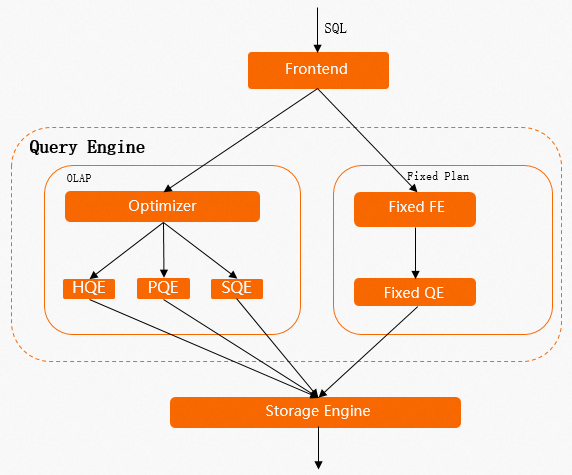
Understanding this distinction explains most write performance problems — and why enabling Fixed Plan is the highest-impact optimization.
Performance baselines
Before tuning, know where the performance ceiling is for your table configuration.
By storage format (full-column writes/updates):
Row-oriented > Column-oriented > Row-column hybrid
By storage format (partial-column writes/updates):
Row-oriented > Row-column hybrid > Column-oriented
By write mode for column-oriented tables:
Performance is highest when the sink table has no primary key. When the sink table has a primary key, performance is ranked as follows:
InsertOrIgnore > InsertOrReplace >= InsertOrUpdate (full) > InsertOrUpdate (partial)
By write mode for row-oriented tables:
InsertOrReplace = InsertOrUpdate (full) >= InsertOrUpdate (partial) >= InsertOrIgnore
For Binlog-enabled tables:
Row-oriented > Row-column hybrid > Column-oriented
Write modes
|
Write mode |
Behavior |
Primary key required |
|
|
Append-only. Duplicate rows are not checked. |
No |
|
|
If a primary key conflict occurs, the incoming record is discarded. |
Yes |
|
|
If a primary key conflict occurs, the existing row is replaced. Columns not included in the write are set to NULL. |
Yes |
|
|
If a primary key conflict occurs, only the specified columns are updated. Columns not included in the write retain their existing values. |
Yes |
Choosing a write mode:
-
Use
Insertfor append-only pipelines with no primary key. -
Use
InsertOrIgnorewhen deduplication is handled upstream and you want the highest write throughput with a primary key table. -
Use
InsertOrReplacewhen you need full-row replacement and NULL-filling is acceptable for missing columns. -
Use
InsertOrUpdatefor partial-column updates — accepting a performance trade-off, because the engine must look up the existing row before writing.
Identify the bottleneck
Check CPU usage in the Hologres Console:
|
CPU usage |
Interpretation |
Next step |
|
Low |
Hologres resources are underutilized. The bottleneck is upstream. |
Check for slow data reads in your upstream source. |
|
High (consistently near 100%) |
Hologres has reached a resource bottleneck. |
Apply the tuning methods in this topic. |
If queries and writes run concurrently, queries can push CPU usage high and affect write performance. Check the slow query logs to see whether concurrent queries are consuming resources. If they are, consider configuring a high availability (HA) deployment with read/write splitting.
After trying all tuning methods, if write performance still does not meet your requirements, scale the Hologres instance.
Enable Fixed Plan
Fixed Plan is the single most impactful optimization for write performance. Enable it before trying anything else.
Check whether writes use Fixed Plan
In the Hologres Console, check the following RPS metrics:
-
QE DML RPS — writes going through the standard HQE/PQE path (table locks, higher latency).
-
FixedQE DML RPS — writes using Fixed Plan (row locks, high concurrency).
To find write operations that are not using Fixed Plan, query the slow query logs:
-- Find INSERT, UPDATE, and DELETE operations that did not use Fixed Plan in the last 3 hours
SELECT *
FROM hologres.hg_query_log
WHERE query_start >= now() - interval '3 h'
  AND command_tag IN ('INSERT', 'UPDATE', 'DELETE')
  AND ARRAY['HQE'] && engine_type
ORDER BY query_start DESC
LIMIT 500;
Scenarios where Fixed Plan is not used
SQL statements that match any of the following conditions fall back to the HQE path:
-
Multi-row
INSERT ON CONFLICTsyntax:INSERT INTO test_upsert(pk1, pk2, col1, col2) VALUES (1, 2, 5, 6), (2, 3, 7, 8) ON CONFLICT (pk1, pk2) DO UPDATE SET col1 = excluded.col1, col2 = excluded.col2; -
INSERT ON CONFLICTfor a partial update where the Hologres table columns don't match the inserted data columns. -
The Hologres table contains columns of the
SERIALtype. -
The Hologres table has the
Defaultproperty set. -
UPDATEorDELETEbased on the primary key (for example:UPDATE table SET col1 = ?, col2 = ? WHERE pk1 = ? AND pk2 = ?). -
Data types not supported by Fixed Plan.
Enable Fixed Plan for these scenarios
Use GUC parameters to extend Fixed Plan coverage. Set these at the database level:
|
Scenario |
GUC parameter |
Notes |
|
Multi-row |
|
Set at the database level. |
|
|
|
Default |
|
|
No GUC needed in Hologres V1.3+. |
In V1.3+, |
|
|
|
Default |
|
|
|
Default |
For more details, see Accelerate SQL execution with fixed plans.
When a write uses Fixed Plan, it is counted in the FixedQE DML RPS metric, and the engine_type field in slow query logs shows FixedQE.
Before Hologres V2.2, Fixed Plan writes reported an engine_type of SDK, and the console tracked all DML writes in a single combined RPS metric. Starting with Hologres V2.2, engine_type is FixedQE, and the metric is split into QE DML RPS and FixedQE DML RPS. For metric definitions, see Monitoring metrics.
Fixed Plan is enabled but writes are still slow
If writes already use Fixed Plan but latency remains high, the most common cause is mixed HQE and FixedQE writes to the same table. HQE operations hold table locks, which block FixedQE writes. To check:
-- Find HQE operations on a specific table in the last 3 hours
SELECT *
FROM hologres.hg_query_log
WHERE query_start >= now() - interval '3 h'
  AND command_tag IN ('INSERT', 'UPDATE', 'DELETE')
  AND ARRAY['HQE'] && engine_type
  AND table_write = '<table_name>'
ORDER BY query_start DESC
LIMIT 500;
Rewrite any HQE operations as FixedQE-compatible statements. Use Get query insights in HoloWeb to quickly identify whether an HQE lock is blocking a Fixed Plan write.
If all writes are already FixedQE writes and latency is still high, check CPU usage. Consistently high CPU indicates an instance resource bottleneck — consider scaling out.
Basic tuning methods
Use a VPC connection
Use a Virtual Private Cloud (VPC) connection instead of the public network. The public network has traffic limits and higher latency than a VPC. This applies especially when connecting from applications via Java Database Connectivity (JDBC) or psql.
For the network types Hologres supports and guidance on choosing one, see Network configurations.
Avoid enabling Binlog on column-oriented tables
Binlog records every INSERT, UPDATE, and DELETE at the full-row level. For a column-oriented table, recording a full-row change requires a point query to read the entire row — which is more resource-intensive than for a row-oriented table. If Binlog is required, use row-oriented tables.
Avoid concurrent real-time and batch writes to the same table
Batch writes (for example, MaxCompute to Hologres) use table locks. Stream writes (for example, Flink or DataWorks Data Integration) typically use row locks via Fixed Plan. When both run concurrently against the same table, the batch write's table lock blocks all real-time writes until it releases. Separate these workloads: run batch writes in a maintenance window, or write to different tables.
Use INSERT OVERWRITE to replace partition data
When you need to replace or clear all data in a partition, use INSERT OVERWRITE instead of DELETE followed by INSERT.
INSERT OVERWRITE is a metadata-level operation that replaces the partition data by swapping file pointers. It executes quickly and does not trigger dynamic pruning logic. In contrast, a DELETE statement requires the engine to scan all data files in the partition to locate and remove rows, causing significant I/O and CPU overhead. Write performance with DELETE + INSERT is substantially lower than with INSERT OVERWRITE.
When you use a scheduling task to write to a partitioned table, use scheduling parameters to specify the target partition directly in the INSERT OVERWRITE statement. Avoid using a subquery to determine which data to delete and re-insert.
-- Recommended: use INSERT OVERWRITE with scheduling parameters
INSERT OVERWRITE hologres_table PARTITION(ds='${bizdate}')
SELECT col1, col2, col3
FROM source_table
WHERE ds = '${bizdate}';

-- Not recommended: DELETE + INSERT
DELETE FROM hologres_table WHERE ds = '${bizdate}';
INSERT INTO hologres_table
SELECT col1, col2, col3
FROM source_table
WHERE ds = '${bizdate}';
Tune Holo Client and JDBC writes
Write in batches
Batch writes provide significantly higher throughput than single-record writes.
-
Holo Client batches data automatically. Use the default configuration.
-
JDBC — add
reWriteBatchedInserts=trueto the connection string:jdbc:postgresql://{ENDPOINT}:{PORT}/{DBNAME}?ApplicationName={APPLICATION_NAME}&reWriteBatchedInserts=true
The following example shows how batching works:
-- Two separate inserts (low throughput)
INSERT INTO data_t VALUES (1, 2, 3);
INSERT INTO data_t VALUES (2, 3, 4);

-- Batched insert (higher throughput)
INSERT INTO data_t VALUES (1, 2, 3), (4, 5, 6);

-- Alternatively, using unnest
INSERT INTO data_t
SELECT unnest(ARRAY[1, 4]::int[]), unnest(ARRAY[2, 5]::int[]), unnest(ARRAY[3, 6]::int[]);
For more details, see Holo Client and JDBC.
Use Prepared Statement mode
Hologres supports the PostgreSQL extended protocol and Prepared Statement mode. This caches SQL compilation results on the server, eliminating repeated parsing overhead from the frontend (FE) and QO on every write — especially beneficial for high-frequency writes.
For how to enable Prepared Statement mode with JDBC and Holo Client, see JDBC.
Tune Flink writes
Table-type requirements
Binlog source tables:
-
Flink supports a limited set of data types when consuming Hologres Binlog. If an unsupported type (such as
SMALLINT) is present in the schema, the job may fail even if you don't consume that field. In Ververica Runtime (VVR) 6.0.3 and later, use JDBC mode for Binlog consumption — it supports more data types. -
Use row-oriented tables for Binlog-enabled sources. Enabling Binlog on column-oriented tables consumes more resources and reduces write performance.
Dimension tables:
-
Use row-oriented or row-column hybrid tables. Column-oriented tables have high overhead in point query scenarios.
-
Set a primary key. Configure the primary key as the clustering key for better performance.
-
The primary key of the dimension table must exactly match the fields used in the Flink
JOIN ONclause — both must be identical.
Sink tables:
-
For wide table merges or partial updates, the Hologres table must have a primary key. Each sink table must declare and write to the primary key field, use
InsertOrUpdatewrite mode, and setignoredelete = trueto prevent retraction messages from generatingDELETErequests. -
For column-oriented tables in wide table merge scenarios, disable Dictionary Encoding for table fields to reduce CPU usage at high records per second (RPS).
-
Set a
segment_keyon tables that have a primary key. Use a timestamp or date field with strong correlation to the write time — this helps the engine quickly locate the target data file during writes and updates.
Recommended Flink connector configs
The default values of Hologres connector options are suitable for most scenarios. Adjust them when you encounter the following issues:
High latency in Binlog consumption:
The default batch read size (binlogBatchReadSize) is 100 rows. If individual rows are small, increase this value to reduce consumption latency.
Poor dimension table point query performance:
-
Set
async = trueto enable asynchronous mode, which processes multiple requests concurrently and eliminates blocking between consecutive requests. Note that asynchronous mode does not guarantee strict request ordering. -
For large, infrequently updated dimension tables, enable the LRU cache: set
cache = 'LRU'. The defaultcacheSizeis 10,000 rows (conservative) — increase it based on actual table size and access patterns.
Connection exhaustion with many Flink jobs:
Use the connectionPoolName parameter. Tables with the same connection pool name within the same TaskManager share connections.
Job development preference
Prefer Flink SQL over DataStream for maintainability and portability:
Flink SQL > Flink DataStream (connector) > Flink DataStream (holo-client) > Flink DataStream (JDBC)
For DataStream jobs, use the Hologres DataStream connector or Holo Client rather than raw JDBC.
Diagnose slow Flink writes
Slow writes in Flink can be caused by bottlenecks earlier in the job, not at the Hologres sink. Check for node backpressure. If backpressure appears at the source or compute nodes, the data arriving at the Hologres sink is already slow — optimize the upstream Flink steps first.
If Hologres CPU usage is consistently near 100% and write latency is high, the bottleneck is on the Hologres side.
For common Flink errors and solutions, see Blink and Flink FAQ and diagnostics.
Tune DataWorks Data Integration writes
Connection and concurrency settings
In wizard mode, each concurrent thread uses three connections. In code editor mode, configure:
-
maxConnectionCount— total connections for the task. -
insertThreadCount— connections per concurrent thread.
In most cases, the default concurrency and connection settings deliver good performance. Adjust only when you observe resource contention.
Exclusive resource group sizing
Most Data Integration jobs require exclusive resource groups. The resource group specifications set the upper performance limit for the task. For optimal throughput, allocate one concurrent thread per CPU core in the resource group.
If the resource group is undersized relative to task concurrency, you may see JVM memory errors. If the resource group's bandwidth is saturated, break the task into smaller tasks and distribute them across multiple resource groups. For resource group specifications and metrics, see Performance metrics.
Diagnose whether the bottleneck is upstream or Hologres
-
If the read-side wait time is longer than the write-side wait time, the bottleneck is in the upstream data source.
-
If Hologres CPU usage is consistently high and write latency is elevated, the bottleneck is on the Hologres side.
DataX writes are slow with high CPU usage
If DataX writes are slow and Hologres instance monitoring shows that CPU usage remains at a high level (for example, some worker nodes reach 100%), CPU resource saturation is causing incoming write requests to queue up or experience processing delays.
To resolve this issue:
-
Check whether writes use Fixed Plan. In the Hologres Console, check the RPS metrics. If writes appear in QE DML RPS (HQE path) rather than FixedQE DML RPS, they are not using Fixed Plan. Configure GUC parameters or rewrite the SQL statements to enable Fixed Plan. For details, see the Enable Fixed Plan section in this topic.
-
If Fixed Plan is already enabled but CPU usage remains consistently high, the instance has reached its resource capacity. Scale the Hologres instance to add more computing resources.
Advanced tuning
These methods address performance problems caused by data distribution and table configuration. Apply them after enabling Fixed Plan and using basic tuning methods.
Data skew
When data is skewed or the distribution key is set improperly, computing resources within the Hologres instance become unbalanced — some shards do far more work than others. To check for data skew and resolve it, see Detect and handle workload skew.
Improper segment key
The segment key controls how Hologres partitions data into underlying storage files. During writes and updates, Hologres uses the segment key to locate existing rows. If the segment key is missing, set to an unrelated field, or the data in the segment key field has no correlation to write time (for example, it arrives out of order), every write must scan a large number of files — consuming heavy I/O and CPU even when the workload is write-heavy.
A symptom: the IO throughput metric in the console shows a high read value during predominantly write workloads.
Fix: Use a timestamp or date field as the segment key. The data in this field must have a strong correlation with the write time — values that arrive roughly in chronological order produce the best results.
Improper clustering key on row-oriented tables
For a row-oriented table with a primary key, Hologres uses both the primary key index and the clustering key index to look up existing rows during writes or updates. If the clustering key differs from the primary key, each write performs two index lookups instead of one, increasing latency.
Keep the clustering key and the primary key identical on row-oriented tables.
On column-oriented tables, the clustering key affects query performance, not write performance. No change is needed for write optimization.