A fixed plan is an execution engine optimization feature unique to Hologres. This topic describes the prerequisites and parameter configuration required for an SQL statement to qualify for a fixed plan.
Background information
A fixed plan is an execution engine optimization method unique to Hologres. Traditional SQL execution involves multiple components, such as the optimizer, coordinator, query engine, and storage engine. In contrast, a fixed plan uses a short-cut path that bypasses the optimizer, coordinator, and parts of the query engine to reduce processing overhead. The fixed frontend connects directly to the fixed query engine, significantly improving SQL execution efficiency. This key optimization enables high-throughput real-time writes and high-concurrency queries. For more information about fixed plans, see product architecture.
In Hologres, fixed plans are used by default in the following scenarios:
-
Real-time writes to Hologres using Flink.
-
Real-time writes to Hologres using Data Integration of DataWorks.
-
Writes to Hologres using Holo Client.
For other write scenarios, you can configure your SQL statements to use a fixed plan. For more information, see the following sections.
In these scenarios, Hologres uses fixed plans by default for eligible SQL statements. However, not all SQL statements in these scenarios are eligible.
Related GUC parameters
-
GUC parameter list
The following parameters are used to configure Fixed Plan. The value for each parameter can be on or off. All parameters are enabled by default in Holo Client and take effect at the session level.
Parameter
Description
Default
Change history
hg_experimental_enable_fixed_dispatcher
Controls whether to enable the fixed plan feature for the instance.
Supports fixed plans for single-row
INSERT,UPDATE,DELETE, andPrefixScanoperations.on
N/A.
hg_experimental_enable_fixed_dispatcher_for_multi_values
Controls whether to use a fixed plan for multi-row
INSERToperations.NoteAtomicity is not guaranteed. For multi-row inserts, a successful operation means all rows were inserted. If an error occurs, the system returns a single message that may indicate either a partial insert or a complete failure. The client application is responsible for retrying any failed rows.
on
Starting from Hologres V1.3.35, this GUC parameter allows multi-row
INSERT,UPDATE, andDELETEoperations to use fixed plans.hg_experimental_enable_fixed_dispatcher_autofill_series
Supports fixed plans for writes to tables that contain
SERIALtype columns. We recommend enabling this parameter at the session level.on
The default value changed to
onin Hologres V1.3.25.hg_experimental_enable_fixed_dispatcher_for_update
Supports fixed plans for
UPDATEoperations. We recommend enabling this parameter at the session level.off
Starting from Hologres V1.3.25, the
hg_experimental_enable_fixed_dispatcher_for_updateparameter is deprecated. Eligible UPDATE statements use a fixed plan by default. However, to update multiple rows, you must configureset hg_experimental_enable_fixed_dispatcher_for_multi_values = on.hg_experimental_enable_fixed_dispatcher_for_delete
Supports fixed plans for
DELETEoperations. We recommend enabling this parameter at the session level.off
Starting from Hologres V1.3.25, the
hg_experimental_enable_fixed_dispatcher_for_deleteparameter is deprecated. Eligible DELETE statements use a fixed plan by default. However, to delete multiple rows, you must configureset hg_experimental_enable_fixed_dispatcher_for_multi_values = on.hg_experimental_enable_fixed_dispatcher_for_scan
Supports fixed plans for
PrefixScanqueries.NoteA
PrefixScanquery is a query on a table with a composite primary key where the query conditions only specify the leading columns of the primary key. Fixed plans forPrefixScanqueries on column-oriented tables are not currently supported.off
Hologres V1.3.35 or later is recommended.
hg_experimental_enable_bhclient_cache_on_session
Controls the caching mode. Two modes are available.
-
on: Uses the
cached on sessionmode. -
off: Uses the
cached on femode.
NoteThe following list compares the
cached on sessionandcached on femodes.-
cached on session: Each session has its own writer and reader. This mode provides higher throughput per session but has a slower startup, as the writer and reader require initialization before the first operation on each table. -
cached on fe: All sessions on an FE node share writers and readers. Writers and readers are not closed when a session ends, which eliminates startup time.
off
N/A.
hg_experimental_disable_fixed_planner_conflict_pk_check
Controls whether the
in the INSERT INTO <table_name> VALUES (...) ON CONFLICT(<column>)syntax can be a non-primary key column.-
false: Not supported.
-
true: Supported.
NoteIf this GUC parameter is set to
true, you can specify a non-primary key column. However, the INSERT ON CONFLICT statement still processes data based on whether the primary key is duplicated, as ifON CONFLICT(pk)were specified.
false
-
In Hologres versions from V1.3 to V2.1.28, the column specified in
ON CONFLICT(<column>)must be a primary key column. -
This parameter is available only in Hologres V2.1.29 and later V2.1.x releases. It controls whether the column in
ON CONFLICT(<column>)can be a non-primary key. This parameter is removed in V3.0 and later, and no configuration is required.
-
-
Using GUC parameters
-
Check the setting of a GUC parameter
Use the
SHOWcommand to check a GUC parameter's setting.SHOW <GUC_name>;Example:
-- Check whether the fixed plan feature is enabled at the instance level. SHOW hg_experimental_enable_fixed_dispatcher; -
Set a GUC parameter
-
Set a GUC parameter at the session level
You can use the
SETcommand to configure a GUC parameter at the session level. The setting applies only to the current session and is discarded when it closes. We recommend that you include this command before your SQL statement.SET <GUC_name> = <values>;GUC_name specifies the name of the GUC parameter, and values specifies the value of the parameter.
Example:
-- Enable fixed plan for multi-row INSERT ON CONFLICT statements. SET hg_experimental_enable_fixed_dispatcher_for_multi_values = on; -
Set a GUC parameter at the database level
Use the
ALTER DATABASE ... SET ...command to set a GUC parameter at the database level. The setting takes effect for the entire database. To apply the change to the current session, you must reconnect. This setting does not apply to new databases; you must configure it for each one manually.ALTER DATABASE <db_name> SET <GUC_name> = <values>;db_name specifies the database name, GUC_name specifies the name of the GUC parameter, and values specifies the value of the parameter.
Example:
-- Enable the fixed plan feature at the database level.
ALTER DATABASE <db_name> SET hg_experimental_enable_fixed_dispatcher = on;
-
-
Data type requirements
-
Columns in a table cannot be of the
MONEYorMONEY ARRAYtype. -
The following data types are supported for columns in DML (
INSERT,UPDATE, andDELETE) andSELECToperations. ForSELECTstatements, this requirement applies to both the target columns and the columns in theWHEREclause.-
BOOLEAN(alias:BOOL) -
SMALLINT -
INTEGER(aliases:INT,INT4) -
BIGINT(alias:INT8) -
FLOAT(alias:FLOAT4) -
DOUBLE PRECISION(alias:FLOAT8) -
CHAR(n) -
VARCHAR(n)(In Hologres V1.1.79 and later,VARCHARcan use Fixed Plan.) -
BYTEA -
JSONandJSONB -
TEXT(alias:VARCHAR) -
TIMESTAMP WITH TIME ZONE(alias:TIMESTAMPTZ) -
DATE -
TIMESTAMP -
DECIMAL(alias:NUMERIC) -
ROARINGBITMAP -
TIME(supported in Hologres V2.2 and later) -
TIMETZ(supported in Hologres V2.2 and later) -
Array types
-
boolean[] -
smallint[] -
int4[] -
int8[] -
float4[] -
float8[] -
char(n)[] -
varchar(n)[] -
text[]
-
-
Insert scenarios
Beginning with Hologres V3.2, you can use the RETURNING clause in an INSERT statement that uses a Fixed Plan to write to a table with a primary key.
-
Insert statement
A Fixed Plan can be used with the following INSERT statements.
-- Write a single row. INSERT INTO TABLE(col1,col2,col3..) VALUES(?,?,?..) ON conflict xxx; -- Write multiple rows. INSERT INTO TABLE(col1,col2,col3..) VALUES(?,?,?..),(?,?,?..) ON conflict xxx;Note-
You can use the INSERT statement to write data to internal tables but not to foreign tables.
-
You can use the INSERT statement to write data to a partitioned table. Hologres V1.3 and later also supports writing to a parent partitioned table.
-
The
RETURNINGkeyword is not supported in INSERT statements in Hologres versions earlier than V3.2. It is supported in Hologres V3.2 and later.
-
-
Single-row INSERT ON CONFLICT
-
The following scenarios are supported:
-
An INSERT statement without an
ON CONFLICTclause. -
An INSERT statement with an
ON CONFLICT DO NOTHINGclause. -
An INSERT statement with an
ON CONFLICT DO UPDATEclause. To use a Fixed Plan, you must update all non-primary key (non-PK) columns that are specified in the INSERT statement. You can optionally update the primary key (PK) columns. The update must use thecol = excluded.colformat. In Hologres V1.3 and later, you can update a subset of non-PK columns, but thecol = excluded.colformat is still required.
-
-
Example:
BEGIN;
CREATE TABLE test_insert_oneline (
    pk1 INT,
    pk2 INT,
    col1 INT,
    col2 INT,
    PRIMARY KEY (pk1, pk2)
);
COMMIT;

-- Update all non-PK columns. A Fixed Plan can be used.
INSERT INTO test_insert_oneline
    VALUES (1, 2, 3, 4)
ON CONFLICT (pk1, pk2)
    DO UPDATE SET
        col1 = excluded.col1, col2 = excluded.col2;

-- Update all columns, including PK and non-PK columns. A Fixed Plan can be used.
INSERT INTO test_insert_oneline
    VALUES (1, 2, 3, 4)
ON CONFLICT (pk1, pk2)
    DO UPDATE SET
        col1 = excluded.col1, col2 = excluded.col2, pk1 = excluded.pk1, pk2 = excluded.pk2;

-- A Fixed Plan requires updating all non-PK columns specified in the INSERT statement. Because col2 is omitted, this statement is supported only in Hologres V1.3 and later.
INSERT INTO test_insert_oneline
    VALUES (1, 2, 3, 4)
ON CONFLICT (pk1, pk2)
    DO UPDATE SET
        col1 = excluded.col1;

-- A Fixed Plan is not supported because the update uses a literal value instead of the required 'col = excluded.col' format.
INSERT INTO test_insert_oneline
    VALUES (1, 2, 3, 4)
ON CONFLICT (pk1, pk2)
    DO UPDATE SET
        col1 = excluded.col1, col2 = 5;
-
-
Multi-row INSERT ON CONFLICT
-
For multi-row INSERT ON CONFLICT operations, use the following syntax:
SET hg_experimental_enable_fixed_dispatcher_for_multi_values = ON; INSERT INTO TABLE (col1, col2, col3..) VALUES (?, ?, ?..), (?, ?, ?..) ON CONFLICT xxx;-
You must set the GUC parameter
hg_experimental_enable_fixed_dispatcher_for_multi_values = on;. In Hologres V1.3.35 and later, this parameter is set toonby default. -
These operations do not guarantee atomicity. A successful operation writes all rows. If an error occurs, some or none of the rows may have been written.
-
-
Alternatively, you can use the following syntax to write multiple rows:
SET hg_experimental_enable_fixed_dispatcher_for_multi_values = ON; INSERT INTO TABLE SELECT unnest(ARRAY[TRUE, FALSE, TRUE]::bool[]), unnest(ARRAY[1, 2, 3]::int4[]), unnest(ARRAY[1.11, 2.222, 3]::float4[]) ON CONFLICT xxx;-
You must set the GUC parameter
hg_experimental_enable_fixed_dispatcher_for_multi_values=on;. -
You cannot write data to columns of an array type.
-
The arrays in the
unnestfunction must be explicitly cast to the array types of the corresponding columns.
Example:
BEGIN; CREATE TABLE test_insert_multiline ( pk1 int8, col1 float4, PRIMARY KEY (pk1) ); COMMIT; -- A Fixed Plan is supported. SET hg_experimental_enable_fixed_dispatcher_for_multi_values = ON; INSERT INTO test_insert_multiline SELECT unnest(ARRAY[1, 2, 3]::int8[]), unnest(ARRAY[1.11, 2.222, 3]::float4[]) ON CONFLICT DO NOTHING; -- The ARRAY in the unnest function is not explicitly cast. A Fixed Plan is not supported. INSERT INTO test_insert_multiline SELECT unnest(ARRAY[1, 2, 3]), unnest(ARRAY[1.11, 2.222, 3]) ON CONFLICT DO NOTHING; -- The first column is of the int8 type, so the array should be cast to int8[]. -- In this example, it is cast to int4[], so a Fixed Plan is not supported. INSERT INTO test_insert_multiline SELECT unnest(ARRAY[1, 2, 3]::int4[]), unnest(ARRAY[1.11, 2.222, 3]::float4[]) ON CONFLICT DO NOTHING; -
-
-
Partial update scenarios
Hologres supports updating specific columns of a table by using the primary key. A Fixed Plan can also be used for partial updates if the following conditions are met:
-
The number and order of columns in the INSERT list must match those in the UPDATE list.
-
The update must use the
col = excluded.colformat.
-
-
Conditional UPSERT
To handle out-of-order upstream data for rows with the same primary key, Hologres provides a feature similar to the HBase CheckAndPut operation. You can use a Fixed Plan for
INSERTorUPDATEstatements with a conditional clause if the following conditions are met:-
This feature is supported for single-row inserts. For multi-row inserts, you must set the GUC parameter
set hg_experimental_enable_fixed_dispatcher_for_multi_values=on;. -
The
WHEREclause must contain only a single non-PK column, and the comparison operator must be one of the following:=, <>, >, >=, <, <=, IS NULL, or IS NOT NULL. You can use thecoalescefunction on this non-PK column.
Example:
BEGIN; CREATE TABLE test_check_and_insert ( pk INT, col INT, scn INT, PRIMARY KEY (pk) ); COMMIT; -- A Fixed Plan is supported. -- Compare the existing column value with a constant. INSERT INTO test_check_and_insert AS old VALUES (1, 1, 1) ON CONFLICT (pk) DO UPDATE SET col = excluded.col, scn = excluded.scn WHERE old.scn > 0; -- Compare the existing column value with the new value being inserted. INSERT INTO test_check_and_insert AS old VALUES (1, 1, 1) ON CONFLICT (pk) DO UPDATE SET col = excluded.col, scn = excluded.scn WHERE old.scn > excluded.scn; -- If the existing value might be NULL, use coalesce. INSERT INTO test_check_and_insert AS old VALUES (1, 1, 1) ON CONFLICT (pk) DO UPDATE SET col = excluded.col, scn = excluded.scn WHERE coalesce(old.scn, 3) > 2; INSERT INTO test_check_and_insert AS old VALUES (1, 1, 1) ON CONFLICT (pk) DO UPDATE SET col = excluded.col, scn = excluded.scn WHERE coalesce(old.scn, 3) > excluded.scn; -- A Fixed Plan is supported. SET hg_experimental_enable_fixed_dispatcher_for_multi_values = ON; -- Compare the existing column value with a constant. INSERT INTO test_check_and_insert AS old VALUES (1, 1, 1), (2, 3, 4) ON CONFLICT (pk) DO UPDATE SET col = excluded.col, scn = excluded.scn WHERE old.scn > 3; -- The unnest syntax is also supported. INSERT INTO test_check_and_insert AS old SELECT unnest(ARRAY[5, 6, 7]::int[]), unnest(ARRAY[1, 1, 1]::int[]), unnest(ARRAY[1, 1, 1]::int[]) ON CONFLICT (pk) DO UPDATE SET col = excluded.col, scn = excluded.scn WHERE old.scn > 3; -
-
Default columns
You can use a Fixed Plan to write to a table that contains a column with a DEFAULT value if the following conditions are met:
-
This feature is supported for single-row inserts. For multi-row inserts, your Hologres instance must be V1.1.36 or later. If your instance is an earlier version, upgrade it. You must also set the GUC parameter
set hg_experimental_enable_fixed_dispatcher_for_multi_values=on;. -
Hologres V1.3 and later versions support Fixed Plan for the
Insert on conflictclause on tables that have a Default column. In instances of earlier versions, Fixed Plan is not supported for theInsert on conflictclause on tables that have a Default column.
Example:
BEGIN; CREATE TABLE test_insert_default ( pk1 INT, col1 INT DEFAULT 99, PRIMARY KEY (pk1) ); COMMIT; -- A Fixed Plan is supported. INSERT INTO test_insert_default (pk1) VALUES (1); -- This requires Hologres V1.1.36 or later. SET hg_experimental_enable_fixed_dispatcher_for_multi_values = ON; INSERT INTO test_insert_default (pk1) VALUES (1), (2), (3); -
-
Serial columns
You can use a Fixed Plan for single-row or multi-row writes to a table with an auto-incrementing SERIAL column if the following conditions are met:
-
You must set the GUC parameter
set hg_experimental_enable_fixed_dispatcher_autofill_series=on;. In Hologres V1.3.25 and later, the default value of this parameter ison. -
For multi-row inserts, you must also set the GUC parameter
set hg_experimental_enable_fixed_dispatcher_for_multi_values=on;.
Example:
BEGIN; CREATE TABLE test_insert_serial ( pk1 INT, col1 SERIAL, PRIMARY KEY (pk1) ); COMMIT; -- A Fixed Plan is supported. SET hg_experimental_enable_fixed_dispatcher_autofill_series = ON; INSERT INTO test_insert_serial (pk1) VALUES (1); -- A Fixed Plan is supported. SET hg_experimental_enable_fixed_dispatcher_autofill_series = ON; SET hg_experimental_enable_fixed_dispatcher_for_multi_values = ON; INSERT INTO test_insert_serial (pk1) VALUES (1), (2), (3); -
Update scenarios
-
UPDATE statement
An
UPDATEstatement with the following clauses can use a fixed plan.SET hg_experimental_enable_fixed_dispatcher_for_update = ON; UPDATE TABLE SET col1 = ?,col2 = ? WHERE pk1 = ? AND pk2 = ?; -
Usage notes
An
UPDATEstatement can use a fixed plan if the following conditions are met:-
You can update internal tables and child partitioned tables, but not foreign tables or parent partitioned tables. The table must have a primary key (PK).
-
You must run the command
SET hg_experimental_enable_fixed_dispatcher_for_update = ON;. Starting from Hologres V1.3.25, this parameter is deprecated. EligibleUPDATEstatements automatically use a fixed plan. However, to update multiple rows at once, you must run the commandSET hg_experimental_enable_fixed_dispatcher_for_multi_values = ON;. -
The columns specified in the
SETclause cannot be primary key columns. -
The
WHEREclause must specify all primary key columns. In Hologres V1.3 and later, the last condition in theWHEREclause can be on a non-primary key column and can use the=, <>, >, >=, <, <=, IS NULL, and IS NOT NULLcomparison operators or thecoalescefunction. -
You can use
pk in (?,?,?) or pk = ANY(...)to update multiple rows in a single statement. For example,pk1 in (1,2) and pk2 = any('{3,4}') and pk3 = 5updates the four rows:(1,3,5), (1,4,5), (2,3,5), and (2,4,5). -
Each column in the
WHEREclause can have only one condition. Identical conditions are treated as a single condition.
Examples:
BEGIN; CREATE TABLE test_update ( pk1 INT, pk2 INT, col1 INT, col2 INT, PRIMARY KEY (pk1, pk2) ); COMMIT; -- Fixed plan supported. SET hg_experimental_enable_fixed_dispatcher_for_update = ON; UPDATE test_update SET col1 = 1, col2 = 2 WHERE pk1 = 3 AND pk2 = 4; -- Fixed plan supported. SET hg_experimental_enable_fixed_dispatcher_for_update = ON; UPDATE test_update SET col1 = 1 WHERE pk1 = 3 AND pk2 = 4; -- Fixed plan supported (Hologres V1.3+, WHERE clause with a non-primary key column). SET hg_experimental_enable_fixed_dispatcher_for_update = ON; UPDATE test_update SET col1 = 1 WHERE pk1 = 3 AND pk2 = 4 AND col1 > 3; -- Fixed plan supported (Hologres V1.3+, WHERE clause with a non-primary key column and coalesce). SET hg_experimental_enable_fixed_dispatcher_for_update = ON; UPDATE test_update SET col1 = 1 WHERE pk1 = 3 AND pk2 = 4 AND coalesce(col1, 4) <> 1; -- Fixed plan supported. SET hg_experimental_enable_fixed_dispatcher_for_update = ON; UPDATE test_update SET col1 = 1, col2 = 2 WHERE pk1 IN (1, 2) AND pk2 = ANY ('{3,4}'); -- Fixed plan supported (Hologres V1.3+, WHERE clause with a non-primary key column). SET hg_experimental_enable_fixed_dispatcher_for_update = ON; UPDATE test_update SET col1 = 1 WHERE pk1 IN (1, 2) AND pk2 = ANY('{3,4}') AND col1 > 3; -- Fixed plan not supported (multiple conditions on pk1). UPDATE test_update SET col1 = 1, col2 = 2 WHERE pk1 = 3 AND pk1 = 4; -- Fixed plan not supported (multiple conditions on pk1). UPDATE test_update SET col1 = 1, col2 = 2 WHERE pk1 IN (1, 2) AND pk1 = 1; -- Fixed plan supported (multiple identical conditions on pk1). SET hg_experimental_enable_fixed_dispatcher_for_update = ON; UPDATE test_update SET col1 = 1, col2 = 2 WHERE pk1 IN (1, 2) AND pk1 IN (1, 2) AND pk2 = 4; -
Delete scenarios
-
DELETE statement
The following statement shows how to use a fixed plan for a
DELETEoperation:SET hg_experimental_enable_fixed_dispatcher_for_delete = ON; DELETE FROM TABLE WHERE pk1 = ? AND pk2 = ? AND pk3 = ?; -
Usage notes
A
DELETEoperation can use a fixed plan if it meets the following conditions:-
The operation must target an internal table or a child table, not an external table or a parent partitioned table. The table must also have a primary key (PK).
-
You must set the GUC parameter
hg_experimental_enable_fixed_dispatcher_for_delete=on;. In Hologres V1.3.25 and later, this parameter is deprecated. EligibleDELETEstatements use a fixed plan by default. However, to delete multiple rows, you must run the commandset hg_experimental_enable_fixed_dispatcher_for_multi_values =on. -
The
WHEREclause must specify conditions for all primary key columns. Starting in Hologres V1.3, the last condition in theWHEREclause can apply to a non-primary key field, which supports the=, <>, >, >=, <, <=, IS NULL, and IS NOT NULLcomparison operators, as well as thecoalescefunction. -
You can use
pk in (?,?,?) or pk = ANY()to delete multiple rows in a single operation. For example,pk1 in (1,2) and pk2 = any('{3,4}') and pk3 = 5deletes the four rows:(1,3,5), (1,4,5), (2,3,5), and (2,4,5). -
Each column can have only one condition in the
WHEREclause. Duplicate conditions are treated as a single condition.
Example:
BEGIN; CREATE TABLE test_delete ( pk1 INT, pk2 INT, col1 INT, col2 INT, PRIMARY KEY (pk1, pk2) ); COMMIT; -- This DELETE statement uses a fixed plan. For more scenarios, see the examples for the UPDATE statement. SET hg_experimental_enable_fixed_dispatcher_for_delete = ON; DELETE FROM test_delete WHERE pk1 = 1 AND pk2 = 2; -
SELECT scenarios
-
SELECT statements
A fixed plan is supported for SELECT statements that contain specific clauses.
SELECT col1, col2, col3, ... FROM TABLE WHERE pk1 = ? AND pk2 = ? AND pk3 = ?;-
The query must target an internal table, not a foreign table.
-
The query must target a child partitioned table, not a parent partitioned table.
-
The table must have a primary key (PK).
-
-
Point query (key/value) scenarios
The following conditions apply to point queries that use a fixed plan.
-
The
WHEREclause must contain all and only the columns of the primary key. -
You can use
pk in (?,?,?) or pk = ANY()to query multiple rows at a time. For example,pk1 in (1,2) and pk2 = any('{3,4}') and pk3 = 5queries four rows:(1,3,5),(1,4,5),(2,3,5),(2,4,5). -
Each column can have only one condition. Duplicate conditions are treated as one.
-
If a
LIMITclause is included, its value must be>0.
Example:
BEGIN; CREATE TABLE test_select ( pk1 INT, pk2 INT, col1 INT, col2 INT, PRIMARY KEY (pk1, pk2) ); CALL set_table_property ('test_select', 'orientation', 'row'); COMMIT; --A fixed plan is supported for this query. SELECT * FROM test_select WHERE pk1 = 1 AND pk2 = 2; -
-
PrefixScan scenarios
-
PrefixScan clauses
A PrefixScan applies to queries on tables with a composite primary key. These queries use the leftmost prefix matching principle to filter on a prefix of the primary key columns. The following code shows examples of such clauses:
SET hg_experimental_enable_fixed_dispatcher_for_scan = on; SELECT col1,col2,col3,... FROM TABLE WHERE pk1 = ? AND pk2 = ?; SELECT col1,col2,col3,... FROM TABLE WHERE pk1 = ? AND pk2 < ?;--From Hologres V1.1.48, the last column of the PK prefix can be a range condition. SELECT col1,col2,col3,... FROM TABLE WHERE pk1 = ? AND pk2 BETWEEN ? AND ?;--From Hologres V1.1.48, the last column of the PK prefix can be a range condition. -
PrefixScan usage
The following conditions must be met to use PrefixScan:
-
The GUC parameter
hg_experimental_enable_fixed_dispatcher_for_scan=on;must be set, and the Hologres instance must be V1.3.35 or later. -
The table must have a distribution key, and the
WHEREclause must include all columns of the distribution key. -
The
WHEREclause can only contain a prefix of the primary key. In Hologres V1.1.48 and later, a range condition (with an upper and lower bound) can also be specified for the last column of the primary key prefix.NoteDefinition of a prefix: If a primary key is
(pk1,pk2,pk3), then(pk1)and (pk1,pk2) are its prefixes. -
Only row-oriented and row-column hybrid tables support PrefixScan.
-
Each column can have only one condition. Duplicate conditions are treated as one.
-
If a
LIMITclause is included, its value must be > 0.
NoteA PrefixScan returns all result rows at once. If the total byte size of the results exceeds the value of
hg_experimental_fixed_scan_bytesize_limit, an error is returned:scan result size larger than fixed scan size limit. You can configure thehg_experimental_fixed_scan_bytesize_limitparameter to a value suitable for your scenario. The default value is 1,048,576 (1 MB).For example, assume a table's primary key is
(pk1,pk2,pk3,pk4)and its distribution key ispk1,pk3.BEGIN; CREATE TABLE test_select_prefix ( pk1 INT, pk2 INT, pk3 INT, pk4 INT, PRIMARY KEY (pk1, pk2, pk3, pk4) ); CALL set_table_property ('test_select_prefix', 'orientation', 'row'); CALL set_table_property ('test_select_prefix', 'distribution_key', 'pk1,pk3'); COMMIT; --Does not include all distribution key columns. A fixed plan cannot be used. SELECT * FROM test_select_prefix WHERE pk1 = ? AND pk2 = ?; --Not a prefix of the primary key. A fixed plan cannot be used. SELECT * FROM test_select_prefix WHERE pk1 = ? AND pk3 = ?; --A fixed plan can be used. SET hg_experimental_enable_fixed_dispatcher_for_scan = ON; SELECT * FROM test_select_prefix WHERE pk1 = ? AND pk2 = ? AND pk3 = ?;You can use
pk in (?,?,?)orpk = ANY()to query multiple rows at a time, as shown in the following examples.pk1 IN (1,2) AND pk2 = 3 --Equivalent to scanning two key groups: (1,3) and (2,3). pk2 =any('{3,4}') AND pk1 IN (1,2) --Equivalent to scanning four key groups: (1,3), (1,4), (2,3), and (2,4). -
-
Usage example
BEGIN;
CREATE TABLE test_scan (
    pk1 INT,
    pk2 INT,
    pk3 INT,
    col1 INT,
    PRIMARY KEY (pk1, pk2, pk3)
);
CALL set_table_property ('test_scan', 'orientation', 'row');
CALL set_table_property ('test_scan', 'distribution_key', 'pk1,pk2');
COMMIT;

INSERT INTO test_scan
    VALUES (1, 2, 3, 4);

--A fixed plan is supported.
SET hg_experimental_enable_fixed_dispatcher_for_scan = ON;

SELECT * FROM test_scan WHERE pk1 = 1 AND pk2 = 2;

--A fixed plan is supported.
SET hg_experimental_enable_fixed_dispatcher_for_scan = ON;

SELECT * FROM test_scan WHERE pk1 = 1 AND pk2 IN (2, 3);

--A fixed plan is supported.
SET hg_experimental_enable_fixed_dispatcher_for_scan = ON;

SELECT * FROM test_scan WHERE pk1 = ANY ('{3,4}') AND pk2 IN (2, 3);

--A fixed plan is supported. The last column of the PK is a range condition. Requires Hologres V1.1.48 or later.
SET hg_experimental_enable_fixed_dispatcher_for_scan = ON;

SELECT * FROM test_scan WHERE pk1 = 1 AND pk2 = 1 AND pk3 > 1 AND pk3 < 4;

--A fixed plan is supported. The last column of the PK is a range condition. Requires Hologres V1.1.48 or later.
SET hg_experimental_enable_fixed_dispatcher_for_scan = ON;

SELECT * FROM test_scan WHERE pk1 = 1 AND pk2 = 1 AND pk3 BETWEEN 1 AND 4;

--Does not include all distribution key columns. A fixed plan is not supported.
SELECT * FROM test_scan WHERE pk1 = 1;

--Does not match a primary key prefix. A fixed plan is not supported.
SELECT * FROM test_scan WHERE pk2 = 2;
-
-
Pagination scenarios
In Hologres V3.2 and later, fixed plan supports PrefixScan queries that use pagination.
Note-
By default, the results of a PrefixScan are sorted in ascending order of the primary key. In the following SQL example, a PrefixScan on
pk1andpk2returns results sorted in ascending order ofpk3. -
To specify the sort order, you can define the column order in the clustering key and set the corresponding GUC parameter in your query, which sorts the results according to the clustering key. The columns of the clustering key must be identical to the columns of the primary key. In the following SQL example, to sort the results in descending order, you can set the last column of the clustering key to
pk3:desc.
-
Ascending order
-- Create a table. CREATE TABLE test_scan( pk1 INT, pk2 INT, pk3 INT, col1 INT, PRIMARY KEY(pk1, pk2, pk3) ) WITH ( orientation = 'row', distribution_key = 'pk1,pk2', clustering_key = 'pk1:asc,pk2:asc,pk3:asc' ); -- Insert data. INSERT INTO test_scan VALUES (1,2,3,4),(1,2,5,6),(1,2,7,8); -- `offset + limit` is supported. Based on PrefixScan, this query returns a specified number of rows starting from a specified offset. SET hg_experimental_enable_fixed_dispatcher_for_scan = on; -- By default, the results are sorted in ascending order of pk3. SELECT * FROM test_scan WHERE pk1 = 1 AND pk2 = 2 OFFSET 1 limit 2; -
Descending order
-- Create a table.
CREATE TABLE test_scan(
  pk1 INT,
  pk2 INT,
  pk3 INT,
  col1 INT,
  PRIMARY KEY(pk1, pk2, pk3)
) WITH (
  orientation = 'row',
  distribution_key = 'pk1,pk2',
  clustering_key = 'pk1:asc,pk2:asc,pk3:desc'
);

-- Insert data.
INSERT INTO test_scan VALUES (1,2,3,4),(1,2,5,6),(1,2,7,8);

-- Enable both of the following GUC parameters to sort the results in descending order of pk3.
SET hg_experimental_enable_fixed_dispatcher_for_scan = on;
SET hg_experimental_enable_fixed_dispatcher_for_clustering_key_scan = on;
SELECT * FROM test_scan WHERE pk1 = 1 AND pk2 = 2 OFFSET 1 limit 2;
-
COPY scenarios
Starting from Hologres V1.3.17, the COPY statement can use a fixed plan, a feature known as Fixed Copy. For a comparison between COPY and Fixed Copy, see Best practices for batch write.
For more information about Fixed Copy parameters, see COPY. The following is an example:
COPY table_name (column0, column1, column2)
FROM
    STDIN WITH (
        format BINARY,
        stream_mode TRUE,
        on_conflict UPDATE);
When you omit columns in a COPY statement, the behavior is as follows:
-
If the
COPYstatement specifies a subset of the table's columns, it performs a partial update. For example:CREATE TABLE t0 ( id INT NOT NULL, name TEXT, age INT, PRIMARY KEY (id) ); COPY t0 (id, name) FROM STDIN WITH (stream_mode TRUE, on_conflict UPDATE); -- The COPY statement above is equivalent to the following INSERT INTO statement: INSERT INTO t0 (id, name) VALUES (?, ?) ON CONFLICT (id) DO UPDATE SET id = excluded.id, name = excluded.name; -
If omitted columns have a default value, the
COPYstatement behaves as follows:CREATE TABLE t0 ( id INT NOT NULL, name TEXT, age INT DEFAULT 0, PRIMARY KEY (id) ); COPY t0 (id, name) FROM STDIN WITH (stream_mode TRUE, on_conflict UPDATE); -- The COPY statement above is equivalent to the following INSERT INTO statement: -- If the ID does not exist, a new row is inserted, and the age column is set to its default value. -- If the ID already exists, the row is updated, and the age column remains unchanged. INSERT INTO t0 (id, name, age) VALUES (?, ?, DEFAULT) ON CONFLICT (id) DO UPDATE SET id = excluded.id, name = excluded.name;
Expressions in Fixed Plan
Starting with Hologres V3.2, the Fixed Plan feature supports expressions in SQL statements. For more information about expressions in PostgreSQL, see Expressions. Supported scenarios include:
-
INSERT statements:
-
VALUES clause
-
INSERT ON CONFLICT DO UPDATE clause
-
Filter condition in the INSERT ON CONFLICT WHERE clause
-
RETURNING clause
-
-
SELECT statements:
The SELECT list
Limitations
-
Only scalar expressions and functions are supported. Aggregate functions, window functions, and subqueries are not supported.
-
For INSERT statements, expressions and functions used in clauses other than the VALUES clause must be supported by HQE.
-
For SELECT statements, Fixed Plan supports only IMMUTABLE expressions and functions that accept a constant argument.
-
To use this feature, you must enable the following parameter:
-- Enable at the session level
SET hg_experimental_enable_fixed_plan_expression = on;

-- Enable at the database level
ALTER DATABASE <db_name> SET hg_experimental_enable_fixed_plan_expression = on;
Examples
-
Using expressions in the four supported clauses of an INSERT statement
-- Create a table. CREATE TABLE test_t ( id INT PRIMARY KEY, col INT, ts TIMESTAMP ) WITH ( orientation = 'row', distribution_key = 'id' ); -- Enable the GUC parameter. SET hg_experimental_enable_fixed_plan_expression = ON; -- Use an expression in the VALUES clause. INSERT INTO test_t VALUES (1, 1, now()); -- Use an expression in the ON CONFLICT DO UPDATE clause. INSERT INTO test_t AS old VALUES (1, 1, now()) ON CONFLICT (id) DO UPDATE SET col = excluded.col + old.col, ts = excluded.ts; -- Use an expression in the ON CONFLICT WHERE clause. INSERT INTO test_t AS old VALUES (1, 1, now()) ON CONFLICT (id) DO UPDATE SET col = excluded.col + old.col, ts = excluded.ts WHERE excluded.ts > old.ts; -- Use an expression in the RETURNING clause. INSERT INTO test_t AS old VALUES (1, 1, now()) ON CONFLICT (id) DO UPDATE SET col = excluded.col + old.col, ts = excluded.ts WHERE excluded.ts > old.ts RETURNING 2 * col, ts; -
Using expressions in the SELECT list of a SELECT statement
-
Point query using a full primary key: This example extracts a key's value from a JSONB column.
-- Create a table. CREATE TABLE test_t ( id int PRIMARY KEY, ts TIMESTAMP NOT NULL, col JSONB ) WITH ( orientation = 'row', distribution_key = 'id' ); -- Use expressions in the SELECT list. JSONB operators are supported. SELECT (col ->> 'b')::int + (col ->> 'a')::int, date_trunc('day', ts) FROM test_t WHERE id = 1; -
PrefixScan using a primary key prefix.
-- Create a table.
CREATE TABLE test_t (
    id INT,
    ts TIMESTAMP NOT NULL,
    col JSONB,
    PRIMARY KEY (id, ts)
)
WITH (
    orientation = 'row',
    distribution_key = 'id'
);

-- Enable the GUC parameter.
SET hg_experimental_enable_fixed_dispatcher_for_scan = TRUE;

-- Use expressions in the SELECT list.
SELECT
    (col ->> 'b')::int + (col ->> 'a')::int,
    date_trunc('day', ts)
FROM
    test_t
WHERE
    id = 1;
-
-
A SELECT statement cannot be optimized by Fixed Plan if it contains non-IMMUTABLE functions or functions that do not accept a constant argument.
-- Create a table.
CREATE TABLE test_t (
    id INT PRIMARY KEY,
    ts TIMESTAMP NOT NULL,
    col JSONB
)
WITH (
    orientation = 'row',
    distribution_key = 'id'
);

-- The random() function is not immutable and is not supported by Fixed Plan.
SELECT
    id + random()
FROM
    test_t
WHERE
    id = 1;

-- The toString function does not accept a constant argument and is not supported by Fixed Plan.
SELECT
    toString (id)
FROM
    test_t
WHERE
    id = 1;
Verifying a fixed plan
-
In the console,
INSERT,UPDATE, andDELETEstatements executed using a fixed plan appear as the SDK type on the Real-time Import (RPS) panel. We recommend using fixed plans for these real-time write operations to improve data update efficiency.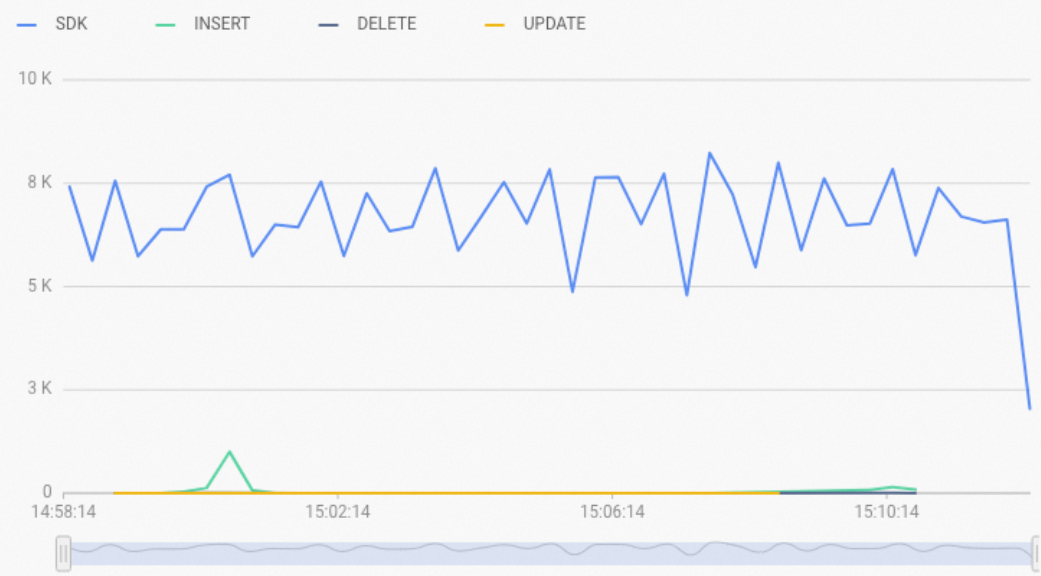
-
To view the SQL execution plan, run an
EXPLAINstatement. If the returned execution plan containsFixedXXXNode, a fixed plan has been triggered, as shown in the following figure. If the execution plan does not containFixedXXXNode, review the support conditions described in the preceding sections and verify that your statement meets the requirements.
Performance tuning
If you still need to tune performance with a fixed plan enabled, you can use the following methods.
-
Analyze the execution plan to identify performance bottlenecks. Run
EXPLAINon an SQL statement to view the time consumed at each stage and locate bottlenecks. -
Hologres versions 1.1.49 and later are optimized for point queries that use a fixed plan, improving throughput by more than 30% in large-scale scenarios. To benefit from this improvement, upgrade your instance to V1.1.49 or a later version.
-
Use client-side batching with a batch size of 512 or a multiple of 512. Holo Client handles batching automatically.
FAQ
-
Symptom: When you try to connect to Hologres, the following error occurs:
role/database does not exist.-
Cause: The specified user or database does not exist.
-
Solution: Check your connection information and ensure that the username and database name are correct.
Log on to the Hologres console. Find the target instance and click Manage in the Actions column. Click Database Management. You can then verify the username on the Users page and the database name on the Database Authorization page.
-
-
Symptom: During a data write operation, the following error occurs:
the requested table name: xxx (id: xx, version: xx) mismatches the version of the table (id: xx, version: xx) from server.-
Cause: The table metadata changes during the data write operation (for example, a column is added), which changes the table version.
-
Solution: Re-establish the connection. The fixed plan then retrieves the new table metadata to complete the write operation.
-