From V1.1, Hologres supports a primary instance with up to 10 read-only secondary instances on shared storage. This separates read and write traffic, providing load and fault isolation without data duplication. Storage is billed only once.
Set up primary and secondary instances
Step 1: Purchase a read-only secondary instance
-
Go to the Hologres purchase page.
-
Set Instance Type to Read-only Secondary Instance.
-
For Primary Instance ID of the Read-only Secondary Instance, select the ID of the primary instance.
-
Configure the remaining parameters. Purchase a Hologres instance.
The read-only secondary instance must be in the same region as the primary instance.
Step 2: Verify the secondary is attached
After purchase, the secondary is automatically attached to the selected primary. Wait for the instance state to change to Running as Expected.
Step 3: Connect to the secondary endpoint
Each secondary instance has its own endpoint. Route read traffic to different secondary endpoints to isolate workloads by business scenario.
Usage guidelines
-
Perform all writes, DDL, authorization, and parameter changes on the primary instance. Secondary instances are read-only.
-
Secondary instances inherit all objects (users, tables, access policies) from the primary. You cannot create instance-specific users on a secondary.
-
Route production read traffic to secondary endpoints after setup.
Recommended scenarios
|
Scenario |
Primary instance |
Secondary instances |
|
Read/write splitting |
Data ingestion and transformation |
Data analytics |
|
Online service isolation (high P99 stability) |
All writes |
Dedicated replica for online queries, isolated from other workloads |
|
OLAP query isolation |
All writes |
Separate analytics-focused replica, distinct from the online service replica |
How it works
Single-instance automatic recovery
Every Hologres instance has built-in automatic recovery. No manual O&M is required.
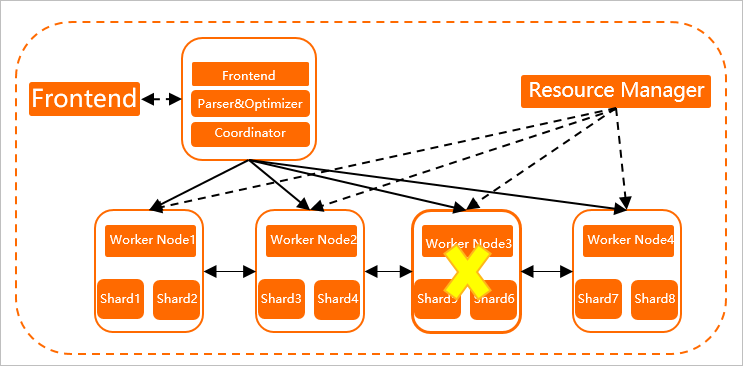
Compute nodes run in containers (Worker Nodes). The Resource Manager health-checks every container periodically. If a container fails to respond within one minute—due to OOM, hardware failure, or software bugs—the Resource Manager launches a replacement node and migrates shard responsibilities to it.
Data resides in the Pangu distributed storage system, not on compute nodes. Because compute nodes are stateless, recovery completes without data migration—approximately one minute in V1.1 and later, 5–10x faster than earlier versions.
Queries that hit a recovering node fail immediately during recovery.
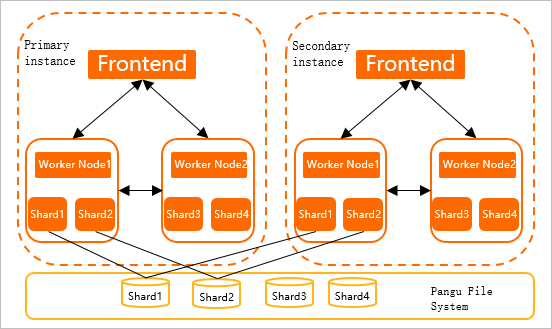
Multi-instance shared storage architecture
Single-instance recovery still causes a brief unavailability window. For workloads requiring continuous availability, V1.1 and later supports multi-instance deployment with shared storage.
|
Component |
Capabilities |
|
Primary instance |
Read/write operations, permission management, system parameter configuration |
|
Secondary instances |
Read-only; all changes (table creation, user authorization, system parameters) must be made on the primary instance |
Instances share data and access policies but not compute resources, providing load and fault isolation. Storage is billed once.
Synchronization between instances
Memory states synchronize in real time between instances—millisecond latency within the same region. Writes to the primary are automatically synced to all secondaries.
Secondary instances consume approximately 1/8 of the primary's CPU and memory even when idle. Avoid significantly different specifications between primary and secondary instances.
Prerequisites
Verify the following:
|
Requirement |
Detail |
|
Hologres version |
V1.1 or later for the primary instance. For earlier versions, see Common upgrade preparation errors or join the Hologres user group to request an upgrade. For more information, see Get online support for Hologres |
|
Region |
Primary and secondary instances must reside in the same region |
|
Version parity |
Primary and secondary instances must run the same Hologres version |
|
RAM permissions |
The RAM user performing attach/detach operations must have the AliyunHologresFullAccess policy. Grant permissions to RAM users. |
Limits
|
Constraint |
Detail |
|
Maximum secondary instances |
10 read-only secondary instances per primary instance |
|
Shard count |
All instances must have the same number of shards |
|
Specifications |
Resource configurations can differ between instances but should not vary significantly |
|
Unattached replicas |
A read-only secondary instance cannot accept connections until it is attached to a primary instance |
|
Attach duration |
Attaching a replica takes approximately 3 to 5 minutes. The replica is unavailable until the process completes |
|
Primary availability during attach |
The primary instance remains fully operational while a replica is being attached |
|
Synchronization latency threshold |
In V1.3.27 and later, the threshold is 60 minutes (previously 20 minutes). If replica utilization stays at 100% for over 60 minutes, the replica restarts automatically. For sustained high utilization, tune performance or scale out. |
|
MaxCompute direct read |
When MaxCompute reads directly from the Hologres storage layer in a primary-secondary architecture, the connection URL must point to the primary instance, not a replica. Enable direct read from Hologres foreign table storage. |