The hologres.hg_worker_info system view shows how shards are distributed across workers and which virtual warehouse each worker belongs to. Use it to diagnose uneven CPU utilization — a common sign of workload skew — and take targeted corrective action.
Limits
Only Hologres V1.3.23 and later support
hologres.hg_worker_info. Check your instance version on the instance details page in the Hologres console. If the version is earlier than V1.3.23, upgrade the instance manually or contact support. For upgrade instructions, see Instance upgrades.The view shows real-time shard allocation only. Historical allocation data is not available.
After creating a table group,
worker_idis populated with a delay of 10 to 20 seconds. Querying immediately after creation may return an emptyworker_id.If a table group has no tables, no resources are allocated to workers. In this case,
worker_idappears asid/0. In Hologres V2.1 and later, workers with no shards also appear in the view, with an emptyworker_id.The view covers the current database only. To get a full instance-level view, query each database separately and aggregate the results.
View the shard allocation
The hologres.hg_worker_info view exposes four fields:
| Field | Data type | Description |
|---|---|---|
worker_id | TEXT | ID of the worker in the current database |
table_group_name | TEXT | Name of the table group |
shard_id | BIGINT | ID of the shard within the table group |
warehouse_id | BIGINT | ID of the virtual warehouse the worker belongs to |
Run the following statement to view the current shard allocation:
SELECT * FROM hologres.hg_worker_info;Example output:
 worker_id  | table_group_name | shard_id
------------+------------------+----------
 bca90a00ef | tg1              |        0
 ea405b4a9c | tg1              |        1
 bca90a00ef | tg1              |        2
 ea405b4a9c | tg1              |        3
 bca90a00ef | db2_tg_default   |        0
 ea405b4a9c | db2_tg_default   |        1
 bca90a00ef | db2_tg_default   |        2
 ea405b4a9c | db2_tg_default   |        3
 ea405b4a9c | db2_tg_internal  |        3
xx_tg_internal is the built-in table group used to manage metadata. Ignore it when analyzing shard distribution.Diagnose workload skew
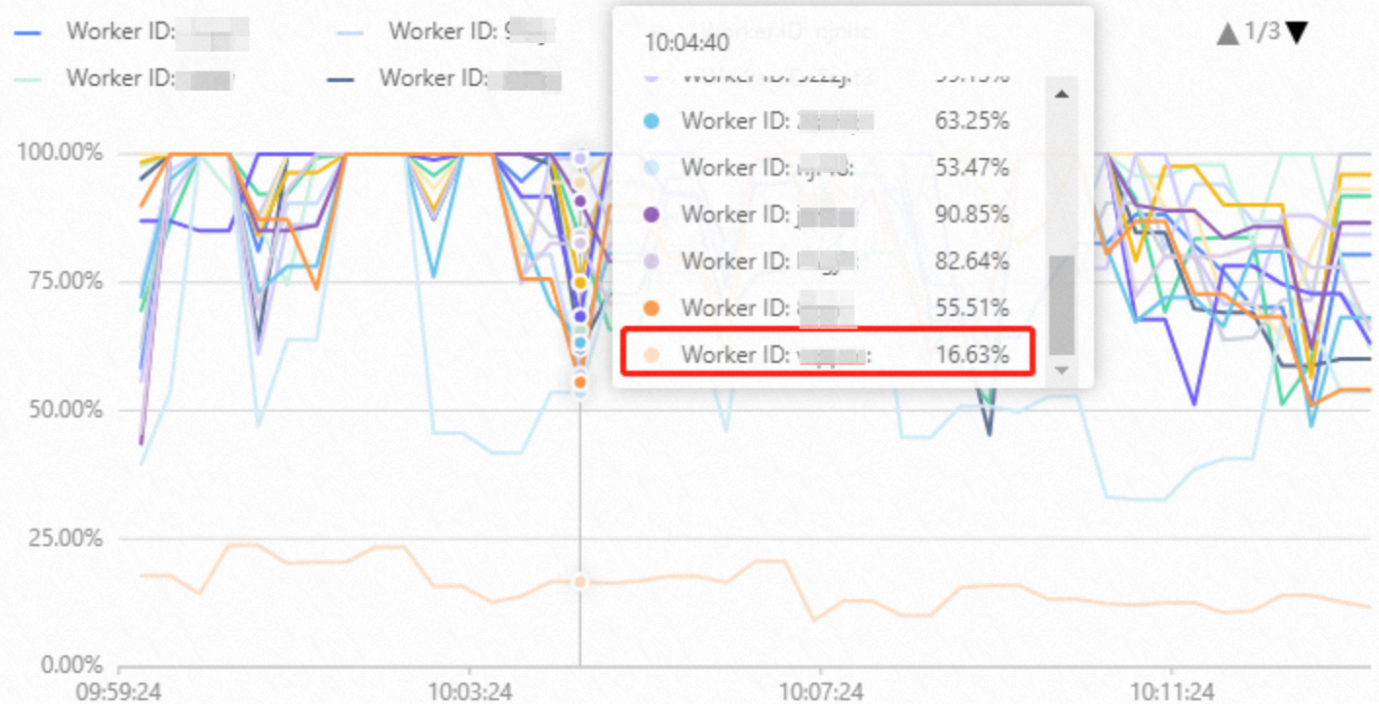
If one or more workers show consistently lower CPU utilization than others, shards may not be evenly distributed. Run this query first to check the shard count per worker:
SELECT worker_id, COUNT(1) AS shard_count
FROM hologres.hg_worker_info
GROUP BY worker_id;
A balanced instance has the same shard_count across all workers. If the counts differ, continue with the cause-specific analysis below to identify the root cause.
Handle workload skew
Workload skew has three common causes. Identify which applies to your instance, then apply the corresponding fix.
Cause 1: Uneven shard redistribution after worker failover
When a worker fails — for example, due to an out of memory (OOM) error — the system temporarily moves that worker's shards to other workers. After the worker recovers, some shards are moved back, but the redistribution may be uneven.
Because workers are shared across all databases in an instance while hg_worker_info only shows the current database, check each database separately and sum the results to get the total shard count per worker across the instance.
Diagnose
SELECT worker_id, COUNT(1) AS shard_count
FROM hologres.hg_worker_info
GROUP BY worker_id;
Example output for a six-worker instance:
 worker_id  | shard_count
------------+-------------
 bca90a     |      4
 ea405b     |      4
 tkn4vc     |      4
 bqw5cq     |      3
 mbbrf6     |      3
 hsx66f     |      1
(6 rows)
The shard counts differ significantly across workers — hsx66f holds only 1 shard while others hold 3 or 4, a ratio of 4:1. Workers with fewer shards typically show lower CPU utilization in the Hologres console.
Fix
Restart the instance. This triggers a full shard rebalance across all workers. Without a restart, idle workers only receive additional shards if another worker fails again.
Cause 2: Data skew
When most rows in a table are concentrated on a small number of shards, workers that own those shards process a disproportionate amount of data. This causes their CPU utilization to spike while other workers remain underutilized.
Diagnose
Step 1: Check for data skew in the table.
SELECT hg_shard_id, COUNT(1)
FROM <table_name>
GROUP BY hg_shard_id
ORDER BY 2;
Example output showing a skewed table — shard 39 holds roughly five times more rows than the others:
hg_shard_id | count
-------------+--------
          53 |  29130
          65 |  28628
          66 |  26970
          70 |  28767
          77 |  28753
          24 |  30310
          15 |  29550
          39 | 164983
Step 2: Identify the worker responsible for the skewed shard.
Replace <tablename> and <shard_id> with the values from the previous step:
SELECT DISTINCT b.table_name, a.worker_id, a.table_group_name, a.shard_id
FROM hologres.hg_worker_info a
JOIN (
    SELECT property_value, table_name
    FROM hologres.hg_table_properties
    WHERE property_key = 'table_group'
) b
ON a.table_group_name = b.property_value
AND b.table_name = '<tablename>'
AND shard_id = <shard_id>;
Example output:
table_name  | worker_id  | table_group_name  | shard_id
------------+------------+-------------------+----------
 table03    | bca90a00ef | db2_tg_default    |       39
If the CPU utilization of bca90a00ef is much higher than that of other workers, data skew is the cause.
Fix
Reconfigure the distribution key so rows spread more evenly across shards. For detailed guidance, see Optimize performance of queries on Hologres internal tables.
Split severely skewed tables. If the data is inherently skewed — for example, a livestreaming orders table where a few top streamers account for the vast majority of gross merchandise volume (GMV) — split the table by the skewed dimension rather than trying to redistribute it.
Cause 3: Shard count not aligned with worker count
Shard counts that are not multiples of the worker count cause uneven allocation by design: some workers always get one extra shard.
Diagnose
SELECT table_group_name, worker_id,
       COUNT(1) AS shard_count, warehouse_id
FROM hologres.hg_worker_info
GROUP BY table_group_name, worker_id, warehouse_id
ORDER BY table_group_name DESC;
Example output for a two-worker instance:
table_group_name | worker_id  | shard_count  | warehouse_id
------------------+------------+--------------+-------------
 tg2              | ea405b4a9c |           1  |           1
 tg2              | bca90a00ef |           2  |           2
 tg1              | ea405b4a9c |           5  |           1
 tg1              | bca90a00ef |           6  |           2
 db2_tg_default   | bca90a00ef |           4  |           2
 db2_tg_default   | ea405b4a9c |           4  |           1
 db2_tg_internal  | bca90a00ef |           1  |           2
(7 rows)
Reading the output:
tg2has 3 shards across 2 workers (1 vs. 2) — not a multiple of 2, so one worker always has more.tg1has 11 shards across 2 workers (5 vs. 6) — same issue.db2_tg_defaulthas 8 shards across 2 workers (4 vs. 4) — evenly distributed.
Fix
Set the shard count for each table group to a multiple of the number of workers. Estimate the right value based on your business requirements, then reconfigure or scale out the instance accordingly.