StarRocks supports multiple data models for various business scenarios, and all data must be organized according to a specific model. Learn the basic concepts, principles, system configurations, use cases, best practices, and FAQ for different import methods.
Background information
Data import cleans, transforms, and loads raw data into StarRocks based on a specific data model for querying. StarRocks provides multiple import methods that you can choose from based on data volume, import frequency, and other business requirements.
The following figure shows the relationship between StarRocks import methods and various data sources.
You can choose different import methods based on the data source:
-
Offline data import: If your source data is in Hive or HDFS, use Broker Load. For complex imports that involve many data tables, you can use . This method has lower performance than Broker Load but avoids data migration. If a single table has a very large data volume, or to use it as a global data dictionary for precise deduplication, consider using Spark Load.
-
Real-time data import: After you synchronize log data and database binary logging (binlog) to Kafka, you can use Routine Load to import the data into StarRocks. If your import process involves complex table joins and extract, transform, and load (ETL) pre-processing, you can use Flink (Flink Connector) to process the data first. Then, you can write the data to StarRocks using Stream Load.
-
Writing to StarRocks from a program: You can use Stream Load. For examples, see the Java or Python demos in the Stream Load documentation.
-
Importing text files: You can use Stream Load.
-
Importing MySQL data: You can use MySQL external tables. To import the data, run the
insert into new_table select * from external_tablecommand. -
Internal import within StarRocks: You can use the Insert Into method. This method works with external schedulers to perform simple ETL processing.
The images and some content in this topic are from the Overview of data loading documentation for open source StarRocks.
Precautions
When you import data into StarRocks, you typically use a program to establish a connection. Note the following:
-
Choose a suitable import method: Select an import method based on the data volume, import frequency, and data source location.
For example, if the source data is on HDFS, you can use Broker Load.
-
Determine the protocol for the import method: If you choose Broker Load, the external system must be able to use the MySQL protocol to periodically submit and check import jobs.
-
Determine the type of import method: Import methods are either synchronous or asynchronous. For an asynchronous import method, after you submit the import job, you must run a command to view the job status. The result of this command indicates whether the import was successful.
-
Create a label generation policy: The policy must ensure that each label is unique and fixed for each batch of data.
-
Ensure Exactly-Once semantics: The external system must ensure At-Least-Once data import. The StarRocks label mechanism ensures At-Most-Once data import. Together, these two mechanisms guarantee Exactly-Once semantics for the entire data import process.
Terms
|
Term |
Description |
|
Import job |
Reads the source data submitted by the user, cleans and transforms it, and then loads it into the StarRocks system. After the import is complete, the data can be queried. |
|
Label |
Identifies an import job. All import jobs have a label. A label can be user-specified or system-generated and is unique within a database. A label can only be used for one successful import job. After an import job with a specific label succeeds, you cannot reuse that label to submit another import job. If an import job fails, the label can be reused. This mechanism ensures At-Most-Once import semantics. |
|
Atomicity |
All import methods in StarRocks provide atomicity. This means that for a single import job, either all valid data is successfully imported, or none of it is. A partial import does not occur. Valid data here does not include data filtered out due to quality issues, such as type conversion errors. For more information about data quality issues, see FAQ about data import. |
|
MySQL and HTTP protocols |
StarRocks provides two access protocol interfaces for submitting jobs: the MySQL protocol and the HTTP protocol. |
|
Broker Load |
Reads data from external sources such as HDFS through a deployed broker program and imports it into StarRocks. The broker process uses its own computing resources to pre-process the data. |
|
Spark Load |
Uses external Spark resources to pre-process data and generate intermediate files that StarRocks reads for import. Spark Load is asynchronous — create the import job using the MySQL protocol and check results with the SHOW LOAD command. |
|
FE |
Frontend (FE). The metadata and scheduling node of StarRocks, responsible for generating import execution plans and scheduling import tasks. |
|
BE |
Backend (BE). The computing and storage node of StarRocks, responsible for data ETL and storage during import. |
|
Tablet |
A logical shard of a StarRocks table. A table can be divided into multiple tablets according to partitioning and bucketing rules. For more information, see Data distribution. |
Basic principles
The import execution flow is shown in the following figure.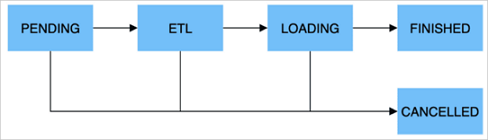
An import job consists of the following five stages.
|
Stage |
Description |
|
PENDING |
Optional. In this stage, the import job has been submitted and is waiting for the FE to schedule its execution. Broker Load and Spark Load include this stage. |
|
ETL |
Optional. This stage performs data pre-processing, including cleaning, partitioning, sorting, and aggregation. Spark Load includes this stage. It uses the external computing resource Spark to complete the ETL process. |
|
LOADING |
In this stage, the data is first cleaned and transformed, and then sent to the BEs for processing. After all data is loaded, the job enters a waiting state for the data to take effect. The import job status is still LOADING at this time. |
|
FINISHED |
After all data involved in the import job takes effect, the job status changes to FINISHED. Data from a FINISHED job can be queried. FINISHED is the final state of a successful import job. |
|
CANCELLED |
Before the job status changes to FINISHED, it can be canceled at any time and enter the CANCELLED state. For example, you can cancel it manually, or an error can occur during the import. CANCELLED is also a final state for an import job. |
The data import formats are listed in the table.
|
Type |
Description |
|
Integer types |
TINYINT, SMALLINT, INT, BIGINT, and LARGEINT. For example: 1, 1000, 1234. |
|
Floating-point types |
FLOAT, DOUBLE, and DECIMAL. For example: 1.1, 0.23, 0.356. |
|
Date types |
DATE and DATETIME. For example: 2017-10-03, 2017-06-13 12:34:03. |
|
String types |
CHAR and VARCHAR. For example: I am a student, a. |
Import methods
StarRocks provides five import methods for various data sources such as HDFS, Kafka, and local files. These methods are either synchronous or asynchronous.
All import methods support the CSV data format. Broker Load also supports the Parquet and ORC data formats.
Introduction to import methods
|
Import method |
Description |
Import type |
|
Broker Load |
Reads external data sources through a broker process and creates an import job in StarRocks via the MySQL protocol. The job runs asynchronously. View results with the Suitable for data in broker-accessible storage systems such as HDFS, with data volumes from tens to hundreds of gigabytes. For more information, see Broker Load. |
Asynchronous import |
|
Spark Load |
Uses external Spark resources to pre-process imported data, improving performance for large datasets and reducing StarRocks cluster resource usage. This asynchronous method requires creating jobs via the MySQL protocol and checking results with the Spark Load is suitable for migrating large amounts of data (up to the terabyte level) to StarRocks for the first time. The source data must be in a storage system that Spark can access, such as HDFS. For more information, see Spark Load. |
Asynchronous import |
|
Stream Load |
A synchronous method that imports local files or data streams into StarRocks via the HTTP protocol. The import result is returned directly in the response. Suitable for importing local files or streaming data from a program. For more information, see Stream Load. |
Synchronous import |
|
Routine Load |
Automatically imports data from a specified source by creating a persistent thread. Submit a routine load job through the MySQL protocol to continuously read and import data from sources such as Kafka. For more information, see Routine Load. |
Asynchronous import |
|
Insert Into |
Similar to the `Insert` statement in MySQL, StarRocks provides the |
Synchronous import |
Import types
If an external program uses the StarRocks data import feature, you must first determine which type of import method to use, and then define the connection logic.
-
Synchronous import
In a synchronous import, StarRocks executes the task immediately and returns the result, which indicates whether the import succeeded.
Procedure:
-
The user (external system) creates an import task.
-
StarRocks returns the import result.
-
The user (external system) checks the import result. If the import fails, the user can create the import task again.
-
-
Asynchronous import
In an asynchronous import, StarRocks returns a creation-success message immediately, but the data is not yet imported. You must poll the job status by running a command. If task creation fails, you can retry based on the failure information.
Procedure:
-
The user (external system) creates an import task.
-
StarRocks returns the result of the task creation.
-
The user (external system) checks the task creation result. If the task is created successfully, proceed to step 4. Otherwise, return to step 1 and try to create the import task again.
-
The user (external system) polls the task status until it is FINISHED or CANCELLED.
-
Scenarios
|
Scenario |
Description |
|
HDFS import |
If the source data is stored in HDFS and the data volume is between tens and hundreds of gigabytes, you can use the Broker Load method to import data into StarRocks. The deployed broker process must be able to access the HDFS data source. The import job runs asynchronously. You can view the import result using the If the source data is stored in HDFS and the data volume reaches the terabyte level, you can use the Spark Load method to import data into StarRocks. The deployed Spark process must be able to access the HDFS data source. The import job runs asynchronously. You can view the import result using the For other external data sources, you can also use Broker Load or Spark Load to import data, as long as the broker or Spark process can read from the corresponding data source. |
|
Local file import |
For local files under 10 GB, use Stream Load. Create the import job via the HTTP protocol — the job runs synchronously and returns the result directly. |
|
Kafka import |
For real-time data from streaming sources like Kafka, use Routine Load. Create a routine load job via the MySQL protocol, and StarRocks continuously reads and imports data. |
|
Insert Into import |
For manual testing and temporary data processing, you can use the The |
Memory limits
Set parameters to limit memory usage per import job and prevent out-of-memory (OOM) errors. The method for limiting memory varies by import method — see each method's documentation for details.
An import job is typically distributed across multiple BEs. The memory limit parameter restricts the memory usage of one import job on a single BE, not the total across the cluster. Each BE also has a total memory limit for all import jobs. For more information, see General system configurations.
A small memory limit may reduce import efficiency by causing frequent disk writes, while a large limit risks OOM errors under high concurrency. Set memory parameters based on your workload requirements.
General system configurations
FE configurations
Configure the following FE parameters in the fe.conf file.
|
Parameter |
Description |
|
max_load_timeout_second |
The maximum and minimum timeout period for an import job, in seconds. The default maximum timeout is 3 days, and the default minimum is 1 second. The custom timeout you set for an import job cannot exceed this range. This parameter applies to all types of import tasks. |
|
min_load_timeout_second |
|
|
desired_max_waiting_jobs |
The maximum number of import tasks that the waiting queue can hold. The default value is 100. For example, if the number of import tasks in the PENDING state (waiting for execution) on the FE reaches this value, new import requests are rejected. This configuration applies only to asynchronously executed imports. If the number of waiting asynchronous import tasks reaches the limit, subsequent requests to create import jobs are rejected. |
|
max_running_txn_num_per_db |
The maximum number of running import tasks in each database. This is counted across all import types. The default value is 100. When the number of running import tasks in a database exceeds the maximum value, subsequent import tasks are not executed. For synchronous jobs, the job is rejected. For asynchronous jobs, the job waits in the queue. |
|
label_keep_max_second |
The retention period for import task records. Records of completed (FINISHED or CANCELLED) import tasks are kept in the StarRocks system for a period of time determined by this parameter. The default value is 3 days. This parameter applies to all types of import tasks. |
BE configurations
Configure the following BE parameters in the be.conf file.
|
Parameter |
Description |
|
push_write_mbytes_per_sec |
The write speed limit for a single tablet on a BE. The default value is 10, which means 10 MB/s. The maximum write speed for a single tablet on a BE is typically between 10 MB/s and 30 MB/s, depending on the schema and system. You can adjust this parameter to control the import speed. |
|
write_buffer_size |
During data import, data is first written to a memory block on the BE. When this memory block reaches a threshold, it is written to disk. The default value is 100 MB. A small threshold can cause many small files on the BE. You can increase this threshold to reduce the number of files. However, a large threshold can cause RPC timeouts. For more information, see the tablet_writer_rpc_timeout_sec parameter. |
|
tablet_writer_rpc_timeout_sec |
The RPC timeout for sending a batch (1024 rows) during the import process. The default is 600 seconds. This RPC may involve writing multiple tablet memory blocks to disk. Therefore, an RPC timeout can occur due to disk writing. You can adjust the timeout to reduce timeout errors, such as send batch fail. Also, if you increase the write_buffer_size parameter, you should also increase the tablet_writer_rpc_timeout_sec parameter. |
|
streaming_load_rpc_max_alive_time_sec |
During the import process, StarRocks starts a writer for each tablet to receive and write data. This parameter specifies the writer's wait timeout. The default is 600 seconds. If the writer does not receive any data within the specified time, it is automatically destroyed. When the system processing speed is slow, the writer may not receive the next batch of data for a long time, causing an import error: |
|
load_process_max_memory_limit_percent |
These parameters specify the maximum memory and maximum memory percentage, respectively. They limit the total memory that can be used for import tasks on a single BE. The system uses the smaller of the two values as the final memory limit for import tasks on the BE.
|
|
load_process_max_memory_limit_bytes |