When you distribute static resources, such as images, audio, video, and documents from Object Storage Service (OSS), you can use ESA acceleration to significantly improve access speed, reduce network latency, and lower data transfer costs.
Use case
A website uses OSS to store a large volume of static assets, such as images and videos, primarily serving users outside the Chinese mainland. As the user base grows, response times for file downloads and asset loading increase, and users who are geographically distant experience higher latency. To resolve this issue, the website uses ESA to accelerate access to OSS. This solution provides fast content delivery at a minimal cost and includes security features like Web Application Firewall (WAF) and DDoS protection to improve the overall user experience and website security.
How it works
Store your static resources in a private OSS bucket and use ESA to accelerate access. When a client sends a request, ESA automatically selects the fastest point of presence (POP) based on the domain name. If the POP has the requested resource cached, it serves the resource directly to the user. If the resource is not cached, the POP sends an origin fetch request to the origin server. The POP then returns the resource to the user and caches it for subsequent requests.

Usage notes
When you use this feature for the first time, you must enable the default permission policy. After the policy is enabled, it grants ESA read-only access to all buckets in your OSS account. This access uses temporary tokens from Security Token Service (STS) and does not allow write or delete operations, such as PUT.
If you choose to configure a permanent security token, ensure that you restrict its permissions to prevent write or delete operations, such as PUT, on your OSS buckets. For more information about how to configure OSS access permissions for a RAM user, see Mitigate unauthorized access risks from leaked account credentials.
After granting authorization and enabling the private bucket origin fetch feature for an accelerated domain name, you can use the accelerated domain name to access all resources in the private bucket. Make this decision carefully based on your business needs. If the content in the private bucket is not suitable as origin content for ESA acceleration, do not grant authorization or enable this feature.
If your website is at risk of attacks, purchase an advanced DDoS protection service and be cautious when you authorize or enable the private bucket origin fetch feature.
The ESA feature for origin fetch from a private OSS bucket is incompatible with the default index page setting of the OSS static website hosting feature. If you need to use both features at the same time, see "You are forbidden to list buckets" error is reported when I access a domain name after I enable origin fetch from a private OSS bucket.
After enabling the private bucket origin fetch feature, an ESA point of presence (POP) adds a header named
Authorizationto the origin fetch request, which contains the authentication signature for the private OSS bucket. Note that an origin fetch request to OSS will fail authentication if it contains signatures in both the header and URL parameters.
Prerequisites
You have created an Alibaba Cloud account.
You have activated Object Storage Service (OSS) and stored your static resources in a private bucket.
You have registered a domain name.
NoteIf your acceleration region includes the Chinese mainland, you must obtain an ICP filing for the domain name.
Add a website
After adding your website's root domain, such as example.com, to ESA, you can accelerate and manage the root domain and all its subdomains.
Step 1: Add a website
In the ESA console, go to the Websites page and click Add Website.
On the Enter Website page, enter the root domain of the website that you want to add, such as
example.com, and click Next.
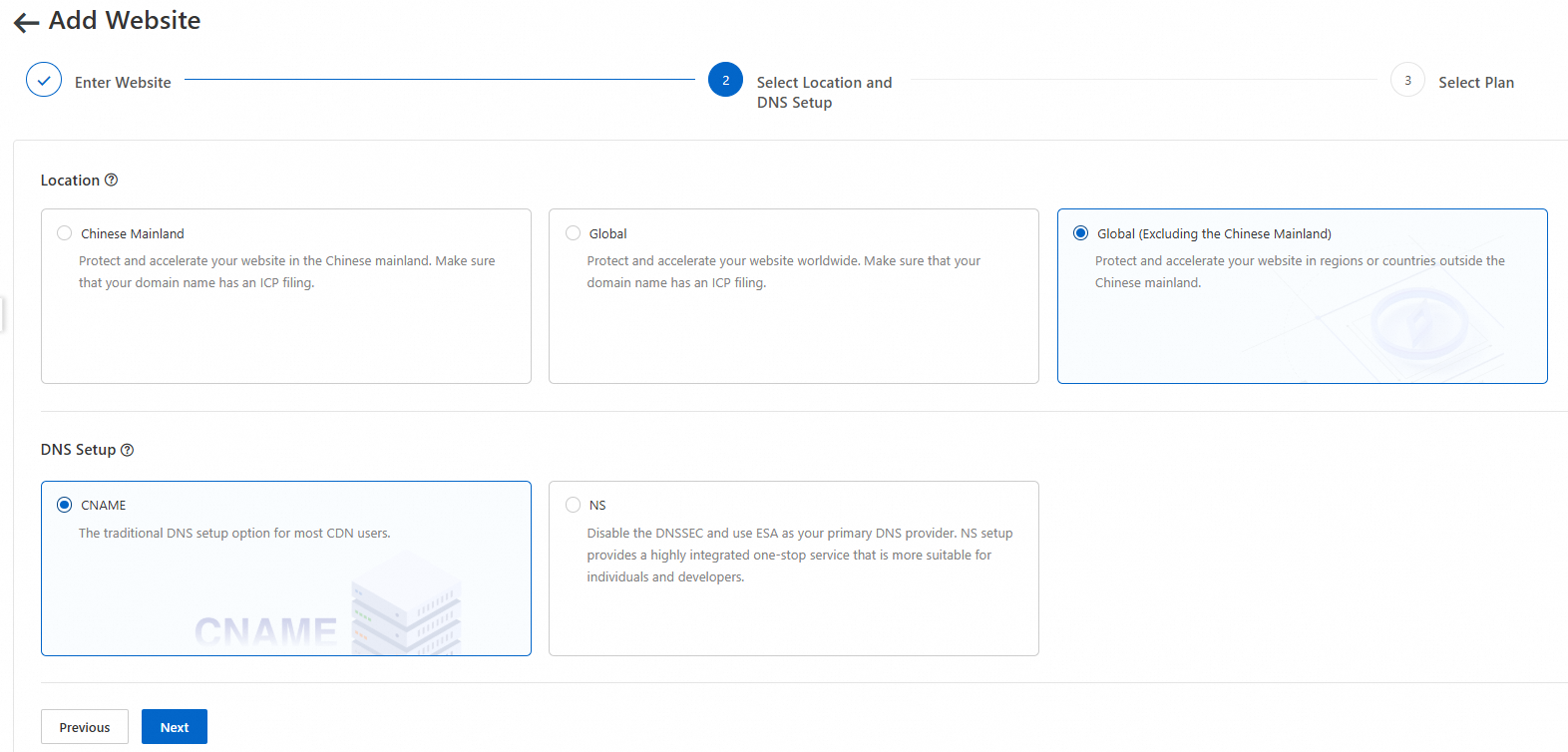
In the Select Location and DNS Setup section, select Global (Excluding the Chinese Mainland). For DNS Setup, select CNAME and click Next.
-
On the Select Plan page, you can choose a suitable plan by selecting New Plans or binding an Purchased Plans, and then follow the instructions in the console to complete the plan purchase.
New plan
On the New Plans tab, select a plan.

Existing plan
On the Purchased Plans tab, select an existing plan to bind.

On the Select Plan page, associate a plan based on your needs:
If you have not purchased a package, on the New Plans tab, select the appropriate package specifications. Confirm the Total Cost and click Buy Now. After the payment is complete, return to the console to confirm.
If you have an available plan, select it on the Purchased Plans tab and click OK.
To activate pay-as-you-go, on the New Pay-as-you-go Instances tab, complete the configuration, select the service agreement, and then click OK.
To associate an existing pay-as-you-go instance, select an instance on the Purchased Pay-as-you-go Instances tab, and then click OK.
If the system displays the message The selected location is not supported by the current plan. Select another plan or return to the previous step to change the location., select a plan that covers the selected acceleration region, or click Previous to change the acceleration region.
If your website is a subdomain, the following message is displayed: Only supports root domains such as example.com. To add a subdomain, please upgrade to a paid plan. For a comparison of plan features, see Select a suitable plan.
After associating a plan, the system automatically proceeds based on the selected DNS setup method:
If you selected ESA One-Stop Service (NS connection): You are redirected to the DNS record configuration page. Proceed to complete the NS connection setup.
If you selected For CDN Users (CNAME connection): You are redirected to the website overview page.
Step 2: Verify domain ownership
You must verify ownership of your domain name the first time you add it to ESA.
On the Overview page, copy the Record Type, Hostname, and Record Value that ESA generates for you.

Log on to the Alibaba Cloud DNS console. On the Public Zone page, find your domain name, such as
example.com, and click Settings in the Actions column.Click Add Record, fill in the parameters with the values you copied in Step 1, and then click OK.
Record Type:
TXTHostname:
_esaauthQuery Source: Default
Record Value:
verify_3***9e1TTL: 10 (Recommended)
Return to the ESA console. On the Overview page of your website, click Verify.
If the system displays a Verification Successful message, the verification is complete.
Add and resolve a domain name
To enable acceleration, you must add the accelerated domain name to ESA and then create a DNS record for it in Alibaba Cloud DNS. This section uses the domain name images.example.com and the private OSS bucket endpoint bucket***aliyuncs.com as an example. In practice, replace these examples with your actual domain name and bucket endpoint.
Common examples for the Hostname value include: www (resolves to www.example.com), @ (resolves the root domain example.com), mail (resolves to mail.example.com, typically for email services), and * (wildcard resolution, which matches all other subdomains like *.example.com). Different plans have limits on the number of wildcard domains.
Step 1: Add a domain in ESA
You need to add a DNS record to configure information such as the accelerated domain name and the OSS private bucket address on the ESA server to obtain a CNAME value.
In the ESA console, select Websites and click your target website in the Website column.
In the left-side navigation pane, choose , and click Add Record. Fill in the record parameters as described below, and then click Next.
Record Type: CNAME.
Hostname:
images.Proxy Status: Enable proxy acceleration.
Record Value: Select OSS.
Access Type: Select Private Access (STS Temporary Token).
Authorization: By default, access to private buckets in the same OSS account is automatically authorized.
OSS Bucket: Select
bucket***aliyuncs.com.TTL: The default is Auto.
Select Image/Video and click OK.
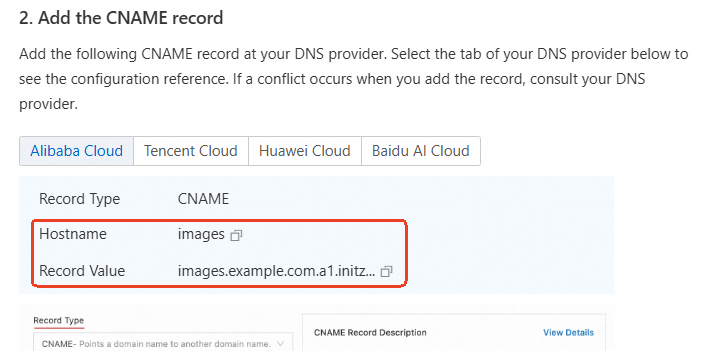
In the CNAME Configuration Guide, copy the Hostname and Record Value. Then, go to the Alibaba Cloud DNS console to add a CNAME record.
Step 2: Resolve the domain
After obtaining the CNAME value from ESA, you must add a corresponding CNAME record in Alibaba Cloud DNS. When a user accesses the accelerated domain name, Alibaba Cloud DNS resolves the request to the appropriate ESA point of presence (POP), which then provides the acceleration service.
In the Alibaba Cloud DNS console, on the Public Zone page, find your target domain name (such as
example.com) and click Settings in the Actions column.Click Add Record and fill in the parameters by using the Hostname and Record Value that you copied from ESA:
Record Type:
CNAMEHostname:
imagesQuery Source: Default
Record Value:
images.example.com.a1.initzz.comTTL: 10 (Recommended)
Wait a few minutes, then return to ESA to check whether the accelerated domain name is active. When the CNAME Status changes to Configured, acceleration is enabled.

Step 3: Verify acceleration
Access the same file through the ESA accelerated domain name and the bucket endpoint to verify the acceleration effect of ESA.
In our example, accessing the file through the accelerated domain name took approximately 128 ms, while accessing it through the bucket endpoint took 163 ms. This represents a speed increase of about 21%.
The data is for reference only. The actual effect may vary due to factors such as network environment and geographic location. Typically, acceleration is more significant for users who are closer to a point of presence (POP) or have a better network connection.
Access through the ESA accelerated domain name

Access through the bucket endpoint

Enable security protection
To improve the security of data in transit and the overall security posture of your website, you can configure multiple security features. These include DDoS protection to defend against flood attacks, Web Application Firewall (WAF) to protect web applications from malicious attacks, and SSL certificate management to ensure data-in-transit encryption. These features work together to help you build a more secure and reliable website environment.
Anomalous access protection
Protecting against anomalous access is a critical part of website security. It helps defend against malicious attacks and ensures the stability and availability of your website. ESA uses its native WAF capabilities, combined with predefined and custom rules, to intelligently filter client request traffic. This ensures that only legitimate, clean traffic reaches your server, reducing potential security risks. You can also enable anti-botting to effectively prevent malicious resource scraping and ensure service stability.

During runtime, ESA uses the Security Analytics and Event Analysis modules to collect and analyze client request data in real time to identify anomalous behavior. In combination with WAF custom rules, you can flexibly configure various protective actions, such as Block, Challenge, and Redirect, to precisely counter different types of attacks.
In addition, ESA enables the DDoS Basic Protection feature by default. This feature effectively defends against large-scale DDoS attacks and CC attacks, ensuring your website remains operational during high-traffic attacks.
With these multi-layered protective measures, ESA not only helps you quickly identify and block anomalous access but also provides robust security against complex attacks, comprehensively safeguarding your website.
Data-in-transit encryption
Encrypting data in transit is a key measure for securing network communications and effectively prevents sensitive data from being intercepted or tampered with during transmission. ESA provides a comprehensive data transmission security solution between clients and your origin server, ensuring data security at every step.

By default, ESA enables SSL/TLS encryption. The SSL/TLS protocol establishes an encrypted channel between the client and the server, ensuring the confidentiality and integrity of data during transmission.
To further enhance security, you can request a free edge certificate. Deploying an edge certificate enables clients to communicate with ESA POPs over HTTPS. This ensures data is encrypted and authenticated during transit.
In addition, ESA lets you enable the edge TLS mutual authentication feature. This feature establishes a bidirectional identity verification mechanism between clients and ESA POPs to ensure that only authorized clients can access the server. This mutual authentication mechanism improves data transmission security by preventing unauthorized access and malicious attacks.
These multi-layered security measures protect your business data from various network threats during transmission.
Recommended configurations
ESA provides multiple optimization strategies to improve resource access performance, optimize network performance, and enhance the cache hit ratio.
Optimize resource access performance
By enabling and optimizing website settings, ESA significantly improves application performance. Specifically, ESA uses several advanced technologies to comprehensively optimize accessed resources, such as custom image transformation, resource minification, and transport protocol upgrade. These optimizations improve your website's access speed from multiple aspects, ensuring that you can retrieve the resources you need more quickly, thereby improving the overall experience.
Custom image transformation: Automatically adjusts image size and format based on the user's device and screen size to reduce unnecessary data transfer.
Resource minification: Compresses and optimizes static resources by removing redundant code and unnecessary data to reduce the size of resource files.
Transport protocol upgrades: Supports the latest transport protocols, such as HTTP/2 and HTTP/3, to improve data transfer efficiency and reduce latency.
Optimize network performance
To further improve network transmission speed, ESA provides several network optimization settings that enhance overall network performance, from protocol support to communication methods.
IPv6 protocol support: ESA is fully compatible with the IPv6 protocol to improve the utilization of network address resources and optimize network connection efficiency.
Low-latency communication with WebSocket: ESA uses the WebSocket protocol for real-time communication to reduce data transmission latency and improve the response speed of real-time applications.
Efficient service interaction with gRPC: ESA provides low-latency, high-throughput service interaction based on the efficient gRPC communication mechanism, which is suitable for scenarios with extremely high performance requirements.
Intelligent rate limiting to prevent overload: ESA uses intelligent traffic control and load balancing technologies to prevent network congestion and overload, ensuring stable network transmission speed even in high-concurrency scenarios.
Improve cache hit ratio
To improve resource access speed, you can configure website cache policies or create cache rules in ESA to store frequently used resource files on POPs. When a user requests a file, the POP responds directly. This avoids long-haul origin fetch requests and significantly reduces resource loading time.
Website cache policy: Flexibly configure cache rules based on business needs to specify which resources to cache and which not to, maximizing the cache hit ratio.
POP storage: Stores popular resources and static files on globally distributed POPs, ensuring users can access resources from a nearby location to reduce network distance and latency.