DTS supports real-time incremental data synchronization from a self-managed MySQL database on an ECS instance to an ApsaraDB RDS for MySQL instance.
Prerequisites
This topic describes how to perform operations in the legacy DTS console. When you try to access the legacy console, you are automatically redirected to the new one. For instructions on how to perform operations in the new console, see Synchronize data from a self-managed MySQL database to an ApsaraDB RDS for MySQL instance.
The self-managed MySQL database runs version 5.1, 5.5, 5.6, 5.7, or 8.0.
You must have an ApsaraDB RDS for MySQL instance to use as the destination instance. The destination instance's storage capacity must be larger than the space used by the source database. For more information, see Create an ApsaraDB RDS for MySQL instance.
Precautions
During initial full data synchronization, DTS consumes read and write resources on both the source and destination databases. This can increase the database server load. If your databases have low specifications, poor performance, or heavy service traffic, the impact can be significant. For example, issues like numerous slow SQL queries, tables without primary keys on the source instance, or deadlocks on the destination instance can increase database pressure and may even cause service interruptions. Before you start the data synchronization task, evaluate the performance of your source and destination instances. Run the task during off-peak hours, such as when the CPU utilization of both instances is below 30%.
During data synchronization, do not use tools such as gh-ost or pt-online-schema-change to perform online DDL operations on the synchronization objects in the source database. Otherwise, the synchronization task fails.
If no data other than the data from DTS is written to the destination database, you can use Data Management (DMS) to perform online DDL operations. For more information, see Change table schemas without locking tables.
If a table to be migrated in the source database has no primary key or UNIQUE constraint, and its fields are not unique, duplicate data may appear in the destination database.
During initial full data synchronization, concurrent INSERT operations can cause table fragmentation in the destination instance. After the initial full data synchronization is complete, the table space in the destination instance is larger than that in the source instance.
If the destination instance is an ApsaraDB RDS for MySQL instance (excluding versions 5.7 and 8.0), DTS creates a data synchronization account named dtssyncwriter in the destination database. This account has write permissions and is used only by DTS.
Billing
Synchronization type | Pricing |
Schema synchronization and full data synchronization | Free of charge. |
Incremental data synchronization | Charged. For more information, see Billing overview. |
Supported synchronization topologies
One-way one-to-one synchronization
One-way one-to-many synchronization
One-way many-to-one synchronization
One-way cascading synchronization
Two-way one-to-one synchronization
NoteTo implement two-way synchronization, see Two-way synchronization between MySQL instances.
Supported SQL operations
|
Operation type |
SQL statement |
|
DML |
INSERT, UPDATE, DELETE, and REPLACE |
|
DDL |
|
Limitations
Incompatibility with triggers
When you synchronize an entire database, a trigger in the source database that updates a table within the same database can cause data inconsistency. For a solution, see How do I configure a synchronization or migration task if the source database contains triggers?.
Limitations on RENAME TABLE operations
A RENAME TABLE operation can cause data inconsistency. For example, if you select only Table A for synchronization and it is renamed to Table B during the process, DTS does not synchronize data from Table B to the destination database. To prevent this, select the entire database that contains the table as the synchronization object.
Before you begin
Before you configure a data synchronization task, you must create an account for a self-managed MySQL database and configure binary logging.
Procedure
Purchase a data synchronization instance. For more information, see Purchase a DTS Instance.
NoteWhen purchasing the instance, select MySQL for the source and destination instances, and select One-way Synchronization for the synchronization topology.
Log on to the Data Transmission Service console.
NoteIf you are redirected to the Data Management (DMS) console, you can click the
 icon in the lower-right corner and then click the
  icon to return to the previous version of the DTS console.
In the navigation pane on the left, click Data Synchronization.
At the top of the Synchronization Tasks page, select the region where the destination instance resides.
Find the purchased data synchronization instance and click Configure Task in the Actions column.

Configure the source and destination instances.
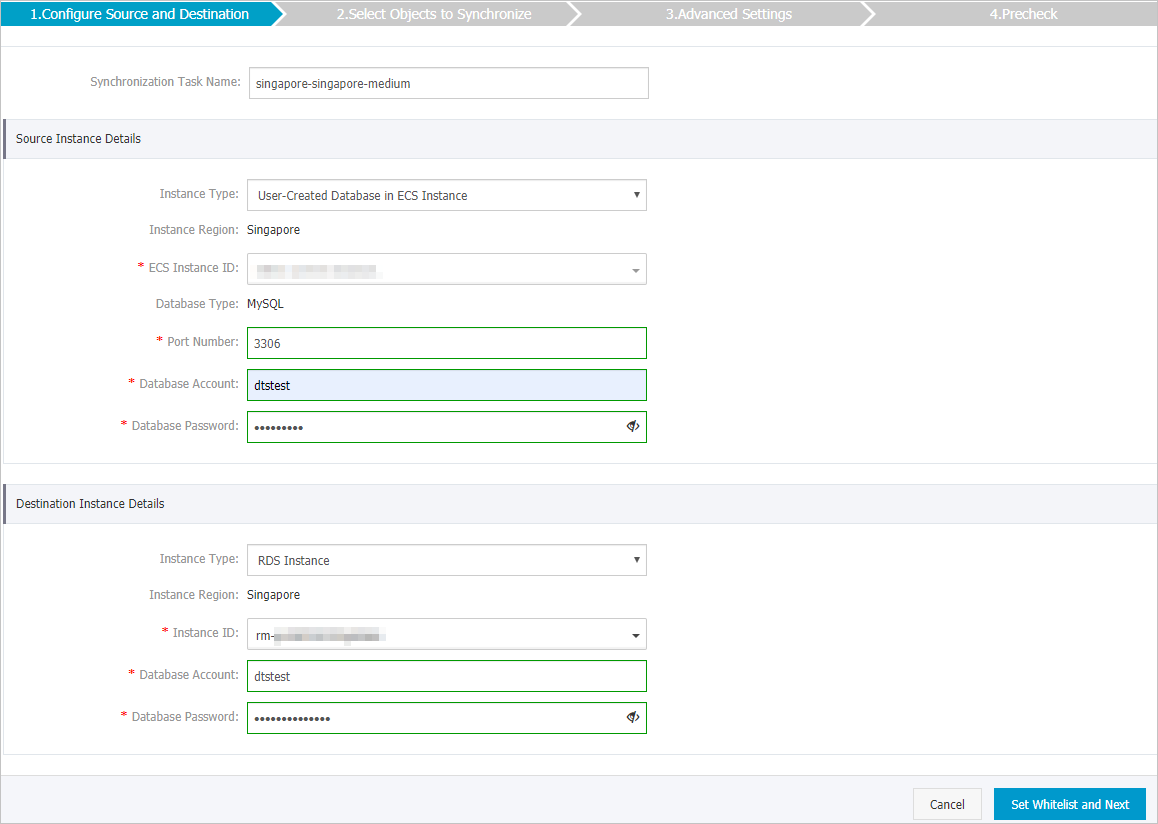
Section
Parameter
Description
N/A
Synchronization task name
DTS automatically generates a task name. We recommend specifying a descriptive name for easy identification. The name does not need to be unique.
Source instance details
Instance type
Select User-Created Database in ECS Instance.
Instance region
The region of the source instance that you selected when you purchased the data synchronization task. This parameter cannot be changed.
ECS instance ID
Select the ID of the ECS instance that hosts the source database.
Database type
The database type that you selected when you purchased the task: MySQL. This parameter cannot be changed.
Port number
Enter the service port of the self-managed MySQL database. The default value is 3306.
Database account
Enter the account for the self-managed MySQL database. The account must have the REPLICATION CLIENT, REPLICATION SLAVE, and SHOW VIEW permissions, and the SELECT permission on all synchronization objects.
Database password
Enter the password for the database account.
Destination instance details
Instance type
Select RDS Instance.
Instance region
The region of the destination instance that you selected when you purchased the data synchronization task. This parameter cannot be changed.
Instance ID
Select the ID of the destination ApsaraDB RDS for MySQL instance.
Database account
Enter the database account of the destination ApsaraDB RDS for MySQL instance.
NoteIf the database engine of the destination ApsaraDB RDS for MySQL instance is MySQL 5.5 or MySQL 5.6, you do not need to specify the database account and database password.
Database password
Enter the password for the database account.
Encryption
Select Non-encrypted or SSL-encrypted based on your requirements. If you select SSL-encrypted, you must enable SSL encryption for the ApsaraDB RDS for MySQL instance in advance. For more information, see Set SSL encryption.
ImportantCurrently, the Encryption can be set only in the Chinese mainland and China (Hong Kong) regions.
In the lower-right corner of the page, click Set whitelist and next.
If the source or destination database is an Alibaba Cloud database instance such as ApsaraDB RDS for MySQL or ApsaraDB for MongoDB, DTS automatically adds the CIDR blocks of the DTS servers in the corresponding region to the whitelist of the database instance. If the source or destination database is a self-managed database on an ECS instance, DTS automatically adds the CIDR blocks of the DTS servers in the corresponding region to the security rules of the ECS instance. You must also ensure the self-managed database allows access from the ECS instance. If your database is deployed as a cluster on multiple ECS instances, you must manually add the CIDR blocks of the DTS servers for the corresponding region to the security rules of each ECS instance. If the source or destination database is a self-managed database in a data center or a database from another cloud provider, you must manually add the CIDR blocks of the DTS servers to allow access. For the CIDR blocks of DTS servers, see IP address ranges of DTS servers.
WarningAdding the public IP address blocks of the DTS service, either automatically or manually, may pose security risks. Using this product, you acknowledge that you understand and accept the potential security risks and that you must implement basic security measures. These measures include, but are not limited to, strengthening password security, limiting the ports open to each CIDR block, using authentication for internal API calls, and regularly checking and restricting unnecessary CIDR blocks. Alternatively, you can connect through a private network using a leased line, VPN Gateway, or Smart Access Gateway.
Configure the synchronization policy and objects.
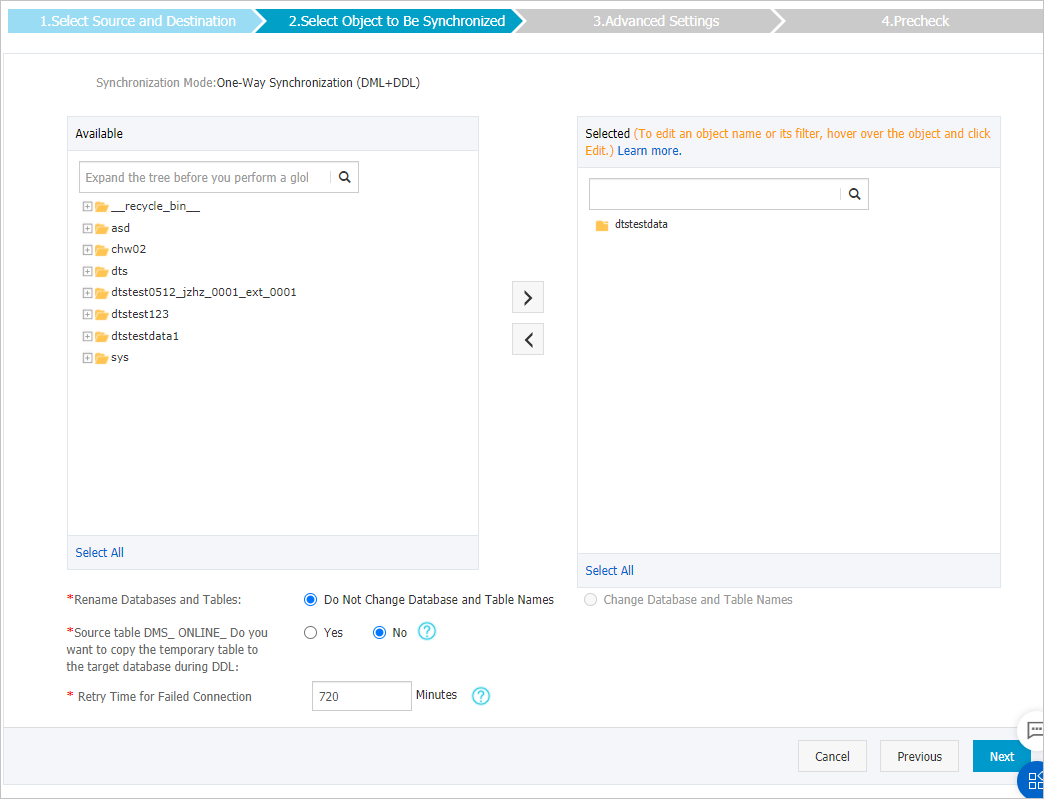
Parameter
Description
Select the objects to be synchronized
In the Available box, click the objects to synchronize. Then, click the
 icon to move them to the Selected box.
You can select databases and tables as synchronization objects.
NoteIf you select an entire database as the synchronization object, all schema changes for all objects in the database are synchronized to the destination database.
By default, the names of synchronization objects in the destination database are the same as in the source database. If you need to change the name of a synchronization object in the destination instance, use the object name mapping feature. For more information, see Rename a synchronization object.
Changing a mapping name
Use the object name mapping feature to rename objects in the destination instance. For details, see Object name mapping.
Replicate temporary tables during online DDL operations
Controls whether DTS syncs temporary tables created by online DDL operations in DMS. Select Yes to sync temporary table data — note that large DDL operations may cause sync delays. Select No to sync only the original DDL statements — note that destination tables may be locked during DDL operations.
Retry time for connection failures
How long DTS retries if it loses the connection to the source or destination database. The default is 720 minutes (12 hours). If DTS reconnects within this window, the task resumes automatically. Charges apply while DTS is retrying, so set this based on your business needs and release the DTS instance promptly when it is no longer needed.
After completing the configuration, click Next in the lower-right corner.
Configure advanced settings for initial synchronization.

This step initializes the schema and data of the selected objects from the source instance to the destination instance. This data serves as the baseline for subsequent incremental data synchronization.
Initial synchronization includes initial schema synchronization and initial full data synchronization. By default, you must select both Initial Schema Synchronization and Initial Full Data Synchronization.
After you complete the preceding configurations, click Precheck in the lower-right corner of the page.
ImportantBefore the data synchronization task starts, a precheck is performed. The task can start only after all check items pass.
If the precheck fails, click the
 icon next to the failed check item to view the details.
You can fix the issue based on the cause and run the precheck again.
If you want to ignore an alert, click Confirm shielding and then click Ignore the alarm and recheck to skip the alert item and run the precheck again.
When the Precheck dialog box shows The precheck is passed, close the Precheck dialog box to start the synchronization task.
Wait until initial synchronization is complete and the task status changes to Synchronizing.
You can view the status of the data synchronization task on the Synchronization Tasks page.
