Plan VPC layout and CIDR blocks; choose Terway or Flannel—CNI and CIDRs are locked after creation.
Network scale planning
Region and zone
VPC count
vSwitch count
Cluster size
Network connectivity planning
Single cluster in a single VPC
A VPC's CIDR block is fixed at creation. Assign non-overlapping pod and service CIDR blocks for each cluster.

Multiple clusters in a single VPC
Multiple clusters can share one VPC. When planning CIDR blocks for each cluster:
The VPC CIDR block is fixed at creation. Each cluster must use non-overlapping CIDR blocks for the VPC, services, and pods.
Pod CIDR blocks across clusters must not overlap. Service CIDR blocks are virtual networks and may overlap across clusters.
In Flannel mode, pod packets route through the VPC. ACK automatically adds routes to each pod CIDR block in the VPC route table.
In this topology, pods in one cluster can access pods and ECS instances in other clusters, but not their ClusterIP services—those are cluster-local. Use LoadBalancer or Ingress for cross-cluster service access.

Multi-cluster inter-VPC connectivity
Plan inter-VPC connectivity for these scenarios.
Multi-region deployment
A VPC is a regional resource. For multi-region systems, create one VPC and cluster per region, then connect them using VPC peering connections, VPN Gateway, or Cloud Enterprise Network (CEN).

Isolation of multiple business systems
For strict network isolation between systems in one region—such as production and staging—deploy each in a separate VPC. Connect them using VPC peering connections, VPN Gateway, or Cloud Enterprise Network (CEN).

Large-scale multi-team architecture
Deploy separate VPCs per team for independent cluster and resource management. This simplifies access control and improves flexibility.

To avoid IP conflicts in multi-cluster inter-VPC setups, verify that each new cluster's CIDR blocks do not overlap with:
Any VPC CIDR block in the connected network
Any other cluster's CIDR block
Any other cluster's pod CIDR block
Cloud cluster to on-premises data center connectivity
When connecting a cluster to an on-premises data center (IDC), pod addresses must not overlap with VPC CIDR blocks routed to the IDC. If the IDC needs direct access to pod addresses, configure routes in the Virtual Border Router (VBR) on the IDC side.

CNI plug-in planning
ACK supports two CNI plug-ins: Terway and Flannel. The plug-in cannot be changed after cluster creation and determines available network features and CIDR configuration.
Choose a CNI plug-in
Select the plug-in that fits your requirements:
Terway | Flannel | |
Best for | Workloads needing NetworkPolicy, fixed pod IPs, pod-bound elastic IP addresses (EIPs), or inter-cluster access | Simpler setups where these features are not needed |
Pod IP source | IPs assigned from VPC vSwitches | IPs assigned from a virtual CIDR block |
IP pool size | Limited by vSwitch CIDR block size | Up to 65,536 pod IPs with a /16 container CIDR block |
IPv6 | Supported | Not supported |
Feature comparison
Feature | Terway | Flannel |
NetworkPolicy | Not supported | |
IPv4/IPv6 dual-stack | Not supported | |
Fixed pod IP | Not supported | |
Pod-bound EIP | Not supported | |
Inter-cluster access | Supported (when security groups allow the required ports) | Not supported |
ACK uses a modified Flannel plug-in optimized for Alibaba Cloud; it does not track upstream changes. See Flannel for update history.
CIDR block planning
Terway network mode
In Terway mode, pods get IPs from dedicated pod vSwitches. Size pod vSwitch CIDR blocks to accommodate all pods across nodes and zones, plus rolling-upgrade headroom.
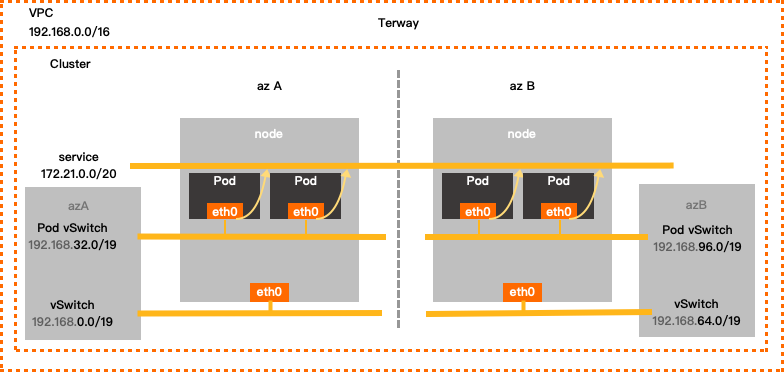
Configuration examples
Single-zone:
VPC CIDR block | vSwitch CIDR block | Pod vSwitch CIDR block | Service CIDR block | Maximum assignable pod IPs |
192.168.0.0/16 | Zone I: 192.168.0.0/19 | 192.168.32.0/19 | 172.21.0.0/20 | 8,192 |
Multi-zone:
VPC CIDR block | vSwitch CIDR block | Pod vSwitch CIDR block | Service CIDR block | Maximum assignable pod IPs |
192.168.0.0/16 | Zone I: 192.168.0.0/19 | 192.168.32.0/19 | 172.21.0.0/20 | 8,192 |
Zone J: 192.168.64.0/19 | 192.168.96.0/19 |
VPC
Use one of the following RFC-standard private CIDR blocks—or a subnet—as your VPC's primary IPv4 CIDR block: 192.168.0.0/16, 172.16.0.0/12, or 10.0.0.0/8. Valid mask lengths range from /8 to /28 (varies by block). Example: 192.168.0.0/16.
For multi-VPC or hybrid cloud deployments, use subnets with a mask of /16 or shorter. Ensure no overlaps between VPCs or with on-premises data centers.
VPCs assign IPv6 CIDR blocks automatically when you enable IPv6. To use IPv6 for containers, choose Terway.
To use a public IP range for your VPC CIDR block, request the ack.white_list/supportVPCWithPublicIPRanges quota in the Quota Center.vSwitch
vSwitches host ECS instances and handle node-to-node traffic. The vSwitch CIDR block must be a subset of the VPC CIDR block.
ECS instances get IPs from this CIDR block. Size it for all nodes.
Multiple vSwitches in one VPC must not have overlapping CIDR blocks.
Each pod vSwitch must be in the same zone as its corresponding node vSwitch.
Pod vSwitch
The pod vSwitch assigns IPs to pods and handles pod traffic. Its CIDR block must be a subset of the VPC CIDR block.
Size for maximum expected pod count, plus upgrade buffer.
The pod vSwitch CIDR block must not overlap with the Service CIDR block.
Service CIDR block
The Service CIDR block cannot be modified after cluster creation.
The Service CIDR block defines the IP range for ClusterIP services. Each service gets one IP.
Service IPs are only reachable within the cluster—not from outside.
The Service CIDR block must not overlap with the vSwitch CIDR block or the pod vSwitch CIDR block.
Service IPv6 CIDR block (when IPv6 dual-stack is enabled)
Use a Unique Local Address (ULA) in the
fc00::/7range. The prefix length must be between /112 and /120.Match the number of usable addresses in the Service CIDR block.
Flannel network mode
In Flannel mode, pod IPs come from a virtual container CIDR block—not tied to any vSwitch. Pod packets route through the VPC, and ACK automatically adds routes to each pod CIDR block in the VPC route table.
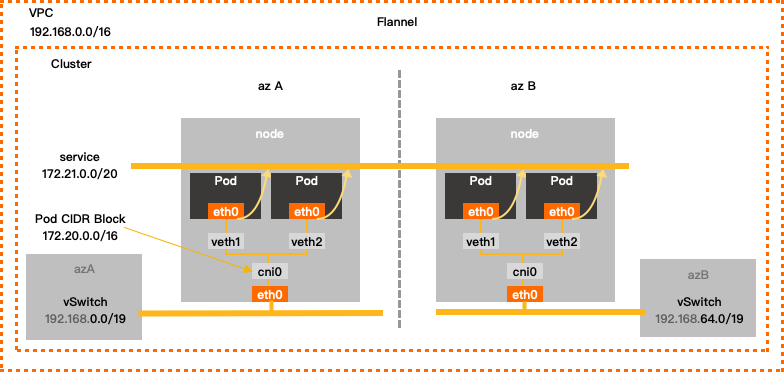
Configuration example
VPC CIDR block | vSwitch CIDR block | Container CIDR block | Service CIDR block | Maximum assignable pod IPs |
192.168.0.0/16 | 192.168.0.0/24 | 172.20.0.0/16 | 172.21.0.0/20 | 65,536 |
VPC
Use one of the following RFC-standard private CIDR blocks—or a subnet—as your VPC's primary IPv4 CIDR block: 192.168.0.0/16, 172.16.0.0/12, or 10.0.0.0/8. Valid mask lengths range from /8 to /28 (varies by block). For multi-VPC or hybrid cloud deployments, use a mask of /16 or shorter with no overlaps between VPCs or with on-premises data centers.
To use a public IP range for your VPC CIDR block, request the ack.white_list/supportVPCWithPublicIPRanges quota in the Quota Center.vSwitch
ECS instances get IPs from this CIDR block. Size it for all nodes.
Multiple vSwitches in one VPC must not have overlapping CIDR blocks.
Container CIDR block
The container CIDR block cannot be modified after cluster creation.
This virtual CIDR block assigns pod IPs across the cluster.
It is not tied to any vSwitch.
It must not overlap with the vSwitch CIDR block or the Service CIDR block.
For example, if your VPC CIDR block is 172.16.0.0/12, do not use 172.16.0.0/16 or 172.17.0.0/16 for the container CIDR block—both fall within 172.16.0.0/12.
Service CIDR block
The Service CIDR block cannot be modified after cluster creation.
The Service CIDR block defines the IP range for ClusterIP services.
Service IPs are only reachable within the cluster.
The Service CIDR block must not overlap with the vSwitch CIDR block or the container CIDR block.
Next steps
Use VPC secondary CIDR blocks: Configure SNAT on a NAT Gateway and update security group rules when expanding with secondary CIDR blocks or new zones.
Account planning: Plan account structure for permission and workload isolation as your business grows.
Security capability planning: Plan security controls based on your network connectivity topology and security requirements.
Disaster recovery capability planning: Plan disaster recovery based on your business architecture to protect data and ensure continuity.
Access the API server from the Internet: Expose your cluster API server to the Internet using an elastic IP address (EIP).
Enable outbound Internet access for the cluster: Configure SNAT for outbound access to public resources such as image registries or dependency libraries.
Network management FAQ: Common network issues with ACK managed clusters.