When migrating your domain's DNS service from another provider to Alibaba Cloud DNS, your primary concern is to prevent downtime for critical services like your website and email. This topic outlines a proven, systematic process that covers risk assessment, record migration, service cutover, verification, monitoring, and emergency rollback. Follow these steps to complete a safe and efficient migration while ensuring business continuity.
Prerequisites
Check and disable DNSSEC
Check if your domain has Domain Name System Security Extensions (DNSSEC) enabled. If it is enabled, you must first go to your domain registrar to delete the DS Record and disable DNSSEC. You can re-enable DNSSEC in the Alibaba Cloud Console after completing the migration. If your domain does not have DNSSEC configured, skip this step.
# Use the dig command to check the DNSSEC status of your domain.
# If the response includes an RRSIG record, DNSSEC is enabled.
dig +dnssec yourdomain.com
Unlock your domain
Log in to your domain registrar's console. Check for and disable any domain update locks, such as
serverUpdateProhibitedorclientUpdateProhibited. Otherwise, you cannot modify the NS server addresses.Export your existing DNS records
From your current DNS provider's console, export all DNS records for the domain you want to migrate. If your provider does not support batch export, you must manually create a file of your DNS records according to the format specified in the DNS record template. For instructions on how to format different record types, see Add a DNS record.
ImportantDo not delete the records from your original DNS provider during the migration. For up to 48 hours, DNS queries may still be sent to your previous provider. We recommend waiting one week after the migration before deleting them.
Procedure
Step 1: Purchase a Public Zone instance
Purchase a Public Zone instance to provide stable, high-quality public DNS resolution for your domain.
Go to the Instance page on the Alibaba Cloud DNS console and select the Public Zone tab.
Click Buy Now.
You can also choose the free Public Zone service. However, it does not include an availability guarantee or resolution nodes outside Chinese mainland. We do not recommend it for production environments, but it is suitable for product evaluation.
Step 2: Add a zone
On the Public Zone tab, click Add Zone.
Enter the domain that you want to configure, and select the Public Zone instance that you created. For detailed parameter descriptions, see Purchase and bind a domain name.

Step 3: Import DNS records
Verify the DNS record format: Check your exported DNS record file to ensure it is formatted correctly. Check that special characters are properly escaped, Time to Live (TTL) values are appropriate, and no duplicate or conflicting records exist.
Import the DNS records: Click the target domain name to go to the Settings page. Click Import/Export and upload your DNS record file. For the initial import, we recommend selecting Full Update.
Verify DNS resolution
Use the Network Detect Tool to verify the records. Enter your domain name, specify the record type to test, and enter a system-assigned DNS server address in the DNS server field. Click Detect Now. If the resolved value matches the record in your imported file, it means your DNS records are active on Alibaba Cloud DNS.
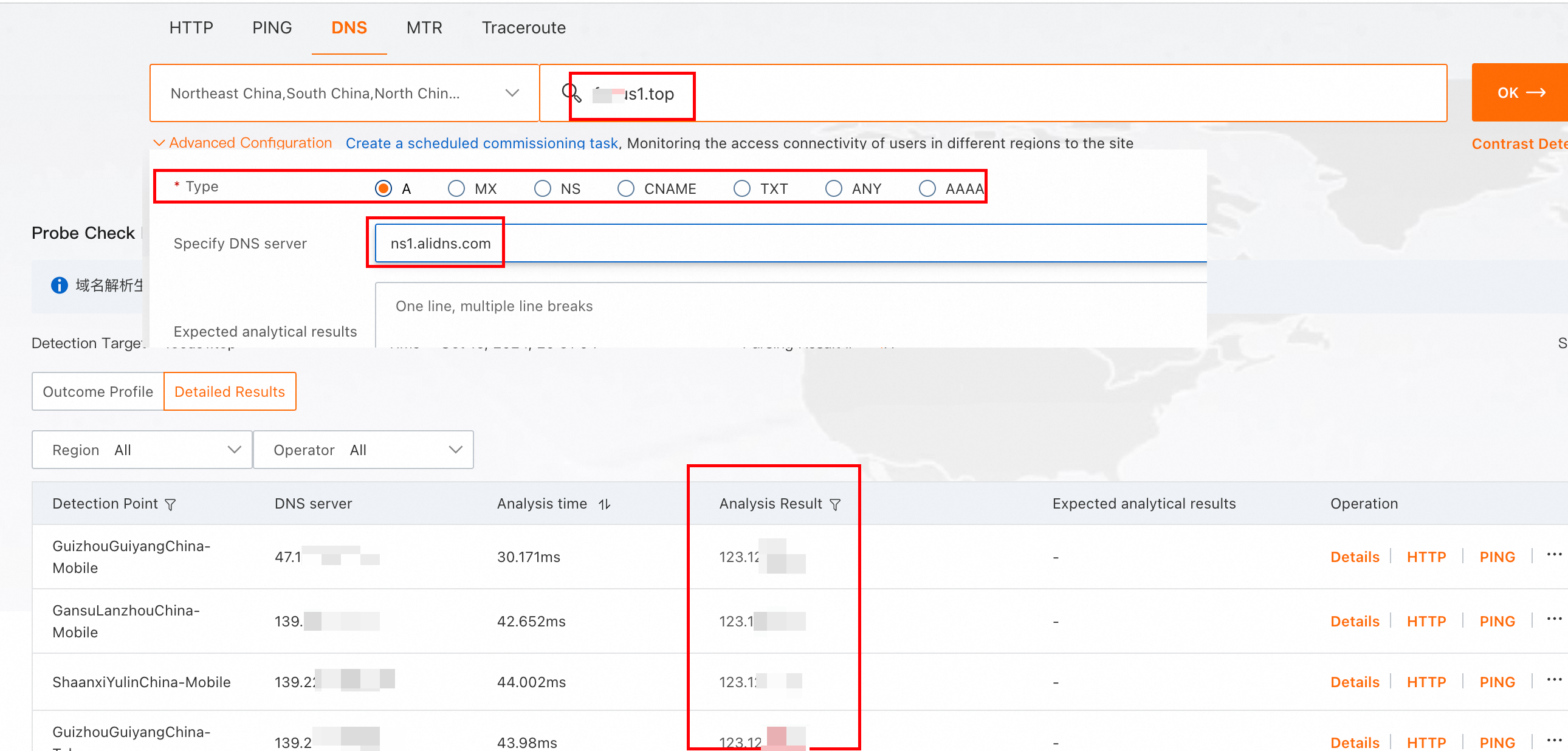
Alternatively, you can use the following commands to check if the DNS records are active.
dig @ns1.alidns.com yourdomain.com A
dig @ns1.alidns.com yourdomain.com MX
Step 4: Change your NS server addresses
Find the NS server addresses assigned by Alibaba Cloud DNS
On the Alibaba Cloud DNS - Public Zone page, find your target domain.
Hover over the DNS Server IP Address column to see the System Assigned NS Address. These are the authoritative name server addresses that Alibaba Cloud has assigned to your domain.

Change the NS servers at your registrar
Go to your domain registrar's website and update the domain's NS records to use the addresses provided by Alibaba Cloud DNS. The method for changing NS servers varies by registrar:
ImportantChange your domain's NS servers during off-peak hours. Continuously monitor your resolution traffic. If any resolution errors occur, immediately revert to your previous NS server addresses. If you roll back, preserve the configuration for troubleshooting before re-attempting the migration.
Step 5: Analyze traffic
Use the Public Zone feature in Alibaba Cloud DNS to check if resolution traffic is successfully switching to the Public Zone. In the Public Zone Traffic Analysis, use the System Assigned NS Address feature to see which regional ISPs' local DNS servers have started sending queries to Alibaba Cloud. Monitor the query data for at least 10 minutes. A gradual increase in query volume indicates that the migration is proceeding as expected. For more information, see Domain resolution statistics.
Use your previous provider's analytics tools to monitor the corresponding decrease in resolution traffic.
Monitor your applications and services for any anomalies.
Step 6: Wait for propagation (up to 48 hours)
During the 48-hour global DNS propagation period, some DNS queries will still be directed to your old provider. Do not shut down your old DNS service during this time. Avoid adding or modifying DNS records. If a record change is unavoidable, you must make the change at both your old and new DNS providers to ensure consistency.
Step 7: Clean up old DNS records (optional)
We recommend waiting at least one week after the migration to Alibaba Cloud is complete before deleting the DNS records from your previous provider.