The Domain Statistics feature in Public Zone provides per-domain and per-subdomain resolution statistics to help identify issues and optimize performance.
Use cases
View query volume rankings for specific domain names.
Identify subdomains with sudden spikes or drops in query volume.
Analyze query sources and resolution line hit rates for specific domain names.
Optimize resolution configurations for individual domain names.
Procedure
Go to the Alibaba Cloud DNS - Dashboard.
By default, the Resolution Dashboard > Public Zone tab is selected.
On the right, switch to the Domain Statistics tab.
The page displays a Domain Statistics overview with three metric cards: Last 24 Hours Subdomains with Query Surges, Last 24 Hours Subdomains with Query Drop, and Last 24 Hours Subdomains with Denied Responses. Below the cards, the Statistics Summary section (filterable by time range and domain name) is followed by Query Volume Ranking and Subdomain Query Ranking.
Select a DNS resolution cluster from the drop-down list in a module's upper-right corner to view cluster-specific data.
Modules
1. Overview
This feature requires DNS traffic analysis to be enabled for at least one domain name.
Metric | Description |
Last 24 Hours Subdomains with Query Surges | Number of subdomains with a sudden query volume increase in the past 24 hours. Helps identify domains with abnormal traffic. |
Last 24 Hours Subdomains with Query Drop | Number of subdomains with a sudden query volume decrease in the past 24 hours. Helps identify domains with abnormal traffic drops. |
Last 24 Hours Subdomains with Denied Responses | Number of subdomains that received a negative response in the past 24 hours. Helps identify domains with potential configuration issues. |
The Overview section supports the following operations:
Click Set Period to change the statistical period (daily, weekly, or monthly).
Select a DNS resolution cluster from the drop-down list to analyze metrics by region and pinpoint traffic anomalies.
Click Alert Notifications to configure alert rules.
2. Statistics Summary
Ranking | Description |
Query Volume Ranking | Ranks domain names by query volume. Sort results and view the DNS traffic analysis status for each domain. |
Subdomain Query Ranking | Ranks subdomains by query volume. Sort results, view DNS traffic analysis status, and navigate to domain monitoring. |
Available operations:
Use the time selector to choose a time range, such as Today or a custom range.
Select a domain name from the drop-down list to filter results.
Select a sorting method from the sort drop-down list.
Version differences: Domains bound to a paid DNS instance or with traffic analysis enabled can view complete DNS query statistics. For domain names on the Free Edition with traffic analysis disabled, the data is shown as 0. Once enabled, it will display the same statistics as the Paid Edition. For free-tier domains, historical DNS query data is not stored, so historical statistics prior to enabling traffic analysis cannot be queried.
Data refresh: DNS query statistics are loaded on demand based on user actions. The page does not refresh automatically via polling. To view the latest data, manually refresh the page or adjust the time range.
Free edition quota: The DNS query quota for the Free Edition is 100,000 queries per day. The quota is calculated daily and resets at 00:00 (UTC+8). Unused quota does not roll over to the next day.
3. Statistics Details
Use the time selector to choose a time range, such as Today or a custom range.
Select a domain name from the drop-down list to filter results.
Switch between tabs to view statistics from different dimensions.
Query Volume
The query volume ranking includes domain names that use a paid Alibaba Cloud DNS edition or have DNS traffic analysis enabled.
This tab includes:
Domain Name Query Statistics: QPS trend chart for the selected domain.
Subdomain Query Ranking: Query volume ranking for each subdomain, with a link to domain monitoring.
Data scope: The DNS query volume statistics for the main domain (zone) include the total number of DNS query requests for all subdomains under that domain.
DNS query volumes are based on the query request itself and are not related to the ownership of the destination IP address in the DNS record. Even if a domain resolves to an IP address hosted on a server outside your account, the DNS query request is still counted in the DNS query volume.
Recommendation
Monitor query volume to verify DNS traffic migration to Public Zone. A gradual increase confirms traffic is being routed to Public Zone after migration.
Query Sources
The Global Statistics feature collects data from domains that have network traffic analysis enabled. Ensure that network traffic analysis is enabled for at least one domain.
Displays query source distribution by geographic location and ISP.
The tab has three sections: a Geographic Distribution of Query Sources map on the left, a Geographic Details of Query Sources table showing query volume and average resolution success rate (switchable between By Region and By ISP) on the upper right, and a Top Source IPs by Query Volume table listing source IP, region, ISP, query volume, and success rate on the lower right.
Usage recommendations
Use query source analysis to track which regions route resolution requests toPublic Zone. Missing traffic from certain regions or ISPs may indicate that local ISP DNS caches have not yet expired.
Resolution Route Analysis
The Global Statistics feature collects data from domains that have network traffic analysis enabled. Ensure that network traffic analysis is enabled for at least one domain.
Shows resolution line hit rates, including custom and default line usage.
A Resolution Line Proportion donut chart on the left shows line distribution. A table on the right lists Line Name and Query Volume (Count) for each line.
Usage recommendations
If you configured smart resolution with granular resolution policies, useResolution Route Analysis to verify that the new line receives query hits, confirming the policy is active.
Rtype and Rcode Analysis
The Global Statistics feature collects data from domains that have network traffic analysis enabled. Ensure that network traffic analysis is enabled for at least one domain.
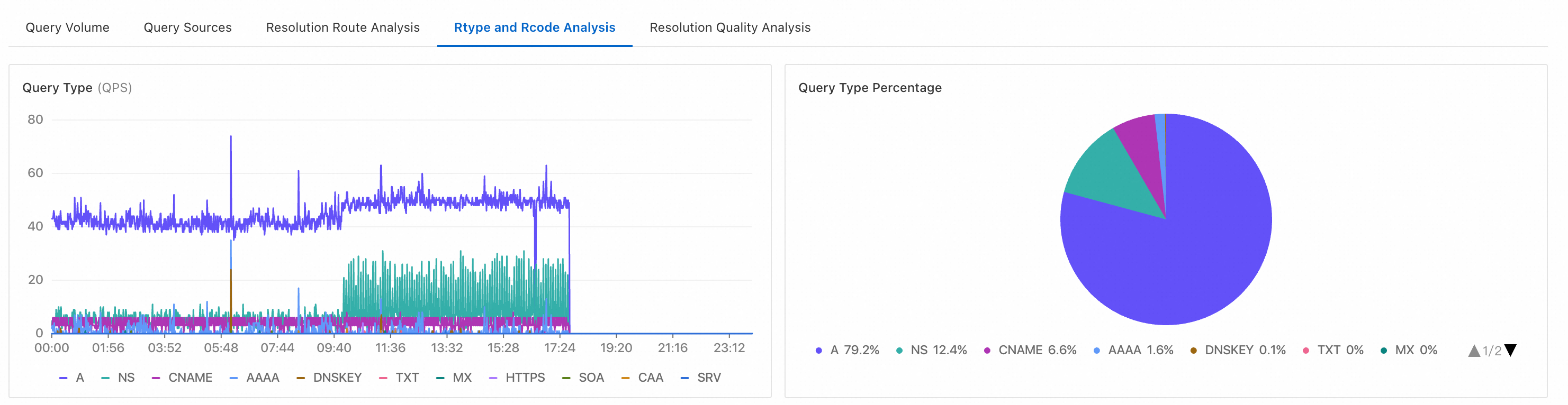
This tab includes:
Query Type: Displays statistics and distribution for different DNS request types, such as A, AAAA, and CNAME.
Denied Response Type: Displays statistics and distribution for negative responses, such as NXDOMAIN and NODATA.
NoteType descriptions:
-
NXDOMAIN (Non-Existent Domain): The queried domain name does not exist.
-
NXRRSET: The domain name exists, but the requested record type (RRset) does not. This is also known as a NODATA scenario.
-
SERVFAIL (Server Failure): The query could not be processed because of a problem with the target DNS server.
-
REFUSED: The DNS server refuses to perform the requested operation for policy reasons.
For example, the server may not want to provide resolution to a specific requester or may not want to perform a specific operation, such as a zone transfer.
-
FORMERR (Format Error): The DNS server could not interpret the query because it was malformed.
-
NOTIMP (Not Implemented): The DNS server does not support the requested query type.
-
Click a negative response type card.
-
The table in the upper-right section aggregates data by domain name and displays the data sorted in descending order by detection count.
-
Click View in the Actions column for a domain. The table in the lower-right section then aggregates data by source address and displays the data sorted in descending order by detection count.
The Statistics Details page contains a Negative response type statistics section, which displays the percentage and detection count for NXDOMAIN and NXRRSET responses. It also includes a time-series line chart and a Negative response domains table with Domain name, Detection count, and Actions columns.
-
Usage recommendations
To troubleshoot DNS resolution accuracy from endpoints, useRtype and Rcode Analysis to locate response logs. Check the source IP's region and ISP to identify routing inaccuracies.
Resolution Quality Analysis
The Global Statistics feature collects data from domains that have network traffic analysis enabled. Ensure that network traffic analysis is enabled for at least one domain.
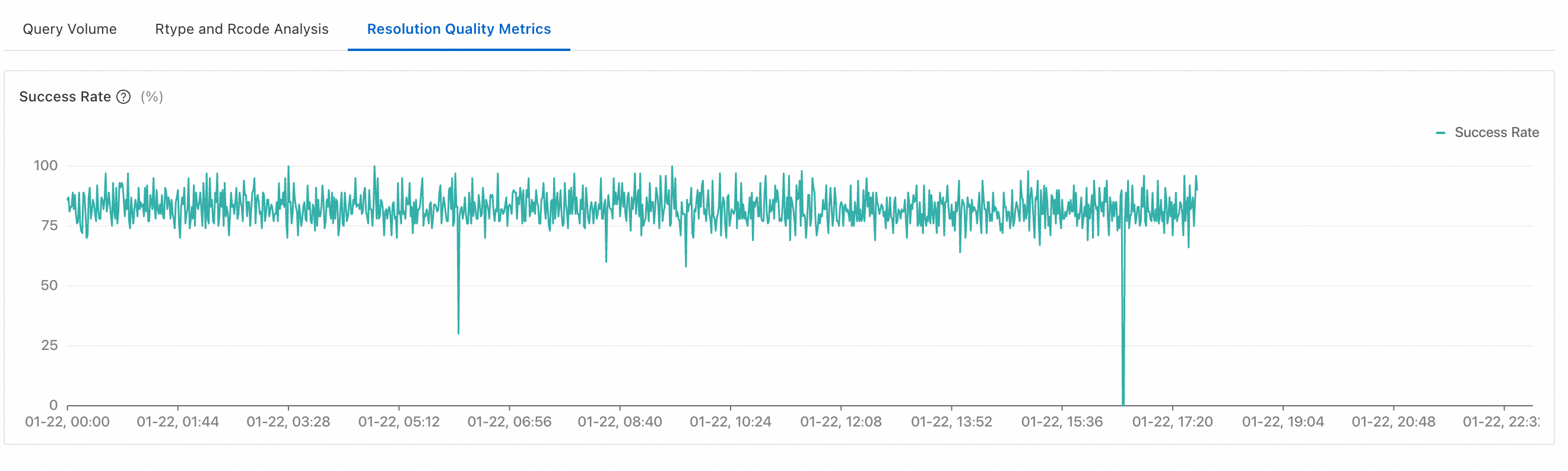
Displays resolution quality metrics and trend charts to evaluate response quality and performance.
How the resolution success rate is calculated
resolution success rate = Number of valid responses that match the requested record type (QTYPE) / Total number of resolutions
Valid response: A response that contains resource record data that matches the requested type. For example, a request for an A record succeeds if an IPv4 address is returned. The request fails if the response is NXDOMAIN, NODATA, or any other status that does not include an A record. Similarly, a request for an AAAA record succeeds only if an IPv6 address is returned.
Recommendation: The resolution success rate measures the stability and availability of your DNS service. However, this metric can be significantly affected by invalid queries, as you cannot control the domain names and record types that clients query. For example, a client might query for randomly generated, non-existent domain names. In most cases, a stable trend line indicates normal performance. You do not need to aim for the highest possible value. Instead, use this metric as part of a comprehensive analysis.