All Products
Search
Document Center

Dataphin:Offline mode configuration overview

Last Updated:Jan 21, 2025

For the offline mode of stream-batch integrated tasks, you need to define the real-time related properties of the task, including task resources, time parameters, Checkpoint, etc. This topic introduces the configuration related to the real-time mode of stream-batch integrated tasks.

Offline mode configuration entry

  1. Navigate to the Development section via the top menu bar on the Dataphin home page.

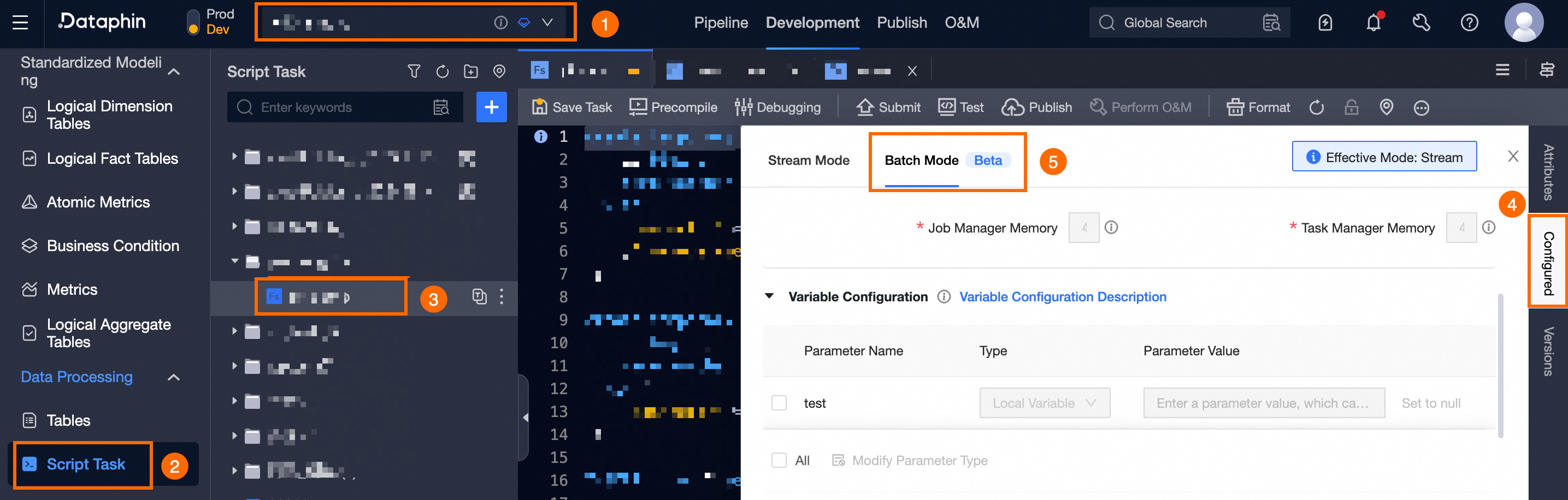
  2. Use the operation guide shown below to access the stream-batch integrated task offline mode configuration panel.

    image.png

Configure offline mode

Within the offline mode configuration panel, configure the parameters related to resources and dependencies for the stream-batch integrated task offline mode as detailed in the table below.

Configuration Item

Description

Schedule Configuration

The schedule configuration allows you to define the recurring schedule for nodes within the production environment. It enables you to set both the task schedule cycle and the effective date via the scheduling properties found in the configuration settings. For guidance on setting up the schedule, refer to offline mode schedule configuration.

Resource Configuration

  • Open-source Flink Real-time Computing Source

    Configure the resource queue, engine version, degree of parallelism, Task Manager quantity, Job Manager Memory, and Task Manager Memory for tasks created by open-source Flink in both production and development environments. For more information, see configure open-source Flink offline mode resources.

  • Ververica Flink Real-time Computing Source

    Ververica Flink's stream-batch integrated tasks allow for the configuration of offline mode resources, including the resource cluster, engine version, degree of parallelism, Task Manager quantity, Job Manager Memory, and Task Manager Memory, for both production and development environments. For guidance on configuring these resources, see configure Ververica Flink offline mode resources.

  • Alibaba Blink Real-time Computing Source

    For stream-batch integrated tasks created with Alibaba Blink, you can configure the offline mode resource settings, including the resource queue and engine version. For guidance on configuration, see configure Alibaba Blink offline mode resources.

Variable Configuration

This is utilized to set variable parameters for real-time computing tasks. For guidance on configuration, see offline mode variable configuration.

Runtime Parameters

When developing stream-batch integrated tasks, configuring the runtime parameters for offline mode is essential to manage the task's execution behavior and performance. This includes setting the JobManager's memory for execution attempt history and the TaskManager's slot timeout, among others. For guidance on configuration, see offline mode runtime parameter configuration.

Dependency Files

For stream-batch integrated tasks that require external resources such as text, Python, or Jar files in offline mode, you can upload these necessary resource files to Dataphin. After uploading, include them in the task's dependency files to ensure proper execution. For guidance on configuration, see offline mode dependency file configuration.

Dependencies

In offline mode, stream-batch integrated tasks are executed in a controlled sequence. This is achieved by configuring scheduling dependencies for each node within the business flow, thereby ensuring the efficient and timely production of business data. For configuration instructions, see offline mode dependency file configuration.