Configure production and development resource clusters, engine versions, parallelism, Task Manager quantity, and memory allocation for Ververica Flink unified stream-batch tasks in offline mode.
Procedure
-
On the Dataphin home page, click Development in the top menu bar. The Data Development page opens by default.
-
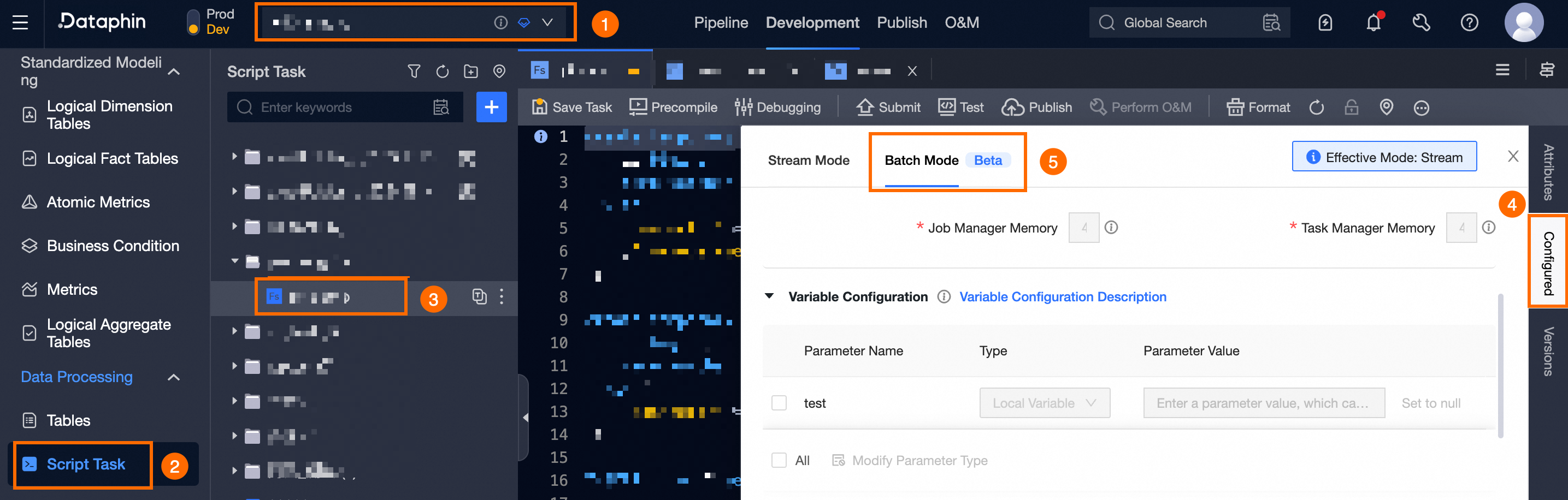
Open the unified stream-batch task offline mode configuration panel:
Select the project (Dev-Prod mode requires environment selection) > click Script Task > select the compute task > click Configure > click Offline Mode.
-
In the Resource Configuration section, configure the Resource Configuration parameters.
Parameter
Description
Production Environment Cluster
Defaults to the cluster selected when the Flink SQL task was created. You can switch clusters as needed.
ImportantSwitching clusters may affect task execution after submission.
Production Environment Engine Version
Defaults to the engine version selected when the Flink SQL task was created. You can switch versions as needed.
Development Environment Cluster And Engine Version
Select the system default or a custom configuration.
-
System Default Configuration: Uses the same cluster and engine version as the production environment.
-
Custom Configuration: Select a different cluster and engine version for the development environment.
NoteNot required if the project space uses Basic mode.
Parallelism
Default: 1. Enter any integer greater than 0, or -1 for automatic inference.
Task Manager Quantity
Defaults to the parallelism value. Enter any integer greater than 0.
Job Manager Memory
Memory for the Flink cluster's Job Manager. Default: 1Gi. Specify values in Gi or Mi units, or in bytes.
Task Manager Memory
Memory for the Flink cluster's Task Manager. Default: 1Gi. Specify values in Gi or Mi units, or in bytes.
-
-
Click OK.