Configure the resource queue and engine version for an Alibaba Blink stream-batch integrated task in offline mode.
Procedure
-
From the Dataphin home page, single click the top menu bar Development. You will be directed to the data development page by default.
-
To access the stream-batch integrated task offline mode configuration panel, follow the operation guide below.
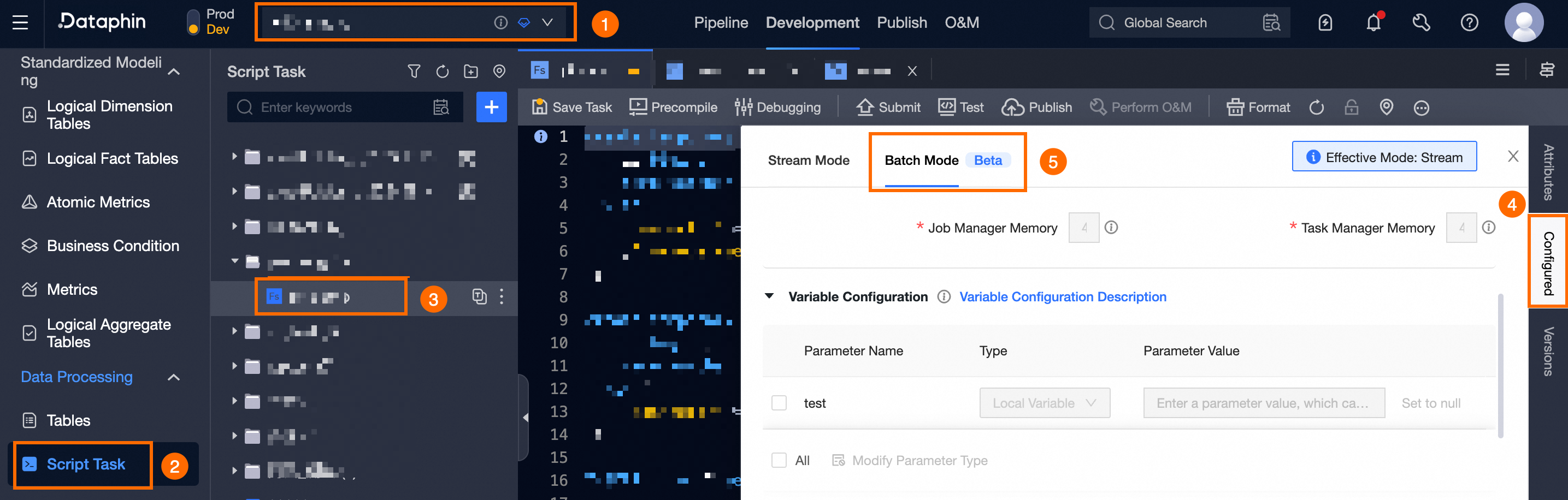
Select a project (for Dev-Prod pattern, choose the environment) -> single click Script Task -> select and single click a compute task -> single click Configure -> single click Offline Mode.
-
In the Resource Configuration section of the configuration panel, set the Resource Configuration parameters for the task's offline mode.
Parameter
Description
Resource Queue
The task uses the resource queue selected during creation by default. Change it here if necessary.
ImportantSwitching the resource queue may affect task execution. Please proceed with caution.
Engine Version
Defaults to the engine version selected during task creation. Update it here if needed.
-
To finalize the resource configuration for the task's offline mode, single click Confirm.