Variable parameter configuration assigns values to variables in computation task code so that the variables are automatically replaced with the corresponding values at runtime. Flink_SQL is used as an example.
Procedure
-
Navigate to the Development section via the top menu bar on the Dataphin home page. You will be directed to the data Development page by default.
-
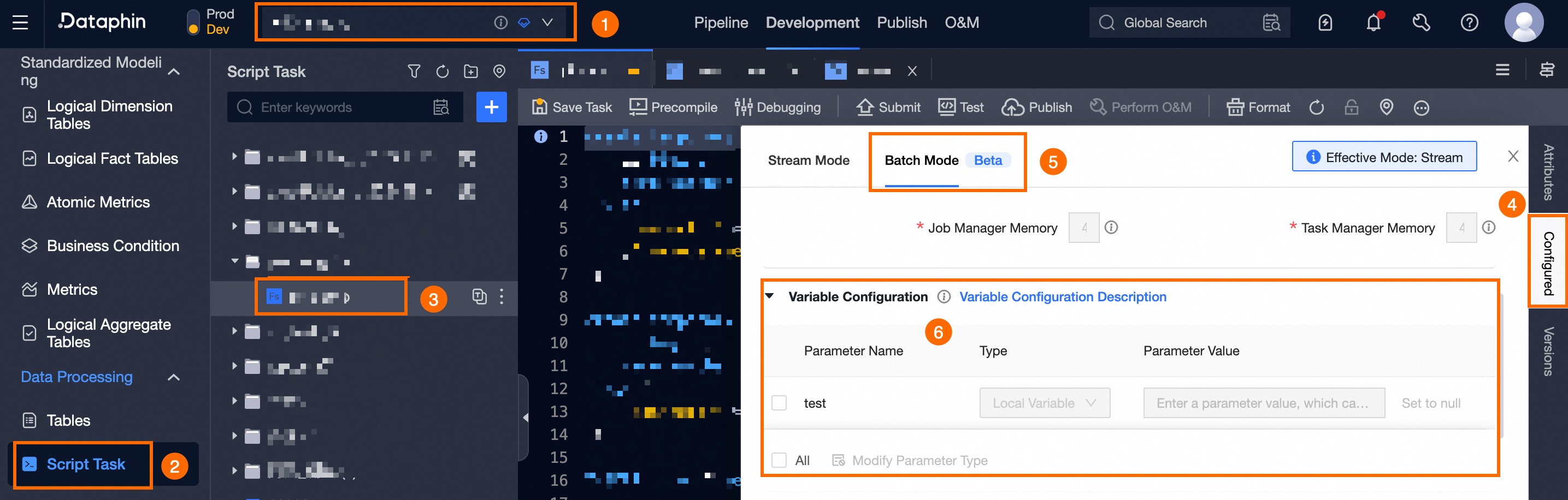
Using the operation guide depicted below, select the task you wish to configure and access the Configuration panel.
-
Within the Variable Configuration section of the configuration panel, set up the task parameters.
In the Variable Configuration area, add parameters by using expressions in the code editor. Existing parameters are automatically populated. Use the Expression format:
${variable_name}to insert variables. You can also edit the parameter type and assign values in the parameter list.NoteThe variable configuration list allows for batch operations. After selecting individual or all parameters, you can perform batch modifications of parameter types by clicking
 .
.Parameter
Description
Parameter Name
The name of the parameter as defined in the code editor. Variable names can include numbers, letters, underscores (_), dots (.), and hyphens (-), and can be up to 32 characters long.
Parameter Type
Includes global variables, space name variables, local variables, and non-variable types. For more information, see Variable classification and assignment.
Parameter Value
-
Global variable: Uses the value defined by the global variable. This is the default setting and cannot be modified. For more information, see Create a global variable.
-
Space name variable: The value is the space name. Conversion to other types is not supported.
-
Local variable: Supports a maximum of 258 characters or can be set to empty.
-
Non-variable: Definition is not supported.
-
-
To finalize the Variable Configuration for the computation task, click OK.