Overview
What is an application delivery network
An application delivery network enables application publishing, disaster recovery, and protection. Server Load Balancer (SLB) is the core component. SLB includes Network Load Balancer (NLB) for Layer 4, Application Load Balancer (ALB) for Layer 7, and Classic Load Balancer (CLB). This topic covers how to select, deploy, and use SLB to build an efficient application delivery network.
Terms
-
VPC: A virtual private cloud (VPC) is a logically isolated private network on Alibaba Cloud where you create and manage cloud resources such as ECS instances, SLB instances, and RDS instances.
-
VIP: A virtual IP address (VIP) is an IP address dynamically allocated among physical servers or devices to provide load balancing, high availability, and redundancy.
-
DNS removal: The process of updating DNS records to shift traffic from one server or service to another during a network migration or switchover, ensuring service continuity.
-
CNAME: A CNAME record maps an alias domain name to another domain name. The DNS server resolves the CNAME to the target domain and returns its A record (IP address).
-
ALB: Application Load Balancer (ALB) handles HTTP, HTTPS, and QUIC traffic with elastic scaling, advanced routing, and deep cloud-native integration. ALB is the official cloud-native Ingress gateway of Alibaba Cloud.
-
NLB: Network Load Balancer (NLB) is a next-generation Layer 4 load balancing service with ultra-high performance and automatic elastic scaling. A single instance handles up to 100 million concurrent connections.
-
CLB: Classic Load Balancer (CLB) distributes inbound traffic to multiple backend ECS instances based on forwarding rules to improve application availability.
-
NIS: Network Intelligence Service (NIS) is an AIOps suite for cloud networks covering network planning through O&M, including traffic analysis, inspection, performance monitoring, diagnostics, path analysis, and topology visualization.
-
Cloud Monitor: Cloud Monitor is a service that monitors Alibaba Cloud resources and Internet applications.
-
Internet Shared Bandwidth: Internet Shared Bandwidth provides region-level bandwidth sharing. You can add EIPs from the same region to an Internet Shared Bandwidth instance so they share bandwidth, reducing public bandwidth costs.
Design principles
Consider the following key points when designing an application delivery network.
-
Performance: Sufficient throughput, new connections, concurrent connections, and QPS to handle peak traffic.
-
Elasticity: Automatic capacity scaling based on traffic volume, with a matching billing model.
-
Stability: Robust architecture with disaster recovery to ensure continuous application delivery.
-
Security: Protection at the application, transport, and network layers.
-
Observability: Comprehensive metrics and logs for real-time monitoring, analysis, and troubleshooting.
Select a load balancer and design a deployment plan by balancing these five points against your application's requirements and network scenario.
Key design considerations
Load balancer selection phase
Focus on four key points: performance (capacity and feature support), stability, elasticity, and security.
Prerequisites
First, determine whether your application requires Layer 4 or Layer 7 load balancing.
|
Item |
ALB |
NLB |
CLB |
|
Product positioning |
|
|
|
-
If your application requires Layer 4 load balancing, select NLB or CLB.
-
If your application requires Layer 7 load balancing, select ALB or CLB.
Performance considerations
Select a load balancer based on your application's performance requirements.
|
Comparison criteria |
ALB |
NLB |
CLB |
|
Service architecture and performance |
|
|
|
|
Forwarding capabilities |
|
|
|
|
Backend service types |
|
|
|
|
O&M capabilities |
|
|
|
|
Cloud-native integration |
|
Supports ACK/ASK integration (version 1.24 and later) |
Weak support. Requires integration with Alibaba Cloud container services such as ACK or ASK. |
|
Common scenarios |
|
|
|
-
Capacity dimension
-
For Layer 4 load balancing with high performance and elasticity requirements, select NLB.
-
For Layer 7 load balancing with high QPS requirements, select ALB.
-
If you do not have high performance requirements, CLB is an option for both Layer 4 and Layer 7.
-
-
Feature support dimension
-
For Layer 4 load balancing with TCP/SSL offloading, burst traffic rate limiting, or cloud-native integration requirements, select NLB.
-
For Layer 7 load balancing with advanced routing or cloud-native Ingress gateway requirements, select ALB.
-
If you do not have advanced feature requirements, CLB can handle basic Layer 4 and Layer 7 needs.
-
Key stability points
ALB, NLB, and CLB have different disaster recovery architectures. Select based on your availability requirements.
-
Multi-zone active-active mode
Both ALB and NLB support multi-zone deployment. Deploy in at least two zones for high availability. This mode works by providing services through a domain name. The domain name resolves through a CNAME record to the ALB or NLB instance domain, and traffic routes to VIPs in the selected zones. When a zone fails, remove its DNS record for disaster recovery. Traffic automatically shifts to other available zones, ensuring service continuity.
-
Dual-zone active-passive mode
CLB supports multi-zone instances in most regions, deployed in two zones with the primary zone active by default. If the primary zone fails, CLB switches to the secondary zone within about 30 seconds. When the primary zone recovers, CLB switches back automatically.
NoteThe primary and secondary zones provide zone-level disaster recovery. Failover to the secondary zone triggers only when the entire primary zone becomes unavailable (for example, data center power outage or fiber optic cable cut), not when a single instance fails.
The multi-zone active-active mode of NLB and ALB provides broader disaster recovery than CLB. A single instance spans two or more zones, improving high availability and fault recovery. You can manually remove DNS records for an abnormal zone to quickly isolate faults. For systems with high availability requirements, NLB and ALB are the better choice.
Elasticity Key Points
Elasticity means having the required capacity during traffic peaks while paying only for what you use. This avoids the cost of pre-provisioning resources.
-
ALB and NLB both offer high performance with pay-as-you-go billing, supporting on-demand usage.
-
CLB supports both pay-by-specification and pay-as-you-go billing. The pay-as-you-go method enables on-demand usage.
Security considerations
ALB, NLB, and CLB have different security capabilities. Select based on your application's security requirements.
-
Layer 7 load balancing: Web attack prevention
If your application requires web attack prevention, use ALB. The WAF-enabled Edition of ALB supports service-based integration with Alibaba Cloud WAF 3.0.
With service-based integration, WAF runs as an SDK module inside ALB, extracting traffic for detection without participating in forwarding. This provides two benefits:
-
Forwarding: WAF does not participate in traffic forwarding, avoiding compatibility and stability issues from an extra forwarding layer and reducing access latency.
-
Deployment: No DNS record changes, certificate configuration, port configuration, or back-to-origin setup required for WAF integration.
-
-
Layer 4 load balancing: Transport-layer encryption
If your application requires Layer 4 load balancing with TCP/SSL encryption, select NLB.
NLB supports TCP/SSL listeners that decrypt encrypted traffic into plaintext before distributing it to backend servers, simplifying backend configuration and improving processing efficiency.
Load balancer deployment phase
After selecting a load balancer, focus on performance, stability, and security during deployment.
Performance considerations
-
Instance processing performance
ALB and NLB instances offer high performance and elasticity. However, if your application must handle predictable burst traffic (such as sales promotions), contact your Alibaba Cloud account manager in advance to assess whether the instance capacity can handle the burst.
For CLB, the maximum processing capacity per instance is equivalent to the S3.large specification (1,000,000 maximum connections, 100,000 new connections, and 50,000 QPS), regardless of whether you use pay-by-specification or pay-as-you-go billing. Select the billing method, instance type, and instance count based on your traffic model.
-
Public bandwidth performance
For public-facing ALB or NLB instances, public network access is provided through EIPs.
-
For stable traffic, use pay-by-bandwidth billing for Internet Shared Bandwidth and set the required peak bandwidth.
-
For traffic with significant peaks and valleys, use pay-by-dominant-traffic billing for Internet Shared Bandwidth. In this mode, the greater of inbound or outbound traffic within a billing cycle is billed.
NoteThe peak bandwidth of a pay-by-data-transfer EIP is 200 Mbps. To ensure sufficient bandwidth, use Internet Shared Bandwidth.
For CLB, you can provide public network access using a private CLB instance with an EIP, or using a public CLB instance directly. To enable bandwidth multiplexing across multiple instances and maintain independent IP ownership, use a private CLB instance with an EIP and Internet Shared Bandwidth.
-
Key points for stability
-
Instance zone planning
-
ALB: Select at least two zones. The zones should match the backend server zones. ALB does not support disabling cross-zone forwarding — a VIP forwards traffic to backend servers in all zones, not just its own zone.
-
NLB: Select at least two zones matching the backend server zones. You can disable cross-zone forwarding so a VIP forwards traffic only to backend servers in the same zone.
-
CLB: The primary zone should match the backend server zone to prevent cross-zone forwarding.
-
-
Backend server health checks
Enable health checks to monitor backend server availability. When a server fails a health check, the load balancer routes new requests to healthy servers. When the failed server recovers, it is automatically restored. ALB, NLB, and CLB all support TCP and HTTP health checks.
-
Listener rate limiting
Use listener rate limiting to prevent traffic bursts from overwhelming backend servers and causing an avalanche effect.
-
Application Load Balancer (ALB): Queries per second (QPS) rate limiting
Set a total QPS limit or a client-level QPS limit (based on client source IP). You can configure these individually or together.
-
Network Load Balancer (NLB): New connections per second (CPS) rate limiting
Set the maximum new connections per second for each zone (VIP).
-
Security considerations
-
Access control using blacklists and whitelists
Both ALB and NLB can be added to security groups. You can implement whitelist- or blacklist-based access control by adding an ALB instance to a security group or adding an NLB instance to a security group.
CLB provides listener-level access control. You can set a whitelist or blacklist for different listeners:
-
Whitelist: Only requests from specified IP addresses or CIDR blocks are forwarded. Use whitelists to restrict access to specific IPs.
-
Blacklist: Requests from specified IP addresses or CIDR blocks are blocked. Use blacklists to deny access from specific IPs.
-
-
Custom TLS policies
-
For Layer 7 HTTPS scenarios, ALB provides preset TLS security policies. Select an appropriate policy or configure a custom one based on your security requirements.
-
For Layer 4 TCP/SSL scenarios, NLB provides preset TLS security policies. Select an appropriate policy or configure a custom one based on your security requirements.
NoteCLB does not support custom TLS security policies.
-
-
Mutual authentication
In HTTPS scenarios, ALB (Standard and WAF-enabled editions), NLB, and CLB all support mutual authentication. In TCP/SSL scenarios, NLB also supports mutual authentication. Deploy an HTTPS service that uses mutual authentication on an ALB instance, Implement TCP/SSL offloading with mutual authentication using an NLB instance, and Deploy an HTTPS service that uses mutual authentication on a CLB instance.
Load balancer usage phase
During load balancer usage, focus on observability to monitor and troubleshoot your application delivery network.
Key Observability Points
-
Monitoring
If your application encounters connection issues such as request timeouts or traffic limiting, or if you want to understand load balancer workload, check the monitoring metrics: NLB metrics, ALB metrics, and CLB metrics.
-
Logs
Load balancers provide operation logs and access logs: ALB logs, NLB logs, CLB access logs, and CLB operation logs.
-
Operation logs: Record the operations performed on your load balancers.
-
Access logs: Record all requests to a Layer 7 load balancer, including request time, client IP, latency, request path, and server response. Use access logs to analyze client behavior, geographic distribution, and troubleshoot issues.
-
-
Network Intelligence Service
In addition to the built-in monitoring and logging, consider enabling Network Intelligence Service for enhanced observability of your application delivery network.
Design best practices
ALB and NLB better align with the five design considerations: performance, stability, elasticity, security, and observability. Use ALB or NLB instead of CLB to build your application delivery network. The following best practices focus on ALB- and NLB-based solutions.
Intra-region application delivery network
An intra-region application delivery network has the load balancer and backend servers in the same Alibaba Cloud region.
Layer 4 load balancing

Review and summary of key design considerations:
-
Key stability points
-
Create an NLB instance in at least two zones. The zones should be the same as the zones where the backend servers are located.
-
Consider disabling cross-zone forwarding for the NLB instance.
-
Evaluate whether to enable new connection rate limiting to prevent an avalanche effect caused by unexpected traffic bursts.
-
Enable health checks for the backend server groups.
-
-
Performance considerations
For a public-facing NLB instance, use Internet Shared Bandwidth with either pay-by-dominant-traffic or pay-by-bandwidth billing based on your traffic model.
-
Security considerations
Based on your application's security control requirements, evaluate whether to add the NLB instance to a security group. If you use a TCP/SSL listener, evaluate whether to use a custom TLS policy and enable mutual authentication.
Layer 7 load balancing

Review and summary of key design considerations:
-
Key points for stability
-
Create an ALB instance in at least two zones. The zones should be the same as the zones where the backend servers are located.
-
Evaluate whether to enable QPS rate limiting to prevent an avalanche effect caused by unexpected traffic bursts.
-
Enable health checks for the backend server groups.
-
-
Performance considerations
For a public-facing ALB instance, use Internet Shared Bandwidth with either pay-by-dominant-traffic or pay-by-bandwidth billing based on your traffic model.
-
Security considerations
Based on your application's security control requirements, evaluate whether to add the ALB instance to a security group, use a custom TLS policy, and enable mutual authentication.
Cross-region application delivery network
A cross-region application delivery network has the load balancer and backend servers in different Alibaba Cloud regions.
Build a cross-region application delivery network with NLB or ALB for nearby access and cross-region disaster recovery. Add servers in a cross-region VPC to an ALB instance and Add servers in a cross-region VPC to an NLB instance.

IPv6 application delivery network
Load balancer selection
If your application uses a load balancer for an IPv6 application delivery network, consider both IPv6 end-to-end communication and IPv6-to-IPv4 translation scenarios.
-
Scenario 1: IPv6 end-to-end communication
NLB and ALB can mount IPv6 backend servers to forward IPv6 requests end-to-end. CLB does not support this.

-
Scenario 2: IPv6-to-IPv4 translation
NLB, ALB, and CLB all support IPv6-to-IPv4 translation, forwarding IPv6 client requests to IPv4 backend servers for quick IPv6 support.


Because NLB and ALB handle both IPv6 end-to-end communication and IPv6-to-IPv4 translation, select NLB or ALB for your IPv6 application delivery network.
NLB and ALB support dual-stack instances — a single instance has both IPv6 and IPv4 addresses, enabling a unified application delivery network. CLB requires separate IPv6 and IPv4 instances, resulting in independent networks. NLB or ALB simplifies your architecture.
Load balancer deployment
During IPv6 deployment, focus on stability, security, elasticity, observability, and self-service.
-
IPv6 end-to-end communication
Step 1: Enable IPv6 for the VPC where the NLB or ALB instance is located.
Step 2: Create an NLB or ALB instance with the protocol version set to dual-stack.
Step 3: If the IPv6 address of the NLB or ALB instance needs to be accessible from the Internet, enable public bandwidth for the IPv6 address in the IPv6 gateway of the VPC where the NLB or ALB instance is located.
Step 4: Create a backend server group for the NLB or ALB instance and enable IPv6 mounting.
-
IPv6-to-IPv4 translation
-
NLB or ALB deployment
Step 1: Enable IPv6 for the VPC where the NLB or ALB instance is located.
Step 2: Create an NLB or ALB instance with the protocol version set to dual-stack.
Step 3: If the IPv6 address of the NLB or ALB instance needs to be accessible from the Internet, enable public bandwidth for the IPv6 address in the IPv6 gateway of the VPC where the NLB or ALB instance is located.
Step 4: Create a backend server group for the NLB or ALB instance. You do not need to enable IPv6 mounting.
-
CLB deployment
Create a CLB instance with the IP version set to IPv6. Only public CLB instances support IPv6. Then, complete the regular load balancer configuration.
-
CADT visual architecture reference
Intra-region application delivery network
Layer 4 load balancing
|
Scenario |
Item |
Description |
|
Intra-region application delivery network (Layer 4 load balancing) |
Template ID |
SX4CLB1IH4FYNAGH |
|
Visual deployment template |
||
|
CADT API call example |
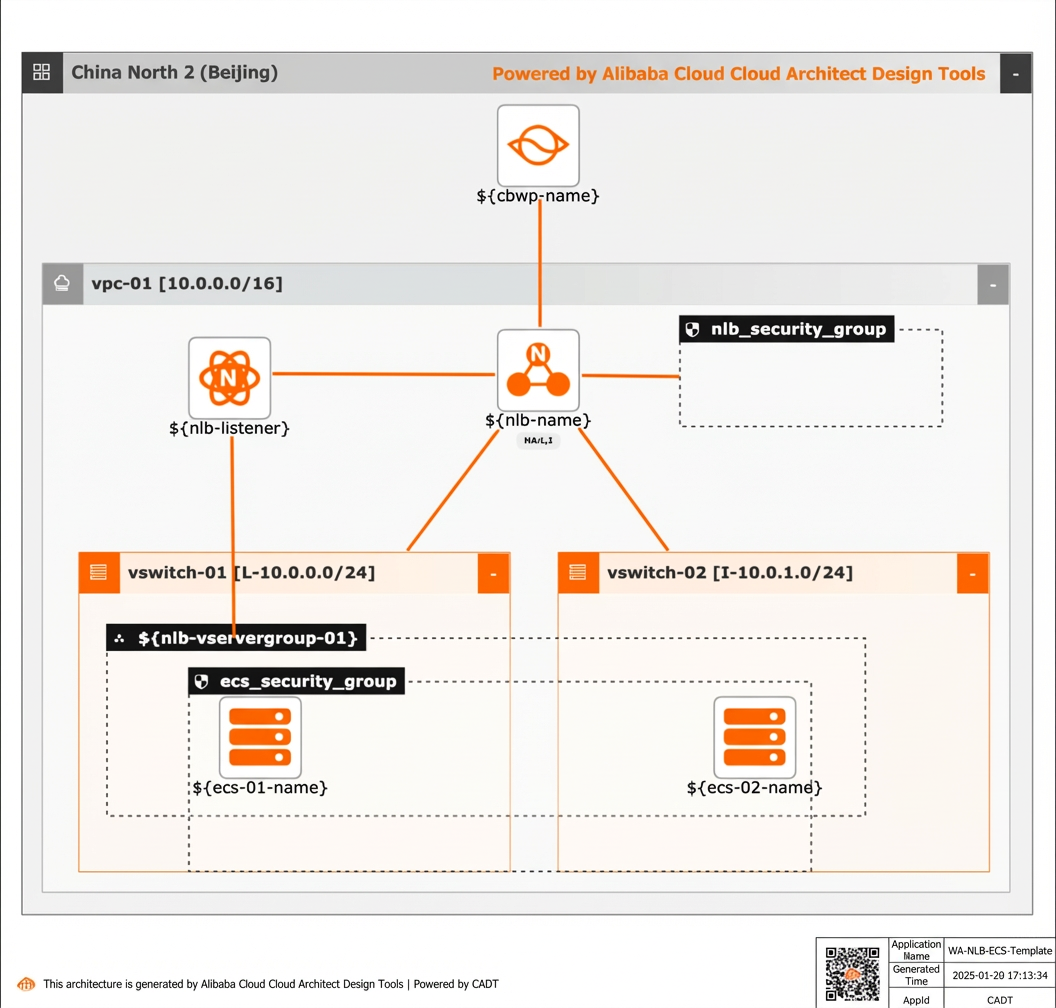
Visual deployment architecture diagram:
Usage procedure
Visual method
-
Create the required Alibaba Cloud services in a batch, including one VPC, two virtual switches, one Internet Shared Bandwidth instance, one NLB instance, and two ECS instances.
-
Create a new application based on the template. The default region is Beijing, and all cloud products are new.
-
Save the application, then validate and price it. In this example, all cloud products use the pay-as-you-go billing method.
-
After verification, agree to the terms and start the batch deployment.
-
-
Verify that the intra-region NLB instance is mounted to the ECS instances.
API integration method
-
Use a set of OpenAPI operations to quickly complete the setup through API integration.
-
Initialize the command line interface as described in the reference document.
-
Deploy and check the output directly using the model YAML file.
-
To change the region, replace the value of the `area_id` field. For example, replace "cn-hangzhou" for Hangzhou with "cn-shanghai" for Shanghai.
-
To use existing instances in the template, such as an existing VPC or vSwitch, replace the corresponding ID in the `instances` field.
Cross-region application delivery network
Layer 4 load balancing
|
Scenario |
Content Project |
Description |
|
Cross-region application delivery network (Layer 4 load balancing) |
Template ID |
FOOKUK1EPTFB97PA |
|
Visual deployment template |
||
|
CADT API call example |
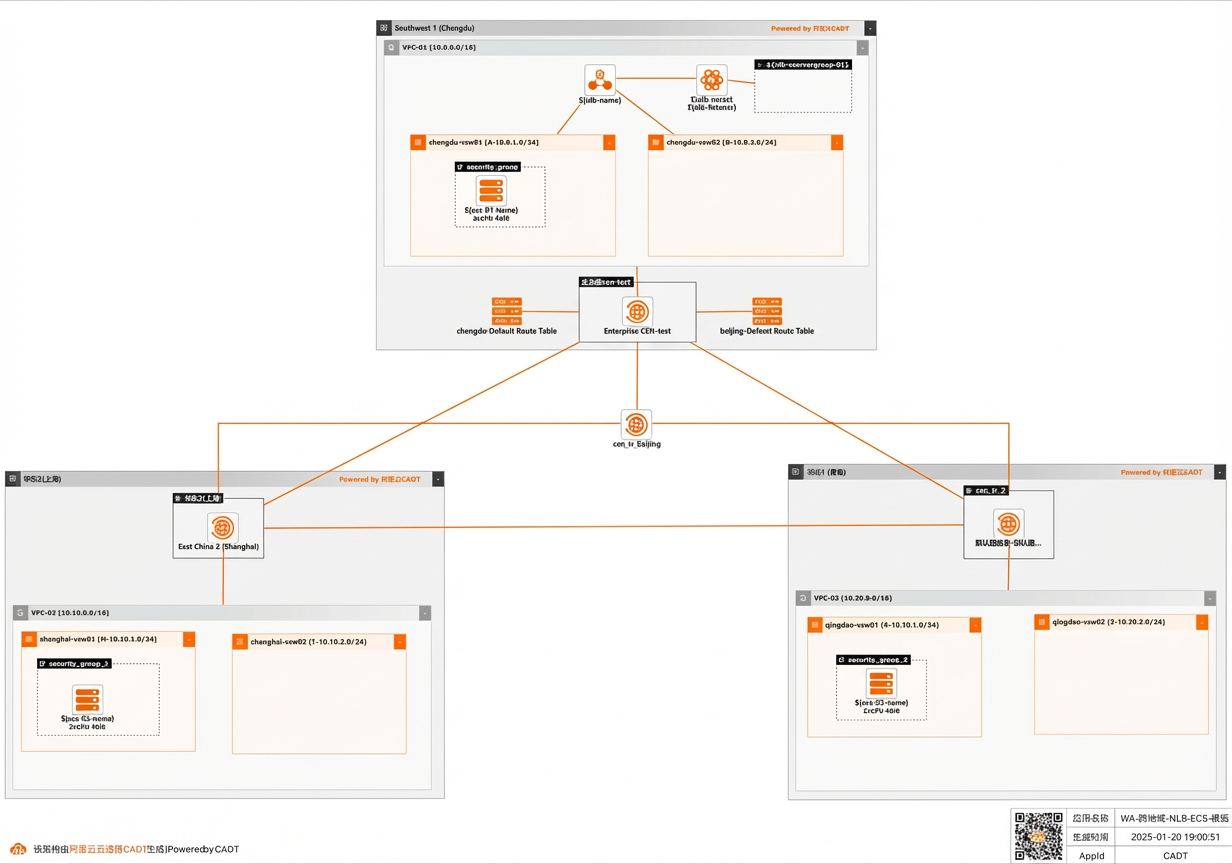
Visual deployment architecture diagram:
Usage procedure
Visual method
-
Create the required Alibaba Cloud services in a batch. Based on the business scenario, plan for three regions (Chengdu, Shanghai, and Qingdao). The required products include three VPCs, six virtual switches, one NLB instance, three ECS instances, and one CEN instance. Create one transit router (TR) in each region and configure the cross-region bandwidth (default bandwidth is 1 Mbps).
-
Create a new application based on the template. The default regions include Chengdu, Shanghai, and Qingdao, and all cloud products are new.
-
Save the application, then validate and price it. In this example, all cloud products use the pay-as-you-go billing method.
-
After verification, agree to the terms and start the batch deployment.
-
-
Verify that the cross-region NLB instance is mounted to the ECS instances.
API integration method
-
Use a set of OpenAPI operations to quickly complete the setup through API integration.
-
You can use the command line interface for initialization, as described in the reference document.
-
Deploy and check the output directly using the model YAML file.
-
To change the region, replace the value of the `area_id` field. For example, replace "cn-hangzhou" for Hangzhou with "cn-shanghai" for Shanghai.
-
To use existing instances in the template, such as an existing VPC or vSwitch, replace the corresponding ID in the `instances` field.