To retain backup data for a long time, you can enable the automatic archiving feature. This feature transfers backup points from the Standard tier to the Archive tier to reduce data protection costs. To enable this feature, set the Days to Transfer to Archive Tier parameter. This topic describes the automatic archiving feature of Cloud Backup, including its benefits, supported data sources, limitations, working principle, fees, and usage notes.
Function Introduction
The automatic archiving feature is a solution provided by Alibaba Cloud Cloud Backup to store backup data for long periods at a low cost in compliance scenarios. To retain backup data for a long time for compliance purposes and the data is infrequently accessed, you can use the automatic archiving feature. This feature transfers backup points from the Standard tier to the Archive tier to reduce data protection costs.
Key benefits
Cost-effective storage for archived data
Backup data is transferred from the Standard tier to the Archive tier for cost-effective, long-term storage.
For more information, see Pricing.
Fully automated backup archiving
After you enable automatic archiving in a backup policy, Cloud Backup automatically transfers backup data from the Standard tier to the Archive tier based on the specified retention period. No manual intervention is required, which reduces operations and maintenance (O&M) complexity.
Easy-to-use data restoration
When you restore data from an Archive-tier backup point, Cloud Backup uses restore-while-unfreezing technology. This provides a restoration experience similar to that of Standard-tier backup points. You do not need to wait for the data to be fully retrieved before you start the data restoration.
Supported scope and limits
The automatic archiving feature supports the following data sources: ECS files, ECS instance backups, local files, Object Storage Service (OSS) objects, File Storage NAS (NAS) files, local NAS files, and CPFS files. For information about the regions that support this feature, see Features available in each region.
ECS instance backup points must be retained in the Standard tier for at least 14 days before they can be automatically archived. Backup points of other data sources must be retained in the Standard tier for at least 30 days. After a backup point is transferred to the Archive tier, it must be retained for at least 60 days. If you manually delete a backup point that has been stored for less than 60 days, you are charged a fee for early deletion.
You are charged for automatically archived ECS instance data based on the storage of archive snapshots. The fees are charged by ECS. Snapshots that are not yet archived are billed as standard snapshots. For other data sources, the minimum billable unit of automatically archived data is 64 KB. A file or object smaller than 64 KB is billed as 64 KB, and a file or object that is 64 KB or larger is billed based on its actual size. The fees are charged by Cloud Backup.
Usage notes
In cross-region backup scenarios, only backups of ECS instances in the destination region support automatic archiving. The archiving feature is not supported for backups of other data sources in the destination region.
In cross-region backup scenarios, Archive-tier data cannot be replicated to mirror vaults. This limit does not apply to ECS instance backups because cross-region replication for them does not use mirror vaults.
After you enable automatic archiving, the feature takes effect only on new backups.
After backup data is automatically archived, you can directly restore data from Archive-tier backup points. However, you cannot transfer the backup points from the Archive tier back to the Standard tier.
If a backup vault is locked, backup data can still be automatically archived. However, backup points in both the Standard and Archive tiers cannot be manually deleted.
The feature to keep at least one backup version is effective only for backup points in the Standard tier. If only one backup version exists in the Standard tier, that version is not transferred to the Archive tier. Archive-tier backup points are not protected by this feature and are automatically deleted when their retention period expires.
Data in the Archive tier and Standard tier is stored and billed independently. After a backup point is automatically archived from the Standard tier, you are charged for Archive-tier data of non-ECS instance data sources based on the size of the source data at the time of archiving. You are charged for Archive-tier data of ECS instances based on the size of the archive snapshots.
How it works
The automatic archiving feature is seamlessly integrated with backup policies. You can transfer backup data from the Standard tier to the Archive tier without deploying additional services.
After you enable automatic archiving in a backup policy by setting the Days to Transfer to Archive Tier parameter, the Cloud Backup service automatically transfers backup point data from the Standard tier to the Archive tier at the specified time. The time required for the transfer depends on the data volume. The first archiving job is a full backup transfer. Subsequent jobs transfer only the incremental data relative to the last archived backup point. A complete Archive-tier backup point is then created.
To enhance data robustness and independence, Archive-tier data does not depend on Standard-tier data. It is stored and billed separately and can be used for independent historical data recovery.
When backup points of a data source are automatically transferred from the Standard tier to the Archive tier, the metering and billing methods for the Standard and Archive tiers differ based on the data source.
ECS instance data source: The Standard tier is billed based on standard snapshot storage. The Archive tier is billed based on archive snapshot storage.
For more information about how snapshot sizes are calculated, see How snapshots work.
Non-ECS instance data source: The Standard tier is billed based on the amount of data after deduplication and compression. The Archive tier is billed based on the original data size.
Assume that backup points 1, 2, and 3 are transferred to the Archive tier at the specified archiving time. For the Standard tier, assume a deduplication and compression ratio of 1:1. The data volume is 10 GB + 20 GB = 30 GB. For the Archive tier, data smaller than 64 KB is rounded up to 64 KB. The data volume is 100 GB + 10 GB + 10 GB = 120 GB.

If automatic archiving is disabled, the billable data in the Standard tier for backup points 1, 2, 3, and 4 is 100 GB + 10 GB + 10 GB + 20 GB = 140 GB. Based on the pay-as-you-go list price, the monthly fee is 140 GB × USD 0.03187/GB/month = USD 4.4618/month.
After backup points 1, 2, and 3 are automatically archived, 100 GB of data is transferred for backup point 1, and only the 20 GB of new and changed data is transferred for backup point 2. No data is transferred for backup point 3.
The billable data in the Standard tier is 10 GB + 20 GB = 30 GB. Based on the pay-as-you-go list price, the monthly fee is 30 GB × USD 0.03187/GB/month = USD 0.9561/month. The billable data in the Archive tier is 100 GB + 10 GB + 10 GB = 120 GB. Based on the pricing details, the monthly fee is 120 GB × USD 0.0045/GB/month = USD 0.54/month. The total fee is USD 0.9561/month + USD 0.54/month = USD 1.4961/month.
The preceding comparison shows that enabling automatic archiving can save USD 4.4618/month - USD 1.4961/month = USD 2.9657/month.
Theoretically, the higher the data churn rate and the larger the amount of independent incremental data, the more cost-effective automatic archiving becomes. If there are many dependencies between incremental data backups or if the backup data retention period is short, enabling automatic archiving may not save costs. Therefore, when you use the automatic archiving feature, you must consider your specific business data patterns and the price difference between Standard-tier and Archive-tier backup storage. This helps you configure the most cost-effective data protection solution.
Procedure
The following figure shows the procedure for backing up and automatically archiving data in the Cloud Backup console. The procedure for automatically archiving OSS backup data is used as an example.

No fees are charged for activating Cloud Backup. Cloud Backup charges fees for items such as storage capacity. For more information about billing, see Billing methods and billable items.
You can create a backup policy to define your backup plan. In the policy, set the backup vault, backup content, backup interval, and retention period. Enable automatic archiving by setting Days to Transfer to Archive Tier. Backup data is stored in the Standard tier by default and is automatically transferred to the Archive tier after the specified number of days. To view the archiving status of a backup point, see View the archiving status of a backup point.
Create a backup plan and associate it with a backup policy
Cloud Backup starts the plan and continuously backs up the data source according to the backup policy.
If a source file is lost or corrupted, you can create a restore job to restore the data source from the backed-up files.
View the archiving status of a backup point
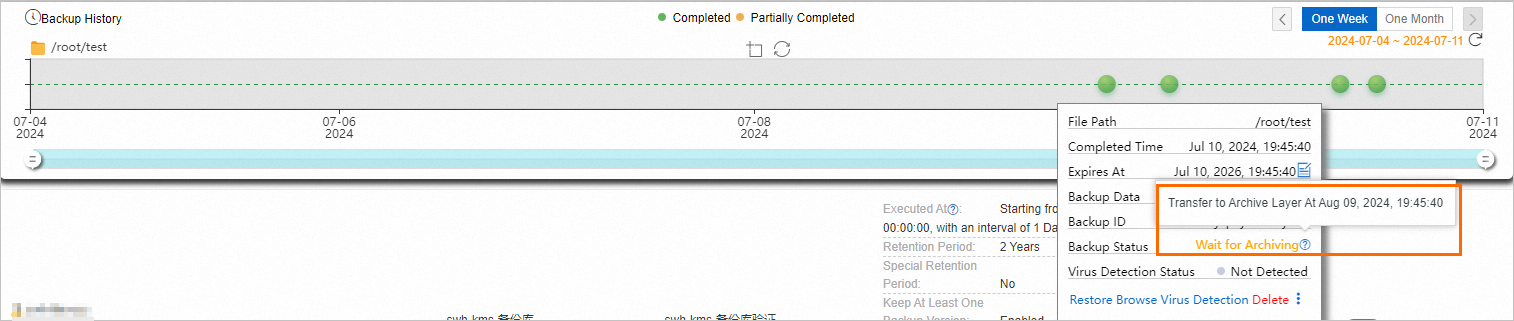
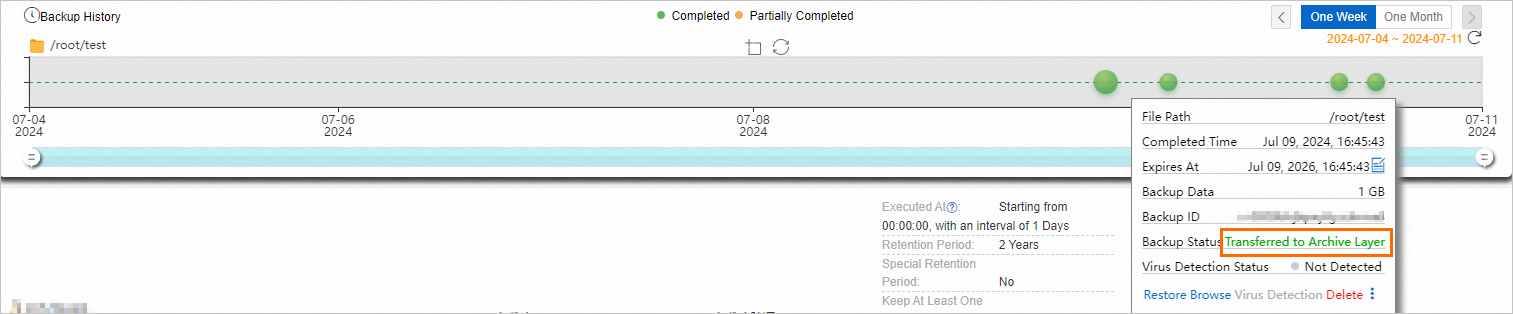
To check whether a backup point has been transferred to the Archive tier, click the backup point in Backup History to view the backup status.
Backup points for a data source are automatically transferred from the Standard tier to the Archive tier only if you associate the data source with a backup policy that has the Automatic Archiving feature enabled. The transfer is based on the backup plan specified in the backup policy.
If the backup status is Completed, the data is backed up and stored in the Standard tier.

If the backup status is Wait for Archiving, the backup data is waiting to be automatically transferred to the Archive tier.
If the backup status is Transferred to Archive Tier, the backup data has been transferred to the Archive tier.
Lifecycle
If you set Specify Time to transfer data to the Archive tier after 30 days:
If you set Retention Period to Permanent (for non-ECS instance data sources): The backup data is transferred to the Archive tier after 30 days and is permanently retained in the Archive tier. The data is not deleted.
If you set Retention Period to 210 days: The backup data is transferred to the Archive tier after 30 days, retained in the Archive tier for another 180 days, and then automatically deleted. The total retention period is 210 days.
Fees
When you use the automatic archiving feature, you will incur the following fees. This feature is commercially available and will be billed starting from June 30, 2025. For more information, see the official announcement.
Backup storage resource plans can be used only to offset fees for Standard-tier storage. Fees for automatic archiving can be paid only using the pay-as-you-go billing method.
Billable item | ECS instance data source | Non-ECS instance data source |
Archive-tier storage usage fees | Calculated based on the size of archive snapshots. For more information, see Snapshot billing. | Billed based on the size of the source data at the time of automatic archiving. The minimum billable unit for Archive-tier data is 64 KB. A file or object smaller than 64 KB is billed as 64 KB. A file or object that is 64 KB or larger is billed based on its actual size. You can view the size of the Archive-tier data in the backup vault on the Overview page in the Cloud Backup console. For more information, see Pricing. |
Capacity of data stored for an insufficient duration in the archive layer | If you delete an Archive-tier backup point that has been stored for less than 60 days, you are charged for archive snapshot storage for the remaining duration (60 days - actual storage duration). For more information, see Snapshot billing. | If you delete an Archive-tier backup point that has been stored for less than 60 days, you are charged for storage for the remaining duration (60 days - actual storage duration). If you delete a backup vault that contains an Archive-tier backup point stored for less than 60 days, you are charged for storage for the remaining duration (60 days - actual storage duration). |
Archive-tier data restoration fees | No restoration fees are charged. | When you restore data from an Archive-tier backup point, you are charged a restoration fee based on the actual size of the restored data. The minimum billable unit for restored data from the Archive tier is 64 KB. A file or object smaller than 64 KB is billed as 64 KB. A file or object that is 64 KB or larger is billed based on its actual size. |