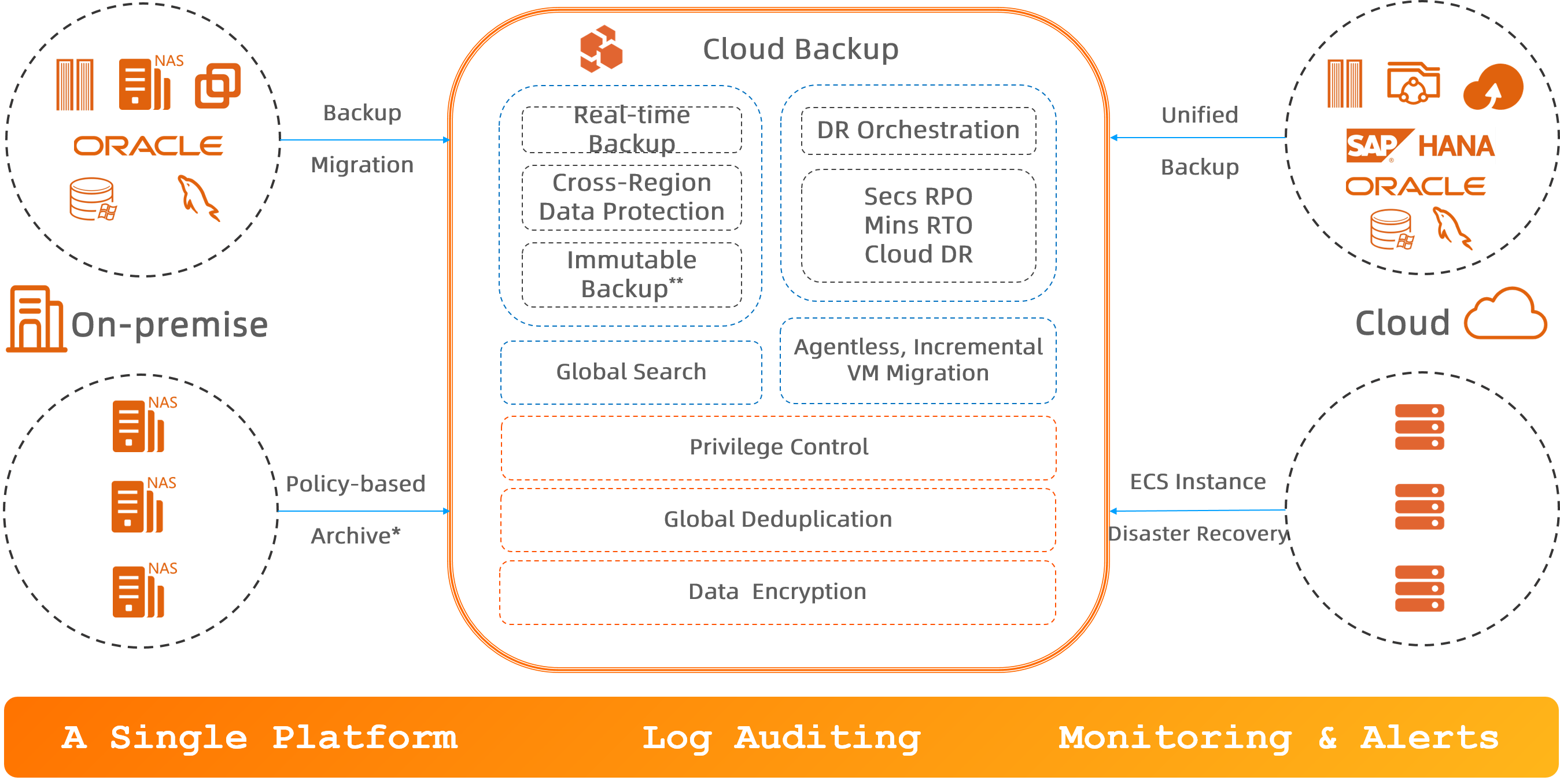
Cloud Backup is the unified disaster recovery platform from Alibaba Cloud. It provides backup, disaster recovery (DR), and policy-based archive management for cloud and on-premises resources, including ECS instances, databases, file systems, NAS, OSS, and VMware virtual machines.
Scenarios
-
Back up data on the cloud
Back up important data to a backup vault over the Alibaba Cloud internal network. Supported data sources include ECS files, self-managed MySQL, Oracle, SQL Server, and SAP HANA databases, NAS file systems, OSS buckets, and Tablestore instances. Cloud Backup supports real-time backups of MySQL and Oracle databases with a near-zero recovery point objective (RPO). Back up data from other cloud platforms to a backup vault on Alibaba Cloud.
-
Back up on-premises data to the cloud
Back up on-premises data from servers, NAS file systems, VMware virtual machines, and databases directly to a backup vault with flexible backup policies.
-
Cross-region or cross-account backup and ECS cross-region disaster recovery
-
Implement cross-region or cross-account disaster recovery for your backup data using cross-region backup or cross-account replication of backup vaults. Use cross-account backup to add multiple layers of data protection.
-
Cloud Backup provides two types of cross-region disaster recovery solutions for ECS instances to meet different RPO and RTO requirements: continuous replication and async replication of cloud disks.
-
-
Migrate VMware VMs to the cloud
Migrate on-premises VMware virtual machines to the cloud without an agent. Cloud Backup provides a simple and fast incremental migration method.
-
Archive data from on-premises NAS, HDFS, and S3-compatible storage based on policies
Archive large volumes of files from on-premises NAS, Hadoop Distributed File System (HDFS), and S3-compatible storage to an archive vault or a cold archive vault based on policies. Configure flexible archive policies. Cloud Backup also supports full-text search of file content in both local storage and archive vaults, with results returned in seconds.
Data sources supported for backup
|
Data source |
System |
|
|
On-premises data center |
Files and directories |
Windows, Windows Server, Linux |
|
NAS |
N/A |
|
|
Virtual machine images in VMware vSphere |
Windows, Windows Server, Linux |
|
|
MySQL, Oracle, and SQL Server databases |
Windows, Windows Server, Linux |
|
|
Alibaba Cloud ECS |
Files and directories in an ECS instance |
Windows Server, Linux |
|
SAP HANA deployed on an ECS instance |
Windows Server, Linux |
|
|
MySQL, Oracle, and SQL Server deployed on an ECS instance |
Windows Server, Linux |
|
|
Cloud disks (system disks and data disks) |
N/A |
|
|
Entire ECS instances |
Windows Server, Linux |
|
|
Alibaba Cloud File Storage NAS |
Data stored in Alibaba Cloud File Storage NAS |
N/A |
|
Alibaba Cloud Object Storage Service (OSS) |
Data stored in Alibaba Cloud Object Storage Service (OSS) |
N/A |
|
Alibaba Cloud Tablestore |
Data in tables of Alibaba Cloud Tablestore instances |
N/A |
Data sources supported for policy-based archiving
|
Data source |
|
|
On-premises NAS |
File Storage NAS deployed on local servers |
|
HDFS system |
Hadoop Distributed File System (HDFS) deployed on local servers |
|
S3-compatible storage |
Amazon S3-compatible storage |
Activate the service
-
Activating Cloud Backup is free. Fees are incurred only when you use Cloud Backup features.
-
Activating the Cloud Backup service enables it, but does not automatically back up any data. Back up your important data promptly. If data is lost or accidentally deleted without a backup, the data cannot be recovered.