A region-level failure is an extreme outage that can disrupt your cloud services. When this occurs, services in any of its availability zones risk connection failures, data loss, and workload unavailability.Service Mesh (ASM) allows you to deploy an ASM ingress gateway in a Kubernetes cluster or an Elastic Container Instance (ECI) as a unified traffic entry point for your applications. Each cluster has an independent IP address for its ingress gateway. When one region fails, the faulty IP address is removed, and all traffic is redirected to the healthy region for region-level disaster recovery.
Disaster recovery architecture
This section describes a dual-region, dual-cluster disaster recovery architecture to demonstrate how to handle region-level failures:
-
Set up a multi-master control plane architecture by deploying one Kubernetes cluster in each of the two regions. Deploy identical cloud-native services in both clusters. The services call each other using Kubernetes cluster domain names.
NoteA multi-master control plane ensures that the push latency for mesh proxies in each region is predictable and production-ready. It also provides control plane high availability for disaster recovery during a region-level failure.
-
Deploy an ASM gateway in each cluster and configure it to expose a public ingress IP address or domain name through a Classic Load Balancer (CLB) or a Network Load Balancer (NLB). Then, use Alibaba Cloud DNS and Global Traffic Manager (GTM) to resolve a domain name to both IP addresses.
-
When a region-level failure occurs, services in the healthy region are unaffected. Global Traffic Manager (GTM) automatically removes the IP address of the faulty region from the DNS resolution pool and routes all traffic to the ASM gateway in the healthy region.
During a traffic surge, configure the following features to further optimize traffic redirection after a regional failure.
-
Enable HPA for the ASM gateway to automatically scale out instances and handle traffic surges.
NoteThe HPA feature is available only on ASM Enterprise and Ultimate editions.
-
Configure throttling for the ASM gateway or critical services in the cluster. ASM's local throttling feature prevents traffic surges from overwhelming your cluster's services, which avoids service crashes in the healthy region due to a massive traffic shift.
-
(Optional) Configure metric monitoring and alerts for ASM's throttling feature. This lets you observe events in real time, promptly detect failures, and quickly scale the workloads in the healthy region.
Disaster recovery workflow
Cross-region disaster recovery is supported for all cluster types. This tutorial uses an ACK managed cluster to demonstrate the process of creating clusters and ASM instances, completing the disaster recovery configuration, and running a failure drill.
Disaster recovery configuration
This tutorial uses a CLB-type ingress gateway as an example. For more information about how to integrate an NLB-type ingress gateway with GTM, see Connect a business domain name to GTM.
Step 1: Set up a multi-master control plane
-
In two different regions, create two clusters named cluster-1 and cluster-2, and enable Expose API server with EIP. For more information, see Create an ACK managed cluster.
-
In the same regions as the clusters, create two Service Mesh instances, mesh-1 and mesh-2. Add cluster-1 and cluster-2 to the respective ASM instances to build a multi-master control plane service mesh. For more information, see Step 1 and Step 2 in Implement multi-cluster disaster recovery by using an ASM multi-master control plane architecture.
Step 2: Deploy the ingress gateway and application
-
In both ASM instances, create an ASM ingress gateway named ingressgateway. For more information, see Create an ingress gateway.
-
In the cluster-1 and cluster-2 clusters, deploy the Bookinfo sample application. For more information, see Deploy an application in a cluster associated with an ASM instance.
-
In both ASM instances, create a Gateway resource and a virtual service to use the ASM gateway as the traffic entry point for the Bookinfo application. For more information, see Use Istio resources to route traffic based on versions.
-
Enable cluster-local traffic retention globally for both ASM instances. For more information, see Enable the cluster-local traffic retention feature at the global level.
NoteIn a region-level disaster recovery scenario, traffic should remain within a single cluster. By default, if two or more Kubernetes clusters are added to the same service mesh instance, the mesh's load balancing mechanism may route calls to services in the peer cluster. Enabling cluster-local traffic retention keeps requests for a service within its own cluster and prevents cross-cluster calls.
(Optional) Step 3: Verify the service status
-
Obtain the public IP addresses of the two ASM gateways. You will use these to verify the service status and configure GTM later. For more information, see Obtain the address of the ingress gateway.
-
Use the kubeconfig files for the cluster-1 and cluster-2 clusters to view the pod names of the reviews service.
kubectl get pod| grep reviewsExpected output:
reviews-v1-5d99dxxxxx-xxxxx 2/2 Running 0 3d17h reviews-v2-69fbbxxxxx-xxxxx 2/2 Running 0 3d17h reviews-v3-8c44xxxxx-xxxxx 2/2 Running 0 3d17h -
In your browser's address bar, enter
http://{IP_address_of_mesh-1_ingress_gateway}/productpageandhttp://{IP_address_of_mesh-2_ingress_gateway}/productpagein sequence. Refresh the page 10 times to access the Bookinfo application.Each time you refresh the page, a different version of the reviews service (v1, v2, or v3) is displayed. The three versions of the reviews service in both clusters match the pod names in the output from the previous step. This indicates that the services are running as expected and the cluster-local traffic retention feature is working.
The service versions are visually distinct: the reviews-v1 version does not show star ratings, the reviews-v2 version shows black star ratings, and the reviews-v3 version shows red star ratings.
Step 4: Configure GTM
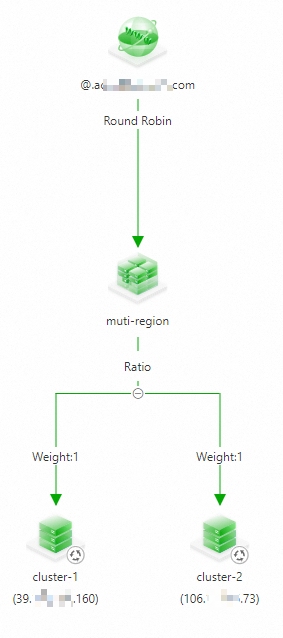
Use the two public IP addresses that you obtained as the traffic ingress IP addresses for the application and configure active-active load balancing and disaster recovery in GTM. For more information, see How GTM implements active-active load balancing and disaster recovery.
After the configuration is complete, the setup is similar to the following figure:
(Optional) Step 5: Configure local throttling and observability
-
Use the following YAML content to configure local throttling rules for mesh-1 and mesh-2. For more information, see Configure local throttling for an ingress gateway.
apiVersion: istio.alibabacloud.com/v1beta1 kind: ASMLocalRateLimiter metadata: name: ingressgateway namespace: istio-system spec: configs: - limit: fill_interval: seconds: 1 quota: 100 match: vhost: name: '*' port: 80 route: name_match: gw-to-productage isGateway: true workloadSelector: labels: istio: ingressgateway -
Configure metric collection and alerts for local throttling for both ASM instances. For more information, see Configure metric collection and alerts for local throttling.
Failure drill
This drill uses the fortio tool to run a load test on the sample application, simulating access from external users. During the load test, manually delete the ingress gateway workload to simulate a regional failure and observe the disaster recovery failover.
-
Run the following command to start a five-minute load test on the sample application. Replace the domain name in the command with the one you configured in GTM.
fortio load -jitter=False -c 1 -qps 100 -t 300s -keepalive=False -a http://{your_domain_name}/productpage -
While the load test is running, simulate a regional failure in cluster-2.
Log on to the ACK console. In the left navigation pane, click Clusters.
On the Clusters page, click the name of your cluster. In the left navigation pane, click .
-
From the Namespace drop-down list, select istio-system.
-
In the list of workloads, find istio-ingressgateway. In the Actions column, click .
-
Wait for the load test to finish. The expected output is as follows:
# range, mid point, percentile, count
>= -261.054 <= -0.0693516 , -130.561 , 100.00, 3899
# target 50% -130.595
WARNING 100.00% of sleep were falling behind
Aggregated Function Time : count 3899 avg 0.076910055 +/- 0.02867 min 0.062074583 max 1.079674 sum 299.872304
# range, mid point, percentile, count
>= 0.0620746 <= 0.07 , 0.0660373 , 19.34, 754
> 0.07 <= 0.08 , 0.075 , 71.94, 2051
> 0.08 <= 0.09 , 0.085 , 96.08, 941
> 0.09 <= 0.1 , 0.095 , 99.23, 123
> 0.1 <= 0.12 , 0.11 , 99.62, 15
> 0.12 <= 0.14 , 0.13 , 99.82, 8
> 0.14 <= 0.16 , 0.15 , 99.92, 4
> 1 <= 1.07967 , 1.03984 , 100.00, 3
# target 50% 0.0758289
# target 75% 0.0812673
# target 90% 0.0874825
# target 99% 0.0992691
# target 99.9% 0.155505
Error cases : count 527 avg 0.074144883 +/- 0.07572 min 0.062074583 max 1.079674 sum 39.0743532
# range, mid point, percentile, count
>= 0.0620746 <= 0.07 , 0.0660373 , 82.54, 435
> 0.07 <= 0.08 , 0.075 , 96.58, 74
> 0.08 <= 0.09 , 0.085 , 99.05, 13
> 0.09 <= 0.1 , 0.095 , 99.24, 1
> 0.12 <= 0.14 , 0.13 , 99.43, 1
> 1 <= 1.07967 , 1.03984 , 100.00, 3
# target 50% 0.0668682
# target 75% 0.0692741
# target 90% 0.0753108
# target 99% 0.0897923
# target 99.9% 1.06568
# Socket and IP used for each connection:
[0] 3900 socket used, resolved to [39.XXX.XXX.160:80 (3373), 106.XXX.XXX.73:80 (527)], connection timing : count 3900 avg 0.038202153 +/- 0.03097 min 0.027057 max 1.07747175 sum 148.988395
Connection time histogram (s) : count 3900 avg 0.038202153 +/- 0.03097 min 0.027057 max 1.07747175 sum 148.988395
# range, mid point, percentile, count
>= 0.027057 <= 0.03 , 0.0285285 , 13.28, 518
> 0.03 <= 0.035 , 0.0325 , 62.79, 1931
> 0.035 <= 0.04 , 0.0375 , 83.95, 825
> 0.04 <= 0.045 , 0.0425 , 86.13, 85
> 0.045 <= 0.05 , 0.0475 , 86.18, 2
> 0.05 <= 0.06 , 0.055 , 86.28, 4
> 0.06 <= 0.07 , 0.065 , 98.03, 458
> 0.07 <= 0.08 , 0.075 , 99.77, 68
> 0.08 <= 0.09 , 0.085 , 99.92, 6
> 1 <= 1.07747 , 1.03874 , 100.00, 3
# target 50% 0.0337079
# target 75% 0.0378848
# target 90% 0.0631659
# target 99% 0.0755882
# target 99.9% 0.0885
Sockets used: 3900 (for perfect keepalive, would be 1)
Uniform: false, Jitter: false, Catchup allowed: true
IP addresses distribution:
39.XXX.XXX.160:80: 3373
106.XXX.XXX.73:80: 527
Code  -1 : 527 (13.5 %)
Code 200 : 3372 (86.5 %)
Response Header Sizes : count 3899 avg 178.19851 +/- 70.45 min 0 max 207 sum 694796
Response Body/Total Sizes : count 3899 avg 4477.7081 +/- 1822 min 0 max 5501 sum 17458584
All done 3899 calls (plus 1 warmup) 76.910 ms avg, 13.0 qps
The output shows that while a few requests failed during the simulated regional failure, most requests succeeded. This demonstrates that combining ASM and GTM effectively provides disaster recovery for the regional failure.
-
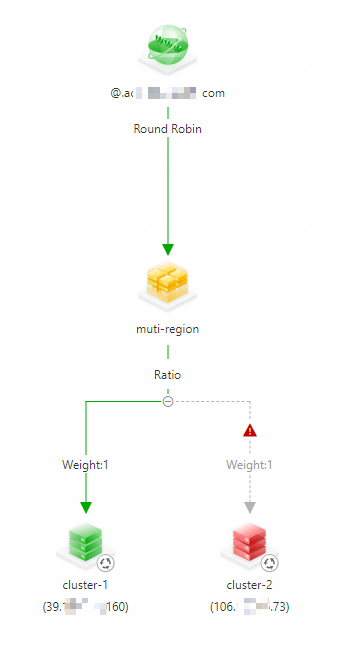
In the GTM console, check the status of the access domain name. The IP address for cluster-2 is shown as unavailable.
You can also configure alerts to be notified when an IP address becomes unavailable, which allows you to remove it manually. For more information, see Configure alerts.