The Real User Monitoring (RUM) sub-service of Application Real-Time Monitoring Service (ARMS) provides the React Native plug-in for monitoring iOS apps and Android apps. This topic describes how to configure the plug-in and integrate a React Native app into RUM.
Supported versions
React Native: RUM only supports collecting error information from React Native versions earlier than 0.70.49.
Android and iOS: Use the default SDK version.
Step 1: Integrate the OpenRUM SDK into the Android or iOS SDK
You can integrate the OpenRUM SDK into the Android or iOS SDK through Android Studio or Xcode. You can also use a third-party tool, such as CocoaPods or Maven, to implement the integration.
Step 2: Integrate the OpenRUM plug-in through Android Studio or Xcode
Download the installation package of the OpenRUM SDK and decompress the package.
Load the dependency libraries in the
@OpenRUMdirectory.In the
@OpenRUMdirectory, run thenpm ioryarn installcommand.Move the
@OpenRUMdirectory to thenode_modulesdirectory of the React Native project.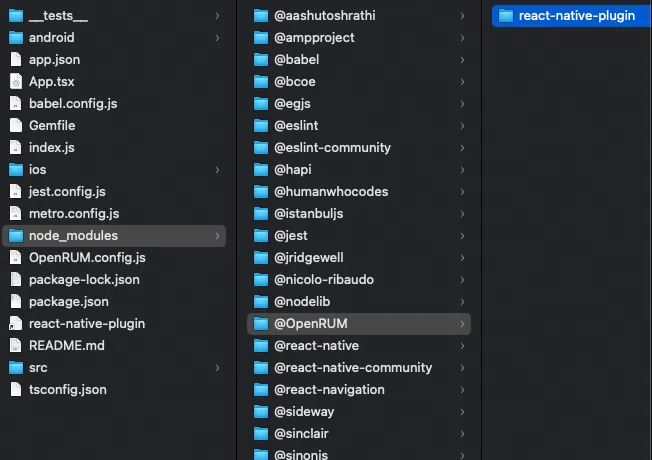
Optional. Monitoring an iOS app requires updating the pod environment. If you monitor an Android app, proceed to the next step.
If the app uses an iOS project under the React Native project, run the
pod installcommand to configure the pod environment as required by data collection in the directory of the iOS project.If the app is embedded with a mobile SDK, move the
OpenRUMRNBridge.handOpenRUMRNBridge.mfiles in thereact-native-plugin/iosdirectory to the project, and correct the references of the SDK header file in the.mfile.
Step 3: Configure the OpenRUM plug-in
Configure transformer settings in the system files
If the
React Nativeversion is 0.59 or later, addbabelTransformerPathto thetransformerparameter of themetro.config.jsfile in the root directory.If the
React Nativeversion is 0.57 or 0.58, addbabelTransformerPathto thetransformerparameter of thern-cli.config.jsfile in the root directory.Example:
module.exports = {
  transformer: {
    babelTransformerPath: require.resolve(
      '@OpenRUM/react-native-plugin/lib/OpenRUM-transformer',
    ),
    getTransformOptions: async () => ({
      transform: {
        experimentalImportSupport: false,
        inlineRequires: false,
      },
    }),
  },
};
If the
React Nativeversion is earlier than 0.57, addgetTransformModulePathto thetransformerparameter of thern-cli.config.jsfile in the root directory. If no such file exists, create one.Example:
module.exports = { getTransformModulePath() { return require.resolve('@OpenRUM/react-native-plugin/lib/OpenRUM-transformer'); }, getSourceExts() { return ['js']; } }NoteIf the project uses a React Native bundle with the
-configparameter configured, addgetTransformModulePathortransformer.babelTransformerPathto the config.js file.
Create the OpenRUM.config.js file
The React Native plug-in supports custom configuration information. You can create a file named OpenRUM.config.js in the root directory of the project. Sample file:
module.exports = {
    react: {
        /**
         * Debug Logs
         */
        debug: false,

        /**
         * Allows you to filter the instrumentation for touch events, refresh events and picker events in certain files
         * True = Will be instrumented
         */
        instrument: (filename) => {
            return true;
        },


        lifecycle: {
            /**
             * Monitor the navigation service switch. The default value is false
             */
            listenNavigation: true,

            /**
             * The data collection rules of component life cycle can be set to specify the fuzzy matching of component name
             */
            componentName: null,
        },
    }
};
Configure React Navigation
React Navigation 6.x
Configure event tracking for the React Native plug-in in the navigation options.
onReady={() => {OpenRUM.reportRouterData(navigationRef) }}
onStateChange={() => {OpenRUM.reportRouterData(navigationRef)}}
Example:
···
import { NavigationContainer ,useNavigationContainerRef } from '@react-navigation/native';
import { OpenRUM } from "@OpenRUM/react-native-plugin";
···
···
export default function App(){
    let navigationRef = useNavigationContainerRef()
    return (
        <NavigationContainer ref={navigationRef}
            onReady={() => {OpenRUM.reportRouterData(navigationRef) }}
            onStateChange={() => {OpenRUM.reportRouterData(navigationRef)}}
        >
            <Stack.Navigator initialRouteName="Home">
                <Stack.Screen name="Home" component={HomeScreen} />
                <Stack.Screen name="About" component={AboutScreen} />
            </Stack.Navigator>
        </NavigationContainer>
    );
}
React Navigation 5.x
Configure event tracking for the React Native plug-in in the navigation options.
useEffect(()=>{
    OpenRUM.reportRouterDataV5(navigationRef)
},[]);
Example:
import { OpenRUM } from "@OpenRUM/react-native-plugin";

export default function App(){
  const navigationRef = React.useRef(null);
  // Modify the following code to obtain navigation event data.
  useEffect(()=>{
      OpenRUM.reportRouterDataV5(navigationRef)
  },[]);
  return (<NavigationContainer ref={navigationRef}>
    <Stack.Navigator>
      <Stack.Screen name="Home" component={HomeScreen} />
      <Stack.Screen name="Details" component={DetailsScreen} />
    </Stack.Navigator>
  </NavigationContainer>)
}
React Navigation 2.10.x
Example:
import {OpenRUM} from "@OpenRUM/react-native-plugin";
<AppContainer
    onNavigationStateChange={OpenRUM.reportRouterDataV2}
/>

// Configure default properties.
AppContainer.defaultProps={
    onNavigationStateChange:OpenRUM.reportRouterDataV2
}