The ApsaraMQ for RocketMQ Java SDK sends and consumes messages in push or pull mode. This topic describes the available methods and configuration parameters.
Push and pull modes
ApsaraMQ for RocketMQ delivers messages to consumers in one of two modes:
Push mode: The broker pushes messages to consumers as they become available. Push mode supports batch consumption, delivering multiple messages in a single batch.
Pull mode: Consumers poll the broker for new messages on demand. Pull mode gives you direct control over which partitions to read from, when to fetch messages, and how to manage offsets.
Pull mode requires an Enterprise Platinum Edition instance.
Connection parameters
Configure the following parameters for both producers and consumers.
| Parameter | Description | Default |
|---|---|---|
NAMESRV_ADDR | TCP endpoint of the ApsaraMQ for RocketMQ instance. Find this on the Instance Details page in the console. | -- |
AccessKey | AccessKey ID used as the unique identifier for authentication. See Create an AccessKey pair. | -- |
SecretKey | AccessKey secret used as the password for authentication. See Create an AccessKey pair. | -- |
OnsChannel | User channel. Set to CLOUD for CloudTmall users. | ALIYUN |
Producer methods
The producer interface provides the following methods:
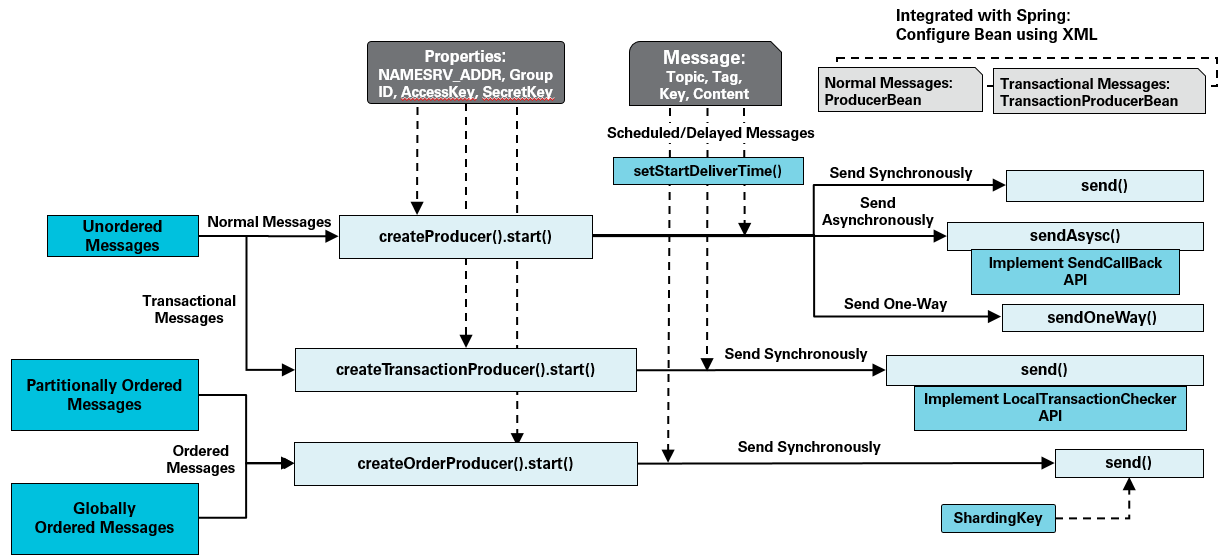
Producer parameters
| Parameter | Description | Default | Unit |
|---|---|---|---|
SendMsgTimeoutMillis | Timeout for sending a message. | -- | Milliseconds |
CheckImmunityTimeInSeconds | Minimum wait time before the broker first checks the status of a transactional message. | -- | Seconds |
shardingKey | Partition key that determines which partition receives an ordered message. | -- | -- |
Consumer methods
Push mode
The push consumer interface provides the following methods:
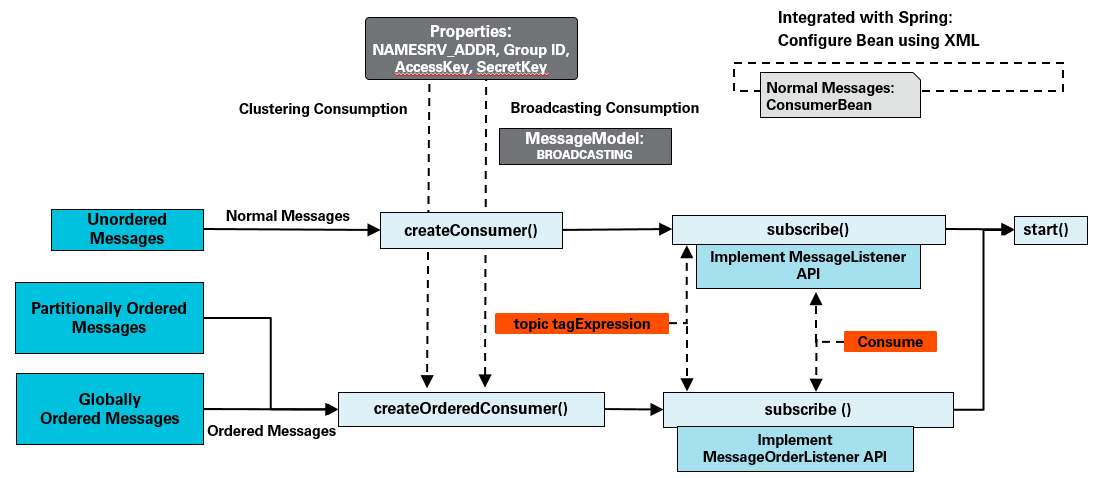
Pull mode
The pull consumer interface provides the following methods:
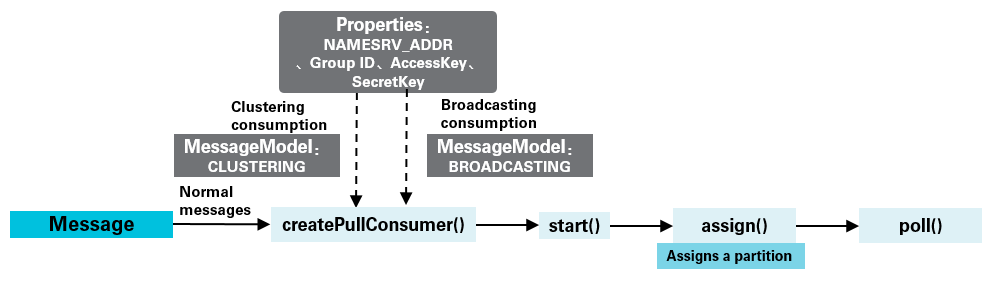
PullConsumer interface
public interface PullConsumer extends Admin {

    /**
     * Returns all partitions for the specified topic.
     * Call this method only after the pull consumer has started.
     */
    Set<TopicPartition> topicPartitions(String topic);

    /**
     * Manually assigns partitions to this consumer. Automatic rebalancing
     * is not performed -- make sure all partitions are covered across
     * your consumers. Calling this method again replaces the previous
     * assignment entirely.
     */
    void assign(Collection<TopicPartition> topicPartitions);

    /**
     * Polls for messages. Returns up to maxBatchMessageCount messages,
     * blocking for at most the specified timeout (in milliseconds).
     */
    List<Message> poll(long timeout);

    /**
     * Resets the consumer offset of a partition to a specific position.
     * The offset must be between the partition's minimum and maximum
     * offset. Call this method only after the consumer has started and
     * has been assigned the target partition.
     */
    void seek(TopicPartition topicPartition, long offset);

    /**
     * Resets the consumer offset of a partition to the earliest available
     * message. Requires a started consumer assigned to the target
     * partition.
     */
    void seekToBeginning(TopicPartition topicPartition);

    /**
     * Resets the consumer offset of a partition to the latest message.
     * Requires a started consumer assigned to the target partition.
     */
    void seekToEnd(TopicPartition topicPartition);

    /**
     * Pauses message consumption on the specified partitions.
     */
    void pause(Collection<TopicPartition> topicPartitions);

    /**
     * Resumes message consumption on previously paused partitions.
     */
    void resume(Collection<TopicPartition> topicPartitions);

    /**
     * Returns the offset of the first message stored at or after the
     * given timestamp in the specified partition. The timestamp refers
     * to when the broker stored the message, not when it was sent.
     */
    Long offsetForTimestamp(TopicPartition topicPartition, Long timestamp);

    /**
     * Returns the latest consumer offset for the specified partition.
     */
    Long committed(TopicPartition topicPartition);

    /**
     * Commits the current consumer offsets synchronously. Offsets are
     * first synced to the local client, then written to the broker
     * asynchronously.
     */
    void commitSync();

    /**
     * Listener interface for partition change events.
     */
    interface TopicPartitionChangeListener {
        /**
         * Called when the partitions of a topic change -- for example,
         * after broker scaling adjusts the partition count.
         */
        void onChanged(Set<TopicPartition> topicPartitions);
    }

    /**
     * Registers a listener that fires when the partition count for a
     * topic changes (for example, due to broker scaling). By default,
     * the maximum callback delay is 5 seconds.
     */
    void registerTopicPartitionChangedListener(String topic,
            TopicPartitionChangeListener callback);
}
Consumer parameters
Common parameters
The following parameters apply to both push and pull consumers.
| Parameter | Description | Default | Valid values | Unit |
|---|---|---|---|---|
GROUP_ID | Consumer group ID created in the ApsaraMQ for RocketMQ console. See Terms. | -- | -- | -- |
MessageModel | Consumption model. Valid values: CLUSTERING (clustering consumption) and BROADCASTING (broadcasting consumption). | CLUSTERING | CLUSTERING, BROADCASTING | -- |
ConsumeThreadNums | Number of threads the consumer uses to process messages. | 20 | -- | -- |
MaxReconsumeTimes | Maximum number of retry attempts when a message fails to be consumed. | 16 | -- | -- |
ConsumeTimeout | Maximum time allowed to consume a single message. If exceeded, the message is redelivered after a retry interval. Set this based on your business logic. | 15 | -- | Minutes |
suspendTimeMillis | Retry interval for ordered messages that fail to be consumed. | -- | -- | -- |
maxCachedMessageAmount | Maximum number of messages cached on the local consumer client. The quota is split evenly across all subscribed topics. For example, if a consumer subscribes to 2 topics and this value is 1,000, each topic can cache up to 500 messages. If a consumer client pulls multiple messages at a time, the actual number of cached messages can exceed this value. Set this to roughly twice the number of messages your consumer processes per second. | 5,000 | 100--50,000 | -- |
maxCachedMessageSizeInMiB | Maximum total size of cached messages on the local consumer client. | 512 | 16--2,048 | MiB |
Setting maxCachedMessageAmount or maxCachedMessageSizeInMiB too high can cause out-of-memory (OOM) errors on the client.
Batch push parameters
The following parameters control how the broker batches messages in push mode before delivering them.
| Parameter | Description | Default | Valid values | Unit |
|---|---|---|---|---|
ConsumeMessageBatchMaxSize | Maximum number of cached messages delivered to a consumer in a single batch. When the cache reaches this threshold, all cached messages are pushed at once. | 32 | 1--1,024 | -- |
BatchConsumeMaxAwaitDurationInSeconds | Maximum wait time before cached messages are pushed to consumers at a time. | 0 | 0--450 | Seconds |
Pull mode parameters
The following parameters apply only to pull consumers.
| Parameter | Description | Default | Valid values | Unit |
|---|---|---|---|---|
maxCachedMessageSizeInMiB | Maximum size of cached messages per partition on the local client. | 100 | 16--2,048 | MiB |
autoCommit | Whether to automatically commit consumer offsets. | true | true, false | -- |
autoCommitIntervalMillis | Interval between automatic offset commits. | 5 | -- | Seconds |
pollTimeoutMillis | Timeout for each poll() call. | 5 | -- | Seconds |
Setting maxCachedMessageSizeInMiB too high can cause OOM errors on the client.
For more information about partitions and offsets, see Terms.
References
Sample code for sending and consuming messages: