ApsaraMQ for RocketMQ supports three transmission modes for normal messages. Choose a mode based on how much delivery guarantee your application requires:
| Mode | Behavior | Best for |
|---|---|---|
| Synchronous | The producer waits for a broker acknowledgment before sending the next message. | Scenarios that require delivery confirmation |
| Asynchronous | The producer sends a message and moves on immediately. A callback returns the result. | Latency-sensitive workflows |
| One-way | The producer sends a message without expecting any response. | High-throughput scenarios where occasional message loss is acceptable |
Prerequisites
Before you begin, make sure that you have:
Instances, topics, and consumer groups created in the ApsaraMQ for RocketMQ console
An AccessKey pair for your Alibaba Cloud account
(Optional) Logging settings configured
Common producer setup
All three modes share the same initialization logic. Create a producer once, then call the mode-specific send method.
import com.aliyun.openservices.ons.api.Message;
import com.aliyun.openservices.ons.api.Producer;
import com.aliyun.openservices.ons.api.SendResult;
import com.aliyun.openservices.ons.api.SendCallback;
import com.aliyun.openservices.ons.api.OnExceptionContext;
import com.aliyun.openservices.ons.api.ONSFactory;
import com.aliyun.openservices.ons.api.PropertyKeyConst;

import java.util.Date;
import java.util.Properties;
import java.util.concurrent.TimeUnit;

Properties properties = new Properties();
// Read credentials from environment variables.
properties.put(PropertyKeyConst.AccessKey, System.getenv("ALIBABA_CLOUD_ACCESS_KEY_ID"));
properties.put(PropertyKeyConst.SecretKey, System.getenv("ALIBABA_CLOUD_ACCESS_KEY_SECRET"));
// Send timeout in milliseconds.
properties.setProperty(PropertyKeyConst.SendMsgTimeoutMillis, "3000");
// TCP endpoint. Find this in the TCP Endpoint section of the Instance Details page
// in the ApsaraMQ for RocketMQ console.
properties.put(PropertyKeyConst.NAMESRV_ADDR, "<your-tcp-endpoint>");

Producer producer = ONSFactory.createProducer(properties);
// Call start() once before sending any messages.
producer.start();
Replace the placeholder with your actual value:
| Placeholder | Description | Example |
|---|---|---|
<your-tcp-endpoint> | The TCP endpoint of your instance | http://MQ_INST_xxxxx.mq-internet.region.aliyuncs.com:80 |
Build a message
Every send call requires a Message object. The constructor takes three arguments:
Message msg = new Message(
    "TopicTestMQ",          // Topic -- must be a normal-message topic
    "TagA",                 // Tag -- used by consumers to filter messages
    "Hello MQ".getBytes()   // Body -- binary payload; producer and consumer must
                            // agree on the serialization format
);

// Optional: set a business key for message tracing in the console.
msg.setKey("ORDERID_100");
A topic used for normal messages cannot be used for other message types such as transactional or scheduled messages.
Synchronous transmission
The producer sends a message and blocks until the broker returns a response. If no exception is thrown, the message was delivered successfully.
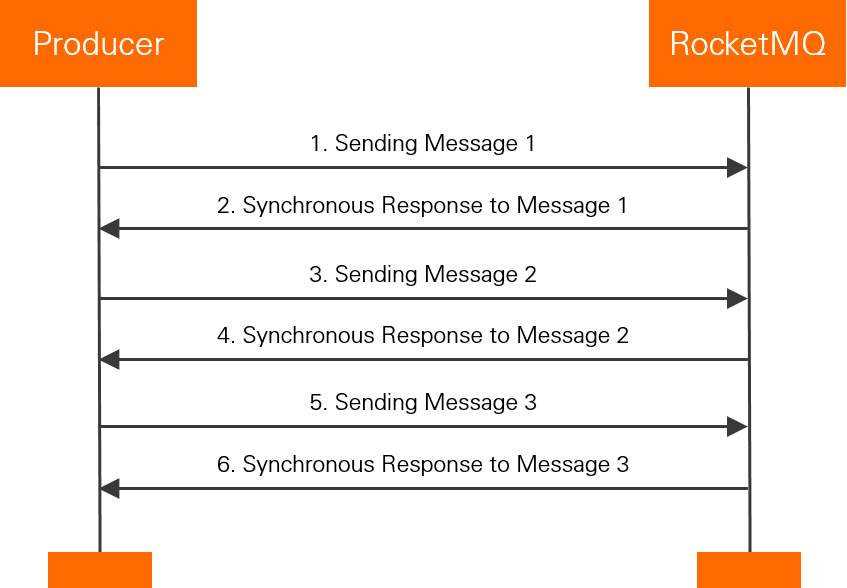
When to use: Scenarios that require delivery confirmation, such as email notifications, sign-up alerts, or promotional messages.
Sample code
for (int i = 0; i < 100; i++) {
    Message msg = new Message("TopicTestMQ", "TagA", "Hello MQ".getBytes());
    msg.setKey("ORDERID_" + i);

    try {
        SendResult sendResult = producer.send(msg);
        // A non-null result means the broker accepted the message.
        if (sendResult != null) {
            System.out.println(new Date() + " Send mq message success. Topic is:"
                + msg.getTopic() + " msgId is: " + sendResult.getMessageId());
        }
    } catch (Exception e) {
        // Handle failures: retry or persist the message for later delivery.
        System.out.println(new Date() + " Send mq message failed. Topic is:" + msg.getTopic());
        e.printStackTrace();
    }
}
Asynchronous transmission
The producer sends a message and returns immediately. The broker response is delivered through a SendCallback with two methods: onSuccess and onException.
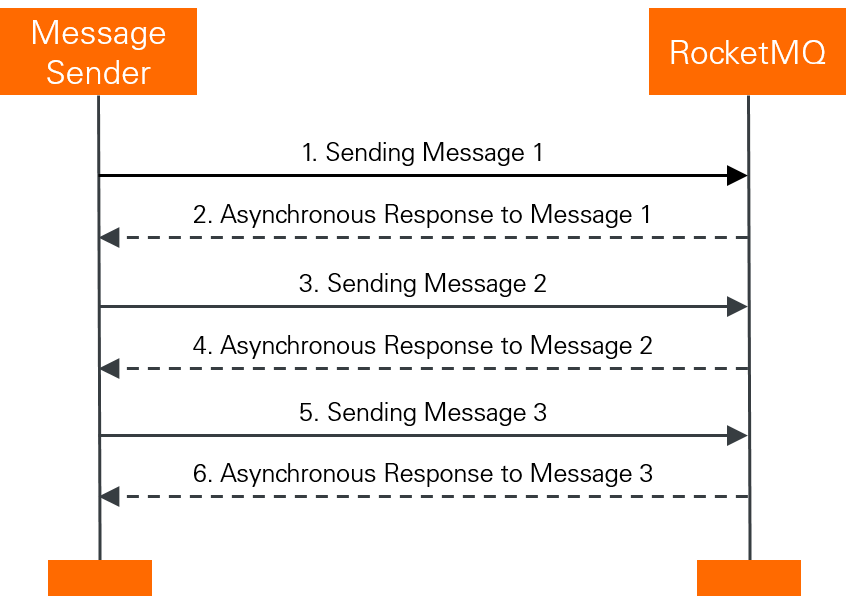
When to use: Latency-sensitive workflows where the calling thread cannot block -- for example, submitting a video transcoding job and handling the result in a callback.
Sample code
Message msg = new Message("TopicTestMQ", "TagA", "Hello MQ".getBytes());
msg.setKey("ORDERID_100");

producer.sendAsync(msg, new SendCallback() {
    @Override
    public void onSuccess(final SendResult sendResult) {
        System.out.println("send message success. topic=" + sendResult.getTopic()
            + ", msgId=" + sendResult.getMessageId());
    }

    @Override
    public void onException(OnExceptionContext context) {
        // Handle failures: retry or persist the message for later delivery.
        System.out.println("send message failed. topic=" + context.getTopic()
            + ", msgId=" + context.getMessageId());
    }
});

// Block for 3 seconds to wait for the callback. In production, use a
// CountDownLatch or similar mechanism instead of Thread.sleep.
TimeUnit.SECONDS.sleep(3);
One-way transmission
The producer fires a message and moves on. No response is returned and no callback is triggered. This mode delivers the highest throughput at the cost of reliability -- a message can be sent within microseconds.
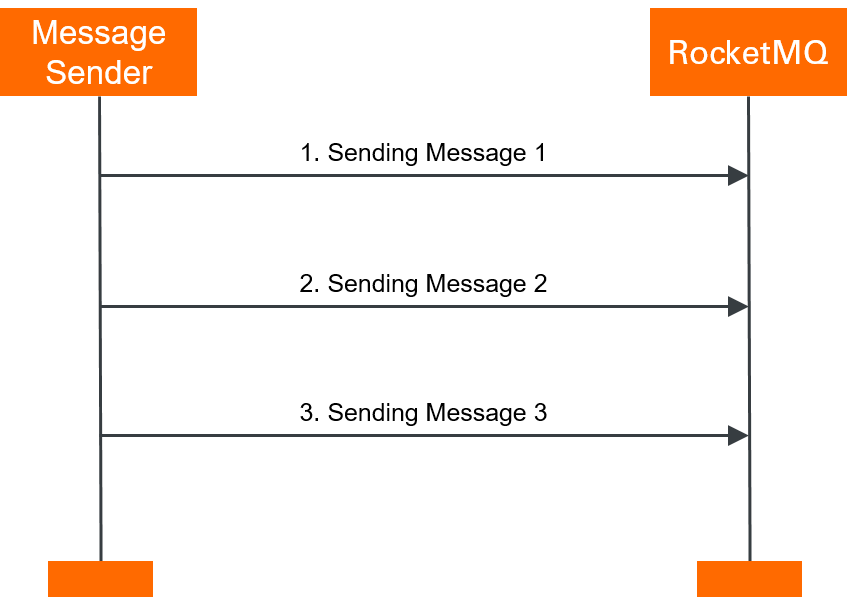
When to use: High-volume scenarios where occasional message loss is acceptable, such as log collection or metrics reporting.
The broker does not send a response in one-way mode, so failed messages are silently lost. If data loss is not acceptable, use synchronous or asynchronous transmission instead.
Sample code
for (int i = 0; i < 100; i++) {
    Message msg = new Message("TopicTestMQ", "TagA", "Hello MQ".getBytes());
    msg.setKey("ORDERID_" + i);

    // No return value, no callback. Fire and forget.
    producer.sendOneway(msg);
}
Shut down the producer
Shut down the producer before your application exits to free resources.
producer.shutdown();Shutting down the producer frees memory. If your application sends messages frequently, keep the producer running instead of creating and destroying it per request.
Comparison of transmission modes
The three modes differ in whether the producer waits for a broker response and the trade-off between throughput and reliability.
| Mode | Send method | TPS | Broker response | Reliability | Typical use case |
|---|---|---|---|---|---|
| Synchronous | producer.send(msg) | High | Yes -- the producer blocks until the broker acknowledges the message | No message loss | Notifications, order confirmations |
| Asynchronous | producer.sendAsync(msg, callback) | High | Yes -- delivered through SendCallback | No message loss | Video transcoding, async workflows |
| One-way | producer.sendOneway(msg) | Highest | No -- the broker does not respond, so the producer cannot detect failures | Possible message loss | Log collection, metrics |
What's next
Subscribe to messages -- consume the normal messages you sent