ApsaraMQ for RocketMQ provides distributed transaction processing similar to eXtended Architecture (X/Open XA) to ensure transaction consistency. This topic describes how to send and receive transactional messages by using the TCP client SDK for Java.
If you are new to ApsaraMQ for RocketMQ, see the Demo project to set up a working project before you send and receive messages.
How transactional messages work
The following diagram shows how the producer, broker, and local transaction interact during transactional message delivery.
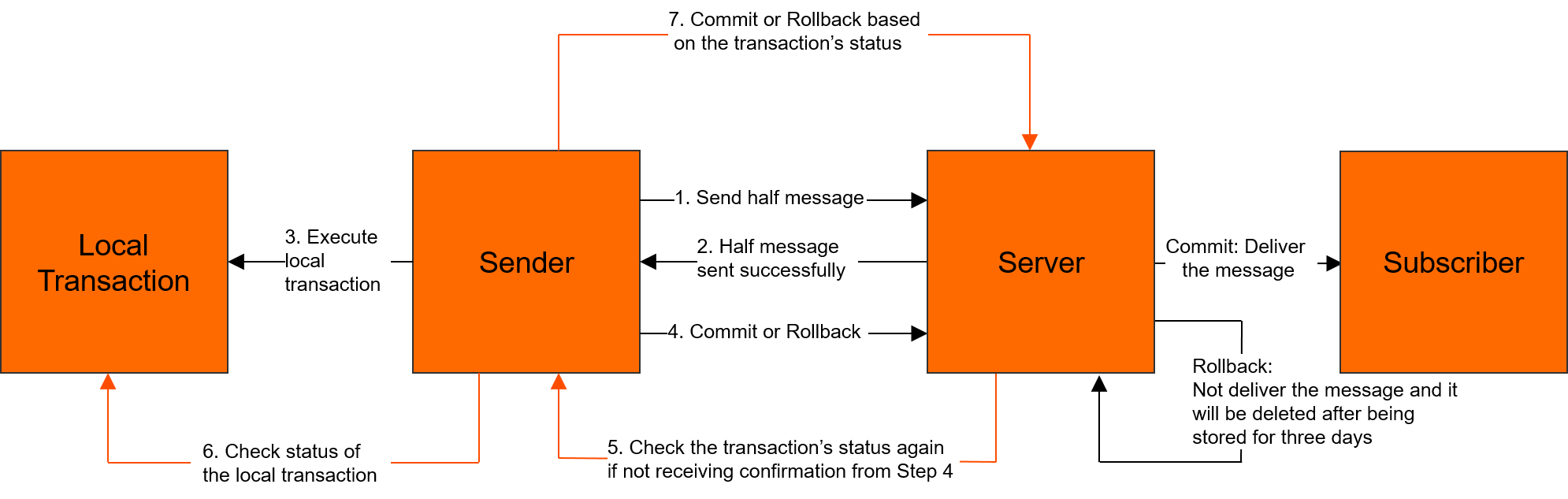
For more information about the transactional message model, see Transactional messages.
Prerequisites
Before you begin, make sure that you have:
Downloaded the SDK for Java. For version information, see Release notes
Set up your development environment. For more information, see Prepare the environment
(Optional) Configured logging. For more information, see Logging settings
Send transactional messages
Sending a transactional message requires three components:
A
TransactionProducerto send the message.A
LocalTransactionExecuterto run your local transaction when the half message is sent.A
LocalTransactionCheckerthat the broker calls to verify unresolved transactions.
For complete source code, see the ApsaraMQ for RocketMQ code library.
package com.aliyun.openservices.tcp.example.producer;

import com.aliyun.openservices.ons.api.Message;
import com.aliyun.openservices.ons.api.ONSFactory;
import com.aliyun.openservices.ons.api.PropertyKeyConst;
import com.aliyun.openservices.ons.api.SendResult;
import com.aliyun.openservices.ons.api.exception.ONSClientException;
import com.aliyun.openservices.ons.api.transaction.LocalTransactionChecker;
import com.aliyun.openservices.ons.api.transaction.LocalTransactionExecuter;
import com.aliyun.openservices.ons.api.transaction.TransactionProducer;
import com.aliyun.openservices.ons.api.transaction.TransactionStatus;

import java.util.Date;
import java.util.Properties;

public class SimpleTransactionProducer {

    public static void main(String[] args) {

        Properties properties = new Properties();
        // The consumer group ID created in the ApsaraMQ for RocketMQ console.
        // The consumer group ID for transactional messages cannot be the same
        // as the ID used for other message types.
        properties.put(PropertyKeyConst.GROUP_ID, "<your-group-id>");
        // Get AccessKey credentials from environment variables
        // to avoid hardcoding sensitive information.
        properties.put(PropertyKeyConst.AccessKey, System.getenv("ALIBABA_CLOUD_ACCESS_KEY_ID"));
        properties.put(PropertyKeyConst.SecretKey, System.getenv("ALIBABA_CLOUD_ACCESS_KEY_SECRET"));
        // The TCP endpoint. You can find this value in the TCP Endpoint section
        // of the Instance Details page in the ApsaraMQ for RocketMQ console.
        properties.put(PropertyKeyConst.NAMESRV_ADDR, "<your-tcp-endpoint>");

        // Register a transaction checker before you create the producer.
        // The broker calls this checker to verify unresolved transactions.
        LocalTransactionCheckerImpl localTransactionChecker = new LocalTransactionCheckerImpl();
        TransactionProducer transactionProducer = ONSFactory.createTransactionProducer(properties, localTransactionChecker);
        transactionProducer.start();

        Message msg = new Message("<your-topic>", "TagA", "Hello MQ transaction===".getBytes());

        for (int i = 0; i < 3; i++) {
            try {
                SendResult sendResult = transactionProducer.send(msg, new LocalTransactionExecuter() {
                    @Override
                    public TransactionStatus execute(Message msg, Object arg) {
                        // Run your local transaction logic here.
                        System.out.println("Execute the local transaction and commit the transaction status.");
                        return TransactionStatus.CommitTransaction;
                    }
                }, null);
                assert sendResult != null;
            } catch (ONSClientException e) {
                // Handle the failure: retry sending or persist the message for later processing.
                System.out.println(new Date() + " Send mq message failed! Topic is:" + msg.getTopic());
                e.printStackTrace();
            }
        }

        System.out.println("Send transaction message success.");
    }
}
Replace the following placeholders with your actual values:
| Placeholder | Description | Where to find it |
|---|---|---|
<your-group-id> | Consumer group ID for transactional messages | ApsaraMQ for RocketMQ console |
<your-tcp-endpoint> | TCP endpoint of your instance | Instance Details page > TCP Endpoint section |
<your-topic> | Topic name | ApsaraMQ for RocketMQ console |
Implement the transaction checker
The broker invokes the transaction checker when it cannot determine the status of a half message. This happens when:
The
LocalTransactionExecuterreturnsTransactionStatus.Unknow.The producer exits before committing a transaction status.
In either case, the broker periodically sends a status check request to a producer in the producer cluster. The producer checks the local transaction and reports the final status.
// Transaction checker implementation
class LocalTransactionCheckerImpl implements LocalTransactionChecker {

    @Override
    public TransactionStatus check(Message msg) {
        System.out.println("Received transaction status check request. MsgId: " + msg.getMsgID());
        // Query the local transaction status and return the result.
        // Return CommitTransaction, RollbackTransaction, or Unknow.
        return TransactionStatus.CommitTransaction;
    }
}
Your check method must:
Check the status (committed or rolled back) of the local transaction that corresponds to the half message.
Return the transaction status to the broker:
TransactionStatus.CommitTransaction,TransactionStatus.RollbackTransaction, orTransactionStatus.Unknow.
Subscribe to transactional messages
Subscribing to transactional messages is the same as subscribing to normal messages. For more information, see Subscribe to messages.