This glossary defines the core concepts in ApsaraMQ for RocketMQ. Terms are grouped by function: how messages are structured, how they are produced and consumed, and how they are managed and monitored.
Messages
Topic
A topic is the primary classifier for messages. Producers send messages to a topic, and consumers subscribe to a topic to receive them. Each topic contains one or more message queues (partitions).
For guidance on structuring topics, see Best practices of topics and tags.
Tag
A tag is a secondary classifier that categorizes messages within a topic. While a topic defines the broad message category, tags let consumers filter for specific subsets of messages in that topic.
For guidance on using tags with topics, see Best practices of topics and tags.
Message
A message is the basic unit of data transfer in ApsaraMQ for RocketMQ. Each message belongs to a topic and can optionally carry a tag.
Message ID
A globally unique identifier that ApsaraMQ for RocketMQ automatically assigns to each message. Use message IDs to track and query individual messages.
Message key
A business-level identifier set by the producer to associate a message with specific business logic. Unlike the message ID (system-generated), the message key is application-defined and helps locate messages related to a particular business operation.
Message queue
Also known as a topic partition. A message queue is a physical partition within a topic. Each topic contains one or more queues, which are automatically assigned when the topic is created. The number of queues in a topic cannot be changed after creation.
Producers
Producer
An entity (also called a message publisher) that creates and sends messages to ApsaraMQ for RocketMQ.
Producer instance
A producer client process. Different producer instances can run in separate processes or on separate machines. Producer instances are thread-safe -- a single instance can run multiple threads within the same process.
Consumers
Consumer
An entity (also called a message subscriber) that receives and processes messages from ApsaraMQ for RocketMQ. ApsaraMQ for RocketMQ supports two consumer types:
| Consumer type | Behavior |
|---|---|
| Push consumer | The broker pushes messages to the consumer. |
| Pull consumer | The consumer actively pulls messages from the broker. Only the TCP SDK for Java supports this type of consumer. |
Pull consumers require an Enterprise Platinum Edition instance. For details, see Methods and parameters and Subscribe to messages.
Consumer instance
A consumer client process. Different consumer instances can run in separate processes or on separate machines. Each consumer instance uses a thread pool to process messages.
Consumer offset
A consumer offset tracks how far a pull consumer has read through a partition. Pull consumers consume messages in a partition sequentially. Each partition has the following offset markers:
MaxOffset: The total number of messages in the partition.
MinOffset: The starting point of the partition.
ConsumerOffset: The number of messages already consumed.
The number of unconsumed (accumulated) messages equals MaxOffset minus ConsumerOffset.
Group
A logical collection of producers or consumers. All clients in a group produce or consume the same type of messages and follow the same publish/subscribe logic.
Group ID
A unique identifier for a group.
Consumption modes
ApsaraMQ for RocketMQ supports two consumption modes. The difference is whether each message is delivered to one consumer or all consumers in a group.
| Mode | Delivery behavior | Example (9 messages, 3 consumers) |
|---|---|---|
| Clustering consumption | Messages are evenly distributed across consumers in the group. Each message goes to one consumer. | Each consumer processes 3 messages. |
| Broadcasting consumption | Every consumer in the group receives every message. | Each consumer processes all 9 messages. |
For details, see Clustering consumption and broadcasting consumption.
Message types
Scheduled message
A message delivered to consumers at a specific point in time. The broker holds the message until the scheduled delivery time arrives.
For details, see Scheduled messages and delayed messages.
Delayed message
A message delivered to consumers after a specified delay period. Unlike a scheduled message (delivered at a fixed time), a delayed message is delivered after a relative time interval from when it was sent.
For details, see Scheduled messages and delayed messages.
Transactional message
A message that participates in a distributed transaction. ApsaraMQ for RocketMQ provides a distributed transaction mechanism similar to X/Open XA (eXtended Architecture) to ensure eventual consistency across distributed transactions.
For details, see Transactional messages.
Ordered message
A message published and consumed in strict first-in, first-out (FIFO) order.
For details, see Ordered messages.
Partitionally ordered message
A message ordered within a specific partition rather than across the entire topic. ApsaraMQ for RocketMQ uses a sharding key to assign messages to partitions. Messages that share the same sharding key are published and consumed in strict FIFO order within their partition.
A sharding key cannot be used as a message key.
For details, see Ordered messages.
Operations and monitoring
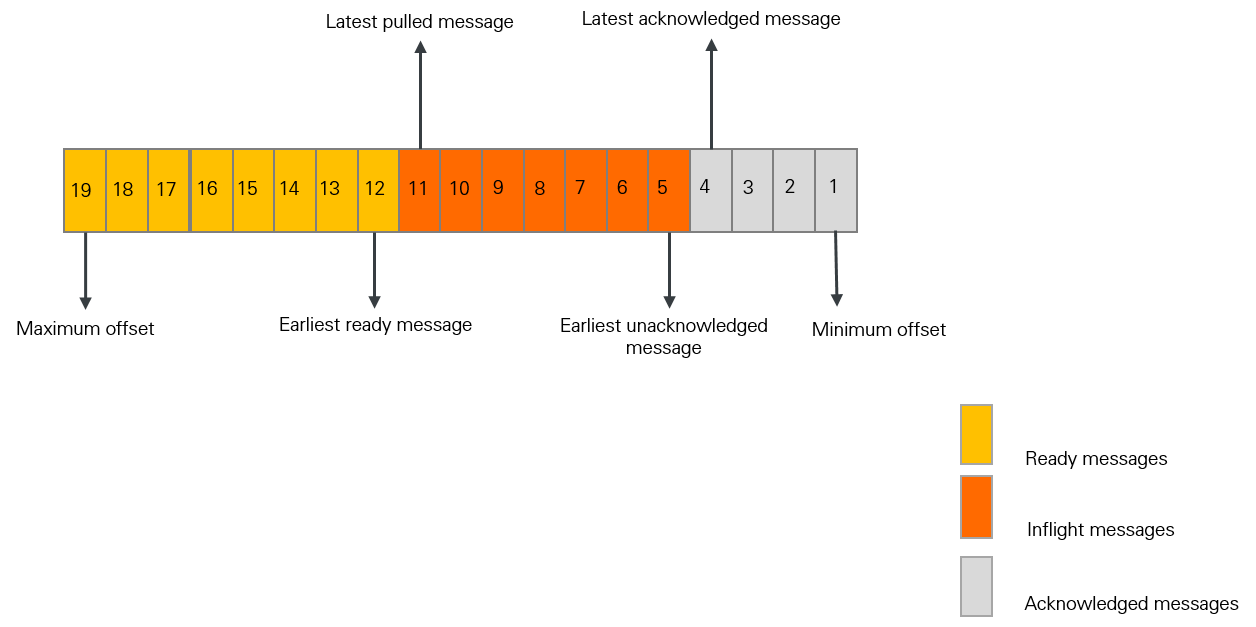
Message accumulation
Message accumulation occurs when consumers cannot keep up with the rate at which producers send messages. Unconsumed messages build up on the broker.
Accumulated messages = Inflight messages + Ready messages
Inflight messages: Messages currently being processed by consumers but not yet acknowledged.
Ready messages: Messages available for consumption but not yet delivered.
Message filtering
A broker-side mechanism that lets consumers receive only messages matching specific tags. Because filtering runs on the broker, irrelevant messages are never delivered to the consumer.
For details, see Message filtering.
Message trace
A complete record of a message's lifecycle, from the moment a producer publishes it to the moment a consumer processes it. Each trace includes timestamps and locations along the full route: producer, broker, and consumer. Use message traces to diagnose delivery issues and verify message flow.
For details, see Query message traces.
Consumer offset resetting
Resets the consumption progress of a consumer group to a specific point in time. After resetting, consumers re-read all messages sent after the specified timestamp. The reset range is limited to the persistent storage window, which is three days by default.
For details, see Reset consumer offsets.
Dead-letter queue
A dedicated queue that stores messages that cannot be successfully consumed. When a message fails to be consumed, ApsaraMQ for RocketMQ retries delivery automatically. If the message still fails after the maximum number of retries, it becomes a dead-letter message and is moved to the dead-letter queue associated with that consumer group rather than being discarded.
For details, see Dead-letter queues.