Batch consumption delivers multiple messages to a consumer thread in a single dispatch, rather than one at a time. This reduces remote procedure call (RPC) overhead to downstream systems and increases message throughput.
How it works
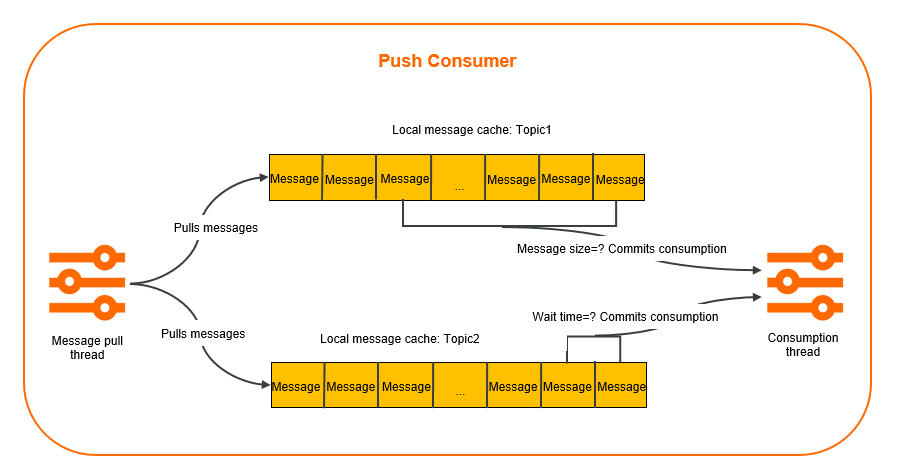
A push consumer handles batch consumption in two stages:
Pull and cache -- Message pull threads retrieve messages from ApsaraMQ for RocketMQ using long polling and cache them locally.
Dispatch -- When the cached messages reach the batch size threshold or the wait time threshold (whichever comes first), the push consumer submits the batch to a consumer thread for processing.
Use cases
Batch consumption is most effective when downstream systems benefit from batched operations. If your goal is only to increase parallelism, consider simpler alternatives first, such as adding consumer instances or tuning thread pool sizes.
Bulk indexing -- An upstream order system publishes log messages that a downstream Elasticsearch cluster indexes. Each message triggers one RPC request (~10 ms). Processing 10 messages individually takes 100 ms; batching them into a single bulk-index call reduces the total to ~10 ms.
Bulk database inserts -- An application inserts records into a database one at a time under high update frequency, creating heavy load. Batching 10 records per insert and flushing every 5 seconds reduces connection overhead and write amplification.
Limitations
Batch consumption is supported only over TCP. Use the commercial edition of the TCP client SDK for Java, version 1.8.7.3.Final or later. For release notes and download instructions, see Release notes.
Maximum batch size: 1,024 messages.
Maximum wait time between batches: 450 seconds.
Parameters
Two parameters control when a batch is dispatched. Dispatch occurs when either condition is met, whichever comes first.
| Parameter | Type | Default | Valid range | Description |
|---|---|---|---|---|
ConsumeMessageBatchMaxSize | String | 32 | 1--1,024 | Maximum number of messages per batch. When the number of cached messages reaches this value, the SDK dispatches the batch to a consumer thread immediately. |
BatchConsumeMaxAwaitDurationInSeconds | String | 0 | 0--450 | Maximum wait time in seconds. When this interval elapses, the SDK dispatches whatever messages have accumulated, even if the batch size threshold has not been reached. |
Sample code
Configure batch consumption through Properties passed to ONSFactory.createBatchConsumer(). The BatchMessageListener callback receives a List<Message> containing up to ConsumeMessageBatchMaxSize messages.
import com.aliyun.openservices.ons.api.Action;
import com.aliyun.openservices.ons.api.ConsumeContext;
import com.aliyun.openservices.ons.api.Message;
import com.aliyun.openservices.ons.api.batch.BatchConsumer;
import com.aliyun.openservices.ons.api.batch.BatchMessageListener;
import java.util.List;
import java.util.Properties;

import com.aliyun.openservices.ons.api.ONSFactory;
import com.aliyun.openservices.ons.api.PropertyKeyConst;
import com.aliyun.openservices.tcp.example.MqConfig;

public class SimpleBatchConsumer {

    public static void main(String[] args) {
        Properties consumerProperties = new Properties();
        consumerProperties.setProperty(PropertyKeyConst.GROUP_ID, MqConfig.GROUP_ID);
        consumerProperties.setProperty(PropertyKeyConst.AccessKey, MqConfig.ACCESS_KEY);
        consumerProperties.setProperty(PropertyKeyConst.SecretKey, MqConfig.SECRET_KEY);
        consumerProperties.setProperty(PropertyKeyConst.NAMESRV_ADDR, MqConfig.NAMESRV_ADDR);

        // Set the maximum number of messages per batch.
        // Default: 32. Valid values: 1 to 1024.
        consumerProperties.setProperty(PropertyKeyConst.ConsumeMessageBatchMaxSize, String.valueOf(128));
        // Set the maximum wait time between batches, in seconds.
        // Default: 0. Valid values: 0 to 450.
        consumerProperties.setProperty(PropertyKeyConst.BatchConsumeMaxAwaitDurationInSeconds, String.valueOf(10));

        BatchConsumer batchConsumer = ONSFactory.createBatchConsumer(consumerProperties);
        batchConsumer.subscribe(MqConfig.TOPIC, MqConfig.TAG, new BatchMessageListener() {

             @Override
            public Action consume(final List<Message> messages, ConsumeContext context) {
                System.out.printf("Batch-size: %d\n", messages.size());
                // Process messages in batches.
                return Action.CommitMessage;
            }
        });
        // Start BatchConsumer.
        batchConsumer.start();
        System.out.println("Consumer start success.") ;

        // Wait for a fixed period to prevent the process from exiting.
        try {
            Thread.sleep(200000);
        } catch (InterruptedException e) {
            e.printStackTrace();
        }
    }
}- For the full source code, see the code library on GitHub.
- For a complete parameter reference, see Methods and parameters.
Best practices
Tune batch size and wait time together
Dispatch triggers when either the batch size or the wait time threshold is reached. Set both parameters to match your workload:
High-throughput scenarios -- Set
ConsumeMessageBatchMaxSizeto a large value (for example, 128 or 256) andBatchConsumeMaxAwaitDurationInSecondsto a short interval (for example, 1--5 seconds). This dispatches batches frequently without waiting for a full batch.Low-throughput scenarios -- Set a moderate batch size (for example, 32) with a longer wait time (for example, 10--30 seconds) to avoid dispatching very small batches.
Example: With ConsumeMessageBatchMaxSize set to 128 and BatchConsumeMaxAwaitDurationInSeconds set to 1, a batch dispatches after 1 second even if fewer than 128 messages have accumulated. In this case, messages.size() in the callback returns a value less than 128.
Implement consumption idempotence
To achieve better batch consumption, implement message idempotence on your consumer client to ensure that a message is processed only once. For more information, see Consumption idempotence.