This topic describes how to use Data Transmission Service (DTS) to synchronize data between ApsaraDB RDS for MySQL instances that belong to different Alibaba Cloud accounts. Serverless RDS instances are supported.
Prerequisites
The source and destination instances are ApsaraDB RDS for MySQL instances.
The available storage of the destination RDS instance must be greater than that of the source RDS instance.
Usage notes
DTS uses read and write resources of the source and destination RDS instances during initial full data synchronization. This may increase the loads of the RDS instances. If the instance performance is unfavorable, the specification is low, or the data volume is large, database services may become unavailable. For example, DTS occupies a large amount of read and write resources in the following cases: a large number of slow SQL queries are performed on the source RDS instance, the tables have no primary keys, or a deadlock occurs in the destination RDS instance. Before data synchronization, evaluate the impact of data synchronization on the performance of the source and destination RDS instances. We recommend that you synchronize data during off-peak hours. For example, you can synchronize data when the CPU utilization of the source and destination RDS instances is less than 30%.
We recommend that you do not use gh-ost or pt-online-schema-change to perform DDL operations on objects during data synchronization. Otherwise, data synchronization may fail.
The tables to be migrated in the source database must have PRIMARY KEY or UNIQUE constraints and all fields must be unique. Otherwise, the destination database may contain duplicate data records.
During initial full data synchronization, concurrent INSERT operations cause fragmentation in the tables of the destination instance. After initial full data synchronization, the size of used tablespace of the destination instance is larger than that of the source instance.
Billing
| Synchronization type | Task configuration fee |
| Schema synchronization and full data synchronization | Free of charge. |
| Incremental data synchronization | Charged. For more information, see Billing overview. |
Supported synchronization topologies
One-way one-to-one synchronization
One-way one-to-many synchronization
One-way cascade synchronization
One-way many-to-one synchronization
For more information about the synchronization topologies that are supported by DTS, see Synchronization topologies.
SQL operations that can be synchronized
Operation type | SQL statement |
DML | INSERT, UPDATE, DELETE, and REPLACE |
DDL |
|
Limits
Incompatibility with triggers
If you select a database as the object to synchronize and the database contains a trigger that updates a table, data inconsistency may occur. For more information about how to resolve this issue, see Configure a data synchronization or migration task for a source database that contains a trigger.
Limits on RENAME TABLE operations
RENAME TABLE operations may cause data inconsistency between the source and destination databases. For example, if only Table A is selected as the object to synchronize and is renamed Table B, Table B cannot be synchronized to the destination database. To prevent this situation, you can select the entire database in which Table A is located as the object to synchronize when you configure the data synchronization task.
Preparations
Set the Alibaba Cloud account to which the destination instance belongs as a trusted account. This allows DTS to access the cloud resources of the Alibaba Cloud account to which the source instance belongs. For more information, see Configure RAM authorization for cross-account data migration or synchronization.
To grant permissions to the Alibaba Cloud account for the destination instance, you must log on to the Resource Access Management (RAM) console by using the Alibaba Cloud account to which the source instance belongs. Then, you can create a data migration task or data synchronization task by using the Alibaba Cloud account to which the destination instance belongs.
Procedure
Create a data synchronization task by using the Alibaba Cloud account to which the destination RDS instance belongs. For more information, see Purchase a DTS instance.
NoteMake sure that the source and destination instances run MySQL, and the one-way synchronization topology is used.
Log on to the DTS console by using the Alibaba Cloud account to which the destination instance belongs.
NoteIf you are redirected to the Data Management (DMS) console, you can move the pointer over the
 icon in the lower-right corner and click the
  icon to go to the DTS console of the old version.
 In the left-side navigation pane, click Data Synchronization.
In the upper part of the Data Synchronization Tasks page, select the region in which the destination instance resides.
Find the data synchronization task and click Configure Task in the Actions column.

Configure the source and destination instances.
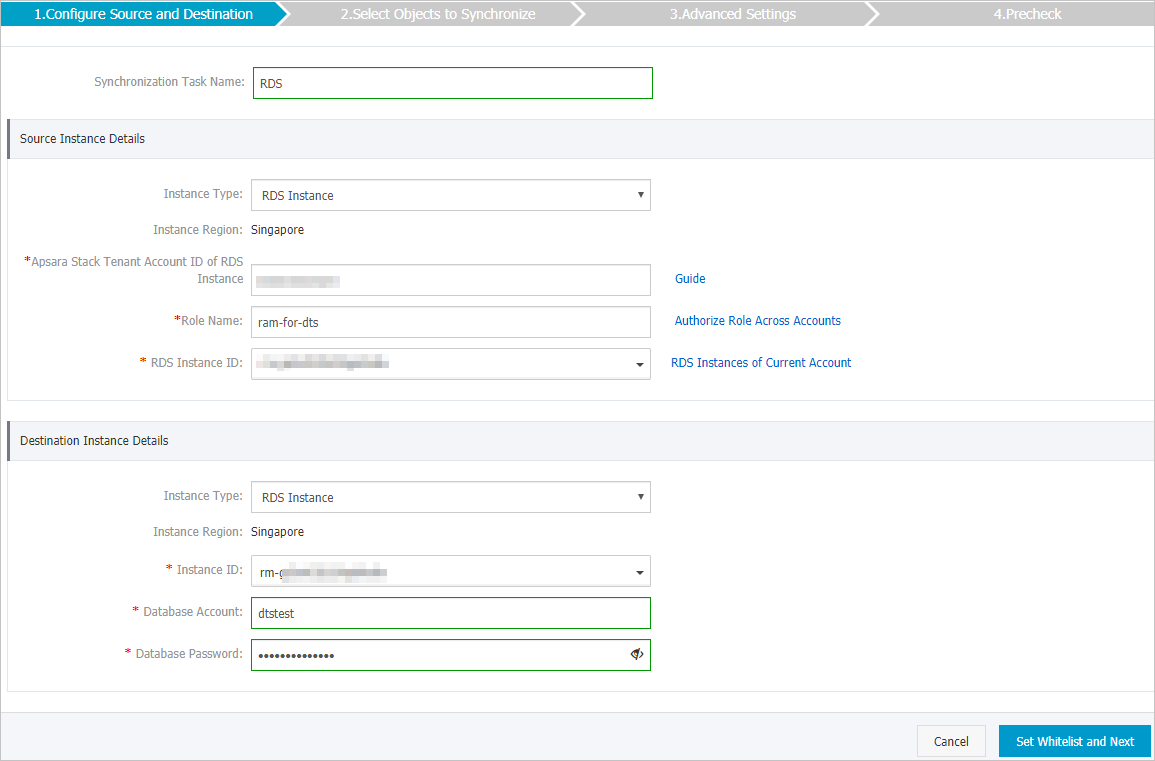
Section
Parameter
Description
N/A
Synchronization Task Name
The task name that DTS automatically generates. We recommend that you specify a name that can help you identify the task. You do not need to specify a unique task name.
Source Instance Details
Instance Type
The type of the source instance. Select RDS Instance.
Instance Region
The region that you selected for the source instance when you created the data synchronization task. You cannot change the value of this parameter.
Apsara Stack Tenant Account ID of RDS Instance
The ID of the Alibaba Cloud account to which the source instance belongs.
NoteBefore you configure this parameter, click RDS Instances of Other Alibaba Cloud Accounts in the Source Instance Details section.

Role Name
The name of the RAM role that is configured in Preparations.
RDS Instance ID
The ID of the source instance.
Destination Instance Details
Instance Type
The type of the destination instance. Select RDS Instance.
Instance Region
The region that you selected for the destination instance when you created the data synchronization task. You cannot change the value of this parameter.
Instance ID
The ID of the destination instance.
Database Account
The username of the account to which the destination instance belongs.
NoteIf the database engine of the destination instance is MySQL 5.5 or MySQL 5.6, you do not need to configure the Database Account and Database Password parameters.
Database Password
The password of the account.
Encryption
Specifies whether to encrypt the connection to the destination instance. Select Non-encrypted or SSL-encrypted based on your business requirements. If you select SSL-encrypted, you must enable SSL encryption for the destination instance before you configure the data synchronization task. For more information, see Configure SSL encryption for an ApsaraDB RDS for MySQL instance.
ImportantThe Encryption parameter is available only within regions in the Chinese mainland and the China (Hong Kong) region.
In the lower-right corner of the page, click Set Whitelist and Next.
If the source or destination database is an Alibaba Cloud database instance, such as an ApsaraDB RDS for MySQL instance or ApsaraDB for MongoDB instance, DTS automatically adds the CIDR blocks of DTS servers in the specified region to a whitelist of the database instance. If the source or destination database is a self-managed database hosted on an Elastic Compute Service (ECS) instance, DTS automatically adds the CIDR blocks of DTS servers in the specified region to the security rules of the ECS instance. You must make sure that you grant access on the self-managed database to ECS. If the source or destination database is a self-managed database on data centers or is from other cloud service providers, you must manually add the CIDR blocks of DTS servers in the specified region to allow DTS to access the database. For more information, see Add the CIDR blocks of DTS servers to the security settings of on-premises databases.
WarningIf the CIDR blocks of DTS servers are automatically or manually added to the whitelist of the database or instance, or to the ECS security group rules, security risks may arise. Therefore, before you use DTS to synchronize data, you must understand and acknowledge the potential risks and take preventive measures, including but not limited to the following measures: enhancing the security of your username and password, limiting the ports that are exposed, authenticating API calls, regularly checking the whitelist or ECS security group rules and forbidding unauthorized CIDR blocks, or connecting the database to DTS by using Express Connect, VPN Gateway, or Smart Access Gateway.
Select the synchronization policy and the objects to be synchronized
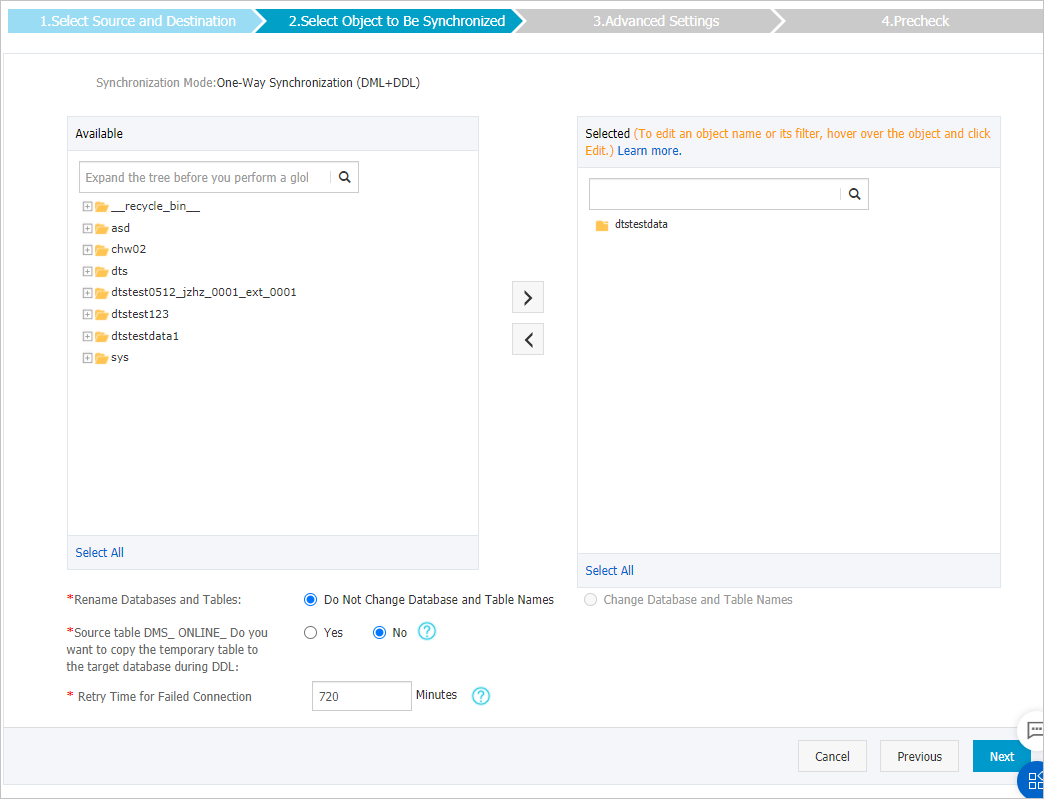
Parameter/Section
Description
Select Object to Be Synchronized
Select one or more objects from the Available section and click the
 icon to move the objects to the Selected section.
 You can select tables or databases as the objects to be synchronized.
NoteIf you select a database as the object to synchronize, all schema changes in the database are synchronized to the destination database.
By default, after an object is synchronized to the destination database, the name of the object remains unchanged. You can use the object name mapping feature to rename the objects that are synchronized to the destination database. For more information, see Rename an object to be synchronized.
Rename Databases and Tables
You can use the object name mapping feature to rename the objects that are synchronized to the destination instance. For more information, see Object name mapping.
Source table DMS_ONLINE_Do you want to copy the temporary table to the target database during DDL
If you use DMS to perform online DDL operations on the source database, you can specify whether to synchronize temporary tables generated by online DDL operations.
Yes: DTS synchronizes the data of temporary tables generated by online DDL operations.
NoteIf online DDL operations generate a large amount of data, the data synchronization task may be delayed.
No: DTS does not synchronize the data of temporary tables generated by online DDL operations. Only the original DDL data of the source database is synchronized.
NoteIf you select No, the tables in the destination database may be locked.
Retry Time for Failed Connection
By default, if DTS fails to connect to the source or destination database, DTS retries within the next 720 minutes (12 hours). You can specify the retry time based on your needs. If DTS reconnects to the source and destination databases within the specified time, DTS resumes the data synchronization task. Otherwise, the data synchronization task fails.
NoteWhen DTS retries a connection, you are charged for the DTS instance. We recommend that you specify the retry time based on your business needs. You can also release the DTS instance at your earliest opportunity after the source and destination instances are released.
In the lower-right corner of the page, click Next.
Configure advanced settings for initial synchronization.

During initial synchronization, DTS synchronizes the schema and data of required objects from the source instance to the destination instance. The schema and data are the basis for subsequent incremental synchronization.
Initial synchronization includes initial schema synchronization and initial full data synchronization. In most cases, you must select both Initial Schema Synchronization and Initial Full Data Synchronization.
In the lower-right corner of the page, click Precheck.
ImportantBefore you can start the data synchronization task, a precheck is performed. You can start the data synchronization task only after the task passes the precheck.
If the task fails to pass the precheck, you can click the
 icon next to each failed item to view details.
 After you troubleshoot the issues based on the causes, you can run a precheck again.
If you do not need to troubleshoot the issues, you can ignore failed items and run a precheck again.
Close the Precheck dialog box after the The precheck is passed. message is displayed in the Precheck dialog box. Then, the data synchronization task starts.
Wait until initial synchronization is complete and the data synchronization task enters the Synchronizing state.
You can view the state of the data synchronization task on the Data Synchronization page.
