Use the Alibaba Cloud Command Line Interface (CLI) to automate the management and maintenance of AnalyticDB for MySQL clusters. This document walks you through installing and configuring the CLI, generating a command example from API Debugging, and calling your first API operation.
Prerequisites
Before you begin, ensure that you have:
An Alibaba Cloud account with AnalyticDB for MySQL clusters to manage
(Optional) Familiarity with the CLI — see What is Alibaba Cloud CLI? for an overview
Install the CLI
The Alibaba Cloud CLI runs on Windows, Linux, and macOS. Follow the installation guide for your operating system:
After installation, confirm the CLI is working:
aliyun --versionTo test CLI commands without a local installation, use Cloud Shell. For details, see What is Cloud Shell?.
Configure the CLI
Using an Alibaba Cloud account to call APIs poses a high security risk because the account has full access permissions. Create and use a Resource Access Management (RAM) user for API calls and daily operations and maintenance (O&M).
Before running CLI commands, gather the following information:
| Information | Where to get it |
|---|---|
| AccessKey ID | Create an AccessKey for a RAM user |
| AccessKey secret | Same as above — record it immediately, as it is only shown once |
| Region ID | Endpoints page for available regions across Data Lakehouse, Basic, and Enterprise editions |
Then follow these steps:
Create a RAM user and grant it the required permissions. See Create a RAM user and Grant permissions to a RAM user.
ImportantThis example requires the
AliyunADBFullAccessaccess policy. In practice, grant only the permissions needed for each specific API call.Create an AccessKey pair for the RAM user. Record the AccessKey ID and AccessKey secret for use in the next step. See Create an AccessKey.
Note the region ID for the region where your clusters reside. See Endpoints for available regions.
NoteUse the
--regionoption to override the default region for a single command. This takes precedence over the region set in the credential configuration and environment variables. See Command-line options.Configure an AccessKey credential profile named
AkProfileusing the AccessKey pair. See Configuration examples for the full procedure.
The CLI supports multiple credential types. For a complete list, see Credential types.
Generate a CLI command example
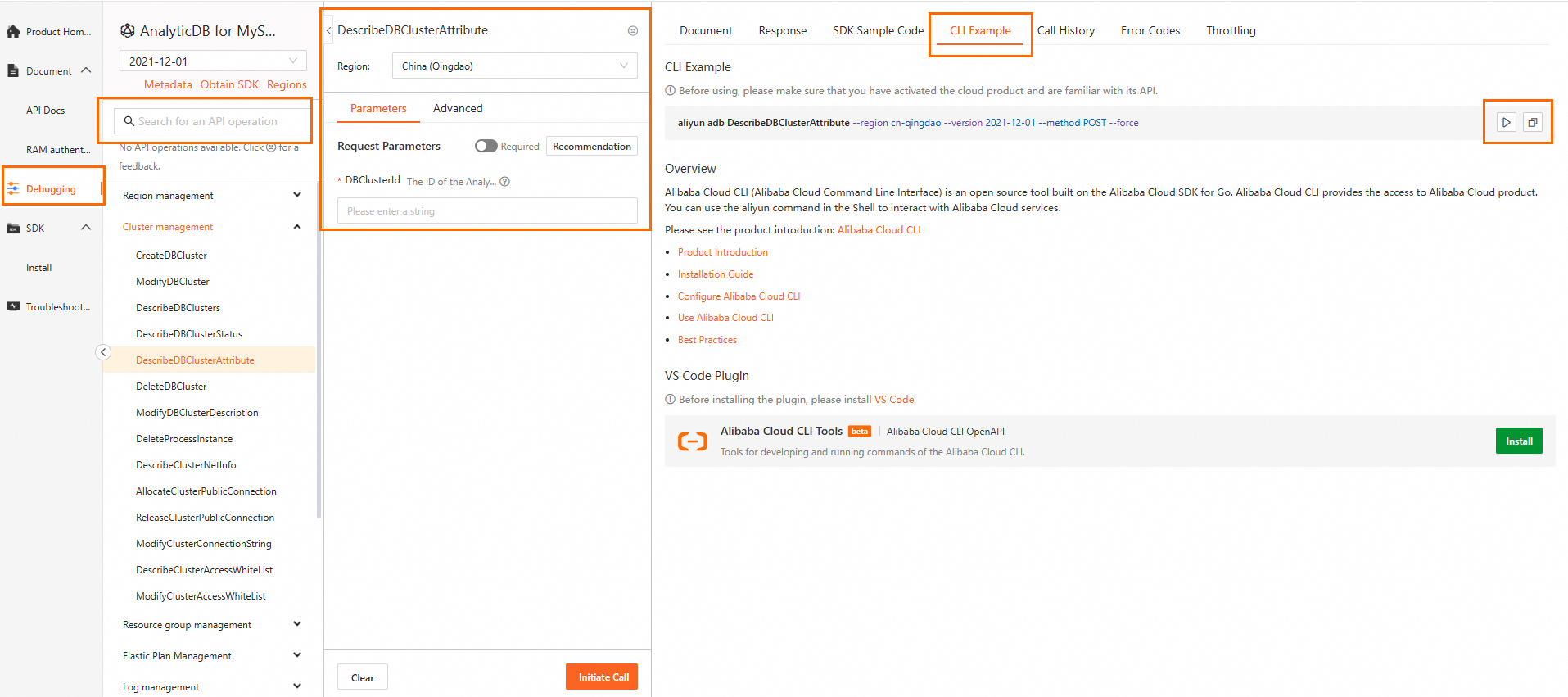
Use the API Debugging page to generate a ready-to-run CLI command for any AnalyticDB for MySQL operation:
Go to the Data Lakehouse, Basic, and Enterprise editions API Debugging page.API Debugging
Search for the API operation in the left panel. On the Parameters tab, fill in the parameters. Then click CLI Example to see the generated command. When running the command locally, note that:
The generated command includes
--regionby default. Remove or keep this option as needed.Parameter formats for the CLI may differ from the API documentation. See Parameter formats.
Call an API
Command structure
All Alibaba Cloud CLI commands follow this structure. See Generate and call a command for details.
aliyun <command> <subcommand> [options and parameters]Common options
| Option | Description |
|---|---|
--profile <profileName> | Specify a credential profile by name. Overrides the default credential configuration and environment variables. |
--region <regionId> | Override the default region for a single command. |
--help | Show help information at any command level. See Get help information. |
For the full list, see Command-line options.
Example: query cluster details
The following example calls DescribeDBClusterAttribute to retrieve details for a specific Data Lakehouse, Basic, or Enterprise edition cluster. See DescribeDBClusterAttribute for the full API reference.
Run the command. Replace
amv-bp15yg4o68****with your cluster ID andcn-hangzhouwith your region ID.aliyun adb DescribeDBClusterAttribute --region cn-hangzhou --DBClusterId 'amv-bp15yg4o68****' --version 2021-12-01 --method POST --forceA successful response returns a JSON object with cluster details:
{
    "Items": {
        "DBCluster": [
            {
                "ClickhouseEngineCacheSize": -1,
                "ClickhouseEngineEnabled": false,
                "CommodityCode": "ads",
                "ComputeResource": "0ACU",
                "ComputeResourceTotal": "0ACU",
                "ConnectionString": "amv-bp15yg4o68****.ads.aliyuncs.com",
                "CreationTime": "2024-09-26T05:25:46Z",
                "DBClusterDescription": "amv-bp15yg4o68****",
                "DBClusterId": "amv-bp15yg4o68****",
                "DBClusterNetworkType": "VPC",
                "DBClusterStatus": "Running",
                "DBClusterType": "Common",
                "DBVersion": "5.0",
                "Engine": "3.2.X.X",
                "EngineVersion": "3.2.2.2",
                "ExpireTime": "",
                "KmsId": "",
                "LockMode": "Unlock",
                "LockReason": "",
                "MaintainTime": "15:00Z-16:00Z",
                "Mode": "flexible",
                "PayType": "Postpaid",
                "Port": "3306",
                "ProductForm": "IntegrationForm",
                "ProductVersion": "EnterpriseVersion",
                "RegionId": "cn-hangzhou",
                "ReservedACU": "0ACU",
                "ReservedNodeCount": 3,
                "ReservedNodeSize": "8ACU",
                "ResourceGroupId": "rg-acfmz7u4zzrngoa",
                "StorageResource": "24ACU",
                "StorageResourceTotal": "24ACU",
                "SupportedFeatures": {
                    "AutoMC": true,
                    "ClickhouseEngine": true
                },
                "UserENIStatus": false,
                "VPCId": "vpc-bp15lqdl91m0fdc****",
                "VSwitchId": "vsw-bp1k9jdi0yznq****",
                "ZoneId": "cn-hangzhou-k"
            }
        ]
    },
    "RequestId": "C42A167C-620C-5CF4-B016-663E3****"
}
What's next
Explore other AnalyticDB for MySQL operations on the API Debugging page.
For a full list of available CLI options, see Command-line options.