Use OpenAPI Explorer to generate ready-to-use Alibaba Cloud CLI commands for any API operation, then run them in Cloud Shell or your local terminal.
Before you begin
-
To run commands locally, install and configure Alibaba Cloud CLI. For more information, see the Installation guide and Configure and manage credentials.
-
Some API operations may incur charges. Activate required services and review their billing rules before running commands.
Generate a CLI command
To generate a CLI command in OpenAPI Explorer:
-
Navigate to the OpenAPI Explorer console.
-
Search for a service or API operation. For example, search
ecsorRunInstancesto find ECS instance operations.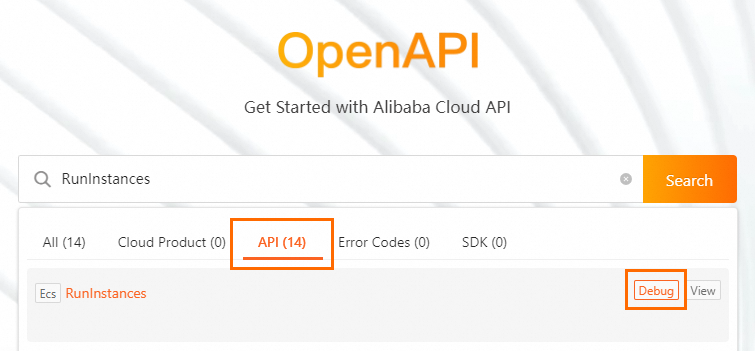
-
Select an API operation to open its debugging page.
-
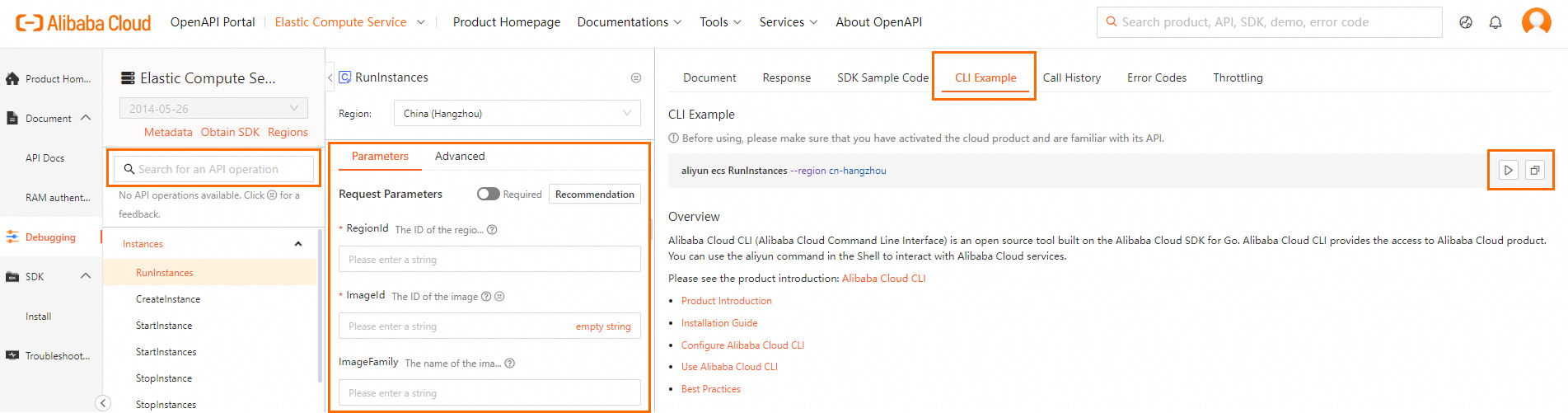
Fill in parameters on the Parameters tab. The CLI Example tab updates automatically as you type.
-
Use the generated command:
-
Click Run in Cloud Shell to execute the command in your browser.
-
Click Copy to copy the command to your local terminal. For more information, see Understand command parameters.
-
Example: Create an ECS instance
This example creates a pay-as-you-go ECS instance using a generated CLI command.
-
Generate the command: In OpenAPI Explorer, find the
ecsservice and theCreateInstanceoperation. Set parameters such asInstanceName,RegionId,InstanceType, andSecurityGroupId. -
Run the command: Copy the command from the CLI Example tab and run it in your terminal.
aliyun ecs CreateInstance \ --RegionId 'cn-hangzhou' \ --InstanceName 'my-first-vm' \ --ImageId 'centos_8_5_x64_20G_alibase_20211228.vhd' \ --InstanceType 'ecs.g6.large' \ --SecurityGroupId 'sg-bp1abcdef12345****' \ --VSwitchId 'vsw-bp1ghijkl67890****' \ --InternetChargeType 'PayByTraffic' \ --Password 'YourPassword123!' -
Review the output: A successful response returns a JSON object with the new instance ID.
{ "InstanceId": "i-bp1abcdefg6789****", "OrderId": "1234567890", "RequestId": "473469C7-AA6F-4DC5-B3DB-A3DC0DE3****", "TradePrice": 0.165 } -
Verify the instance: Check the ECS console or run
aliyun ecs DescribeInstances.