Transit routers act as the central hub in a Cloud Enterprise Network (CEN). They connect virtual private clouds (VPCs), on-premises networks, and other network instances — enabling traffic to flow within a region or across regions without requiring point-to-point connections between each pair.
Choose an edition
CEN offers two transit router editions. Enterprise Edition is the default for all Alibaba Cloud regions.
| Enterprise Edition | Basic Edition | |
|---|---|---|
| Supported network instances | VPC, Virtual Border Router (VBR), Express Connect Router (ECR), IPsec-VPN, transit router (inter-region) | VPC, VBR, Cloud Connect Network (CCN), transit router (inter-region) |
| Custom route tables | Supported | Not supported (one default route table only) |
| Associated forwarding | Supported | Not supported |
| Route learning | Supported (per connection, per route table) | Not supported (all routes auto-advertised) |
| IPv6 | Supported | Not supported |
| Prefix lists | Supported | Not supported |
| Aggregated routes | Supported | Not supported |
| Routing policies | Supported | Supported |
| Availability | All Alibaba Cloud regions | CCN areas only (as of March 31, 2022) |
Basic Edition transit routers are no longer available for purchase in Alibaba Cloud regions. If your Basic Edition transit router is in a region that no longer supports it, upgrade to Enterprise Edition. For more information, see Upgrade Basic Edition transit routers.
How Enterprise Edition transit routers work
Connect network instances
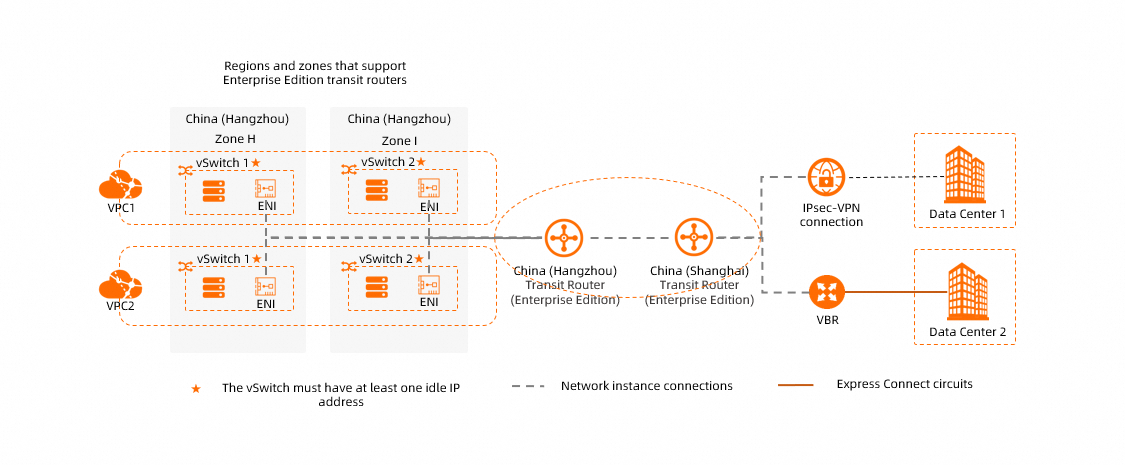
Enterprise Edition transit routers support the following network instances:
-
Transit router instances (for inter-region connectivity)
Once connected, the transit router forwards traffic between any combination of these instances — VPC-to-VPC, VPC-to-VBR, VPC-to-IPsec, and across regions through inter-region transit router connections.
VPC connection requirements
When connecting a VPC, the zone availability of the transit router determines how many vSwitches you need:
Single-zone regions (for example, China (Nanjing - Local Region)):
-
The VPC must have at least one vSwitch in the supported zone with at least one available IP address.
-
One elastic network interface (ENI) is created in the vSwitch and occupies one IP address.
Multi-zone regions (for example, China (Hangzhou)):
-
The VPC must have at least two vSwitches in different zones, each with at least one available IP address.
-
One ENI is created in each vSwitch, occupying one IP address per vSwitch.
-
The two vSwitches provide zone-disaster recovery to ensure uninterrupted data transmission.
For regions that support multiple zones, create a vSwitch in each zone for VPC connections and make sure each vSwitch has at least one idle IP address. This reduces network latency and improves performance by shortening data transmission distance. For zone availability details, see What is CEN?. For routing behavior details, see VPC connection routing principles.
Routing
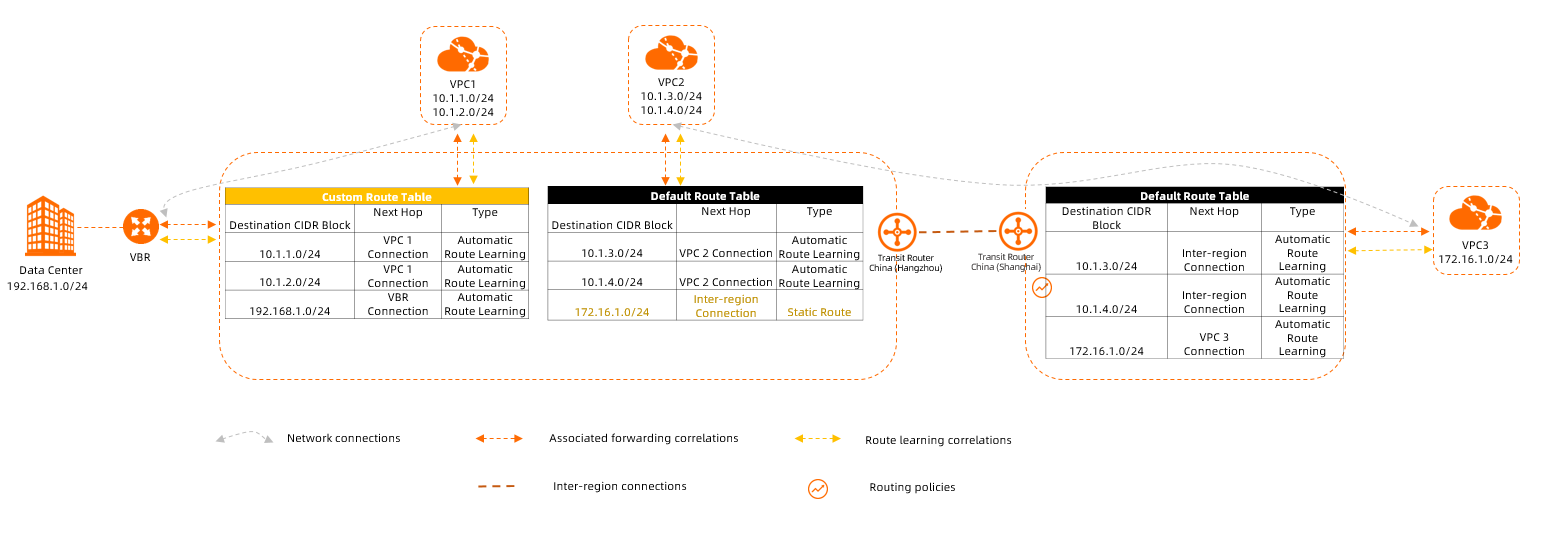
Enterprise Edition transit routers use a two-mechanism routing model: associated forwarding controls where the transit router looks up routes for incoming traffic, and route learning controls which routes get populated into route tables.
Route tables
Each Enterprise Edition transit router has one default route table. You can also create custom route tables for traffic segmentation — for example, isolating development VPCs from production VPCs, similar to virtual routing and forwarding (VRF) in traditional networks. Default and custom route tables are isolated from each other for access control.
After connecting a network instance, no routes are advertised to it by default. Enable route synchronization to turn on automatic route advertisement.
Associated forwarding
Associated forwarding determines which route table the transit router queries when forwarding traffic from a network instance.
-
Traffic from a network instance is only forwarded after its connection is associated with a route table.
-
Each network instance connection can be associated with the route tables of only one Enterprise Edition transit router.
Route learning
Route learning determines which route tables receive routes from a network instance.
-
Routes from a network instance are advertised to a route table only after route learning is enabled between the connection and that route table.
-
A single network instance connection can propagate routes to route tables of one or more Enterprise Edition transit routers.
How the two mechanisms work together:
| Mechanism | Controls | Default behavior |
|---|---|---|
| Associated forwarding | Where to look up routes for outbound traffic from a network instance | No forwarding until associated |
| Route learning | Which route tables receive routes from a network instance | No routes advertised until enabled |
Additional routing features
-
Custom route entries: Add static routes to route tables to override or supplement learned routes.
-
Prefix lists: Associate a prefix list with a route table to automatically add routes for all CIDR blocks in the list. This reduces manual configuration.
-
Routing policies: Filter and modify routes in a route table — control whether routes are advertised to specific network instances or other transit routers, and adjust route attributes. When a VBR or IPsec-VPN connection is attached, the system automatically adds a routing policy (priority 5000, action Reject, direction Egress Regional Gateway) to prevent direct communication between VBR or IPsec-VPN connections on the same transit router. For details, see Default routing policy.
-
Aggregated routes: Combine multiple specific routes in a route table into a single aggregate route. When route synchronization is enabled for the associated VPC, the aggregate route is advertised instead of the individual routes — reducing route count and accelerating synchronization.
-
Multi-region VBR equal-cost routes: When Multi-region Equal-Cost Multi-Path (ECMP) routing is enabled and routes from multiple VBRs share the same attributes except for region IDs, those routes are treated as equal-cost routes and load-balanced.
Route priority
Enterprise Edition transit routers use the longest prefix match principle. When multiple routes match the same destination, the following rules determine which route is used.
VPC route conflict rules
Routes to and from VPCs take precedence in specific conflict scenarios. When a conflict is detected, the lower-priority route is marked as conflicting and blocked — without disrupting traffic already flowing through existing routes.
| Scenario | Result |
|---|---|
| A static or dynamic route entry exists with a VPC connection as the next hop | All other route entries with the same destination (from non-VPC instances) are marked conflicting |
| A dynamic route entry sourced from a VPC exists | All other route entries with the same destination (from non-VPC instances) are marked conflicting |
| A static or dynamic route entry exists that is not sourced from a VPC | VPC route entries with the same destination are marked conflicting |
VPCs and on-premises networks host different services. Overlapping CIDR blocks across VPCs or hybrid cloud connections should not have active-standby or ECMP relationships.
Joining a network instance to CEN — for example, configuring CEN for network interconnection or connecting a VPC that hosts ECS instances — does not negatively affect existing ECS server operations or VPC network functionality. Whether creating a Cloud Enterprise Network affects your VPC network depends entirely on route configuration:
-
Adding a network instance to CEN does not by itself disrupt existing traffic flows. Existing peering connections and communication paths remain intact as long as no route conflicts arise in the transit router's route table.
-
The core factor that affects traffic forwarding is route conflicts. If no conflicting routes exist in CEN, all existing communication continues without interruption.
-
If conflicting routes are present or improperly synchronized route entries are propagated to your VPC instances, the routing behavior for those VPC instances may change — which can affect network communication for the corresponding services.
Priority for non-conflicting data-center routes
For routes pointing to a data center that do not trigger conflict rules, priority is determined in this order:
-
Static routes (highest priority): Manually configured custom route entries and prefix list entries. When both exist for the same destination, they automatically form ECMP routes.
-
Dynamic routes — evaluated in the following order when multiple dynamic routes exist:
-
Source instance type: VBR > ECR > Cloud Connect Network (CCN) > IPsec connections (VCO)
-
Route entry type in the source route table: BGP routes take precedence over custom route entries.
-
AS_PATH length: Routes with shorter BGP AS_PATH are preferred.
-
Next hop location: Intra-region connections are preferred over inter-region connections.
-
Routing policy priority: A lower priority value indicates a higher priority.
-
Tie-breaker:
-
For intra-region next hops: ECMP is enabled automatically.
-
For inter-region next hops: If multi-region ECMP routing for VBRs is enabled and the source is a VBR or ECR, ECMP is enabled. Otherwise, region IDs of the next-hop transit routers are compared alphabetically — entries with alphabetically earlier region IDs take priority.
-
-
IPv6 support
Enterprise Edition transit routers support IPv6 route learning, propagation, and traffic forwarding. Connect VPC, ECR, or VBR instances to enable IPv6 communication within a region or across regions.

IPv6 support by network instance
| Network instance | IPv6 support |
|---|---|
| Enterprise Edition transit router | Enabled by default upon creation |
| VPC | Supported. IPv6 must be enabled for both the VPC instance (see Enable IPv6 for a VPC) and the VPC connection (see Create a VPC connection) |
| ECR | Enabled by default upon creation |
| VBR | Supported. IPv6 must be enabled on the VBR instance (see Create a VBR) |
| IPsec-VPN connection | Not supported |
| Cloud Connect Network (CCN) | Not supported |
Limitations
-
The multicast feature does not support IPv6.
-
IPv6 route entries share the same route table entry quota as IPv4 entries. For example, if the quota is 10,000 entries, the combined total of IPv4 and IPv6 entries must stay below that limit.
-
When creating a VPC connection with Automatically Create Route That Points to Transit Router and Add to All Route Tables of Current VPC selected, the system automatically adds three IPv4 routes (10.0.0.0/8, 172.16.0.0/12, 192.168.0.0/16). IPv6 routes are not added automatically.
To route IPv6 traffic through the transit router for a VPC, either activate route synchronization after creating the VPC connection, or manually add IPv6 route entries in the VPC route tables. For a step-by-step example, see Establish inter-region IPv6 communication with transit router.
How Basic Edition transit routers work
Basic Edition transit routers are no longer available for purchase in Alibaba Cloud regions (as of March 31, 2022). They remain supported only in CCN areas. If your Basic Edition transit router is in a region that no longer supports it, upgrade to Enterprise Edition. For more information, see Upgrade Basic Edition transit routers.
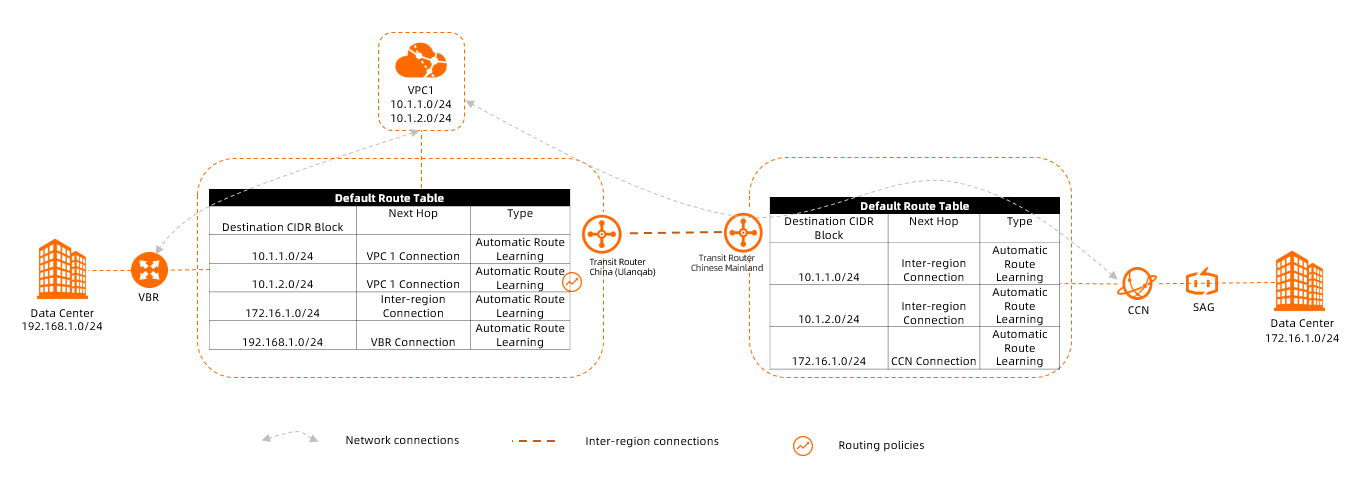
Connect network instances
Basic Edition transit routers support the following network instances:
-
Transit router instances (for inter-region connectivity)
Routing
Each Basic Edition transit router has one default route table. Custom route tables are not supported.
Route advertisement is automatic and fully open: after a network instance is connected, all its routes are advertised to the default route table, and the transit router then advertises those routes to all other connected network instances. This enables full-mesh communication without additional configuration.
Routing policies can be used to filter or modify route advertisement between the route table and connected network instances.
When both VBRs and CCN instances are connected to a Basic Edition transit router, the system automatically creates a routing policy (priority 5000, action Reject, direction Egress Regional Gateway) to prevent VBRs and CCN instances from communicating with other VBRs and CCN instances on the same transit router. For details, see Default routing policy.