When you only need to change a button label, you want the Agent to finish quickly so you can review the result at a glance. When investigating an intermittent concurrency issue, you are willing to wait a little longer while it works through the cause and verifies the fix.
These two tasks call for different levels of thinking effort. The setting controls how much reasoning the model does before the Agent takes action, influencing how much time it spends working through the problem and checking its approach.
We recently evaluated models in Qoder on real tasks at different thinking effort levels. Based on the results, we changed the default for GLM-5.3, Kimi-K3, Kimi-K2.8-Preview, and DeepSeek-Flash from "Maximum" to "High". The defaults for GLM-5.3-Flash and DeepSeek-V4-Pro remain at "Maximum".
Kimi-K3 has since been replaced in the model list by the newly released Kimi-K3.1-Pro. For now, it uses the same default thinking effort as Kimi-K3: "High".
These changes are already in effect. To set any of these 4 models back to "Maximum", open "Manage models" in the model selector and change its thinking effort setting.
Before the change, all 6 models had "Maximum" as their default thinking effort. The defaults have now been updated as follows:
For each of these models, you can choose "Low", "High", or "Maximum" to suit the task. The next section explains what each option means.
If thinking effort is new to you, this section will explain what the setting controls and why it affects how long you wait and how many Credits you use.
For a complex problem, a reasoning model can work through intermediate reasoning before producing a final answer. Think of this as an internal draft: breaking down the problem, comparing approaches, and checking intermediate results. This is what we mean here by the model's "thinking".
For a difficult math problem, working through the calculations step by step on scratch paper is better than simply giving an answer. It is more likely to produce the right answer, but it also takes more time. The same is true for models.
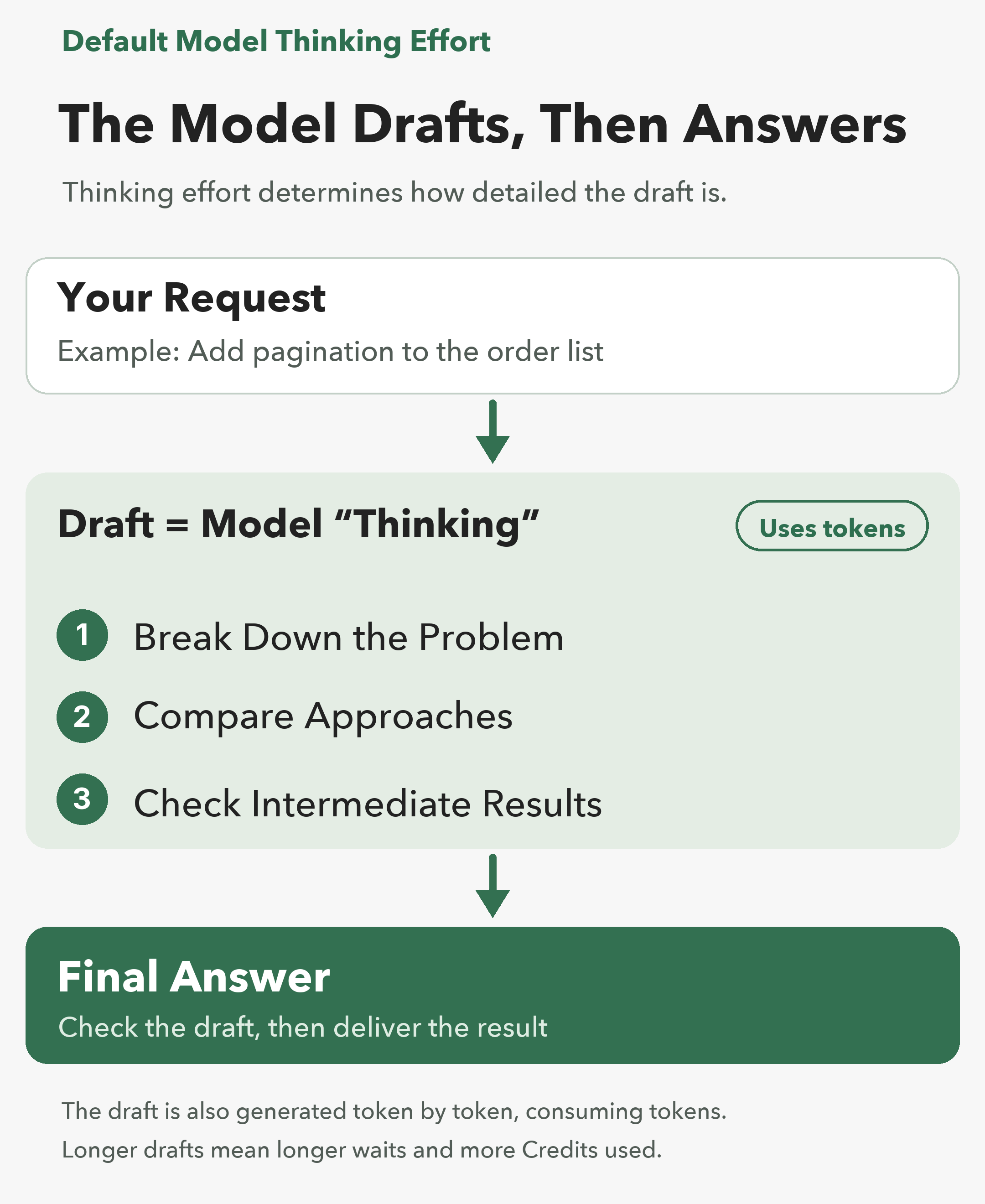
The model generates this internal draft token by token, just like the final answer. Tokens are units of text, and token counts give a rough measure of text length rather than a literal word count. Longer reasoning generally uses more tokens, increases waiting time, and consumes more Credits.
Imagine assigning a task to a colleague. If you say, "Have it ready by tonight", they have time to check edge cases more thoroughly. If you say, "Have it ready in ten minutes", they might deliver a usable first version and refine it as they go. The same person approaches the work differently depending on the time available.
Thinking effort works the same way. Most models in Qoder offer three thinking effort options:
Changing thinking effort changes how thoroughly the model works through a task, not its underlying knowledge or capabilities. A higher setting gives it more scope to reason through a problem; it does not give it new knowledge or abilities.
An Agent works through a task in multiple steps, rather than a single question-and-answer exchange. To fix a bug, for example, it reads the relevant files, edits the code, and runs tests. If the tests fail, it examines the errors, updates the code, and runs the tests again. The cycle continues until the tests pass.
Each step requires a request to the model. The number of these requests is the "model call count" referred to in the evaluation below.
Higher thinking effort can mean more reasoning at each step and more steps for the Agent overall. For example, the Agent may read more files, run additional rounds of tests, or check more edge cases.
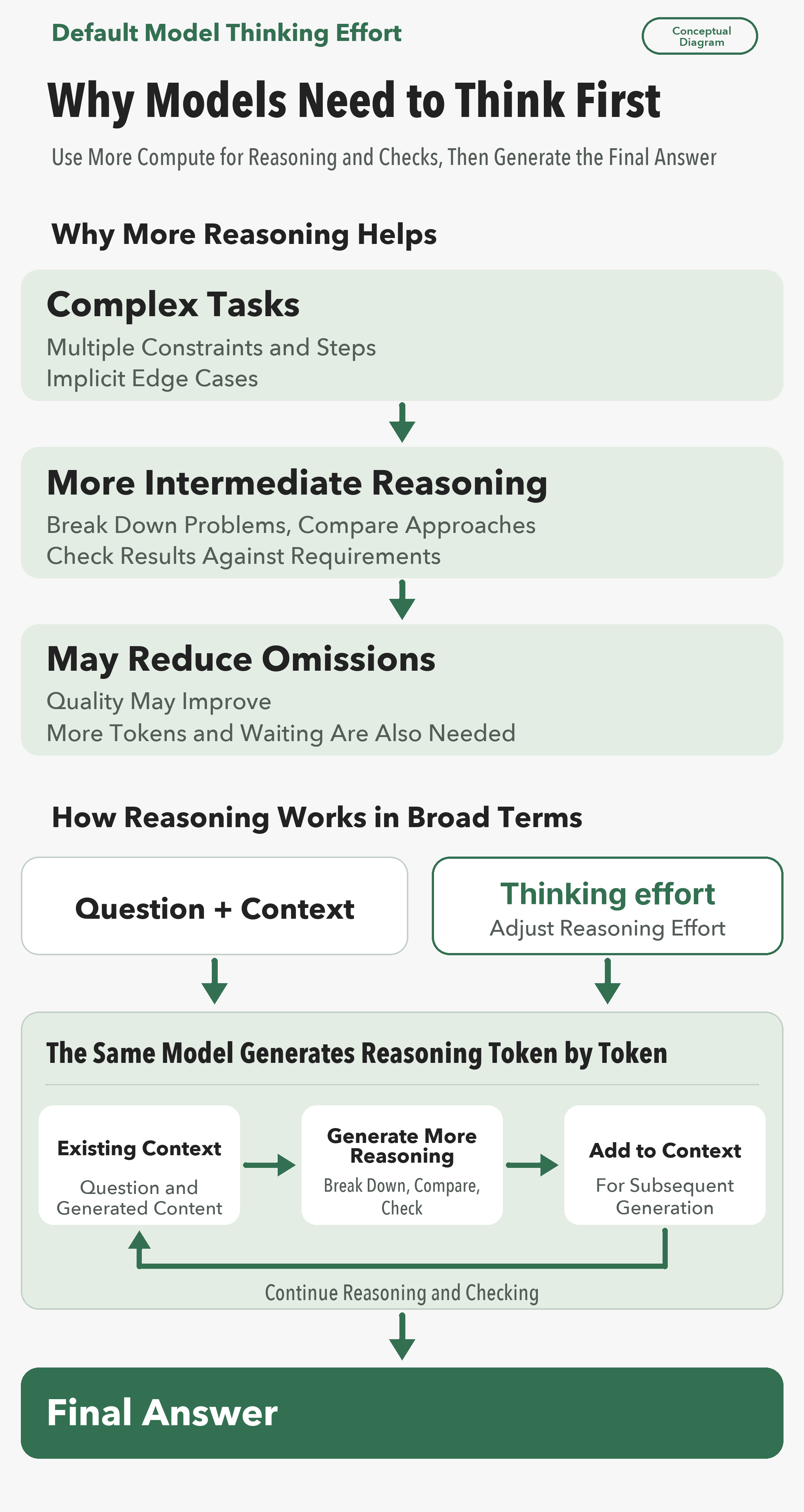
The additional cost comes from two sources: longer reasoning drafts and more model calls.
Each model call also includes the context supplied to the model at that step: your requirements, relevant content from files the Agent has read, and earlier conversation messages. As that context grows, the request contains more input tokens and can cost more.
Difficult tasks are worth more thought. When there are many edge cases and mistakes are costly, extra rounds of verification can catch more omissions.
Simple tasks are different. Most of the extra reasoning is of little use, and the additional waiting time and tokens are unlikely to produce better results.
Official documentation from several model vendors also notes that the highest thinking effort setting may offer diminishing returns: additional spending brings progressively smaller improvements. Test first, then decide whether to use "Maximum" as your regular setting.
We used Qoder CLI to compare Maximum and High on QoderBench, Qoder's evaluation dataset of nearly 200 cases. We ran each of the 6 models through the dataset once at each setting.
The Kimi results below are for Kimi-K3, not its replacement, Kimi-K3.1-Pro, which had not yet launched when we ran the tests. We have not yet completed the evaluation of Kimi-K3.1-Pro, so it uses Kimi-K3's High default for now.
Two metrics need a quick explanation. Output tokens count everything the model generates, including its internal reasoning. Model call count is the number of requests sent to the model to complete a task.
Lowering thinking effort by just one level from Maximum produced the following changes across the 6 models:
By model:
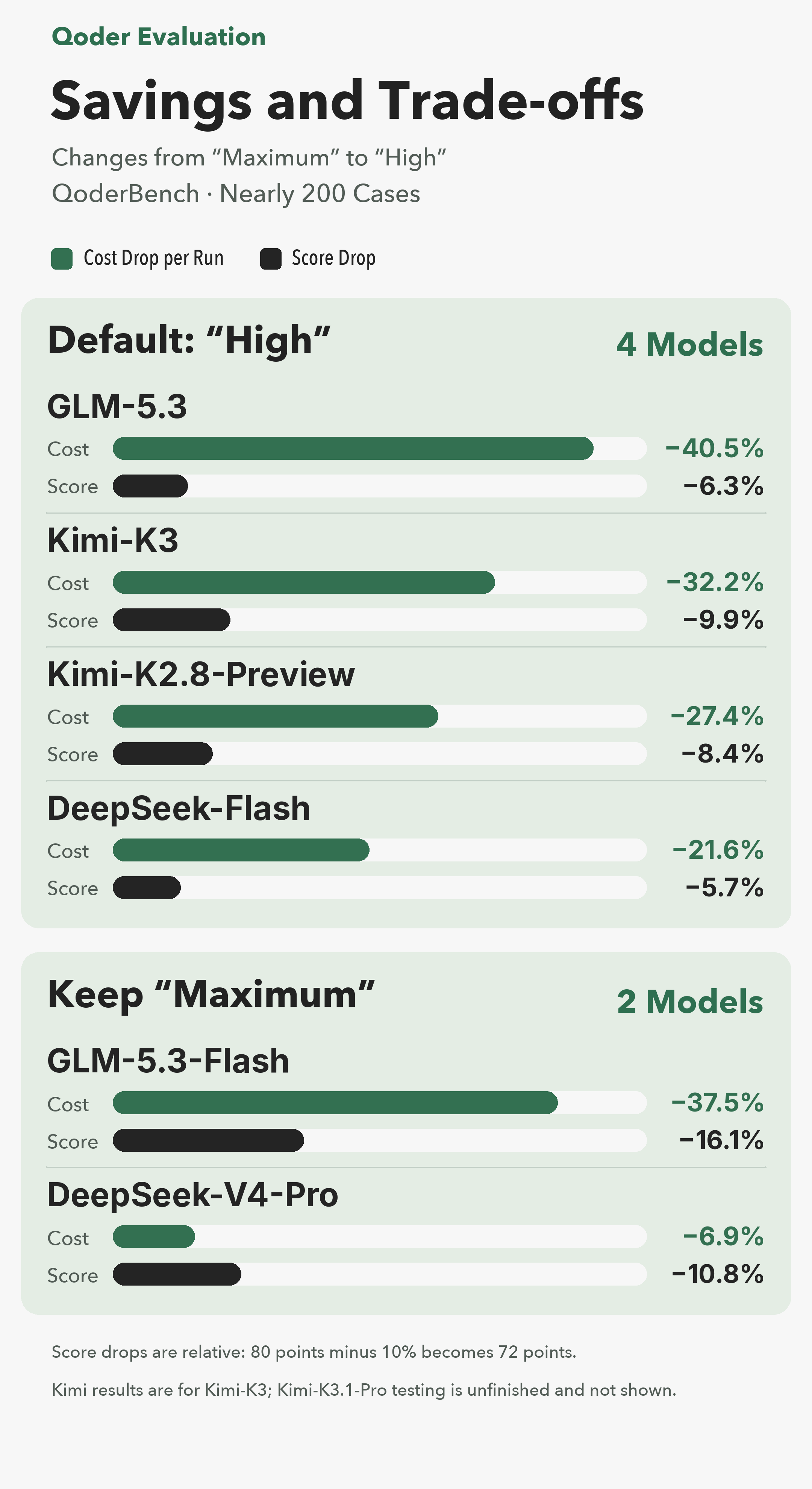
Score decreases are relative percentages, not percentage-point changes: a score of 80 falling by 10% becomes 72. These results come from nearly 200 QoderBench cases; the Kimi model tested was Kimi-K3.
Qoder's Credits usage is tied to tokens. Fewer output tokens also mean lower Credits usage; the exact reduction depends on the task and model.
Lowering thinking effort comes with a tradeoff: all 6 models scored lower. This evaluation did not measure end-to-end task duration. Fewer model calls and output tokens may reduce waiting time, but the effect varies by task. Some of the extra reasoning at Maximum was useful.
These defaults are recommendations based on Qoder's evaluation results. You can adjust a model's thinking effort to suit the difficulty of your current task.
Low: Use for brainstorming or small, well-defined changes, such as editing a button label, adding comments to a function, or standardizing API field names. Get a quick result, then review and refine it yourself.
High: Use for everyday development and bug fixes. For example, you might add pagination to an order list and handle empty results and out-of-range page numbers. High adds a few more verification steps.
Maximum: Use for hard-to-diagnose problems or changes where mistakes would be costly. Examples include investigating an intermittent concurrency bug and reviewing the signature verification logic for payment callbacks. You can also choose Maximum for long tasks you would rather not monitor throughout.
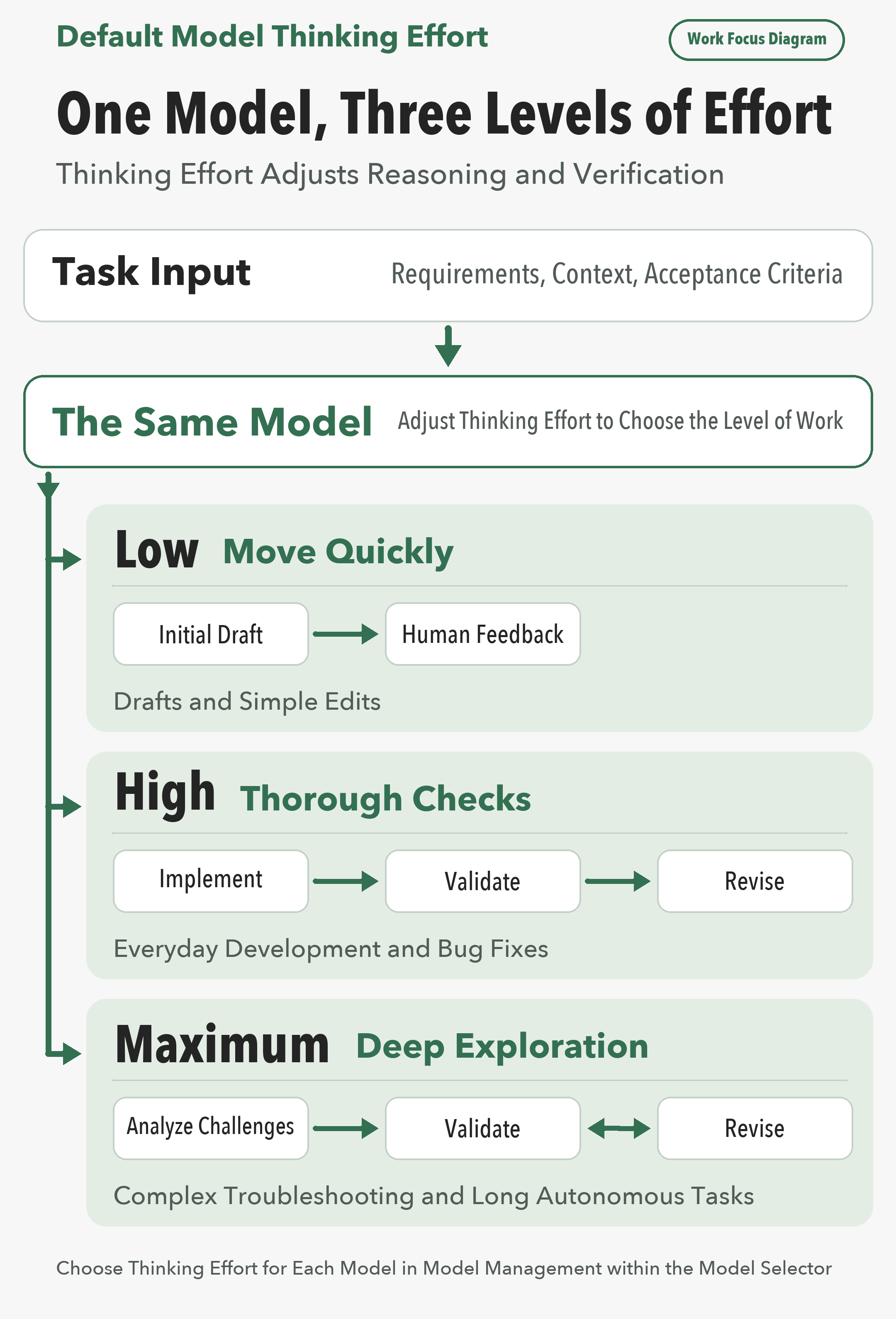
To set thinking effort separately for each model in Qoder, click the model selector at the bottom of the input box, then click "Manage models" at the bottom of the selector.
Try not to change thinking effort midway through a task. With prompt caching, previously processed input can be reused in later requests, which can save time and substantially reduce costs. Changing thinking effort mid-task may prevent cache reuse, requiring those input tokens to be processed again.
When a result is wrong, first identify why. If the model missed edge cases or skipped verification, it may need to reason more thoroughly. Try increasing thinking effort.
If the model took the wrong approach from the start, increasing thinking effort will not help. Instead, try a different model or make your requirements, constraints, and acceptance criteria clearer.
A thinking effort change in "Manage models" applies to all subsequent tasks. It does not affect a reply already being generated; the new setting takes effect in the next round.
Open "Manage models" to review each model's current default thinking effort. For complex tasks, choose Maximum.
High-Risk PHP and Node.js Vulnerabilities: A Scan Costs Pennies. A Miss Could Cost a Fortune.
QoderWake: Digital Workers Take the Initiative — No Need to @ Every Time

1,601 posts | 526 followers
FollowAlibaba Cloud Community - September 14, 2026
Alibaba Cloud Native Community - March 27, 2025
Alibaba Cloud Community - August 28, 2026
Alibaba Cloud Community - October 20, 2026
Alibaba Cloud Community - September 3, 2025
Alibaba Cloud Community - August 3, 2026
1,601 posts | 526 followers
Follow Qoder
From Assisted to Autonomous — Adapting to Every Programming Need
Learn More Token Plan
Build more, spend less. One plan, every modality.
Learn More QwenWork
 is dedicated to helping employees strengthen their professional competitiveness in the AI era and to enabling enterprises to improve organizational effectiveness.
Learn More
Alibaba Cloud Model Studio
A one-stop generative AI platform to build intelligent applications that understand your business, based on Qwen model series such as Qwen-Max and other popular models
Learn MoreMore Posts by Alibaba Cloud Community

