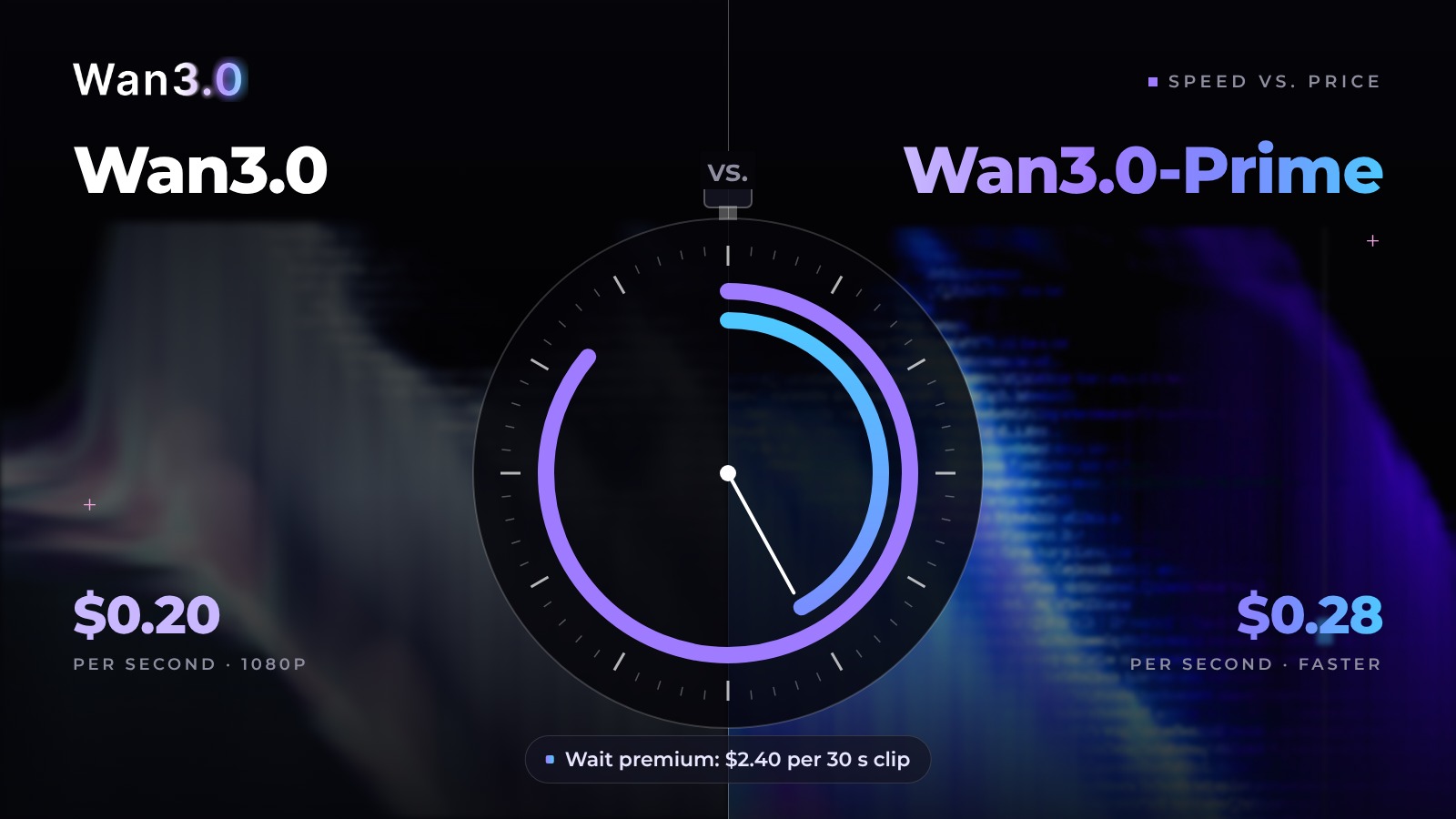
wan3.0-video-prime costs 40% more per generated second than wan3.0-video at 720P and 1080P in Singapore. It is officially "significantly faster", with no figure for how much. So "which model is better" is the wrong question. Ask this instead: where in your workflow is someone waiting?
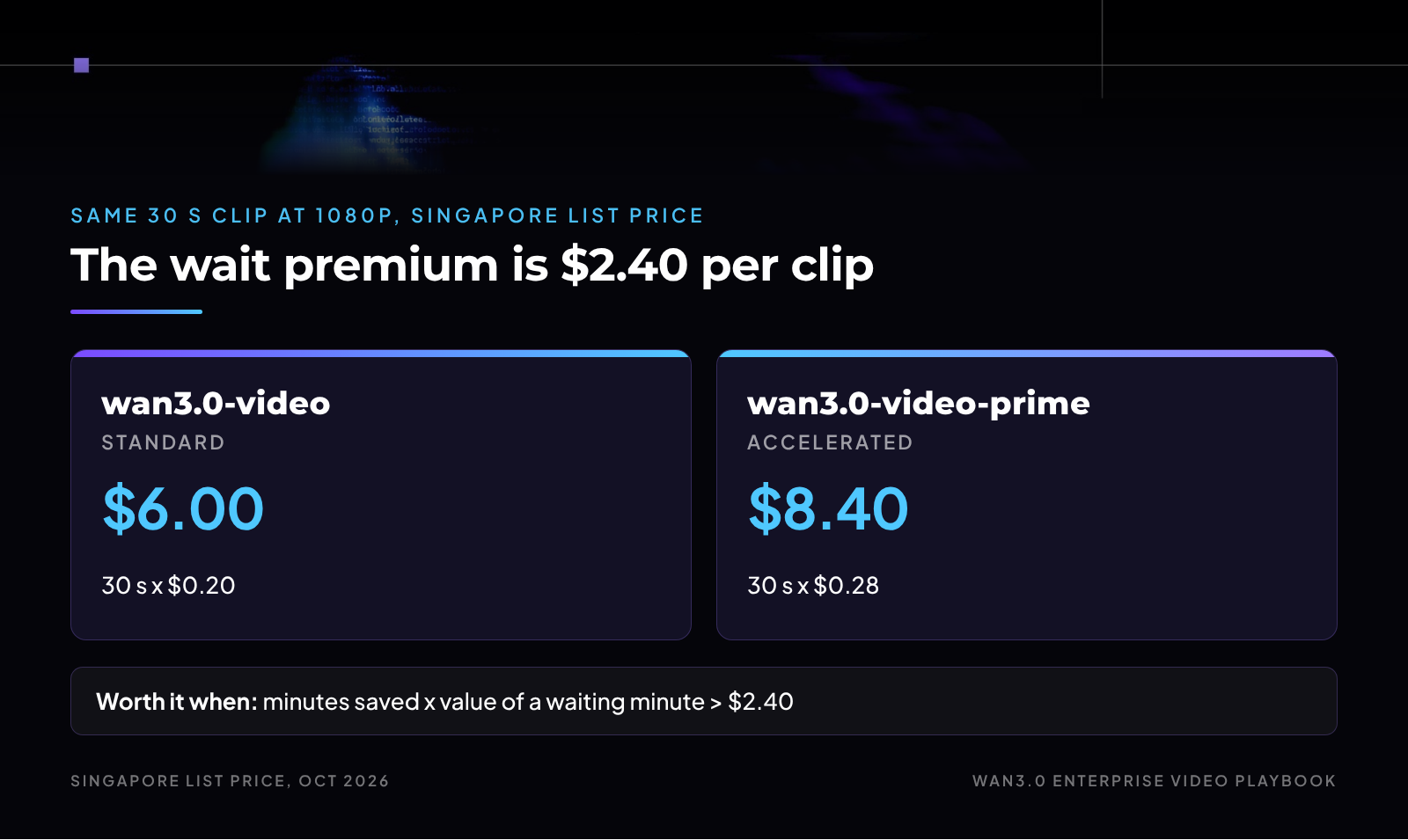
Pay the wait premium only where a person or a deadline is waiting.
In this guide
What Prime actually changes: speed and price, not capability
The real premium by region, from 1.36x in Singapore to about 1.54x elsewhere
A five-step timing test that gives you your own p50 and p90
A break-even rule that shows which lanes earn the wait premium
Alibaba Cloud Model Studio lists wan3.0-video-prime next to wan3.0-video; its release notes date the Singapore listing Aug 20, 2026 (Alibaba Cloud Model Studio, model release notes, accessed Oct 5, 2026).
The model page calls it "the accelerated version of the Wan video generation model, delivering significantly faster generation speed while maintaining high-quality output" (Alibaba Cloud Model Studio, wan3.0-video-prime, accessed Oct 5, 2026). The Qwen Cloud listing describes it as the high-speed model of Wan3.0, "with capabilities aligned to the standard version" (Qwen Cloud, wan3.0-video-prime, accessed Oct 5, 2026).
So this is not a new generation and not a quality tier. It is the same capability set at a different speed and price. That makes the decision clean: you are not choosing what the model can do, only how long you will wait and what that wait is worth.
The common instinct runs the other way: "Prime is the premium one, so use it for finals." That spends the premium where it buys the least.
Finals usually have the most calendar slack, because they come after days of drafting and review. The work with the least slack is often the cheapest: reactive clips and live drafts someone is watching load.
If you suspect the premium is sitting in the wrong lane today, find the lanes where waiting costs money with the Wan team.
Prime buys time, not quality, so spend it where time is the constraint.
Everything in this table comes from the two Model Studio model pages, the video generation overview, and the model release notes, all accessed Oct 5, 2026.
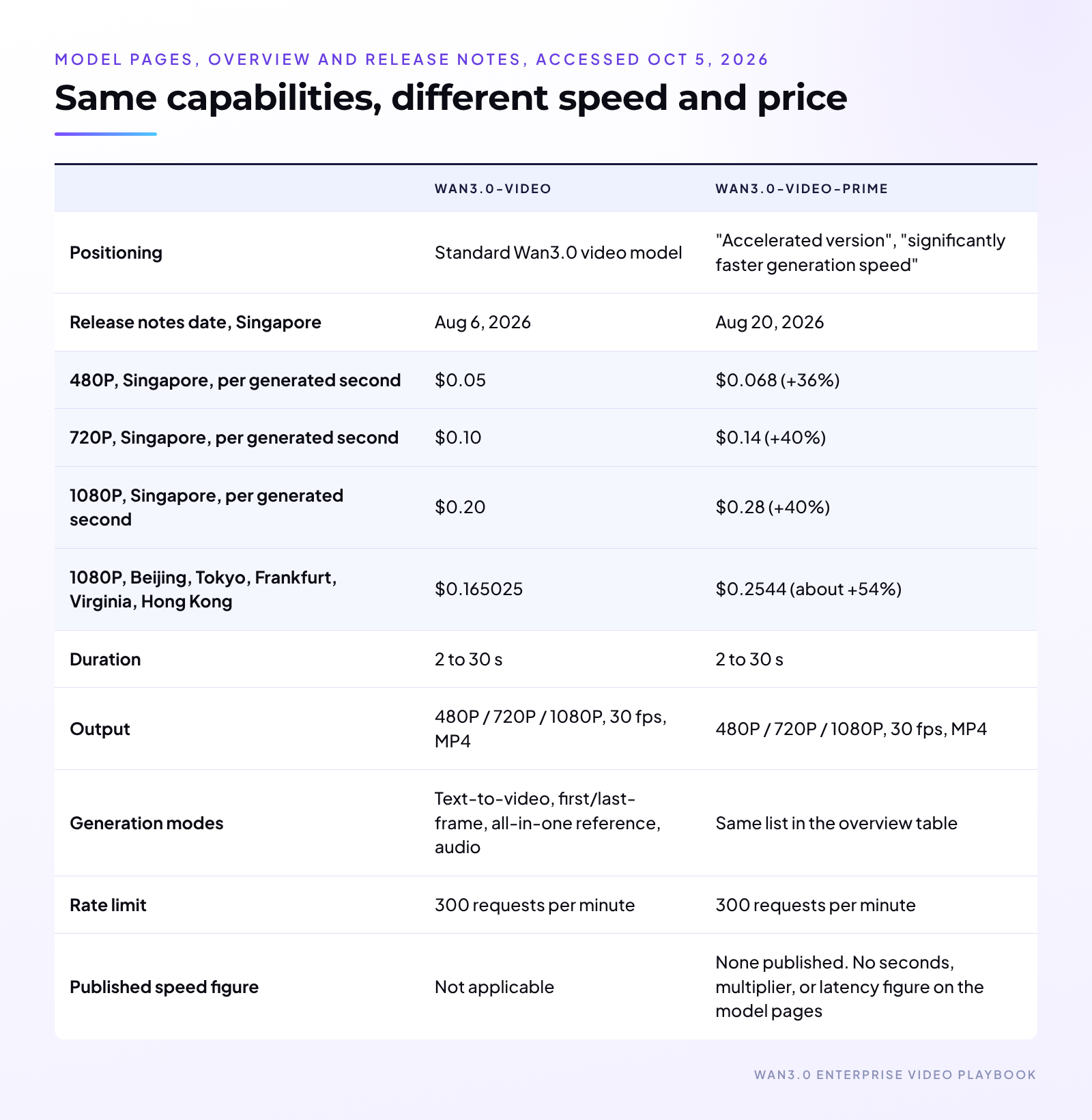
Three things in that table matter more than the headline price.
1. The premium is a ratio, and it changes by region. In Singapore, Prime costs 1.36x to 1.40x the standard rate. In the other listed regions it is about 1.54x (for example, $0.2544 / $0.165025 at 1080P).
A team running in Frankfurt pays a steeper wait premium than a team in Singapore for the same speedup.
2. Speed does not raise your ceiling. Both models list 300 requests per minute. Prime may finish each job sooner, but if your bottleneck is how many jobs you can submit, switching models will not move it.
3. List price is not always your price. The Model Studio pages show original prices and exclude limited-time promotions. When I checked on Oct 5, 2026, Qwen Cloud showed a limited-time discount on wan3.0-video and none on wan3.0-video-prime, which widens the gap while it lasts.
Promotions vary by platform and change over time, so recompute with the price you actually pay.
Compare the ratio in your region at your real price, not the headline in someone else's.
Alibaba Cloud has not published a speed figure for wan3.0-video-prime, so I will not quote one.
"Significantly faster" is a direction, not a number for a business case. The good news: speed is the easiest property here to measure, and your own number beats a published one because it reflects your prompts, resolutions, region, and concurrency.
A five-step test a developer can run in an afternoon:
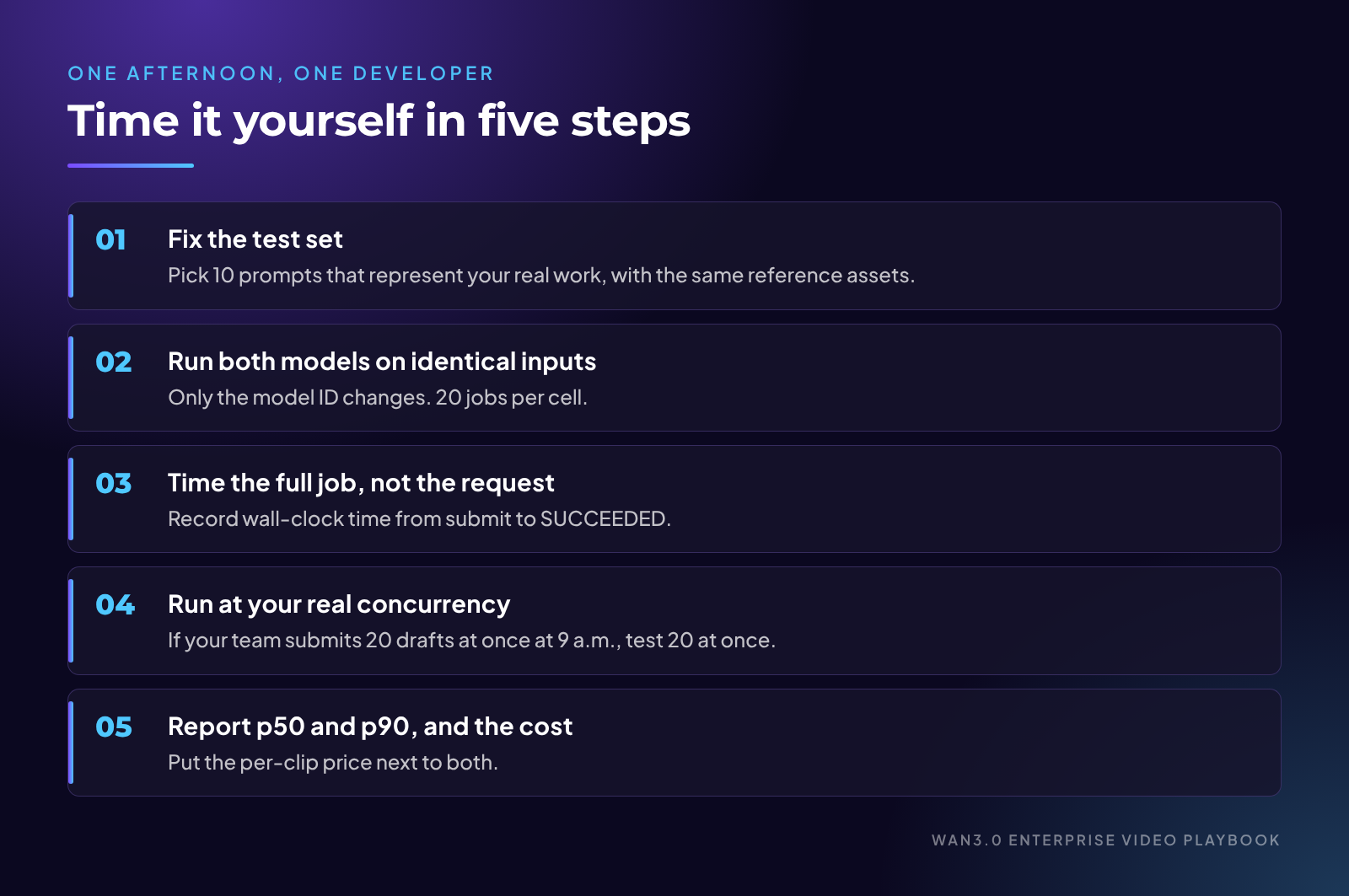
1. Fix the test set. Pick 10 prompts that represent your real work, with the same reference assets. Use the durations and resolutions you actually ship, for example 10 s at 480P and 30 s at 1080P.
2. Run both models on identical inputs. Same region, same API key type, same parameters, only the model ID changes. Run each prompt twice per model and resolution, so you have 20 jobs per cell.
3. Time the full job, not the request. Video generation in Model Studio is asynchronous: you submit a task, receive a task ID, and poll for status. Record wall-clock time from submit to SUCCEEDED. During the test, poll every few seconds rather than the 15 seconds suggested for production, or the polling interval will blur the difference.
4. Run at your real concurrency. If your team submits 20 drafts at once at 9 a.m., test 20 at once. A single job in an empty queue tells you little about a Monday morning.
5. Report p50 and p90, and the cost. The median tells you the usual wait. The 90th percentile tells you what your deadline has to survive. Put the per-clip price next to both.
The output is one small table per resolution: median minutes, p90 minutes, and dollars per clip, for each model. That table, not this article, should make your decision.
Never pay a speed premium you have not timed yourself.
Assumptions, stated so you can swap in your own: Singapore list prices per generated second, as in section 02, and illustrative volumes.
Drafts: concept exploration, 2,000 clips a month, 10 s each at 480P.
Finals: 100 finished spots a month, 2 takes of 30 s each at 1080P.
Time-critical: reactive social clips during events and launches, 300 clips a month, 15 s each at 720P.
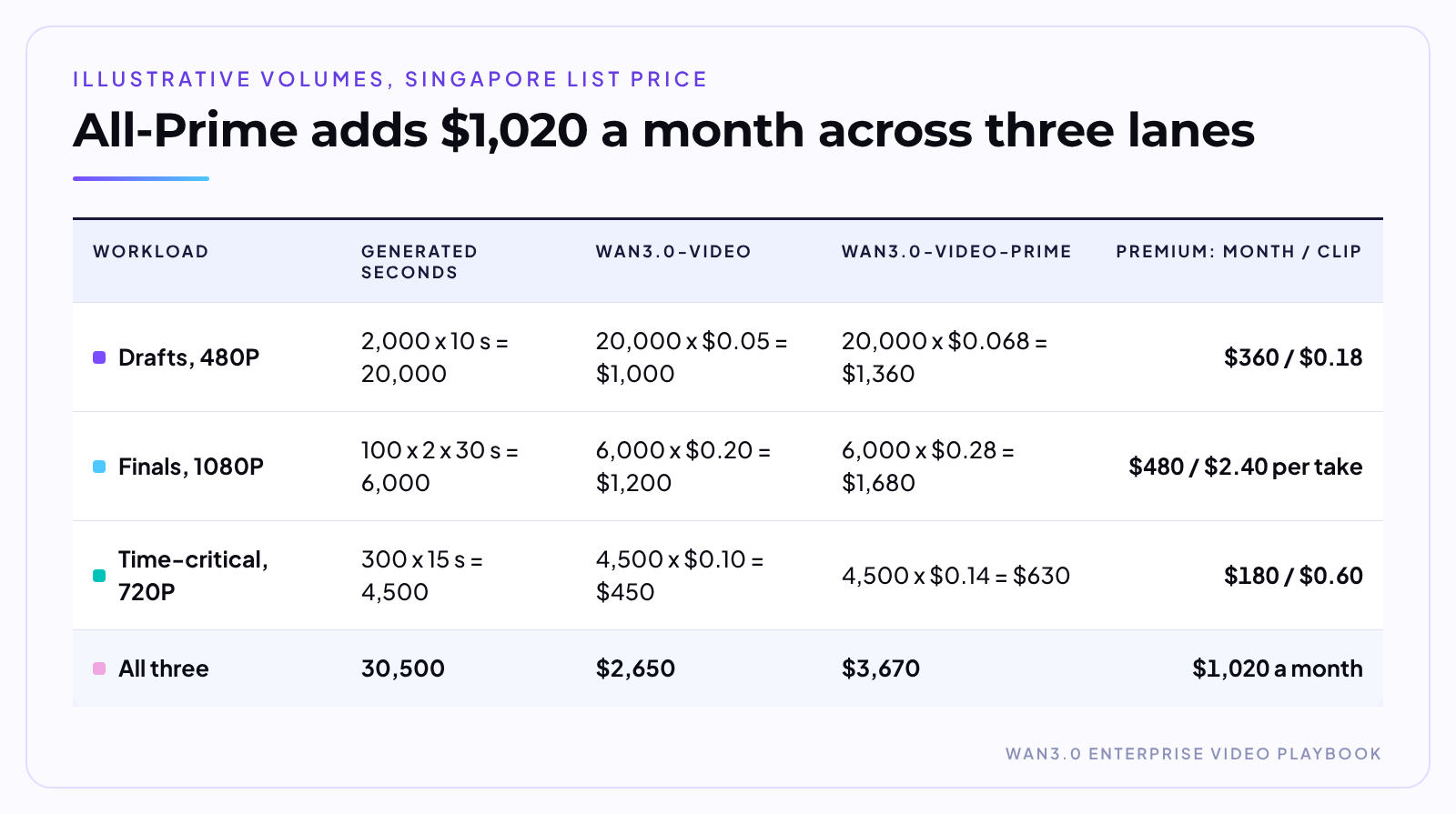
Result: at list price, the three lanes cost $2,650 a month on wan3.0-video and $3,670 on wan3.0-video-prime.
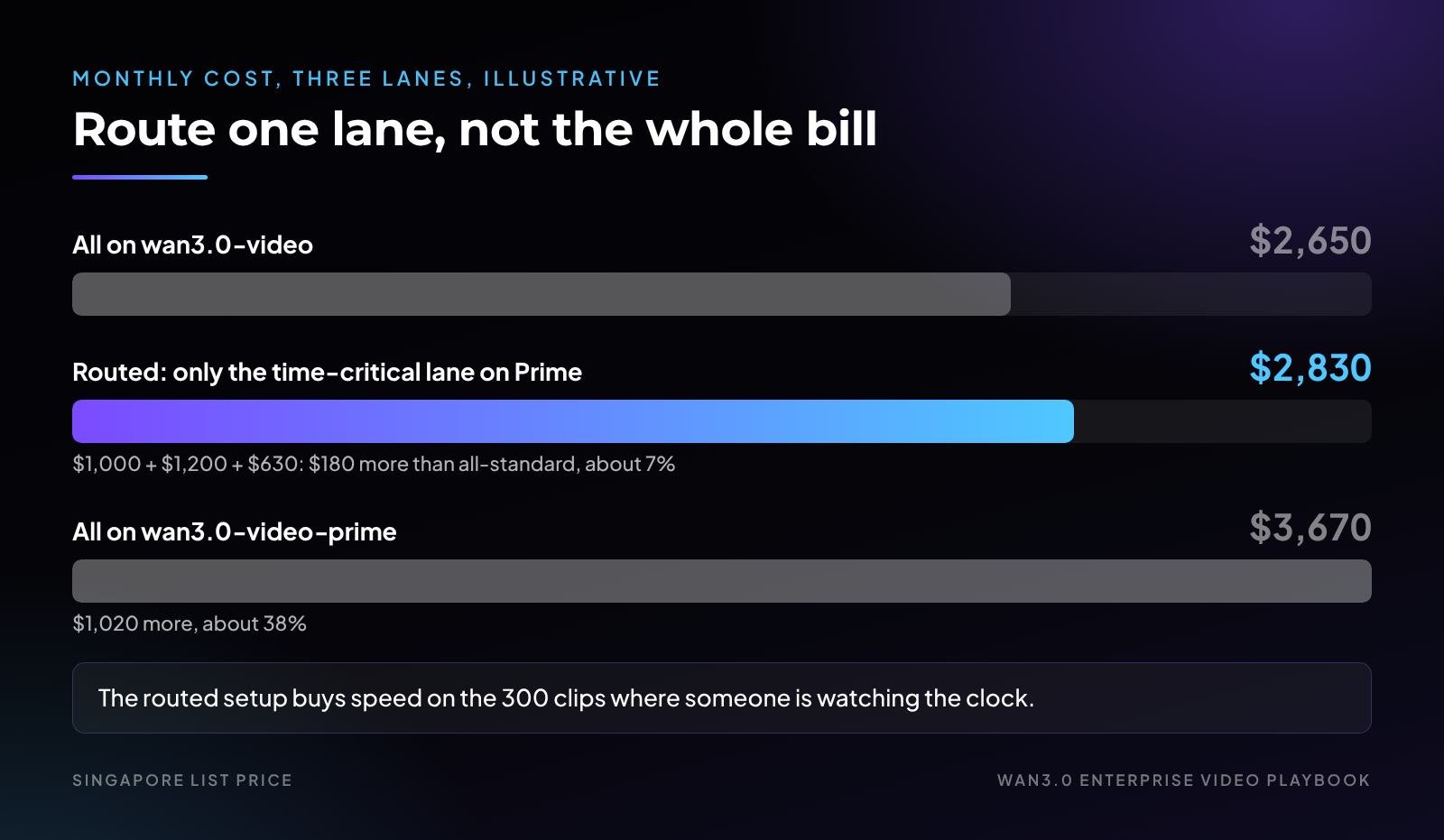
Now route instead of switching wholesale. Keep drafts and finals on wan3.0-video and move only the time-critical lane to Prime: $1,000 + $1,200 + $630 = $2,830.
That is $180 more than all-standard, about 7%, against $1,020 more for all-Prime, about 38%. The routed setup buys speed on the 300 clips where someone is watching the clock and leaves 26,000 seconds at the standard rate.
The per-clip column is where the decision gets made. Turn it into a break-even: Prime pays when minutes saved per clip x value of a waiting minute is greater than the premium per clip.
Take the time-critical lane. Suppose two people on an event social desk are waiting on each clip, at a loaded cost of $60 an hour each. That is $2.00 per waiting minute.
The premium is $0.60 per clip, so Prime breaks even if your test shows it saves more than 0.6 / 2.00 = 0.3 minutes, about 18 seconds, per clip. Now take finals: if nobody is waiting because the clip renders overnight, the value of a waiting minute is roughly zero, and no speedup covers $2.40.
Result: in the time-critical lane, Prime pays if your test shows it saves more than about 18 seconds per clip; in an overnight finals lane, it never does.
Know your break-even wait before you pay
Share your lanes, monthly clip counts, durations and region through a short form. The team will work through the wait premium per clip and the break-even minutes for each lane, at the price you actually pay. Get your wait-premium break-even per lane →
Compute the break-even wait per clip, then let your own timing test decide.
With the break-even in hand, each workload gets a default and a trigger to change it.
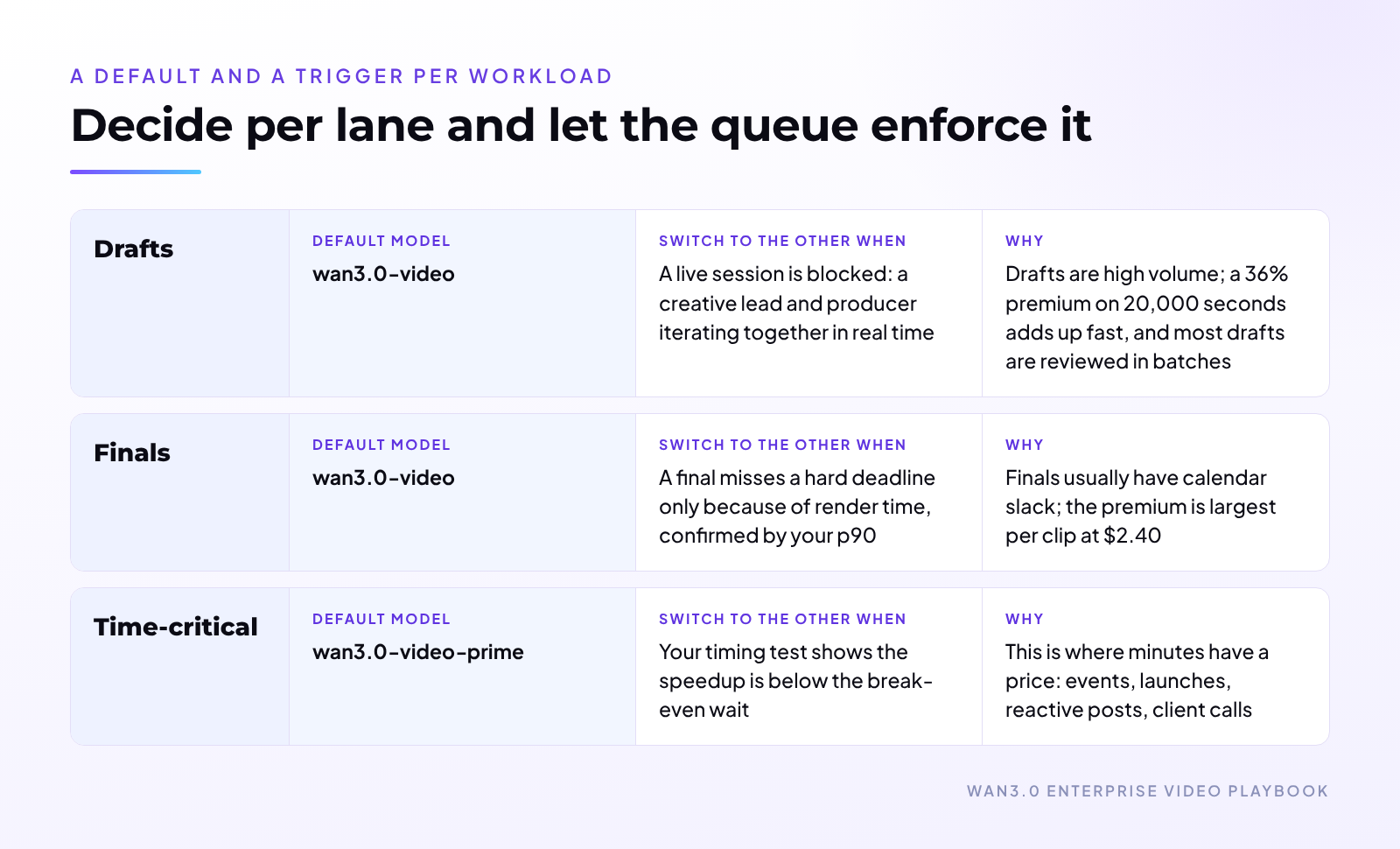
Two notes on applying it.
1. Route by lane, not by person. Put the model ID in the job's lane configuration, not in a producer's notebook. The queue decides, so the premium is spent on purpose and shows up as one line in the cost report.
2. Re-test after any change. New prompt styles, longer durations, a region move, or a pricing update can all move the break-even. Re-run the five-step test each quarter or after any of those changes, and update the lane rules from the result.
Decide per lane and let the queue enforce it.
Most of the value here is knowing when to leave things alone.
Do not move a workload to Prime if:
The work runs overnight or in batches. If a human looks at the output the next morning, render speed has no value and the premium is pure cost.
Your bottleneck is review, not render. If clips wait two days for brand sign-off, cutting render minutes changes nothing. Fix the review gate first.
You are limited by request rate. Both models list 300 requests per minute. Prime will not let you submit more jobs.
You have not timed it. Without your own p50 and p90, the switch is a guess at a 36% to 54% markup, depending on region.
You are outside Singapore and margins are thin. At about 1.54x in the other listed regions, the break-even wait is longer; recompute before switching.
Your reference inputs are unusual. Capabilities are described as aligned, but if your pipeline depends on a specific reference type, run your own inputs through both before you move production traffic.
A partner renders for you. If an agency or platform delivers finished video, speed is their cost to manage and price. The question becomes contractual, the same build-or-partner call we broke down in Build vs. Buy, or Both? The Enterprise AI Decision: put turnaround time in the contract and let them choose the model.
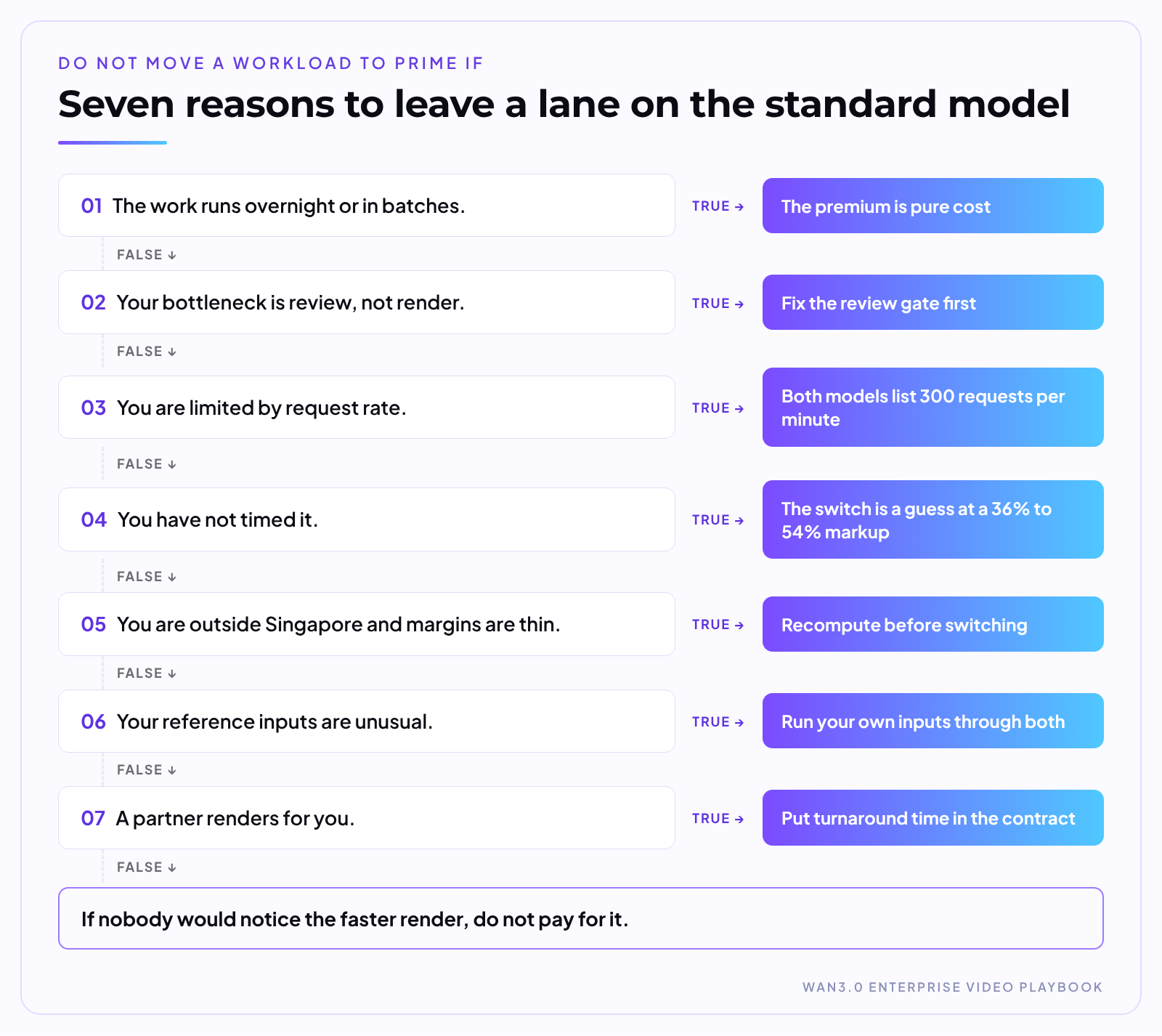
If nobody would notice the faster render, do not pay for it.
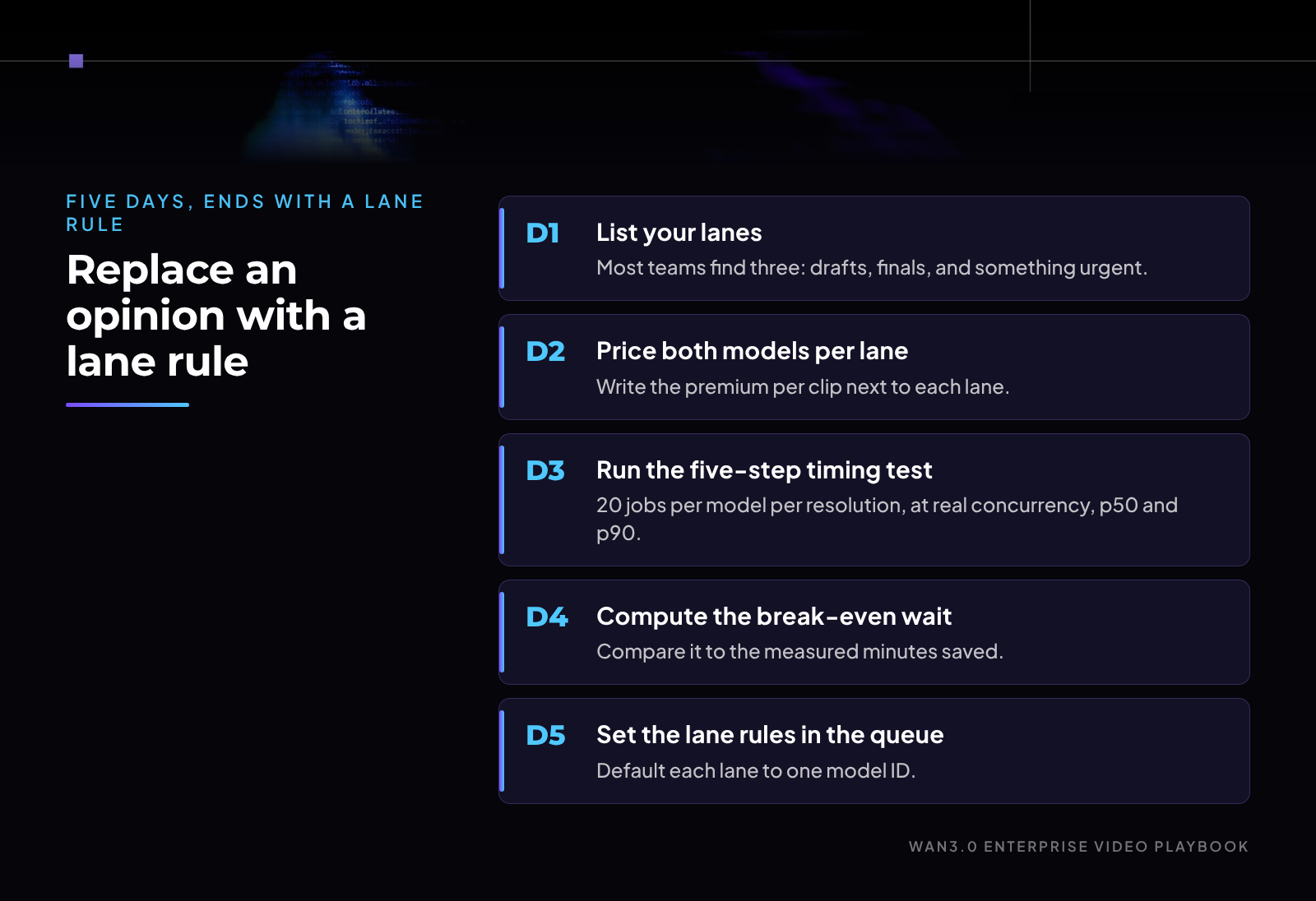
A five-day plan that ends with a lane rule instead of an opinion:
1. Day 1: list your lanes. Name each workload, its monthly clip count, duration, and resolution. Most teams find three: drafts, finals, and something urgent.
2. Day 2: price both models per lane. Use your region and the price you actually pay. Write the premium per clip next to each lane.
3. Day 3: run the five-step timing test. 20 jobs per model per resolution, at real concurrency, p50 and p90.
4. Day 4: compute the break-even wait. Premium per clip divided by the value of a waiting minute in that lane. Compare it to the measured minutes saved.
5. Day 5: set the lane rules in the queue. Default each lane to one model ID and write down the trigger that would change it.
One afternoon of timing beats a quarter of guessing.
Key takeaways
Prime buys time, not quality. Same capability set; the premium is 36% to 40% in Singapore and about 54% in the other listed regions.
Route by lane, not wholesale. Moving only the time-critical lane costs $180 a month more, against $1,020 for switching everything.
Time it before you pay. Your own p50 and p90 beat a speed figure nobody has published.
Design the timing test around your real queue
Tell us your prompts, resolutions and peak concurrency for Wan3.0 and Wan3.0-Prime. We will walk through the five-step test with your developer, so your own p50 and p90 set the lane rules instead of a headline. Plan your Prime timing test →
See Wan3.0 in action at wan.video.
About Wan. Wan is Alibaba Cloud's generative video model family. Wan3.0 is available through Alibaba Cloud Model Studio and Qwen Cloud, with API pricing billed per generated second.
Sources: Alibaba Cloud Model Studio, wan3.0-video-prime model page, https://www.alibabacloud.com/help/en/model-studio/wan3-0-video-prime (accessed Oct 5, 2026); Alibaba Cloud Model Studio, wan3.0-video model page, https://www.alibabacloud.com/help/en/model-studio/wan3-0-video (accessed Oct 5, 2026); Alibaba Cloud Model Studio, Video generation overview, https://www.alibabacloud.com/help/en/model-studio/video-generation (accessed Oct 5, 2026); Alibaba Cloud Model Studio, Wan3.0 Video Generation API Reference, https://www.alibabacloud.com/help/en/model-studio/wan3-video-generation-api-reference (accessed Oct 5, 2026); Alibaba Cloud Model Studio, model release notes, https://www.alibabacloud.com/help/en/model-studio/newly-released-models (accessed Oct 5, 2026); Qwen Cloud, wan3.0-video and wan3.0-video-prime model pages, https://www.qwencloud.com/models/wan3.0-video-prime (accessed Oct 5, 2026).
By Johnny Mai, Director, Gen AI Product Strategy & GTM.
Disclaimer: This post is provided for general information only. Worked examples are illustrative and use stated assumptions; your costs will vary. Prices are Alibaba Cloud Model Studio list prices for the Singapore region as published in October 2026, vary by region, and may change over time. Product and service availability, features, and program terms vary by region and may change over time. Nothing in this post constitutes professional, legal, or investment advice. © 2026 WAN. All rights reserved.
How a Video Team Runs Wan3.0 in Production: Pipeline, Review Gates, Reliability
Budgeting AI Video by the Second: A Campaign Planning Template

14 posts | 2 followers
FollowJohnny Mai - October 7, 2026
Johnny Mai - August 27, 2026
Johnny Mai - October 7, 2026
Johnny Mai - August 27, 2026
Alibaba Cloud Community - August 13, 2026
Johnny Mai - August 27, 2026
14 posts | 2 followers
Follow Qwen
Qwen
Full-range, open-source, multimodal, and multi-functional
Learn More Alibaba Cloud Model Studio
A one-stop generative AI platform to build intelligent applications that understand your business, based on Qwen model series such as Qwen-Max and other popular models
Learn More
Token Plan
Build more, spend less. One plan, every modality.
Learn More Alibaba Cloud for Generative AI
Accelerate innovation with generative AI to create new business success
Learn MoreMore Posts by Johnny Mai

