By Mocheng
Data and traffic skew are common issues in distributed databases, which have a significant negative impact on the performance and availability of the distributed database. Data skew causes the disk space usage of some nodes to be too high, which triggers alerts and even affects data ingestion. Traffic skew causes the CPU utilization of some nodes to reach 100%, which becomes a system bottleneck and affects the overall throughput.
This article shares best practices to diagnose and resolve data skew.
This article attempts to provide best practices for analyzing the causes of skew, helping you to quickly find the source of the skew and formulate corresponding solutions.
The INFORMATION_SCHEMA of PolarDB-X contains a system view named TABLE_DETAIL, which records the data distribution and access status of logical tables and global indexes. The analysis of data and traffic skew is based on the information in this view. The following section provides a brief introduction to the key columns of TABLE_DETAIL. For more details, you can refer to the previous article "PolarDB-X Best Practice Series (9): N Ingenious Uses for the TABLE_DETAIL View". The TABLE_DETAIL view records a piece of statistics information for each data partition, including the following key content:
| Column Name | Description | Remarks |
|---|---|---|
| table_schema | Database name | |
| table_name | Table name | |
| table_index | Index name | For a partition of the primary table, this column is empty. For a partition of a GSI, this column is the index name. |
| partition_name | Hash partition name | A single table has only one hash partition. |
| subpartition_name | Subpartition name | If there is only a hash partition, this column is empty. |
| table_rows | Number of data rows in the partition | Derived from statistics information. |
| data_length | Data size of the partition | Derived from statistics information. The sum of the three items equals the storage space occupied by this partition. |
| index_length | Local index size of the partition | Derived from statistics information. |
| data_free | Data hole size of the partition | Derived from statistics information. |
| storage_inst_id | Data node (DN) name | Multiple partitions may be stored on the same data node. |
| rows_read | Number of rows read on the partition | Derived from statistics information. It is a cumulative value that continues to increase after the DN starts. |
| rows_inserted | Number of rows inserted on the partition | Derived from statistics information. It is a cumulative value that continues to increase after the DN starts. |
| rows_updated | Number of rows updated on the partition | Derived from statistics information. It is a cumulative value that continues to increase after the DN starts. |
| rows_deleted | Number of rows deleted on the partition | Derived from statistics information. It is a cumulative value that continues to increase after the DN starts. |
In the ideal scenario, we want the data of a table to be evenly stored on all DNs. This achieves optimality in terms of cost and access efficiency. When the data distribution in a table shows that some DNs have more data while others have less, this is called "data skew". The most obvious phenomenon of data skew is that some DNs first experience disk space alerts. The "DN Perspective" section describes how to start with the alerting DN to find the table that causes the skew. Post-processing after receiving an alert belongs to post-event analysis. The "Global Perspective" section provides a method to discover data skew in advance, which allows you to analyze the data skew existing in the system as a whole and prevent system bottlenecks.
The disk space of a DN is divided into four categories based on the stored content: data space, log space, temporary file space, and system file space. Data written by users is stored in the data space, while other spaces are automatically managed by the system.
In most scenarios, the cause of disk space alerts is a large amount of data space. However, there are other possibilities. For example, the use of the row store snapshot feature requires retaining more UNDO logs, or the space usage is high because BINLOG logs are not cleared in a timely manner.
To avoid misjudgment, you can follow these steps after receiving a disk space alert to confirm whether it is related to data skew:
Usually, due to the complementary nature of data distribution among tables, it may appear that the data distribution is unbalanced on DNs from the perspective of a single table, but from the DN perspective, only the data volume of individual DNs is significantly higher than that of other DNs. In this case, you must prioritize the DNs with a large amount of data. You can first find the instance ID of the hot spot DN on the monitoring page, and then refer to the following steps to find the logical table that causes the skew.
1. Query the space occupied by a single table on a specific DN
SELECT s.storage_inst_id,
       s.single_table_data_size_gb,
       s.single_table_data_size_gb * 100 / t.storage_inst_data_size_gb AS storage_inst_data_pct,
       s.single_tables * 100 / t.storage_inst_tables                   AS storage_inst_single_table_pct
FROM (SELECT storage_inst_id,
             SUM(data_size_gb)                        AS single_table_data_size_gb,
             COUNT(DISTINCT table_schema, table_name) AS single_tables
      FROM (SELECT table_schema,
                   table_name,
                   storage_inst_id,
                   COUNT(1) OVER ( PARTITION BY table_schema, table_name )            AS table_partitions,
                   SUM(DATA_LENGTH + INDEX_LENGTH + DATA_FREE) / (1024 * 1024 * 1024) AS data_size_gb
            FROM information_schema.table_detail
            GROUP BY table_schema, table_name, storage_inst_id) r
      WHERE table_partitions = 1
        AND storage_inst_id = 'pxc-xdb-s-xxxxxxxxx') s
         JOIN (SELECT storage_inst_id                                                    AS storage_inst_id,
                      COUNT(DISTINCT table_schema, table_name, index_name)               AS storage_inst_tables,
                      SUM(DATA_LENGTH + INDEX_LENGTH + DATA_FREE) / (1024 * 1024 * 1024) AS storage_inst_data_size_gb
               FROM information_schema.table_detail
               WHERE storage_inst_id = 'pxc-xdb-s-xxxxxxxxx') t
              ON s.storage_inst_id = t.storage_inst_id
ORDER BY single_table_data_size_gb DESC;
To illustrate the meaning of the return result, assume that the monitoring shows that the disk space usage of DN pxc-xdb-s-xxxxxxx01 is significantly higher than that of other DNs. Modify the conditions on the two storage_inst_id in the SQL to 'pxc-xdb-s-xxxxxxx01'. The following results are obtained after execution:
| storage_inst_id | single_table_data_size_gb | storage_inst_data_pct | storage_inst_single_table_pct |
|---|---|---|---|
| pxc-xdb-s-xxxxxxx01 | 0.1516 | 0.00525287 | 0.6471 |
The meaning of the result is as follows:
| Column name | Description | Sample interpretation |
|---|---|---|
| storage_inst_id | DN instance ID | |
| single_table_data_size_gb | Data volume of a single table | The data volume of the single table on pxc-xdb-s-xxxxxxx01 is 0.1516 GB. |
| storage_inst_data_pct | Percentage of single table data volume | The data of the single table on pxc-xdb-s-xxxxxxx01 accounts for 0.00525287% of the total data volume on the current DN. |
| storage_inst_single_table_pct | Percentage of single table quantity | The quantity of single tables on pxc-xdb-s-xxxxxxx01 accounts for 0.6471% of the total quantity of logical tables. |
You can see that the data volume of the single table on pxc-xdb-s-xxxxxxx01 is extremely small and is unrelated to data skew. Search for specified
2. Search for the Top 10 large single tables on the specified Data Node (DN)
SELECT table_schema,
       table_name,
       table_data_size_gb,
       table_data_size_gb * 100 / t.storage_inst_data_size_gb AS table_data_pct
FROM (SELECT table_schema,
             table_name,
             table_data_size_gb
      FROM (SELECT table_schema,
                   table_name,
                   storage_inst_id,
                   COUNT(*) OVER ( PARTITION BY table_schema, table_name )            AS total_partitions,
                   SUM(DATA_LENGTH + INDEX_LENGTH + DATA_FREE) / (1024 * 1024 * 1024) AS table_data_size_gb
            FROM information_schema.table_detail
            GROUP BY table_schema, table_name, storage_inst_id) AS r
      WHERE total_partitions = 1
        AND storage_inst_id = 'pxc-xdb-s-xxxxxxxxx') AS s
         JOIN (SELECT storage_inst_id                                                    AS storage_inst_id,
                      COUNT(DISTINCT table_schema, table_name, index_name)               AS storage_inst_tables,
                      SUM(DATA_LENGTH + INDEX_LENGTH + DATA_FREE) / (1024 * 1024 * 1024) AS storage_inst_data_size_gb
               FROM information_schema.table_detail
               WHERE storage_inst_id = 'pxc-xdb-s-xxxxxxxxx') t
ORDER BY table_data_size_gb DESC
LIMIT 10;
To illustrate the meaning of the result, change the two storage_inst_id conditions in the SQL to 'pxc-xdb-s-xxxxxxx02'. After the SQL is executed, the following results are obtained:
| table_schema | table_name | table_data_size_gb | table_data_pct |
|---|---|---|---|
| db_0 | tb_0 | 139.9325 | 5.70442104 |
| db_0 | tb_1 | 1.3241 | 0.05397762 |
| db_1 | tb_2 | 0.4018 | 0.01637959 |
| db_0 | tb_3 | 0.0098 | 0.00039950 |
| db_0 | tb_4 | 0.0005 | 0.00002038 |
| db_0 | tb_5 | 0.0003 | 0.00001223 |
| db_0 | tb_6 | 0.0002 | 0.00000815 |
| db_0 | tb_7 | 0.0001 | 0.00000408 |
| db_0 | tb_8 | 0.0001 | 0.00000408 |
| db_0 | tb_9 | 0.0001 | 0.00000408 |
The meaning of the result is as follows:
| Column name | Description | Sample interpretation |
|---|---|---|
| table_schema | Database name | |
| table_name | Table name | |
| table_data_size_gb | Data volume of a single table | The data volume of the single table db_0.tb_0 on pxc-xdb-s-xxxxxxx01 is 139.9325 GB. |
| table_data_pct | Percentage of single table data volume | The data volume of the single table db_0.tb_0 on pxc-xdb-s-xxxxxxx01 accounts for 5.70442104% of the total data volume on the current DN. |
You can see that the only relatively large single table on pxc-xdb-s-xxxxxxx02 is db_0.tb_0, and its data volume accounts for only 5.70442104%. This will not cause data skew.
1. Partitioned tables with a single hot spot value
The characteristic is that the data of the partitioned table is almost entirely stored on the specified DN.
Specifically, a partitioned table that meets the following conditions is considered a partitioned table with a single hot spot value:
SELECT t.table_schema,
       t.table_name,
       t.index_name,
       t.storage_inst_table_data_size_gb,
       r.table_data_size_gb,
       t.storage_inst_table_data_size_gb * 100 / r.table_data_size_gb AS table_data_pct,
       t.storage_inst_table_partitions * 100 / r.table_partitions     AS table_partitions_pct,
       t.storage_inst_table_data_size_gb * 100 / s.storage_inst_data_size_gb AS storage_inst_data_pct
FROM (SELECT table_schema,
             table_name,
             index_name,
             storage_inst_id,
             COUNT(1)                                                           AS storage_inst_table_partitions,
             SUM(DATA_LENGTH + INDEX_LENGTH + DATA_FREE) / (1024 * 1024 * 1024) AS storage_inst_table_data_size_gb
      FROM information_schema.table_detail
      WHERE storage_inst_id = 'pxc-xdb-s-xxxxxxxxx'
      GROUP BY table_schema, table_name, index_name
      HAVING storage_inst_table_data_size_gb > 50) AS t
         JOIN (SELECT storage_inst_id                                                    AS storage_inst_id,
                      COUNT(DISTINCT table_schema, table_name, index_name)               AS storage_inst_tables,
                      SUM(DATA_LENGTH + INDEX_LENGTH + DATA_FREE) / (1024 * 1024 * 1024) AS storage_inst_data_size_gb
               FROM information_schema.table_detail
               WHERE storage_inst_id = 'pxc-xdb-s-xxxxxxxxx') s
              ON t.storage_inst_id = s.storage_inst_id
         JOIN (SELECT table_schema,
                      table_name,
                      index_name,
                      COUNT(partition_name)                                              AS table_partitions,
                      SUM(DATA_LENGTH + INDEX_LENGTH + DATA_FREE) / (1024 * 1024 * 1024) AS table_data_size_gb
               FROM information_schema.table_detail
               GROUP BY table_schema, table_name, index_name
               HAVING table_partitions > 2) AS r
              ON t.table_schema = r.table_schema AND t.table_name = r.table_name AND t.index_name = r.index_name
WHERE t.storage_inst_table_data_size_gb / r.table_data_size_gb > 0.5
ORDER BY t.storage_inst_table_data_size_gb DESC;
To illustrate the meaning of the result, assume that monitoring shows that the disk space usage of DN pxc-xdb-s-xxxxxxx01 is significantly higher than that of other DNs. Change the conditions on the two storage_inst_id in the SQL to 'pxc-xdb-s-xxxxxxx01'. After the SQL is executed, the following results are obtained:
|
table_schema |
table_name |
index_name |
storage_inst_table_data_size_gb |
table_data_size_gb |
table_data_pct |
table_partitions_pct |
storage_inst_data_pct |
|
db_0 |
tb_0 |
|
194.2554 |
209.7259 |
92.62346711 |
4.1667 |
6.73085839 |
|
db_0 |
tb_1 |
|
134.4106 |
134.8100 |
99.70373118 |
4.1667 |
4.65726417 |
|
db_0 |
tb_2 |
|
97.4769 |
99.9482 |
97.52741920 |
4.1667 |
3.37752881 |
|
db_0 |
tb_2 |
idx_2 |
90.8013 |
93.1046 |
97.52611579 |
4.1667 |
3.14622240 |
|
db_0 |
tb_3 |
|
80.0332 |
80.0339 |
99.99912537 |
4.1667 |
2.77311280 |
|
db_0 |
tb_3 |
idx_3 |
58.5273 |
58.5280 |
99.99880399 |
4.1667 |
2.02794346 |
The meaning of the result is as follows:
| Column name | Description | Sample interpretation |
|---|---|---|
| table_schema | Database name | |
| table_name | Table name | |
| index_name | Index name | Global index name. For a normal logical table, this column is an empty string. |
| storage_inst_table_data_size_gb | Data volume on the current DN | db_0.tb_0 has 194.2554 GB of data on pxc-xdb-s-xxxxxxx01. |
| table_data_size_gb | Total data volume | The total data volume of db_0.tb_0 is 209.7259 GB. |
| table_data_pct | Table-level data percentage | The data volume of db_0.tb_0 on pxc-xdb-s-xxxxxxx01 accounts for 92.62346711% of the entire table. |
| table_partitions_pct | Table-level partition percentage | The number of partitions of db_0.tb_0 on pxc-xdb-s-xxxxxxx01 accounts for 4.1667% of the entire table. |
| storage_inst_data_pct | DN-level data percentage | The data volume of db_0.tb_0 on pxc-xdb-s-xxxxxxx01 accounts for 6.73085839% of the total data volume on the current DN. |
Based on the query result, the following conclusions can be obtained:
• Data skew exists on tables tb_0, tb_1, tb_2, and tb_3. Data skew also exists on the two Global Secondary Indexes (GSIs) idx_2 and idx_3. More than 90% of the data is concentrated on a single DN. There is a high probability that the partition keys of all data have the same value.
• The data volume of the above 6 tables (4 tables and 2 GSIs) accounts for more than 20% of the entire DN and needs optimization.
2. Partitioned tables with multiple hot spot values
The characteristic is that data is concentrated on some partitions. The data volume of a single DN does not exceed 50% of the total data volume, but the standard deviation of the DN data distribution is relatively large. A common example is using RANGE partitioning based on Time, where the data volume for some months is relatively large.
Specifically, a partitioned table that meets the following conditions is considered a partitioned table with multiple hot spot values:
SELECT r.table_schema,
       r.table_name,
       r.index_name,
       r.storage_inst_table_data_size_gb,
       r.storage_inst_table_data_size_gb - r.storage_inst_data_avg_gb AS storage_inst_delta_gb,
       r.storage_inst_table_data_size_gb * 100 / r.table_data_size_gb AS table_data_pct,
       (r.storage_inst_table_data_size_gb - r.storage_inst_data_avg_gb) * 100 /
       u.storage_inst_data_size_gb                                    AS storage_inst_delta_pct,
       r.partitions * 100 / r.table_partition_count                   AS table_partitions_pct,
       r.storage_inst_rn                                              AS storage_inst_data_size_rank,
       r.table_dn_count,
       r.table_data_size_gb
FROM (SELECT table_schema,
             table_name,
             index_name,
             storage_inst_id,
             storage_inst_table_data_size_gb,
             AVG(storage_inst_table_data_size_gb)
                 OVER (PARTITION BY table_schema, table_name, index_name)   AS storage_inst_data_avg_gb,
             SUM(storage_inst_table_data_size_gb)
                 OVER (PARTITION BY table_schema, table_name, index_name)   AS table_data_size_gb,
             partitions,
             SUM(partitions)
                 OVER (PARTITION BY table_schema, table_name, index_name)   AS table_partition_count,
             ROW_NUMBER()
                     OVER (PARTITION BY table_schema, table_name, index_name
                         ORDER BY storage_inst_table_data_size_gb DESC)     AS storage_inst_rn,
             COUNT(storage_inst_id)
                   OVER (PARTITION BY table_schema, table_name, index_name) AS table_dn_count
      FROM (SELECT table_schema,
                   table_name,
                   index_name,
                   storage_inst_id,
                   COUNT(partition_name)                                              AS partitions,
                   SUM(DATA_LENGTH + INDEX_LENGTH + DATA_FREE) / (1024 * 1024 * 1024) AS storage_inst_table_data_size_gb
            FROM information_schema.table_detail
            GROUP BY table_schema, table_name, index_name, storage_inst_id) AS t) AS r
         JOIN (SELECT table_schema,
                      table_name,
                      index_name,
                      STD(data_size_gb) AS dn_data_size_gb_stddev
               FROM (SELECT table_schema,
                            table_name,
                            index_name,
                            SUM(DATA_LENGTH + INDEX_LENGTH + DATA_FREE) / (1024 * 1024 * 1024) AS data_size_gb
                     FROM information_schema.table_detail
                     GROUP BY table_schema, table_name, index_name, storage_inst_id) AS t
               GROUP BY table_schema, table_name, index_name) AS s
              ON r.table_schema = s.table_schema AND r.table_name = s.table_name AND r.index_name = s.index_name
         JOIN (SELECT storage_inst_id                                                    AS storage_inst_id,
                      COUNT(DISTINCT table_schema, table_name, index_name)               AS storage_inst_tables,
                      SUM(DATA_LENGTH + INDEX_LENGTH + DATA_FREE) / (1024 * 1024 * 1024) AS storage_inst_data_size_gb
               FROM information_schema.table_detail
               WHERE storage_inst_id = 'pxc-xdb-s-xxxxxxxxx') u
              ON r.storage_inst_id = u.storage_inst_id
WHERE (dn_data_size_gb_stddev > 50 OR (dn_data_size_gb_stddev > storage_inst_data_avg_gb and table_data_size_gb > 50))
  AND (storage_inst_rn < (table_dn_count / 2) AND storage_inst_table_data_size_gb > 50)
ORDER BY storage_inst_delta_gb DESC;|
table_schema |
table_name |
index_name |
storage_inst_table_data_size_gb |
storage_inst_delta_gb |
table_data_pct |
storage_inst_delta_pct |
table_partitions_pct |
storage_inst_data_size_rank |
table_dn_count |
table_data_size_gb |
|
db_0 |
tb_0 |
|
194.2554 |
183.76909500 |
92.62337878 |
6.367512842848 |
4.1667 |
1 |
20 |
209.7261 |
|
db_0 |
tb_1 |
|
134.4106 |
127.67011000 |
99.70387909 |
4.423709356967 |
4.1667 |
1 |
20 |
134.8098 |
|
db_1 |
tb_4 |
|
301.7778 |
114.41845000 |
8.05344916 |
3.964545561014 |
5.2632 |
5 |
20 |
3747.1870 |
|
db_0 |
tb_2 |
|
97.4769 |
92.47950500 |
97.52771194 |
3.204371419404 |
4.1667 |
1 |
20 |
99.9479 |
|
db_0 |
tb_2 |
idx_2 |
90.8013 |
86.14608500 |
97.52643004 |
2.984921390610 |
4.1667 |
1 |
20 |
93.1043 |
|
db_0 |
tb_3 |
|
80.0332 |
76.03152000 |
99.99950021 |
2.634456463212 |
4.1667 |
1 |
20 |
80.0336 |
|
db_1 |
tb_5 |
|
186.8813 |
70.25258000 |
8.01180447 |
2.434218906031 |
5.2632 |
5 |
20 |
2332.5744 |
|
db_1 |
tb_6 |
|
117.4307 |
56.50533000 |
9.63725785 |
1.957883149310 |
5.2632 |
3 |
20 |
1218.5074 |
|
db_0 |
tb_3 |
idx_3 |
58.5273 |
55.60091500 |
99.99931656 |
1.926545594278 |
4.1667 |
1 |
20 |
58.5277 |
|
db_1 |
tb_7 |
|
53.0457 |
45.33794000 |
34.41058102 |
1.570938330073 |
4.5455 |
1 |
20 |
154.1552 |
The meaning of the result is as follows:
| Column name | Description | Sample interpretation |
|---|---|---|
| table_schema | Database name | |
| table_name | Table name | |
| index_name | Index name | Global index name. For a general logical table, this column is an empty string. |
| storage_inst_table_data_size_gb | DN-level data volume | db_1.tb_4 has 301.7778 GB of data on pxc-xdb-s-xxxxxxx01. |
| storage_inst_delta_gb | DN-level data offset | The data volume of db_1.tb_4 on pxc-xdb-s-xxxxxxx01 is 114.41845000 GB higher than the average value of db_1.tb_6 on all DNs. |
| table_data_pct | Table-level data percentage | The data volume of db_1.tb_4 on pxc-xdb-s-xxxxxxx01 accounts for 8.05344916% of the entire table. |
| storage_inst_delta_pct | DN-level data offset percentage | The amount by which the data volume of db_1.tb_4 on pxc-xdb-s-xxxxxxx01 exceeds the average value of db_1.tb_6 on all DNs accounts for 3.964545561014% of the current DN. |
| table_partitions_pct | Table-level partition percentage | The number of partitions of db_1.tb_4 on pxc-xdb-s-xxxxxxx01 accounts for 5.2632% of the entire table. |
| storage_inst_data_size_rank | Table-level data volume ranking | The data volume of db_1.tb_4 on pxc-xdb-s-xxxxxxx01 ranks 5th among all DNs. |
| table_dn_count | Number of DNs | The data of db_1.tb_4 is distributed across 20 DNs. |
| table_data_size_gb | Total data volume | The total data volume of db_1.tb_4 is 3747.1870 GB. |
Based on the query result, the following conclusions can be obtained:
• For tb_0, tb_1, tb_2, tb_3, tb_7, idx_2, and idx_3, the table-level data volume ranking is 1, and the table-level data proportion is as high as 90%. The skew is most critical on pxc-xdb-s-xxxxxxx01.
• The optimization Priority is sorted in descending order by the DN-level data offset. For example, although the table-level data proportion of db_1.tb_4 is only 8.0% and its table-level data volume ranks 5th, it still contributes 114.41845000 GB of data to the skew because the total data volume is large. Therefore, it should be prioritized for optimization.
Unlike the DN perspective, the focus of the global perspective is no longer on the Impact of skew on DN monitoring metrics. Instead, it starts more from the data distribution of each partition of the logical table to determine whether data skew exists in the table. Based on the statistics information in information_schema.table_detail, you can find the most critical skewed table/database in the instance.
Search for the top 20 large single tables
SELECT table_schema,
       table_name,
       storage_inst_id,
       total_data_size_gb
FROM (SELECT table_schema,
      table_name,
      storage_inst_id,
      COUNT(*) OVER ( PARTITION BY table_schema, table_name )            AS total_partitions,
      SUM(DATA_LENGTH + INDEX_LENGTH + DATA_FREE) / (1024 * 1024 * 1024) AS total_data_size_gb
      FROM information_schema.table_detail
      GROUP BY table_schema, table_name, storage_inst_id) AS t
WHERE total_partitions = 1
ORDER BY total_data_size_gb DESC
LIMIT 20;
The query result is relatively simple. total_data_size_gb is the data volume of a single table. Generally, you only need to consider processing a single table when it exceeds 300 GB.
1. Search for the top 20 partitioned tables with data skew
A table that meets any of the following conditions is considered to have data skew:
SELECT table_schema,
       table_name,
       index_name,
       SUM(data_size_gb)                                  AS table_data_size_gb,
       STDDEV_POP(data_size_gb)                           AS table_data_stddev_gb,
       STDDEV_POP(data_size_gb) * 100 / AVG(data_size_gb) AS table_data_cv,
       SUM(partitions)                                    AS partitions,
       STDDEV_POP(partitions)                             AS partitions_stddev,
       STDDEV_POP(partitions) * 100 / AVG(partitions)     AS partitions_cv
FROM (SELECT table_schema,
             table_name,
             index_name,
             COUNT(partition_name)                                              AS partitions,
             SUM(DATA_LENGTH + INDEX_LENGTH + DATA_FREE) / (1024 * 1024 * 1024) AS data_size_gb
      FROM information_schema.table_detail
      GROUP BY table_schema, table_name, index_name, storage_inst_id) AS t
GROUP BY table_schema, table_name, index_name
HAVING table_data_stddev_gb > 50
    OR (table_data_cv > 100 and table_data_size_gb > 50)
ORDER BY table_data_stddev_gb DESC
LIMIT 20;
To illustrate the meaning of the result, execute the SQL directly to obtain the following results:
|
table_schema |
table_name |
index_name |
table_data_size_gb |
table_data_stddev_gb |
table_data_cv |
partitions |
partitions_stddev |
partitions_cv |
|
db_1 |
tb_4 |
|
3747.1870 |
123.15203810491526 |
65.730393548502 |
38 |
0.30000000000000004 |
15.78947368421053 |
|
db_1 |
tb_5 |
|
2332.5744 |
74.42037405389466 |
63.809646589531866 |
38 |
0.30000000000000004 |
15.78947368421053 |
|
db_1 |
tb_6 |
|
1218.5074 |
72.85013809644495 |
119.57274629016607 |
38 |
0.30000000000000004 |
15.78947368421053 |
|
db_0 |
tb_8 |
|
242.8668 |
52.430857535027975 |
431.7663635789492 |
24 |
0.4 |
33.333333333333336 |
|
db_0 |
tb_0 |
|
209.7261 |
42.29182621291584 |
403.30532263667556 |
24 |
0.4 |
33.333333333333336 |
|
db_1 |
tb_9 |
|
140.5700 |
29.438161001343136 |
418.8398805057002 |
24 |
0.40000000000000013 |
33.33333333333335 |
|
db_0 |
tb_1 |
|
134.8098 |
29.28960197930146 |
434.5322369635065 |
24 |
0.4 |
33.333333333333336 |
|
db_1 |
tb_10 |
|
400.7963 |
28.254190150600227 |
140.99027436431038 |
38 |
0.30000000000000004 |
15.78947368421053 |
|
db_0 |
tb_2 |
|
99.9479 |
21.22272150871502 |
424.6756862068141 |
24 |
0.4 |
33.333333333333336 |
|
db_0 |
tb_2 |
idx_2 |
93.1043 |
19.769303038657558 |
424.6700321823494 |
24 |
0.4 |
33.333333333333336 |
|
db_0 |
tb_3 |
|
80.0336 |
17.442826958139555 |
435.8876011610012 |
24 |
0.4 |
33.333333333333336 |
|
db_1 |
tb_7 |
|
154.1552 |
14.822920413447546 |
192.31164973283478 |
110 |
0.5000000000000001 |
9.090909090909093 |
|
db_0 |
tb_3 |
idx_3 |
58.5277 |
12.755724718661616 |
435.88675853182735 |
24 |
0.4 |
33.333333333333336 |
The meaning of the result is as follows:
| Column name | Description | Sample interpretation |
|---|---|---|
| table_schema | Database name | |
| table_name | Table name | |
| index_name | Index name | Global index name. For a general logical table, this column is an empty string. |
| table_data_size_gb | Total data volume | The total data volume of db_1.tb_4 is 3747.1870 GB. |
| table_data_stddev_gb | Data volume standard deviation | The standard deviation of the data volume of db_1.tb_4 on each DN is 123.15203810491526 GB. |
| table_data_cv | Data volume coefficient of variation (standard deviation × 100 / average value), used to describe the degree of fluctuation | The coefficient of variation of the data volume of db_1.tb_4 on each DN is 65.730393548502. |
| partitions | Number of partitions | The total number of partitions of db_1.tb_4 is 38. |
| partitions_stddev | Standard deviation of the number of partitions | The standard deviation of the number of partitions of db_1.tb_4 on each DN is 0.30000000000000004. |
| partitions_cv | Coefficient of variation of the number of partitions | The coefficient of variation of the number of partitions for db_1.tb_4 on each DN is 15.78947368421053. |
Based on the query results, the following conclusions can be obtained:
• The data volume of Tables db_1.tb_4, db_1.tb_5, and db_1.tb_6 is large, and the data volume variation coefficient is relatively high. This will affect the data balance between DNs and requires analysis.
• The data volume of Tables db_0.tb_8, db_0.tb_0, db_1.tb_9, db_0.tb_1, db_0.tb_2, and db_0.tb_3 and global indexes db_0.tb_2.idx and db_0.tb_3.idx_3 is not large, but the data volume variation coefficient is very high, and the skew is critical. Optimization is required.
• The data volume of Tables db_1.tb_10 and db_1.tb_7 is not large, but the data volume variation coefficient is relatively high. This may be data skew caused by multiple hot spot values and requires analysis.
After the partitioned table with data skew is found, you can use the following SQL statement to further analyze the data distribution on each DN.
SELECT r.storage_inst_id,
       r.table_storage_inst_data_gb,
       r.table_storage_inst_partitions,
       r.table_storage_inst_data_gb * 100 / s.storage_inst_data_gb AS storage_inst_data_pct,
       r.table_storage_inst_data_gb * 100 / t.table_data_gb           AS table_data_pct,
       r.table_storage_inst_partitions * 100 / t.table_partitions     AS table_partitions_pct
FROM (SELECT table_schema,
             table_name,
             index_name,
             storage_inst_id,
             SUM(DATA_LENGTH + INDEX_LENGTH + DATA_FREE) / (1024 * 1024 * 1024) AS table_storage_inst_data_gb,
             COUNT(1)                                                           AS table_storage_inst_partitions
      FROM information_schema.table_detail
      WHERE table_schema = 'db_xxx'
        AND table_name = 'db_xxx'
        AND index_name = 'idx_xxx'
      GROUP BY storage_inst_id) AS r
         JOIN (SELECT storage_inst_id,
                      SUM(DATA_LENGTH + INDEX_LENGTH + DATA_FREE) / (1024 * 1024 * 1024) AS storage_inst_data_gb
               FROM information_schema.table_detail
               GROUP BY storage_inst_id) AS s ON r.storage_inst_id = s.storage_inst_id
         JOIN (SELECT SUM(DATA_LENGTH + INDEX_LENGTH + DATA_FREE) / (1024 * 1024 * 1024) AS table_data_gb,
                      COUNT(1)                                                           AS table_partitions
               FROM information_schema.table_detail
               WHERE table_schema = 'db_xxx'
                 AND table_name = 'db_xxx'
                 AND index_name = 'idx_xxx') AS t
ORDER BY r.table_storage_inst_data_gb DESC;
Based on the analysis in the first step, db_1.tb_6 is used as an example to explain the meaning of the return results. The following results are obtained after the table_schema, table_name, and index_name parameters are replaced and the SQL statement is executed:
|
storage_inst_id |
table_storage_inst_data_gb |
table_storage_inst_partitions |
storage_inst_data_pct |
table_data_pct |
table_partitions_pct |
|
pxc-xdb-s-xxxxxxx03 |
338.2742 |
1 |
13.80737452 |
27.76135787 |
2.6316 |
|
pxc-xdb-s-xxxxxxx01 |
132.7956 |
2 |
5.41348161 |
10.89821859 |
5.2632 |
|
pxc-xdb-s-xxxxxxx00 |
117.4307 |
2 |
4.06891861 |
9.63725785 |
5.2632 |
|
pxc-xdb-s-xxxxxxx04 |
84.7207 |
2 |
3.68890059 |
6.95282606 |
5.2632 |
|
pxc-xdb-s-xxxxxxx05 |
69.8359 |
1 |
3.26121716 |
5.73126597 |
2.6316 |
|
pxc-xdb-s-xxxxxxx06 |
69.3493 |
2 |
3.32033387 |
5.69133187 |
5.2632 |
|
pxc-xdb-s-xxxxxxx07 |
60.1309 |
2 |
2.35208380 |
4.93479974 |
5.2632 |
|
pxc-xdb-s-xxxxxxx08 |
57.1348 |
2 |
2.66856756 |
4.68891695 |
5.2632 |
|
pxc-xdb-s-xxxxxxx09 |
55.6491 |
2 |
2.47068276 |
4.56698909 |
5.2632 |
|
pxc-xdb-s-xxxxxxx10 |
50.3690 |
2 |
3.11832479 |
4.13366386 |
5.2632 |
|
pxc-xdb-s-xxxxxxx11 |
39.6209 |
2 |
1.99091146 |
3.25159289 |
5.2632 |
|
pxc-xdb-s-xxxxxxx12 |
33.7022 |
2 |
1.43868044 |
2.76585928 |
5.2632 |
|
pxc-xdb-s-xxxxxxx13 |
29.3757 |
2 |
1.36436560 |
2.41079373 |
5.2632 |
|
pxc-xdb-s-xxxxxxx14 |
28.0108 |
2 |
1.78169974 |
2.29877964 |
5.2632 |
|
pxc-xdb-s-xxxxxxx15 |
19.9961 |
2 |
1.38775591 |
1.64103230 |
5.2632 |
|
pxc-xdb-s-xxxxxxx16 |
17.3379 |
2 |
1.20862999 |
1.42288016 |
5.2632 |
|
pxc-xdb-s-xxxxxxx17 |
7.5459 |
2 |
0.49992686 |
0.61927404 |
5.2632 |
|
pxc-xdb-s-xxxxxxx18 |
6.0812 |
2 |
0.38406428 |
0.49906960 |
5.2632 |
|
pxc-xdb-s-xxxxxxx19 |
1.1349 |
2 |
0.07246653 |
0.09313854 |
5.2632 |
|
pxc-xdb-s-xxxxxxx20 |
0.0116 |
2 |
0.00071336 |
0.00095198 |
5.2632 |
The meaning of the result is as follows:
| Column Name | Description | Sample Explanation |
|---|---|---|
| storage_inst_id | DN Instance ID | |
| table_storage_inst_data_gb | DN-level Data Volume | The data volume of db_1.tb_6 on DN pxc-xdb-s-xxxxxxx03 is 338.2742 GB. |
| table_storage_inst_partitions | DN-level Number of Partitions | The number of partitions of db_1.tb_6 on DN pxc-xdb-s-xxxxxxx03 is 1. |
| storage_inst_data_pct | DN-level Data Volume Percentage | The data volume of db_1.tb_6 on DN pxc-xdb-s-xxxxxxx03 accounts for 13.80737452% of the data volume of the current DN. |
| table_data_pct | Table-level Data Volume Percentage | The data volume of db_1.tb_6 on DN pxc-xdb-s-xxxxxxx03 accounts for 27.76135787% of the data volume of the entire table. |
| table_partitions_pct | Table-level Partition Count Percentage | The number of partitions of db_1.tb_6 on DN pxc-xdb-s-xxxxxxx03 accounts for 2.6316% of the number of partitions of the entire table. |
Based on the query results, the following conclusions can be obtained:
• db_1.tb_6 has only 1 partition on pxc-xdb-s-xxxxxxx03, but the data volume accounts for 27.76135787% of the entire table and 13.80737452% of the entire DN.
• db_1.tb_6 has data skew on pxc-xdb-s-xxxxxxx03, and it may be the main reason for the high data volume on pxc-xdb-s-xxxxxxx03.
The previous two steps focused on data skew caused by some logical tables (large single tables or partitioned tables with skew). Another situation is that single tables are not large but are numerous and all fall on one DN. In this case, you can determine the skew caused by single tables by viewing the distribution of single tables on each DN.
SELECT s.storage_inst_id,
       s.single_table_data_size_gb,
       s.single_table_data_size_gb * 100 / t.storage_inst_data_size_gb AS storage_inst_data_pct
FROM (SELECT storage_inst_id,
             SUM(data_size_gb) AS single_table_data_size_gb
      FROM (SELECT table_schema,
                   table_name,
                   storage_inst_id,
                   COUNT(1) OVER ( PARTITION BY table_schema, table_name )            AS table_partitions,
                   SUM(DATA_LENGTH + INDEX_LENGTH + DATA_FREE) / (1024 * 1024 * 1024) AS data_size_gb
            FROM information_schema.table_detail
            GROUP BY table_schema, table_name, storage_inst_id) r
      WHERE table_partitions = 1
      GROUP BY storage_inst_id) s
         JOIN (SELECT storage_inst_id                                                    AS storage_inst_id,
                      SUM(DATA_LENGTH + INDEX_LENGTH + DATA_FREE) / (1024 * 1024 * 1024) AS storage_inst_data_size_gb
               FROM information_schema.table_detail
               GROUP BY storage_inst_id) t
              ON s.storage_inst_id = t.storage_inst_id
ORDER BY single_table_data_size_gb DESC;
Use an example to explain the meaning of the return results. The following results are obtained by directly executing the SQL statement:
| storage_inst_id | single_table_data_size_gb | storage_inst_data_pct |
|---|---|---|
| pxc-xdb-s-xxxxxxx00 | 141.6709 | 5.77528782 |
| pxc-xdb-s-xxxxxxx01 | 114.9667 | 79.03343670 |
| pxc-xdb-s-xxxxxxx02 | 56.0059 | 64.38791934 |
| pxc-xdb-s-xxxxxxx03 | 50.5644 | 62.28178330 |
| pxc-xdb-s-xxxxxxx04 | 1.2912 | 0.05622131 |
| pxc-xdb-s-xxxxxxx05 | 1.1198 | 0.05230196 |
| pxc-xdb-s-xxxxxxx06 | 0.7282 | 0.04478173 |
| pxc-xdb-s-xxxxxxx07 | 0.6290 | 0.02921415 |
The meaning of the result is as follows:
| Column Name | Description | Sample Explanation |
|---|---|---|
| storage_inst_id | DN Instance ID | |
| single_table_data_size_gb | Total Data Volume of Single Tables | The total data volume of single tables on DN pxc-xdb-s-xxxxxxx00 is 141.6709 GB. |
| storage_inst_table_data_pct_avg | Percentage of Data Volume of Single Tables | The data of single tables on DN pxc-xdb-s-xxxxxxx00 accounts for 5.77528782% of the total data volume on the DN. |
Based on the query results, the following conclusions can be obtained:
• The data volume of single tables on pxc-xdb-s-xxxxxxx00 is large, but it only accounts for 5.77528782% of the DN storage space. Therefore, it does not need to be processed for now.
• The data volume of single tables on pxc-xdb-s-xxxxxxx01, pxc-xdb-s-xxxxxxx02, and pxc-xdb-s-xxxxxxx03 accounts for a high proportion and the proportions are close. This may be because the storage pool + single-table scattering feature is used. You can view specific information in the user console. Refer to this document for more information.
This article focuses on how to start from disk space alerts to analyze the source of data skew that causes the alerts. It also provides a method to detect data skew in advance from a global perspective. The following figure summarizes the flowchart for analyzing data skew:
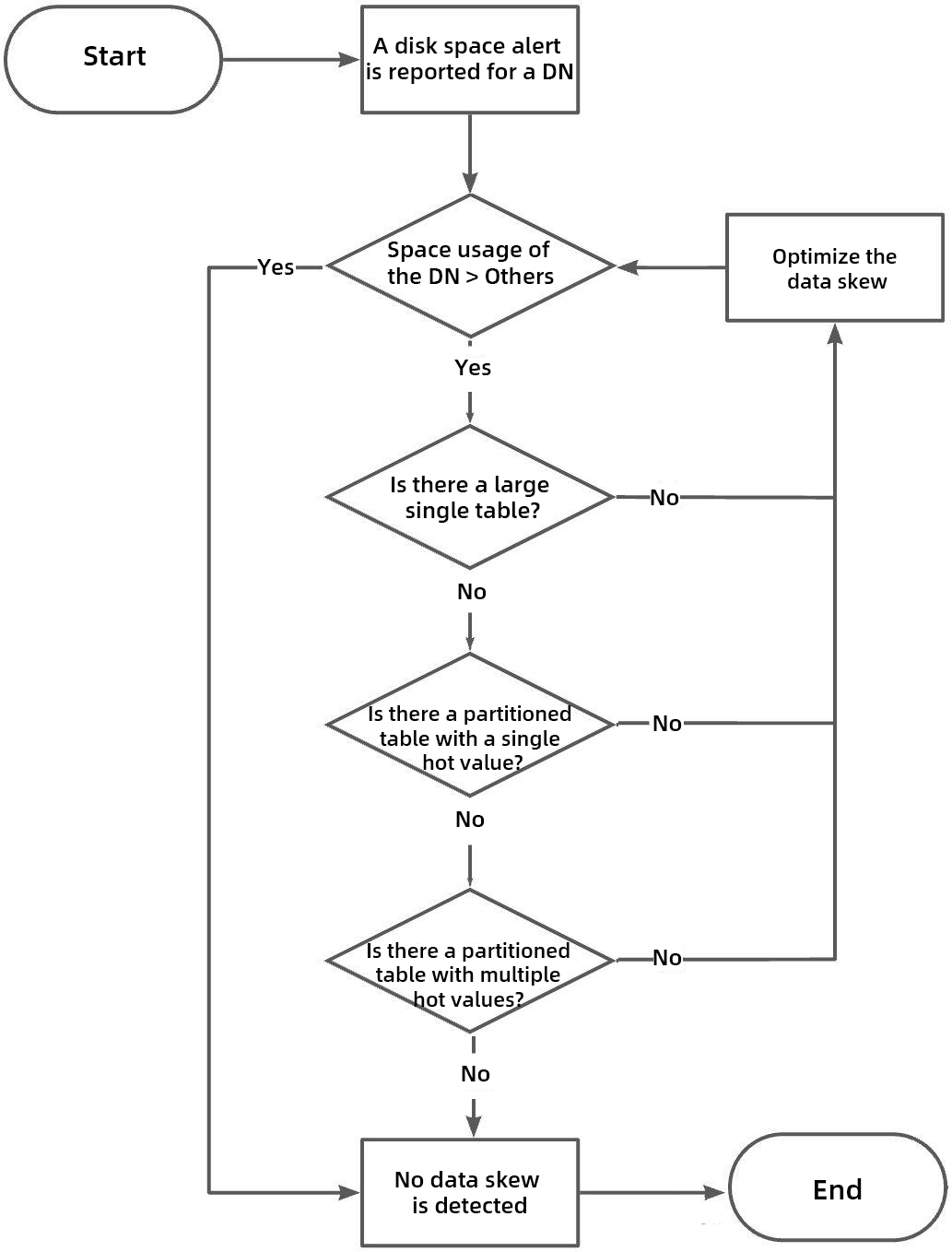
The analysis steps described in this topic are mainly based on the INFORMATION_SCHEMA.TABLE_DETAIL system table. The provided SQL statements are applicable to most business scenarios and usually do not need to be modified. If necessary, you can also adjust the SQL content according to your specific scenarios.
Because of space limitations, traffic skew analysis and how to optimize data and traffic skew will be described in subsequent articles. Stay tuned.
Q: Is the data in the TABLE_DETAIL view accurate?
A: Information such as the row count in this view is calculated based on statistics information, so it is not an exact value. In a few scenarios, missing data or large bias may occur. However, it is sufficient for reference.
Q: Is it safe and reliable to query the TABLE_DETAIL view?
A: When the total number of partitions in the system is relatively large, querying this view consumes a relatively large amount of time. It is safe to query it, but do not query it with high concurrency (for example, performing a large number of queries on it in a program).
Q: How can I avoid data skew in advance during the early business design process?
A: Refer to the previous article https://www.alibabacloud.com/blog/polardb-x-best-practice-series-7-partition-design_602737
Alibaba Cloud PolarDB PolarStore Receives Best Paper Award Nomination at Top Conference FAST'26
ApsaraDB - June 18, 2026
ApsaraDB - May 8, 2026
ApsaraDB - December 22, 2025
ApsaraDB - December 12, 2025
ApsaraDB - June 4, 2024
ApsaraDB - April 20, 2023
 Best Practices
Follow our step-by-step best practices guides to build your own business case.
Learn More PolarDB for PostgreSQL
Alibaba Cloud PolarDB for PostgreSQL is an in-house relational database service 100% compatible with PostgreSQL and highly compatible with the Oracle syntax.
Learn More
PolarDB for Xscale
Alibaba Cloud PolarDB for Xscale (PolarDB-X) is a cloud-native high-performance distributed database service independently developed by Alibaba Cloud.
Learn More
PolarDB for MySQL
Alibaba Cloud PolarDB for MySQL is a cloud-native relational database service 100% compatible with MySQL.
Learn MoreMore Posts by ApsaraDB


