Over the past year, from AI coding assistants in IDEs and ChatOps bots to ChatBI for data teams and low-code platforms for external partners — more and more AI agents want to "just connect to the database."very role asks the same thing:
"Can I have AI operate my Alibaba Cloud databases directly?"
But once the question lands on an actual RDS / PolarDB / MongoDB / Tair instance on the public cloud, nearly everyone hits the same wall:
• How do you hand credentials to AI? Shoving the root password into an AI client's environment variable fails the very first audit check.
• How do you configure the whitelist? Allowing 0.0.0.0/0 exposes the database to the Internet; restricting to the current IP means configuring machines one by one.
• How do you guard against misoperations? If AI ever writes DROP TABLE or FLUSHALL, who stops it?
• How do you cover multiple engines? PolarDB for MySQL has one client, Redis another, MongoDB yet another, RDS for MySQL a fourth — the toolchain is fragmented.
• Where's the expert who "knows this cloud"? When slow queries, lock waits, or capacity questions come up, AI can only copy error messages to a large model and guess — it has no way to reach official documentation or product-specific agents.
The ApsaraDB AI-Native MCP Server we are open-sourcing today (package: alibabacloud-yaochi-db-mcp-server, hereafter "ApsaraDB MCP") is the engineering answer to all of the above. It wraps instance management, data-plane execution, command security controls, and ApsaraDB Agent integration into a standard Model Context Protocol (MCP) Server.
Any AI client that supports the MCP protocol — Qoder / Cursor / Claude Desktop in your IDE, ChatOps bots, internal agent platforms, low-code workflows — can plug it in via stdio and instantly give its AI the ability to "operate Alibaba Cloud databases + invoke ApsaraDB Agent."
💡 One-Line Positioning
ApsaraDB MCP Server = the AI-native middleware layer for Alibaba Cloud databases. It lets any AI application — coding assistant, ops assistant, data analytics assistant, test automation — create databases, execute commands, and invoke ApsaraDB Agent for diagnostics and tuning through conversation, exposing the "AI collaborator" capabilities of the ApsaraDB console to every upstream AI client.
Based on the real Q&A patterns accumulated by ApsaraDB Agent in the console, "AI wants to connect to the database" shows up in the following scenarios. ApsaraDB MCP collapses the friction points across all of them:
| Scenario | Typical Pain Point | What ApsaraDB MCP Offers |
|---|---|---|
| Cloud instance lifecycle management DBA / Platform engineering |
Manually creating and querying instances across multiple accounts and regions is tedious; calling OpenAPIs directly has parameter complexity and misoperation risk |
create_instance / list_instances + ask_yaochi_agent via "OpenAPI as Tool": natural-language instance creation, parameter changes, whitelist management; write operations require secondary confirmation |
| Operations management DBA / SRE / App owner / On-call / Incident response |
When slow queries / lock waits / capacity alerts fire, the workflow is "switch to console → check monitoring → search docs → paste errors into a large model and guess"; diagnostic entry points are scattered across products | A single ask_yaochi_agent call triggers diagnostics + direct evidence collection in one conversation — "observe symptoms → form hypotheses → run verification" in a closed loop |
| Data analytics Analyst / BI / Business user |
Can't write SQL? Debugging SQL also requires asking a DBA for an account and installing a client | search_database + execute_sql: your local AI assistant understands natural language, inspects your schema, writes the SQL, and debugs it on a test database |
| AI coding (vibe coding) R&D / Algorithm engineer |
AI finishes writing ORM code and wants to "create a database + run SQL to verify" immediately, but you dare not give AI the database password or open the whitelist to the public internet |
create_instance + execute_instance_sql in temporary account mode + IP/32 whitelist: no passwords, ephemeral and disposable — AI writes code and runs it end-to-end |
| Test and PoC environment setup QA / Test architect / Evaluation engineer |
Test databases should be "use and discard," but the manual cycle of creating instances, loading data, and tearing down takes hours |
create_instance spins up any engine in seconds; scripts/agents release it when done — no environment debt, CSPRNG-based temporary accounts prevent exposed instances by design |
| Learning and configuration consulting New team members / External partners |
"Persistent vs. in-memory Tair — which should I pick?" "When should I use PolarDB columnar indexes?" — the only option is to dig through official docs |
ask_yaochi_agent returns answers with documentation citations via RAG — like embedding a database support engineer into every tool |
In essence, ApsaraDB MCP extends what ApsaraDB Agent has been doing — shifting from reactive response to proactive enablement through RAG-powered Q&A, shortcut commands, OpenAPI tool-calling, and intelligent diagnostics and tuning — to multiple upstream entry points such as IDEs, ChatOps, and agent platforms via open source. The "AI collaborator" is no longer confined to the Alibaba Cloud console.
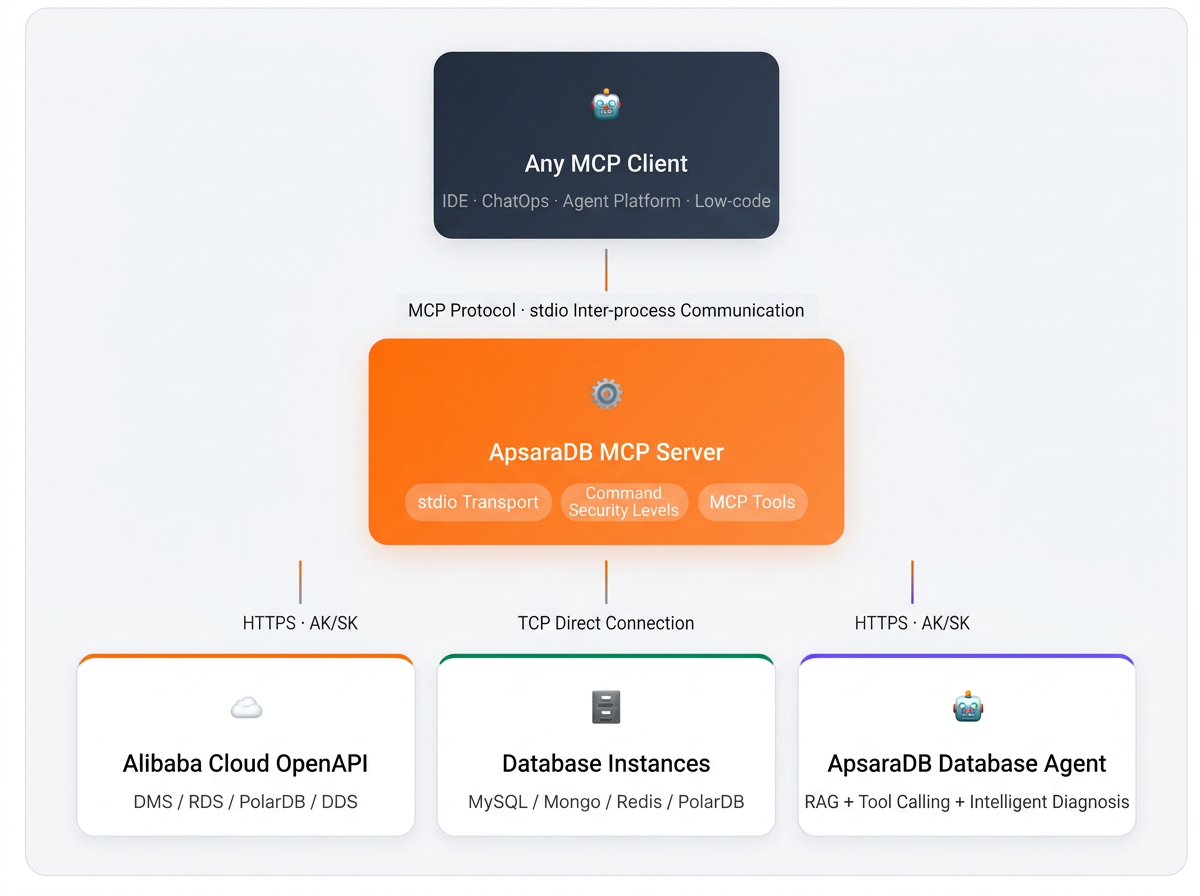
The server currently runs as a local stdio process: when an MCP client (IDE, ChatOps bot, internal agent platform, or script) starts, it forks the server as a child process. All calls go through stdin/stdout — no ports are listened on, the attack surface is minimal, and AK/SK credentials never leave the local machine.
Regrouping the tools by "what they do" yields three categories, each serving multiple scenarios described above:
• Instance management — giving upstream AI a pair of hands for "spinning up machines." A single "create a PolarDB cluster for me" can provision an RDS for MySQL, PolarDB for MySQL, Tair, or MongoDB instance in seconds, with coverage expanding to all ApsaraDB engines. If you don't need a new one, AI can list existing instances under your account for reuse. This layer serves both "create-and-verify" after AI coding and "use-and-discard" for test PoCs, as well as "spin up a standby" for operations scenarios.
• Data-plane execution — reducing "create database / create table / run SQL / write cache" to conversational commands. AI can use the recommended temporary account mode (no password, ephemeral) to execute SQL, or connect directly to MySQL / MongoDB / Redis when you already have connection details. This covers the full spectrum from developer self-verification and analyst ad-hoc queries to operations canary scripts.
• ApsaraDB Agent integration — giving upstream AI an expert who "knows this cloud." A single sentence triggers ApsaraDB Agent to leverage RAG documentation knowledge, OpenAPI tools, and intelligent diagnostics and tuning capabilities to answer questions like "why is it slow, how should I tune parameters, how do I assess capacity, how do I set up read-write splitting." This is the core differentiator that sets ApsaraDB MCP apart from a plain "SQL executor" — and the key entry point for exposing the "console AI collaborator" to all upstream applications.
Opening the ApsaraDB console's "AI collaborator" to any MCP client
ApsaraDB Agent is the unified AI service entry point in the ApsaraDB console. It integrates the official database documentation knowledge base and orchestrates product-specific agents (PolarDB, Tair, AnalyticDB, DTS, Lindorm, MongoDB, SelectDB, and more). Exposed to upstream applications through ask_yaochi_agent, it delivers far more than a "Q&A interface" — it is an entire skill marketplace driven by natural language and continuously extensible, curated by the ApsaraDB team and evolving with every console release.
Concretely, any MCP client can access the following capabilities with a single natural-language prompt:
RAG-powered Q&A: answers usage, configuration, and architecture questions based on official documentation — "What scenarios suit PolarDB columnar indexes? What should I watch out for when writing to the database?" — one sentence returns answers with documentation citations.
OpenAPI as Tool: manages instances (create, scale, modify parameters, configure whitelists) in natural language; write operations trigger a confirmation card, and whitelist changes are enforced through the yaochi_agent security group.
Intelligent diagnostics and tuning (with built-in skills): ApsaraDB Agent ships with a set of product-grade "diagnostic expert" skills, finely scoped by product line × scenario. For example:
🤖 Performance anomaly diagnostics: deep performance diagnosis for Tair / Redis instances experiencing RT fluctuations and access timeouts, automatically locating root causes and providing optimization recommendations;
🤖 PolarDB stability expert: replication delay diagnostics (RW/RO/Standby replay lag, slot WAL accumulation, read-consistency issues), I/O performance diagnostics (high latency, buffer pool misses, checkpoint write pressure, disk spikes), table health patrol (XID wraparound risk, table bloat, unused indexes, autovacuum long-transaction blocking), and table maintenance diagnostics;
🤖 Resource panoramic observability: TopK resource utilization for PolarDB for MySQL instances (CPU / memory / IOPS / connections), one-click identification of high-load instances by region with resource pressure summaries;
🤖 AI-native capability provisioning: type and status explanations for PolarDB AI applications (Agent Express / Agent Flow / Mem0 / Ray, etc.), plus one-click provisioning and management of AnalyticDB for PostgreSQL long-term memory service (Memory) and AI Drama Assistant;
🤖 Data warehouse slow query analysis: rapid identification and optimization recommendations for SelectDB slow queries.
The above are just a subset of the built-in skills — the ApsaraDB Agent skill marketplace continues to expand by product line. New capabilities take effect automatically with console updates, requiring no code changes or re-integration from upstream MCP clients.
When any MCP client invokes ask_yaochi_agent, it triggers the exact same capabilities that ApsaraDB Agent provides in the console. Whether it's a developer in an IDE, an ops engineer in ChatOps, a business user on an agent platform, or an automation script in CI/CD — all get equal access to the ApsaraDB Agent "AI collaborator" experience, covering database development, daily operations, incident response, performance tuning, capacity planning, AI application provisioning, and documentation Q&A. This is the most critical differentiator of this open-source release: ApsaraDB MCP is not just a set of CRUD executors — it is an AI collaboration layer that understands your context and helps you think.
Traditionally, AI database operations either "pass the root password in the clear" or "require a pre-created account" — the former is insecure, the latter is inelegant. Whether for IDE self-verification, ops scripts, or ad-hoc analysis, the goal is always "don't hold a database password long-term." ApsaraDB MCP makes the entire execution flow credential-free, zero-config, and zero-residue:
execute_instance_sql(instance_id, sql, database)
  ├─ 1. Try direct TCP connection (prefer internal VPC, also probe public endpoint)
  ├─ 2. [If unreachable] Auto-enable public access:
  │   ├─ Detect local public IP
  │   ├─ AllocateInstancePublicConnection
  │   ├─ ModifySecurityIps(当前IP/32, group=mcp_public_access)
  │   └─ Wait 3s for DNS propagation → retry connection
  ├─ 3. Auto-create database (DescribeDatabases → CreateDatabase if not exists)
  ├─ 4. CreateAccount → mcp_<random> (CSPRNG 32-char password)
  ├─ 5. GrantAccountPrivilege → ReadWrite on target_db
  ├─ 6. pymysql.connect → execute SQL → return results
  └─ 7. DeleteAccount → clean up temporary account (finally block fallback)
Developers, ops engineers, and analysts hold only AK/SK throughout — they never touch a database password. The whitelist is set to the current machine's IP/32, not 0.0.0.0/0. Accounts are freshly created each time and deleted after use, leaving an attack window of only seconds. Even on error paths, the finally block ensures account deletion — no "zombie accounts" left behind. Whether AI runs in an IDE, ChatOps, or an automation script, the security posture is identical.
| Tier | Covered Operations | Handling Strategy | Toggle |
|---|---|---|---|
| readonly | SELECT / SHOW / DESC / EXPLAIN | Execute directly | — |
| write | INSERT / UPDATE / DELETE | Requires force=true
|
YAOCHI_ENABLE_WRITE_SQL (default: true) |
| ddl | CREATE TABLE / DATABASE | Requires force=true
|
YAOCHI_ENABLE_DDL_SQL (default: false) |
| dangerous | DROP / TRUNCATE / ALTER / RENAME | Rejected outright | — |
Four additional hard constraints prevent bypass attacks: comments (-- / # / /*) are rejected, multi-statement queries are rejected, the full SELECT text is regex-scanned for dangerous keywords, and SQL exceeding 10,000 characters is rejected. Redis / MongoDB maintain their own independent blacklists (FLUSHALL / CONFIG SET / dropDatabase / shutdown).
ApsaraDB MCP serves many scenarios — operations management, data analytics, AI coding, test setup, and incident response are all target use cases. Below, we pick one of the most concrete and easiest-to-reproduce scenarios for developers — vibe coding — and walk through the collaboration chain of "MCP tools + ApsaraDB Agent" within a single conversation. The invocation pattern for other scenarios is identical; only the upstream AI client changes from IDE to ChatOps, agent platform, or ops script.
You are writing an e-commerce order service in Qoder. You need a persistent storage layer plus a cache tier, and you also want to assess the health baseline of the new cluster. Your code is done. You want to:
"Create a PolarDB for MySQL cluster and a Tair instance for caching."
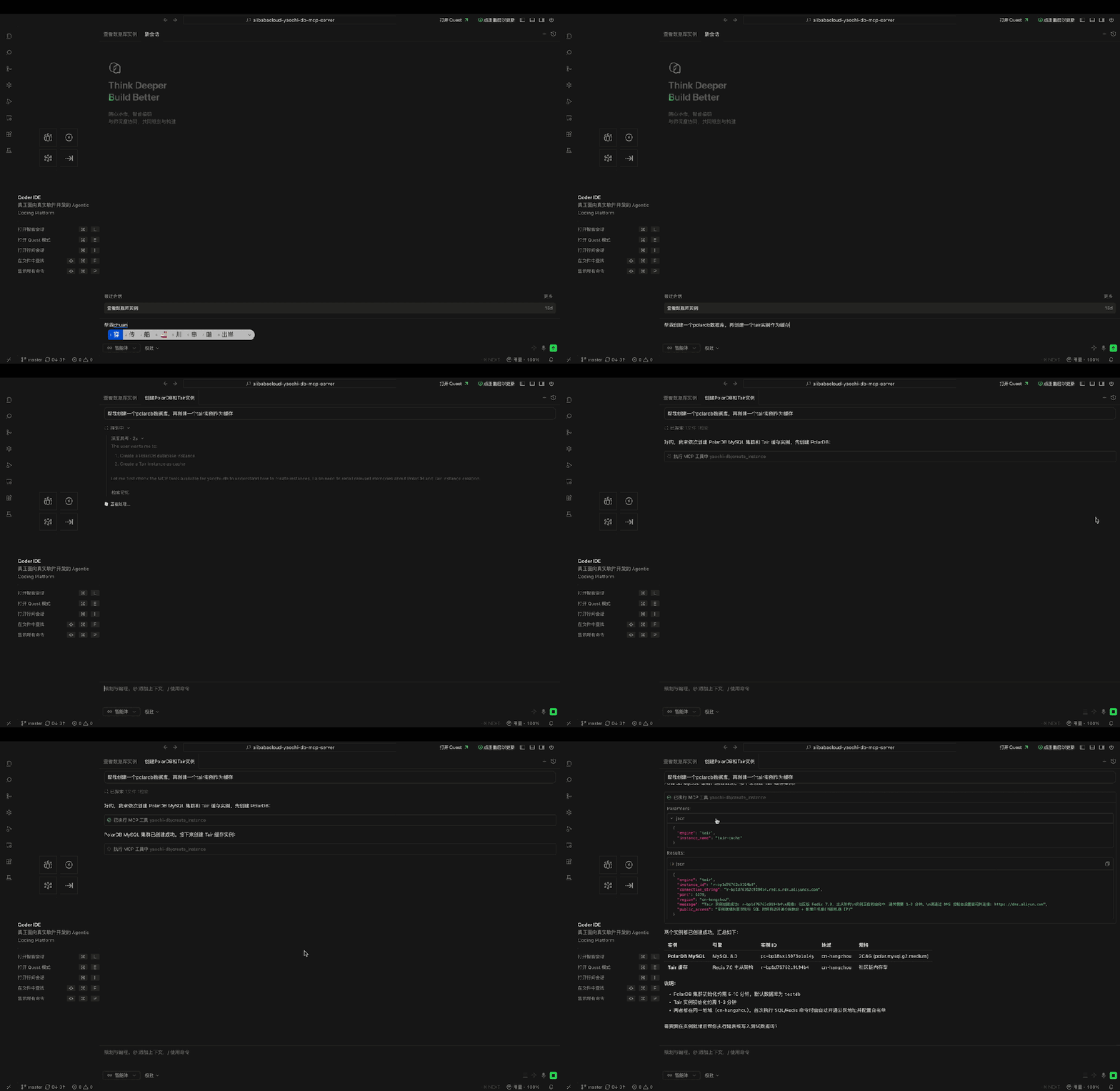
AI decomposes the task and calls create_instance to provision PolarDB for MySQL first.
Once the primary database is ready, it provisions a Tair instance.
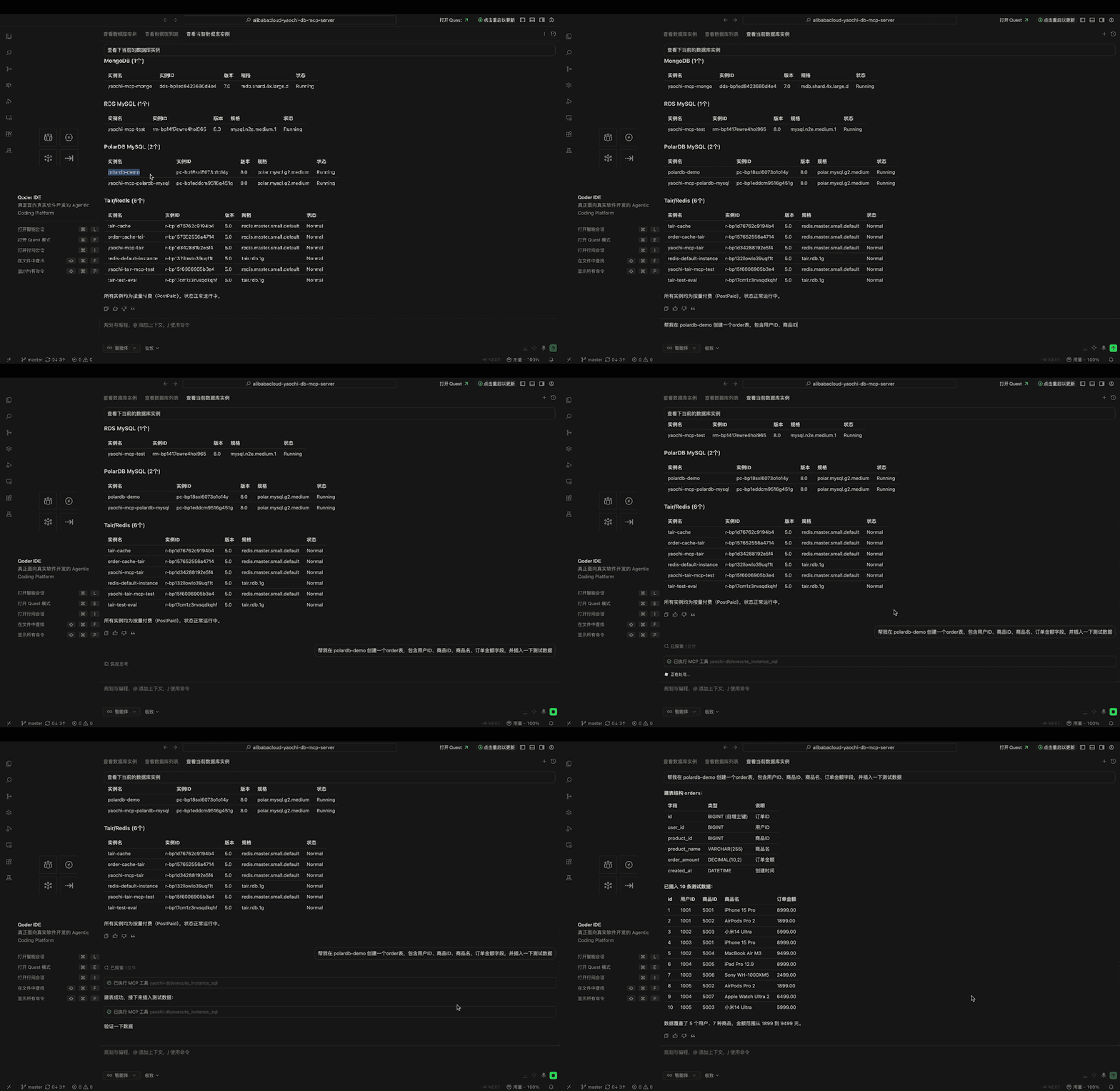
"Create an orders table on the PolarDB XXX instance with user ID, product ID, and order amount columns, then insert some test data."
Calls execute_instance_sql — temporary account mode, no password needed:
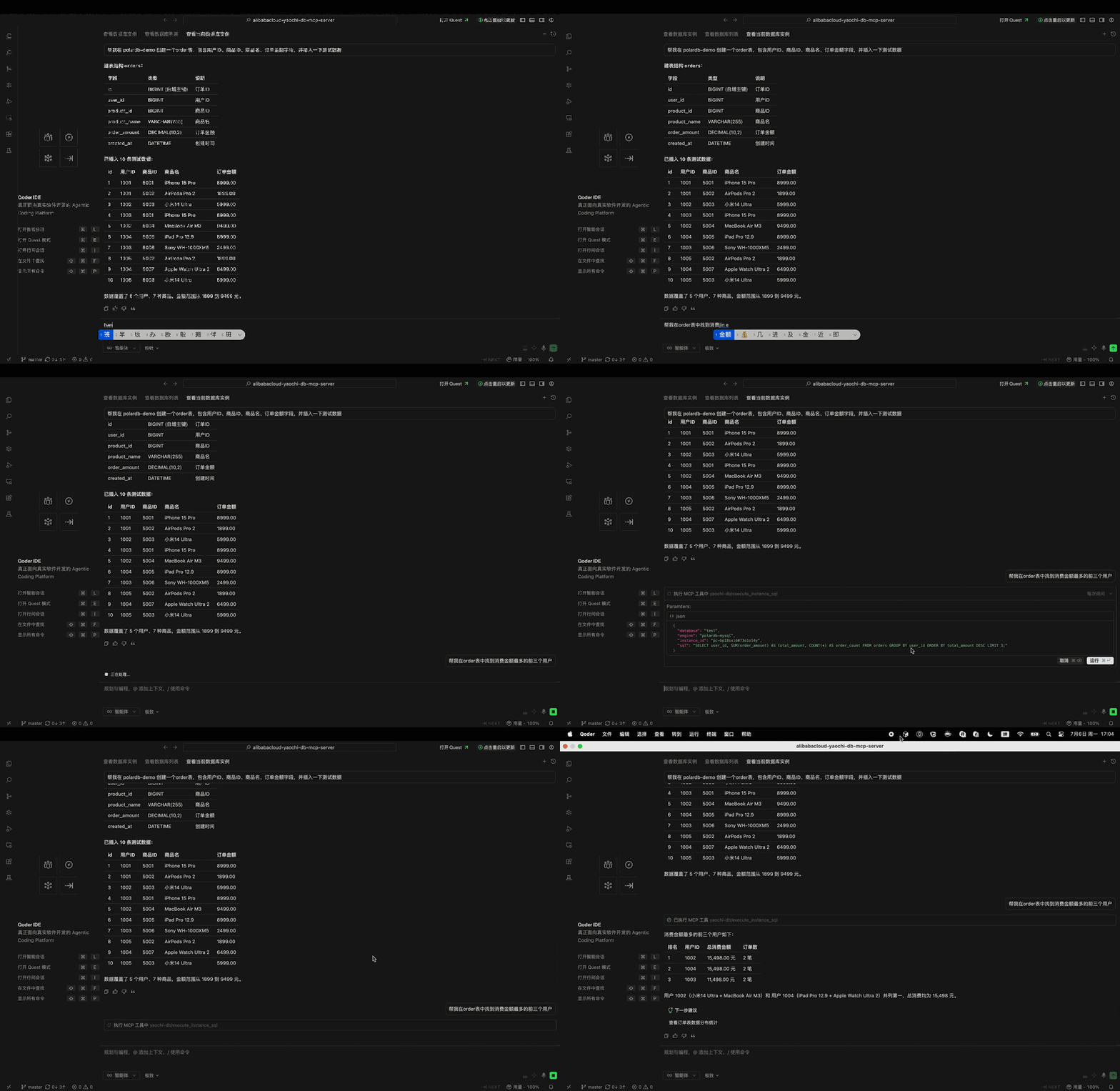
"Find the top three users by total spending from the orders table."
Calls execute_instance_sql — temporary account mode, no password needed:
Have ApsaraDB Agent run different types of diagnostics on the database instance:
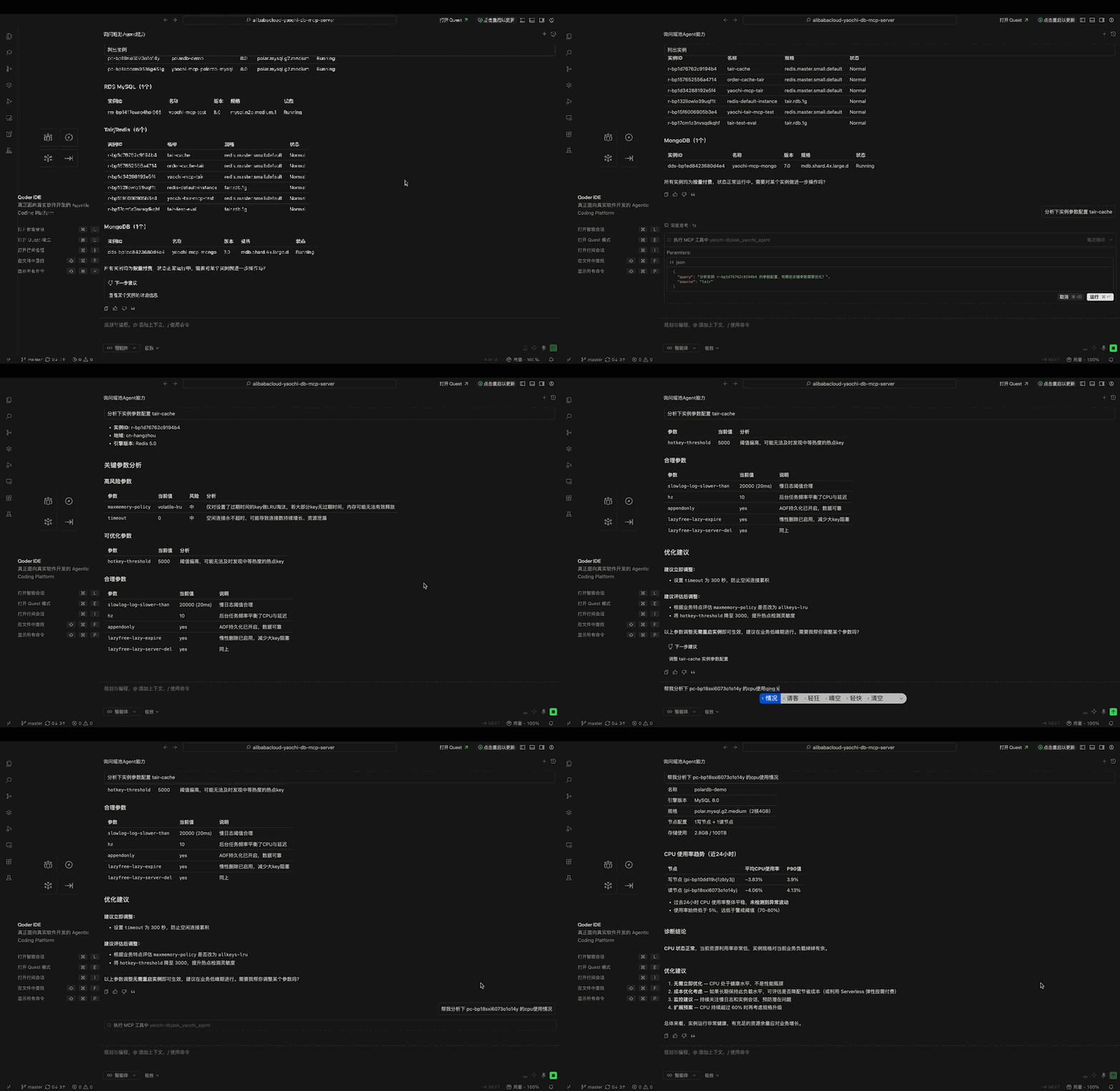
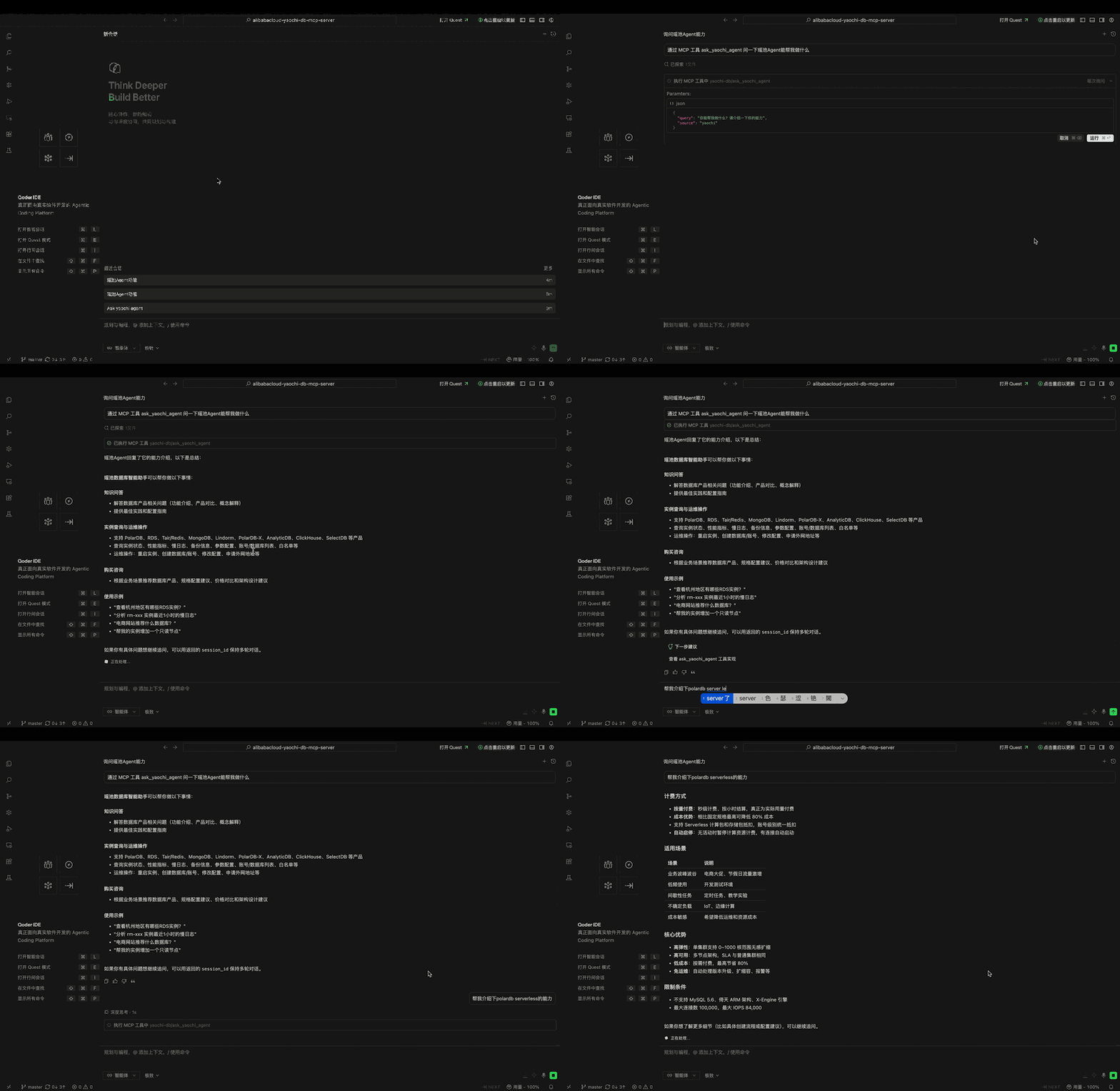
The entire process — creating the PolarDB cluster, creating the table, provisioning the Tair cache, writing test data, running performance diagnostics — required nothing more than natural language from the upstream AI. No console was opened, no whitelist was configured by hand, no database password was ever pasted. This is what ApsaraDB Agent advocates: "ask and get, from reactive response to proactive enablement." The same workflow works identically if you swap the "AI client" for ChatOps, an ops platform, or an agent workflow.
Whether you're plugging ApsaraDB MCP into an IDE, a ChatOps bot, or an enterprise agent platform, the following three steps are the same:
# 1. Clone + install dependencies
git clone https://github.com/aliyun/alibabacloud-yaochi-db-mcp-server.git
cd alibabacloud-yaochi-db-mcp-server
python3 -m venv .venv && source .venv/bin/activate
pip install .

# Configure AK/SK (environment variables recommended)
export ALIBABA_CLOUD_ACCESS_KEY_ID="你的AK"
export ALIBABA_CLOUD_ACCESS_KEY_SECRET="你的SK"
export ALIBABA_CLOUD_REGION_ID="cn-hangzhou"
export YAOCHI_ENABLE_WRITE_SQL="true"
export YAOCHI_ENABLE_DDL_SQL="true"   # Set to true when you create tables and change schemas

# 3. Verify
yaochi-db-mcp-server   # wait in stdio = success
Add the following JSON content to the mcpServers settings of any of your MCP client:
~/Library/Application Support/Claude/claude_desktop_config.json;{
"mcpServers": {
"yaochi-db": {
"command": "<project path >/alibabacloud-yaochi-db-mcp-server/.venv/bin/yaochi-db-mcp-server",
"env": {
"ALIBABA_CLOUD_ACCESS_KEY_ID": "your AK",
"ALIBABA_CLOUD_ACCESS_KEY_SECRET": "your SK",
"ALIBABA_CLOUD_REGION_ID": "cn-hangzhou",
"YAOCHI_ENABLE_WRITE_SQL": "true",
"YAOCHI_ENABLE_DDL_SQL": "true"
}
}
}
}Restart the MCP server and chat with the AI.
The open-sourcing of the ApsaraDB MCP Server is the engineering answer to a critical question in the AI era: "How should cloud databases be accessed by AI?":
• For Developers & Analysts——It's a "universal cloud database toolbox" accessible with a single line in a chat prompt. It handles tasks like provisioning instances, running SQL queries, looking up documentation, and diagnosing slow queries, covering a wide range of scenarios from AI-powered coding and ad-hoc analysis to test environment setup.
• For Operations & Security——It transforms the practice of "direct AI-to-database connections" from the insecure model of "plaintext passwords + public network access" to a robust framework featuring "temporary credentials + /32 IP whitelisting + command-level permissions," enabling security auditors to grant approval with confidence. When an alert triggers, it can directly leverage the ask_yaochi_agent to complete a closed loop of "observing symptoms -> forming a hypothesis -> running verification."
• For the Ecosystem——Through the MCP protocol, it opens up the assets accumulated by the Yaochi Database Agent in our console—including the RAG knowledge base, OpenAPI as a Tool, intelligent diagnostics, and a matrix of product-specific agents—to all AI clients. This ensures that "AI collaborators" are no longer confined to the Alibaba Cloud console.
Whether you're engaged in Vibe Coding, building ChatOps for operations, assembling data analysis agents, or setting up test automation for your team—as long as your application uses Alibaba Cloud databases, we invite you to clone the repository and get it running: https://github.com/aliyun/alibabacloud-yaochi-db-mcp-server
We welcome you to open Issues and PRs on GitHub to tell us:
• What new capabilities would you most like to see in ask_yaochi_agent (e.g., automatic slow query rewriting, index recommendation and implementation, capacity assessment, read/write splitting solutions)?
In what scenarios has your team encountered database-related roadblocks where AI couldn't help?
Our journey to make the "AI collaborator" a true expert on Alibaba Cloud databases for every cloud user has just begun.
What Kind of PostgreSQL Do We Need When 80% of Databases Are Automatically Created by AI?
48 Hours Before the Crisis, They Chose to Simulate Three Futures First
ApsaraDB - January 15, 2026
ApsaraDB - January 29, 2026
Alibaba Cloud Native Community - July 4, 2025
ApsaraDB - June 21, 2026
Alibaba Cloud Native Community - August 25, 2025
Alibaba Cloud Native Community - June 4, 2025
 ApsaraDB for MongoDB
A secure, reliable, and elastically scalable cloud database service for automatic monitoring, backup, and recovery by time point
Learn More ApsaraDB for OceanBase
A financial-grade distributed relational database that features high stability, high scalability, and high performance.
Learn More ApsaraDB for Cassandra
A database engine fully compatible with Apache Cassandra with enterprise-level SLA assurance.
Learn More Database for FinTech Solution
Leverage cloud-native database solutions dedicated for FinTech.
Learn MoreMore Posts by ApsaraDB


