With the rapid development of Large Language Models (LLMs), AI Agents are moving from the lab to production. From intelligent customer service to code assistants, and from data analytics to automated O&M, AI Agents are transforming how we work. However, unlike traditional applications, AI Agents possess two distinct characteristics:
● Unpredictable behavior: The same input might generate different outputs and invoke different toolchains.
● Execution capability: Agents don't just "talk"; they "act"—accessing data, invoking APIs, and executing operations.
These two characteristics present entirely new challenges.
Consider this scenario: A customer service Agent answering a query is subjected to a prompt injection attack. It accidentally accesses another user's order information, or even triggers a refund API. This is a real-world security risk, not science fiction.
AI Agent security risks primarily stem from two areas:
1. Lack of strong isolation in execution environments
Agents require data access and tool invocation at runtime. Without strict permission controls, prompt injections or accidental triggers can lead to unauthorized access, data leaks, or unintended operations—such as an Agent bypassing security checks to access a restricted database.
2. Lack of control over external capabilities
The greatest threats often arise from the abuse of external capabilities—such as abnormal outbound calls, SSRF/intranet probing, or sensitive data persistence and exfiltration. For example, an Agent might be tasked with "checking the weather" but actually initiates a scan of internal network services.
Traditional applications are deterministic; the same input yields the same output. AI Agents, however, may make different decisions each time, leading to three major observability hurdles:
1. Behavior is hard to reproduce and troubleshoot
For the same query, an Agent might use Tool A today, Tool B tomorrow, or simply provide a direct answer the day after. When errors occur, identifying the exact point of failure is difficult.
2. Difficulty in cost control and attribution
Costs are driven by LLM token consumption and external API calls, both of which fluctuate significantly. It is often unclear which users, tasks, or models are driving up expenses.
3. Quality is hard to measure and optimize
Output quality depends on model capability, prompt design, and retrieval data. Because these factors change constantly, it is difficult to pinpoint what is working, what isn't, and how to optimize.
Traditional monitoring and security solutions fall short in AI Agent scenarios:
| Dimension | Traditional application | AI Agent | Why they differ |
|---|---|---|---|
| Security boundary | Controlled by code logic | Requires mandatory runtime isolation | Agent behavior is decided by the LLM; code cannot fully predict its actions. |
| Observability targets | Requests, responses, and logs | Reasoning chain, tool calls, and token consumption | Must record the decision-making process, not just inputs and outputs. |
| Cost model | Computing resources | Tokens and API calls | Costs correlate with data volume, model choice, and task complexity. |
| Troubleshooting | Reviewing logs and error stacks | Requires a full replay of the decision chain | Non-determinism makes issues difficult to reproduce. |
This is why a runtime platform and observability solution specifically designed for AI Agents are essential. Let's explore how ACS Agent Sandbox and LoongCollector address these challenges.
ACS Agent Sandbox provides a secure execution environment based on Kubernetes, while LoongCollector acts as a telemetry data collector to provide agents with comprehensive monitoring and analysis. Together, their deep integration forms a complete production-grade execution platform for AI Agents.
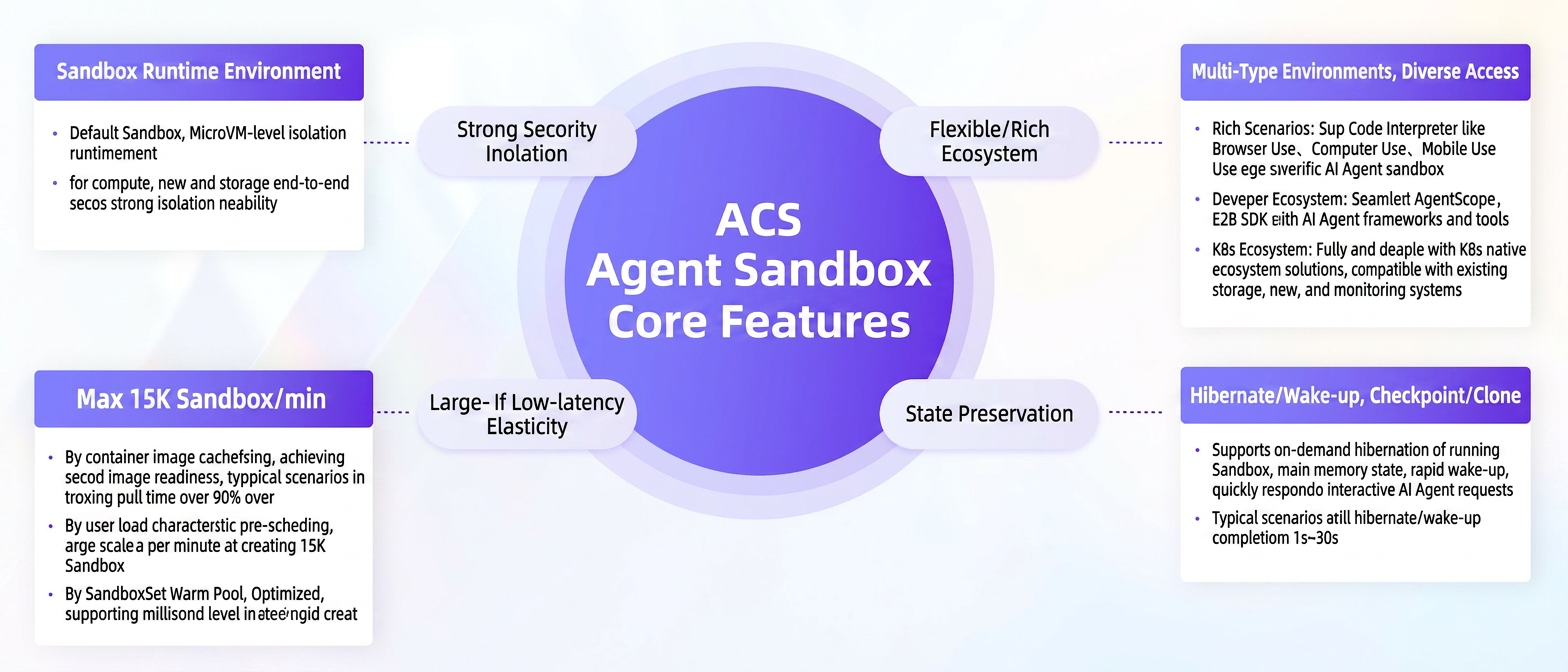
Alibaba Cloud Container Service (ACS) Agent Sandbox is a specialized environment launched by Alibaba Cloud. Built on Kubernetes, it provides a secure, isolated, and scalable platform for running AI Agents.
LoongCollector is a unified telemetry collector open-sourced by the Alibaba Cloud Observability team. Designed for cloud-native and high-performance scenarios, it offers unique advantages for AI Agent use cases:
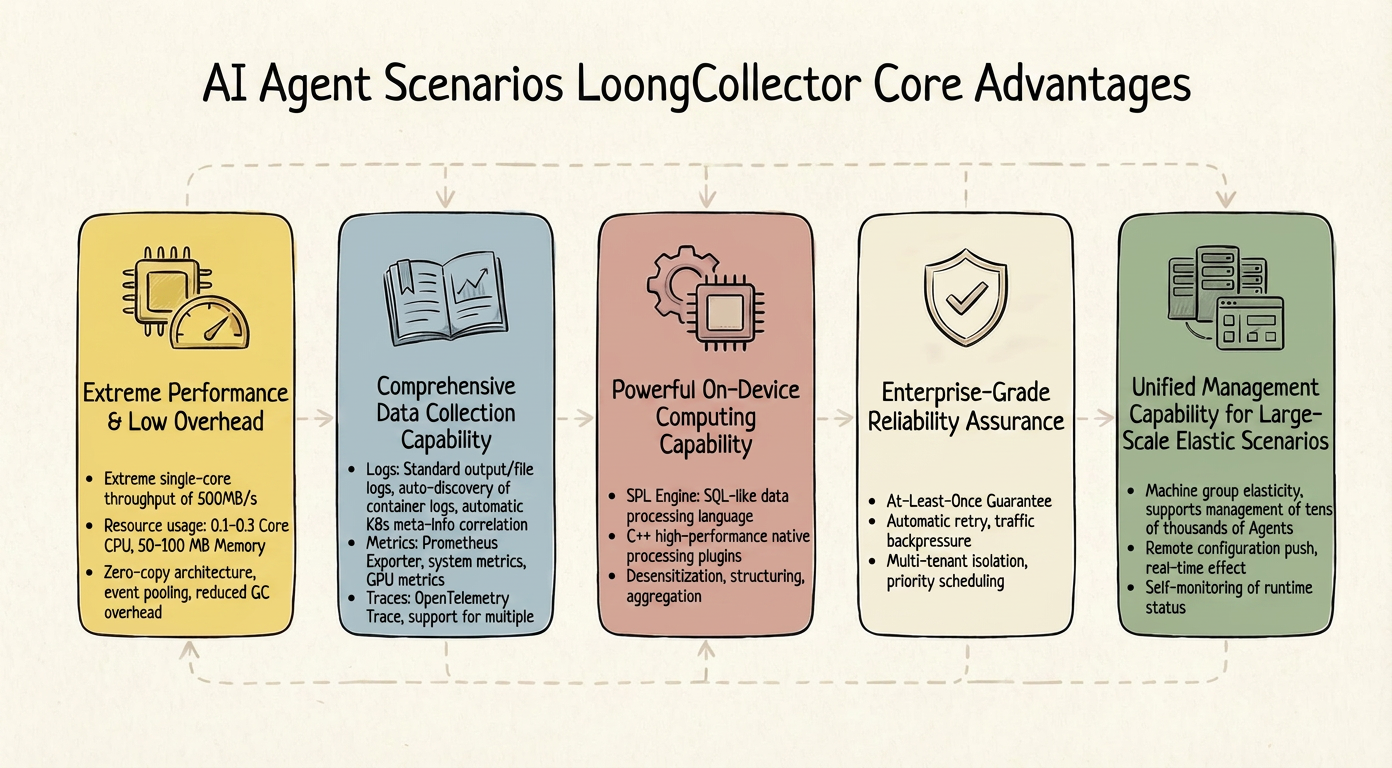
AI Agents are compute-intensive, so observability components must be lightweight to avoid impacting business operations:
● Zero-copy architecture: Utilizes Memory Arena and zero-copy to minimize unnecessary memory overhead.
● Event pooling and reuse: High-frequency object pooling reduces memory allocation and Garbage Collection (GC) pressure.
● High single-core throughput: A single core can support log collection throughput of up to 500 MB/s.
● Logs: Supports stdout/stderr and file logs; automatically associates Kubernetes metadata such as Pods, Namespaces, and Labels.
● Metrics: Native support for Prometheus Exporter, system metrics (CPU, memory, network, and disk I/O), and GPU metrics (NVIDIA DCGM).
● Traces: Full support for OpenTelemetry.
Beyond collection, it performs edge-side preprocessing to reduce transmission and storage costs:
● High-performance C++ plugins and Structured Process Language (SPL) engine.
● Supports complex processing: Filtering, transformation, and aggregation.
● Edge-side dimensionality reduction: Minimizing noise and data volume at the source.
Data reliability
● At-least-once delivery semantics.
● Local disk caching: Persisting data to disk during network anomalies and retransmitting upon recovery.
● Automatic retry and exponential backoff.
● Backpressure and rate limiting: Protects the system during downstream congestion.
Operational reliability:
● Multi-tenant pipeline isolation.
● Priority scheduling: Ensuring critical data is processed first.
● Hot updates and graceful changes: Configuration changes take effect without restarts or service interruptions.
● ConfigServer: Centralized configuration management supporting tens of thousands of Agents.
● Remote configuration delivery: Changes take effect in real-time without requiring manual login.
● Status and performance monitoring: A unified view of health and resource overhead.
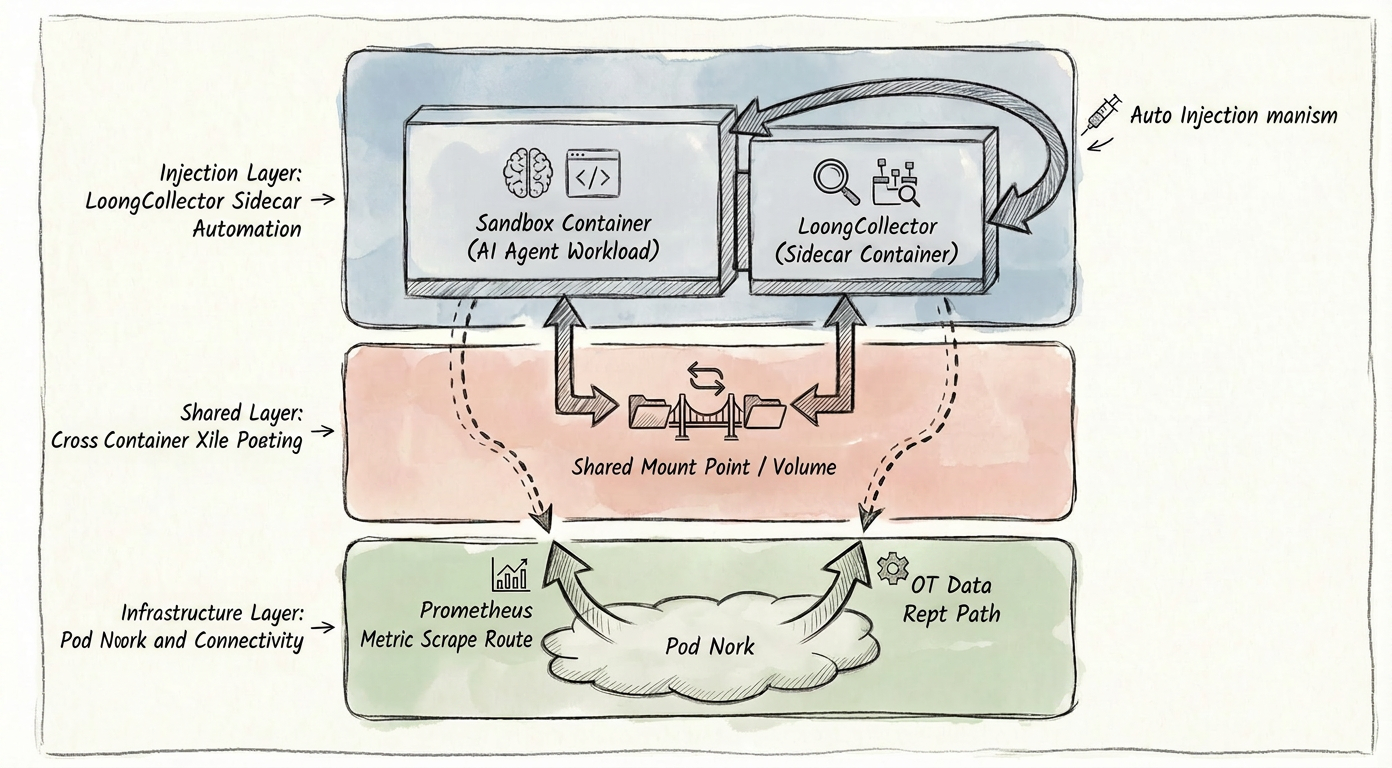
● ACS management automatically injects the LoongCollector container into the Sandbox.
● Via shared file path mounting.
● Use the Pod network to perform Prometheus scraping on AI Agents or receive OpenTelemetry data.
Through the deep integration of ACS Agent Sandbox and LoongCollector, we have built a comprehensive production-grade platform for AI Agents:
| Capability dimension | ACS Agent Sandbox | LoongCollector | Combined value |
|---|---|---|---|
| Security | Container isolation, access control, and network isolation | Collection isolation and send isolation | Multi-layered security guarantees |
| Reliability | Automatic fault recovery, multiple replicas, and health checks | At-least-once, local cache, and automatic retries | End-to-end reliability assurance |
| Scalability | Automatic scaling and startup in seconds | High performance, low overhead, and edge compute | Elasticity to handle traffic fluctuations |
| Manageability | Unified configuration and canary releases | Configserver and remote delivery | Unified management of large-scale clusters |
| Observability | Automatic injection and meta information association | Full-link collection and real-time processing | Complete observability view |
OpenClaw is a trending AI application that redefines the boundaries of AI assistants. Its core value is no longer just answering questions, but understanding intent, planning steps, and invoking tools to complete tasks—acting as an "always-on" digital employee. Next, let's explore how to run OpenClaw securely and with full observability using ACS Agent Sandbox and LoongCollector.
ACK clusters
Note: Install the following components in advance:
● Install the LoongCollector component in Components and Add-ons.
● Install the ACK Virtual Node component in Components and Add-ons.
● Install ack-agent-sandbox-controller components in Components and Add-ons.
● To expose services via EIP, install the ack-extend-network-controller component from the Marketplace. Refer to the help document for specific configuration steps.
Modify the eci-profile ConfigMap in the kube-system namespace. The slsMachineGroup parameter defines the Sandbox machine group identifier; we recommend using a unique identifier different from the ACK DaemonSet group.
ACS clusters
Note: Install the following components first:
● Go to Components and Add-ons and install the ack-agent-sandbox-controller component (version ≥0.5.3).
● To expose services via EIP, go to Components and Add-ons in the ACK cluster and install the ack-extend-network-controller component.
● Go to Components and Add-onsand install the in alibaba-log-controller component.
The machine group identifier is the unified ACS cluster group ID: k8s-log-${cluster_id}
Enable the OpenTelemetry (OTel) plugin for OpenClaw
Note
● Ensure extensions/diagnostics-otel is included when packaging the OpenClaw image.
● You must enable diagnostics-otel in the configuration to report metrics and trace data.
Configure ~/.openclaw/openclaw.json
Note: The endpoint configured here will be required for the LoongCollector collection configuration later.
{
  "plugins": {
    "allow": ["diagnostics-otel"],
    "entries": {
      "diagnostics-otel": { "enabled": true }
    }
  },
  "diagnostics": {
    "enabled": true,
    "otel": {
      "enabled": true,
      "endpoint": "http://127.0.0.1:4318",
      "protocol": "http/protobuf",
      "serviceName": "openclaw-gateway",
      "traces": true,
      "metrics": true,
      "logs": true,
      "sampleRate": 1,
      "flushIntervalMs": 60000
    }
  }
}
OpenClaw sandbox deployment example
Below is a simplified example of creating an OpenClaw sandbox directly using a Sandbox CR:
apiVersion: agents.kruise.io/v1alpha1
kind: Sandbox
metadata:
  name: openclaw
  namespace: default
spec:
  template:
    metadata:
      labels:
        alibabacloud.com/acs: 'true'
        app: openclaw
    spec:
      containers:
        - name: openclaw
          # Replace with the actual OpenClaw image address
          image: <open-claw image address>
          imagePullPolicy: IfNotPresent
          resources:
            limits:
              cpu: '4'
              memory: 8Gi
            requests:
              cpu: '4'
              memory: 8Gi
          securityContext:
            readOnlyRootFilesystem: false
          terminationMessagePath: /dev/termination-log
          terminationMessagePolicy: File
      dnsPolicy: ClusterFirst
      paused: true
      restartPolicy: Always
      schedulerName: default-scheduler
      securityContext: {}
terminationGracePeriodSeconds: 1 As described in Is Your OpenClaw Really Running Under Control?, the observability data for OpenClaw is as follows:
| Observability data | OpenClaw data source |
|---|---|
| Logs (Session) | ~/.openclaw/agents/<id>/sessions/*.jsonl |
| Logs (Application) | /tmp/openclaw/openclaw-YYYY-MM-DD.log |
| Metrics |
diagnostics-otel plugin OTLP output |
| Traces |
diagnostics-otel plugin OTLP output |
Session logs
apiVersion: telemetry.alibabacloud.com/v1alpha1
kind: ClusterAliyunPipelineConfig
metadata:
  name: openclaw-session-log
spec:
  config:
    aggregators: []
    global: {}
    inputs:
      - Type: input_file
        # This path varies depending on the run path of the openclaw image.
        FilePaths:
          - /home/node/.openclaw/agents/main/sessions/*.jsonl
        MaxDirSearchDepth: 0
        FileEncoding: utf8
        EnableContainerDiscovery: true
        # Filter containers based on the OpenClaw sandbox information.
        ContainerFilters:
          K8sPodRegex: ^(openclaw.*)$
    processors:
      - Type: processor_parse_json_native
        SourceKey: content
    flushers:
      - Type: flusher_sls
        Logstore: openclaw-session-log
    sample: ''
  # Replace this with the sandbox machine group name of the ACK or ACS cluster.
  machineGroups:
    - name: <your-sandbox-machine-group>
  # The project to which logs are collected.
  project:
    name: k8s-log-xxx
  # The Logstore to which logs are collected.
  logstores:
    - name: openclaw-session-log
Application logs
apiVersion: telemetry.alibabacloud.com/v1alpha1
kind: ClusterAliyunPipelineConfig
metadata:
  name: openclaw-app-log
spec:
  config:
    aggregators: []
    global: {}
    inputs:
      - Type: input_file
        FilePaths:
          - /tmp/openclaw/*.log
        MaxDirSearchDepth: 0
        FileEncoding: utf8
        EnableContainerDiscovery: true
        # Filter containers based on OpenClaw sandbox information.
        ContainerFilters:
          K8sPodRegex: ^(openclaw.*)$
    processors:
      - Type: processor_parse_json_native
        SourceKey: content
    flushers:
      - Type: flusher_sls
        Logstore: openclaw-app-log
    sample: ''
  # Replace this with the name of the sandbox machine group for your ACK or ACS cluster.
  machineGroups:
    - name: <your-sandbox-machine-group>
  # The destination project for data collection.
  project:
    name: k8s-log-xxx
  # The destination Logstore for data collection.
  logstores:
    - name: openclaw-app-log
OpenTelemetry
apiVersion: telemetry.alibabacloud.com/v1alpha1
kind: ClusterAliyunPipelineConfig
metadata:
  name: openclaw-otel-config
spec:
  config:
    # This corresponds to the logstores below. It distributes and stores OpenTelemetry logs, metrics, and trace data.
    aggregators:
      - Type: aggregator_opentelemetry
        MetricsLogstore: openclaw-otel-metrics
        TraceLogstore: openclaw-otel-traces
        LogLogstore: openclaw-otel-logs
    global: {}
    inputs:
      - Type: service_otlp
        Protocals:
          HTTP:
            # Corresponds to the diagnostics-otel Endpoint enabled in OpenClaw.
            Endpoint: '127.0.0.1:4318'
            ReadTimeoutSec: 10
            ShutdownTimeoutSec: 5
            MaxRecvMsgSizeMiB: 64
    processors: []
    flushers:
      - Type: flusher_sls
        Logstore: openclaw-otel-logs
  # Replace with the Sandbox machine group Name for the ACK or ACS cluster.
  machineGroups:
    - name: <your-sandbox-machine-group>
  # The project for Collection.
  project:
    name: k8s-log-xxx
  # The Logstore for Collection. Note that OpenTelemetry has three Data Types. You must define three Logstores.
  # For metrics Data, set telemetryType to Metrics.
  logstores:
    - name: openclaw-otel-logs
    - name: openclaw-otel-metrics
      telemetryType: Metrics
- name: openclaw-otel-tracesSandbox runs OpenClaw securely and in isolation
● Each Sandbox runs in an isolated kernel environment, preventing malicious code from attacking host system programs.
● Each Sandbox uses an isolated temporary file system to prevent unauthorized reading, tampering, or deletion of host files.
LoongCollector enables full-stack observability for OpenClaw
| OpenClaw observable data Types | Issues addressed |
|---|---|
| Session logs | What did the Agent do? Which tools were called, which parameters were passed, and what was the result of each step? |
| Application logs | Where did the system fail? For example, did a Webhook fail or a message queue get blocked? |
| OT-Traces | What happened to a message from reception to response? How is the trace path linked? |
| OT-Metrics | How much is it costing right now? Is latency within normal limits? Are there any frozen sessions? |
The production-readiness of AI Agents is not a matter of "if," but "how." Security and observability are not optional—they are essential requirements.
If you are building an AI agent application:
● Start now by prioritizing runtime security and observability.
● Choose the right tools instead of reinventing the wheel.
● Establish best practices and promote them within your team.
● Continually learn and optimize to ensure your Agents create real value.
Both ACS Agent Sandbox and LoongCollector are open platforms; we invite you to try them and share your feedback. Together, let's build a more secure, reliable, and efficient production environment for AI Agents. We hope this article provides valuable reference and inspiration for your observability journey.
Add Enterprise Memory to OpenClaw, and Your Agent Finally Doesn’t Have to Ask Again

776 posts | 60 followers
FollowAlibaba Container Service - March 12, 2026
Alibaba Cloud Native Community - September 18, 2026
Alibaba Container Service - January 15, 2026
Justin See - March 27, 2026
Alibaba Cloud Native Community - August 25, 2025
Alibaba Cloud Native Community - June 18, 2026
776 posts | 60 followers
Follow QwenWork
QwenWork is dedicated to helping employees strengthen their professional competitiveness in the AI era and to enabling enterprises to improve organizational effectiveness.
Learn More Token Plan
Build more, spend less. One plan, every modality.
Learn More
Alibaba Cloud Model Studio
A one-stop generative AI platform to build intelligent applications that understand your business, based on Qwen model series such as Qwen-Max and other popular models
Learn More Container Service for Kubernetes
Alibaba Cloud Container Service for Kubernetes is a fully managed cloud container management service that supports native Kubernetes and integrates with other Alibaba Cloud products.
Learn MoreMore Posts by Alibaba Cloud Native Community

