By DanKun
When using AI programming tools like Claude Code, developers often encounter the following dilemmas:
● Premature Exit: The AI stops working when it thinks it is "good enough", rather than truly completing the task.
● Single Prompt Fragility: Complex tasks cannot be completed with a single prompt and require repeated human intervention.
● High Cost of Re-Prompting: Every manual redirection wastes developer time.
● Context Breakage: After a conversation restarts, all previous progress and context are lost.
The essence of these problems is: The self-assessment mechanism of LLMs is unreliable — it exits when it subjectively thinks it is "complete" rather than when it meets objectively verifiable standards.
The Claude Code community has spawned a minimalist yet effective paradigm — Ralph Loop (also known as Ralph Wiggum Loop):
while :; do
  cat PROMPT.md | claude-code --continue
done
The core idea is: Continuously input the same prompt, allowing the AI to see its previous work results in the file system and Git history. This is not simply "output feedback as input", but rather forms a self-referential iterative loop through external states (code, test results, commit records). Its technical implementation relies on the Stop Hook interception mechanism.
The Ralph Loop allows large language models to continuously iterate and run automatically until the task is complete, instead of exiting in a typical "one-time prompt → finish" cycle. This paradigm has been integrated into mainstream AI programming tools and frameworks, referred to as "AI Continuous Work Mode" by some tech bloggers and developers.
Even Ralph Loop combined with Amp Code has been used to create new programming languages (AFK): https://x.com/GeoffreyHuntley/status/1944377299425706060
The Ralph Loop allows AI agents to continually iterate until the task is complete.
Three core elements:
● Clear Task + Completion Criteria: Define verifiable success standards.
● Stop Hook Prevents Premature Exit: Forcibly continue if standards aren’t met.
● Max-iterations Safety Valve: Prevent infinite loops.
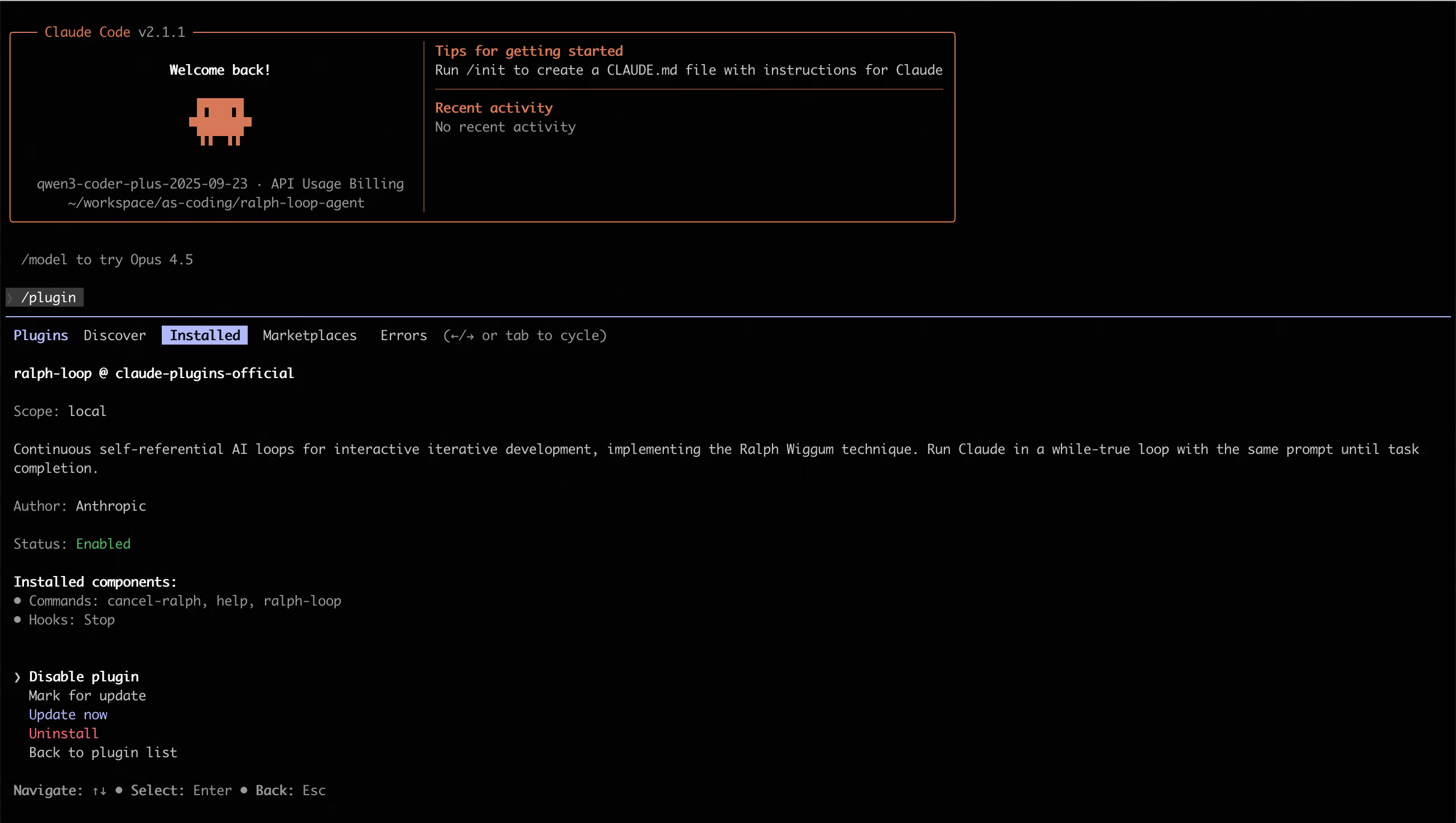
Simplest example (Claude Code):
# Install plugin
/plugin install ralph-wiggum@claude-plugins-official

# Run loop
/ralph-loop "Add unit tests to the current project
Completion criteria: - Tests passing (coverage > 80%) - Output <promise>COMPLETE</promise>" \
  --completion-promise "COMPLETE" \
--max-iterations 50Ralph Loop is a self-iterating loop mechanism. After you provide a task and completion criteria, the agent starts executing the task; when the model tries to exit in a certain iteration, a Stop Hook intercepts the exit attempt and reinjects the original task prompt, thus creating a self-referential feedback loop. In this loop, the model can read files changed in the previous iteration, test results, and git history, gradually correcting its output until it meets the completion criteria or reaches the set iteration limit.
In short:
● It's not a simple one-time run, but a continuous iteration until the task is complete;
● The same prompt is used repeatedly, but external states (code, test outputs, files, etc.) change after each iteration;
● Requires clear completion criteria (like outputting specific keywords, tests passing, etc.) and reasonable maximum iterations as safety control.

● The name Ralph Wiggum comes from a character in "The Simpsons", symbolizing the spirit of "iterating repeatedly and not giving up", but the actual implementation is a simple loop control mechanism rather than a model with special cognition.
● The core mechanism does not involve the model creating the loop on its own; it is the Stop Hook (see Stop-hook interception mechanism) that intercepts when the model attempts to exit and reinjects the prompt, forming "self-referential feedback" in the same session.
● Iteration is not unconditionally continuous but depends on clear verifiable completion signals or maximum iteration counts. Otherwise, the loop may never end.
● Philosophical Roots: The Ralph Loop traces back to the "Bash Loop" thinking in software engineering, with the core logic being "continuously providing tasks to the agent until the task is complete." This extreme simplification reflects a design philosophy that views failures as data and prioritizes persistence over perfection.
To deeply understand the differences between Ralph Loop and conventional agent loops, one must first establish a common semantic framework for the concept of "agent." According to a contemporary consensus among artificial intelligence laboratories, agents are defined as "LLM systems that run tools in loops to achieve goals". This definition emphasizes three key attributes:
In the conventional agent architecture, loops typically occur within the context window of a single session, determined by the LLM based on current observed results for the next action.
ReAct follows the rhythm of "Observation → Reasoning → Acting". The advantage of this mode is its dynamic adaptability: when agents encounter unforeseen tool outputs, they can instantly correct the reasoning path in the current context sequence.
However, this "internal loop" is limited by the self-assessment ability of the LLM. If the LLM becomes delusional at a certain step, thinking that the task is complete and choosing to exit, the system will stop running without achieving the real goal.
Plan-and-Execute decomposes tasks into static subtask sequences, executed sequentially by the executor. While this is more structured than ReAct for handling long-term tasks, it has a lower adaptability to environmental changes. If the third step fails, the entire plan often collapses or requires complex re-planning mechanisms.
Ralph Loop breaks the limitations of relying on the LLM's self-assessment. Its implementation mechanism adopts Stop Hook technology: when an agent attempts to exit the current session (believing the task is complete), the system cuts off the exit signal through specific exit codes (like exit code 2). An external control script scans the output; if it does not find the predefined "Completion Promise", the system reloads the original prompt and starts a new round of iteration.
This pattern is essentially mandatory; it does not depend on the agent's subjective judgment but on external verification.
In the developer context, "agent loop" usually refers to the perception-decision-execution-feedback loop within the agent (that is, the typical perception-reasoning-action mechanism). In contrast, Ralph Loop focuses more on iterative execution of the same task until success, differing in purpose and design from typical agent loops:
|
Dimension |
Conventional Agent Loop (ReAct/Plan-Execute) |
Ralph Loop (Persistence Loop) |
|
Control Subject |
Agent internal logic (LLM autonomously decides when to stop) |
External scripts/stop hooks (forced restart) |
|
Exit Condition |
LLM self-assessment complete or reaching maximum reasoning steps |
Exact string match ("Completion Promise") |
|
Context State |
Single session history that expands with the number of steps |
Cross-session persistence based on files and Git history |
|
Tolerance Mechanism |
Attempts to fix errors in the reasoning chain |
Allows tasks to fail and exit, restarting from the file system in the next round |
|
Typical Uses |
Real-time Q&A, dynamic queries, complex but limited-step tasks |
Mechanical restructuring, large-scale test migration, overnight automated development |
|
Risk Points |
Goal drift, context rot, excessive token consumption |
Infinite loops (limited by max-iterations), excessive token consumption |
|
Task Status |
Dynamic, open-ended |
Clear, verifiable completion criteria |
|
Iteration Basis |
Adaptive, state-driven |
Iterative trial and error based on external tests/results feedback |
The comparison results indicate:
● Conventional Agent Loops are usually more general: Used for decision-making agents that can dynamically adjust the next step based on various states and inputs. The ReAct mode suits scenarios that require dynamic adaptation, while the Plan-and-Execute mode is suitable for structured task decomposition.
● Ralph Loop resembles an automated refine-until-done mode: Focusing on allowing the model to continuously correct its output on fixed tasks until satisfaction of the completion criteria. It avoids the limitations of LLM self-assessment through external forced control.
Thus, it does not contradict the looping mechanisms of agents in general terms, but is positioned with a focus on the continuous iterative correction of verifiable tasks, rather than comprehensive agent lifecycle management.
The technical elegance of the Ralph Loop lies in how it utilizes existing development toolchains (like Bash, Git, Linter, Test Runner) to construct a closed-loop feedback system. In conventional loops, the tool's output merely serves as a reference for the next reasoning; in the Ralph Loop, the tool's output becomes "objective facts" that determine whether the loop persists.
The industrial implementation of Ralph Loop relies on deep interception of terminal interactions. Through the hooks/stop-hook.sh script, developers can capture the agent's intention to exit. If the agent does not output the user-specified commitment identifier (like <promise>COMPLETE</promise>), the stop hook prevents the normal session from completing.
This mechanism forcibly confronts the LLM with the fact that as long as it does not meet objective success standards, it cannot "clock out". This external pressure is achieved by repetitively inputting the same prompt, allowing the agent to see the traces of changes left from the previous round and the Git commit history in each iteration.
A core pain point for conventional agents is "Context Rot" — as the number of conversation rounds increases, the LLM's attention and precision to earlier instructions will linearly decline. Ralph Loop addresses this issue by "refreshing context":
● Each round of the loop can be seen as a brand new session, with the agent no longer reading states from bloated history records.
● The agent directly scans the current project structure and log files through file reading tools.
● This pattern shifts "state management" from the LLM's memory (token sequence) to the disk (file system).
Since Git history records are cumulative, the agent can view its previous attempt paths using git log, thus avoiding repeating the same mistakes. This approach — treating the environment as "cumulative memory" — is the core reason why Ralph Loop can support continuous development for hours or even days.
In a typical Ralph implementation, the agent maintains the following key files:
passes: true in this JSON file. This ensures that even if the loop is interrupted, new agent instances can clearly identify the upcoming priorities.scripts/ralph/
├── ralph.sh
├── prompt.md
├── prd.json
└── progress.txt#!/bin/bash
set -e
MAX_ITERATIONS=${1:-10}
SCRIPT_DIR="$(cd "$(dirname \
"${BASH_SOURCE[0]}")" && pwd)"
echo "🚀 Starting Ralph"
for i in $(seq 1 $MAX_ITERATIONS); do
echo "═══ Iteration $i ═══"
OUTPUT=$(cat "$SCRIPT_DIR/prompt.md" \
| amp --dangerously-allow-all 2>&1 \
| tee /dev/stderr) || true
if echo "$OUTPUT" | \
grep -q "<promise>COMPLETE</promise>"
then
echo "✅ Done!"
exit 0
fi
sleep 2
done
echo "⚠️ Max iterations reached"
exit 1Instructions for Each Iteration:
# Ralph Agent Instructions

## Your Task

1. Read `scripts/ralph/prd.json`
2. Read `scripts/ralph/progress.txt`
   (check Codebase Patterns first)
3. Check you're on the correct branch
4. Pick highest priority story
   where `passes: false`
5. Implement that ONE story
6. Run typecheck and tests
7. Update AGENTS.md files with learnings
8. Commit: `feat: [ID] - [Title]`
9. Update prd.json: `passes: true`
10. Append learnings to progress.txt

## Progress Format

APPEND to progress.txt:

## [Date] - [Story ID]
- What was implemented
- Files changed
- **Learnings:**
  - Patterns discovered
  - Gotchas encountered
---

## Codebase Patterns

Add reusable patterns to the TOP
of progress.txt:

## Codebase Patterns
- Migrations: Use IF NOT EXISTS
- React: useRef<Timeout | null>(null)

## Stop Condition

If ALL stories pass, reply:
<promise>COMPLETE</promise>
Otherwise end normally.Task List:
{
  "branchName": "ralph/feature",
  "userStories": [
    {
      "id": "US-001",
      "title": "Add login form",
      "acceptanceCriteria": [
        "Email/password fields",
        "Validates email format",
        "typecheck passes"
      ],
      "priority": 1,
      "passes": false,
      "notes": ""
    }
  ]
}Task Progress Log
# Ralph Progress Log
Started: 2024-01-15

## Codebase Patterns
- Migrations: IF NOT EXISTS
- Types: Export from actions.ts

## Key Files
- db/schema.ts
- app/auth/actions.ts
---

## 2024-01-15 - US-001
- What was implemented: Added login form with email/password fields
- Files changed: app/auth/login.tsx, app/auth/actions.ts
- **Learnings:**
  - Patterns discovered: Use IF NOT EXISTS for migrations
  - Gotchas encountered: Need to handle email validation on both client and server
---./scripts/ralph/ralph.sh 25Run for a maximum of 25 iterations. Ralph will:
● Create a feature branch
● Complete tasks one by one
● Commit after each task is completed
● Stop when all tasks pass
Conventional agents typically use summarization or truncation to manage context. Research shows that simple "Observation Masking" (keeping the latest N rounds of conversations and replacing the rest with placeholders) often outperforms complex LLM summaries in both efficiency and reliability. However, even the best masking strategies cannot handle tasks that span dozens of rounds and thousands of lines of code changes.
The Ralph Loop circumvents this challenge; it does not attempt to "summarize" the past but guides the agent to "self-reload" through prompts. Each round's prompt always contains a clear description of the core goal, while the specific execution details are left for the agent to explore the environment in real-time. This "immediate context" loading method allows Ralph to handle projects of a scale far exceeding its single-window capacity.
Here are some mainstream frameworks and tools supporting the Ralph Loop model:
https://github.com/langchain-ai/deepagents/tree/master/examples/ralph_mode
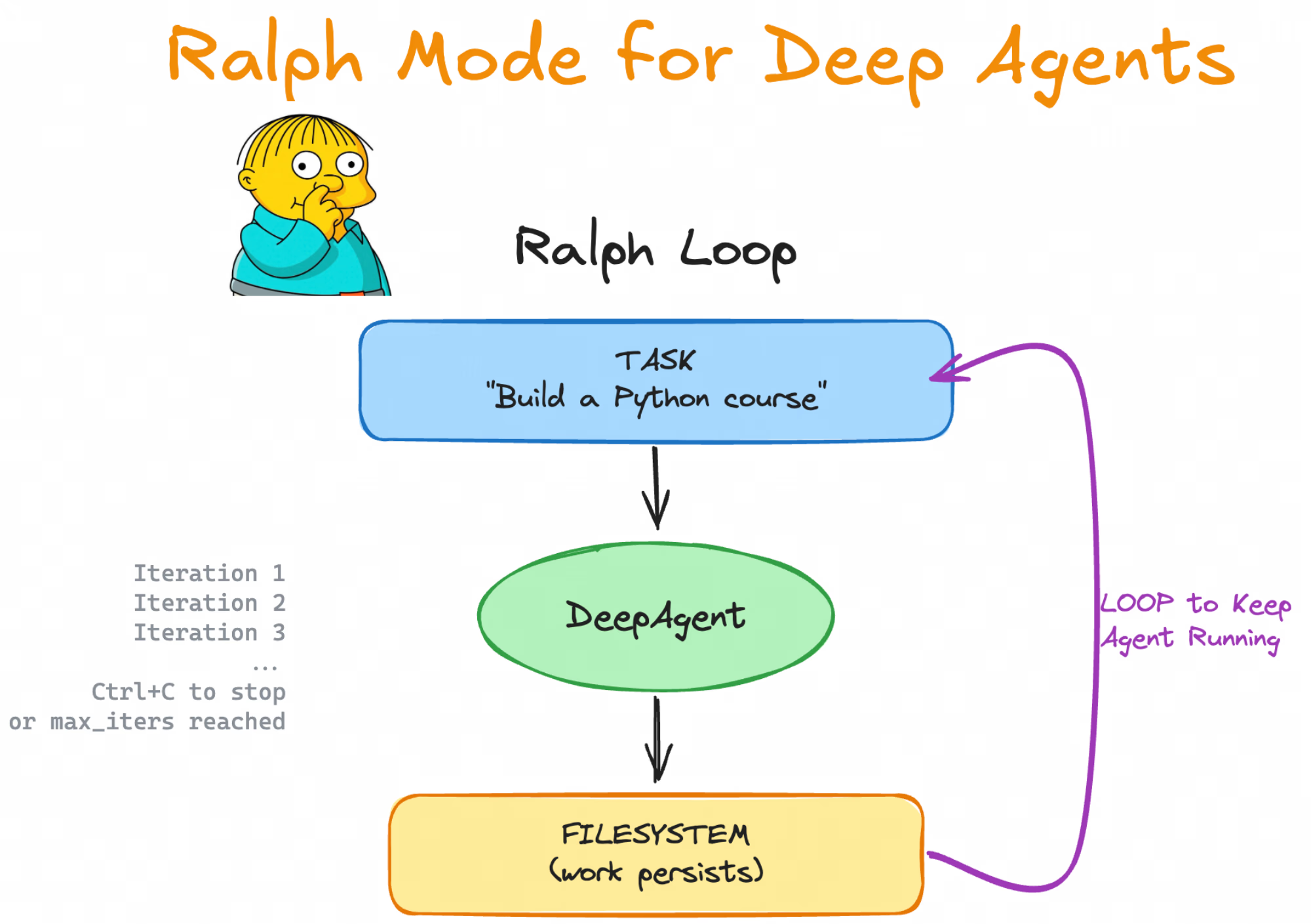
DeepAgents provides similar mode support, requiring programmatic parameter passing:
uv run deepagents --ralph "Build a Python programming course" --ralph-iterations 5Here, --ralph-iterations specifies the maximum loop count.
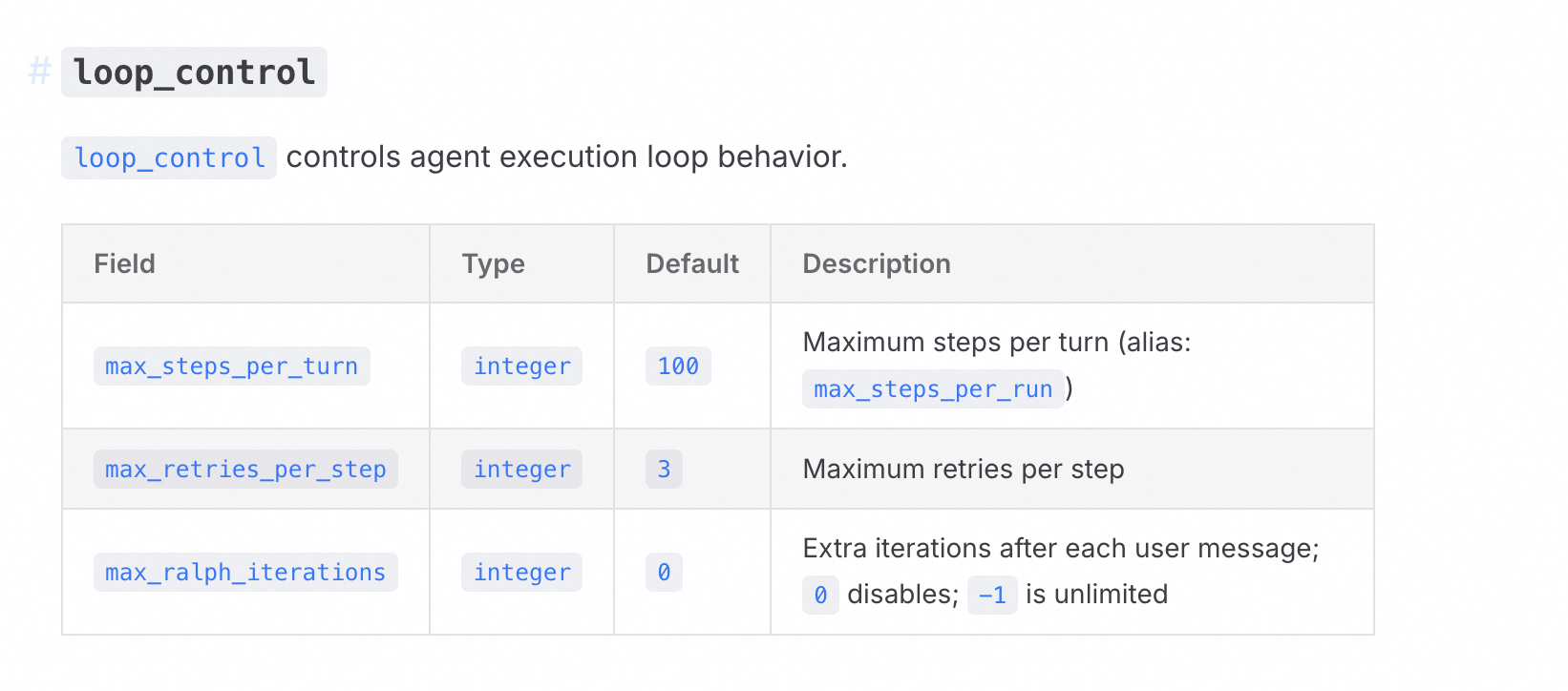
https://moonshotai.github.io/kimi-cli/en/configuration/config-files.html
loop_control controls the behavior of the agent executing loops.
https://github.com/vercel-labs/ralph-loop-agent
The community implementation of ralph-loop-agent allows more fine-grained development control:
┌──────────────────────────────────────────────────────┐
│                   Ralph Loop (outer)                 │
│  ┌────────────────────────────────────────────────┐  │
│  │  AI SDK Tool Loop (inner)                      │  │
│  │  LLM ↔ tools ↔ LLM ↔ tools ... until done      │  │
│  └────────────────────────────────────────────────┘  │
│                         ↓                            │
│  verifyCompletion: "Is the TASK actually complete?"  │
│                         ↓                            │
│       No? → Inject feedback → Run another iteration  │
│       Yes? → Return final result                     │
└──────────────────────────────────────────────────────┘
import { RalphLoopAgent, iterationCountIs } from 'ralph-loop-agent';
const migrationAgent = new RalphLoopAgent({
model: 'anthropic/claude-opus-4.5',
instructions: `You are migrating a codebase from Jest to Vitest.
Completion criteria:
- All test files use vitest imports
- vitest.config.ts exists
- All tests pass when running 'pnpm test'`,
tools: { readFile, writeFile, execute },
stopWhen: iterationCountIs(50),
verifyCompletion: async () => {
const checks = await Promise.all([
fileExists('vitest.config.ts'),
!await fileExists('jest.config.js'),
noFilesMatch('**/*.test.ts', /from ['"]@jest/),
fileContains('package.json', '"vitest"'),
]);
return {
complete: checks.every(Boolean),
reason: checks.every(Boolean) ? 'Migration complete' : 'Structural checks failed'
};
},
onIterationStart: ({ iteration }) => console.log(`Starting iteration ${iteration}`),
onIterationEnd: ({ iteration, duration }) => console.log(`Iteration ${iteration} completed in ${duration}ms`),
});
const result = await migrationAgent.loop({
prompt: 'Migrate all Jest tests to Vitest.',
});
console.log(result.text);
console.log(result.iterations);
console.log(result.completionReason);Key Features:
stopWhen and verifyCompletion customize loop exit logicIf you are using AI programming CLIs (like Claude Code, Copilot CLI, OpenCode, Codex), the following practices will help you use Ralph Loop more efficiently.
If you are using AI programming CLIs (like Claude Code, Copilot CLI, OpenCode, Codex), the following practices will help you use Ralph Loop more efficiently.
Most developers use these tools interactively: giving tasks, observing the work process, and intervening when things go off track. This is the "Human-in-the-Loop" (HITL) model.
But Ralph provides a new approach: having the AI programming CLI run in the loop, autonomously handling the task list. You define what needs to be done, and Ralph takes care of how to do it—and keeps working until it's done. In other words, it is long-running, autonomous, unattended AFK (Away From Keyboard) programming.
Tip: This section provides specific operational-level tips; for principle-level advice, please refer to the practice recommendations section.
AI programming has gone through several phases in the past year or so:
Vibe Programming: Letting the AI write code without actually checking it. You "feel" the AI, accept its suggestions without careful scrutiny. Fast, but with poor code quality.
Planning Mode: Requiring the AI to plan before coding. In Claude Code, you can enter planning mode, allowing the AI to explore the codebase and create plans. This improves quality, but is still limited to a single context window.
Multi-Stage Planning: Breaking large functionalities into multiple stages, each handled in a separate context window. You write different prompts for each stage: "Implement the database schema," then "Add API endpoints," then "Build UI." This allows for better scalability but requires continuous human involvement to write each prompt.
Ralph simplifies all this. Instead of writing new prompts for each stage, it runs the same prompt in a loop:
#!/bin/bash
# ralph.sh
# Usage: ./ralph.sh <iterations>

set -e

if [ -z "$1" ]; then
  echo "Usage: $0 <iterations>"
  exit 1
fi

# Each iteration: Run Claude Code with the same prompt
for ((i=1; i<=$1; i++)); do
  result=$(docker sandbox run claude -p \
"@some-plan-file.md @progress.txt \
1. Decide on the next task to work on. This should be the highest priority task in your judgment, \
   not necessarily the first one in the list.\
2. Check for any feedback loops, such as type checking and tests.\
3. Append your progress to the progress.txt file.\
4. Make a git commit for the feature.\
Focus on a single feature at a time.\
If, while implementing the feature, you notice all work is complete, \
output <promise>COMPLETE</promise>.\
")

  echo "$result"

  if [[ "$result" == *"<promise>COMPLETE</promise>"* ]]; then
    echo "PRD complete, exiting."
    exit 0
  fi
done
Each iteration:
Key improvement: Delegate task selection instead of you.
When using multi-stage planning, humans write new prompts at the start of each stage. When using Ralph, the agent selects the next task to do from your PRD. You define the final state, and Ralph gets there.
There are two ways to run Ralph:
|
Mode |
How it works |
Best suited for |
|
HITL (Human-in-the-Loop) |
Run once, observe, intervene |
Learning, prompt optimization |
|
AFK (Away From Keyboard) |
Run in the loop, set max iterations |
Batch work, low-risk tasks |
For HITL, you watch everything it does and intervene when necessary.
For AFK Ralph, always limit the number of iterations. Infinite loops in a stochastic system are dangerous. For how to set iteration limits, see the practice recommendations - safety mechanisms and resource controls.
HITL is similar to pair programming. You work with the AI, reviewing during code creation. You can guide, contribute, and share project understanding in real time.
This is also the best way to learn Ralph. You will understand how it works, optimize your prompts, and build confidence before letting go.
Once your prompts are stable, AFK Ralph can unleash true leverage. Set it to run, do other things, and come back when done.
You can create notification mechanisms (like CLI, email, or push notifications) to alert you when Ralph is finished. This means less context switching, allowing you to focus completely on another task. Typical loops usually take 30-45 minutes, although they can run for hours.
Progress is simple:
You don’t need a structured TODO list. You can give Ralph a vague task—"improve this codebase"—and let it track its own progress.
But the vaguer the task, the greater the risk. Ralph may loop indefinitely, finding endless improvements. Or it may cut corners and declare victory before you think the work is done.
Real Case: One time I ran Ralph to improve test coverage on a project. The repository had internal commands—marked as internal but still user-facing. The goal was to cover everything with tests.
After three iterations, Ralph reported: "All user-facing commands are complete." But it completely skipped the internal commands. It decided they were not user-facing and marked them as ignored by coverage.
Fix: Clearly define what you want to cover:
|
What to Specify |
Why It Prevents Shortcuts |
|
"All commands, including those marked internal" |
Prevents the agent from redefining what "user" means |
|
"Coverage must be > 80%" |
Prevents the agent from stopping at 50% |
|
"All tests must pass" |
Prevents the agent from ignoring failing tests |
Before letting Ralph run, you need to define what "done" looks like. This is the shift from planning to requirement gathering: not specifying every step, but describing the expected final state and letting the agent figure out how to get there.
Core Principle: Clear, machine-verifiable completion conditions must be defined. Vague criteria can lead to loops failing to exit correctly or producing meaningless output.
There are various ways to define Ralph's scope (Markdown lists, GitHub Issues, Linear tasks), but it's recommended to use a structured prd.json:
{
  "branchName": "ralph/feature",
  "userStories": [
    {
      "id": "US-001",
      "title": "New Chat Button Creates New Conversation",
      "acceptanceCriteria": [
        "Click the 'New Chat' button",
        "Verify a new conversation is created",
        "Check that the chat area displays a welcome state"
      ],
      "priority": 1,
      "passes": false,
      "notes": ""
    }
  ]
}
Ralph will mark passes as true when completed. The PRD serves both as a scope definition and a progress tracker—a living TODO list.
Tip: For more examples and best practices on how to define completion conditions, see the practice recommendations - clear completion standards.
Ralph uses progress files between iterations to resolve context decay issues. By maintaining progress.txt and prd.json (see state persistence and memory management), Ralph can:
progress.txt to understand completed work and learned codebase patternsprd.json to understand pending tasks and prioritiespasses status of completed tasks in prd.json
Best Practices:
● Maintain a "codebase patterns" section at the top of progress.txt for quick reference in subsequent iterations
● Only handle one task per iteration and immediately update status upon completion
● Document pitfalls encountered and solutions to avoid repeating mistakes
This creates a cumulative knowledge base that subsequent iterations can sync with quickly, without needing to read through the entire Git history.
Feedback loops are Ralph's guardrails. They tell the agent whether it's on the right track. Without them, Ralph may produce code that seems correct but is actually flawed.
|
Feedback Loop |
Command |
Why It's Important |
|
Type Checking |
|
Captures type errors, preventing runtime errors |
|
Testing |
|
Validates that functionality works as expected |
|
Linting |
|
Ensures code adheres to project standards |
|
Building |
|
Ensures the code can compile |
In your Ralph prompts, explicitly request to run these feedback loops:
In each iteration:
1. Implement features.
2. Run type checking: `tsc --noEmit`
3. Run tests: `npm test`
4. Run Linter: `npm run lint`
5. Commit only after all checks pass.
This ensures Ralph does not submit destructive code.
Ralph works best in small, verifiable steps. Each iteration should:
● Complete one feature
● Run feedback loops
● Submit code
Why? Because:
Avoid letting Ralph handle multiple features at once. This leads to:
● Chaotic commits
● Difficult progress tracking
● Higher risk of failure
Not all tasks are created equal. Some tasks, if they fail, can break the entire project. Other tasks, if they fail, are just minor issues.
Ralph should prioritize high-risk tasks:
Reserve AFK Ralph for when the foundation is stable. Once the architecture is validated and high-risk integration works well, you can let Ralph run unattended on low-risk tasks.
Give It a Try
Add priority guidance in your Ralph prompts:
When selecting the next task, prioritize in the following order:
1. Architectural decisions and core abstractions
2. Integration points between modules
3. Unknown unknowns and exploratory work
4. Standard features and implementations
5. Polish, cleanup, and quick wins

Fail fast on high-risk work. Save easy wins for later.Not all repositories are the same. Much code is prototype code—demonstrations, short-term experiments, client proposals. Different repositories have different quality standards.
The agent does not know which repository it is in. It does not know whether this is a disposable prototype or production code that will be maintained for years. You need to make this clear to it.
|
Repository Type |
What to Say |
Expected Behavior |
|
Prototype |
"This is a prototype. Speed is prioritized over perfection." |
Take shortcuts, skip edge cases |
|
Production |
"Production code. Must be maintainable." |
Follow best practices, add tests |
|
Library |
"Public API. Backward compatibility is important." |
Handle breaking changes with caution |
Place this in your AGENTS.md file, in your skills, or directly in the prompt.
Ralph will reference both your instructions and the current code. When the two conflict, the influence of the codebase is stronger.
Specific Example:
// Your instruction: "Never use 'any' type"
// But in existing code:
const userData: any = fetchUser();
const config: any = loadConfig();
const response: any = apiCall();

// Ralph will learn this pattern and continue using 'any'● Instructions are just a few lines of text
● The codebase has thousands of lines of "evidence"
● AI is more likely to mimic existing patterns
Clearly state quality standards in your AGENTS.md or Ralph prompts:
## Code Quality Standards

This is a production codebase. Please adhere to the following:
- Use TypeScript strict mode; `any` types are prohibited.
- Every function requires unit tests.
- Follow existing file structure and naming conventions.
- All lint and type checks must pass before committing.

Priority: Maintainability > Performance > Rapid DeliveryAFK Ralph needs the permission to edit files, run commands, and submit code. What prevents it from running rm -rf ~? You're not at the keyboard, so you can't intervene.
The Docker sandbox is the simplest solution:
docker sandbox run claudeThis will run Claude Code inside a container. Your current directory is mounted, but nothing else. Ralph can edit project files and submit—without touching your home directory, SSH keys, or system files.
Trade-off: Your global AGENTS.md and user skills won’t be loaded. For most Ralph loops, this isn’t a problem.
For HITL, the sandbox is optional—you’re observing. For AFK Ralph, especially overnight loops, they are fundamental insurance against runaway agents.
Ralph Loop can run for hours, making cost control important. Here are some practical cost management strategies:
Typical Cost Range (using Claude 3.5 Sonnet as an example):
● Small Tasks (5-10 iterations): $5-15
● Medium Tasks (20-30 iterations): $15-50
● Large Tasks (30-50 iterations): $50-150
Influencing Factors:
● Size of the codebase (context window)
● Complexity of tasks (how many iterations needed)
● Model choice (GPT-4 vs Claude vs local models)
1. Start with HITL
● First learn and optimize prompts in a human-in-the-loop mode
● Once prompts are stable, switch to AFK mode
● HITL is more cost-controlled but still provides significant value
2. Set Strict Limits
# Always set max iterations
/ralph-loop "task" --max-iterations 20
3. Choose Cost-Effective Tasks
● Mechanical refactoring: high efficiency, low risk
● Test migration: clear standards, easy verification
● Avoid creative tasks: require human judgment
|
Mode |
Cost |
Best Use Case |
|
HITL Ralph |
$5-20/task |
Learning, optimizing, high-risk tasks |
|
AFK Ralph |
$20-150/task |
Batch work, mechanized tasks |
|
Traditional Multi-Stage |
$10-30/task |
One-off large tasks |
4. The Reality of Local Models
Currently, local models (like Llama 3.1) still lag in performance on complex coding tasks. However, consider:
● Preprocessing for simple tasks
● As an alternative for cost-sensitive projects
5. ROI Perspective
If Ralph can accomplish in a few hours what would normally take days, spending $50-150 is worth it. The key is to choose the right tasks and set reasonable expectations.
Ralph is just a loop. This simplicity makes it infinitely configurable. Here are ways to make it your own:
The examples in this document use a local prd.json. But Ralph can pull tasks from anywhere:
|
Task Source |
How It Works |
|
GitHub Issues |
Ralph picks an issue and implements it |
|
Ralph pulls from your sprint |
|
|
Ralph works through bead files |
The key insight remains unchanged: the agent picks tasks, not you. You are simply changing the location of that list.
Instead of committing directly to main, each iteration of Ralph can:
● Create a branch and open a PR
● Add comments to existing issues
● Update changelogs or release notes
This is useful when you have issues queued up that need to become PRs. Ralph categorizes, implements, and opens PRs. Review when you’re ready.
Ralph does not need to address feature backlogs. Here are some loops I've been experimenting with:
Test Coverage Loop: Point Ralph to your coverage metrics. It finds uncovered lines, writes tests, and iterates until coverage meets your goal. For instance, raising a project's test coverage from 16% to 100%.
Duplicate Code Loop: Connect Ralph to jscpd to find duplicate code. Ralph identifies clones, refactors them into shared utilities, and reports on the changes made.
Linting Loop: Provide Ralph with your linting errors. It fixes them one at a time, running the linter between iterations to validate each fix.
Entropy Loop: Ralph scans for code smells—unused exports, dead code, inconsistent patterns—and cleans them up. A reversal of software entropy.
Any task that can be described as "view the repository, improve something, report findings" fits the Ralph model. The loops are the same. Only the prompts change.
Try out one of these alternative loop prompts:
# Test Coverage Loop
@coverage-report.txt
Find uncovered lines in the coverage report.
Write tests for the most critical uncovered code paths.
Run coverage again and update coverage-report.txt.
Goal: at least 80% coverage.

# Linting Loop
Run: npm run lint
Fix one linting error at a time.
Run lint again to verify the fix.
Repeat until there are no errors.

# Entropy Loop
Scan for code smells: unused exports, dead code, inconsistent patterns.
Fix one issue per iteration.
Record your changes in progress.txt.Tip: This section offers principle-level guidance; for specific operational tips, see the Ralph Loop Best Practices section.
Whether in Claude Code or a self-implemented agent loop model, clearly defined machine-verifiable completion conditions are key to the success of the Ralph Loop (see discussion on completion conditions in core principles).
Examples of Completion Conditions:
● All tests pass
● Build has no errors
● Lint results are clean
● Explicit output markers (like <promise>COMPLETE</promise>)
● Test coverage > 80%
● All type checks pass
Avoid Vague Standards: For example, "make it look a bit nicer" will lead to loops that cannot exit correctly or produce meaningless outputs.
Example:
Build a Todo REST API

Completion criteria:
- All CRUD operations are available
- Input validation is complete
- Test coverage > 80%

Output upon completion: <promise>COMPLETE</promise>Always set --max-iterations to protect your wallet:
/ralph-loop "Task description" --max-iterations 30 --completion-promise "DONE"Recommended Iteration Counts:
● Small tasks: 5-10 iterations
● Medium tasks: 20-30 iterations
● Large tasks: 30-50 iterations
Cost Control Strategies:
● Combine cost monitoring with token usage limit strategies
● Prioritize using HITL mode to learn and optimize prompts
● Only use AFK mode after prompts have stabilized
✅ Suitable Scenarios:
● TDD Development: Write tests → Run failures → Change code → Repeat until green
● Greenfield Projects: Define requirements well, execute overnight
● Tasks with automatic validation: Tests, lint, type checks can tell if it's correct
● Code Refactoring: Mechanical refactoring, large-scale test migration
● Test Migration: Migration from Jest to frameworks like Vitest
❌ Unsuitable Scenarios:
● Require subjective judgment or human design choices
● Tasks without clear success criteria
● Overall strategic planning and long-term decisions (regular Agent Loops are more suitable)
● Cost-sensitive scenarios: ralph-loop can run for hours or even dozens of hours
Ralph Loop is a agent operation paradigm centered on continuous iterative correction, making agents less prone to exit easily through Stop Hook and clearly defined completion conditions. It does not conflict with the general meaning of an agent loop but is a reinforced iterative model under specific types of tasks (verifiable goal conditions). Understanding the applicable boundaries of both can help developers make more informed choices about architecture and control strategies when building automated agent pipelines.
● https://www.aihero.dev/tips-for-ai-coding-with-ralph-wiggum
● https://github.com/muratcankoylan/ralph-wiggum-marketer/
● https://github.com/frankbria/ralph-claude-code
● https://github.com/anthropics/claude-code/blob/main/plugins/ralph-wiggum/README.md
● https://www.youtube.com/watch?v=dPG-PsOn-7A
● https://www.youtube.com/watch?v=yi4XNKcUS8Q
● https://www.youtube.com/watch?v=_IK18goX4X8
Powered by Alibaba Cloud, POPUCOM Delivers a Zero-latency Adventure for Players Worldwide
Why Does Alibaba Cloud Want to Open Source the Data Collection Development Kit

780 posts | 60 followers
FollowAlibaba Cloud Native Community - December 11, 2025
Alibaba Cloud Native Community - July 1, 2026
Alibaba Cloud Community - July 23, 2026
Alibaba Cloud Native Community - June 10, 2026
Alibaba Cloud Native Community - November 21, 2025
Alibaba Cloud Native Community - May 26, 2026
780 posts | 60 followers
Follow Token Plan
Build more, spend less. One plan, every modality.
Learn More QwenWork
QwenWork is dedicated to helping employees strengthen their professional competitiveness in the AI era and to enabling enterprises to improve organizational effectiveness.
Learn More
Alibaba Cloud Model Studio
A one-stop generative AI platform to build intelligent applications that understand your business, based on Qwen model series such as Qwen-Max and other popular models
Learn More Qwen
Qwen
Full-range, open-source, multimodal, and multi-functional
Learn MoreMore Posts by Alibaba Cloud Native Community

