If you've used HiClaw, you may already be familiar with the Manager + Worker multi-agent collaborative model. A Manager acts as an "AI steward", managing multiple specialized Workers —— front-end development, back-end development, data analysis...
However, during actual use, we have also received considerable feedback:
"Each Worker needs to run in a complete container, which puts a bit of memory pressure" — The default OpenClaw Worker container occupies about 500MB of memory. If you need to run 4-5 Workers simultaneously, a server with 8GB of memory can feel a bit tight.
"Workers running in containers can’t access my local environment" — Some tasks require operating a browser, accessing the local file system, running desktop applications... none of these can be done in a containerized isolated environment.
In version 1.0.4, we provided an answer: CoPaw Worker.
CoPaw is an open-source lightweight AI Agent project based on Python, with core features including:
● Lightweight: Based on Python, no need for the entire Node.js ecosystem, with a memory consumption of only 1/5 of OpenClaw Worker.
● Console-friendly: Built-in web console that manages multiple functionalities like configuring channels, skills, scheduled tasks, workspace files, environment variables, etc.
● Fast execution speed: Native Python startup, short cold start time.
● Easy to extend: Tool definitions based on OpenAI SDK with a low entry cost, supports various ways to extend skills.
● Features agent-oriented memory management: built-in ReMe for automatic dialog compression, persistent saving of important information, and automatic recall in subsequent conversations.
HiClaw 1.0.4 integrated CoPaw into HiClaw's multi-agent collaborative system by implementing the Matrix Channel and configuring a bridging layer. The codebase isn't large but unlocks many new possibilities.
The successful integration of CoPaw Worker fully demonstrates the advantages of HiClaw's Manager-Worker architecture in reducing the costs of integrating new agents.
If you want to integrate a new agent runtime (like CoPaw) into users, the traditional approach requires:
This represents a huge amount of engineering effort. Many excellent agent runtimes cannot reach users because this barrier is too high.
HiClaw's Manager-Worker architecture unifies the communication layer to the Matrix protocol:
┌─────────────────────────────────────────────────────────────────┐
│                          HiClaw Manager                         │
│                                                                 │
│   ┌─────────────────────────────────────────────────────────┐   │
│   │                 Tuwunel Matrix Server                    │   │
│   │                (built-in, out of the box)                │   │
│   └─────────────────────────────────────────────────────────┘   │
│                              │                                  │
│              ┌───────────────┼───────────────┐                  │
│              ↓               ↓               ↓                  │
│            Discord         Telegram          Slack              │
│          (via bridges)    (via bridges)    (via bridges)        │
│                                                                 │
└─────────────────────────────────────────────────────────────────┘
                               ↑ Matrix protocol
                               │
┌──────────────────────────────┴─────────────────────────────────┐
│                             Worker                              │
│                                                                 │
│   Only needs to implement the Matrix Channel—one protocol to     │
│   cover all channels                                             │
│                                                                 │
└────────────────────────────────────────────────────────────────┘
For new agent runtimes, integrating with HiClaw requires just one thing: implementing the Matrix Channel.
HiClaw 1.0.4's integration with CoPaw has only two core files:
matrix_channel.py (~450 lines): Implements Matrix protocol communication.bridge.py (~230 lines): Bridges openclaw.json to CoPaw configuration.That's it! CoPaw does not need to worry about Discord, Telegram, Slack... It just needs to communicate with Matrix to:
● ✅ Reuse all supported channel ecosystems from Manager.
● ✅ Reuse out-of-the-box Matrix clients (Element Web included, with mobile clients like Element, FluffyChat, etc.).
● ✅ Seamlessly collaborate with other Workers (regardless of their runtime).
● ✅ Be uniformly managed, monitored, and scheduled by the Manager.
For users, integrating new agent runtimes incurs no learning cost — because the interaction method is exactly the same, still through the Matrix client for conversation, and the Manager automatically handles the underlying differences.
If you are developing a new agent runtime or want to integrate an existing agent into the HiClaw ecosystem:
● No need to: Adapt to Discord, Telegram, Slack one by one...
● Just need to: Implement the Matrix protocol (a mature open standard).
● Gain: A dozen messaging channels + ready-to-use clients + multi-agent collaboration capabilities.
This is the core value of the Manager-Worker architecture: One integration, usable everywhere.
If you only need more Workers to work in parallel and do not need to access the local environment, CoPaw Worker in Docker mode is the best choice:
| Comparison Item | OpenClaw Worker | CoPaw Worker (Docker) |
|---|---|---|
| Base Image | Node.js ecosystem | Python 3.11-slim |
| Memory Usage | ~500MB | ~150MB |
| Startup Speed | Relatively Slow | Relatively Fast |
| Security | Container Isolation | Container Isolation |
The security remains completely identical, but memory usage is significantly reduced.
You only need to tell the Manager to create a CoPaw Worker in Element
Actual resource usage is only about 150MB:

This means you can run more Workers on the same hardware configuration. Previously, an 8GB memory could only run 8-10 OpenClaw Workers; now you can run 40+ CoPaw Workers.
On-demand Console Activation
To save memory, CoPaw Worker has the web console disabled by default. When debugging, you just need to let the Manager enable it in Element
The Manager will automatically restart the CoPaw Worker container and enable the console without any manual operation. After debugging is complete, the Manager can also be instructed to disable the console to save resources.
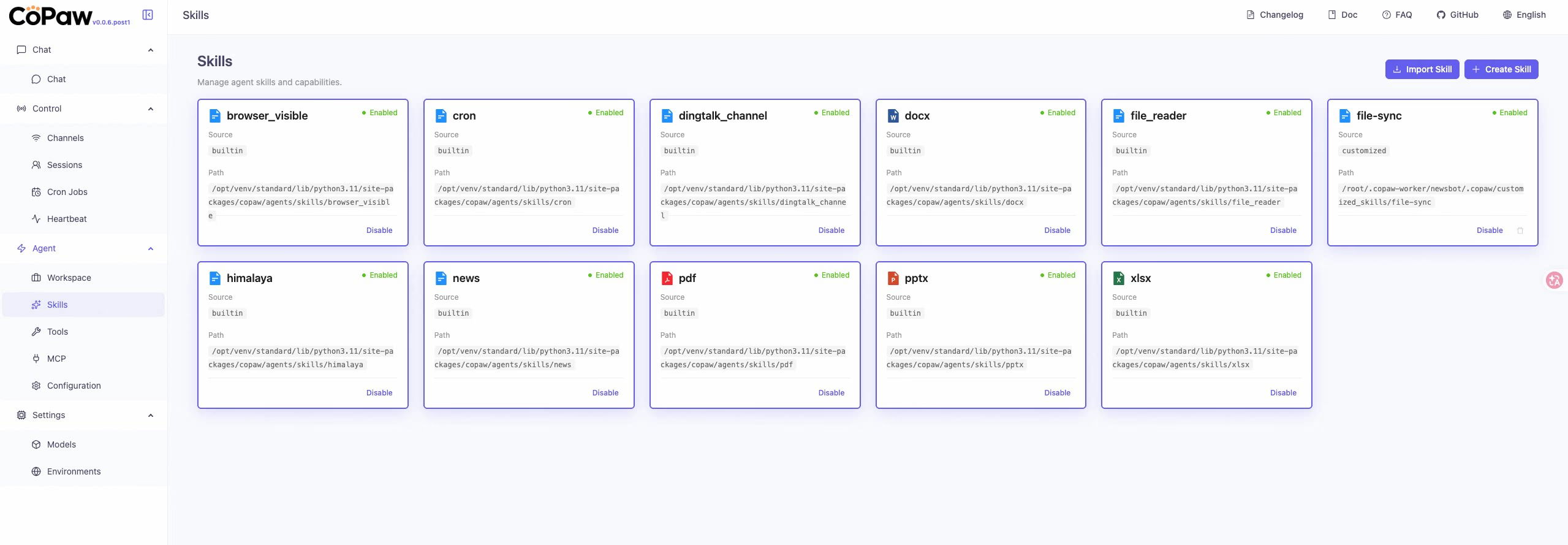
Once the console is open, you can directly manage Workers in the CoPaw console, for example, view and manage the built-in skills of CoPaw:
Some tasks inherently require access to the local environment:
● Operating a Browser: Automated testing, webpage screenshots, data collection.
● Accessing Local Files: Reading files on the desktop, operating the local IDE.
● Running Desktop Applications: Automating Figma, Sketch, local database clients.
These tasks cannot be done in a container because containers are isolated environments.
The local mode of CoPaw Worker is designed for these types of tasks. You only need to let the Manager create a remote-mode CoPaw Worker, and the Manager will give you a pip command to execute locally
The Worker runs directly on your local machine, having complete local access permissions. At the same time, it still communicates with the Manager and other Workers through Matrix, perfectly integrating into HiClaw's multi-agent collaboration system.
For example, instruct it to open a browser to search for AI gateways on Alibaba Cloud, it will open the browser and operate step by step:
Architectural Illustration:
┌─────────────────────────────────────────────────────────────┐
│                      HiClaw Manager                         │
│                   (container environment)                   │
│                                                             │
│    Worker A (Docker)    Worker B (Docker)                   │
│    Frontend dev          Backend dev                        │
└─────────────────────────────────────────────────────────────┘
              ↑ Matrix communication
              │
┌─────────────┴───────────────────────────────────────────────┐
│                       Your local computer                    │
│                                                             │
│    Worker C (CoPaw local mode)                               │
│    Browser actions / local file access                       │
└─────────────────────────────────────────────────────────────┘
Local mode has the console enabled by default (--console-port 8088), and you can open http://localhost:8088 to see the execution process of the Worker in real-time.
Whether in Docker mode or local mode, CoPaw Worker can enable the web console.
The console can display in real-time:
● Thinking Output: What the Worker is thinking.
● Tool Calls: Which tools were called and what their parameters are.
● Execution Results: What the tools returned.
● Error Messages: Where the errors occurred.
This is very helpful for debugging and optimizing agent behaviors. Especially when you find that a Worker is not operating as expected, checking the Thinking output in the console can often help you quickly locate the problem.
In addition to the significant feature of CoPaw Worker, version 1.0.4 has made optimizations based on a series of community feedback pain points.
Previously, users reported that during model switching, the Manager might "take the liberty" to modify other configurations, leading to unexpected behavior.
Version 1.0.4 splits the Worker model switching into an independent worker-model-switch skill, with a more singular responsibility and more predictable behavior. It also fixes the hardcoding issue of the model input field, which will now be dynamically set based on whether the model supports visual capabilities.
In project group chats, Workers sometimes engage in unnecessary conversations, wasting tokens.
Version 1.0.4 optimizes the awakening logic of Workers to ensure that calls to the LLM are only triggered when mentioned with @. It also fixes the issue of CoPaw MatrixChannel replies not carrying sender information, preventing Managers from ignoring Worker replies and causing duplicate calls.
The AI identity declaration has been added to SOUL.md to ensure Agents clearly know they are AI and not human. This can avoid some strange identity confusion issues, such as Agents pretending to be real human users.
## My Role

You are an AI assistant powered by HiClaw. You help users complete tasks
through natural language interaction, but you are not a human.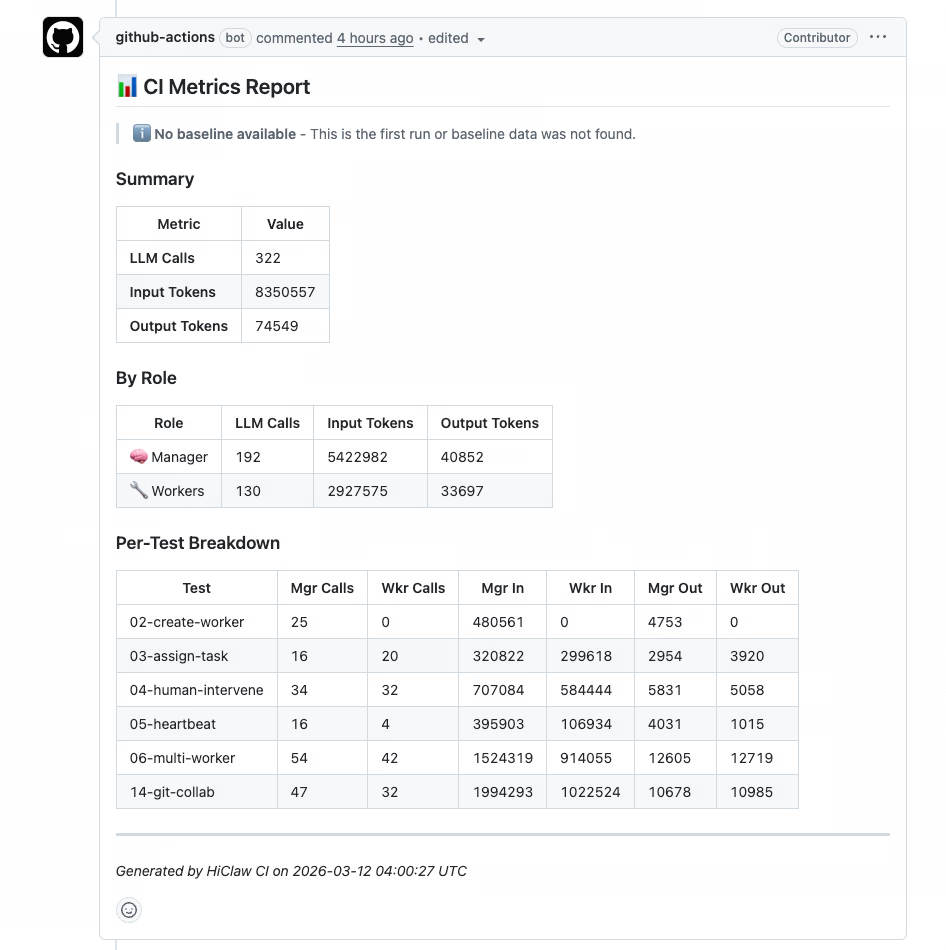
Version 1.0.4 introduces a Token consumption baseline CI process, allowing for a quantitative analysis of token optimization effects in each version.
In critical processes (creating Workers, assigning tasks, multi-Worker collaboration, etc.), CI will record token consumption and compare it with the previous version. This allows for:
Installation and upgrading use the same command; the script will interactively guide you through the selection:
macOS / Linux:
bash <(curl -sSL https://higress.ai/hiclaw/install.sh)Windows (PowerShell 7+):
Set-ExecutionPolicy Bypass -Scope Process -Force; Invoke-Expression ((New-Object System.Net.WebClient).DownloadString('https://higress.ai/hiclaw/install.ps1'))During installation, you will be asked which Worker runtime you want to use by default:
During upgrades, the script will automatically detect existing installations; simply choose "in-place upgrade". The upgrade process will also ask for the default Worker runtime; after selection:
Select default worker runtime:
  1) openclaw (~500MB)
  2) copaw (~150MB, lightweight)

Enter your choice [1-2]:Thanks to the CoPaw team for their work! CoPaw is a well-designed lightweight agent runtime, with an outstanding console experience. HiClaw seamlessly integrates CoPaw through the implementation of the Matrix Channel and configuration bridging layer, making the entire process smooth and with minimal code.
If you're interested in CoPaw itself, check out the CoPaw GitHub repository.
The core goal of HiClaw 1.0.4 is to make Workers lighter and more flexible:
If you have any of the following scenarios, we particularly recommend trying CoPaw Worker:
Get started now:
bash <(curl -sSL https://higress.ai/hiclaw/install.sh)HiClaw is an open-source project, based on the Apache 2.0 license. If you find it useful, feel free to Star ⭐ and contribute code!
40+ Commits Daily: HiClaw v1.0.6 Lands; Credential-zero Security, Skills + MCP > 2

762 posts | 60 followers
FollowAlibaba Cloud Native Community - April 3, 2026
Alibaba Cloud Native Community - April 30, 2026
Alibaba Cloud Native Community - April 22, 2026
Alibaba Cloud Native Community - March 25, 2026
Alibaba Cloud Native Community - March 5, 2026
Alibaba Cloud Native Community - March 13, 2026
762 posts | 60 followers
Follow Token Plan
Build more, spend less. One plan, every modality.
Learn More
Alibaba Cloud Model Studio
A one-stop generative AI platform to build intelligent applications that understand your business, based on Qwen model series such as Qwen-Max and other popular models
Learn More Qwen
Qwen
Full-range, open-source, multimodal, and multi-functional
Learn More Managed Service for Prometheus
Multi-source metrics are aggregated to monitor the status of your business and services in real time.
Learn MoreMore Posts by Alibaba Cloud Native Community

