❓Have you experienced this?
OpenClaw🦞(an open-source AI agent framework) is becoming a "digital employee" for more enterprises. It processes emails, writes code, manages files, and executes commands. It does almost anything. Many teams have deployed dozens or hundreds of OpenClaw instances. They formed a sizable "digital lobster farm".
However, a problem arises.
Lobster farmers can at least watch their pond. What about your OpenClaw? Do you know how many tokens it consumed today? Do you know which model is silently draining your budget? Do you know if a "lobster" was lured into reading /etc/passwd at 3:00 AM?
The answer for most is: I don't know. 😶
You carefully deployed OpenClaw. However, when these issues arise, you find yourself without the right tools to pinpoint the problem.
This article discusses using one command to equip your OpenClaw with an X-ray machine. This makes every LLM invocation, tool execution, and token consumption visible.
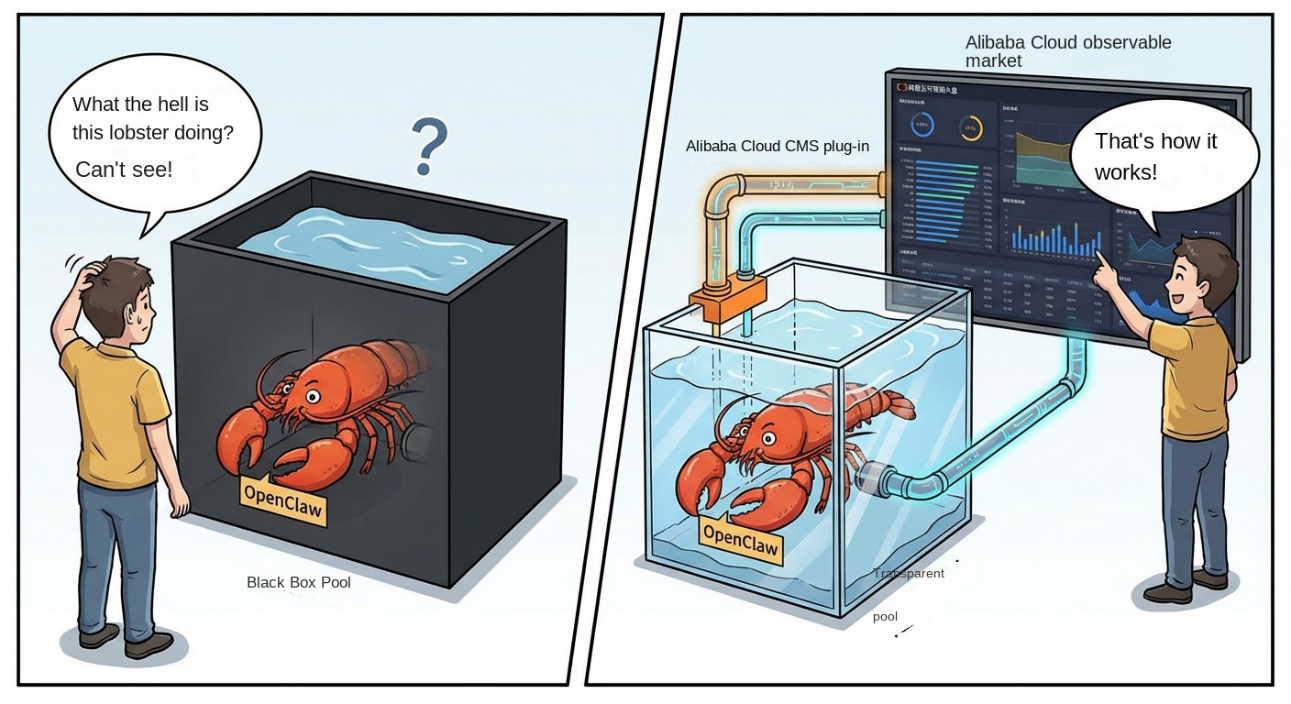
📚 Before we start, let's discuss three "blind spots". If you use OpenClaw, at least one has likely troubled you.
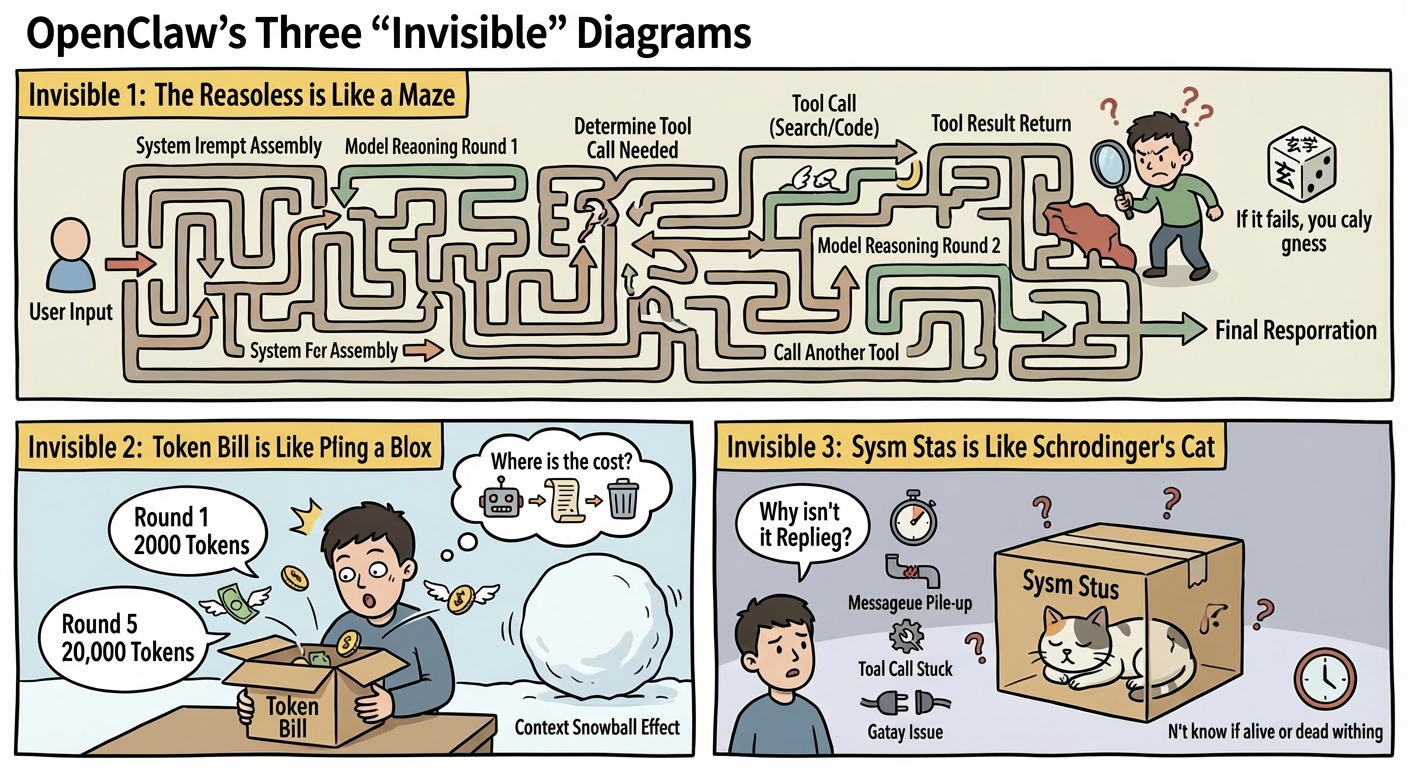
The complete path OpenClaw takes to process a user message is more complex than you think. A simple question may travel the following journey:
User input → System prompt assembly → Model inference round 1 → Determine need for tool calling → Tool calling (such as search or code execution) → Return tool result → Model inference round 2 → Call another tool → Generate final response
If any step fails, the final output may deviate from expectations. Without tracing analysis, you face an "input-output" black box. You can only guess where the problem lies. Is the prompt poor? Is it model hallucination? Did the tool return incorrect data?
Tuning prompts relies on inspiration. Troubleshooting relies on luck. This is not science. It is mysticism. 🎲
LLMs charge by token. Everyone knows this. However, as an agent, OpenClaw has a token consumption pattern different from directly invoking an API. It has a context snowball effect.
In every conversation round, the agent stuffs previous conversation history, system prompts, and tool calling results into the context. The first round might use 2000 tokens. By the fifth round, it might expand to 20,000. If a tool returns a large block of HTML or JSON, the situation worsens.
Worse, you do not know the source of the cost. Is a model too expensive? Is an agent prompt too wordy? Was the context not clipped in time? Without fine-grained consumption data, you cannot perform optimization. 💸
OpenClaw involves message queues, webhook processing, and session management during operation. When a user asks why it is not responding, the problem could lie in any layer. Did model inference timeout? Did tool calling stall? Are message queues stacked? Did the gateway fail?
Without real-time metric monitoring, you only discover issues after user complaints. By then, a group of users may be affected. ⏰
🛠️ To address these three "blind spots", our solution involves two plugins working together. They solve problems at different layers:
| Plugin | Signals handled | Problem solved |
|---|---|---|
openclaw-cms-plugin |
Traces (tracing analysis) | View the complete trace of every request: what the LLM inferred, what tools were invoked, and how many tokens each step cost |
diagnostics-otel |
Metrics (run metrics) | Monitor system pulse in real time: invocation QPS, response duration, queue depth, session freeze, message backlog |
Both rely on the OpenTelemetry standard protocol. Data is uniformly reported to Cloud Monitor 2.0 of Alibaba Cloud. View and analyze data on the same platform.
The openclaw-cms-plugin is the focus of this topic. It is a trace reporting plugin designed for OpenClaw. It follows OpenTelemetry GenAI semantics and generates structured traces for every OpenClaw run.
Specifically, it records the following types of spans:
| Span name | Type | What it records |
|---|---|---|
enter_openclaw_system |
ENTRY | Entry of a request — who sent the message and which channel it came from |
invoke_agent |
AGENT | Agent invocation — which agent is executing and what the session ID is |
chat |
LLM | LLM invocation: the model used, token consumption (input/output/cache), the system prompt, and the full content of input and output messages |
execute_tool |
TOOL | Tool calling: the tool called, parameters passed, results returned, and any errors |
These spans have a parent-child relationship. Together, they form a complete trace. You can see a trace view similar to this in the Cloud Monitor 2.0 console:
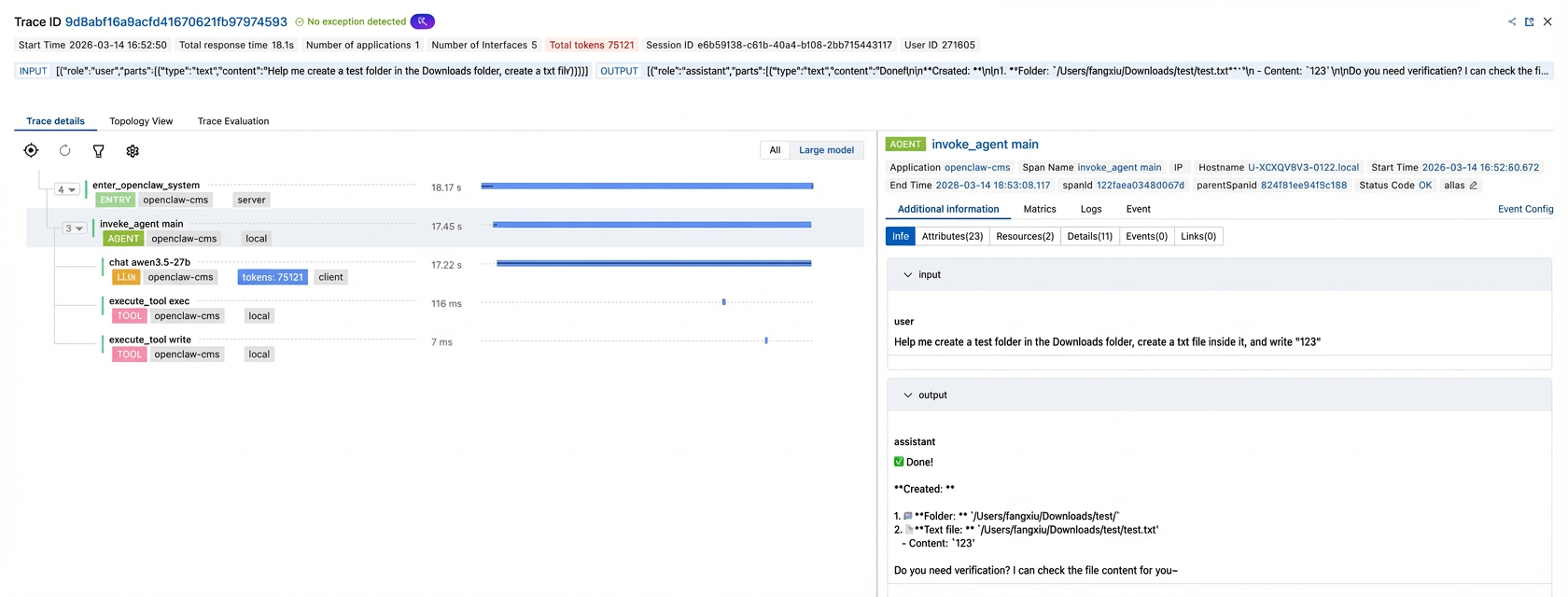
You can see at a glance how many times the LLM was invoked and how many tokens were used. You can also see which tools were invoked, which step took the longest, and if any errors occurred.
It is that simple to go from "guessing" to "seeing". 👁
diagnostics-otel is a built-in extension of OpenClaw. It outputs runtime metrics data, including token consumption rate, invocation QPS, response duration distribution, queue depth, and session status. The installation script automatically finds and enables it. You do not need to do anything else.
Good question. The diagnostics-otel supports trace reporting. However, if you look closely at the generated trace, you will find a fundamental problem: All spans are independent and have no parent-child relationship.
The diagnostics-otel uses an event-driven architecture to generate spans. Each event creates a span independently with a different trace ID. It generates the following five types of spans:
● openclaw.model.usage: model invocation (records token usage)
● openclaw.webhook.processed/openclaw.webhook.error: webhook processing
● openclaw.message.processed: message processing (records processing results and duration)
● openclaw.session.stuck: session stuck alerting
There is no trace context propagation between these spans. Simply put, they are just independent data points. The only way to associate them is using business fields such as sessionKey.
Webhook  [openclaw.webhook.processed]  traceId: abc123
Message  [openclaw.message.processed]  traceId: def456  ❌ Different trace IDs
Model    [openclaw.model.usage]        traceId: ghi789  ❌ Different trace IDs
However, openclaw-cms-plugin is designed for complete tracing. All spans share the same trace ID. They are linked into a call tree via an explicit parent-child relationship. You can see the full picture of a request:
enter_openclaw_system              traceId: aaa111
  └── invoke_agent main            traceId: aaa111  ✅ Same trace ID
        ├── chat qwen3-235b        traceId: aaa111  ✅ Same trace ID
        ├── execute_tool search    traceId: aaa111  ✅ Same trace ID
        └── execute_tool exec      traceId: aaa111  ✅ Same trace ID
In addition to trace integrity, there is a fundamental difference in data richness between the two:
| Dimension | diagnostics-otel trace | openclaw-cms-plugin trace |
|---|---|---|
| Trace association | ❌ Spans are independent with different trace IDs. | ✅ Complete call tree with shared trace ID. |
| Span level | Flat points, no parent-child relationship | ENTRY → AGENT → LLM/TOOL tree structure |
| Model input and output | Not recorded | Fully records gen_ai.input.messages, gen_ai.output.messages, and gen_ai.system_instructions
|
| Tool calling details | Not recorded | Fully records input parameter gen_ai.tool.call.arguments and return value gen_ai.tool.call.result
|
| Semantic standards | Custom openclaw.* properties |
Follows Alibaba Cloud GenAI semantic standards (based on OTel GenAI standard extensions) |
Simply put: The trace from diagnostics-otel is a set of independent "record cards", while the trace from openclaw-cms-plugin is a complete "invocation map". The former only tells you "what happened," while the latter tells you "every step." Use them together. One handles system metrics, and the other handles business traces. They complement each other perfectly. 🤝
🚀 Enough theory. Let's get started. The entire integration process takes less than a minute.
Log on to the Cloud Monitor 2.0 console. Go to your application monitoring workspace. Choose Integration Center > AI application observability. Click OpenClaw.
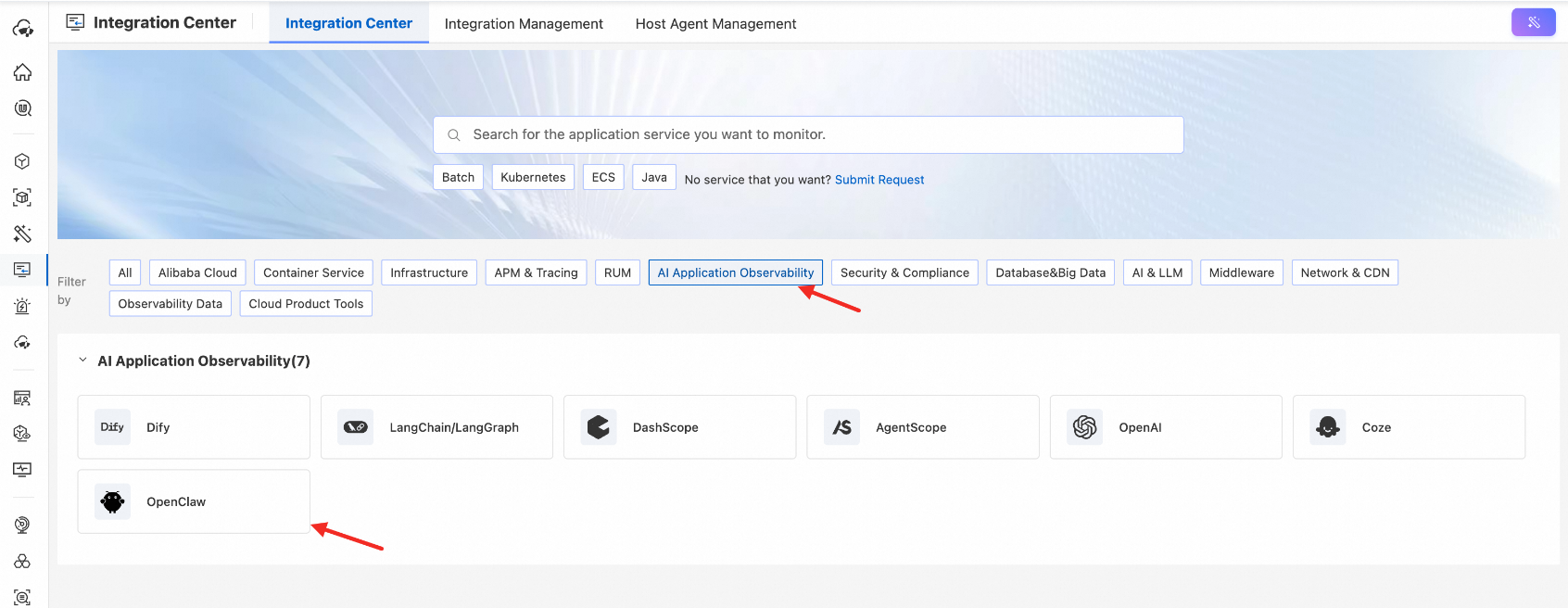
In the sidebar, enter the application name and click Click to obtain to generate the integration command immediately. Click the icon in the upper-right corner to copy it with one click.
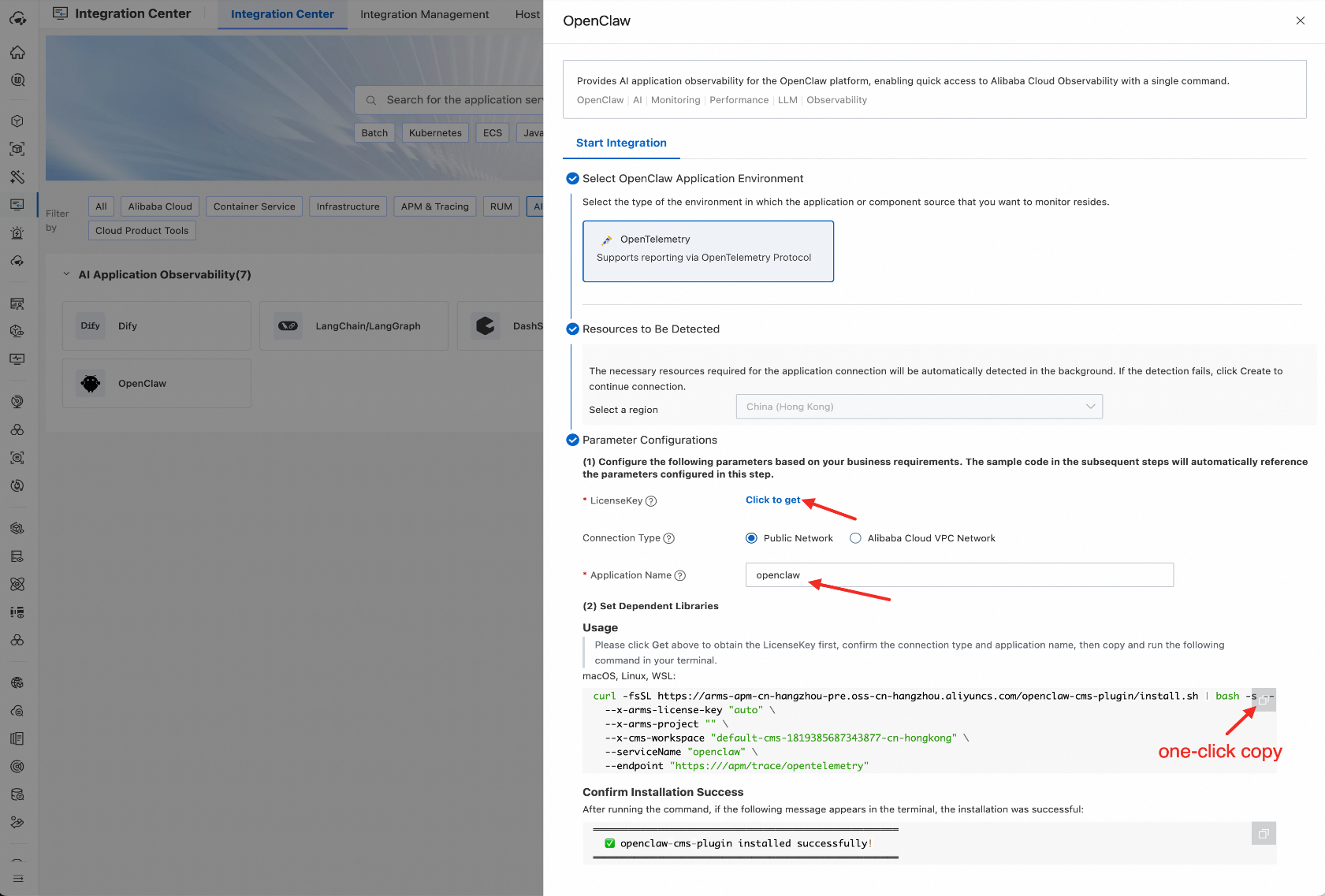
Open the terminal on the machine where OpenClaw runs. Paste the command you copied and press Enter:
curl -fsSL https://arms-apm-cn-hangzhou-pre.oss-cn-hangzhou.aliyuncs.com/openclaw-cms-plugin/install.sh | bash -s -- \
  --endpoint "https://Your ARMS-OTLP address" \
  --x-arms-license-key "Your license key" \
  --x-arms-project "Your project" \
  --x-cms-workspace "Your workspace" \
  --serviceName "Your service name"
Then, sit back and watch it run. ☕
The installation script automatically does the following:
[INFO]  Checking prerequisites...
[OK]    Node.js v24.14.0
[OK]    npm 11.9.0
[OK]    OpenClaw CLI found
[INFO]  Downloading plugin...
[OK]    Downloaded
[INFO]  Extracting...
[OK]    Extracted
[INFO]  Installing npm dependencies...
[OK]    Dependencies installed
[INFO]  Locating diagnostics-otel extension...
[OK]    Found diagnostics-otel at: /home/.../extensions/diagnostics-otel
[OK]    diagnostics-otel dependencies already present
[INFO]  Updating config...
[OK]    Config updated
[INFO]  Restarting OpenClaw gateway...
[OK]    Gateway restarted

════════════════════════════════════════════════════
  ✅ openclaw-cms-plugin installed successfully!
════════════════════════════════════════════════════
What does it do?
openclaw-cms-plugin to the OpenClaw extension folder.diagnostics-otel extension. If dependencies are missing, it installs them automatically.openclaw.json configuration (configurations for both plugins are written at once).You do not need to manually edit any configuration files. The installation script intelligently handles various edge cases. It merges updates into existing configurations instead of overwriting them. It also searches for multiple possible installation locations for diagnostics-otel based on priority.
After installation, chat with your OpenClaw. Wait a minute or two. Open the Cloud Monitor 2.0 console. Go to AI application observability in the sidebar on the right. Your OpenClaw application appears. Congratulations. Your lobster is no longer a black box. 🎉
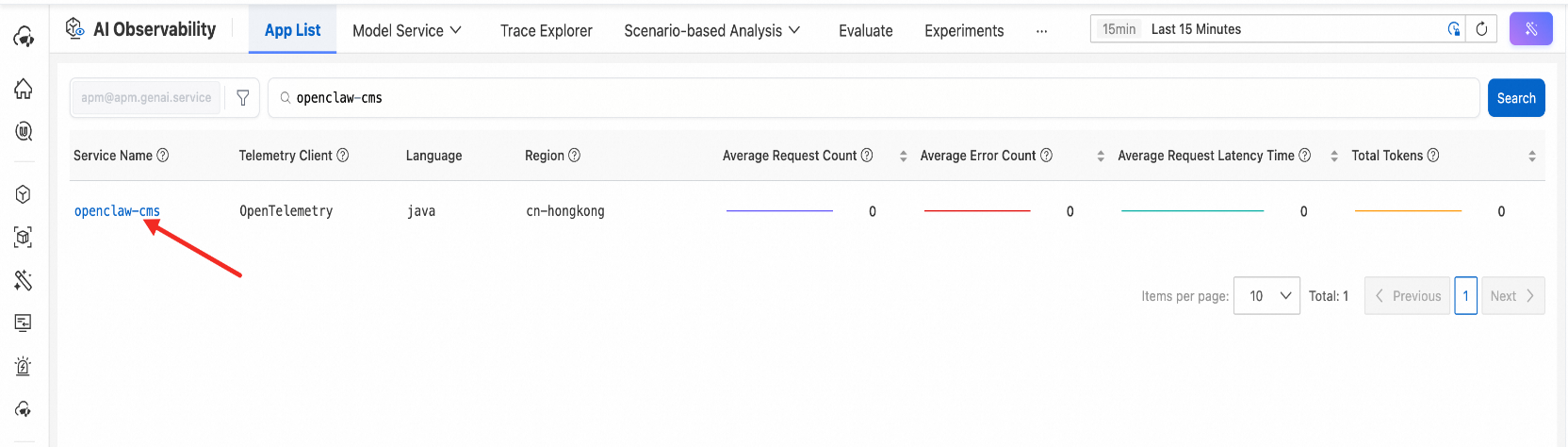
If you want to stop using it (though I doubt it), one command does it:
curl -fsSL https://arms-apm-cn-hangzhou-pre.oss-cn-hangzhou.aliyuncs.com/openclaw-cms-plugin/uninstall.sh | bash The uninstall script automatically cleans up the plugin folder and all related configurations in openclaw.json. It also disables the diagnostics-otel configuration. If you only want to uninstall the trace plugin but keep metrics, add the --keep-metrics parameter.
Clean and quick. No side effects. 🧹
This is the core value of openclaw-cms-plugin. Cloud Monitor 2.0 displays a structured trace for every user request:
enter_openclaw_system (Request entry: sender and source)
 └── invoke_agent main (Agent execution procedure)
   ├── chat qwen3-235b  (LLM invoke: model inference + token usage details)
   ├── execute_tool search (Tool calling: search)
   └── execute_tool exec (Tool calling: code execution)
In a conversation round, the plugin records agent-level LLM invokes and each independent tool calling. If the agent runs a tool loop internally (such as "invoke tool → get result → invoke next tool"), each tool calling is recorded independently as a tool span. This includes input parameters, return values, and execution status. You can clearly see the complete toolchain execution procedure.
💡 In the current version, LLM invokes in a conversation round aggregate into one LLM span. It records the final total token usage and input/output content for that round. Future versions will refine this. They will support generating a separate span for each independent LLM inference. Then, even intermediate inference steps in multi-round tool loops will be fully visible.
Each span is annotated with rich properties:
● Duration—see which step is slowest at a glance
● Model information—which model and provider were used
● Token usage—input_tokens, output_tokens, cache_read_tokens, and total_tokens, broken down item by item
● Tool parameters and return values—what tool was invoked, what parameters were passed, and what results were returned
● Error message—displayed in red if an error occurs
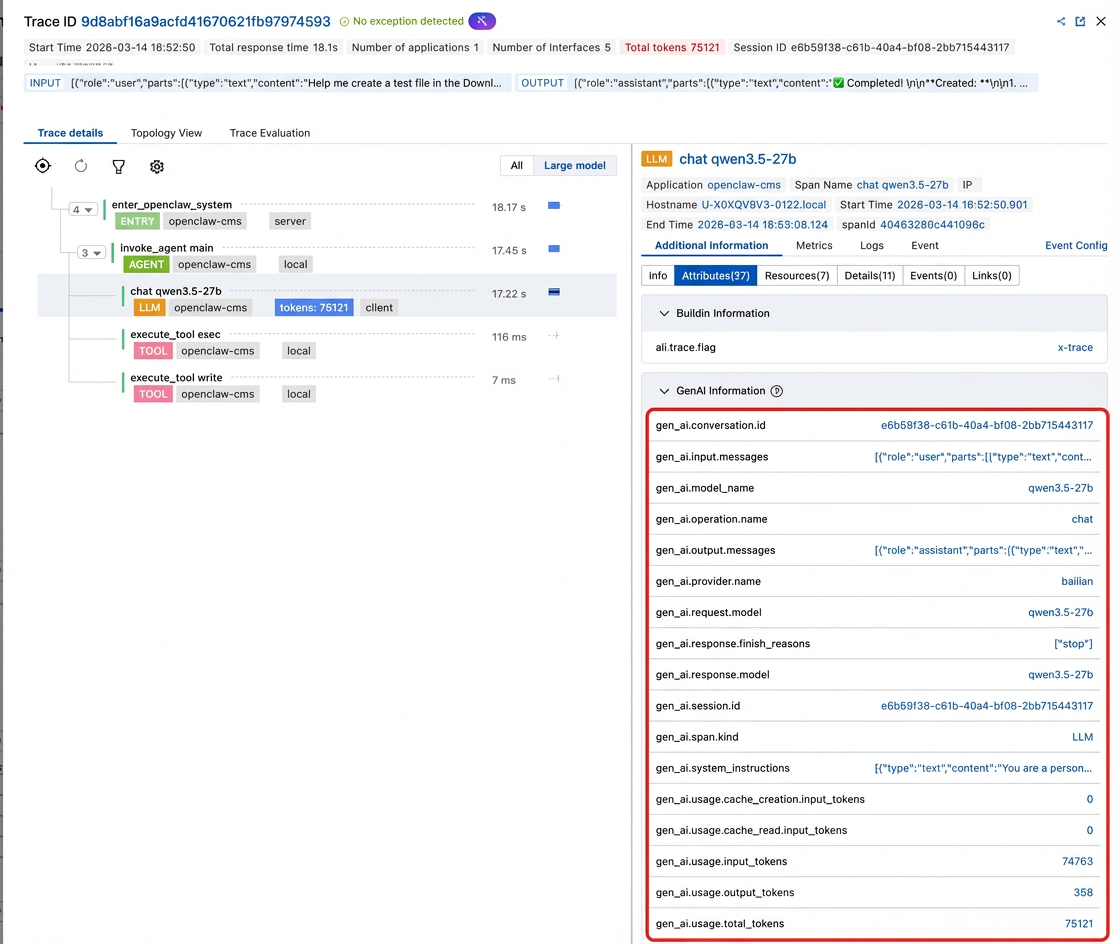
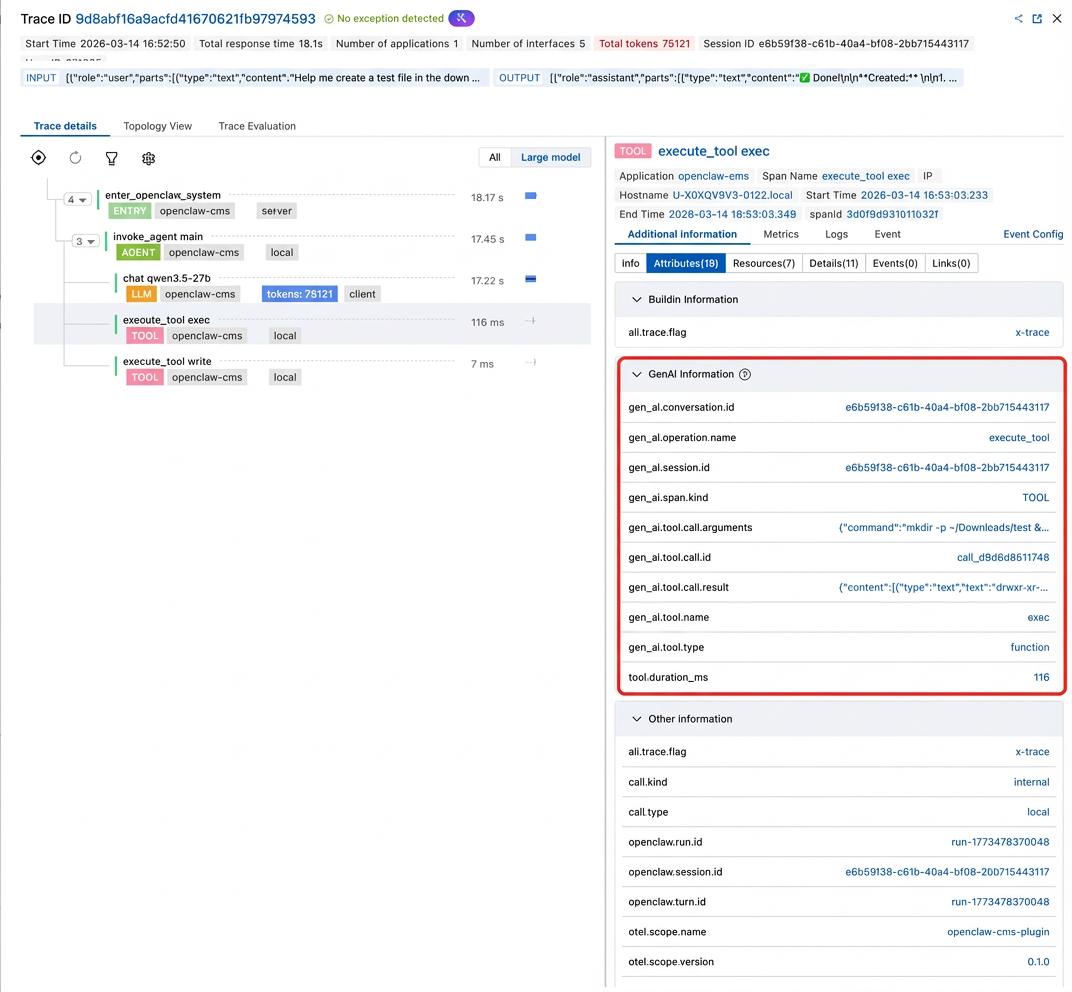
What does this mean?
Previously, if a user said the "answer is wrong," you had to guess by checking chat records. Now, check the traces. You see the search tool returned an empty result. The model "creatively" made up a paragraph based on that empty result. Problem localization drops from "two hours" to "two minutes". ⚡
Each LLM span in trace carries complete token usage properties:
| Property | Description |
|---|---|
gen_ai.usage.input_tokens |
Input token count |
gen_ai.usage.output_tokens |
Output token count |
gen_ai.usage.cache_read.input_tokens |
Cache hit token count |
gen_ai.usage.cache_creation.input_tokens |
Cache write token count |
gen_ai.usage.total_tokens |
Total token count |
Use gen_ai.request.model and gen_ai.provider.name. You can know exactly: which model consumed how many tokens at which step.
Consider a real scenario. You find five LLM invocations in a conversation trace. The input_tokens for the third invocation reach 12,000. Click it. You see the tool returned a full page of HTML, all stuffed into the context. You found the "token-swallowing blackhole." Optimization now has a direction.
Token usage transforms from a "messy account" to a "detailed ledger". 💰
Metrics data exported by the diagnostics-otel plugin can build running metric gauges on Cloud Monitor 2.0. This allows real-time monitoring:
● Token usage rate and fee trends — broken down by model and time dimension
● Invoke QPS and response duration — is system throughput normal
● MSMQ depth and wait time — is there a backlog
● Session stall count — Are any lobsters "playing dead"?
● Context size trend — Is the context expanding uncontrollably?
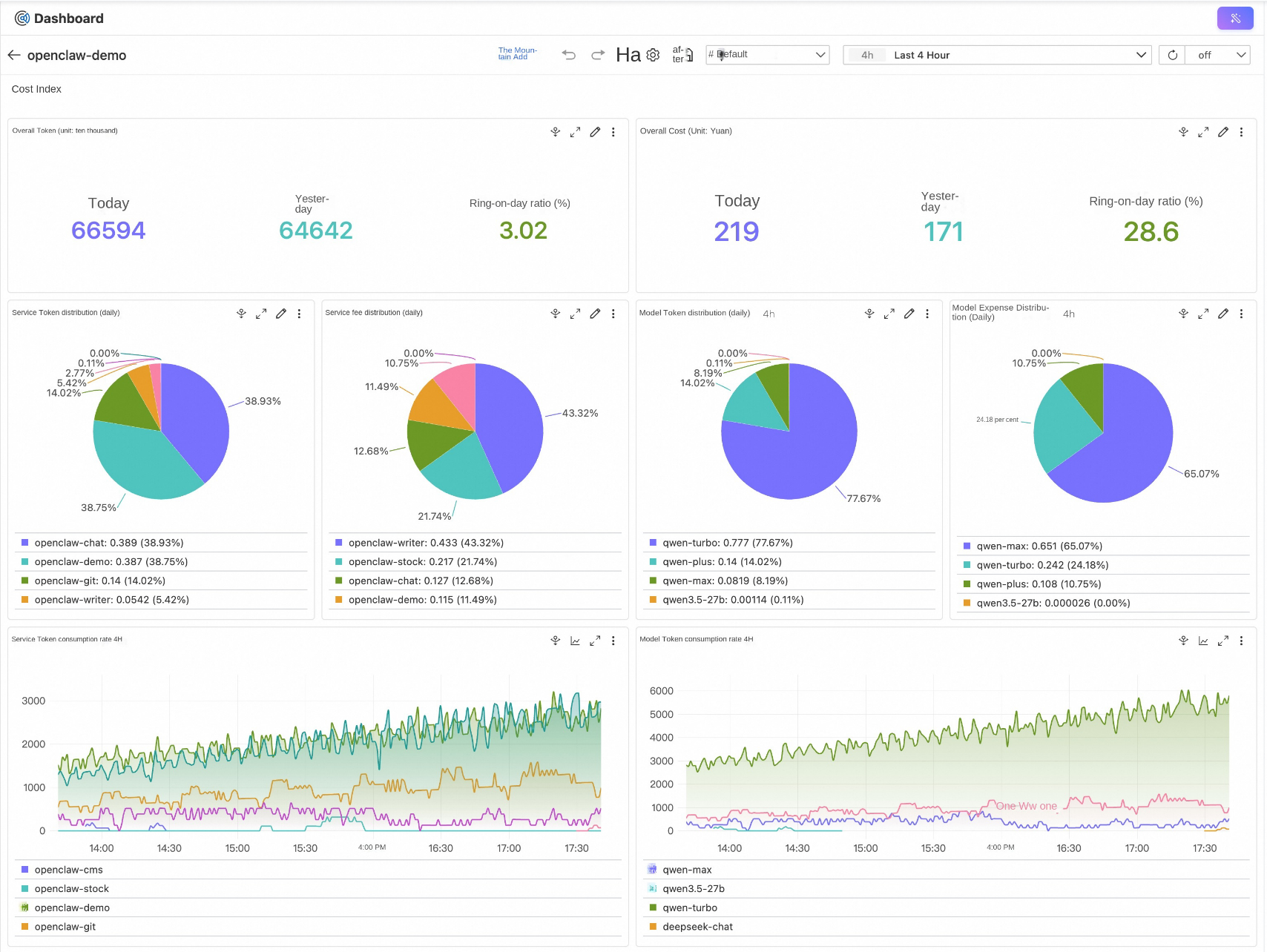
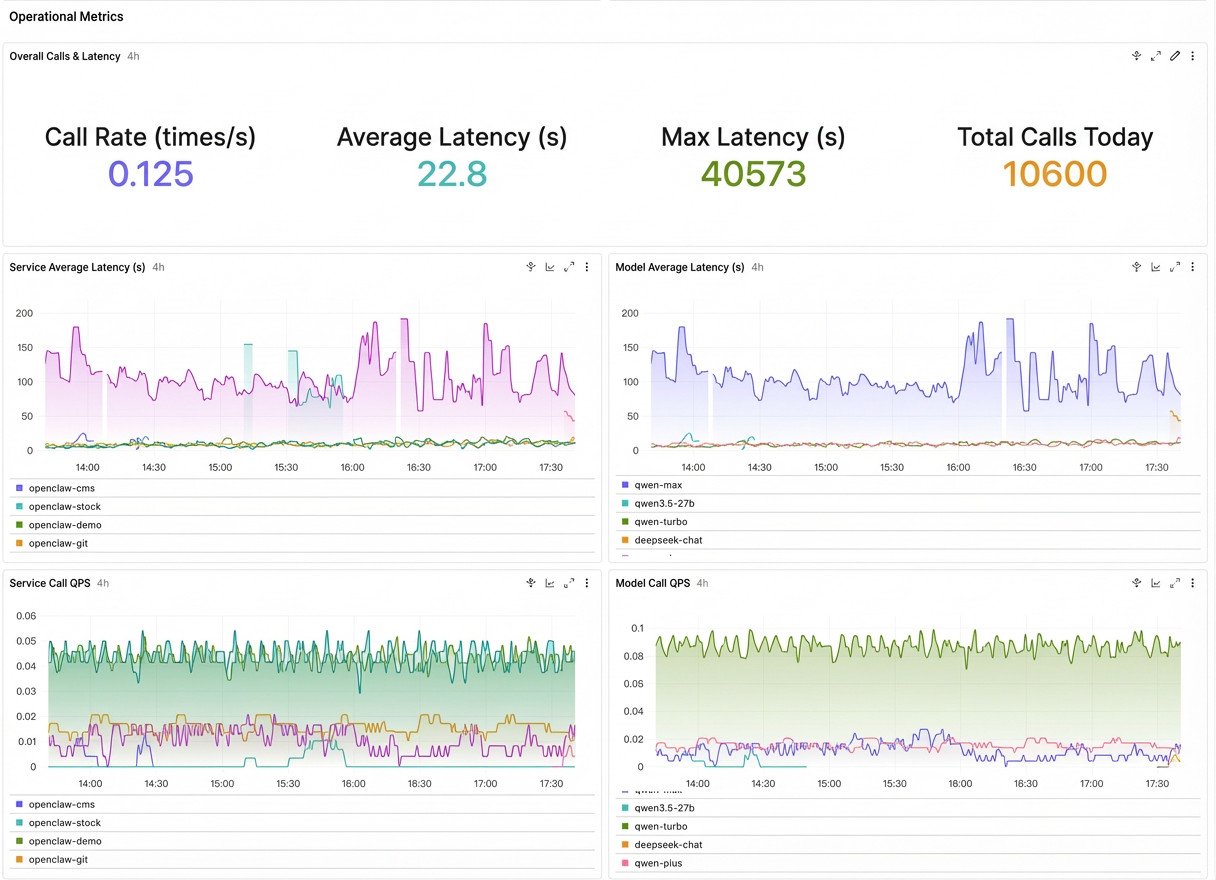
Paired with the alerting feature of Ccloud Monitor 2.0, these metrics enable automatic alerts for a 50% day-over-day surge in daily token consumption, automatic alerts when queue depth exceeds a threshold, and automatic alerts for session stalls. You know immediately when a problem occurs, rather than waiting for user complaints. 🔔
Note that the trace data reported by openclaw-cms-plugin strictly follows the OpenTelemetry GenAI semantic conventions. These are not field names we defined arbitrarily, but international standards.
This means:
gen_ai.request.model, gen_ai.usage.input_tokens, and gen_ai.tool.name match industry standards. This simplifies integration with other tools.gen_ai.input.messages, gen_ai.output.messages, and gen_ai.system_instructions are formatted according to standard JSON schema. This supports multiple message types, such as TextPart, ReasoningPart, ToolCallRequestPart, and ToolCallResponsePart.While compatible with OTel open-source standards, openclaw-cms-plugin also implements extension capabilities from the Alibaba Cloud GenAI semantic conventions. Compared to the community Standard Edition, you receive some "extra helpings":
ENTRY span — A clear "entry point" for the trace
The OTel community specification defines only span types such as LLM (inference), tool (tool calling), and agent. It lacks an "entry point" concept. The Alibaba Cloud specification extends the ENTRY span type to specifically identify the call entry point of an AI application. In openclaw-cms-plugin, this is the enter_openclaw_system span. It records "who initiated the request" (gen_ai.user.id) and the "current session ID" (gen_ai.session.id). This lets you view the trace and perform analysis and tracking by user and session dimensions.
🔗 Session-level association —gen_ai.session.id
The OTel standard provides gen_ai.conversation.id. However, for agent applications, "session" is more appropriate than "conversation". The Alibaba Cloud specification introduces gen_ai.session.id, which spans ENTRY, AGENT, and LLM spans. This lets you search directly by session ID in Cloud Monitor 2.0, retrieve all traces under that session at once, and quickly restore the full session content.
📊 gen_ai.span.kind — An AI-specific span categorization system
The SpanKind in the OpenTelemetry standard includes only generic types such as CLIENT, INTERNAL, and SERVER. For an AI application trace, SpanKind alone cannot distinguish between an LLM inference and a tool calling. Alibaba Cloud introduces the gen_ai.span.kind property to define a GenAI-specific classification system: LLM, TOOL, AGENT, ENTRY, TASK, STEP (ReAct round), CHAIN, RETRIEVER, and RERANKER. Cloud Monitor 2.0 uses this categorization to automatically detect the AI application structure and render a dedicated AI trace view. LLM calls appear in orange, tool calling in pink, and agents in green. This lets you see the "role distribution" of the entire trace at a glance.
💡 These extensions do not disrupt standard compatibility. The data reported by openclaw-cms-plugin displays basic information normally on any backend that supports OpenTelemetry. However, Cloud Monitor 2.0 unlocks the complete AI application observability experience.
This standardized approach benefits future data analytics and platform evolution.
📈 Installing an X-ray machine fundamentally changes your "lobster farming" method:
| Before (without observability) | Now (with observability) |
|---|---|
| Guess errors and tune prompts by inspiration | Open traces to see exactly where the problem lies |
| Check the bill at month-end to see costs | View token consumption details for every invocation in real-time |
| Helpless when users say it is "stuck" | Identify issues instantly with queue depth and response duration |
| Unsure if tool calling is correct | Complete records of tool Input parameters and return results |
| Optimization by trial and error | Make decisions based on data with quantifiable results |
This is not merely an improvement. It is a leap from "blind farming" to "precision farming."
A farmer upgrades from "checking water color visually" to using "water quality sensors, cameras, and automatic feeding systems." You manage the same lobsters, but your control level changes completely. 🦞📊
Beyond performance tuning and cost control, enterprise AI agent deployment involves an unavoidable topic: security compliance and behavior audit. Agents can execute commands, read and write files, and initiate network requests. Without behavior audit capabilities, you cannot know if an agent secretly read an SSH key at 3:00 a.m.
Our observability team covers this capability with another solution: the Alibaba Cloud Simple Log Service (SLS) OpenClaw one-click solution. It collects OpenClaw session audit logs and application operational logs. It provides out-of-the-box security audit dashboards, including high-risk command detection, prompt injection detection, and sensitive data leakage analysis. This makes every agent operation traceable.
If you are interested in security audits, read this article: https://www.alibabacloud.com/help/sls/enable-managed-openclaw-with-sls (SLS one-click integration and audit solution makes OpenClaw controlled operation possible).
Cloud Monitor 2.0 manages performance and cost, and SLS manages security and compliance. Together, they form a complete control system for the "lobster farm." 🔐
💡 Here are answers to common questions about the process:
Q: Does the integration impact OpenClaw performance?
A: The impact is minimal. The openclaw-cms-plugin uses the OpenTelemetry batch export mechanism. Span data is buffered in memory and reported in batches periodically. This does not block the normal processing flow of the agent.
Q: Can I install only traces without metrics?
A: Yes. Add the --disable-metrics parameter during installation to skip the diagnostics-otel configuration.
Q: Do traces from diagnostics-otel conflict with traces from openclaw-cms-plugin?
A: The installation script sets diagnostics.otel.traces to false by default. The openclaw-cms-plugin handles trace reporting. They work independently without duplication.
Q: I have configured diagnostics-otel. Will the installation overwrite my configuration?
A: No. The traces, logs, sample rate, and other configurations remain unchanged. It adds necessary fields such as endpoints and headers.
Q: Which OpenClaw versions are supported?
A: The version must be 26.2.19 or later (earlier versions exclude the diagnostics-otel plugin). The openclaw-cms-plugin works using the standard OpenClaw Hook mechanism. It does not depend on internal APIs of specific versions.
Q: Why is the token consumption always 0?
A: OpenClaw introduced a bug in V2026.3.8. This causes incorrect token consumption collection. We are urging the community to expedite the fix. Relevant issue link: https://github.com/openclaw/openclaw/issues/46616
📋 Back to the first question: Do you know what your lobster is doing underwater?
If the answer is "I don't know", it is time to install an X-ray machine.
The openclaw-cms-plugin + diagnostics-otel, and one command: ten minutes to integrate, bringing three core capabilities to your OpenClaw:
✅Tracing analysis— End-to-end visualization of every LLM invocation, tool execution, and token flow.
✅Real-time metrics— Monitor system pulse in real time, including token consumption rate, invocation QPS, queue depth, and session status.
✅GenAI semantic standards— Standardized data structures. They lay the foundation for cost analysis, performance optimization, and exception detection.
Stop letting your lobster "freestyle" in a black box. Install an X-ray machine. Make every step visible, traceable, and optimizable.
After all, a visible lobster is a good lobster. 🦞✨
❓Interaction time!
Share your "lobster farming" insights in the comments. Bring your questions. We are here! 🦞🎉
Achieve Operational Control for OpenClaw with Alibaba Cloud SLS One-Click Integration

703 posts | 57 followers
FollowAlibaba Cloud Native Community - April 15, 2026
CloudSecurity - March 18, 2026
Alibaba Cloud Native Community - March 30, 2026
Alibaba Cloud Native Community - April 10, 2026
CloudSecurity - March 16, 2026
Alibaba Cloud Native Community - February 4, 2026
703 posts | 57 followers
Follow Container Compute Service (ACS)
A cloud computing service that provides container compute resources that comply with the container specifications of Kubernetes
Learn More
Container Service for Kubernetes
Alibaba Cloud Container Service for Kubernetes is a fully managed cloud container management service that supports native Kubernetes and integrates with other Alibaba Cloud products.
Learn More Tongyi Qianwen (Qwen)
Top-performance foundation models from Alibaba Cloud
Learn More Managed Service for OpenTelemetry
Allows developers to quickly identify root causes and analyze performance bottlenecks for distributed applications.
Learn MoreMore Posts by Alibaba Cloud Native Community

