By Jun Liu
Based on Spring AI Alibaba Graph, developers can effortlessly develop workflows and intelligent agents & multiple agents in various modes, offering flexibility and richer features on the basis of Spring AI ChatClient.
In this article, we will show you how to use Spring AI Alibaba to develop workflows and agent applications through three practical examples, implementing intelligent agent orchestration in just a few lines of code.
For the complete source code of the Spring AI Alibaba Graph kernel and examples, see: https://github.com/alibaba/spring-ai-alibaba/tree/main/spring-ai-alibaba-graph
System architecture:

This example demonstrates a customer review processing system that first receives user comments and automatically classifies them based on the content of the comments, with a total of two levels of issue types.
Core code snippet:
AgentStateFactory<OverAllState> stateFactory = (inputs) -> {
            OverAllState state = new OverAllState();
            state.registerKeyAndStrategy("input", new ReplaceStrategy());
            state.registerKeyAndStrategy("classifier_output", new ReplaceStrategy());
            state.registerKeyAndStrategy("solution", new ReplaceStrategy());
            state.input(inputs);
            return state;
        };

StateGraph stateGraph = new StateGraph("Consumer Service Workflow Demo", stateFactory)
            .addNode("feedback_classifier", node_async(feedbackClassifier))
            .addNode("specific_question_classifier", node_async(specificQuestionClassifier))
            .addNode("recorder", node_async(new RecordingNode()))

            .addEdge(START, "feedback_classifier")
            .addConditionalEdges("feedback_classifier",
                    edge_async(new CustomerServiceController.FeedbackQuestionDispatcher()),
                    Map.of("positive", "recorder", "negative", "specific_question_classifier"))
            .addConditionalEdges("specific_question_classifier",
                    edge_async(new CustomerServiceController.SpecificQuestionDispatcher()),
                    Map.of("after-sale", "recorder", "transportation", "recorder", "quality", "recorder", "others",
                            "recorder"))
            .addEdge("recorder", END);
You can download the source code of this example and run it. Open a browser to visit the following example links to view the running effect:
• http://localhost:18080/customer/chat?query=The product I received was damaged during delivery. How can I get a return or exchange?
• http://localhost:18080/customer/chat?query=My product is not working properly. How can I get it repaired?
• http://localhost:18080/customer/chat?query=I received the product - it's great. I will definitely buy it again.
The following figure shows the React Agent architecture:
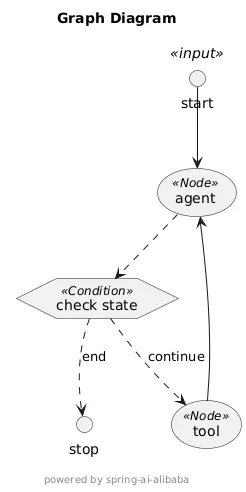
In this example, only one weather query service is bound to the agent. After receiving a weather query service from the user, the process loops between AgentNode and ToolNode until the user's command is completed. The condition for determining the completion of the command (that is, the ReAct end condition) is also simple. The process ends when the model's AssistantMessage contains no tool_call command (using the default behavior).
ReactAgent reactAgent = ReactAgent.builder()
    .name("React Agent Demo")
    .prompt("Please proceed to complete the task that the user enters for you.")
    .chatClient(chatClient)
    .resolver(resolver)
    .maxIterations(10)
    .build();

reactAgent.invoke(Map.of("messages", new UserMessage(query)))
You can download the source code of this example and run it. Open a browser to visit the following example link to view the running effect:
• http://localhost:18080/react/chat?query=Help me check the weather in Hangzhou, Shanghai, and Nanjing respectively.
Spring AI Alibaba released the industry's first Java implementation solution for OpenManus. For the source code of the original implementation and blog interpretation articles, see:
The original OpenManus implementation did not use Spring AI Alibaba Graph, requiring us to invest significant effort in writing workflow control logic. In previous versions of OpenManus, we summarized the following implementation-related issues:
• 80% of the code in the repository was dedicated to workflow orchestration, including connecting manus agent sub-processes, memorizing messages, calling forwarding tools, and modifying the global state. These tasks could be handled by a highly abstracted agent framework to simplify development complexity.
• The coverage and execution effect of tools were suboptimal, particularly for functionalities like browser operations and script execution tools.
• In the planning and workflow processes, you cannot perform manual reviews, dynamic modifications, rollbacks, and other actions.
• It is relatively difficult to debug the current OpenManus implementation.
Now, with the help of Spring AI Alibaba Graph, we can implement the same OpenManus system with 80% less code than before. The following is the architecture diagram of OpenManus implementation:
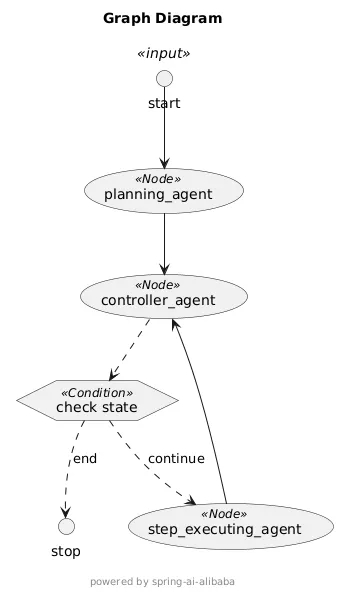
In the OpenManus example, we have implemented a multi-agent system where three core agents collaborate to accomplish user tasks:
You can download the source code of this example and run it. Open a browser to visit the following example link to view the running effect:
• http://localhost:18080/manus/chat?query=Help me check Alibaba's stock information in the past week.
Run the following command to download the source code:
git clone https://github.com/alibaba/spring-ai-alibaba.git
cd spring-ai-alibaba-graph/spring-ai-alibaba-graph-example
To access the LLM, you need to export the model API key as an environment variable:
export AI_DASHSCOPE_API_KEY=xxxYou can then start the sample application by running the GraphApplication class directly in the IDE.
Alternatively, you can run the following Maven command to enable the sample application (note that since Spring AI Alibaba Graph hasn't been officially released yet, you need to install the source code in the root directory first):
mvn clean install
cd spring-ai-alibaba-graph/spring-ai-alibaba-graph-example
mvn spring-boot:runThe current version of Spring AI Alibaba Graph draws significant design inspiration from Langgraph, including global state management and graph definition. It can essentially be considered to be a Java implementation of Langgraph. Special thanks to the Langchain community for their open-source Langgraph intelligent agent framework, allowing us to move forward upon the achievements of predecessors. As Agent technology is evolving rapidly, we will explore more cutting-edge implementation solutions on this basis.
Spring AI Alibaba Graph has not been officially released. Developers are welcome to experience and contribute to the project through the GitHub source code: https://github.com/alibaba/spring-ai-alibaba/tree/main/spring-ai-alibaba-graph
Non-intrusive Go Application Observability Based on Docker Multi-stage Builds

710 posts | 57 followers
FollowAlibaba Cloud Native Community - June 13, 2025
Alibaba Cloud Native Community - April 27, 2025
Alibaba Cloud Native Community - June 16, 2025
Alibaba Cloud Community - July 17, 2025
Alibaba Cloud Native Community - April 9, 2025
Alibaba Clouder - May 17, 2021
710 posts | 57 followers
Follow Alibaba Cloud Model Studio
A one-stop generative AI platform to build intelligent applications that understand your business, based on Qwen model series such as Qwen-Max and other popular models
Learn More Tongyi Qianwen (Qwen)
Top-performance foundation models from Alibaba Cloud
Learn More Alibaba Cloud for Generative AI
Accelerate innovation with generative AI to create new business success
Learn More AI Acceleration Solution
Accelerate AI-driven business and AI model training and inference with Alibaba Cloud GPU technology
Learn MoreMore Posts by Alibaba Cloud Native Community

