By Musi
With the widespread adoption of cloud-native technologies, the Golang programming language has gained increasing popularity. Compared with Java, Golang is favored by more and more engineers because of its lightweight nature and easy-to-learn characteristics. However, since Golang applications need to be compiled into binary files before execution, the language loses more flexibility than programming languages with runtime virtual machines like Java. For example, in the observability field, Java applications usually use the bytecode enhancement mechanism provided by JVM to collect observability data through Java Agent; for Golang applications, it is usually necessary to change the source code to recompile or replace the original Golang toolchain with a compile-time injection tool like opentelemetry-go-auto-instrumentation to achieve a similar effect. This article describes a non-intrusive Golang application observability method based on Docker multi-stage builds. With this method, users can inject observability capabilities into Golang applications at zero cost without any modification to the source code or compilation instructions of Golang applications.
Docker allows you to split image building into multiple stages, where subsequent stages can access outputs from previous ones. Golang developers usually write the following Dockerfile when building image pipelines of Golang applications:
# stage 1
FROM golang:1.22-alpine3.19 as builder

RUN go version
RUN go build -v -o /workspace/demo
# stage 2
FROM alpine

COPY --from=builder /workspace/demo /demo
export ENV1=e1
# Specify the default startup command.
CMD ["/demo"]
This Dockerfile is primarily divided into two phases. The first phase is the build phase. In this phase, the binary file to be executed is generated through various Golang compilation tools and passed to the next phase as output. The second phase is generally the running phase. In the second phase, the binary file built in the first phase is obtained, and then the file is started after setting the necessary environment variables so that the Golang application can run successfully.
What modifications are needed to enable observability for such a Golang application image built through Docker multi-stage builds? Continue reading below.
# stage 1
# Replace the image with the ARMS compiled image while keeping everything else unchanged.
FROM registry-cn-hangzhou.ack.aliyuncs.com/acs/golangbuilder-alpine-linux-amd64:0.0.1 as builder
RUN go version
RUN go build -v -o /workspace/demo
# stage 2
FROM alpine

COPY --from=builder /workspace/demo /demo
ENV ENV1=e1
# Specify the default startup command.
CMD ["/demo"]
You only need to replace the base image in the compilation stage with the ARMS compiled image while keeping all other configurations unchanged. Then it will automatically use the instgo compilation tool of ARMS for hybrid compilation. You can run the docker build command to build an image corresponding to the Dockerfile:
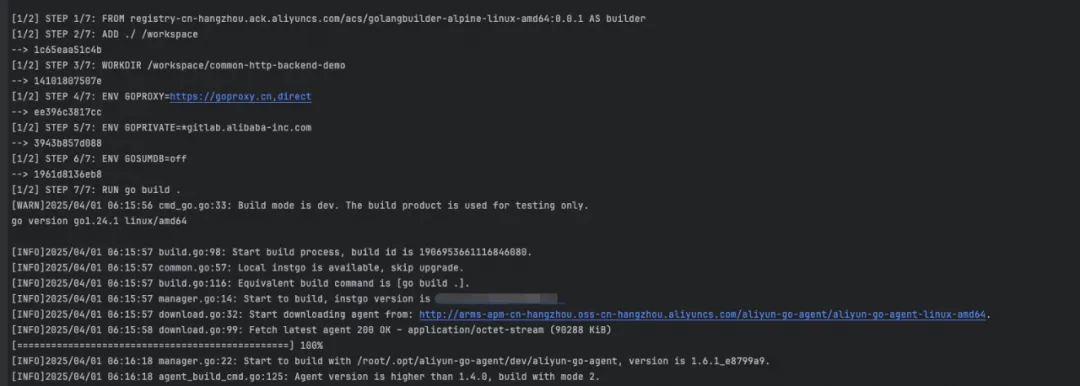
As shown, after the base image in the compilation stage is replaced with the ARMS compiled image, the Golang application is actually built by using the instgo compilation tool of ARMS. For other native Golang tools, such as the go version, instgo behaves exactly the same as the native Golang tools.
Upon completing these steps, we have successfully built a Golang application image with observability capabilities.
After the application image is built, you need to run the image. For example, you can run the image in Alibaba Cloud Container Service for Kubernetes (ACK). Before you run the application, you need to specify some configurations. For example, you need to determine the application in the region that the observability data is reported to and whether to report the observability data. Naturally, you may add some environment variables to the Dockerfile:
# stage 1
# Replace the image with the ARMS compiled image while keeping everything else unchanged.
FROM registry-cn-hangzhou.ack.aliyuncs.com/acs/golangbuilder-alpine-linux-amd64:0.0.1 as builder
RUN go version
RUN go build -v -o /workspace/demo
# stage 2
FROM alpine

COPY --from=builder /workspace/demo /demo
ENV ENV1=e1
# Manually add runtime environment variables.
ENV ARMS_ENABLE=true
ENV ARMS_APP_NAME={AppName}
ENV ARMS_REGION_ID={regionId}
ENV ARMS_LICENSE_KEY={licenseKey}
# Specify the default startup command.
CMD ["/demo"]
Although the preceding solution is feasible, it is less flexible. If the values of the relevant environment variables need to be changed, for example, if the user no longer wants to enable observability one day, the Dockerfile needs to be modified to rebuild the image. Additionally, if the user needs to manage multiple applications, the cost of such changes becomes prohibitively high.
Another imperceptible approach is to use the ack-onepilot component provided by ARMS. First, click the Component Management section on the O&M Management page of ACK and search for the ack-onepilot component in the upper-right corner. Then, click Install on the card.
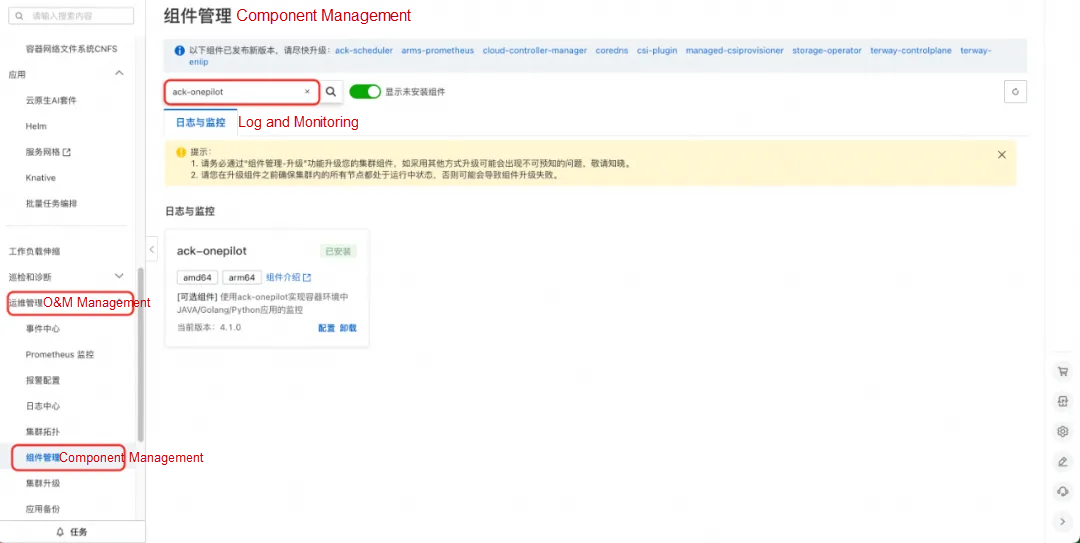
After installing the ack-onepilot component, you only need to add the following labels to spec.template.metadata when you create a workload to integrate the Golang application:
labels:
  aliyun.com/app-language: golang # Specify a Go application.
  armsPilotAutoEnable: 'on'
armsPilotCreateAppName: "<your-deployment-name>" # Replace <your-deployment-name> with the actual application name. 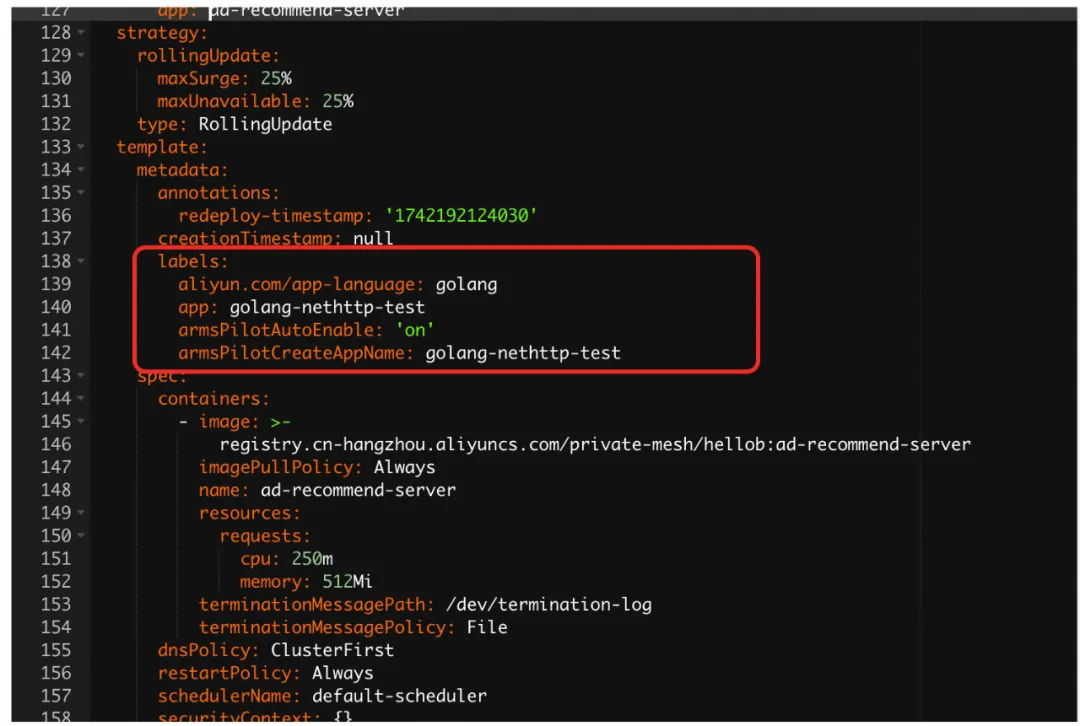
After you add the relevant labels, you can view the corresponding Golang application in the ARMS console. Click the application to go to the details page to check the detailed observability data of the application.

The non-intrusive observability solution based on Docker multi-stage builds effectively reduces the cost for users to integrate Golang Agent. The solution has been commercially launched on Alibaba Cloud public cloud to provide customers with powerful monitoring capabilities. This technology was originally designed to allow users to easily insert monitoring code without changing the existing code, thereby realizing real-time performance monitoring and analysis. However, its practical application fields extend far beyond this scope, covering service governance, code audit, application security, and code debugging. It even shows potential in many unexplored fields.
We have made this innovation open-source and donated it to the OpenTelemetry community. The open-sourcing of the solution not only promotes technical sharing and improvement but also helps us continuously explore its potential in more fields with the help of the community.
Achieve Manus in A Dozen Lines of Code: A Quick Preview of Spring AI Alibaba Graph
Leap in Log Collection Efficiency: Comprehensive Upgrade from iLogtail to LoongCollector

786 posts | 60 followers
FollowAlibaba Cloud Native Community - September 4, 2025
Alibaba Cloud Storage - June 19, 2019
Alex - January 22, 2020
Alibaba Cloud Native Community - September 8, 2025
Community Builder - July 1, 2026
Alibaba Cloud Native - March 6, 2024
786 posts | 60 followers
Follow Application Real-Time Monitoring Service
Build business monitoring capabilities with real time response based on frontend monitoring, application monitoring, and custom business monitoring capabilities
Learn More ECS(Elastic Compute Service)
Elastic and secure virtual cloud servers to cater all your cloud hosting needs.
Learn More Super Computing Cluster
Super Computing Service provides ultimate computing performance and parallel computing cluster services for high-performance computing through high-speed RDMA network and heterogeneous accelerators such as GPU.
Learn More Elastic High Performance Computing
A HPCaaS cloud platform providing an all-in-one high-performance public computing service
Learn MoreMore Posts by Alibaba Cloud Native Community

