Remote Access with Centralized Hostname Management: Alibaba Cloud PrivateZone, SAG App, and VPN Gateway
By Jonah Wang, Alibaba Cloud Solutions Architect
Introduction
The most common practice to ensure the security and supportability of the systems deployed on a public cloud is to:
- Block the direct access to the internal system and data from external users
- Open a secure tunnel to enable the internal users (e.g., support team and system admin) that are working remotely to access and use cloud applications and resources securely from anywhere
On Alibaba Cloud, we offer two options to establish this secure tunnel to access your private network segment on Alibaba Cloud:
- SSL-VPN Client: You can connect to Alibaba Cloud PrivateZone through VPN Gateway.
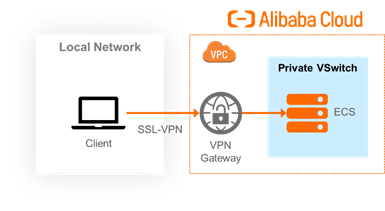
- Smart Access Gateway (SAG) App: You can connect to Alibaba Cloud PrivateZone through SAG's Cloud Connect Network (CCN) and Cloud Enterprise Network (CEN).
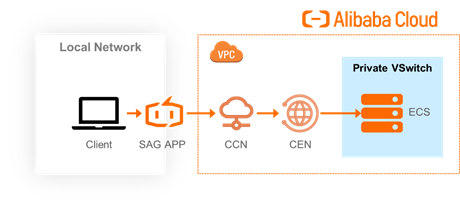
PrivateZone (part of Alibaba Cloud's DNS product) provides a highly available and scalable DNS service to help manage your internal hostnames within your VPCs easily. This way, you can use custom hostnames for your internal Alibaba Cloud resources, rather than IP address or Alibaba Cloud provided names.
In this article, we'll show you how to access Alibaba Cloud DNS PrivateZone when you are connecting your VPC through SSL-VPN or SAG App. This way, you can use private hostnames to access your cloud resources, such as Elastic Compute Service (ECS) instances (instead of IP addresses), and make your admin and maintenance work on the cloud much easier and more efficient.
Overview
In this article, we'll explain the detailed steps of how to access PrivateZone in the SSL-VPN solution and then follow up with the SAG App solution. It is important to note that these solutions have no dependency on each other. The PrivateZone and VPC setups of these solutions are the same.
All the Alibaba Cloud products and services we set up in the sections below are from the same region (Singapore), which is the closest to an on-premises location. Setup between multiple regions and locations is possible, but it will not be covered in this article.
Also, IPsec-VPN connection and Customer Gateway-related configuration will not be discussed in this article.
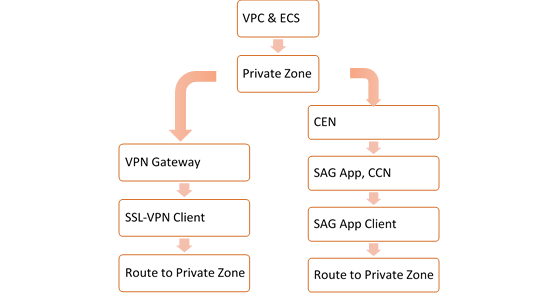
Asset List
The list of assets and items we are creating on Alibaba Cloud for this demo are listed below:
Network
The IP Addresses used in the demo network are listed below:
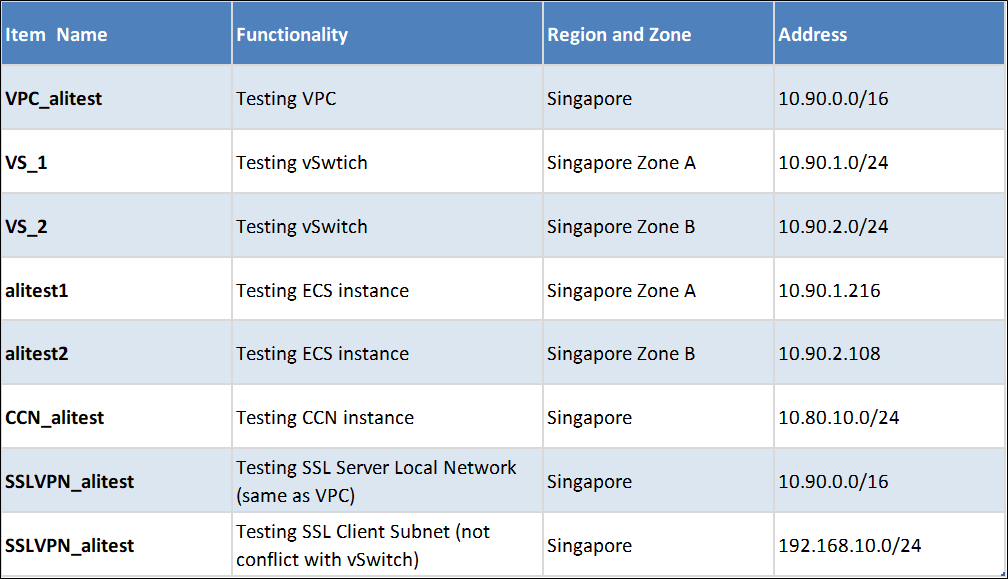
Hostname
The list of hostnames used in the demo is listed below:

Alibaba Cloud DNS server
The default IP addresses of the Alibaba Cloud DNS servers are:
- 100.100.2.136
- 100.100.2.138
Common Steps
VPC and ECS
In this section, we will build up a simple VPC environment for testing purposes. In this demo, we will set up one VPC, two vSwitches, and two ECS instances. The OS of the ECS instances is Ubuntu 20.04. The details of managing a VPC can be found here.
The IP Address of the VPC resources and ECS instances can be found in the Section labeled Asset List > Network.
Note: Make sure the security group of the ECS instances allows inbound traffic for the ports below:
- All ICMP (IPv4): for testing using the "ping" command
- To remote access the Linux system through SSH
PrivateZone
Go to the Alibaba Cloud DNS console and create PrivateZone hostnames according to the Section labeled Asset List > Hostname. Then, bind the VPC created in the demo to the PrivateZone. The details of PrivateZone hostnames creation and VPC binding can be found here.
Testing and Verification
1. Log in to the "alitest1" ECS instance (through Alibaba Cloud VNC console), and you should be able to ping the "alitest2" setup within the same VPC using the IP address below:

2. Try to ping the "alitest2" instance from the "alitest1" ECS instance using the hostname instead of using IP address:

3. On your local PC (which will be used later for remote access), you can't ping "alitest2" since it is set up in a private VPC with no external IP address. We will address this in the following section.
VPN Solution
After we set up our VPC environment and PrivateZone successfully, we can continue with the VPN solution.
VPN Gateway
1. Go to VPC > VPN > VPN Gateways on the VPN Gateway console page and click Create VPN Gateway
2. On the VPN Gateway creation page, fill in the VPN Gateway parameters, and click Buy Now to complete the process. The details of creating a VPN Gateway can be found here. Note: The Region of the VPN Gateway should be the same as the VPC used in this demo. Then, enable the IPsec-VPN and SSL-VPN.
3. Go to VPC > VPN > SSL Servers on the SSL Servers console and click Create SSL Server to create an SSL server for the VPN Gateway created. The details of creating and configuring SSL-VPN can be found here.
4. Go to VPC > VPN > SSL Client on the SSL Clients console and click Create Client Certificate to create and download the client certificate and VPN configuration file for the VPN client to initiate the connection. The details of creating an SSL client certificate can be found here.
SSL-VPN Client
1. Go to the OpenVPN downloads page to download the OpenVPN client and install it on the PC for remote connection
2. Start the OpenVPN GUI program on your PC and import the VPN client certificate and VPN configuration file you downloaded in the section above
3. On the OpenVPN GUI program, choose the configuration profile you just imported and click Connect.
Make sure you don't have other VPNs connected to your PC at the same time.
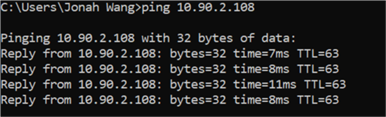
After successfully connecting to the VPN Gateway, ECS instances can be accessed directly from the PC using the internal IP Address
Route to PrivateZone
Even though the PC can connect to the VPC internal network now, the hostname in the PrivateZone still cannot be resolved since there is no route to the Alibaba Cloud DNS servers (please see the Section labeled Asset List > Alibaba Cloud DNS server.)
1. On the OpenVPN GUI program, choose the correct configuration profile, and click Edit Config. The configuration file of the VPN connection profile will open.
2. Edit the configuration file by adding the two lines below:
route 100.100.2.136 255.255.255.255
route 100.100.2.138 255.255.255.255
3. Reconnect the VPN connection and set the Alibaba Cloud DNS servers (100.100.2.136 and 100.100.2.138) to the PC's VPN network DNS (TAP-Windows Adapter for Windows OS, resolv.conf file for Linux OS)
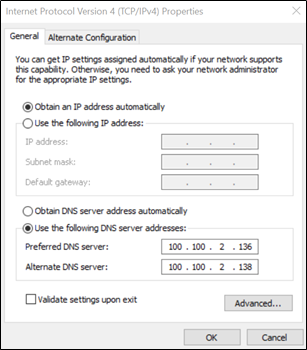
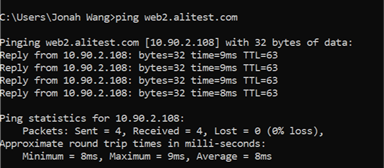
4. The PrivateZone hostnames will be resolvable from your PC.
SAG App Solution
Alibaba Cloud Smart Access Gateway (SAG) goes through Cloud Connect Network (CCN) and the Alibaba Cloud SD-WAN access network to connect to Alibaba Cloud VPC internal networks.
Cloud Enterprise Network (CEN)
CEN is a global virtual enterprise network. CEN uses Alibaba Cloud's global backbone network to provide high-quality global networking services for enterprise customers.
- Go to Cloud Enterprise Network > Instances on the CEN console and click the Create CEN Instance button to create a CEN instance
- On the Create CEN Instance page, fill in the details of the CEN configuration to create a CEN instance for the VPC we created in this demo. The details of the CEN configuration can be found here.
Note: The Network Type should be VPC, and Region & Networks should be the same as the VPC we created.
SAG App and Cloud Connect Network (CCN)
- Go to Smart Access Gateway > Smart Access Gateway APP > SAG APP Instances on the SAG APP Instance console page and click the Create SAG APP button to create a SAG App and CCN
- Under Network Configuration, choose CCN_alitest in the Section labeled Asset List > Network for this demo
- Under Associate with a CEN, choose the CEN created in the previous step
The details of the SAG App and CCN creation can be found here. Note: The Region of the SAG App should be the same as the VPC created.
SAG App Client
- Download and install the Alibaba Cloud network client application, following the details on this page
- Open and log on to the Alibaba Cloud network client by entering the instance ID, username, and password of the Smart Access Gateway APP created in this demo
- Click Connect to Intranet to connect to the VPC intranet
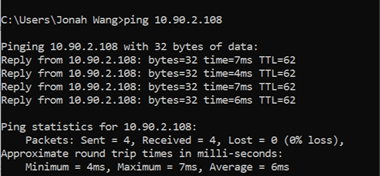
- After connecting to the Intranet successfully, ECS instances can be accessed from the PC directly using the internal IP Address.
Route to PrivateZone
Even though the PC can connect to the VPC internal network now, the hostname in the PrivateZone still cannot be resolved since there is no route to the Alibaba Cloud DNS servers (100.100.2.136 and 100.100.2.138).
1. Go to Smart Access Gateway > Smart Access Gateway APP > SAG APP Instances and click the Network Configuration link of the SAG App created in this demo
2. On the Network Configuration popup, type in the Alibaba Cloud DNS servers IP Addresses: 100.100.2.136 and 100.100.2.138
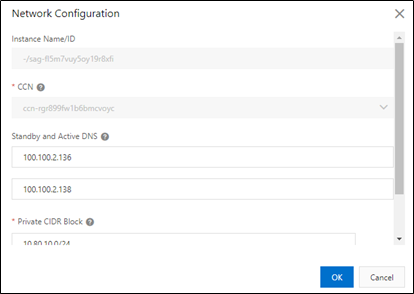
3. Go to Cloud Enterprise Network > Instances on the CEN console and click the Manage link of the CEN created in the demo
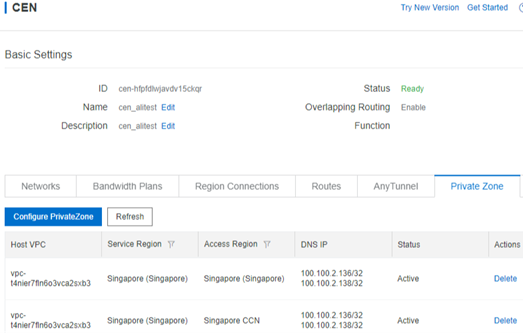
4. On the Basic Settings page, go to the PrivateZone tab and click the Configure PrivateZone button
5. On the Configure PrivateZone popup, type in the parameters for the configuration:
- Host Region: "Singapore"
- Host VPC: The VPC ID created in this demo
- Access Region: Singapore CCN
6. The PrivateZone configuration will be configured for the CEN
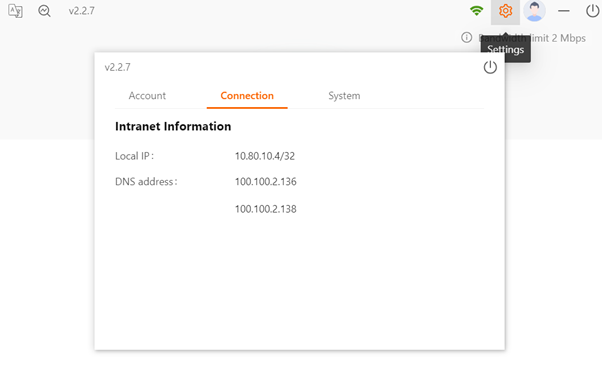
7. Restart the Alibaba Cloud network client and reconnect to Alibaba Cloud VPC. Click the Settings button, and you will see the updated DNS settings under the Connection tab.
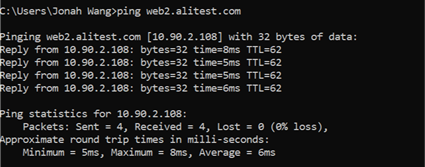
8. The PrivateZone hostnames will be resolvable from your PC.
Conclusion
Using VPN Gateway to remote access cloud backbone networks is a common practice for most cloud service providers. However, to centralize the hostname management for the resources on the cloud, using VPN Gateway and Alibaba Cloud PrivateZone requires additional configuration on local PC VPN configuration and DNZ configuration.
Thus, in Alibaba Cloud, we recommend using the SAG App + CEN + PrivateZone solution. The pros and cons of the SAG App solution are listed below:
- Pros: It is centrally managed on an Alibaba Cloud account and easy to configure. Once set up, it will be applicable for remote access from PC, mobile, and even Smart Access Gateway devices.
- Cons: Currently, the SAG App client application doesn't support Linux. Users using any Linux-based OS, such as Ubuntu Desktop, cannot use this solution.
Read previous post:
The Cloud Forward Podcast by Alibaba Cloud: Our Newly Launched Podcast Series!
Read next post:
Media Integration and Digital Transformation in the Post-Pandemic Era
-

-
Alibaba Clouder
2,593 posts | 797 followers
Follow
Comments
-
-
Alibaba Clouder
2,593 posts | 797 followers
Follow
Related Products
-
 Smart Access Gateway
SmartAG provides an end-to-end cloud deployment solution for connecting hardware and software to Alibaba Cloud.
Learn More -
 Database Gateway
A tool product specially designed for remote access to private network databases
Learn More -
 VPN Gateway
 is an Internet-based service that establishes a connection between a VPC and your on-premise data center.
Learn More -
 API Gateway
 provides you with high-performance and high-availability API hosting services to deploy and release your APIs on Alibaba Cloud products.
Learn More
More Posts by Alibaba Clouder
- MyBatis with a More Fluent Experience
- Alibaba Cloud Sustainability Report 2021
- Comparing CNI Models in Container Service for Kubernetes — Alibaba Cloud Series Part 1
- [Infographic] 5 Steps to Accelerate Your Digitalization in Asia
- Attackers Use the Vulnerability of ShowDoc to Spread Botnets
- Powerful: MyBatis and Three Streaming Query Methods
- What is the Difference between Spring Boot and Spring?
- What are the Differences and Functions of the Redo Log, Undo Log, and Binlog in MySQL?
- On the In-Depth Cluster Scheduling and Management
- Alibaba Technological Practices: Experiences in Cloud Resource Scheduling